

Novel writing software is an app built for long fiction: it splits a book into chapters and scenes, keeps notes on characters, places and plot beside the draft, and exports the manuscript for an editor, an agent or a store. Scrivener and Dabble are made for drafting and organising, Plottr and Campfire for planning, Vellum and Atticus for formatting the finished book, and Word or Google Docs for the file an editor marks up. The best novel writing software for you is the one that covers the jobs your book needs, on the computers you own, at a price model you accept.
No standards body, publisher or writers' organisation ranks writing software, so this page ranks nothing and awards no scores. It sets out twelve apps side by side, from each vendor's own pages, read on 31 October 2026. Prices are US dollars before tax. This is Deckle's own site, and Deckle is one of the twelve, so weigh its row and its section accordingly.
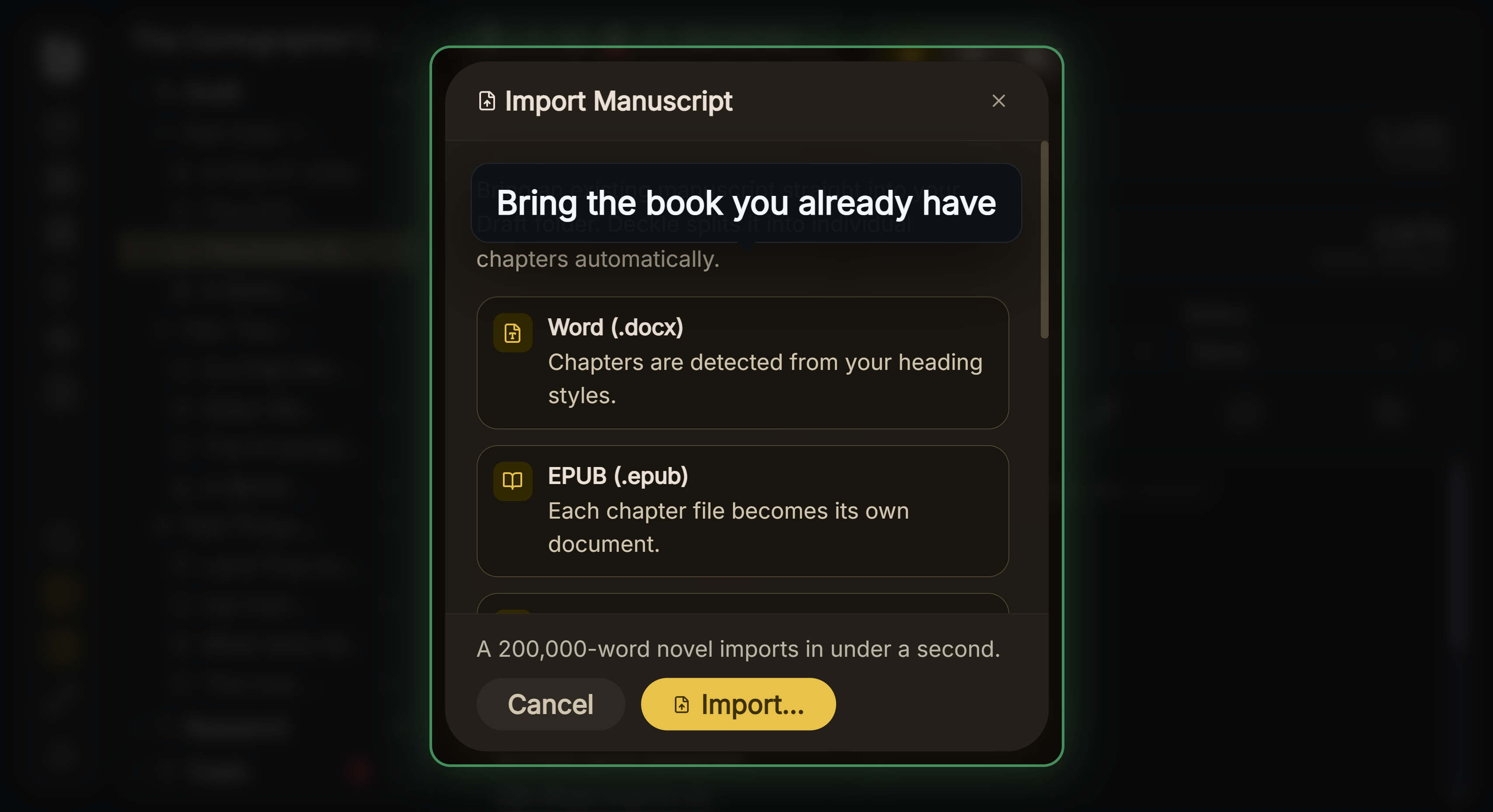 Import from Word, EPUB, Scrivener or Markdown
What does novel writing software do that a word processor doesn't?
A novel is 70,000 to 120,000 words of connected story. A word processor treats it as one long page. Novel writing software treats it as a project, and four things follow from that.
- Scenes and chapters you can move. Each scene is its own item in a sidebar, so restructuring the middle of a book is a drag, not a cut and paste across 300 pages.
- The story's facts beside the prose. Character sheets, places, a plot outline and a timeline sit in the same project as the draft, so continuity is checked as you write, not in revision.
- Progress you can see. Word counts per chapter, a target and a deadline, and labels such as "First Draft" or "Revised" on each scene.
- Output for the next reader. A Word file in manuscript format for an agent or editor, or EPUB and print PDF if you self-publish.
None of this is required. Plenty of novels are written in Word, and when that is enough is covered in writing a novel in Word vs dedicated software. The tools earn their keep on a long book, a complex plot or a series.
Novel writing software comparison: how do the apps compare?
| App | Made for | Platforms | Price (31 October 2026) | Offline | Exports | AI |
|---|---|---|---|---|---|---|
| Scrivener | Drafting and organising | macOS 11+, Windows 10+ (64-bit), iOS | $59.99 once per platform; Mac and Windows bundle $95.98; iOS $23.99 | Yes, desktop app | Word, RTF, PDF, EPUB, plain text, Final Draft | None mentioned |
| Ulysses | Drafting in Markdown | Mac (macOS 15.4+), iPad, iPhone | $39.99/yr or $5.99/mo; App Store also lists a $199.99 perpetual licence | Yes, with iCloud sync | Text, HTML, ePub, PDF, DOCX | Supports Apple's Writing Tools |
| Dabble | Drafting and plotting, synced | Windows, Mac, Linux desktop; browser; phones and tablets as a web app | $15, $23 or $39 a month billed annually; lifetime $699 or $899 | Yes, syncs on reconnect | Word, Google Docs, Markdown, HTML; no PDF or EPUB | None apart from Read to Me voices; won't train AI on your work |
| Atticus | Writing and formatting | Windows, Mac, Linux, Chromebook, browser | $147 once | Formatting yes; import and export need a connection | EPUB, print PDF, DOCX | None |
| Vellum | Formatting only | Mac only, macOS 13+ | $199.99 Ebooks; $249.99 Press (adds paperbacks), once | Yes | EPUB, print PDF (Press) | None of its own |
| Plottr | Planning and series bible | Windows, Mac; Pro adds a web app | $60/yr or $150 lifetime; Pro $99/yr | Yes on the base plan | Word, Scrivener | None, by policy |
| Campfire Writing | Planning, worldbuilding and writing | Mac, Windows, browser, iOS, Android | Free plan; Standard $12/mo | Desktop app; mobile needs a connection | PDF, EPUB | None mentioned |
| Novelcrafter | Planning and drafting with a Codex | Browser only | $4, $8, $14 or $20 a month; 21-day trial | No | Word, Markdown | Optional, bring your own key |
| Reedsy Studio | Writing and formatting in a browser | Browser | Free; Craft $4.99/mo, Outline $7.99/mo | No | EPUB 3, print PDF (PDF/X-1a), Word | None listed |
| Microsoft Word | General word processor | Windows, Mac, iPad, phones, web | Microsoft 365 Personal $99.99/yr; Office Home 2024 $179.99 once | Yes, desktop app | .docx, PDF, RTF, ODT, text; no EPUB | Copilot on Microsoft 365 |
| Google Docs | General word processor, shared | Browser, iOS, Android | Free with a Google account | With the Docs Offline extension | .docx, PDF, EPUB, Markdown and more | Gemini on paid plans |
| Deckle | Writing, planning and formatting | Windows 10/11, macOS 11+, Linux | One-time purchase, 2 devices; free demo | Yes, after activation | EPUB, print PDF, DOCX, Markdown, plain text | None in the app |
Which fiction jobs does each app cover?
A novel passes through four jobs. This table shows which ones each vendor says its app covers, with the fiction tools named.
| App | Drafting | Organising scenes and chapters | Planning (characters, plot, world) | Formatting the book |
|---|---|---|---|---|
| Scrivener | Yes | Binder, Corkboard, Outliner | Character and setting sheets in the Binder | Compile to PDF and EPUB; no typesetting claim |
| Ulysses | Yes | Library, groups, keywords | No dedicated tools | PDF, DOCX and ePub styles |
| Dabble | Yes | Binder of parts, chapters, scenes | Plot Grid, character profiles, Story Notebook | No |
| Atticus | Yes | Chapters, parts, volumes | Not listed | Yes, print PDF and EPUB |
| Vellum | Edits only | Box sets, reusable elements | No | Yes, print PDF and EPUB |
| Plottr | Not built for it, says Plottr | Timeline of scene cards | Yes, 30+ templates, character bios, places | No |
| Campfire Writing | Manuscript module | Chapters | Yes, 18 modules | PDF and EPUB export |
| Novelcrafter | Yes | Acts, chapters, scenes | Codex with mentions and relations | No, by its own help page |
| Reedsy Studio | Yes | Sections, chapters, scenes | Boards (Outline add-on) | Yes, EPUB 3 and print PDF |
| Microsoft Word | Yes | Headings | No | PDF save, no book typesetting |
| Google Docs | Yes | Document tabs | No | EPUB and PDF download, no book typesetting |
| Deckle | Yes | Binder, Outliner | Codex (characters, locations, items) and Timeline | Yes, EPUB and print PDF |
Which novel writing software suits which writer?
Scrivener, for a long, research-heavy draft
Scrivener is the long-form app most other tools are compared with. Literature & Latte sells it for $59.99 on macOS or Windows, one licence per platform, or $95.98 for both. The trial lasts 30 days of actual use. Each scene sits in the Binder, with a card on the Corkboard and a row in the Outliner, and Compile produces Word, PDF and EPUB. It suits a plotter with a large book and plenty of research. Its learning curve is the usual complaint, covered in is Scrivener good for writing a book.
Ulysses, for Markdown on Apple devices
Ulysses runs on Mac, iPad and iPhone and syncs through iCloud. It costs $39.99 a year or $5.99 a month. It suits a novelist who drafts on an iPad as much as a Mac and likes plain text with no formatting menus. There is no Windows or Android version. How it compares with Scrivener is on Scrivener vs Ulysses.
Dabble, for a synced app with a Plot Grid
Dabble has desktop apps for Windows, Mac and Linux, works in a browser, and runs on phones and tablets as a web app. Its offline writing syncs when you reconnect. Plans are $15, $23 or $39 a month billed annually, with lifetime options at $699 and $899 and a 14-day trial with no card. Dabble's help is plain that it "does not export PDF or ePub directly", so you format elsewhere. It suits a novelist who works on several devices and plots subplots in a grid.
Atticus, for writing and formatting in one purchase
Atticus is $147 once, for Windows, Mac, Linux and Chromebook, and in a browser. It writes and formats, with print PDF, EPUB and DOCX export. The homepage says you can format "with or without an internet connection", and its help centre adds that "you will need an internet connection to upload an existing document and export your book". It suits a self-publishing novelist who wants a formatter on Windows.
Vellum, for polished formatting on a Mac
Vellum formats a finished manuscript; it is not a drafting app. Vellum Ebooks is $199.99 and Vellum Press, which adds paperbacks, is $249.99. It needs macOS 13 or newer, and Vellum's help says it has no plans for a native Windows version. It suits a Mac author who drafts elsewhere and wants print-ready output with little setup. Its head-to-head with Atticus is on Atticus vs Vellum.
Plottr, for planning before you draft
Plottr is a visual outliner and series bible for Windows and Mac. Its docs say of drafting, "You can (sort of), but that's not what Plottr is built for", and it exports to Word and Scrivener. The base plan is $60 a year or $150 once, and its pricing page lists "No AI" on every plan. It suits a plotter who wants a timeline of scene cards before writing a word. Other planners are on best plotting software. A writer who wants a method taught step by step can look at The Novel Factory, whose Novel Writing Roadmap runs "from first idea to publishing paths"; it has its own review of The Novel Factory.
Campfire Writing, for worldbuilding
Campfire splits a story into 18 modules, from Characters and Timeline to Magic and Languages. It runs in a browser, on Mac and Windows desktops (the desktop app "allows you to write offline"), and on phones with a connection. A free plan caps the manuscript at 25,000 words; Standard is $12 a month on monthly billing. It suits a fantasy or science fiction writer whose world is half the work, and genre-specific picks are on best writing software for fantasy.
Novelcrafter, for a Codex and optional AI
Novelcrafter is a browser app built around a Codex that tracks characters and places through the text. Plans run from $4 to $20 a month, with a 21-day trial and no free plan. Its help says "you can only use Novelcrafter with an active internet connection" and "you cannot format your novel within Novelcrafter for publication". It suits a novelist who wants AI help with their own API key.
Reedsy Studio, for free writing and formatting in a browser
Reedsy Studio is free for writing and formatting, with Craft ($4.99 a month) and Outline ($7.99 a month) add-ons. It exports "EPUB 3" and "PDF (PDF/X-1a:2001 for print-on-demand)". It runs in the browser and needs a connection. It suits a first-time self-publisher on any computer, and co-authors who edit together.
Microsoft Word and Google Docs, for the file everyone accepts
Agents and editors work in Word files, and Track Changes is how an edit comes back. Microsoft 365 Personal is $99.99 a year, or Office Home 2024 is $179.99 once. Google Docs is free, and Google says "multiple people can work on the same document at the same time", which suits beta readers. Neither typesets a book. The wider field of word processors is on best word processor for writers.
Which fiction tools matter most when you choose?
Novelists tend to outgrow a word processor at the same three points. Check how each app handles them before you buy.
Characters and continuity. Eye colour drifts, a minor character changes name, a town is two days' ride in chapter 3 and five in chapter 20. An app that keeps a character sheet beside the draft helps, and one that finds where each name appears helps more. The trackers are compared on character tracking app, and the whole reference file on story bible software.
Plot order and chronology. A thriller with a ticking clock or a fantasy with flashbacks needs two orders: when events happen and when the reader learns them. Plottr, Campfire and Deckle each keep a timeline; the differences are on timeline software for writers.
Revision at scene level. Moving a subplot, cutting a viewpoint or splitting a sagging chapter is easier when scenes are separate items with a synopsis and a status. Scrivener, Dabble, Novelcrafter and Deckle all work this way.
What should you compare before you buy?
Features are easy to photograph and easy to change. These six things are harder to change later, and every one can be checked before you pay.
1. Is the project one file or a folder? A single file syncs and backs up like any document. A folder of many files can partially sync: Literature & Latte warns that cloud storage optimisation "can cause some of the component files in your project to appear to be missing or blank."
2. What is your prose stored as? Plain text, Markdown, XML and SQLite can be read with ordinary tools. Scrivener stores document text as RTF, a format frozen since 2008.
3. Does it export DOCX with real styles? Styles rather than direct formatting are what an editor needs. See DOCX vs RTF for sending to an editor.
4. What happens to notes, synopses, labels and status? These rarely survive an export, and no vendor publishes a matrix of what leaves cleanly.
5. Does it make a publishable book, or only a manuscript? EPUB and print PDF matter if you self-publish. They don't if you are querying agents, who want a Word file.
6. Where does it run, and does it need a connection? Browser apps (Reedsy Studio, Novelcrafter) need the internet. Mac-only apps (Vellum, Ulysses) rule out a Windows laptop.
Then test it: a file with everything you use, exported and imported elsewhere. The method is in how to move a manuscript between writing apps.
Novel writing app or desktop program: which kind fits?
The choice between kinds matters more than the choice within a kind.
- Desktop programs (Scrivener, Vellum, Plottr, Deckle) keep files on your own disk and work without a connection. Moving between computers means a sync folder or a licence on each.
- Browser apps (Reedsy Studio, Novelcrafter) run on any computer and save to an account. They need a connection, and your book lives on the vendor's server.
- Hybrids (Dabble, Atticus, Campfire) pair a desktop or offline mode with cloud sync. Check what works offline in each, because it differs by task.
If you want a novel writing app for a phone or iPad, Ulysses, Dabble and Scrivener for iOS are the main choices here. If you co-write live, Google Docs and Reedsy Studio are built for it. Which writing apps run on a phone, an iPad or Android is compared device by device on its own page. By operating system, see novel writing software for Windows and novel writing software for Mac.
What does each app cost over three years?
| App and plan | Three years |
|---|---|
| Google Docs, Reedsy Studio (free plan) | $0 |
| Scrivener, one platform | $59.99 (major upgrades may be paid) |
| Scrivener, Mac and Windows | $95.98 |
| Ulysses, yearly | $119.97 |
| Atticus | $147 |
| Plottr, lifetime | $150 |
| Office Home 2024, one PC or Mac | $179.99 |
| Vellum Ebooks / Press | $199.99 / $249.99 |
| Novelcrafter, monthly | $144 to $720 |
| Microsoft 365 Personal, yearly | $299.97 |
| Campfire Standard, monthly | $432 |
| Dabble Writer, billed annually | $540 |
| Deckle | One price, every update included (check the shop) |
Paying once against paying monthly is covered in writing software one-time purchase.
What do ranking pages get wrong about novel writing software?
These claims appear on pages that rank for this search. Each disagrees, in whole or in part, with the vendor's own page on 31 October 2026.
- "Scrivener $49 one-time; the macOS plus Windows bundle runs $80." Guideflow's guide (updated August 2026) gives those figures. Literature & Latte lists $59.99 per platform and $95.98 for the bundle.
- "Atticus: runs on desktop and tablet browsers; works across Mac, Windows, Chromebook." The same guide. Atticus lists Linux as well, and installs as a desktop app as well as running in a browser.
- "Scrivener: Price: $45" and "Ulysses: $49.99/year". TCK Publishing's list of novel writing software tools. Scrivener is $59.99, and Ulysses is $39.99 a year or $5.99 a month.
- "Microsoft Word: $159.99, or $6.99/month". The same list. Microsoft lists Office Home 2024 at $179.99 once and Microsoft 365 Personal at $9.99 a month or $99.99 a year.
- "Vellum: $49.99 for ebooks, $99.99 for print." A 2026 list on alphonsolabs.com. Vellum lists $199.99 for Ebooks and $249.99 for Press.
- "Dabble is subscription-only. There is no one-time purchase." The same list, which also prices Dabble at $10 to $25 a month. Dabble lists $15, $23 and $39 a month billed annually, and lifetime access at $699 or $899 once.
- "Atticus requires an internet connection." The same list, and half true. Atticus says you can format "with or without an internet connection"; importing and exporting need one.
- "Scrivener exports Kindle." The same list, and true only in part. The Scrivener overview still lists Kindle e-books, but the macOS release notes say "Kindle (.mobi) has now been removed as a Compile export option". Both versions export EPUB, which KDP takes.
Where does Deckle sit in this comparison?
Deckle is our app, so discount this accordingly and check it yourself. It is a desktop app for Windows, macOS and Linux that covers all four fiction jobs in one project: drafting, the Binder and Outliner for scenes and chapters, a Codex and Timeline for characters, places and plot order, and export to EPUB, print PDF and DOCX. It has no generative AI, works offline after activation, and is a one-time purchase that activates on two devices.
Where the writing lives. A Deckle project is a folder holding one .deckle SQLite database, which stores every chapter, note, synopsis and setting, plus research/ and .deckle-assets/ folders for imported files and images. The prose can't partially sync across hundreds of small files, but the folder is still the project: move, copy and back it up as a whole.
Who is better served elsewhere. A writer who drafts on a phone or iPad is better served by Ulysses, Dabble or Scrivener for iOS. Co-authors editing the same page at once are better served by Google Docs or Reedsy Studio. A writer who wants AI drafting help is better served by Novelcrafter. And a writer who wants plain text files readable with no software at all is better served by a Markdown system.
How do you test novel writing software in Deckle?
The fair test is the same book in each app. Deckle's free demo has no card, account or time limit, and lets you check the whole route from draft to finished files.
- Open the demo. On the screen Deckle opens to, click Take Deckle for a Spin. A sample novel opens with a guided tour.
- Look at the structure. The Binder holds the Draft, Research and Trash. Open View ▸ Outliner and switch between Grid View (index cards) and List View (synopsis, words, label and status per chapter).
- Check the fiction tools. Open View ▸ Codex and pick a character. The Mentions tab lists where the name appears in the draft. Then open View ▸ Timeline and switch to Story order to see events by chapter.
- Write a little. View ▸ Focus Mode hides the panels. View ▸ Continuous View reads several chapters as one. The demo allows about 500 words of new prose.
- Export the book. Choose File ▸ Export…. Pick EPUB with a Generic EPUB, Kindle (KPF), Apple Books or Kobo target, PDF for print, or DOCX for an editor or agent. The Kindle target writes an EPUB for KDP to convert.
- Open what you made. Check the EPUB in an ebook reader, the PDF at print size and the DOCX in Word, side by side with the same test from the other apps on your list.
In the demo, imports and new documents are blocked, so judge it on the sample book. Once activated, Import… in the Binder's + menu brings in Word, EPUB, a Scrivener project zipped from its own backup, or a Markdown folder. Every difference from Scrivener is on Scrivener vs Deckle.
Common mistakes when choosing novel writing software
- Trusting a ranked list. Nothing authoritative ranks writing software, and many lists earn a commission on the top pick.
- Buying one app for a job it doesn't do. Check the jobs table: a planner or a formatter alone won't hold a draft.
- Using last year's prices. Several ranking pages quote prices that vendors have changed. Check the vendor's page on the day.
- Ignoring the platform. Vellum and Ulysses need a Mac. Browser apps need a connection. Check before building a routine around one.
- Paying before you try. Scrivener's trial runs 30 days of use, Dabble's 14 days, Novelcrafter's 21, and Deckle has a free demo. Use them on your own chapters.
- Testing on chapter one. Any app copes with 5,000 words. Try it with 30,000 or more, a cast of a dozen names, and an export.
- Switching mid-draft. Finish the draft first, then move.
- Forgetting the hand-over. Whatever you draft in, check its Word export opens cleanly before a deadline.
FAQ
What is the best novel writing software?
Nothing authoritative ranks them. Scrivener and Dabble suit drafting and organising, Plottr and Campfire suit planning, Vellum and Atticus suit formatting, and Word suits the editing stage.
What is a novel writing program?
Usually the same thing as novel writing software: a desktop program or app for drafting and organising a book. The phrase also covers taught courses, such as university novel-writing programmes, which this page doesn't compare.
Which novel writing software is best for beginners?
One that does few things clearly. Reedsy Studio is free in a browser; Google Docs is free and familiar. More on best writing software for beginners.
Is there free novel writing software?
Yes. Google Docs and Reedsy Studio are free, and Campfire has a free plan with a 25,000-word cap. On the desktop, bibisco's Community Edition is free for Windows, macOS and Linux, and yWriter7 is free for Windows. More on free novel writing software.
Which novel writing software works on Windows and Mac?
Scrivener (a licence for each), Dabble, Atticus, Plottr, Campfire, Word and Deckle. Vellum and Ulysses are Apple-only.
Which novel writing apps work offline?
Scrivener, Ulysses, Vellum, Plottr's base plan, Word and Deckle are desktop apps. Dabble and Campfire's desktop app work offline and sync later. Atticus formats offline but needs a connection to import and export. Reedsy Studio and Novelcrafter need a connection.
Which novel writing software has no AI?
Plottr and Atticus say so on their own pages, and Dabble calls itself AI-free apart from its Read to Me voices. Deckle has none in the app. Novelcrafter, Word and Google Docs offer AI. More on novel writing software without AI.
Do I need dedicated software to write a novel?
No. Plenty of novels are written in Word. Structure earns its keep on long or complex books, and on series.
Sources
Retrieved 31 October 2026 unless stated. Prices change, so check the vendor page before buying.
- Literature & Latte, Scrivener overview (prices, platforms, trial, Kindle e-books listed) and macOS release notes (Kindle removal; read 26 October 2026, the page refused automated access on 31 October)
- Ulysses, Pricing, App Store listing, Export help and Writing Tools help (read 20 October 2026)
- Dabble, Pricing, Export your manuscript, Install the desktop app and Understanding your subscription (AI-free with the Read to Me exception; read 21 October 2026)
- Atticus, homepage, help: internet connection for import and export and help: AI features (read 21 October 2026)
- The Novel Factory, homepage (Novel Writing Roadmap)
- Vellum, homepage and Purchasing help
- Plottr, Pricing, Devices and Can I write my story in Plottr?
- Campfire Writing, Pricing and FAQ
- Novelcrafter, Pricing, Offline mode and Formatting for publication
- Reedsy, Studio pricing, Reedsy Studio (real-time co-authors; read 20 October 2026) and Book writing software FAQ
- Microsoft, Compare all Microsoft 365 plans
- Google, Google Docs, Work offline and Export MIME types
- bibisco, Download (Community Edition free; Supporters Edition $69 once), and Spacejock Software, yWriter (yWriter7 listed as free software)
- Library of Congress, Rich Text Format (RTF) Family
- The ranking claims checked above: Novel Writing Software (Guideflow, updated 14 August 2026), Best Novel Writing Software Tools (TCK Publishing, undated) and 7 Best Software for Writing a Book in 2026 (alphonsolabs.com)
Scrivener is a trademark of Literature & Latte. Ulysses is a trademark of Ulysses GmbH & Co. KG. Vellum is a trademark of 180g LLC. Microsoft Word, Microsoft 365 and Copilot are trademarks of Microsoft. Google Docs and Gemini are trademarks of Google LLC. Mac, iPad and iCloud are trademarks of Apple Inc. KDP and Kindle are trademarks of Amazon.com, Inc. Dabble, Atticus, Plottr, Campfire, Novelcrafter, Reedsy and The Novel Factory are trademarks of their respective owners. Deckle is not affiliated with or endorsed by any product named here.