

Scrivener and Deckle are both desktop apps for drafting and organising a long book. The main difference is the last step. Scrivener turns the manuscript into files through Compile, a configurable output system. Deckle formats the book itself, with style presets and a live preview, and exports EPUB, print PDF and DOCX. Scrivener runs on macOS, Windows and iOS. Deckle runs on Windows, macOS and Linux.

Deckle is our app, so weigh this page accordingly. Every Scrivener fact here comes from Literature & Latte's own pages and manuals, read on 20 October 2026. Every Deckle fact was checked against Deckle's code (version 1.7.8). The page includes the places where Scrivener is ahead.
Scrivener vs Deckle at a glance
| Scrivener | Deckle | |
|---|---|---|
| Main job | Writing and organising, with Compile for output | Writing, organising and book formatting |
| Platforms | macOS, Windows, iOS and iPadOS | Windows, macOS, Linux |
| Phone or tablet app | Yes (iOS) | No |
| Sync | "Sync using Dropbox or transfer with iTunes" | None built in; projects are local folders |
| Price model | One-time, one licence per platform | One-time, one licence for two devices in any mix |
| Trial | 30 days of actual use, full features, macOS and Windows | Free demo with no time limit (writing capped at about 500 words) |
| Ebook output | EPUB and Kindle ebooks via Compile | EPUB with Generic, Kindle, Apple Books and Kobo targets |
| Print output | PDF via Compile, "ready for self-publishing" | Print PDF with 8 trim sizes, bleed, drop caps, running heads |
| Other output | Word, RTF, OpenOffice, Final Draft, plain text, Pandoc and MultiMarkdown | DOCX, Markdown, plain text, Academia PDF (PDF/A-2b) |
| Imports | Word, plain text, Final Draft, images, PDFs, movies, sound files, web pages | Word, EPUB, a zipped Scrivener project, a Markdown folder |
| Generative AI | None mentioned on its product pages | None in the app |
Scrivener prices and licence terms are in what Scrivener costs.
How do Scrivener and Deckle compare for writing and organising?
Both apps are built around the same idea: a book is many small documents in a tree, and you can view and edit them one at a time or together.
Binder. Both apps call the project tree the Binder. Deckle's Binder has three system sections, Draft, Research and Trash, and document types for Parts, chapters, scenes, notes, folders and special pages.
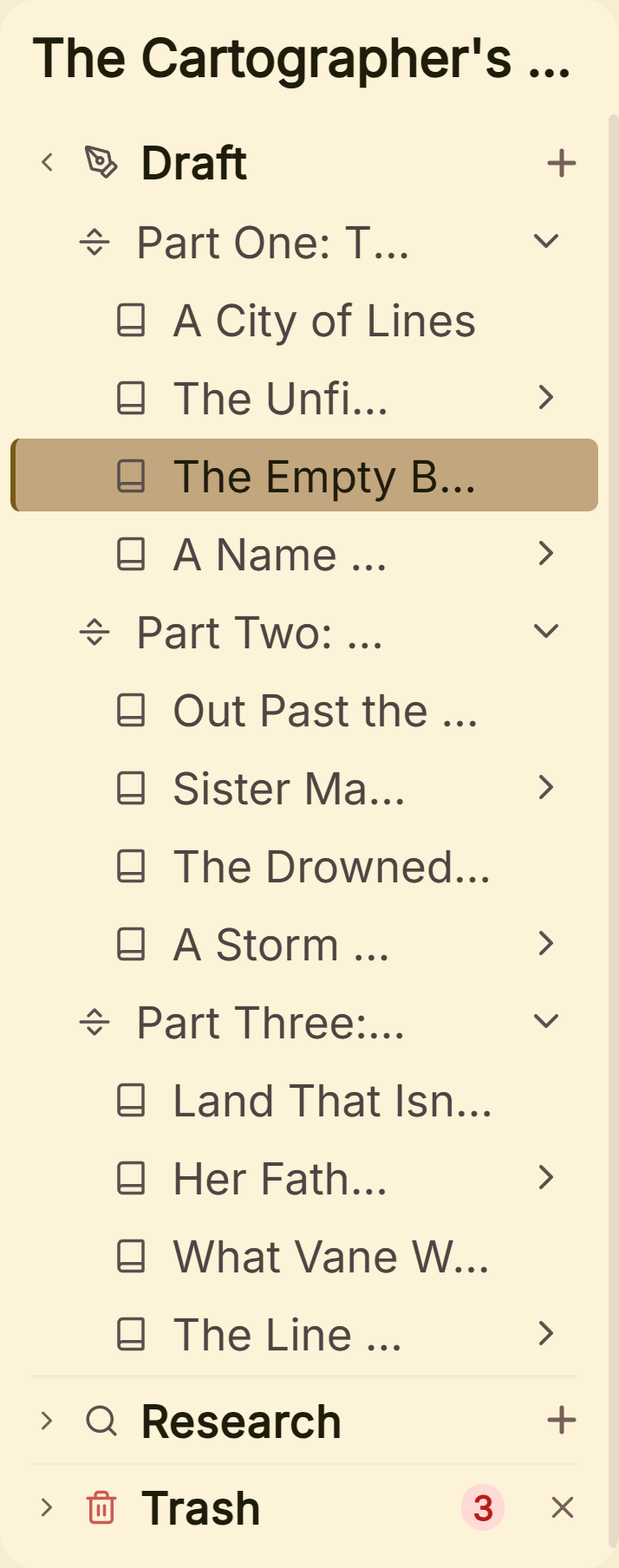 The Binder: Draft, Research and Trash
Scrivenings and Continuous View. Scrivener's Scrivenings mode edits several sections "as though they were all part of a single document." Deckle's equivalent is called Continuous View.
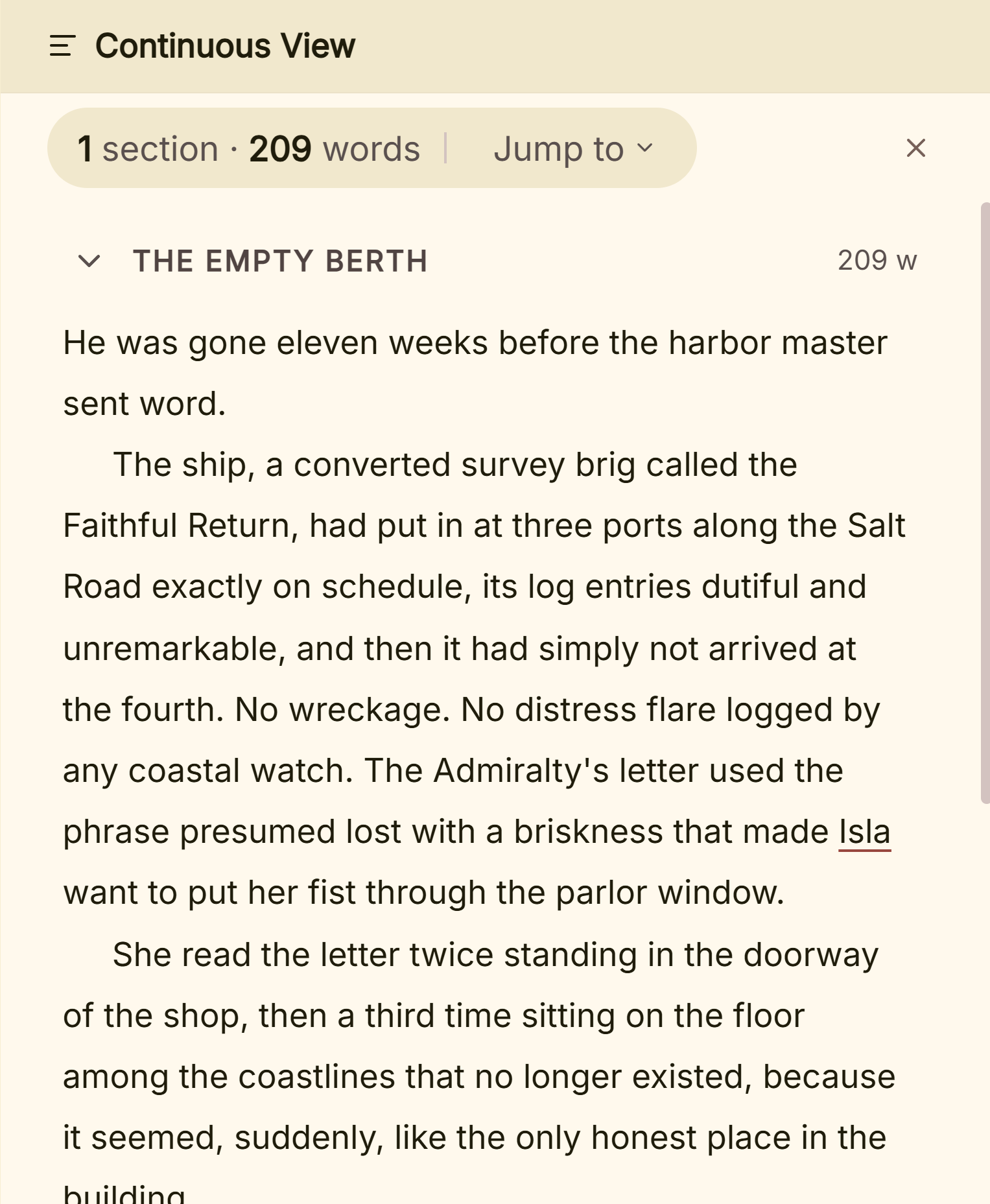 Continuous View, Deckle's name for Scrivenings
Corkboard and Grid View. In Scrivener's Corkboard, as Literature & Latte's features page puts it, "every section of your project is attached to a virtual index card", and cards can sit along coloured lines or in a freeform mode. Deckle has no view called Corkboard. Its Outliner has a Grid View of index cards, one level at a time, and a List view with custom columns and date columns. Scrivener's Outliner shows synopses, word counts and metadata in the same way.
Collections. Scrivener's Collections "build smart lists that automatically show you documents that need more work." Deckle has no Collections or saved searches. It has Find in Project (Ctrl/Cmd+Shift+F) with Match Case, Whole Word and Replace All.
Snapshots. Scrivener saves a Snapshot of a section before revising and has a Compare feature to see what changed. Deckle keeps snapshots under Inspector ▸ Versions, where you create, name and restore them, and each one shows its word count. Deckle does not show a side-by-side comparison of two snapshots.
Targets and goals. Scrivener sets word or character targets for the manuscript, for individual sections and for a session, with a Writing History. Deckle's Writing Stats view sets a manuscript target with a deadline, daily or weekly goals in words or minutes, a day streak, a writing heatmap and words per chapter. Deckle has no per-document target.
Split view and focus. Scrivener can show up to "four different documents open" in one window, and Composition Mode is its full-screen writing view. Deckle has a Split Editor, a floating window for any Binder document, and Focus Mode with optional typewriter scrolling.
Metadata. Scrivener has Labels, Status, keywords and custom fields. Deckle's Inspector has Label and Status fields, a Synopsis, Notes, Comments and Versions. Deckle has no keywords.
Scrivener Research vs Deckle Research
Both apps keep research inside the project, next to the manuscript. Scrivener's Research folder imports Word files, plain text, Final Draft scripts, PDFs, images, movies, sound files and web pages.
Deckle's Research section imports images (JPG, PNG, GIF, WebP, AVIF, SVG), PDFs (opened in a built-in viewer), text, Markdown and Word files. New Web Page saves a snapshot of a page from its URL. Deckle does not import video or audio files.
Scrivener character templates vs the Deckle Codex
Scrivener handles characters and places with document templates. Its features page describes templates for new sections such as "character or location sheets", with custom icons. A character sheet is an ordinary Binder document with headings to fill in.
Deckle has a separate story bible called the Codex. It has built-in Characters, Locations and Items sections, plus any custom sections you add, and the Character Role, Location Type and Item Type options can be extended. Entries can use templates and hold an image gallery. One entry exports as a sheet, and the whole Codex exports as a Story bible (PDF) or Story bible (Word). Deckle also has a Timeline with a to-scale view and a Story order view, plotlines and optional real calendar dates. Scrivener's product pages do not list a timeline.
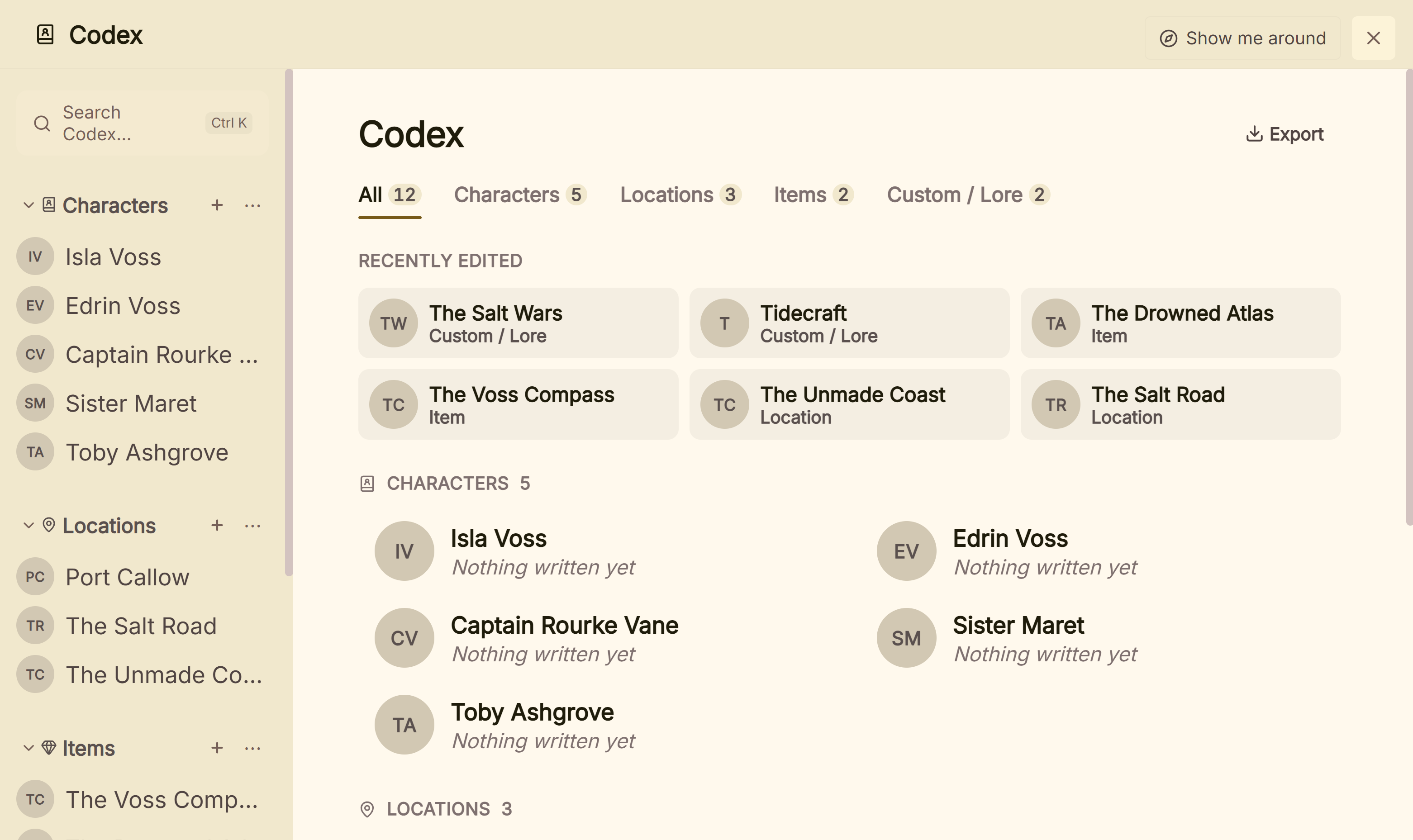 The Codex, kept beside the manuscript
Scrivener Compile vs Deckle Styles
Scrivener Compile is a separate step at the end. You choose a file type in Compile for, pick a Format, and map your project's Section Types to Section Layouts. Literature & Latte's built-in Formats include manuscript formats for agents and editors, ebook formats and two paperback formats. The format designer controls separators, styles, headers and footers, footnotes and much more. Literature & Latte describes some formats as suited "for further refinement in book design software." Its pages say Compile makes PDFs "ready for self-publishing" and do not describe the output as professionally typeset. The steps are in the Scrivener compile tutorial.
Deckle Styles sets the book's look while you write. It has 26 built-in presets, plus presets you save or import. You choose a trim size, scene break style (whitespace, asterisks, an asterism, a fleuron, em dashes or a custom glyph or image), drop caps, small caps, running heads and chapter openings. The Inspector's Preview tab shows the result on Kindle, iPhone, iPad and Print layouts. Front and back matter come from special pages: Title Page, Copyright, Dedication, Epigraph, Table of Contents, About the Author, Also by the Author and more. Widow and orphan control is available and off by default. Compile then exports the files, and the print PDF is typeset with Typst, a typesetting system Deckle builds in.
Many Scrivener users add a second app for this step. Literature & Latte ships a Vellum Export format for that purpose, and the Word-file handoff to Atticus is covered in moving Scrivener to Atticus. Deckle does both jobs in one project.
Is there Scrivener for Linux, and is there Deckle for iPad?
Scrivener has no Linux version. Literature & Latte lists macOS, Windows and iOS only. Deckle ships for Linux as .deb and .rpm packages, alongside Windows and macOS. The Linux picture is covered in Scrivener for Linux.
Deckle has no iPhone, iPad or Android app, no web version and no cloud sync. Scrivener's iOS app, $23.99 as of October 2026, syncs with the desktop versions through Dropbox. If you draft on an iPad, that difference alone decides it.
A Deckle project is a folder on your own disk. It holds one .deckle SQLite database with all the writing, notes and settings, plus research/ and .deckle-assets/ folders. Deckle works offline after activation. Its backups are zip files, 20 kept by default, made on close and every 500 words.
How do Scrivener and Deckle licences compare?
Both are one-time purchases, and neither is a subscription. They differ in what one licence covers.
- Scrivener costs $59.99 for macOS or Windows, as of October 2026. Each licence covers one platform, so Mac and Windows together are $95.98 as a bundle, or $37.95 to crossgrade later. The iOS app is a separate $23.99. The standard licence is a household licence. Minor updates are free, and Literature & Latte says a future major version would be a paid upgrade.
- Deckle is a one-time purchase with every update included. One licence covers two devices in any mix of Windows, Mac and Linux. The licence is personal, not a household licence. Refunds are available for 30 days.
| Setup | Scrivener, as of October 2026 | Deckle |
|---|---|---|
| One Mac or one Windows PC | $59.99 | one licence |
| A Mac and a Windows PC | $95.98 (bundle) | one licence |
| A Windows PC and a Linux laptop | not available on Linux | one licence |
| A Mac and an iPad | $83.98 | no iPad app |
The wider comparison of buy-once writing apps is in is Scrivener worth it in 2026.
Can Deckle import a Scrivener project?
Yes, from a zip. In Scrivener, choose File > Back Up > Back Up To… and tick the option to save the backup as a ZIP file. Import that .zip in Deckle. Draft, Research and Notes come across as separate documents, with synopses, labels, statuses, images, inline annotations and comments. Deckle cannot open a raw .scriv folder, and Scrivener's compile settings do not carry over, so you set the book's look once in Styles. The walkthrough is in moving from Scrivener to Deckle.
Going the other way, Deckle exports DOCX and Markdown, and Scrivener imports Word files. Deckle's whole-project Markdown export writes Draft, Research and Notes as folders.
Does Scrivener or Deckle use AI?
Neither app advertises generative AI features. Literature & Latte mentions no AI feature on its overview, features or FAQ pages. That shows what it advertises, not what the code contains. The details, including the writing tools a Mac's operating system adds to every app, are in does Scrivener use AI.
Deckle has no generative AI anywhere in the app. A search of its code finds no AI model, SDK or API. Its writing log records sessions, words and pasted text in Writing Stats. It is a record of your sessions, not evidence of authorship.
What does Scrivener do better than Deckle?
- iOS. Scrivener has an iPhone and iPad app that syncs through Dropbox. Deckle is desktop only.
- Collections and keywords. Scrivener's smart lists and keywords have no equivalent in Deckle.
- Snapshots with Compare. Scrivener shows what changed between versions of a section. Deckle restores snapshots but doesn't compare them.
- Section, session and document targets. Scrivener sets targets per section and per session. Deckle's targets are for the manuscript, the day and the week.
- A freeform Corkboard. Scrivener's cards can be placed freely or along coloured lines. Deckle's Grid View is a grid.
- More panes. Scrivener shows up to four documents side by side.
- Output range. Compile writes RTF, OpenOffice, Final Draft, Pandoc and MultiMarkdown, and Scrivener has screenwriting features. Deckle has neither screenwriting nor Final Draft output.
- Research media. Scrivener's Research holds movies and sound files.
- Documentation and trial. Literature & Latte publishes a full user manual for each platform, and the trial gives 30 days of use with every feature.
Who should pick Scrivener over Deckle?
- You write on an iPhone or iPad as well as a computer.
- You rely on Collections, keywords, Snapshot Compare or per-section targets.
- You already have a Compile format you like, or you hand the manuscript to Vellum, Atticus or a typesetter anyway.
- You write scripts as well as prose.
- You want a household licence for a family on one platform.
Who should pick Deckle over Scrivener?
- You want to format the finished book in the same app you wrote it in.
- You work on Linux, or across Windows, Mac and Linux on one licence.
- You want a separate story bible (the Codex) and a Timeline rather than character sheets in the Binder.
- You write non-fiction and want citations formatted inside the app. Deckle ships CSL styles including APA 7th, MLA 9th and Chicago 18th, imports BibTeX and generates a References page. Scrivener's features page lists footnotes and MLA and APA paper templates, not a citation tool.
Try it first. Click Take Deckle for a Spin on the screen Deckle opens to. There is no card, no account and no time limit. It opens a sample novel with every screen open to explore, and you can restyle it and export real EPUB, PDF and DOCX files. New writing is capped at about 500 words, and new documents and imports are blocked. For a wider look at the field, see Scrivener alternatives.
FAQ
Is Deckle better than Scrivener?
It depends on the job. Scrivener is ahead on iOS, Collections, Snapshot Compare and output formats. Deckle formats the finished book in the same app, runs on Linux, and covers two devices on one licence.
Does Deckle have a Corkboard like Scrivener?
Deckle's Outliner has a Grid View of index cards, one level at a time. It has no freeform card mode.
Does Deckle have Scrivenings?
Yes, under another name. Deckle's Continuous View shows several documents as one editable text.
Can I move my Scrivener project to Deckle?
Yes. Back up the project in Scrivener as a ZIP file and import the .zip. Deckle can't open a raw .scriv folder.
Is Scrivener or Deckle a subscription?
Neither. Scrivener is $59.99 per platform, one-time, as of October 2026. Deckle is a one-time purchase covering two devices.
Does Deckle work on iPad or Linux?
Linux, yes: Deckle ships .deb and .rpm packages. iPad, no: Deckle has no mobile app. Scrivener is the reverse.
Does either app sync between computers?
Scrivener syncs with its iOS app through Dropbox. Deckle has no built-in sync; a project is a local folder you move or back up yourself.
Do Scrivener or Deckle use AI?
Literature & Latte advertises no AI features for Scrivener. Deckle has none, and its code contains no AI model or API.
Sources
All retrieved 2026-10-20.
- Scrivener overview, Literature & Latte (platforms and versions, export and import formats, organising tools, Compile PDF wording)
- Scrivener features, Literature & Latte (Corkboard, Scrivenings, Collections, Templates and Icons, Metadata, Snapshots and Compare, Targets and Writing History, four documents side by side, Dropbox sync)
- Scrivener FAQs, Literature & Latte (one licence per platform, household licence, 30-day trial, paid major upgrades)
- Scrivener store and Crossgrading, Literature & Latte (prices, bundle, crossgrade)
- Scrivener 3 User Manual for Windows, Literature & Latte, revision 3.1.6.0-02 (5.2.2 Manually Backing Up; 23.2.2 Built-In Formats; 23.3.3 Assigning Section Layouts)
- Scrivener 3 User Manual for macOS, Literature & Latte, revision 3.5.2-01 (Collections, freeform Corkboard)
- Typst, the typesetting system behind Deckle's print PDF (Deckle: src-tauri/Cargo.toml:35-38)
- Scrivener 3 on the Mac App Store, Apple (price, latest version)
Scrivener is a trademark of Literature & Latte. Deckle is not affiliated with or endorsed by any product named here.