

Scrivener and Vellum are not competitors. Scrivener is a writing and organising app, and its Compile feature can also make ebooks and PDFs. Vellum is a formatting app that turns a finished manuscript into ebook and print files. Many authors use both: they write in Scrivener, compile a Word file, and import it into Vellum.

What is the difference between Scrivener and Vellum?
Scrivener is built for drafting a long book. Literature & Latte's overview lists a Binder, an index-card view, an Outliner with synopses and metadata, Snapshots with Compare, word Targets, Scrivenings and composition mode as its core tools. It runs on macOS, Windows and iOS.
Vellum is built for the last step. 180g describes it as an app that builds ebook and print editions from a manuscript. Its Text Editor can hold a whole draft (Vellum Help: "write your entire novel from scratch"), but there is no binder, outline or writing goals. It runs on the Mac only, and needs macOS 13 or newer.
| Scrivener | Vellum | |
|---|---|---|
| Main job | Writing and organising | Formatting for publication |
| Platforms | macOS, Windows, iOS | macOS 13+ only |
| Imports | Word, plain text, Final Draft, PDFs, images, web pages | .docx only |
| Ebook output | EPUB via Compile; Kindle on Windows only | EPUB 3 and EPUB 2, per store (Kindle, Apple, Kobo) plus Generic EPUB |
| Print output | PDF via Compile, "ready for self-publishing" | PDF/X-1a, 24 trim sizes plus large print (Vellum Press only) |
| Price model | One-time, per platform | One-time, free updates |
| Trial | 30 days of actual use, macOS and Windows | Free download; Generate is locked until purchase |
| AI features | None mentioned | None mentioned |
All facts in this table come from the two vendors' own pages, retrieved 2026-10-20 (see Sources).
How do you get a book from Scrivener into Vellum?
The handoff is a Word file. Vellum's help says it "can import any file with a .docx extension", and it imports nothing else.
Scrivener has a Compile format made for this. Vellum's own Scrivener page gives the steps:
- Choose File ▸ Compile… in Scrivener.
- Select the Vellum Export format and press Compile. Scrivener writes a .docx "that you can import into Vellum".
- If Vellum Export is missing, Vellum says "you'll need to update to the latest version of Scrivener 3".
Literature & Latte's matching page adds the setting that trips people up. Set Compile for to Microsoft Word (.docx) first. Projects started from the Novel, Novel (with Parts) or General Non-Fiction templates need nothing more. A project started from any other template, or from Blank, needs Assign Section Layouts to map the Vellum Export layouts onto its section types.
On import, Vellum "automatically detects chapters, creates Text Features, and preserves character formatting whenever possible". It reads Word's Heading 1 style as a chapter title. Runs of blank lines can split one chapter into several, which Vellum warns about.
- Both editions of Scrivener have the Vellum Export format. It arrived "as of Scrivener 3.0.3 for macOS", and the Scrivener 3 manual for Windows lists it too (appendix D.2.11), describing it as "designed to convey your work to the Vellum book creation tool, for macOS." A Windows user can compile the .docx, but Vellum itself needs a Mac to open it.
- Vellum's page stops at the basic steps. For a complicated structure, it says "you may have to dig into some of Scrivener's advanced options."
The full walkthrough, including what to check after import, is in moving a Scrivener manuscript into Vellum.
Is Scrivener's compile enough, or do you need Vellum?
Scrivener's Compile is enough when the goal is a manuscript, a review copy or a plain ebook. Literature & Latte says Compile can "Generate PDF files ready for self-publishing" and "Create Epub and Kindle e-books to sell on Amazon or elsewhere". The features page still says so, but the macOS release notes record Kindle (.mobi) removed in 3.5.0 (1 October 2025); the Windows version still has it. KDP accepts both an EPUB and a Word file for an ebook, and a PDF or DOCX for a paperback without bleed, so a Scrivener compile can be uploaded directly. KDP's ebook format list adds that "Most DOC/DOCX files convert well to eBooks." KDP's paperback rules are summarised in KDP print file requirements.
Authors add Vellum for book design rather than for file acceptance. Vellum's pitch is the finished print interior: a "Professional-Grade PDF/X-1a" file, 24 trim sizes plus large print, full bleed, widow handling and spread balancing. It also generates a separate ebook file for each store (Kindle, Apple, Kobo) plus a Generic EPUB for aggregators. Literature & Latte does not describe Scrivener's PDF as professionally typeset.
Add Vellum when:
- The print interior needs to look like a trade paperback, not a manuscript.
- You publish to several stores and want a tuned file for each.
- You would rather pick a style than learn Scrivener's Compile format designer.
Stay with Scrivener's Compile when:
- The output is a submission manuscript for an agent or editor.
- You publish an ebook only, with simple formatting.
- You already have a Compile format you like.
How much do Scrivener and Vellum cost together?
Both are one-time purchases, so the three-year cost is mostly the purchase price. Prices below are official list prices in US dollars, before tax, as of October 2026.
| Setup | Year 1 | Years 2 and 3 | Three-year total |
|---|---|---|---|
| Scrivener (macOS) + Vellum Ebooks | $59.99 + $199.99 | $0 listed | $259.98 |
| Scrivener (macOS) + Vellum Press | $59.99 + $249.99 | $0 listed | $309.98 |
| Scrivener (macOS + iOS) + Vellum Press | $59.99 + $23.99 + $249.99 | $0 listed | $333.97 |
| Scrivener (Windows) + Vellum Press | $59.99 + $249.99 | $0 listed | $309.98, plus access to a Mac |
What the table can't show:
- Vellum print needs the Press tier. Vellum Ebooks makes ebooks only. Upgrading from Ebooks to Press later costs $69.99.
- Vellum updates are free. 180g sells it as a one-time purchase with free updates.
- Scrivener's minor updates are free, and a major new version may be a paid upgrade. Literature & Latte publishes no price for a future upgrade, so the table can't include one.
- A Scrivener licence covers one platform. Moving from macOS to Windows, or adding the other, is a $37.95 crossgrade.
Does Vellum work on Windows?
No. Vellum "is only available for Mac", and 180g says it doesn't "have plans to develop a native version for Windows." Its suggestion for PC users is "renting a Mac 'in the cloud' that you can access via your PC."
This is the platform mismatch in the Scrivener and Vellum pairing. Scrivener for Windows exists and is the same price as the Mac version. A Windows author can draft the whole book in Scrivener, then reach the formatting step and find that Vellum can't be installed. The options at that point are a Mac, a rented cloud Mac, Scrivener's own Compile, or a formatter that runs on Windows.
Is there one app that does both writing and formatting?
Yes. Two desktop apps cover both jobs in one place, and both import the Word file Scrivener compiles. Neither is a drop-in replacement for the pair, and each trade-off is listed below.
Atticus
Atticus describes itself as an all-in-one app for writing and formatting print books and ebooks. It costs $147 one-time, as of October 2026, with ongoing updates and a 30-day money-back guarantee. It runs on Windows, Mac, Linux, Chromebook and in a browser as a PWA, with cloud storage. Atticus says it works with or without an internet connection, though its help centre (last updated 14 February 2024) says you need to be online to import and export files.
What Atticus does well: the widest platform list of any tool on this page, print-ready PDF and EPUB export, 17+ chapter themes with a custom theme builder, and collaboration for authors, editors and readers. It imports .docx, which Scrivener can produce. What it lacks next to Scrivener: version history is listed as "Coming Soon", and its organising tools are chapters, parts, goals and a word counter rather than a full binder and outliner.
Deckle
Deckle is our app, so weigh this section accordingly.
Deckle is a desktop app for Windows, macOS and Linux that covers drafting and formatting. The writing side has a Binder, an Outliner with a Grid View of index cards, Continuous View, a Codex for characters and places, a Timeline, and snapshots under Inspector ▸ Versions. The formatting side exports EPUB, print PDF and DOCX, with 26 built-in style presets, bleed, drop caps and a live preview for Kindle, iPhone, iPad and print. EPUB targets are Generic, Kindle, Apple Books and Kobo. The Kindle target writes an EPUB for KDP to convert, not a KPF file.
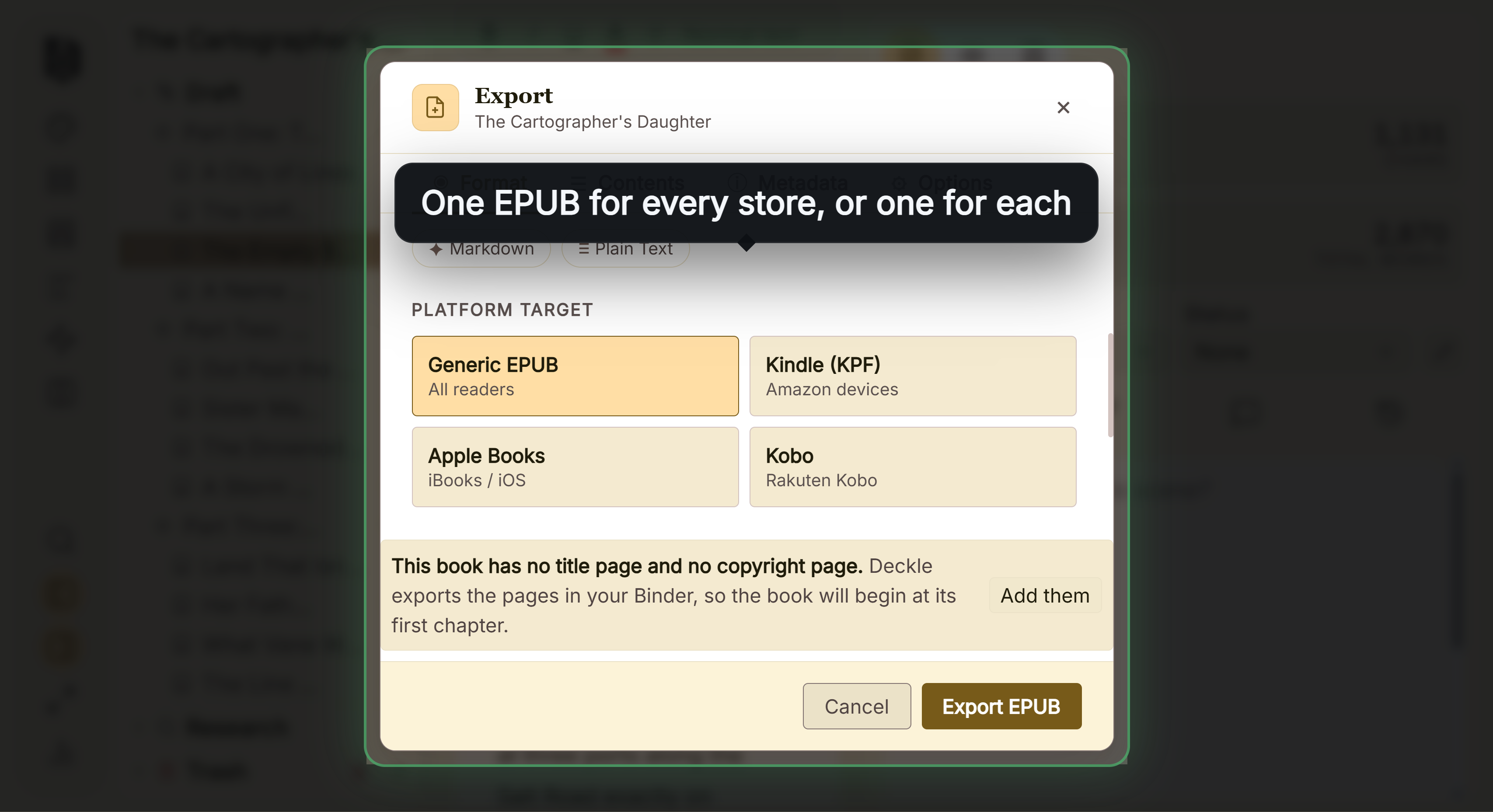 One EPUB for every store, or one built for each
Deckle imports a Scrivener project directly, without a Word file in between. Zip the project first in Scrivener with File ▸ Back Up ▸ Back Up To… and tick Backup as ZIP file, and the Draft, Research and Notes come across. A raw .scriv folder can't be picked. The steps are in moving from Scrivener to Deckle.
What you would give up compared with Scrivener plus Vellum:
- Trim sizes. Deckle has 8 trim sizes and no custom size. Vellum lists 24 plus large print.
- A phone or tablet app. Scrivener has an iOS app. Deckle is desktop only.
- Vellum's stated print and accessibility credentials. Vellum states PDF/X-1a print output and ACE-approved accessible ebooks. Deckle makes no PDF/X claim.
Deckle is a one-time purchase that runs on two devices, in any mix of Windows, Mac and Linux. It has no generative AI of any kind. The free demo is on the screen Deckle opens to: choose Take Deckle for a Spin. It needs no card, no account and has no time limit. It opens a sample novel with every screen open to explore, and you can export from it to see the EPUB and PDF output. New writing in the demo is capped at about 500 words.
For a wider look at the field, see Scrivener alternatives.
What goes wrong in the Scrivener to Vellum handoff?
- Compiling to the wrong target. Vellum Export needs Compile for set to Microsoft Word (.docx). Another target gives a file Vellum can't read.
- Skipping Assign Section Layouts. A project from a custom or Blank template compiles without Vellum's layouts mapped, and chapters can arrive wrong.
- Buying Vellum Ebooks when you need a paperback. Print needs Vellum Press.
- Planning the pair on a PC. Vellum has no Windows version, so check this before drafting in Scrivener for Windows with Vellum in mind.
- Leaving long runs of blank lines. Vellum warns that too many blank lines in a row can split one chapter into several elements.
FAQ
Do I need both Scrivener and Vellum?
No. Scrivener's Compile can make an EPUB, a Word file and a PDF that KDP accepts. Authors add Vellum for a designed print interior and per-store ebook files.
How do I export from Scrivener to Vellum?
Choose File ▸ Compile, set Compile for to Microsoft Word (.docx), pick the Vellum Export format and press Compile. Then import the .docx into Vellum.
Does Vellum work on Windows?
No. Vellum is Mac only, and 180g has no plans for a native Windows version. It suggests renting a cloud Mac.
Is Vellum worth it if I already own Scrivener?
It is worth it if you want a designed paperback interior without learning Compile's format designer. It costs $199.99 for ebooks or $249.99 with print, as of October 2026.
Is Scrivener a one-time purchase?
Yes. It is $59.99 for macOS or Windows, one licence per platform, as of October 2026. Major new versions may be a paid upgrade.
Does Vellum have a free trial?
The download is free, and you can import, style and preview a book. You can't Generate publishing files until you buy.
Can Scrivener format a book for KDP?
Yes. Compile makes EPUB, Kindle ebook, Word and PDF files, and KDP accepts EPUB and DOCX for ebooks and PDF for print. Literature & Latte doesn't claim professional typesetting.
Do Scrivener or Vellum use AI?
Neither vendor mentions an AI feature on its product pages, as of October 2026.
Sources
All retrieved 2026-10-20.
- Scrivener overview, Literature & Latte (platforms, export formats, Compile PDF wording, organising tools)
- Scrivener features, Literature & Latte (Compile to EPUB, Kindle and PDF)
- Scrivener FAQs, Literature & Latte (per-platform licence, trial, paid major upgrades)
- Scrivener 3 User Manual for Windows, Literature & Latte (appendix D.2.11 Vellum Export), retrieved 2026-10-20
- Scrivener store and Crossgrading, Literature & Latte (prices)
- Export to Vellum, Literature & Latte (Vellum Export format, Assign Section Layouts, macOS 3.0.3)
- Vellum, 180g (prices, macOS 13+, PDF/X-1a, trim sizes)
- Purchasing, Vellum Help (no Windows plans, cloud Mac, trial, Press upgrade price)
- Importing Your Manuscript and Importing from Scrivener, Vellum Help (.docx only, chapter detection, Compile steps)
- Atticus, Atticus (price, platforms, export, version history status, "with or without an internet connection")
- How to Access Atticus, Atticus (last updated 14 February 2024): online to import and export
- What file formats are supported for eBook manuscripts?, Amazon KDP Help
- Save Your Manuscript File, Amazon KDP Help
- Vellum Help, The Text Editor: "write your entire novel from scratch? You can do it all here", "a full-featured word-processor" (retrieved 21 October 2026)
- Literature & Latte, Scrivener release notes for macOS: 3.5.0, 1 October 2025, Kindle (.mobi) removed from Compile; the Windows notes, up to 3.1.6 (3 September 2025), record no such change (retrieved 21 October 2026)
Scrivener is a trademark of Literature & Latte. Vellum and Atticus are trademarks of their respective owners. Deckle is not affiliated with or endorsed by any product named here.