

Novel writing software without AI includes Scrivener, Vellum, Atticus, Storyist, Bibisco, yWriter and Manuskript, none of which describes an AI feature of its own. Vellum supports Apple's Writing Tools, off by default. Plottr, Novlr, Ellipsus and Penpoint go further and publicly reject AI. Novelcrafter, LivingWriter, Squibler, Sudowrite, Word, Google Docs and InDesign include generative AI.
"Without AI" covers three different promises:
- No AI features. The vendor's pages describe no AI feature. This is a fact about today's product, not a promise about next year.
- A public no-AI policy. The vendor states in writing that it will not build AI into the product.
- A data-training policy. The vendor states that it will not train AI on your manuscript. This says nothing about whether the app has AI features.
Every fact below comes from the vendor's own site, read on 2026-10-20. Prices are as of October 2026. No ranking is offered: nothing authoritative ranks writing software, and this page is published by the maker of one of the apps on it.
Which writing apps publicly reject AI?
Four vendors put a no-AI commitment in writing.
| App | What it is | Platforms | Price (as of October 2026) | The vendor's own words |
|---|---|---|---|---|
| Plottr | Visual outlining and series bible | Mac, Windows; web on Pro | $60/yr or $150 lifetime | "We're not building AI into Plottr" and "committed to rejecting AI features" |
| Novlr | Browser-based writing workspace | Web only | Free plan; $8 or $16/mo billed yearly, $10 or $20 billed monthly; $499 lifetime | "We do not have AI built into our platform" and "All words by humans" |
| Ellipsus | Collaborative writing | Web, Android | Free; Plus $6/mo over 24 months or $99 once | "we will never integrate or use generative AI within Ellipsus." |
| Penpoint | Desktop drafting and worldbuilding | Windows, Mac, Linux, offline | $40 once | "no AI ever touches your prose." |
Plottr is a planning tool, not a drafting tool. Its own help page says "we recommend doing the bulk of your writing in a program designed for it." Novlr and Ellipsus are browser-based. Novlr has limited offline use, and Ellipsus says that "in the browser, it is not currently possible to open or edit documents or drafts offline"; only its mobile apps work offline (as of October 2026). Penpoint is the only one of the four that is a native desktop app working fully offline.
Writing software with no AI features
These apps are for drafting and organising a manuscript. Their vendors describe no AI feature, and none has published a no-AI policy.
| App | Platforms | Price (as of October 2026) | AI on the vendor's pages |
|---|---|---|---|
| Scrivener | Mac, Windows, iOS; offline | $59.99 Mac or Windows; $23.99 iOS | None mentioned |
| Bibisco | Windows, Mac, Linux; offline | Free Community; $69 Supporters | None mentioned |
| yWriter | Windows; offline | Free on Windows | None mentioned |
| Manuskript | Linux, Windows; offline; open source | Free | None mentioned |
| Obsidian | Windows, Mac, Linux, iOS, Android | Free core | None built in |
Two writing apps add a data-training statement on top of having no AI features today:
- Dabble lists no AI features. It says it will not train AI on your content, and that any future AI features will be "strictly opt-in". Dabble is a subscription, from $15/month billed annually, with lifetime plans at $699 and $899.
- World Anvil has no generative writing feature. Its FAQ says "we do not train AI models on your work." It is browser-only and needs a connection.
Obsidian's core has no AI, but it runs third-party community plugins. A plugin you install yourself can add anything, AI included.
Ulysses sits between categories. It has no generative AI of its own, and it supports Apple's Writing Tools, which Ulysses describes as "Powered by Apple Intelligence". That is an operating-system feature on Mac, iPad and iPhone. Writing Tools arrived in Ulysses 36 (30 October 2024) and include a Compose option that uses ChatGPT. Ulysses 41 (14 September 2026) added Siri AI. Both can be switched off, and Ulysses's help says your texts are "never used to train AI models". The detail is in does Ulysses use AI.
Book formatting software with no AI features
Formatting tools turn a finished manuscript into an ebook and a print interior. Most of them describe no AI feature.
| App | Platforms | Price (as of October 2026) | AI on the vendor's pages |
|---|---|---|---|
| Vellum | Mac only (macOS 13+) | $199.99 Ebooks; $249.99 Press | No AI features of its own; supports Apple Intelligence Writing Tools, "disabled by default" |
| Kindle Create | Windows, Mac | Free | None mentioned |
| Draft2Digital formatter | Web browser | Free | None mentioned |
| Affinity by Canva | Mac, Windows | Free with a Canva account | Image and vector generation only, on a Canva premium plan |
Vellum's strength is the output: "Professional-Grade PDF/X-1a" print files on the Press tier, 24 trim sizes, and store-specific EPUB files. Its limit is the platform. Vellum runs only on a Mac, and the company has no plans for a Windows version. Kindle Create outputs KPF and EPUB for KDP, and Amazon mentions no print-ready PDF output.
Affinity lists no text-writing AI. Its generative tools (Generative Fill, Expand and others) work on images and need a paid Canva plan. If you never subscribe, they are not available to you.
For what the print file itself has to meet, see KDP's print file requirements.
Writing and formatting in one app, without AI
These apps cover drafting and book output in one place. None mentions an AI feature.
| App | Platforms | Price (as of October 2026) | AI on the vendor's pages |
|---|---|---|---|
| Atticus | Windows, Mac, Linux, Chromebook, browser | $147 once | No AI features and "no plans to incorporate AI into the editor" (help centre) |
| Storyist | Mac, iOS/iPadOS | $59 Mac; $19 iOS | None mentioned |
| Papyrus Author 12 | Windows, Mac | $349 | No generative AI mentioned |
| Reedsy Studio | Web only, no offline | Free; paid add-ons from $4.99/mo | None listed; Reedsy says it will never use your work to train AI |
| Deckle | Windows, Mac, Linux; offline | One-time purchase | None (see below) |
Atticus offers print-ready PDF, EPUB and DOCX, 17+ chapter themes and collaboration. Storyist imports Scrivener projects directly and produces print-ready PDFs from paperback templates. Papyrus adds a 16-category style analysis (filler words, repetition, adverbs and more), and its vendor pages mention no generative AI. Reedsy Studio is free at its core and typesets a print-ready PDF, but it has no offline mode.
A style or grammar checker checks text and does not generate it. KDP treats even AI-powered editing and error-checking as "AI-assisted", which it does not ask you to disclose (more on that below).
Which writing apps include generative AI?
These products build generative AI in. Some let you avoid it.
| Product | What the AI does, per the vendor | Can you avoid it? |
|---|---|---|
| Novelcrafter | Prose from scene beats, summaries, Workshop chat; you bring your own API key | Yes: AI starts at the Hobbyist tier and needs your own key |
| LivingWriter | AI Outline, Rewrite, Summarize, Manuscript Chat, cover images | Not stated by the vendor |
| Squibler | Full book and screenplay generation, the core of the product | No: the product is built around it |
| Sudowrite | Write, Describe, Expand, Rewrite; "the non-judgemental AI writing partner you always wanted." | No: the product is built around it |
| Microsoft Word | Copilot drafts, rewrites and summarises | Yes: it "can be turned off in Word settings", and the Basic plan has no AI features |
| Google Docs | Gemini "Help me write", Shorten, Match Writing Style | Partly: Gemini in Docs comes with Google AI Pro or Workspace Standard and up |
| Adobe InDesign | Layout-aware Rewrite, Generative Expand, AI alt text | Not stated; plans include monthly generative credits |
Novelcrafter sits in the middle. Its planning tools and Codex work without AI, and its AI only runs with an API key you supply. It is still built with AI in mind, with no offline mode and no publication formatting ("you cannot format your novel within Novelcrafter for publication").
Why authors look for software without AI
Two official rules and one industry scheme decide what AI use costs a working author.
Copyright registration. The US Copyright Office's registration guidance (effective 16 March 2023) says "If a work's traditional elements of authorship were produced by a machine, the work lacks human authorship and the Office will not register it." Applicants "have a duty to disclose the inclusion of AI-generated content in a work submitted for registration", and "AI-generated content that is more than de minimis should be explicitly excluded from the application." The Office also says the policy "does not mean that technological tools cannot be part of the creative process." Its Part 2 report on copyrightability followed on January 29, 2025.
KDP's disclosure rule. Amazon KDP's content guidelines require publishers to declare AI-generated text, images and translations when they publish or republish a book. KDP counts content as AI-generated if an AI tool created it, even if you edited it substantially afterwards. Content you wrote yourself and refined or error-checked with AI is "AI-assisted", and of that KDP says "It is not necessary to inform us of the use of such tools or processes."
The Authors Guild's certification. The Authors Guild runs a "Human Authored" certification for books whose text was "fully authored by one or more human beings and not generated by GAI". Spelling and grammar tools do not disqualify a book. The Guild runs it as self-certification and says "we are not aware of any truly reliable way to test whether a work includes AI-generated material."
A no-AI app does not settle any of these questions for you. It removes one way AI text can enter a manuscript by accident, such as a "rewrite" button pressed on the wrong paragraph.
Where Deckle sits
Deckle is our app, so weigh this section accordingly.
Deckle is a desktop app for Windows, Mac and Linux that covers both writing and formatting. It has no generative AI anywhere. We checked the code for this page: no AI or language-model library or API appears in the app's dependencies or source. The app's only network use is licence activation, update checks, and fetching a web page into Research when you ask it to. The editing toolbar has no rewrite, expand or generate button.
 Deckle's editing toolbar
A Deckle project is a folder on your own disk, stored wherever you choose: one .deckle database holds the writing, beside folders for research and images. Nothing is stored on a server.
For writing, Deckle has a Binder, the Outliner (with a Grid View of index cards), Continuous View, a Codex for characters, locations and items, a Timeline, Snapshots, comments, and goals with streaks. For formatting, it has 26 built-in style presets, a live preview, print PDF in 8 trim sizes with bleed, and EPUB targets for Kindle, Apple Books and Kobo. The Kindle target writes an EPUB for KDP to convert, not a KPF file.
Deckle keeps a writing session log. In Writing Stats, click a day on the heatmap to open the Session log: words, characters, words pasted, time written and start time for each session. Each row is chained to the one before it, so altering a row after the fact breaks the chain. It is a record of your writing sessions. It is not proof of authorship, and Deckle has no authorship report or export. Writing Stats also has a setting for whether pasted text counts toward goals and activity.
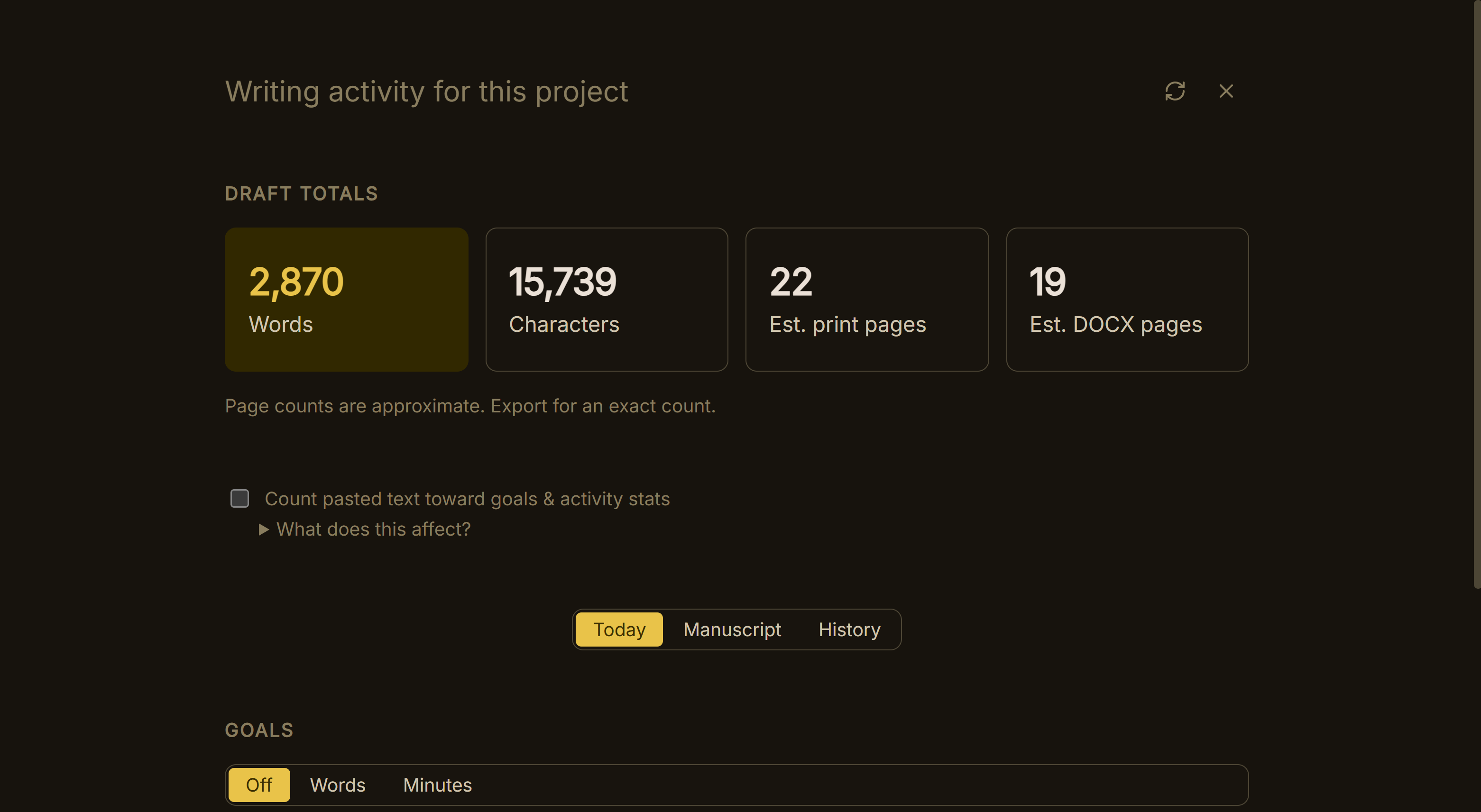 Writing Stats, with the pasted-text setting
What you would give up, compared with the apps above:
- No mobile, iPad or web version. Scrivener, Storyist and Obsidian run on phones and tablets.
- No real-time collaboration. Ellipsus, Atticus and Reedsy Studio offer it.
- No built-in cloud sync. Penpoint, Dabble and Plottr Pro sell sync.
- No custom trim size beyond the 8 built in. Vellum offers 24.
- No public no-AI policy of the kind Plottr, Novlr, Ellipsus and Penpoint publish. What Deckle offers instead is a codebase with no AI in it today.
If you are coming from another app, Deckle imports Word, EPUB, a zipped Scrivener project and Markdown folders. The general method for a clean move is in how to move a manuscript between writing apps, and the wider field is covered in best novel writing software and Scrivener alternatives.
Try it first. Click Take Deckle for a Spin on the screen Deckle opens to. There is no card, no account and no time limit. It opens a sample novel with every screen open to explore, and you can restyle it and export real EPUB, PDF and DOCX files. New writing is capped at about 500 words, and new documents and imports are blocked.
Does each writing app use AI? Checked tool by tool
Each of these pages quotes the vendor's own words on three separate questions: whether the app has AI features, whether it has a public no-AI policy, and what it says about training on your work.
- Does Scrivener use AI?
- Does Vellum use AI?
- Does Atticus use AI?
- Does Dabble use AI?
- Does Plottr use AI?
- Does Campfire use AI?
- Does Reedsy Studio use AI?
- Does Ulysses use AI?
- Does Novelcrafter use AI?
- Does LivingWriter use AI?
- Does Novlr use AI?
- Does Storyist use AI?
- Does yWriter use AI?
- Does bibisco use AI?
- Does World Anvil use AI?
What do writers get wrong about AI-free software?
- Reading "no AI features" as a promise. Only a published policy is a commitment. Features change with updates.
- Confusing a training policy with a feature policy. "We won't train AI on your work" says nothing about AI buttons in the app.
- Treating every checker as generative AI. Checking your text is not generating it, and KDP does not ask you to disclose AI-assisted editing.
- Assuming a session log proves anything. No app's record proves authorship, and no reliable AI-text test exists.
- Forgetting the formatting stage. A no-AI drafting app still hands off to a formatter, and that tool's AI stance matters too.
FAQ
Q: What novel writing software has no AI? A: Scrivener, Bibisco, yWriter and Manuskript describe no AI features. Plottr, Novlr, Ellipsus and Penpoint publicly reject AI. Atticus, Storyist, Papyrus and Deckle combine writing and formatting without AI.
Q: Does Scrivener use AI? A: Literature & Latte's overview, features and FAQ pages mention no AI feature. Literature & Latte has not published a no-AI policy on those pages.
Q: Does Vellum use AI? A: Vellum has no AI features of its own. Its privacy page says it supports Apple Intelligence Writing Tools, which are "disabled by default" and can be turned on in Text Editor Settings. Vellum is a formatting app for Mac only.
Q: Does Atticus use AI? A: No. Its homepage and updates log mention no AI features, and its help centre says there are "no plans to incorporate AI into the editor" (as of October 2026).
Q: Are there offline writing apps with no AI? A: Yes. Penpoint, Scrivener, Bibisco, yWriter, Manuskript and Deckle are desktop apps that work offline with no AI features.
Q: Can I turn off AI in Microsoft Word? A: Yes. Microsoft says Copilot can be turned off in Word settings, and the Microsoft 365 Basic plan has no AI features.
Q: Do I have to tell KDP if I used AI? A: You must declare AI-generated text, images or translations. AI-assisted editing of text you wrote yourself does not need disclosing.
Q: Can I copyright a book written with AI? A: The US Copyright Office registers only human authorship. You must disclose AI-generated content and exclude anything more than de minimis from the claim.
Sources
Official guidance:
- US Copyright Office, Copyright Registration Guidance: Works Containing Material Generated by Artificial Intelligence, 16 March 2023, retrieved 2026-10-20
- US Copyright Office, Copyright and Artificial Intelligence (Part 2: Copyrightability, 29 January 2025), retrieved 2026-10-20
- Amazon KDP Help, Content Guidelines: Artificial intelligence (AI) content, retrieved 2026-10-20
- The Authors Guild, Human Authored FAQ, retrieved 2026-10-20
Vendor AI statements (all retrieved 2026-10-20):
- Plottr, homepage and Can I write my story in Plottr?
- Novlr, Writing help articles
- Novlr, Pricing (monthly billing $10 and $20) and Novlr Help, How much does Novlr cost? (EPUB export on Studio), both retrieved 21 October 2026
- Ellipsus, Generative AI
- Ellipsus Help, Can I use Ellipsus offline? (retrieved 21 October 2026): no offline editing in the browser; offline in the mobile apps
- Penpoint, penpoint.app
- Dabble, Pricing
- World Anvil, FAQ
- Reedsy, Write a book
- Ulysses, Releases
- Ulysses, Release notes (Ulysses 36, 30 October 2024; Ulysses 41, 14 September 2026) and Ulysses Help, Apple Intelligence (ChatGPT Compose, Siri AI, "never used to train AI models"), retrieved 20 October 2026
- Affinity by Canva, Page layout software
- Novelcrafter, Pricing and Formatting for export
- LivingWriter, AI features
- Squibler, homepage
- Sudowrite, homepage
- Microsoft, Copilot in Microsoft 365 subscriptions FAQ and Compare Microsoft 365 plans
- Google, Google Docs and Google One plans
- Adobe, InDesign
- Literature & Latte, Cross-grading: "Scrivener for macOS or Windows is $59.99" (the store page loads its prices from the checkout, so this page shows the figure in its text), retrieved 21 October 2026
Vendor product pages for apps with no AI mentioned (all retrieved 2026-10-20): Scrivener features, Vellum, Vellum purchasing help, Vellum privacy (Apple Intelligence Writing Tools, disabled by default), Atticus updates, Atticus help: AI features (28 October 2025, retrieved 2026-10-21), Storyist for Mac, Papyrus style analysis, Bibisco FAQ, yWriter 7, Manuskript on GitHub, Obsidian, Kindle Create, Draft2Digital.
Scrivener is a trademark of Literature & Latte. Vellum is a trademark of 180g, Kindle Create of Amazon, Word of Microsoft, Google Docs of Google, InDesign of Adobe, Affinity of Canva, and Penpoint of Tophat Creative, LLC. Every other product name here belongs to its owner. Deckle is not affiliated with or endorsed by any product named here.