

The main Vellum alternatives are Atticus, Reedsy Studio, the Draft2Digital formatter, Kindle Create, Affinity, Adobe InDesign, Word with KDP's templates, and Deckle. Reedsy Studio, Draft2Digital, Kindle Create and Affinity are free, InDesign is a subscription, and Atticus and Deckle are one-time purchases. Authors usually leave Vellum for a lower price, a free tool, more layout control, or one app for writing and formatting.
No standards body or publishing association ranks formatting software, so this page does not rank anything. It compares what each vendor states on its own pages, as of October 2026, and says who each tool suits.
What Vellum does well
Vellum is a Mac book-formatting app from 180g. It turns a finished manuscript into ebook and print editions. Vellum Help says its Text Editor can be used to "write your entire novel from scratch", but it has no binder, outline or writing goals.
Its own feature list, from vellum.pub:
- Book Styles. "Use drop caps, embedded fonts, and flourishes, all with a click to select your favorite Style."
- Store-specific ebooks. "Create ebooks for every platform: Kindle, Kobo, Apple Books, and more." Files are "Validated Files in EPUB 3 / EPUB 2".
- Painless Print. "Choose your trim size, and Vellum does the rest, with automatic setup of margins, page numbers, and headers and footers."
- Print range. "24 Trim Sizes + Large Print", "Paperback or Hardcover", "Full-Bleed Pages & Backgrounds" and "Professional-Grade PDF/X-1a".
- Typesetting care. Vellum "handles complex tasks like widow-handling and spread-balancing".
- Accessibility. "ACE-Approved Accessible Output".
- Box sets. "Completed a series? Combine everything into a box set in just a few steps."
- Preview. Vellum's Preview shows the ebook "on a range of devices" and the print book as it will look on paper.
The PDF/X-1a point matters, because KDP's own manuscript guidance says "PDF/X-1a is preferred". Vellum's weak points are just as plain. It runs only on Mac (macOS 13 or newer), it costs $199.99 for Vellum Ebooks or $249.99 for Vellum Press (as of October 2026, before tax), and it imports only .docx.
Is there a free alternative to Vellum?
Four free options exist, and each one has a stated limit.
Kindle Create is Amazon's free formatter for Windows 10+ and macOS 10.15+. It outputs "Kindle Package Format (KPF) and EPUB", and EPUB only for reflowable books. It handles page numbers, headers and footers, widows and orphans, and trim sizes for KDP print. Amazon states that "Tables, footnotes, lists, and inline images imported from your DOC(X) file cannot currently be edited in Kindle Create" and that themes "cannot be edited by the user". No print-ready PDF output is mentioned, so its files are built for KDP.
The Draft2Digital formatter runs in a browser and is free "even without ebook distribution". It produces "a pixel-perfect paperback PDF or ebook EPUB file". Print is limited to six trim sizes, perfect-bound paperback, black and white only, 32 to 1,050 pages. It needs an internet connection.
Reedsy Studio is a free browser app for writing and formatting, with paid add-ons (Craft $4.99 a month, Outline $7.99 a month, as of October 2026). It exports EPUB 3 and "PDF (PDF/X-1a:2001 for print-on-demand)". Its help centre gives a Word file through Manage ▸ Exports ▸ Back Up. Asked whether it works offline, Reedsy's FAQ answers "Currently, no".
Affinity by Canva is free professional page layout for Mac and Windows with a free Canva account. It is design software, not a book formatter: you build the pages yourself. Details are in the InDesign and Affinity section below.
Cheaper alternatives to Vellum
Atticus costs $147 once (as of October 2026), "No monthly fees. Forever.", with a 30-day money-back guarantee. It runs on Windows, Mac, Linux and Chromebook, plus a browser app. Atticus says it works with or without an internet connection, though its help centre (last updated 14 February 2024) says "You do need to be online to import and export files". It exports EPUB, PDF and DOCX, and offers 17+ chapter themes, a custom theme builder, 1,500+ fonts, full-bleed images, large print and footnotes. It is also a writing app, with chapters, parts, goals and a word counter. Atticus lists version history as "Coming Soon". No free trial is listed. Atticus and Vellum are compared feature by feature in Atticus vs Vellum.
Microsoft Word with KDP's templates costs nothing extra if you already own Word. KDP offers "blank templates" with page size and margins already set, and "templates with sample content" with formatted front matter and placeholder chapters. KDP warns that leftover sample text may cause an upload error or rejection. Word does not save EPUB, so it covers print only. Microsoft also says a Word PDF "might not have a perfect page-to-page correspondence with the original… pages might break at different locations", which is why you check the PDF, not the document, before upload.
Vellum alternatives with more design control: InDesign and Affinity
Vellum's styles are fixed choices. Authors who want to set every margin, grid and master page by hand move to desktop publishing software.
Adobe InDesign is the professional standard for page layout. It has paragraph and character styles, parent pages, automatic chapter numbering, OpenType and variable fonts, and a Preflight panel that flags missing fonts, low-resolution images and overset text. It exports print PDF and reflowable EPUB. It is subscription only: US$22.99 a month for the single app on an annual plan (as of October 2026). The 7-day trial "will automatically convert to a paid" membership unless cancelled. It also includes generative AI features such as Layout-aware Rewrite.
Affinity by Canva replaced Affinity Publisher, whose older versions "won't receive future updates". The new app is free and combines design, photo editing and page layout. It exports PDF with bleed and crop marks, and EPUB. It has Smart Master Pages and shared text styles, and it opens InDesign IDML files and, since September 2026, native INDD files. It has no manuscript or outline tools. Its Books panel, per Affinity's help on books, combines separate Affinity documents "as chapters" with page and note numbers kept in sync, but each chapter is laid out by hand. Its AI tools are image and vector tools that need a Canva premium plan.
Both are the right choice when the design is the project: illustrated books, cookbooks, poetry with exact line placement. For a text novel they mean rebuilding every chapter by hand, which is the work Vellum exists to skip. If you hire a designer who works in InDesign, preparing a manuscript for a professional typesetter covers what to send.
Writing and formatting in one app
Vellum assumes you drafted elsewhere, usually in Scrivener or Word, and saved a .docx. Some authors want one app for both jobs. Atticus and Reedsy Studio both do this, as above. Deckle does too.
Deckle is our app, so weigh this section accordingly.
Deckle is a desktop app for Windows, macOS and Linux that works offline and keeps each project on your own disk. For writing, it has a Binder (Draft, Research, Trash), an Outliner with a Grid View of index cards, a Codex for characters, locations and items, a Timeline, snapshots and goals. For formatting, it has 26 built-in style presets, eight trim sizes, bleed, drop caps, running heads and scene-break ornaments. It adds special pages such as Title Page, Copyright and Also by the Author, and Full Page Image pages and spreads.
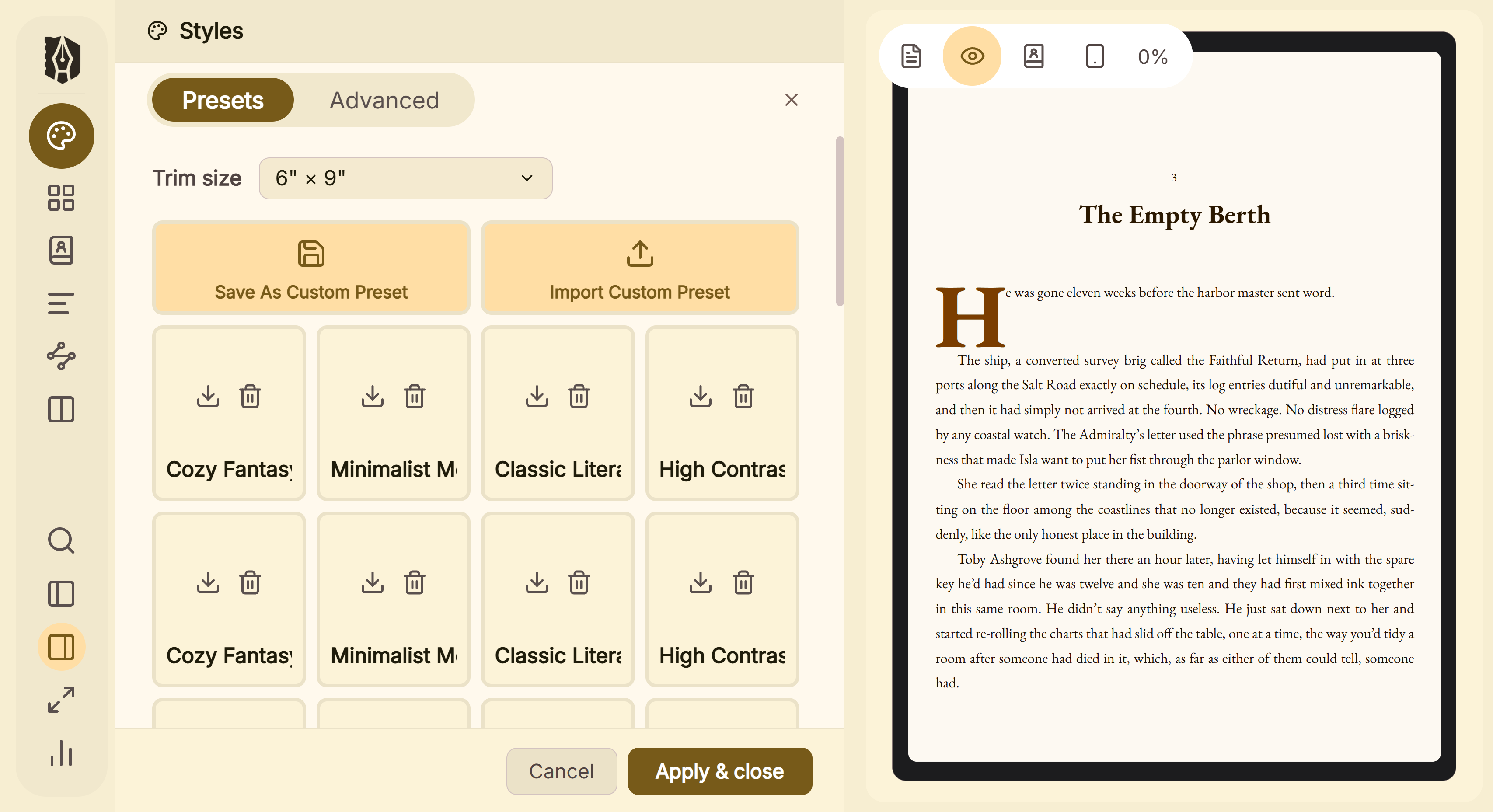 Presets in Deckle's Styles panel, with the page previewed beside them
It exports EPUB with Generic, Kindle, Apple Books and Kobo targets, a Typst-built print PDF, and DOCX for Word or InDesign. The Kindle target writes an EPUB for KDP to convert, not a KPF file. It imports Word, EPUB, a zipped Scrivener project, or a Markdown folder, and it has no generative AI.
One difference from Vellum's trial is worth stating. Vellum's free download lets you import and preview, but you "won't be able to Generate files for publishing until you make a purchase". Deckle's free demo lets you export.
Deckle is a one-time purchase. To try it, click "Take Deckle for a Spin" on the screen Deckle opens to. There is no card, no account and no time limit. It opens a sample novel with every screen open to explore, and you can restyle it and export real EPUB, PDF and DOCX files. New writing is capped at about 500 words, and new documents and imports are blocked.
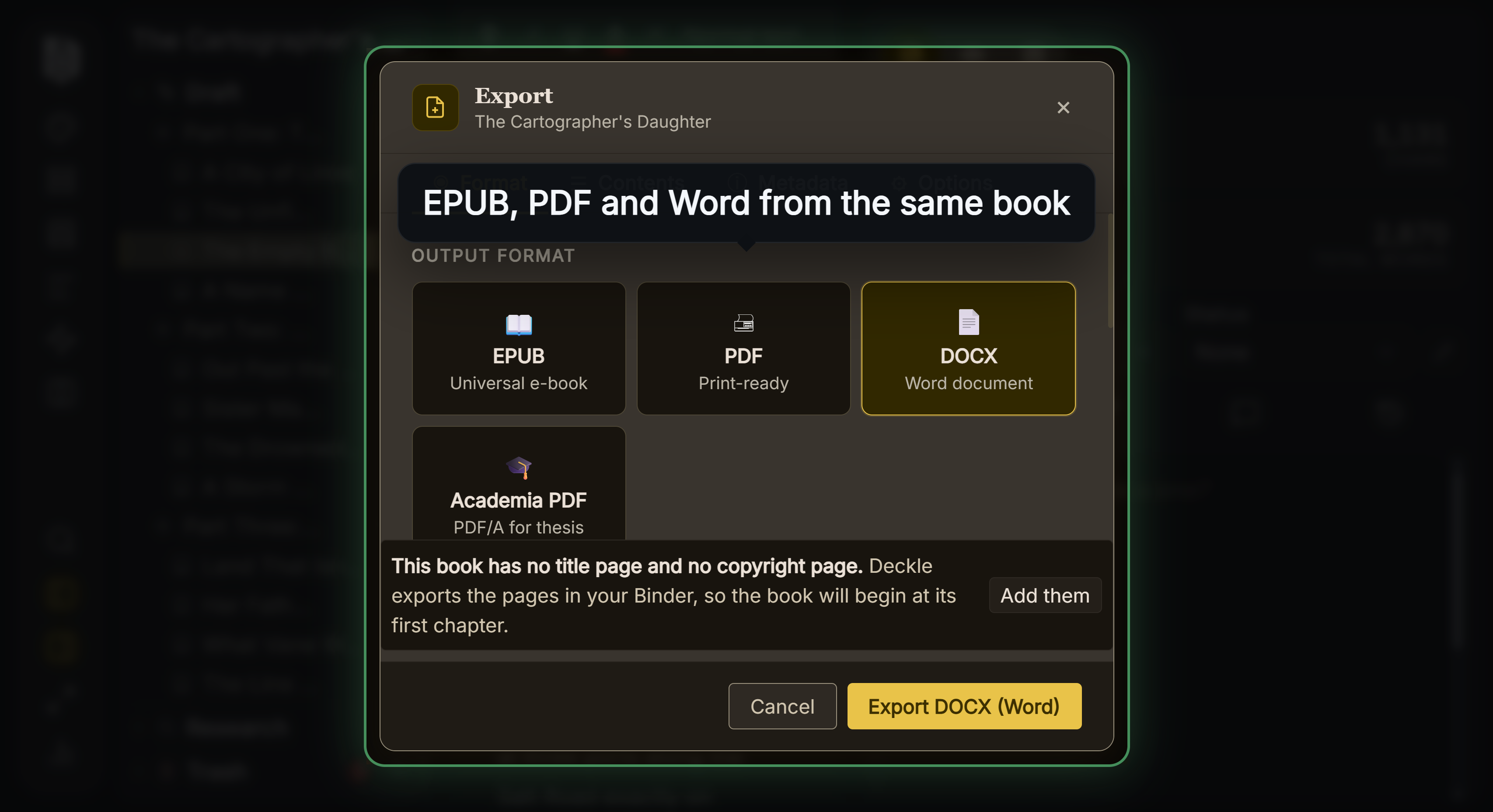 One manuscript, four output formats
Vellum alternative for Windows
Vellum is "only available for Mac", and 180g's help suggests renting a cloud Mac to Windows users. Atticus, Kindle Create, Affinity, InDesign, Word and Deckle all run on Windows, and Reedsy Studio and Draft2Digital run in any browser. The Windows question has its own page: Vellum alternatives for Windows.
What you give up leaving Vellum
Measured against Vellum's own feature list, these are the real losses. The Deckle column is ours, checked in our code.
| Vellum feature (vellum.pub wording) | What the alternatives offer |
|---|---|
| "Professional-Grade PDF/X-1a" | KDP prefers PDF/X-1a. Deckle's print PDF is a standard PDF, not PDF/X-1a. InDesign and Affinity give you full control of PDF output settings. Reedsy Studio names "PDF/X-1a:2001 for print-on-demand". Atticus says its PDFs are "not classified as PDF X-1a". Draft2Digital says "print-ready" without naming PDF/X. |
| "24 Trim Sizes + Large Print" | Deckle has eight trim sizes and no custom size. Draft2Digital has six. Atticus offers large print. InDesign and Affinity take any page size. |
| "Paperback or Hardcover" | Draft2Digital prints perfect-bound paperback only. |
| "widow-handling and spread-balancing" | Deckle has a Widow & orphan control setting, off by default. It makes no spread-balancing claim. Kindle Create handles widows and orphans. |
| "ARCs for Beta Readers in EPUB + MOBI" | Deckle exports EPUB but not MOBI. |
| "ACE-Approved Accessible Output" | Ace by DAISY is a free EPUB accessibility checker. Deckle writes schema.org accessibility metadata and image alt text, but it has no ACE approval to cite. |
| "Each specialized file can guide readers to buy your next book in their favorite store." | Deckle builds separate store targets and an Also by the Author page. This page does not claim Deckle rewrites buy links per store. |
| "Full-Bleed Pages & Backgrounds" | Deckle's page background art is print only and deliberately left out of EPUB. Kindle Create themes cannot be edited. |
| A single-purpose app | Every all-in-one tool, Deckle included, has more to learn than a formatter that does one job. |
What you gain is the reverse of Vellum's limits: Windows or Linux, a lower price or no price, files Vellum cannot import, or your draft and your layout in the same project. You can also get a DOCX of the finished book. Vellum says its own File ▸ Export Content As ▸ Word File is "not intended for publishing".
What Vellum and its alternatives cost over three years
List prices from each vendor, as of October 2026, in US dollars before tax. Three years is long enough for subscriptions to show their real cost.
| Tool | Price model | Cost over 3 years |
|---|---|---|
| Vellum Ebooks | one-time | $199.99 |
| Vellum Press (ebooks and print) | one-time | $249.99 |
| Atticus | one-time | $147.00 |
| Reedsy Studio, core | free | $0 |
| Reedsy Studio with Craft and Outline, monthly | subscription | $467.28 |
| Kindle Create | free | $0 |
| Draft2Digital formatter | free | $0 |
| Affinity by Canva | free with Canva account | $0 |
| Adobe InDesign, single app, annual plan billed monthly | subscription | $827.64 if $22.99 a month continues |
| Microsoft 365 Personal (Word), yearly | subscription | $299.97 |
| Office Home 2024 (Word) | one-time | $179.99 |
| Deckle | one-time | see the free demo first |
Reedsy's annual billing "saves 10%", but annual figures are not shown, so the monthly price is used. Upgrading Vellum Ebooks to Press after the first 30 days costs $69.99.
Common mistakes when leaving Vellum
- Choosing on price alone. A free tool that cannot produce your trim size or your hardcover costs more in workarounds.
- Assuming "print-ready" means PDF/X-1a. Vellum and Reedsy Studio name PDF/X-1a, Atticus says its PDFs are not PDF X-1a, and the DTP apps let you choose. Check the file KDP or IngramSpark asks for in KDP's print file requirements.
- Keeping Word template sample text. KDP says leftover text may cause an upload error or rejection.
- Expecting a design app to format a novel. InDesign and Affinity make every chapter a manual job.
- Not testing the EPUB. Run the finished file through EPUBCheck whatever tool made it, as in how to make an EPUB file.
FAQ
Is there a free alternative to Vellum?
Yes. Kindle Create, the Draft2Digital formatter, Reedsy Studio's free plan and Affinity by Canva are all free. Each has a stated limit, from KDP-only output to black-and-white paperback only.
What is the best Vellum alternative for Mac?
Nothing authoritative ranks these tools. Atticus suits a lower one-time price, InDesign or Affinity suit full design control, and Atticus, Reedsy Studio or Deckle suit writing and formatting in one app.
Is Vellum worth it?
It is worth it if you are on a Mac, write elsewhere, and want PDF/X-1a print files, store-specific ebooks and box sets with little setup. It costs $199.99 or $249.99 once, as of October 2026.
Does Vellum have a free trial?
The download is free and you can import, style and preview. You cannot generate files for publishing until you buy.
Does Vellum work on Windows?
No. Vellum is Mac only and needs macOS 13 or newer. Windows options are covered on our Vellum alternatives for Windows page.
Can you write a book in Vellum?
Vellum is a formatter whose Text Editor, by Vellum's own Help, can take a whole novel written from scratch. It has no binder, outline or writing goals, so most authors draft in Scrivener or Word and import a .docx.
Does Vellum use AI?
Vellum has no AI features of its own. Its privacy page says it supports Apple Intelligence Writing Tools, which are "disabled by default". The detail is in does Vellum use AI.
Sources
All pages retrieved 2026-10-20.
- Vellum, home page (features, prices, macOS 13 requirement): https://vellum.pub/
- Vellum Help, Purchasing (trial, upgrade price, no Windows version): https://help.vellum.pub/purchasing/
- Vellum Help, Importing (.docx only): https://help.vellum.pub/importing/
- Vellum FAQ, Word export ("not intended for publishing"): https://faq.vellum.pub/can-i-create-a-word-file-to-share-with-my-editor/
- Vellum, privacy (Apple Intelligence Writing Tools, disabled by default): https://vellum.pub/privacy/
- Amazon KDP, manuscript file guidance (PDF/X-1a preferred): https://kdp.amazon.com/en_US/help/topic/G202145060
- Amazon KDP, paperback and hardcover manuscript templates: https://kdp.amazon.com/en_US/help/topic/G201834230
- Amazon KDP, Kindle Create download and output formats: https://kdp.amazon.com/en_US/help/topic/GUGQ4WDZ92F733GC
- Amazon KDP, Kindle Create features and limitations: https://kdp.amazon.com/en_US/help/topic/G7R2L7V5X6SJH948
- Atticus, home page (price, platforms, exports, "with or without an internet connection"): https://www.atticus.io/
- Atticus, How to Access Atticus (last updated 14 February 2024; online to import and export): https://www.atticus.io/accessing-atticus/
- Atticus Help, Does Atticus create PDF X-1a files?: https://intercom.help/atticus-5877e36564df/en/articles/12684255-does-atticus-create-pdf-x-1a-files
- Reedsy Studio, pricing: https://reedsy.com/studio/pricing
- Reedsy Studio, FAQ (offline, exports including PDF/X-1a:2001, add-on prices): https://reedsy.com/studio/resources/book-writing-software-faq/
- Reedsy Help, Back up my book (Word export): https://reedsy.com/faq/studio-app/export-options/back-up-book
- Draft2Digital, FAQ (free tools, trims, print limits): https://draft2digital.com/faq/
- Affinity by Canva, page layout: https://www.affinity.studio/page-layout-software
- Affinity by Canva, download and requirements: https://affinity.studio/download
- Affinity, V2 apps status: https://affinity.serif.com/v2/
- Affinity, September 2026 update: https://www.affinity.studio/blog/affinity-update-september-2026
- Adobe InDesign, product and pricing: https://www.adobe.com/products/indesign.html
- Adobe InDesign, features: https://www.adobe.com/products/indesign/features.html
- Microsoft, Office file format reference (Word save formats, PDF caveat): https://learn.microsoft.com/en-us/office/compatibility/office-file-format-reference
- Microsoft 365, compare plans and prices: https://www.microsoft.com/en-us/microsoft-365/buy/compare-all-microsoft-365-products
- DAISY Consortium, Ace by DAISY (EPUB accessibility checker): https://daisy.org/activities/software/ace/
- Affinity Help Center, About books: "Add Affinity (.af) documents as chapters", reorder them, keep "page, list and note numbers in sync", retrieved 21 October 2026
- Vellum Help, The Text Editor: "write your entire novel from scratch? You can do it all here", "a full-featured word-processor" (retrieved 21 October 2026)
- Adobe, Subscription and cancellation terms, effective 1 August 2026: US annual plans billed monthly "automatically renew on a monthly basis" after the first year, at "the then-current rate for your plan" (read 21 October 2026)
Vellum is a trademark of 180g. Other product names are trademarks of their respective owners. Deckle is not affiliated with or endorsed by any product named here.