

Scrivener has no supported Linux version. Literature & Latte sells Scrivener for macOS, Windows and iOS only. It ran a free Linux beta until 2015, then stopped, saying it had "no capacity or plans to release another Linux version." Writing apps that run natively on Linux include Manuskript, bibisco, Atticus, Obsidian, Dabble, Penpoint and Deckle.

Every fact here comes from each vendor's own site, forum staff posts or download page, read on 2026-10-20. Prices are as of October 2026. Deckle is on this list, and this is Deckle's site, so the Deckle section is marked as ours.
Is there a Scrivener for Linux?
There is no current Scrivener for Linux. Literature & Latte's Scrivener overview lists three editions: macOS 3.5.2 (macOS 11 or later), Windows 3.1.6 (64-bit Windows 10 or later) and iOS 1.2.4. Linux and Android are not listed. The store sells each licence for one platform only: "Each licence we sell covers only one platform."
The Scrivener price is $59.99 for macOS or for Windows, as of October 2026. Neither licence covers Linux.
What happened to the Scrivener Linux beta?
Literature & Latte released a Linux beta of Scrivener for several years, then ended it in October 2015. The announcement was posted on Literature & Latte's own forum on 21 October 2015, signed by its developers ("Lee & Tiho & Jennifer"). It released two final builds:
- 1.9.0.1, which carried over fixes from the paid Windows 1.9.0.1 and Mac 2.7 versions, with no expiry date.
- 1.7.2.4, identical to the previous Linux 1.7.2.3 "but with the beta expiry removed".
The same post set out the status in plain words:
- "Both versions remain unsupported."
- "Note that we currently have no capacity or plans to release another Linux version."
- "We will be resuming focus on the next major releases of Windows & Mac."
Those builds match the Scrivener 2 era (Mac 2.7). No Linux build of Scrivener 3 has been released.
Will Scrivener come to Linux?
Literature & Latte has made no announcement of a Linux version. In April 2023, AmberV, a Literature & Latte staff member and forum administrator, answered a request for a native Linux release on the official forum. The reply said "it was never stated we would never consider it again, only that it was currently not feasible." It described a return to Linux as "a big 'if'" and said "that's not an official statement." It ended: "don't expect anything any time soon."
When the same question came up again in June 2025, the same staff member pointed back to that 2023 reply.
Can you run Scrivener on Linux with Wine?
Running the Windows edition of Scrivener under Wine is a community workaround, and it is not supported. Literature & Latte's 2015 post said the Windows version "will always be an option to Linux users - either via WINE or VM". In 2023 its staff added that "it's not our official position that one should use Wine", calling it "a personal choice". The forum section where Linux users discuss it is titled "Scrivener on Linux (Unofficial)".
This page does not give Wine setup steps, because no official source documents them. If you take that route, you are running a Windows licence through a compatibility layer the vendor does not support.
Novel writing software that runs natively on Linux
These apps install on Linux directly, with no Wine layer. Each vendor lists Linux on its own download or home page.
| App | What it is | Linux packages on the vendor's page | Price (as of October 2026) | Offline |
|---|---|---|---|---|
| Manuskript | Open-source planning and writing tool (GPL-3.0) | .deb, .rpm, Flatpak, Snap (0.17.0) | Free | Yes |
| bibisco | Novel planning and writing (chapters, scenes, characters; timeline on Supporters) | Linux listed, 64-bit only; package type not named | Free Community; Supporters $69 once | Yes |
| Atticus | Writing and book formatting in one | Linux listed; package type not named | $147 once | Writing yes; import and export need a connection |
| Obsidian | General Markdown notes and writing | AppImage, Snap, .deb, community Flatpak | Free core; Sync and Publish paid | Yes |
| Dabble | Cloud-synced writing and plotting | AppImage | Subscription from $15/mo billed annually | Yes ("True Offline") |
| Penpoint | Desktop drafting and worldbuilding | Linux listed; package type not named | $40 once | Yes |
| Deckle (ours) | Writing and book formatting in one | .deb (Debian/Ubuntu), .rpm (Fedora/RHEL), x86_64 | One-time purchase | Yes |
Two more names come up in Linux searches. Plottr has a native Linux build that its own help calls "unsupported, beta software" that "may be discontinued at any time". yWriter is a Windows app, and its developer says it was tested on Linux via Wine.
What each one does well
- Manuskript is the only open-source option here, published under GPL-3.0 on GitHub. It has an outliner, index cards, a snowflake-method assistant, and character, plot and world sheets. Its download page says it is "still in the early development stages" and recommends frequent backups. ePub, OpenDocument and DocX import and export need pandoc installed, and PDF needs LaTeX too, its wiki says.
- bibisco stores everything locally: "no novel data is housed on bibisco.com". It exports PDF, DOCX, TXT and EPUB. The $69 Supporters Edition includes two years of free updates, and bibisco's edition comparison, updated 28 February 2026, puts the Timeline, EPUB export, find/replace and writing goals in it only.
- Atticus combines drafting and formatting, with print-ready PDF, EPUB and DOCX export, 17+ chapter themes and collaboration. It says it works "on all devices with a browser, whether you're online or not".
- Obsidian is not a book tool, but its core app is "Free without limits". The third-party Longform plugin orders scenes and compiles a manuscript. Its built-in PDF export handles one note at a time.
- Dabble syncs between Linux, Windows, Mac and the browser. It exports Word, Google Docs and Markdown, and it "does not export PDF or ePub directly".
- Penpoint works fully offline with no account. It exports Word, PDF, EPUB and Markdown, and it imports Scrivener 3 projects.
Scrivener users who want the closest feature match should look at what each app imports. Penpoint imports Scrivener 3 projects, and Deckle imports a zipped Scrivener project. The wider field, including apps that do not run on Linux, is in Scrivener alternatives. If AI matters to you, every app in the table above is covered in novel writing software without AI.
Where Deckle sits
Deckle is our app, so weigh this section accordingly.
Deckle is a desktop app for Windows, Mac and Linux. Every release is built for Linux, and the download page offers a .deb package for Debian and Ubuntu and an .rpm package for Fedora and RHEL, both x86_64. The Linux builds are made on Ubuntu 22.04 so they also install on older Linux releases. One licence covers any two devices, in any mix of Windows, Mac and Linux. It is a one-time purchase, with every update included.
Deckle covers drafting and formatting in one app. For writing, it has a Binder, the Outliner (with a Grid View of index cards), Continuous View, a Codex for characters, locations and items, a Timeline, Snapshots, comments, and goals with streaks.
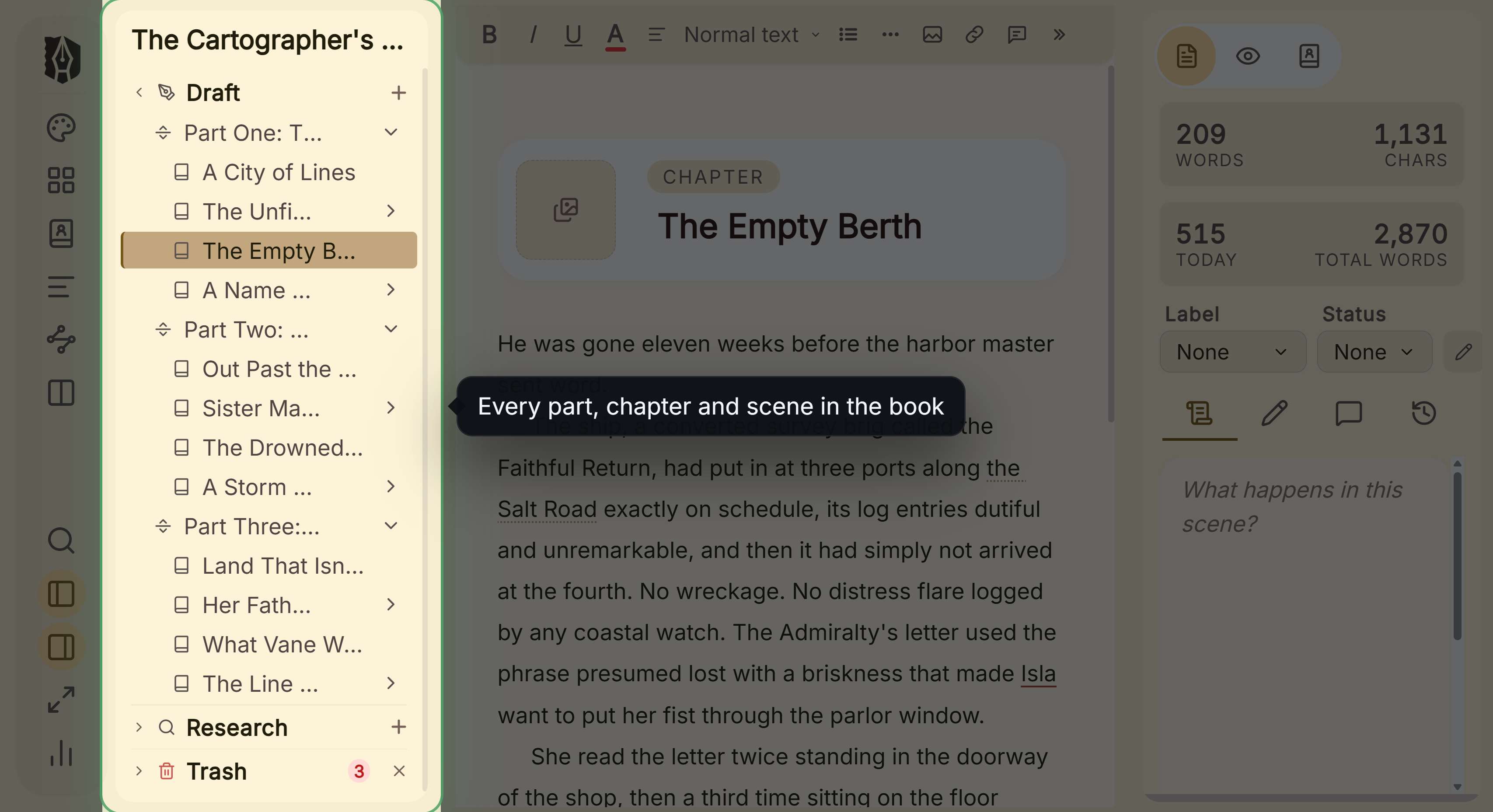 The Binder, Deckle's equivalent of Scrivener's
For formatting, it has 26 built-in style presets, a live preview, print PDF in 8 trim sizes with bleed, and EPUB targets for Kindle, Apple Books and Kobo. The Kindle target writes an EPUB for KDP to convert, not a KPF file.
A Deckle project is a folder on your own disk. It holds one .deckle SQLite database (all the writing, notes and settings) plus research/ and .deckle-assets/ folders. Nothing is stored on a server, and the app works offline after activation.
Deckle imports a Scrivener project as a ZIP backup (in Scrivener: File ▸ Back Up ▸ Back Up To…, with Backup as ZIP file ticked). A raw .scriv folder cannot be picked directly. The full steps are in moving from Scrivener to Deckle.
What you would give up, compared with the apps above:
- Open source. Deckle is not open source. Manuskript is, under GPL-3.0.
- Sync and mobile. Deckle has no built-in cloud sync, and no mobile, iPad or web version. Dabble and Obsidian sync across devices, and Obsidian runs on iOS and Android.
- Collaboration. Deckle has no real-time collaboration. Atticus offers it.
- ARM Linux. The Linux packages are x86_64 only.
- Trim sizes. Deckle has 8 built-in trim sizes and no custom size.
Try it first. Install Deckle and click Take Deckle for a Spin on the screen Deckle opens to. There is no card, no account and no time limit. It opens a sample novel with every screen open to explore, and you can restyle it and export real EPUB, PDF and DOCX files. New writing is capped at about 500 words, and new documents and imports are blocked.
Common mistakes
- Expecting a Scrivener 3 Linux build. The last Linux builds were 1.9.0.1 and 1.7.2.4, from 2015. Nothing newer exists.
- Assuming a Windows licence covers Linux. Scrivener licences cover one platform each, and Linux is not one of them.
- Treating Wine as supported. Literature & Latte calls Wine "a personal choice", not its official position.
- Reading "works on Linux" as "native". Plottr's Linux build is an unsupported beta, and yWriter runs on Linux only through Wine.
- Moving the project without exporting first. Whatever app you move to, keep a ZIP backup of the Scrivener project and a Word export before you switch. The general method is in how to move a manuscript between writing apps.
FAQ
Q: Is Scrivener available for Linux? A: No. Scrivener is sold for macOS, Windows and iOS. Literature & Latte ended its Linux beta in 2015 and has announced no Linux version since.
Q: Was there ever a Scrivener Linux version? A: Yes, an unsupported free beta. Its last builds were 1.9.0.1 and 1.7.2.4, released in October 2015 with the expiry date removed.
Q: Can I run Scrivener on Linux with Wine? A: People do, but it is unsupported. Literature & Latte staff say "it's not our official position that one should use Wine".
Q: What is the best Scrivener alternative for Linux? A: No authority ranks writing software. Manuskript and bibisco are native, offline and free to start. Atticus, Penpoint and Deckle are paid one-time purchases. Dabble is a subscription.
Q: Is there a free Scrivener alternative for Linux? A: Yes. Manuskript is free and open source, bibisco has a free Community Edition, and Obsidian's core app is free.
Q: Does Manuskript run on Linux? A: Yes. Manuskript 0.17.0 ships as a .deb, an .rpm, a Flatpak and a Snap.
Q: Is Scrivener online or offline? A: Offline. Scrivener is a desktop app on macOS and Windows, with sync through Dropbox if you want it.
Sources
Literature & Latte (all retrieved 2026-10-20):
- Scrivener overview: editions and system requirements
- Scrivener FAQs: one licence per platform
- Scrivener store: platform requirements
- Literature & Latte forum, Linux 1.9.01 Beta Released, 21 October 2015
- Literature & Latte forum, Please, release a native version for Linux again, staff reply, 24 April 2023
- Literature & Latte forum, Will there ever be plans to make Scrivener supported on Linux, staff reply, 27 June 2025
Native Linux apps (all retrieved 2026-10-20):
- Manuskript, GitHub repository, releases and import and export capabilities
- bibisco, download page, general FAQs and Community vs Supporters (updated 28 February 2026, retrieved 20 October 2026)
- Atticus, atticus.io and How to Access Atticus (last updated 14 February 2024): import and export need a connection
- Obsidian, download, pricing and Longform plugin
- Dabble, Install the desktop app and Export your manuscript
- Penpoint, penpoint.app
- Plottr, Can I install Plottr for Linux?
- Spacejock Software, yWriter 7 download
- Literature & Latte, Cross-grading: "Scrivener for macOS or Windows is $59.99" (the store page loads its prices from the checkout, so this page shows the figure in its text), retrieved 21 October 2026
Scrivener is a trademark of Literature & Latte. Penpoint is a product of Tophat Creative, LLC, and yWriter of Spacejock Software. Every other product name here belongs to its owner. Deckle is not affiliated with or endorsed by any product named here.