

The best writing apps for a book are the ones that run on the devices you actually write on, keep your work where you can reach it, and export a file the next person in the chain can open. Google Docs and Microsoft Word run almost everywhere. Ulysses and iA Writer suit writers on Apple devices, and Scrivener runs on a Mac, Windows PC and iPhone or iPad. Dabble and Reedsy Studio run in a browser on any device. Obsidian keeps plain files on every platform. Deckle is a desktop app for Windows, macOS and Linux, bought once, that writes the book and formats it.
No standards body tests writing apps, so this page ranks nothing and awards no winner. It compares what each app runs on, what it costs, whether it works offline and what it exports, from each vendor's own pages, read on 31 October 2026 unless another date is given. Prices are US dollars before tax. This is Deckle's own site, and Deckle is one of the apps compared, so weigh that section accordingly.
This page is about apps for writing books and other long fiction, across all your devices. For a straight comparison of novel software by what each does for a manuscript, see the best novel writing software; for software matched to each kind of book, from memoir to a children's book, see book writing software.
What kinds of writing apps are there?
Writing apps for books fall into four kinds. Most writers use one main app and borrow from a second.
- Word processors. Microsoft Word and Google Docs. One long document, the file format editors and agents expect, and apps on almost every device.
- Long-form writing apps. Scrivener, Dabble, Reedsy Studio and Deckle. The book is split into chapters and scenes you can reorder, with notes and research beside the draft.
- Plain-text and distraction-free editors. Ulysses, iA Writer and Obsidian. A quiet page, Markdown formatting and files that sync between devices.
- Formatting tools. Vellum, Atticus and Kindle Create turn a finished manuscript into an ebook and a print file. They are for the end of the job, not the drafting.
Grammar checkers such as ProWritingAid and Grammarly, and AI drafting tools, are a fifth kind. They check or generate text rather than hold the book, so they sit beside a writing app instead of replacing one. They are covered briefly further down.
Writing apps compared: devices, price, offline and export
| App | Computer | Phone and iPad | Price (31 October 2026) | Offline | Exports | AI |
|---|---|---|---|---|---|---|
| Microsoft Word | Windows, Mac, web | iOS and Android apps | Microsoft 365 Personal $9.99/mo or $99.99/yr; Office Home 2024 $179.99 once | Desktop app | DOCX, PDF, RTF, ODT, TXT; no EPUB | Copilot on Microsoft 365 Personal |
| Google Docs | Web browser | iOS and Android apps | Free with a Google Account | Chrome or Edge with the Docs Offline extension | DOCX, ODT, RTF, PDF, TXT, HTML, EPUB, Markdown | Gemini on some plans |
| Scrivener | macOS 11+, Windows 10+ (64-bit) | iPhone and iPad app, $23.99 | $59.99 once per desktop platform; 30 days of use free | Yes | Word, RTF, PDF, EPUB, Final Draft, plain text | None mentioned |
| Ulysses | Mac | iPhone and iPad, same subscription | $39.99/yr or $5.99/mo | Yes | Text, HTML, ePub, PDF, DOCX | Supports Apple's Writing Tools |
| iA Writer | Mac, Windows | iPhone and iPad; Android no longer sold | Mac $49.99, Windows $29.99, iPhone and iPad $49.99, each once; 7-day trial | Yes, a native app | PDF, Word, HTML | Marks pasted and AI text in its authorship view |
| Dabble | Windows, Mac, Linux, browser | Runs in the phone's browser | Writer $180/yr; Author $276/yr or $699 once; 14-day trial | Yes, stored on your devices | Word, Google Docs, Markdown, web; no direct PDF or ePub | None; future AI "strictly opt-in" |
| Reedsy Studio | Web browser | Mobile browser, online | Free; Craft $4.99/mo, Outline $7.99/mo add-ons | No | EPUB 3, print PDF; Word file by email | None listed |
| Obsidian | Windows, Mac, Linux | iOS and Android apps | Free; Sync from $4/mo billed yearly | Yes, files on your device | Markdown files; PDF one note at a time on desktop | None built in |
| Deckle | Windows 10/11, macOS 11+, Linux | Desktop only | One-time purchase, 2 devices; free demo | Yes, after activation | EPUB, print PDF, DOCX, Markdown, plain text | None in the app |
The table sorts itself into three groups. Word, Google Docs, Obsidian and Scrivener reach the most devices. Ulysses and iA Writer are strongest on Apple hardware. Reedsy Studio and Deckle also typeset the finished book as an EPUB and a print PDF, and Scrivener makes both through its Compile step.
Which writing apps work on a phone, iPad and computer?
Writing on several devices is the question that splits these apps most cleanly. There are three ways an app gets your book onto a phone.
- A native app on every device, synced. Ulysses syncs between Mac, iPad and iPhone on one subscription. Obsidian has apps for Windows, Mac, Linux, iOS and Android, with its own paid Sync or a folder you sync yourself. Word and Google Docs have phone and tablet apps tied to the same cloud account. LivingWriter has iOS and Android apps that sync with its web and desktop apps.
- A separate mobile app, synced by you. Scrivener's iOS app is bought separately, and Literature & Latte says you "sync using Dropbox or transfer with iTunes". iA Writer's iPhone and iPad app is a separate one-time purchase.
- The browser. Dabble runs on phones and tablets from the browser, with no app store listing. Reedsy Studio works in a mobile browser while you are online.
Deckle is a desktop app for Windows, macOS and Linux, and one licence covers two computers in any mix. A writer who drafts on a phone on the commute suits Ulysses, Google Docs, Obsidian or Scrivener for iOS for that part of the day, then brings the text to the desktop to revise and build the book. How to carry text between apps without losing chapters is on moving a manuscript between writing apps.
Which writing app suits which writer?
Microsoft Word, for the file everyone else uses
Word is the format agents, editors and many publishers ask for, so writing in it means no conversion at the end. Microsoft 365 Personal is $9.99 a month or $99.99 a year, with a one-month free trial, and covers PCs, Macs, phones and tablets. Office Home 2024 is $179.99 once for one PC or Mac. Copilot is included in Personal's desktop apps. Word suits a writer who wants one document, Track Changes with an editor and no new software to learn.
Google Docs, for free writing on every device
Google Docs is free with a Google Account and runs in the browser and on iOS and Android. Several people can edit at once, which suits a critique group or a co-author. Offline use on a computer needs Chrome or Edge, the Google Docs Offline extension, and an internet connection to switch it on. A document downloads as DOCX, PDF, EPUB, Markdown and more. It suits a writer who switches devices all day and wants no cost.
Scrivener, for a big book with research beside it
Scrivener 3.5.2 runs on macOS 11 or later and 3.1.6 on 64-bit Windows 10 or later, with an iOS app at $23.99. A desktop licence is $59.99 once per platform, and the trial lasts "30 days of use". The licence is a household one: "you can install Scrivener on any machines you own and of which you are the primary user." It suits a writer with a long, research-heavy book who is happy to learn Compile for the output. Whether its iPad app covers a full writing day is weighed on Scrivener for iPad.
Ulysses, for writing across Apple devices
Ulysses is "on all your Macs, iPads and iPhones" for $39.99 a year or $5.99 a month. It keeps every text in one library and exports DOCX, PDF and ePub. It has no Windows or Android version. It suits a writer who lives on Apple hardware and wants the same library on every screen.
iA Writer, for a quiet page bought once
iA Writer is a one-time purchase per platform: $49.99 on the Mac, $29.99 on Windows and $49.99 for iPhone and iPad, with a 7-day trial on Mac and Windows and no card. It writes plain-text Markdown and exports to PDF or Word. It tracks what you typed against what you pasted, and shows AI text in colour. Its Android app "is no longer for sale". It suits a writer who wants a calm editor and owns the files outright. Its platforms, export limits and the claims ranking reviews get wrong are on our iA Writer review.
Dabble, for one subscription on every device
Dabble's desktop app runs on Windows, Mac and Linux, and phones run it from the browser. Writer is $180 a year, Author $276 a year or $699 once, and Bestseller $468 a year or $899 once, after a 14-day trial with no card. Work is "stored locally on your devices for offline access". Dabble says "We never use your writing to train AI models." It exports Word, Google Docs and Markdown, and does not export PDF or ePub directly. It suits a writer who wants a plotting grid and sync with nothing to set up.
Reedsy Studio, for free writing and formatting online
Reedsy Studio is free in the browser, with Craft at $4.99 a month and Outline at $7.99 a month as add-ons. It exports an EPUB 3 ebook and a print PDF, and a Word file by email. It has no offline mode. It suits a writer who always has a connection and wants a typeset book at no cost.
Obsidian, for plain files and many notes
Obsidian's core app is "Free without limits" on Windows, Mac, Linux, iOS and Android, and notes are Markdown files on your device. Sync is $4 a month billed yearly or $5 monthly. It exports PDF one note at a time on the desktop, and book export needs community plugins. It suits a writer whose book grows out of a large web of notes. How far it stretches for fiction is on is Obsidian good for novel writing.
Are there writing apps for Windows, Mac and Linux?
Most writing apps for computers run on Windows and Mac. Ulysses runs only on Apple devices, and Vellum only on the Mac. On Linux, the choice is narrower: Obsidian, Dabble's desktop app, LibreOffice Writer and Deckle all ship Linux builds. The platform-by-platform picks are on novel writing software for Windows, for Mac and for Linux.
Do you pay once or every year for a writing app?
Writing apps come in three price models, and the difference compounds over a book that takes three years.
- Free. Google Docs, Reedsy Studio's core and Obsidian's core app.
- Pay once. Scrivener, iA Writer, Office Home 2024, Dabble's lifetime plans, and Deckle.
- Pay every year or month. Microsoft 365, Ulysses, Dabble's yearly plans and Reedsy Studio's add-ons.
Three years of Ulysses is $119.97, and three years of Dabble's Writer plan is $540. A Scrivener licence for one platform is $59.99 once. The full cost comparison is on writing software with a one-time purchase.
What about grammar checkers and AI writing apps?
Grammar checkers such as ProWritingAid and Grammarly check sentences you have already written. AI drafting tools generate text. Neither holds a book's chapters, notes and exports, so they work beside a writing app rather than as one. Some writing apps build AI in: Word has Copilot, Google Docs has Gemini, and Ulysses supports Apple's Writing Tools. Writers who want none in the app they draft in can compare writing software without AI.
What do ranking pages get wrong about writing apps?
Four claims in pages that rank for this search disagree with the vendors' own pages on 31 October 2026.
- "iA Writer runs on Android." Selfpublishing.com's "The 10 Best Distraction-Free Writing Apps of 2026" (Scott Allan, 25 May 2026) says it "runs on Mac, Windows, iOS, and Android". iA's own Android FAQ says "iA Writer for Android is no longer for sale" and was "removed from sale in September 2024". The same page gives a 14-day trial; iA's pricing page lists a 7-day trial. (Its iOS price of $19.99 matches the US App Store on 1 November 2026, though iA's pricing page lists $49.99.)
- "Ulysses costs $49.99 a year." The same selfpublishing.com page says "$5.99/month or $49.99/year". Ulysses's pricing page says $39.99 a year.
- "Vellum premium $299.99." Reedsy's writing apps directory (no date, © 2026) lists Vellum's "Premium price" as "$299.99 one-time payment". Vellum's site lists Vellum Press, the tier that adds paperbacks, at $249.99.
- "Scrivener's iOS app syncs in real time" and "one computer at a time." ProWritingAid's "Best Writing Apps for Windows and Mac" (Krystal N. Craiker, 23 November 2022) says both. Literature & Latte says you "sync using Dropbox or transfer with iTunes", and its licence lets you install Scrivener "on any machines you own and of which you are the primary user."
Check each price on the vendor's own page before you buy. Directory pages and listicles are often a year or more behind.
How do you start writing a book in Deckle?
Deckle is our app, so weigh this section accordingly. Deckle is a desktop writing app for Windows, macOS and Linux. Each project is a folder on your own computer, it works offline after activation, and it has no generative AI. The same project holds the draft, the notes and the book's EPUB and print PDF.
- Try it free. Install Deckle and click Take Deckle for a Spin on the screen it opens to. A sample project opens with a guided tour. There is no card, no account and no time limit.
- Write in a chapter. Click a chapter in the Binder on the left and type. New writing in the demo is capped at about 500 words.
- Clear the screen. Choose View ▸ Focus Mode to hide the panels around the page.
- Set a goal. Choose View ▸ Writing Stats, pick Words or Minutes, then Daily or Weekly. The view shows your day streak and a writing heatmap.
- See the book's shape. Choose View ▸ Outliner for the chapters as cards in Grid View, and drag one to move it.
- Make the files. Choose File ▸ Export… (Ctrl+E, or Cmd+E on a Mac) and pick EPUB, PDF or DOCX. Export works in the demo, so you can open the result before you decide.
- Bring your own book after buying. Choose File ▸ New Project…, then click + beside Draft and choose Import… for a Word file, an EPUB, a zipped Scrivener project or an Obsidian Markdown folder.
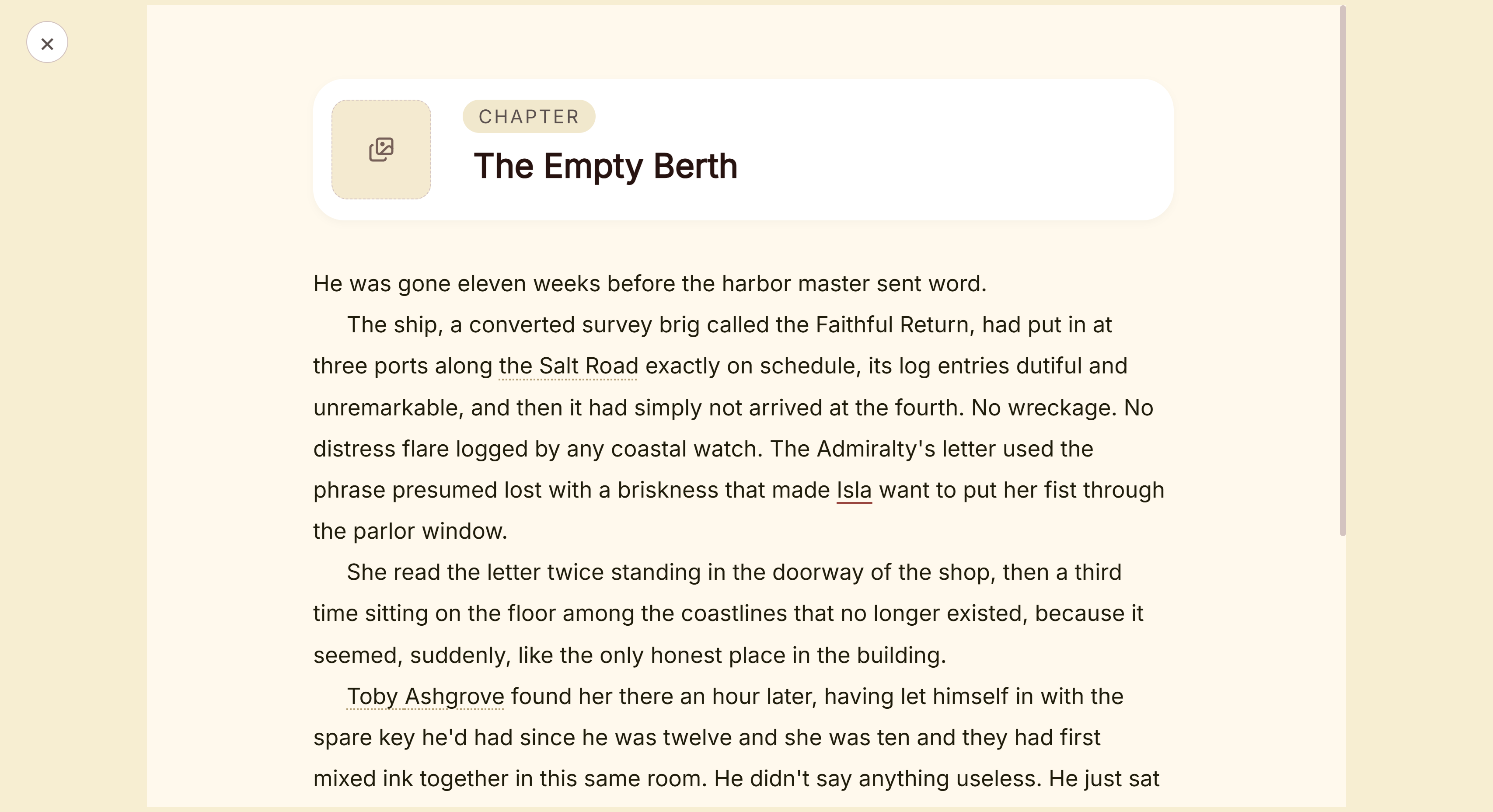 Focus Mode, with the Binder and Inspector hidden
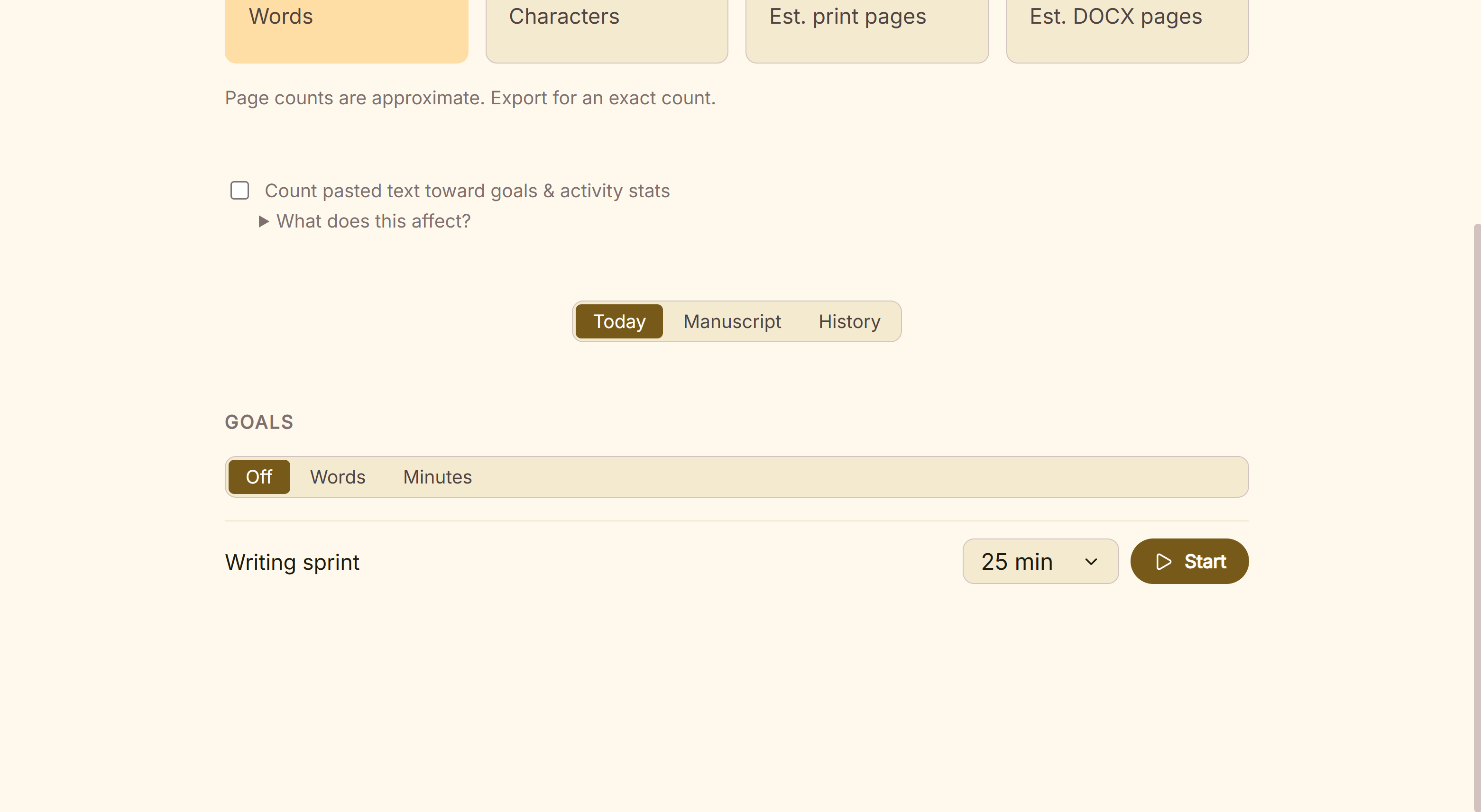 A daily word goal in Writing Stats
For drafting on a phone, Ulysses, Google Docs, Obsidian or Scrivener for iOS suit that part of the day. For a co-author typing in the same document at the same time, Google Docs suits. What Deckle adds is the whole book on your own disk, from first draft to an EPUB and a print PDF for KDP, with one payment.
Common mistakes when choosing a writing app
- Choosing by feature list instead of device. An app you cannot open where you write gets abandoned. List the devices you write on first.
- Trialling with a blank page. Paste in three real chapters during the trial, then export them. A trial only shows its worth with your own book in it.
- Ignoring export until the end. Check the app writes the file you need next: Word for an editor, EPUB and PDF for self-publishing.
- Trusting sync without a backup. Sync copies mistakes as quickly as it copies work. Keep a separate backup off the device.
- Paying yearly for an app you use for one book. Work out three years of the subscription against a one-time price before you commit.
- Buying from a listicle's price. Prices in roundups go stale. Check the vendor's page on the day.
- Mixing a grammar checker up with a writing app. A checker improves sentences. It does not hold chapters, notes or exports.
FAQ
What are the best writing apps for writers?
Nothing authoritative ranks them. Word and Google Docs suit writers who want the standard file on every device. Scrivener and Deckle suit long books on a computer. Ulysses and iA Writer suit Apple devices, Dabble and Reedsy Studio suit the browser, and Obsidian suits plain files everywhere.
What is the best writer app for iPad and iPhone?
Ulysses syncs one library across Mac, iPad and iPhone by subscription. Scrivener's iOS app is $23.99 once and syncs through Dropbox. iA Writer for iPhone and iPad is $49.99 once. Google Docs, Word and Obsidian also have iOS apps.
Which writing apps work on Android?
Google Docs, Microsoft Word and Obsidian have Android apps, and LivingWriter has one too. Dabble and Reedsy Studio run in the phone's browser. iA Writer for Android is no longer sold, and Scrivener and Ulysses have no Android version.
Is there a free writing app for books?
Google Docs and Obsidian are free, and Reedsy Studio's core is free online. Scrivener, Dabble, iA Writer and Microsoft 365 have free trials, and Deckle has a free demo with no time limit.
Which writing apps work offline?
Desktop apps such as Scrivener, iA Writer, Obsidian, Word and Deckle work offline. Dabble keeps work on your devices. Google Docs needs the Docs Offline extension, set up while connected. Reedsy Studio has no offline mode.
Do writing apps use AI?
Some do. Word has Copilot, Google Docs has Gemini, and Ulysses supports Apple's Writing Tools. Scrivener's pages mention none, Dabble says any future AI is opt-in, and Deckle has none in the app.
Can one writing app also format the book?
Reedsy Studio and Deckle both export a typeset EPUB and print PDF. Scrivener compiles to EPUB and PDF. Word, Google Docs, Ulysses, iA Writer, Dabble and Obsidian need a formatting tool for a print-ready book.
Sources
Retrieved 31 October 2026 unless stated. Prices change, so check the vendor page before buying.
- Microsoft, Compare all Microsoft 365 plans: Personal $9.99 a month or $99.99 a year, one-month trial, Office Home 2024 $179.99 for one PC or Mac, Copilot by plan, PCs, Macs, phones and tablets; File format reference for Word: Word's save formats, no EPUB (retrieved 30 October 2026)
- Google, Use Google Docs offline: Chrome or Edge, the Docs Offline extension, connected to switch it on; Google Docs: co-editing, Gemini, phone and tablet apps in the App Store and Play Store; Export formats: DOCX, ODT, RTF, PDF, TXT, HTML, EPUB, Markdown (retrieved 30 October 2026)
- Literature & Latte, Scrivener overview: versions, system requirements, "sync using Dropbox or transfer with iTunes", export formats; Store: iOS $23.99, 30-day trial, with desktop prices of $59.99 from the store's Paddle price feed (retrieved 30 October 2026); FAQs: household licence, "30 days of use"
- Ulysses, Pricing: $39.99 a year or $5.99 a month, Macs, iPads and iPhones; App Store listing: $199.99 Perpetual License in-app purchase, requirements (retrieved 20 October 2026); Export help: formats (retrieved 30 October 2026); Apple Intelligence help: Writing Tools available in Ulysses
- iA, Writer pricing: Mac $49.99, Windows $29.99, iPhone and iPad $49.99, one-time, 7-day trial; iA Writer: PDF and Word export, typed and pasted text, AI in colour; Android FAQ: "no longer for sale", removed from sale in September 2024
- Dabble, Pricing: plans, lifetime prices, 14-day trial, offline storage, AI statements; Install the desktop app: Windows, Mac and Linux; Install on mobile: phones and tablets from the browser (retrieved 20 October 2026); Export your manuscript: formats, no direct PDF or ePub (retrieved 30 October 2026)
- Reedsy, Studio pricing: free plan, Craft and Outline add-ons; Book writing software FAQ: no offline mode, EPUB 3, print PDF (retrieved 30 October 2026); Back up your book: a Word file by an emailed link
- Obsidian, Pricing: "Free without limits", Sync prices; Download: Windows, macOS, Linux, iOS, Android; PDF export help: one note at a time, desktop only (retrieved 20 October 2026)
- LivingWriter, Downloads: Windows and Mac apps syncing with web, iOS and Android (retrieved 20 October 2026)
- Vellum, Vellum: Vellum Ebooks $199.99, Vellum Press $249.99, Mac only
- LibreOffice, Download LibreOffice: Windows, macOS and Linux builds
- Ranking pages checked for the claims above: selfpublishing.com, "The 10 Best Distraction-Free Writing Apps of 2026" (Scott Allan, 25 May 2026); Reedsy, "Best Writing Apps in 2026" directory (undated); ProWritingAid, "Best Writing Apps for Windows and Mac" (Krystal N. Craiker, 23 November 2022)
Scrivener is a trademark of Literature & Latte. Microsoft Word is a trademark of Microsoft. Google Docs is a trademark of Google. Ulysses, iA Writer, Obsidian, Dabble, LivingWriter, Reedsy Studio and Vellum are trademarks of their respective owners. Deckle is not affiliated with or endorsed by any product named here.