

The novel writing software that installs on a Windows PC includes Scrivener, yWriter, bibisco, Dabble, Campfire, Plottr, Penpoint, Atticus, Microsoft Word and Deckle, and Reedsy Studio, Novelcrafter and Google Docs run in a Windows browser. The right one depends on your budget, whether you write offline, how much planning your book needs, and whether you also want to format it.

No standards body or writers' organisation ranks writing software, so this page ranks nothing. It sorts the tools by need and sets each vendor's own Windows requirements side by side, as of October 2026. How to judge any writing app by how it stores your work is covered in best novel writing software. This is Deckle's site, and Deckle is one of the tools below, so its section is marked as ours.
Windows system requirements for novel writing software
Each row comes from the vendor's own page, retrieved 20 October 2026. Where a vendor publishes no minimum, the cell says so.
| Tool | Windows version | Other requirements | Installs as |
|---|---|---|---|
| Scrivener 3.1.6 | 64-bit Windows 10 or later | minimum display 1024x768 | desktop app |
| yWriter 7.1.5.2 | Windows 7 SP1 or newer | .NET 4.8 runtime or newer | desktop app |
| bibisco | Windows 10 or later | 64-bit only, minimum display 1024x768 | desktop app |
| Plottr | Windows 10 and 11 | updates after 7 August 2025 do not support Windows 8.1 or earlier | desktop app |
| Campfire Writing | Windows 7 and later | more memory helps with larger projects | desktop app plus browser |
| Dabble | no minimum published | account and internet needed to sign in and sync | desktop app plus browser |
| Penpoint | no minimum published | no account needed | desktop app |
| Atticus | no minimum published | installed from Chrome as a web app | web app |
| Microsoft Word (Microsoft 365, home use) | Windows 11 | 1.6 GHz 2-core, 4 GB RAM, 4 GB disk, 1280x768 | desktop app |
| Deckle | Windows 10 or 11, 64-bit | x86_64 build | desktop app (.msi) |
| Reedsy Studio, Novelcrafter, Google Docs | any current browser | an internet connection (Google Docs has an offline extension) | browser |
Two rows catch people out. Microsoft's current Microsoft 365 home-use requirements list Windows 11 only. And Atticus has no Windows installer of its own: its help says "You'll need to use Chrome to do this", then you open app.atticus.io and click Install App.
Three popular writing apps do not run on Windows at all. Ulysses is for "Mac, iPad and iPhone", with no Windows, Android or web version. Storyist is macOS and iOS only. Vellum, a formatter rather than a writing app, is Mac only. Mac writers have their own page: novel writing software for Mac.
Free novel writing software for Windows
Six options cost nothing to write a novel on a PC, and each carries a stated limit.
yWriter is a free Windows program from Spacejock Software that splits a novel into chapters and scenes. Each scene has fields for viewpoint, goal, conflict and outcome, and the program keeps a daily progress log and automatic backups. It exports EPUB and Mobi, RTF, and LaTeX "for generating print-ready PDFs". Its latest release is 7.1.5.2, dated 30 January 2024. Its changelog lists "import and export from docx" in version 7.1.3.4. Spacejock's pages do not mention Scrivener import.
bibisco Community Edition is free for Windows, Mac and Linux, with chapters, scenes, storylines and character development. "As a desktop application, novel data is stored securely on your PC/Mac." It exports PDF, DOCX and TXT. The paid Supporters Edition is $69 once with two years of updates (as of October 2026). bibisco's edition comparison, updated 28 February 2026, puts the Timeline, EPUB export, find/replace and writing goals in it, not in Community.
Manuskript is free and open source (GPL-3.0), with an outliner, index cards and a snowflake-method assistant. Its 0.17.0 release has a Windows .zip. Its download page says it is "still in the early development stages", and EPUB, OpenDocument and DOCX need pandoc installed separately (PDF needs LaTeX too, its wiki says).
Reedsy Studio is free in a browser, with sections, chapters and scenes, front and back matter, boards, goals and version history. Paid add-ons cost $4.99 or $7.99 a month (as of October 2026). Asked whether it works offline, Reedsy answers "Currently, no."
Campfire Writing has a free plan with a Windows desktop app, capped at 25,000 manuscript words, 10 characters and 20 timeline events. Elements over those limits become read-only.
Google Docs is free with a Google Account. It works offline only in Chrome or Edge with the Google Docs Offline extension, and one document holds up to 1.02 million characters. It exports DOCX, PDF and EPUB, and its paid tiers add Gemini generative AI.
Novel writing software for Windows that organises a long book
Scrivener is a structured writing and organising app from Literature & Latte. Its own feature list includes the Binder, Corkboard index cards, an Outliner with synopses and metadata, Snapshots with Compare, Scrivenings, Collections, targets for manuscript, section and session, and composition mode. Compile exports Word, RTF, PDF, EPUB and Kindle e-books. It costs $59.99 once for Windows (as of October 2026), and the trial lasts 30 days of actual use. Its strengths and costs are set out in Scrivener alternatives and is Scrivener a one-time purchase.
Dabble is a cloud-synced writing app with a Windows desktop app and "True Offline" writing that syncs when you reconnect. It has a binder of parts, chapters and scenes, a Plot Grid, character profiles and co-authoring. It is a subscription from $15 a month billed annually, or $699 for Lifetime Author (as of October 2026), with a 14-day trial. Dabble says it "does not export PDF or ePub directly".
Plottr is a visual outlining and series-bible tool for Windows 10 and 11, with timelines, character bios and 30+ plot templates (the features page figure; the homepage now says 40+). Plottr says you can write in it "(sort of), but that's not what Plottr is built for", so it pairs with a writing app. It costs $60 a year or $150 lifetime (as of October 2026).
Campfire Writing suits heavy worldbuilding, with 18 modules from Characters and Timeline to Magic and Languages. Its Windows desktop app "allows you to write offline", but exporting to DOCX needs a connection.
Penpoint is a newer native app (1.0 in October 2025) for Windows, macOS and Linux, with chapter and scene views, a corkboard, a codex, a timeline and snapshots. It costs $40 once with a 14-day trial (as of October 2026), and says "no AI ever touches your prose."
Novel writing software for Windows that works offline
These run fully offline on Windows once installed: Scrivener, yWriter, bibisco, Penpoint, Plottr's base plan and Deckle after activation. Campfire's desktop app writes offline, but subscribers must connect occasionally so Campfire can "verify that they are still active". Dabble writes offline and needs a connection to sign in and sync.
Atticus says it works "online, offline, in a plane or on a train", and its help adds "You do need to be online to import and export files". Reedsy Studio and Novelcrafter need a connection for everything. Novelcrafter's help says "Right now you can only use Novelcrafter with an active internet connection."
Software to write and format a book on Windows in one app
Most writing apps stop at a manuscript. Three tools on Windows also produce the EPUB and print PDF: Atticus, Reedsy Studio and Deckle.
Atticus costs $147 once (as of October 2026), "No monthly fees. Forever." It exports EPUB, PDF and DOCX, with 17+ chapter themes, a custom theme builder and collaboration "for authors, editors, and readers". It also runs on a Chromebook or in any browser. Atticus lists version history as "Coming Soon".
Deckle is our app, so weigh this section accordingly. Deckle is a desktop app for Windows, macOS and Linux. The Windows download is a 64-bit .msi for Windows 10 or 11. A Deckle project is a folder on your own disk: one .deckle database holds the writing, notes and settings, beside research/ and .deckle-assets/ folders. It works offline after activation, and one licence covers two devices in any mix of Windows, Mac and Linux.
For writing, Deckle has a Binder (Draft, Research, Trash), an Outliner with a Grid View of index cards and a List view, Continuous View, a Codex for characters, locations and items, and a Timeline. It also has inline comments, snapshots, Writing Stats with goals and streaks, writing sprints, Focus Mode and spellcheck in 16 languages. The Outliner's List view puts every part, chapter and scene in a row with its word count and synopsis.
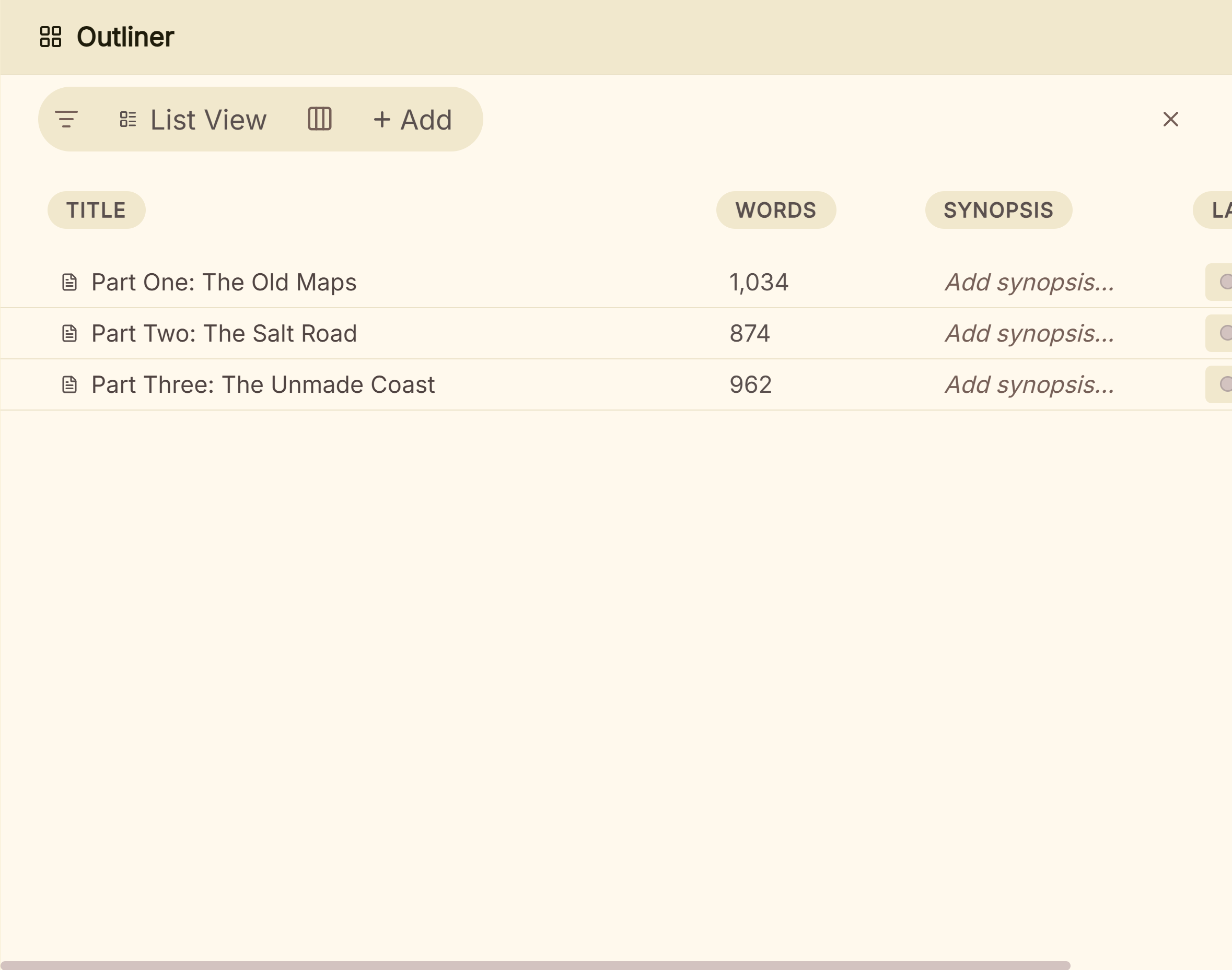 The Outliner's List View
It imports Word, EPUB, a zipped Scrivener project or a Markdown folder. For output, it exports EPUB (Generic, Kindle, Apple Books and Kobo targets), a print PDF typeset with Typst, DOCX, Markdown and plain text. The Kindle target writes an EPUB for KDP to convert, not a KPF file. It has no generative AI.
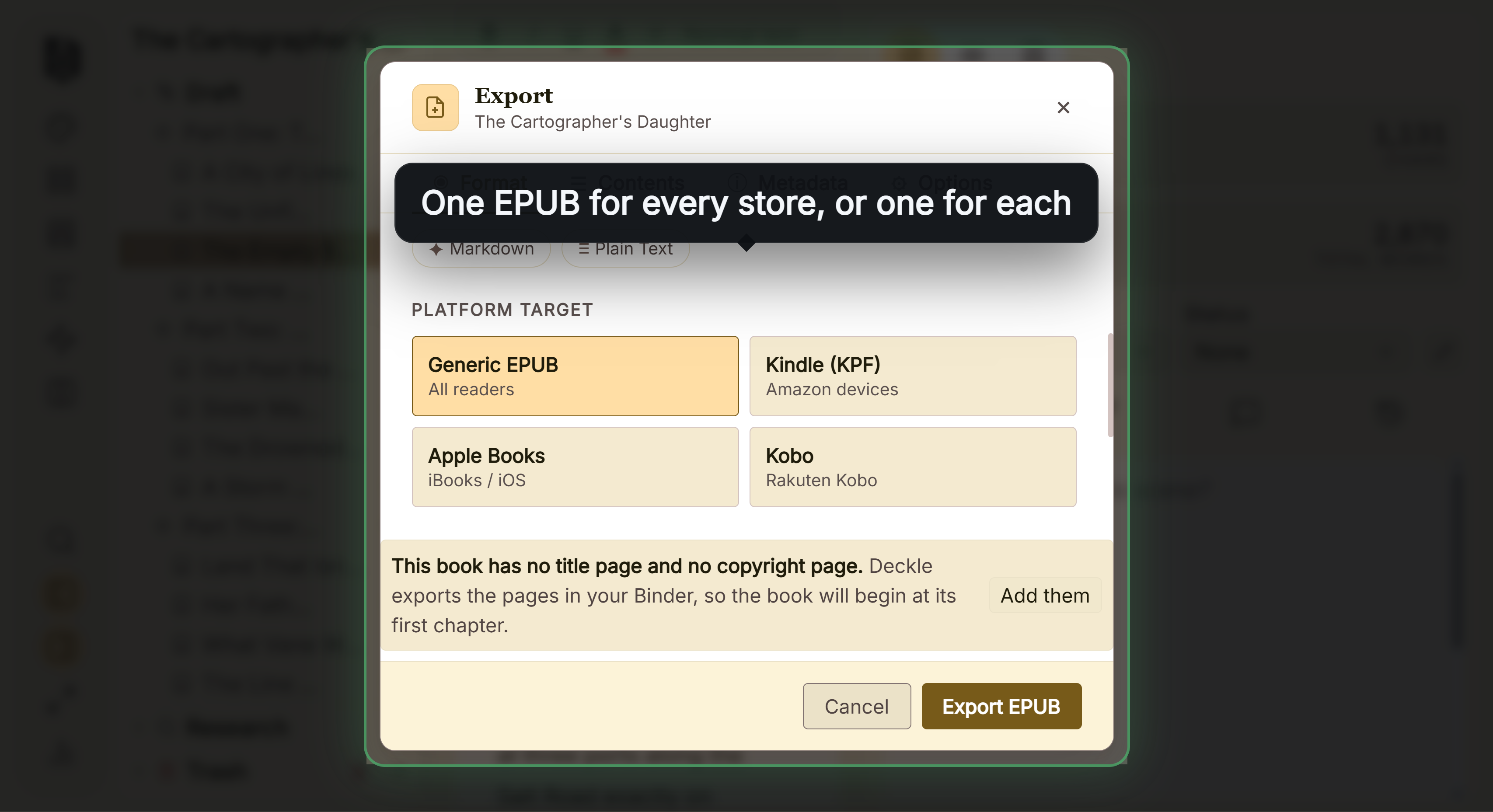 One EPUB for every store, or one for each The formatting side is compared in book formatting software for Windows.
Where Deckle is behind on Windows: it has no browser version, no phone or tablet app, no real-time collaboration and no built-in cloud sync. Scrivener also has an iPhone and iPad app ($23.99 as of October 2026), which Deckle does not. And six options on this page are free, while Deckle is a paid one-time purchase.
Writing a novel in Microsoft Word on Windows
Microsoft 365 Personal costs $9.99 a month or $99.99 a year, and Office Home 2024 costs $179.99 once for one PC or Mac (as of October 2026). Word has no binder, scene cards or story bible, and it does not save EPUB. Copilot in Word drafts and rewrites text, and Microsoft says it can be turned off in Word settings. The trade-off is set out in Scrivener vs Word.
If you also use a Mac
Licences differ across platforms. A Scrivener licence covers one platform: a Windows licence does not cover the Mac version, and crossgrading costs $37.95 (as of October 2026). Dabble, Campfire, Atticus and Reedsy Studio sync through their own accounts. Penpoint's licence covers Windows, macOS and Linux. Deckle's licence covers two devices in any mix of Windows, Mac and Linux, and it has no built-in sync, so the project folder moves by your own copy or a sync folder. Moving a book between apps is covered in how to move a manuscript between writing apps.
Novel writing software for Windows compared
| Tool | Price (October 2026) | Offline on Windows | Exports EPUB | Print PDF | Generative AI |
|---|---|---|---|---|---|
| Scrivener | $59.99 one-time | yes | yes | Compile to PDF | none mentioned |
| yWriter | free | yes | yes (and Mobi) | via LaTeX, typeset in the free TeXworks | none mentioned |
| bibisco | free; Supporters $69 one-time | yes | Supporters only | PDF export | none mentioned |
| Manuskript | free | yes | needs pandoc | needs pandoc and LaTeX | none mentioned |
| Dabble | from $15/month billed annually; lifetime $699 | writing yes, sign-in and sync no | no | browser print only | none now |
| Campfire Writing | free plan; Standard $12/month | desktop app yes | yes | PDF export | not stated |
| Plottr | $60/year or $150 lifetime | base plan yes | no | no | none (vendor rejects AI) |
| Penpoint | $40 one-time | yes | yes | PDF export | none |
| Atticus | $147 one-time | writing yes, import and export no | yes | yes | none mentioned |
| Reedsy Studio | free; add-ons from $4.99/month | no | EPUB 3 | yes | none listed |
| Novelcrafter | $4 to $20/month | no | no | no | yes, bring your own key |
| Microsoft Word | $99.99/year or $179.99 one-time | desktop app | no | saves PDF | yes, Copilot |
| Google Docs | free | with the Chrome or Edge extension | yes | saves PDF | yes, Gemini on paid tiers |
| Deckle | one-time purchase | yes, after activation | yes, 4 store targets | yes, Typst | none |
Whether a tool uses AI has its own page: writing software without AI.
Which novel writing software should a Windows writer choose?
- You want to spend nothing and stay offline: yWriter or bibisco Community Edition.
- You want the deepest organising tools and will format elsewhere: Scrivener.
- You want cloud sync across a PC and a phone browser: Dabble or Campfire.
- You plan in detail before drafting: Plottr beside a writing app.
- You want to write and format in one app with a browser option: Atticus, or Reedsy Studio for free.
- You want to write and format in one desktop app that works fully offline: Deckle.
Try Deckle on Windows
Deckle has a free demo. Install Deckle, then click Take Deckle for a Spin on the screen Deckle opens to. It needs no card and no account, and it has no time limit. It opens a sample novel with every screen open to explore, and you can restyle it and export real EPUB, PDF and DOCX files. New writing is capped at about 500 words, and new documents and imports are blocked. Deckle itself is a one-time purchase.
FAQ
What is the best novel writing software for Windows?
No authority ranks it, so it depends on the need. yWriter and bibisco are free and offline, Scrivener has the deepest organising tools, and Atticus and Deckle write and format in one app.
Is there free novel writing software for Windows?
Yes. yWriter, bibisco Community Edition and Manuskript are free Windows programs, and Reedsy Studio and Google Docs are free in a browser. Campfire has a free plan capped at 25,000 words.
Does Scrivener work on Windows 11?
Yes. Literature & Latte lists Scrivener 3.1.6 for 64-bit Windows 10 or later, which includes Windows 11.
Does one Scrivener licence cover Windows and Mac?
No. Each platform needs its own licence, and crossgrading to the second one costs $37.95 as of October 2026.
Is Ulysses available for Windows?
No. Ulysses runs on Mac, iPad and iPhone only, with no Windows, Android or web version.
What is the best app to write a book on a PC?
For a free, offline start, yWriter or bibisco. For a long, complex book, Scrivener or Deckle. For a browser you can use on any PC, Reedsy Studio or Atticus.
Can I write a novel in Word on Windows?
Yes. Word has no binder or scene cards and does not save EPUB, and the current Microsoft 365 home apps require Windows 11.
Sources
All pages retrieved 2026-10-20.
- Literature & Latte, Scrivener overview (Windows 3.1.6, 64-bit Windows 10+, display): https://www.literatureandlatte.com/scrivener/overview
- Literature & Latte, Scrivener features: https://www.literatureandlatte.com/scrivener/features
- Literature & Latte, Scrivener FAQs (trial, per-platform licence): https://www.literatureandlatte.com/scrivener/faqs
- Literature & Latte, crossgrading: https://www.literatureandlatte.com/crossgrading
- Literature & Latte, Scrivener store (iOS price): https://www.literatureandlatte.com/store/scrivener/
- Spacejock Software, yWriter 7 download and changelog (Windows 7 SP1, .NET 4.8, version, docx import and export in 7.1.3.4): https://www.spacejock.com/yWriter7_Download.html
- Spacejock Software, yWriter 7 features ("Use TeXworks (free) to generate a print-ready PDF!", retrieved 21 October 2026): https://www.spacejock.com/yWriter7.html
- bibisco, general FAQs (requirements, local storage): https://bibisco.com/docs/general-faqs/
- bibisco, download and editions: https://bibisco.com/novel-writing-software-download/
- bibisco docs, Community vs Supporters editions (updated 28 February 2026; Timeline, EPUB, find/replace and goals are Supporters only): https://bibisco.com/docs/differences-between-community-and-supporters-editions/
- Manuskript, project site: https://www.theologeek.ch/manuskript/
- Manuskript, import and export capabilities: https://github.com/olivierkes/manuskript/wiki/Import-and-Export-capabilities
- Plottr Docs, software requirements (last updated 17 March 2026): https://docs.plottr.com/article/30-what-are-plottrs-software-requirements
- Plottr Docs, can I write my story in Plottr: https://docs.plottr.com/article/27-can-i-write-my-story-in-plottr
- Plottr, pricing: https://plottr.com/pricing/
- Campfire Writing, FAQ (desktop requirements, offline): https://www.campfirewriting.com/faq
- Campfire Writing, pricing (free plan limits): https://www.campfirewriting.com/pricing
- Dabble, install the desktop app: https://www.dabblewriter.com/docs/apps-sync-offline/install-desktop-app
- Dabble, system requirements: https://www.dabblewriter.com/docs/reference/system-requirements
- Dabble, pricing: https://www.dabblewriter.com/pricing
- Dabble, export your manuscript: https://www.dabblewriter.com/docs/import-export-printing/export-your-manuscript
- Penpoint, home page (platforms, price, trial, AI statement): https://penpoint.app
- Atticus, home page: https://www.atticus.io/
- Atticus Help, How to download Atticus on a desktop or laptop computer: https://intercom.help/atticus-5877e36564df/en/articles/12961553-how-to-download-atticus-on-a-desktop-or-laptop-computer
- Atticus Help, How can I use Atticus offline: https://intercom.help/atticus-5877e36564df/en/articles/12703251-how-can-i-use-atticus-offline
- Reedsy Studio, FAQ (offline, add-on prices): https://reedsy.com/studio/resources/book-writing-software-faq/
- Novelcrafter Help, offline mode: https://www.novelcrafter.com/help/faq/general/can-i-use-nc-in-ofline-mode
- Novelcrafter, pricing: https://www.novelcrafter.com/pricing
- Google Docs Help, work offline: https://support.google.com/docs/answer/6388102
- Google Drive Help, file size limits: https://support.google.com/drive/answer/37603
- Microsoft Support, system requirements for Microsoft 365 for home use: https://support.microsoft.com/en-us/office/system-requirements/system-requirements-for-microsoft-365-for-home-use
- Microsoft 365, compare plans and prices: https://www.microsoft.com/en-us/microsoft-365/buy/compare-all-microsoft-365-products
- Microsoft Support, Copilot in Microsoft 365 subscriptions FAQ: https://support.microsoft.com/en-us/microsoft-365-copilot/frequently-asked-questions-about-copilot-in-microsoft-365-subscriptions
- Ulysses, pricing (platforms): https://ulysses.app/pricing/
- Storyist, home page (platforms): https://storyist.com/
- Plottr, features ("30+ proven plot templates"): https://plottr.com/features/ and home page ("40+ plot outlining templates"): https://plottr.com/
Prices, requirements and features last checked 20 October 2026.
Scrivener is a trademark of Literature & Latte. Microsoft Word is a trademark of Microsoft, and Google Docs is a trademark of Google. Ulysses, Storyist, Vellum, yWriter, bibisco, Manuskript, Dabble, Plottr, Campfire, Penpoint, Atticus, Reedsy and Novelcrafter are trademarks of their respective owners. Deckle is not affiliated with or endorsed by any product named here.