

Scrivener is better than Word for organising a long draft: it splits the book into a Binder of chapters and scenes, keeps notes beside the text, and compiles the whole thing into a manuscript, ebook or PDF. Word is better for the editing stage, because editors and publishers mark up a .docx file with Track Changes. Most authors who use Scrivener still end up in Word.

This page compares the two tools only. The wider question, one long document against any dedicated app, is covered in writing a novel in Word vs dedicated software.
Every fact below comes from Literature & Latte's and Microsoft's own pages and manuals, read on 2026-10-20. Prices are US list prices as of October 2026.
Is Scrivener better than Word for writing a novel?
Scrivener is built around the shape of a book. Literature & Latte's overview lists a Binder, a Corkboard of index cards, an Outliner with synopses and metadata, Snapshots with Compare, word Targets for the manuscript and each session, Scrivenings (several sections edited as one), Collections and a composition mode. Each chapter or scene is its own document, so moving chapter nine means dragging one item in the Binder.
Word is a general word processor. Its tool for structure is the Navigation pane, and it depends on heading styles. Microsoft's Navigation pane help says "If you've applied heading styles to the headings in the body of your document, those headings appear in the Navigation pane", and "To move part of the document, select the heading and drag it to a new location." Word can reorder chapters by drag and drop, provided every chapter title uses a Heading style.
| Scrivener | Microsoft Word | |
|---|---|---|
| What it is | Long-form writing and organising app with Compile | General word processor |
| Structure | Binder, Corkboard, Outliner, Scrivenings | Navigation pane built from Heading styles |
| Notes and research | Inside the project, beside the text | Separate files, or comments |
| Version history | Snapshots with Compare, per section | Previous versions, only for files in OneDrive or SharePoint |
| Editing markup | Revision Mode (colours new text) | Track Changes and comments |
| Platforms | macOS, Windows, iOS | Windows, Mac, iPad and iOS, Android, web |
| Price model | One-time, per platform | Microsoft 365 subscription, or Office Home 2024 one-time |
| Generative AI | None mentioned | Copilot |
Why use Scrivener instead of Word?
Scrivener earns its place on long, many-part books. Three things in it have no direct Word equivalent:
- Per-section notes and synopses. Every Binder item carries its own synopsis, notes and metadata, which the Outliner shows as columns.
- Snapshots. A Snapshot keeps an earlier copy of one section, and Compare shows what changed. Word's version history works only for files saved to OneDrive or SharePoint, and Microsoft says personal accounts keep the last 25 versions.
- Compile. One project produces several outputs. Scrivener's built-in compile formats include Manuscript (Courier), which the manual says uses "standard Courier 12pt type" with "double-spacing, underlined emphasis (instead of italic), page numbers, standard page headers", and Manuscript (Times) with italics kept as italics.
Word earns its place when the book is linear, when the author already knows Word's styles, or when the manuscript is about to go to an editor.
Does Word do anything better than Scrivener?
Word does three things better.
Track Changes. Scrivener has nothing equivalent, and its own manual says so: "Revision levels are not to be considered equivalent to 'track changes', as seen in version controlled software, or Microsoft Word. They are very simple, low bandwidth tools, that only mark modified or new text. Removed text will not be marked in any way." In Word, per Microsoft's Track Changes help, "Deletions are marked with a strikethrough, and additions are marked with an underline", "Different authors' changes are indicated with different colors", and the markup leaves the file only through the Accept and Reject commands.
Styles. Microsoft says styles "apply a set of formatting choices consistently throughout your document", and when a style changes, "All text with the style that you changed will automatically change to match." A manuscript built on styles can be restyled in one move, and an editor or typesetter can work with it in the same program the styles were made in.
Platforms. Word runs on Windows, Mac, iPad and iOS, Android and in a browser. Scrivener runs on macOS, Windows and iOS, with one licence per platform.
What do editors and agents expect, Word or Scrivener?
Editors and publishers work in Word files with Track Changes. Penn State University Press's author guidelines (revised June 5, 2026) say "Files should be created in Microsoft Word. Do not submit manuscript files in any format other than .doc/.docx", and that copyedits "will be marked with Word's 'track changes' feature for author review." Editors Canada's professional standards tell editors working on screen to "use an agreed-on system for tracking and showing edits (e.g., Track Changes, PDF markup tools)."
Literary agents vary more at the query stage. RCW's submissions page, for example, says "Attachments in either Word or PDF formats are acceptable", and other agencies want sample pages pasted into the email. Editors and presses working on a full manuscript use .docx, as the guidelines above show. The page-by-page conventions are in formatting a manuscript for a literary agent.
This is why the two tools usually work in sequence rather than as rivals:
- Draft and organise in Scrivener.
- Compile to Microsoft Word (.docx), with a Manuscript format.
- The editor marks up the .docx with Track Changes and comments.
- Accept or reject the changes in Word.
- Bring the edited text back into Scrivener, or finish the book in Word.
Step 5 is the weak point. Scrivener has no Track Changes view, so the review itself happens in Word. Scrivener does carry comments outward: its Word export writes notes as "Margin comments", which the manual describes as "a format that most word processors will display as a margin comment or 'speech balloon' style comment." Why a .docx beats an RTF for this exchange is covered in DOCX vs RTF for sending to an editor.
What does each one export?
Scrivener compiles to Microsoft Word, RTF, OpenOffice, PDF, Final Draft and plain text, plus EPUB, and Pandoc or MultiMarkdown for LaTeX. "Kindle e-books" are still on the features page, but the macOS release notes say 3.5.0 (1 October 2025) removed Kindle (.mobi); Windows keeps it. Literature & Latte says Compile makes PDF files with custom formatting "ready for self-publishing". It does not claim professional typesetting.
Word saves .docx, .doc, .pdf, .xps, .odt, .rtf, .txt, .html and a few others. Microsoft's format list has no EPUB and no Markdown. On PDF, Microsoft's own caveat is that the file "might not have a perfect page-to-page correspondence with the original" and "pages might break at different locations."
For a self-published book, Scrivener can make the EPUB directly. A Word file needs a separate tool to become an EPUB.
Does Word have AI, and does Scrivener?
Word includes generative AI. Microsoft says Copilot in Word drafts from a prompt, outline or file, rewrites or changes tone, summarises and answers questions. It is included in Microsoft 365 Personal, Family and Premium with AI credits, and Microsoft says it can be turned off in Word settings. The Basic plan has no AI features. Office Home 2024 gets "limited usage with a free account."
Literature & Latte's overview, features and FAQ pages mention no AI feature in Scrivener. The full vendor-by-vendor picture is in novel writing software without AI.
How much do Scrivener and Word cost over three years?
Scrivener is a one-time purchase. Word is a subscription, or a one-time Office 2024 licence with no upgrade path. US list prices before tax, as of October 2026:
| Option | Year 1 | Years 2 and 3 | Three-year total |
|---|---|---|---|
| Scrivener (macOS or Windows) | $59.99 | $0 listed | $59.99 |
| Scrivener (macOS) + Scrivener for iOS | $59.99 + $23.99 | $0 listed | $83.98 |
| Microsoft 365 Personal (yearly) | $99.99 | $99.99 a year | $299.97 |
| Microsoft 365 Family (yearly, up to 6 people) | $129.99 | $129.99 a year | $389.97 |
| Office Home 2024 (1 PC or Mac) | $179.99 | $0 | $179.99 |
| Scrivener + Office Home 2024 | $239.98 | $0 | $239.98 |
What the table can't show:
- Scrivener's major versions may be paid upgrades. Minor updates are free, and Literature & Latte publishes no price for a future major upgrade.
- A Scrivener licence covers one platform. Adding the other desktop platform is a $37.95 crossgrade.
- Office Home 2024 has "no upgrade option", per Microsoft's FAQ, and covers one PC or Mac.
- Microsoft 365 includes more than Word: 1 TB of storage on Personal, 2 TB shared on Family, and the other Office apps.
- The Mac App Store copy of Word is a free download that "requires a qualifying Microsoft 365 subscription."
An author who drafts in Scrivener still needs a program that shows Track Changes to review an editor's markup, which is why the last row exists.
Where does Deckle fit between Scrivener and Word?
Deckle is our app, so weigh this section accordingly.
Deckle is a desktop app for Windows, Mac and Linux that does the organising and the book formatting in one place. It has a Binder, an Outliner with a Grid View of index cards, Continuous View, a Codex, a Timeline and snapshots under Inspector ▸ Versions. A project is a folder holding one .deckle database plus its research and image folders.
On the Word side of the job, Deckle exports a Word file labelled "For editors & review", with a Standard Manuscript Format option, and writes its inline comments into the .docx as real Word comments.
 The Word variant is the one an editor opens
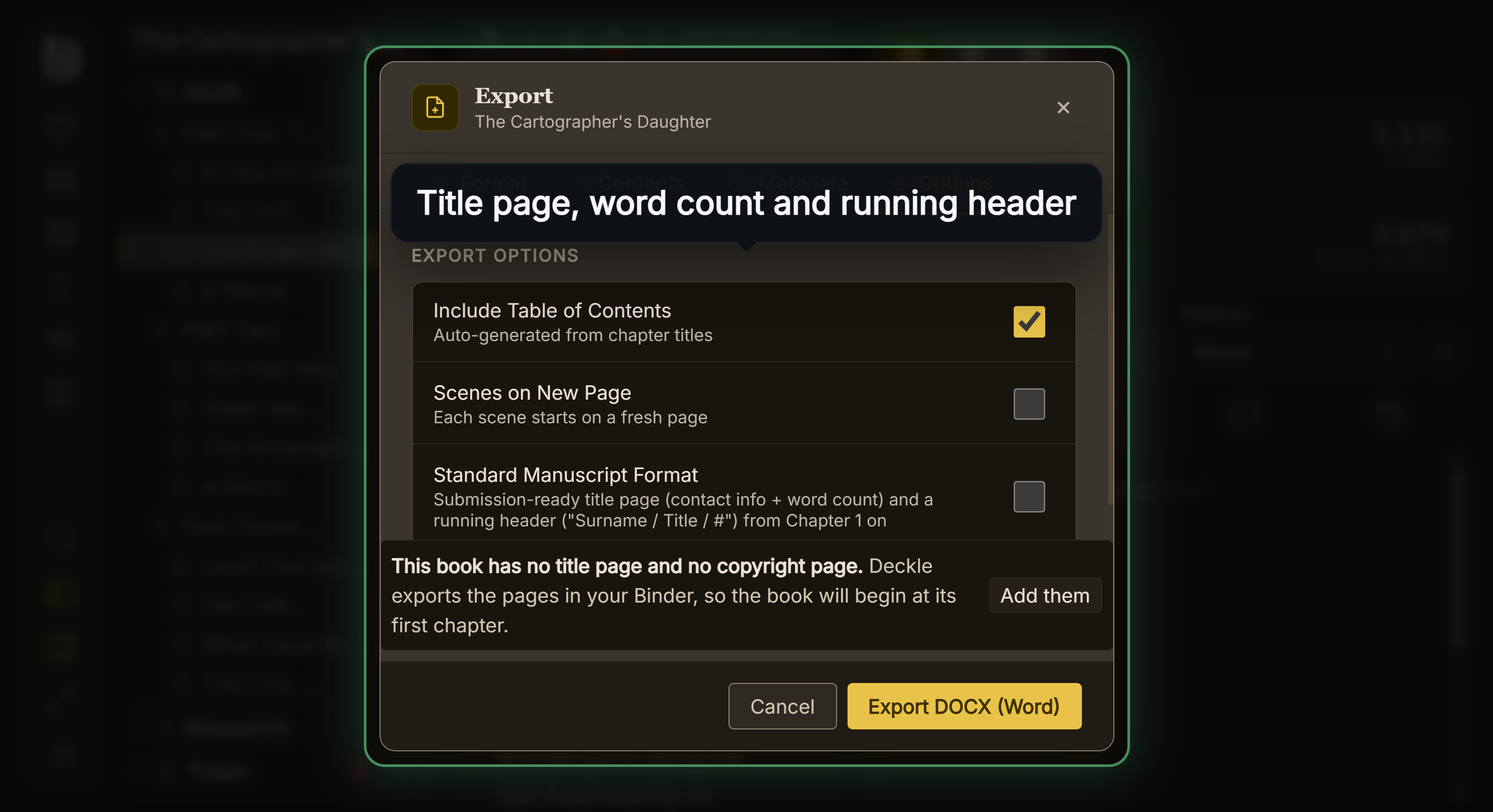 Standard Manuscript Format adds the submission title page and header
Its Word import splits chapters by heading style and brings Word comments in, replies included. Deckle has no Track Changes view, so review an editor's tracked changes in Word before importing. When Deckle reads a .docx, it keeps tracked insertions and drops tracked deletions, which is the same result as Accept All.
What you would give up: Word's Track Changes, Word's phone, tablet and browser apps, and Scrivener's iOS app. Deckle has no mobile version. Coming from Scrivener, the steps are in moving from Scrivener to Deckle. A direct comparison is in Scrivener vs Deckle.
Deckle is a one-time purchase. To try it, click Take Deckle for a Spin on the screen Deckle opens to. There is no card, no account and no time limit. It opens a sample novel with every screen open to explore, and you can restyle it and export real EPUB, PDF and DOCX files. New writing is capped at about 500 words, and new documents and imports are blocked.
What mistakes do authors make with Scrivener and Word?
- Writing a long novel in Word without Heading styles. The Navigation pane only lists headings that use them, so chapters can't be dragged.
- Expecting Scrivener's Revision Mode to work like Track Changes. Its manual says removed text "will not be marked in any way."
- Sending an editor a Scrivener project. Editors and presses work in .docx. Compile first.
- Relying on Word's version history for a file on your own disk. It works only for files in OneDrive or SharePoint.
- Re-importing an edited Word file over your Scrivener project without a Snapshot. Take one first, so Compare can show what changed.
FAQ
Is Scrivener better than Word?
For organising a long, many-part draft, yes: it has a Binder, Outliner, Snapshots and Compile. For editing with a publisher or editor, Word is the standard, because they mark up .docx files with Track Changes.
Why use Scrivener instead of Word?
Each chapter and scene is its own document with its own notes and synopsis, and Compile turns one project into a manuscript, an EPUB or a PDF. Word has no EPUB export.
Can Scrivener export to Word?
Yes. Compile to Microsoft Word (.docx). Scrivener's notes can go out as Word margin comments.
Does Scrivener have Track Changes?
No. Its Revision Mode colours new text, and the manual says it is "not to be considered equivalent to 'track changes'". Removed text is not marked.
Do agents want Word or Scrivener files?
Agency pages ask for Word or PDF, not a Scrivener project. Some agencies want sample pages in the email body instead. Check each agency's page.
Is Word a subscription?
Microsoft 365 is, from $99.99 a year for Personal, as of October 2026. Office Home 2024 is a one-time $179.99 for one PC or Mac.
Is Scrivener a one-time purchase?
Yes. It is $59.99 for macOS or Windows, one licence per platform, as of October 2026. Major new versions may be paid upgrades.
Can I write a whole novel in Word?
Yes. Use Heading styles for chapter titles, so the Navigation pane can list them and move them.
Sources
All retrieved 2026-10-20.
- Literature & Latte, Scrivener overview (organising tools, platforms, export formats, Compile PDF wording)
- Literature & Latte, Scrivener features (EPUB and Kindle ebooks, no AI mentioned)
- Literature & Latte, Scrivener FAQs, store and Crossgrading (licence per platform, paid major upgrades, prices)
- Literature & Latte, Scrivener 3 User Manual for macOS, March 2026 (§18.6 Marking Revisions, §24.19.2 Comment & Annotation Options, D.2.3 and D.2.4 Manuscript formats)
- Microsoft Support, Use the Navigation pane in Word
- Microsoft Support, Track changes in Word
- Microsoft Support, Customize or create new styles
- Microsoft Support, Welcome to Copilot in Word and Copilot in Microsoft 365 subscriptions FAQ
- Microsoft, Compare Microsoft 365 plans (prices, Office Home 2024, AI by plan)
- Microsoft Learn, Office file format reference (save formats, PDF caveat)
- Microsoft Support, View previous versions of Office files: OneDrive or SharePoint only; "If you sign in with a personal Microsoft account, you can retrieve the last 25 versions" (retrieved 21 October 2026)
- Apple App Store, Microsoft Word
- Penn State University Press, Monograph Author Guidelines, revised June 5, 2026 (.doc/.docx only, Track Changes copyedit)
- Editors Canada, Professional Editorial Standards: The Fundamentals of Editing (A12.1)
- RCW Literary Agency, Submissions
- Literature & Latte, Scrivener release notes for macOS: 3.5.0, 1 October 2025, Kindle (.mobi) removed from Compile; the Windows notes, up to 3.1.6 (3 September 2025), record no such change (retrieved 21 October 2026)
Scrivener is a trademark of Literature & Latte. Microsoft Word, Microsoft 365 and Copilot are trademarks of Microsoft. Deckle is not affiliated with or endorsed by any product named here.