

iA Writer is a plain-text Markdown editor from the design studio iA (Information Architects), built around a quiet page and a Focus Mode that fades everything but the sentence or paragraph you are writing. It suits a writer who wants a calm editor, keeps work as plain .md files they own, and pays once per platform: $49.99 on a Mac and $29.99 on Windows, with a 7-day trial and no card. A novelist who also wants chapters, scenes and characters in one project, and a finished ebook and print interior at the end, will want a book app beside it or instead of it.
How was this review put together?
This page is built from iA's own product page, pricing page, support pages and release notes, plus the US App Store listings, all read on 1 November 2026. Nobody at Deckle has written a book in iA Writer, and nothing here comes from hands-on testing. Prices are US dollars before tax. This is Deckle's own site, and Deckle is one of the alternatives compared, so weigh that section accordingly.
What is iA Writer?
iA's product page puts the idea plainly: "iA Writer separates writing from formatting." You write in plain text with Markdown, then switch to Preview to see it styled by a template. The files are ordinary Markdown files, kept in a local folder or a cloud folder you choose.
It runs on Mac, Windows, iPhone and iPad. The Mac app is at version 8, and the Windows app reached version 2.1 on 28 May 2026. The Android app is no longer sold (more on that below).
What does iA Writer do well?
Focus Mode. iA says "Focus Mode keeps you in the flow": it highlights the current sentence or paragraph and fades the rest. Scrivener's macOS manual credits the idea to iA: "Focus mode was originally an innovation of iA Writer." The wider field of apps with the same feature is on best distraction-free writing app.
Plain files you own. Your writing is Markdown text, readable in any editor on any system, now or in twenty years. iA's feature table lists local folder storage plus iCloud, Dropbox, Google Drive and OneDrive on every platform.
Typing versus pasting, and AI in colour. "iA Writer tracks and shows what you typed and what you pasted." Text from AI tools shows in colour, other people's text in subtler tones, and reference material dimmed. Version 2.1 brought this Authorship view to Windows.
Style Check and Syntax Highlight. Style Check "flags clichés, fillers, and clutter" and runs on your device. Syntax Highlight can pick out adjectives, nouns, verbs and adverbs, which is useful on a revision pass.
Content Blocks for longer work. You can embed one file inside another by typing its path on its own line. iA's support page says Content Blocks "are popular with writers who need to compile the chapters of a book into a single document". The embedded files are included when you export to HTML, PDF, Markdown and Word.
A clear price. One payment per platform, no subscription on Mac, Windows, iPhone or iPad, and a 20% education discount on direct Mac and Windows purchases.
Where does iA Writer stop?
Export is for documents, not finished books. iA's export pages list PDF, Word (.docx), HTML and Markdown on Mac and Windows, plus a Project Archive (.zip) on Mac. There is no EPUB export, and no print settings such as trim size or bleed: the paper sizes are office ones such as A4 and Letter (Legal too on a Mac). For a self-published ebook or paperback interior you need a second tool.
A book is files, not a project. iA Writer organises a Library of files and folders. It has no binder of parts, chapters and scenes with synopses, no character or place records, and no timeline. A long novel is either one long file or a set of files tied together with Content Blocks.
The platforms differ. iA's own feature table shows Global Document Search, Wikilinks, the Command Palette and the blogging integrations on Mac, iPhone and iPad but not Windows. Windows has its own extras: Writing Goals, Snippets, Folding and a Dynamic Outline.
One-time is not lifetime. The pricing page says "One-Time ≠ Lifetime": minor updates are free, "while major updates may incur costs". The Windows 2.1 notes say existing owners upgrade to 2.1 for free.
How much does iA Writer cost?
iA's pricing page lists, on 1 November 2026:
| Platform | Price | Requirement | Where to buy | Trial |
|---|---|---|---|---|
| Mac | $49.99 once | macOS 10.15 or later | Direct or Mac App Store | 7 days, no card |
| Windows | $29.99 once | Windows 10 or later | Direct from iA | 7 days, no card |
| iPhone and iPad | $49.99 once (pricing page) | iOS 15 or later | App Store only | None listed |
| Android | Not sold |
Each platform is a separate purchase. A licence covers "multiple devices of the same type", such as a Windows PC at home and one at work, but a Mac licence does not unlock Windows or the iPhone app. On 1 November 2026 the US App Store listing for the iPhone and iPad app showed $19.99, below the $49.99 on iA's pricing page, so check the store on the day you buy. Direct purchases can be refunded within 30 calendar days with proof of purchase; App Store refunds go through Apple. How this compares with other one-off prices is on writing software one-time purchase.
Is iA Writer available for Windows?
Yes. iA Writer for Windows needs Windows 10 or later and costs $29.99 once, with a 7-day trial. Version 2.0 (20 January 2025) redesigned it to match Windows 11, added a new typographic engine, an updated PDF export engine, full-width Preview and line comments. Version 2.1 (28 May 2026) added Authorship, sign-in with an iA Account instead of licence keys, and roughly twice-as-fast start-up. Spell-check on Windows uses Hunspell dictionaries, with English (US), German, French, Italian and Spanish listed.
A Windows writer who wanted Ulysses will find iA Writer is one of the few Markdown editors from the Apple world that also runs on a PC. More options are on Ulysses alternatives for Windows.
Is iA Writer on Android?
Not any more. iA's Android FAQ says "iA Writer for Android is no longer for sale" and that version 3.1.4 "was removed from sale in September 2024". Existing installs are unsupported and "may become less reliable with newer Android versions". iA warns that removing or reinstalling the app without first exporting or backing up its documents will delete them. Android writers who need a Markdown app will find Obsidian on Android, and more phone options are on writing apps.
iA Writer and its alternatives compared
Prices and features are from each vendor's own pages, read on the dates in Sources. Nothing here is a score.
| Tool | Platforms | Price model and price | Offline | Export | AI | Writing surface and book structure |
|---|---|---|---|---|---|---|
| iA Writer | Mac, Windows, iPhone, iPad; Android withdrawn | One-time per platform: $49.99 Mac, $29.99 Windows, $49.99 iOS (App Store showed $19.99); 7-day trial | Yes, native apps | PDF, Word, HTML, Markdown | No generative AI; marks AI and pasted text in Authorship | Plain-text Markdown files; Focus Mode; Content Blocks to join chapters |
| Ulysses | Mac, iPad, iPhone | Subscription, $39.99 a year or $5.99 a month | Yes | Plain text, RTF, Markdown, HTML, EPUB, PDF, DOCX | Supports Apple Intelligence Writing Tools; none of its own | Markdown-style sheets in a library with groups, goals and keywords |
| Scrivener | macOS, Windows, iOS | $59.99 once per desktop platform; iOS $23.99; 30-day-of-use trial | Yes | Word, PDF, EPUB and more via Compile | None mentioned | Binder of chapters and scenes, Corkboard, Outliner, Composition Mode |
| Obsidian | Windows, macOS, Linux, iOS, Android | Free; Sync from $4 a month | Yes, files on your device | PDF built in; Word and EPUB through a community plugin | None built in | Plain Markdown notes; the Longform plugin orders scenes |
| FocusWriter | Windows, Linux | Free (GPL 3) | Yes | Not listed on its home page | None | Full-screen editor with a hide-away interface, daily goals and statistics |
| Deckle | Windows, macOS, Linux | One-time purchase; free demo | Yes, after activation | EPUB (Generic, Kindle, Apple Books, Kobo), print PDF, DOCX, Academia PDF, Markdown, plain text | None in the app | Binder of parts, chapters and scenes; Focus Mode with sentence or paragraph dimming; Codex and Timeline |
Which iA Writer alternative suits which writer?
Stay with iA Writer if you write articles, essays, notes or a book whose structure you keep in your head, and you value plain files and a beautiful page above everything else. Its Focus Mode is the one the others are measured against.
Ulysses suits a writer who lives on a Mac, iPad and iPhone, wants one synced library and EPUB export, and is happy to subscribe. The trade-offs are set out on Scrivener vs Ulysses.
Scrivener suits a novelist who wants a binder, corkboard and Compile to Word, PDF and EPUB, for a one-off price on Mac or Windows.
Obsidian suits a writer who wants Markdown files on every platform, including Android and Linux, for free, and enjoys building a setup from plugins. The other plain-file editors are on Obsidian alternatives for writers.
FocusWriter suits a Windows or Linux writer who wants a free full-screen editor for one document or a few.
Deckle suits a novelist who likes iA Writer's quiet page but wants the whole book in one project on their own computer: chapters and scenes, characters and a timeline, and the finished EPUB and print PDF from the same file, for one payment.
Is iA Writer good for writing a novel?
It can be, for a writer who keeps the structure simple. A novel in iA Writer is usually one file per chapter in a folder, with a master file of Content Blocks that joins them for export. That works well for a writer who outlines on paper or in their head.
It is less of a fit once the book needs the things a novel tends to collect: scene synopses you can rearrange, notes on 40 characters, a timeline for a flashback, and a typeset ebook and paperback at the end. Then you either add tools around iA Writer or move the draft into a book app. Our best novel writing software page sorts the apps by those jobs.
What do ranking pages get wrong about iA Writer?
Three pages that rank for this search disagree with iA's own pages on 1 November 2026.
- "14-day full-feature trial", Android on Google Play, and Authorship "has not yet rolled out to Windows." Nubia Magazine's "iA Writer Review 2026" (updated 31 October 2026) says all three. iA's pricing page lists a 7-day trial. Its Android FAQ says the app was removed from sale in September 2024. The Windows release notes list Authorship in version 2.1, dated 28 May 2026, and iA's feature table marks Authorship on Windows.
- "Export options limited to only PDF and DOCX format", a single "$29.99" price, a 14-day trial and Android. Elephas's "The Honest Truth About iA Writer in 2026" (29 December 2025) gives these. iA's export pages also list HTML and Markdown, its prices differ by platform ($49.99 Mac, $29.99 Windows), the trial is 7 days, and Android is no longer sold.
- Android at $29.99 with a 30-day trial, 14-day trials on Mac and Windows, and subscriptions "arriving across all platforms in the near future." SelfPublishing.com's "IA Writer Review: Should You Use It?" (Christopher Ortiz, 23 October 2024) says this. iA's pricing page lists 7-day trials and says "Subscriptions to Writer are not available for iPad, iPhone, Mac, and Windows."
How do you move from iA Writer to Deckle?
Deckle is our app, so weigh this section accordingly. Deckle is a desktop writing and book-formatting app for Windows, macOS and Linux. Each project is a folder on your own computer, it works offline after activation, and it has no generative AI. Because iA Writer keeps your book as Markdown files, the move is a folder import.
- Gather the chapters in one folder. Put one Markdown file per chapter in a folder, or one subfolder per chapter holding its scene files. Deckle reads
.mdand.markdownfiles, so rename any chapter you saved as.txt. It sorts by name the way a person numbers chapters, so "Chapter 2" comes before "Chapter 10". - Open the importer. In a Deckle project, click Add to Draft (the + at the top of the Binder's Draft section) and choose Import…. The Import Manuscript window opens.
- Choose the folder. Under Markdown folder (Obsidian), click Choose Folder… and pick the folder. Each file becomes a chapter, a folder of files becomes a chapter with those files as its scenes, and one long file splits at its
#headings. A chapter takes its title from a leading#heading, else the frontmattertitle:, else the file name. Tables are skipped. The details are in Markdown import. - Set up the quiet page. Open Settings (Ctrl+, on Windows and Linux, Cmd+, on a Mac), go to Editor, and set Focus mode dimming to Current sentence or Current paragraph. Typewriter scrolling is a switch in the same tab. Choose how you leave under Leave focus mode with.
- Write in Focus Mode. Choose View ▸ Focus Mode. The Binder, Inspector and menus go, and only the text you are on stays bright. How it works is in Focus Mode.
- Export the book. Press Ctrl+E (Cmd+E on a Mac) for Export. Choose EPUB for the ebook stores, PDF for the print interior, or DOCX for an editor. To keep plain files alongside, choose Markdown and tick Export the whole project, which writes the Draft, Research and Notes as a folder of Markdown files laid out like your Binder.
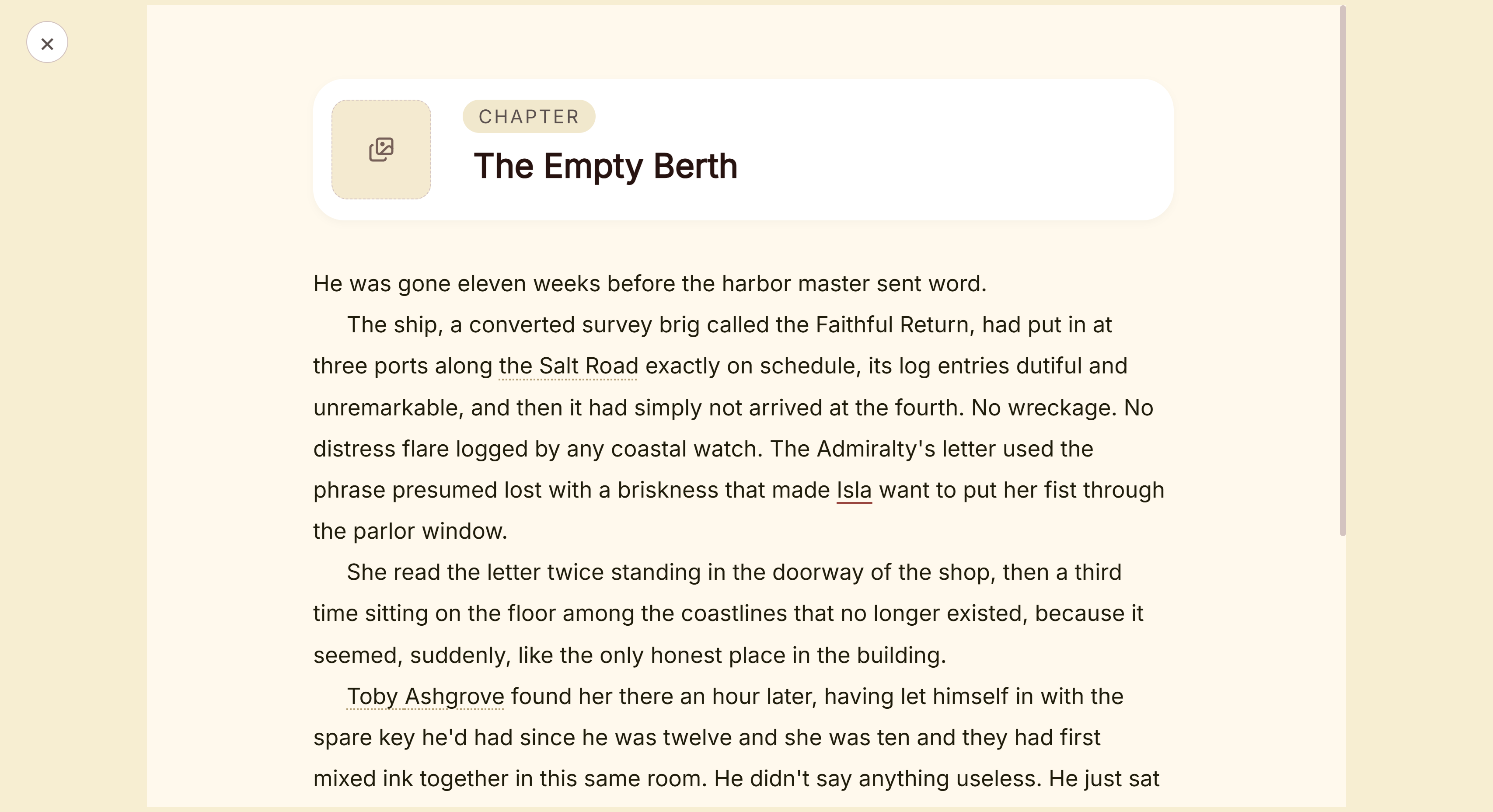 Focus Mode, with every panel hidden
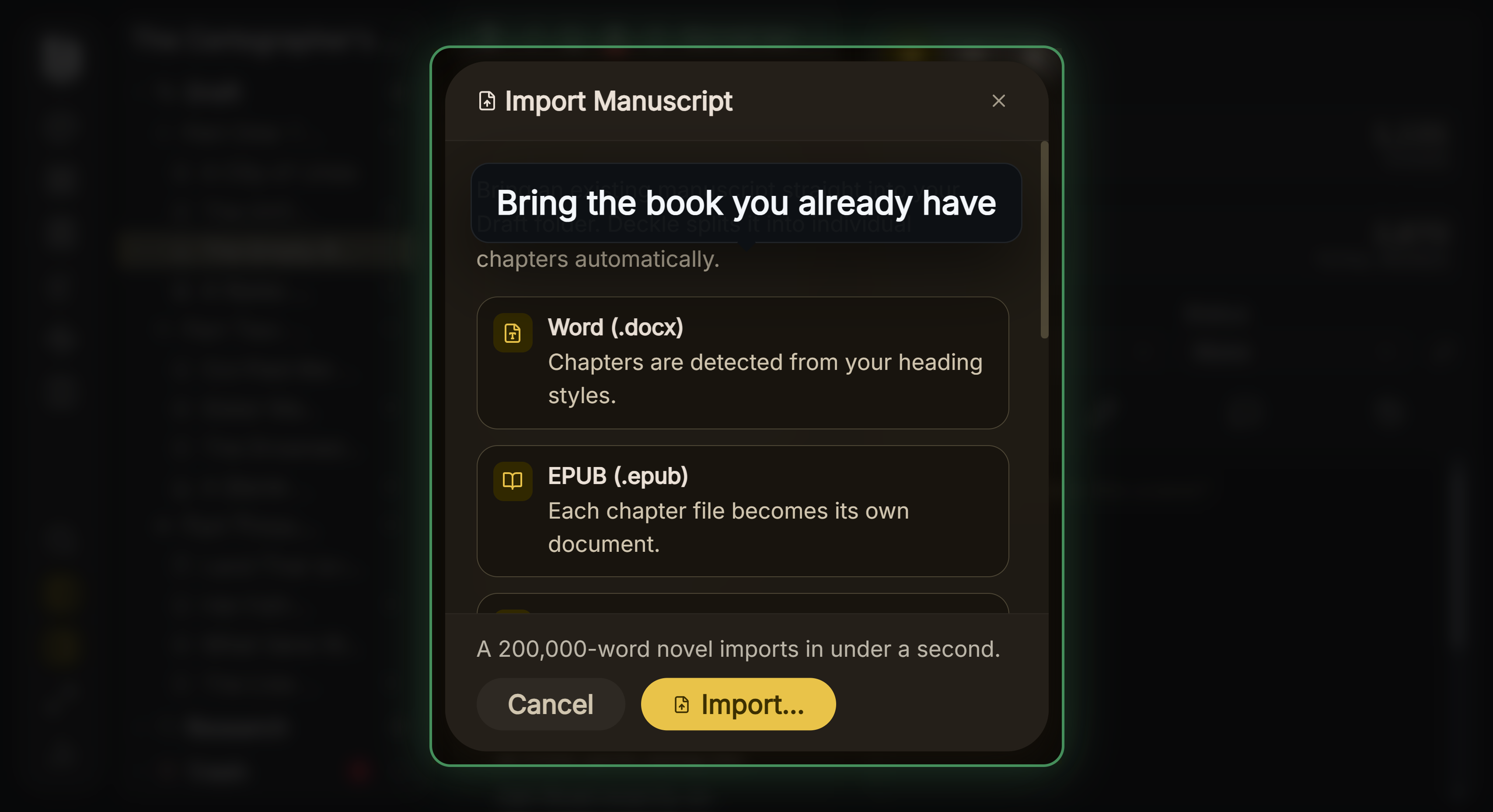 The Import Manuscript window, where the Markdown folder option sits below Word, EPUB and Scrivener
A writer who wants an editor on an iPhone or iPad as well as a computer is better served by iA Writer or Ulysses. What Deckle adds is that the draft, the plan, the characters and the store-ready files are one project on your own disk. Deckle's Kindle target writes an EPUB for KDP to convert, not a KPF file.
Deckle is a one-time purchase. To try it, click Take Deckle for a Spin on the screen Deckle opens to. It is a free demo with no card, no account and no time limit. It opens a sample novel with Focus Mode, the Outliner, Codex and Timeline to explore, and you can restyle it and export real EPUB, PDF and DOCX files. New writing is capped at about 500 words, and new documents and imports are blocked, so bring your iA Writer folder in once you have a licence.
Common mistakes when choosing iA Writer or an alternative
- Buying for the wrong platform. Each platform is its own licence. A writer with a Windows PC and an iPhone pays twice.
- Counting on Android. The Android app is withdrawn. If your phone is Android, plan around a different mobile app before you buy.
- Expecting an ebook out of it. iA Writer exports PDF, Word, HTML and Markdown. Check which tool will make your EPUB and print PDF before the draft is finished.
- Importing the master file instead of the chapters. If your book is a master file of Content Blocks, its lines are paths to other files. Move the chapter files themselves into another app, not the master.
- Leaving chapters as
.txt. iA Writer opens plain.txtfiles too. Deckle's Markdown import reads.mdand.markdownfiles, so give every chapter a.mdending before you move it. - Running the trial on an empty page. Seven days is short. Spend it on a real chapter, an export to Word and an export to PDF.
- Trusting a review's price. Several ranking pages quote old trials and platforms. iA's pricing page and the App Store are the current word.
FAQ
What is iA Writer?
A plain-text Markdown editor from iA for Mac, Windows, iPhone and iPad, known for its Focus Mode, Style Check and an Authorship view that marks typed, pasted and AI text.
How much does iA Writer cost?
On 1 November 2026, iA's pricing page lists $49.99 once on a Mac, $29.99 once on Windows and $49.99 once on iPhone and iPad. The US App Store showed the iPhone and iPad app at $19.99 that day.
Is iA Writer a one-time purchase?
Yes, per platform. Minor updates are free, and iA says major updates "may incur costs".
Is iA Writer worth it?
It is good value for a writer who wants a calm Markdown editor, plain files and one payment per platform. For a novel that needs a binder, character notes and a finished EPUB, budget for a book app as well.
Does iA Writer have a free trial?
Yes, 7 days on Mac and Windows, with no credit card. No trial is listed for iPhone and iPad.
Is iA Writer available for Windows?
Yes, for Windows 10 or later at $29.99. Version 2.1 came out on 28 May 2026.
Is iA Writer on Android?
No. iA removed the Android app from sale in September 2024 and no longer supports it.
Can iA Writer export to EPUB?
Not according to iA's export pages, which list PDF, Word, HTML and Markdown. An ebook needs another tool.
Does iA Writer use AI?
It has no generative AI of its own. Its Authorship view shows text from AI tools in colour so you can see what you wrote yourself.
What is the best iA Writer alternative?
It depends on what you need. Ulysses suits Apple devices with EPUB export, Scrivener a binder and Compile, Obsidian free Markdown on every platform, FocusWriter a free editor on Windows and Linux, and Deckle a whole novel and its finished files in one desktop project.
Sources
Retrieved 1 November 2026 unless stated. Prices change, so check the vendor page before buying.
- iA, iA Writer: "separates writing from formatting", Focus Mode, Style Check, Authorship, PDF and Word export
- iA, Writer pricing: $49.99 Mac, $29.99 Windows, $49.99 iPhone and iPad, requirements, 7-day trial with no card, "One-Time ≠ Lifetime", devices of the same type, education discount, refunds, no subscriptions on Mac, Windows, iPhone or iPad
- iA Support, Features: feature table by platform, storage options, Hunspell languages on Windows
- iA Support, Export on Mac and Export on Windows: export formats, Project Archive, A4 or Letter
- iA Support, Content Blocks: file embedding, compiling chapters into one document, export formats
- iA Support, Android FAQ: no longer for sale, removed September 2024, unsupported
- iA Support, Windows version history and Mac version history: Windows 2.0 and 2.1 dates and contents, Mac 8.0 and 7.3
- Apple, iA Writer on the App Store ($19.99, version 8.1.2, iOS 15 or later) and on the Mac App Store ($49.99, macOS 10.15 or later)
- Literature & Latte, Scrivener 3 User Manual for macOS: footnote in the Focus Mode section, "Focus mode was originally an innovation of iA Writer"
- Ulysses, Pricing and Export: platforms, subscription prices, export formats (retrieved 20 October 2026)
- Literature & Latte, Scrivener overview, FAQs and store: platforms, prices, trial, export (retrieved 20 October 2026)
- Obsidian, Download, Pricing and PDF export help: platforms, free core app, Sync price, PDF export (retrieved 20 October 2026)
- Gott Code, FocusWriter: version 1.9.1 (23 July 2026), downloads for Windows 10 x64 and Linux
- Ranking pages checked for the claims above: Nubia Magazine, iA Writer Review 2026 (updated 31 October 2026); Elephas, The Honest Truth About iA Writer in 2026 (29 December 2025); SelfPublishing.com, IA Writer Review: Should You Use It? (23 October 2024)
iA Writer is a product of Information Architects AG. Ulysses is a trademark of Ulysses GmbH & Co. KG, and Scrivener of Literature & Latte. Obsidian is a product of Dynalist Inc. FocusWriter is a trademark of its owner. Deckle is not affiliated with or endorsed by any product named here.