

Scrivener is better for a long, many-part book that needs notes, research and a formatted manuscript: it runs on Mac, Windows and iOS for a one-time price and compiles to Word, PDF and EPUB. Ulysses is better for writing in plain-text markup across Apple devices: it is a subscription app for Mac, iPad and iPhone only, with fast iCloud sync and direct blog publishing.

Every fact below comes from Literature & Latte's pages and from ulysses.app, help.ulysses.app and Ulysses's App Store listing, read on 2026-10-20. Prices are US list prices as of October 2026.
Which is better, Scrivener or Ulysses?
Neither is better at everything. One keeps each book as a project, the other keeps every text in one library.
Scrivener is a project app. Literature & Latte's overview lists a Binder, a Corkboard of index cards, an Outliner with synopses and metadata, Snapshots with Compare, Targets for the manuscript and each session, Scrivenings, Collections and a composition mode. Each book is one project with its own research inside it.
Ulysses is a library app. Its home page describes a "markup-based text editor", and its help says "In Ulysses, you write in plain text." Every text lives in one library, sorted into groups and projects, tagged with keywords and tracked with writing goals and deadlines.
| Scrivener | Ulysses | |
|---|---|---|
| What it is | Long-form writing and organising app with Compile | Markdown-based writing app with a library |
| Platforms | macOS, Windows, iOS | Mac, iPad, iPhone |
| Windows | Yes | No |
| Writing format | Rich text | Markdown XL markup, or Markdown files in External Folders |
| Structure | Binder, Corkboard, Outliner, Scrivenings | Library, groups, projects, keywords |
| Sync | "sync using Dropbox or transfer with iTunes" | iCloud across Mac, iPad and iPhone |
| Export | Word, RTF, OpenOffice, PDF, Final Draft, plain text, EPUB; Kindle on Windows only | Plain Text, RTF, Markdown, TextBundle, TextPack, HTML, ePub, PDF, DOCX |
| Blog publishing | Not listed | WordPress, Ghost, Medium, Micro.blog |
| Price model | One-time, per platform | Subscription, or a $199.99 perpetual in-app purchase |
| Generative AI | None mentioned | No AI of its own; supports Apple's Writing Tools (with ChatGPT Compose) and Siri AI; texts "never used to train AI models" |
What does Ulysses do better than Scrivener?
Ulysses does three things better.
Plain-text writing. Formatting in Ulysses is typed, not clicked. Its markup is Markdown XL, "inspired by Gruber's and Swartz's Markdown." In an External Folder, Ulysses saves standard Markdown by default, "to ensure broad compatibility across applications", so the text stays readable in any editor. Scrivener writes rich text inside its own project format, and reaches Markdown only through its MultiMarkdown and Pandoc export.
Apple sync. Ulysses syncs through the user's iCloud account across Mac, iPad and iPhone, and its pricing page includes "Apple Family Sharing included: Share Ulysses with up to five other family members." Scrivener syncs through Dropbox, and its iOS app is a separate $23.99 purchase.
Publishing to a blog. Ulysses publishes directly to WordPress, Ghost, Medium and Micro.blog. Scrivener lists no blog publishing.
What does Scrivener do better than Ulysses?
Scrivener does three things better.
Windows. Scrivener runs on 64-bit Windows 10 or later. Ulysses has no Windows version, and the options for a PC are in Ulysses alternatives for Windows.
Research and planning inside the book. Scrivener imports Word documents, PDFs, images, movies, sound files and web pages into the project, beside the draft. Its Outliner shows each section's synopsis and metadata as columns, and Snapshots with Compare keep earlier copies of a section. Ulysses's listed imports are DOCX, Evernote ENEX, Bear TextBundle and Apple Notes.
Manuscript output. Scrivener compiles to Word, RTF, PDF, EPUB and Final Draft, plus Kindle (.mobi) on Windows only, since Scrivener for Mac 3.5.0 (1 October 2025) removed it. Ulysses exports PDF and DOCX with shared styles, and says its ePub export "technically leaves fewer options for an individual layout." Neither vendor claims professional print typesetting.
Can you move a Scrivener project into Ulysses?
Not directly. Ulysses's import guide says "Scrivener saves your work in proprietary project files (.SCRIV) which Ulysses can't handle directly." It gives two workarounds on a Mac:
- Compile from Scrivener as MultiMarkdown and drag the folder into the Ulysses library. The guide warns: "If you select MultiMarkdown your images will not be imported into Ulysses."
- Export from Scrivener as DOCX and import the DOCX files into Ulysses.
On iOS, the guide says to compile as Plain Text. The general method for any switch is in how to move a manuscript between writing apps.
How much do Scrivener and Ulysses cost over three years?
Scrivener is a one-time purchase per platform. Ulysses is a subscription, with a one-time option sold inside the app, which Ulysses's App Store listing shows as a $199.99 Perpetual License. US list prices before tax, as of October 2026:
| Option | Year 1 | Years 2 and 3 | Three-year total |
|---|---|---|---|
| Scrivener (macOS or Windows) | $59.99 | $0 listed | $59.99 |
| Scrivener (macOS) + Scrivener for iOS | $59.99 + $23.99 | $0 listed | $83.98 |
| Scrivener macOS and Windows bundle | $95.98 | $0 listed | $95.98 |
| Scrivener (macOS) + Windows crossgrade | $59.99 + $37.95 | $0 listed | $97.94 |
| Ulysses, yearly | $39.99 | $39.99 a year | $119.97 |
| Ulysses, monthly | $71.88 | $71.88 a year | $215.64 |
| Ulysses, student ($10.99 per 6 months) | $21.98 | $21.98 a year | $65.94 |
| Ulysses Perpetual License (App Store in-app purchase) | $199.99 | $0 | $199.99 |
What the table can't show:
- Scrivener's major versions may be paid upgrades. Literature & Latte publishes no price for a future upgrade.
- A Ulysses subscription covers Mac, iPad and iPhone together. So does the perpetual licence, which Ulysses's help says "does not include a trial period."
- Ulysses's perpetual licence includes "all future updates to the current App Store app", but the help page says new features aren't guaranteed indefinitely.
- Scrivener's trial is 30 days of actual use. Ulysses's subscription plans include "a fully functional trial". Its Subscription Options help says both the monthly and yearly plans "include a 7-day free trial", started through the App Store.
Where does Deckle fit next to Scrivener and Ulysses?
Deckle is our app, so weigh this section accordingly.
Deckle is a desktop app for Windows, Mac and Linux that covers Scrivener's side of this comparison and adds book formatting. It has a Binder, an Outliner with a Grid View of index cards, Continuous View, a Codex, a Timeline, snapshots under Inspector ▸ Versions, and writing goals. It exports EPUB, PDF, DOCX, Markdown and plain text, with 26 built-in style presets for the finished book.
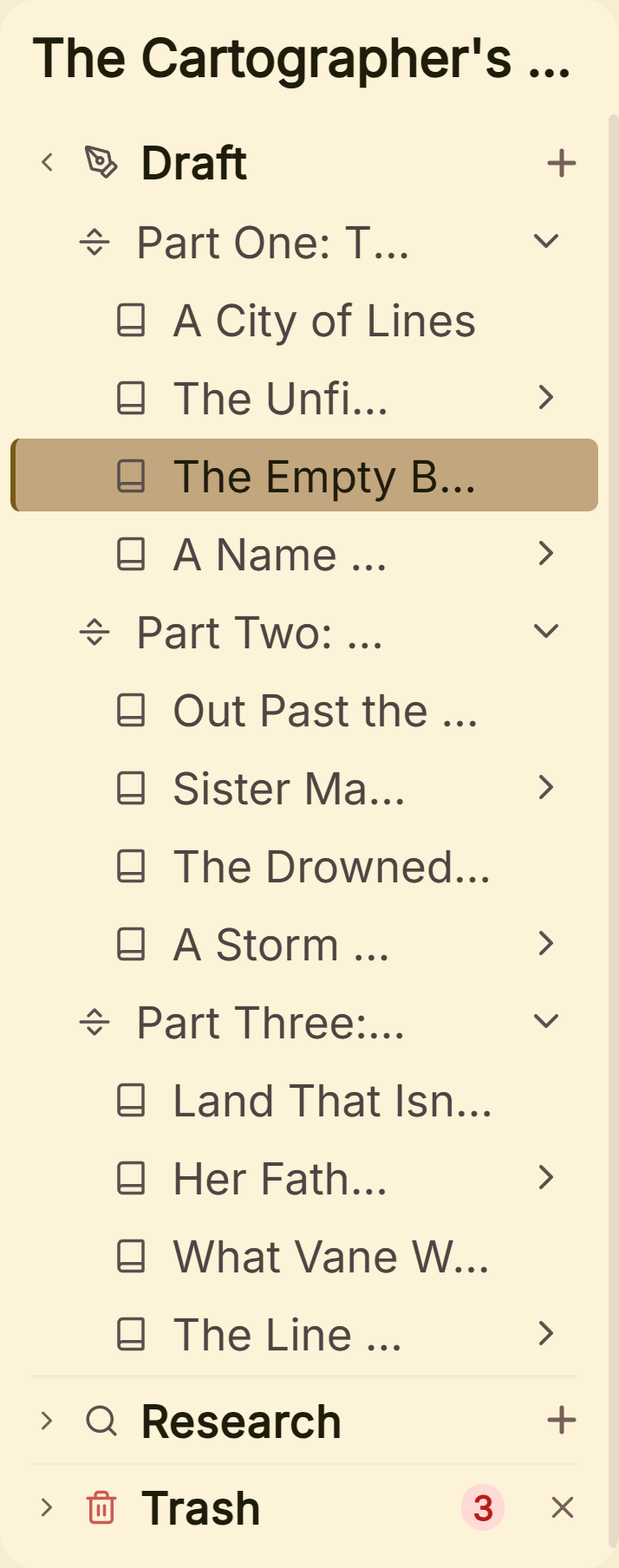 A Binder of Parts and chapters, as in Scrivener
Deckle is closer to Scrivener than to Ulysses. It writes rich text, not markup. A project is a folder holding one .deckle SQLite database (all the writing, notes and settings) plus research/ and .deckle-assets/ folders. Markdown is an exchange format: it imports a folder of Markdown files as chapters, and its Markdown export can write the whole project as folders of .md files. Coming from Scrivener, the steps are in moving from Scrivener to Deckle, and the direct comparison is Scrivener vs Deckle.
What you would give up: Ulysses's iPad and iPhone apps, iCloud sync and blog publishing, and Scrivener's iOS app. Deckle has no mobile version and no cloud sync.
Deckle is a one-time purchase. To try it, click Take Deckle for a Spin on the screen Deckle opens to. There is no card, no account and no time limit. It opens a sample novel with every screen open to explore, and you can restyle it and export real EPUB, PDF and DOCX files. New writing is capped at about 500 words, and new documents and imports are blocked.
What goes wrong when switching between Scrivener and Ulysses?
- Choosing Ulysses on a mixed Mac and Windows setup. Ulysses has no Windows app.
- Dragging a .scriv project into Ulysses. Ulysses can't read it. Compile to MultiMarkdown or DOCX first.
- Using MultiMarkdown when the book has images. Ulysses's guide says images will not be imported that way. Use DOCX.
- Buying the Ulysses perpetual licence to test it. It has no trial. Test on a subscription trial first.
- Expecting either app to typeset a print book. Neither vendor claims print-ready typesetting. Check the PDF against your printer's specification.
FAQ
Which is better, Scrivener or Ulysses?
Scrivener is better for long, research-heavy books and for Windows users. Ulysses is better for plain-text writing on Apple devices, with iCloud sync and blog publishing.
Is Ulysses easier than Scrivener?
Ulysses has fewer parts: one library, sheets and markup tags. Scrivener has more tools, including the Binder, Corkboard, Outliner and Compile.
Is Ulysses a one-time purchase?
Ulysses is sold as a subscription, $39.99 a year or $5.99 a month, as of October 2026. The App Store also lists a $199.99 Perpetual License in-app purchase.
Is Scrivener a subscription?
No. Scrivener is $59.99 once for macOS or Windows, one licence per platform, as of October 2026. Major new versions may be paid upgrades.
Can Ulysses import Scrivener files?
Not directly. Ulysses says it "can't handle" .scriv files. Compile from Scrivener as MultiMarkdown or DOCX and import that.
Does Scrivener use Markdown?
Scrivener writes in rich text. It can compile through MultiMarkdown and Pandoc, for example for LaTeX.
Is Ulysses good for novel writing?
Ulysses organises a novel as groups and sheets with goals and keywords, and exports DOCX, PDF and ePub. It has no Windows version.
Sources
All retrieved 2026-10-20.
- Literature & Latte, Scrivener overview (organising tools, platforms, import and export formats)
- Literature & Latte, Scrivener features (EPUB, Kindle e-books, MultiMarkdown and Pandoc, Dropbox sync)
- Literature & Latte, Scrivener FAQs, store and Crossgrading (licence per platform, trial, prices)
- Ulysses, home page and Pricing (platforms, prices, Family Sharing, blog publishing)
- Ulysses, Students ($10.99 per 6 months)
- Apple App Store, Ulysses Writing App (requirements, Perpetual License, trial wording)
- Ulysses Help, Perpetual License
- Ulysses Help, Export (formats, ePub layout limit)
- Ulysses Help, Import into Ulysses (.scriv not supported, workarounds)
- Ulysses Help, Markdown XL and External Folders
- Ulysses, Releases (Writing Tools powered by Apple Intelligence)
- Ulysses Help, Apple Intelligence (Writing Tools, ChatGPT Compose, Siri AI, "never used to train AI models") and Release notes (Ulysses 36, 30 October 2024; Ulysses 41, 14 September 2026), retrieved 20 October 2026
- Ulysses Help, Subscription Options: "Both options include a 7-day free trial", through the App Store, retrieved 21 October 2026
- Literature & Latte, Scrivener release notes for macOS: 3.5.0, 1 October 2025, Kindle (.mobi) removed from Compile; the Windows notes, up to 3.1.6 (3 September 2025), record no such change (retrieved 21 October 2026)
- Literature & Latte's checkout, Paddle price data for the store's products: $59.99 macOS, $59.99 Windows, $95.98 macOS and Windows bundle (US, retrieved 21 October 2026)
Last checked 2026-10-20. Scrivener is a trademark of Literature & Latte. Ulysses is a trademark of Ulysses GmbH & Co. KG. Deckle is not affiliated with or endorsed by any product named here.