

Scrivener is better for writing and compiling a novel: it is built around a book, with a Binder, Outliner, Snapshots and Compile to Word, PDF and EPUB. Obsidian is better for notes, research and worldbuilding kept as plain Markdown files you own: the core app is free, runs on every major platform, and a novel workflow in it depends on community plugins.

Every fact below comes from Literature & Latte's pages and from obsidian.md and its help and community plugin pages, read on 2026-10-20. Prices are US list prices as of October 2026.
Is Obsidian or Scrivener better for novel writing?
Scrivener is the better tool for the manuscript itself. Obsidian is the better tool for the knowledge around it. The difference comes from what each was made for.
Scrivener is a long-form writing app. Literature & Latte's overview lists a Binder, a Corkboard of index cards, an Outliner with synopses and metadata, Snapshots with Compare, Targets for the manuscript and each session, Scrivenings, Collections and a composition mode. Compile turns the project into a manuscript or a book file.
Obsidian is a general note-taking app. Its home page says it "stores your notes locally as plain text Markdown files" and that "With thousands of plugins and themes, you can shape Obsidian to fit your way of thinking." Nothing in the core app is specific to books.
| Scrivener | Obsidian | |
|---|---|---|
| What it is | Long-form writing and organising app with Compile | General Markdown notes and writing app |
| Platforms | macOS, Windows, iOS | Windows, Mac, Linux, iOS, Android |
| Storage | A Scrivener project | Plain Markdown files in a vault folder on your device |
| Book structure | Binder, Corkboard, Outliner, Scrivenings | Folders and links; Longform is a community plugin |
| Version history | Snapshots with Compare, per section | File recovery snapshots, default 7 days; longer with paid Sync |
| Built-in export | Word, RTF, OpenOffice, PDF, Final Draft, plain text, EPUB; Kindle on Windows only | Export to PDF, one open note, desktop only |
| Price model | One-time, per platform | Core free; Sync and Publish paid |
| Generative AI | None mentioned | None built in mentioned |
Why do writers use Obsidian for a novel?
Obsidian's case is real, and it is mostly about ownership.
- Your files stay readable. Obsidian says "Obsidian uses open file formats, so you're never locked in." A vault is a folder of
.mdfiles that any text editor opens. - Local and private. Notes are stored "privately on your device, so you can access them quickly, even offline." Obsidian adds: "No one else can read them, not even us."
- Free, everywhere. The core app is "Free without limits", including commercial use, on Windows, Mac, Linux, iOS and Android. Scrivener has no Linux or Android version.
Scrivener cannot match these. Its text lives inside a Scrivener project, and reaching plain Markdown means compiling through MultiMarkdown or Pandoc.
What does Scrivener do that Obsidian doesn't?
Scrivener does three things Obsidian's core app does not.
Book structure. Each chapter and scene is a Binder item with its own synopsis, notes and metadata, and the Outliner shows them as columns. Obsidian has folders and notes. Its best-known manuscript tool is Longform, a community plugin (source on GitHub) that "Helps you write and edit novels, screenplays, and other long projects." Longform's listing shows version 2.1.0 with about 192,000 downloads; its GitHub releases date 2.1.0 to 19 March 2025, still the latest release as of October 2026.
Compile. Scrivener compiles one project to Word, RTF, PDF and EPUB, plus Kindle (.mobi) on Windows only, since Scrivener for Mac 3.5.0 (1 October 2025) removed it. Obsidian's help documents Export to PDF for the open note, with page size, landscape, margin and downscale options, and says "Exporting to PDF is not available in the Obsidian app on mobile." Obsidian's help does not document a built-in DOCX or EPUB export.
Version history for a draft. Scrivener's Snapshots keep earlier copies of a section, and Compare shows what changed. Obsidian's File recovery core plugin keeps local snapshots for 7 days by default, and the help says it "isn't a full backup solution." Obsidian Sync keeps one month of history on Standard and 12 months on Plus.
Are Obsidian plugins safe to rely on for a novel?
Community plugins are made by third parties, not by Obsidian. Obsidian's help describes them as "plugins built by the community" and warns that they "run third-party code on your behalf that could potentially do harm." To install one, you first turn off Restricted Mode.
Obsidian's plugin security page says it "automatically scans every plugin version for security vulnerabilities, code quality issues, and malware", and that "Manual reviews continue for popular, featured, and flagged plugins." It also says "Obsidian cannot reliably restrict plugins to specific permissions or access levels", so "plugins will inherit Obsidian's access levels."
For a novel, the practical risk is maintenance rather than malware. A book that depends on a plugin depends on that plugin's author keeping it working. Your Markdown files stay readable either way, which is Obsidian's safety net.
How much do Scrivener and Obsidian cost over three years?
Obsidian's core app is free. Scrivener is a one-time purchase per platform. US list prices before tax, as of October 2026:
| Option | Year 1 | Years 2 and 3 | Three-year total |
|---|---|---|---|
| Obsidian (core app) | $0 | $0 | $0 |
| Obsidian + Sync (billed annually, $4 a month) | $48 | $48 a year | $144 |
| Obsidian + Sync Plus (billed annually, $8 a month) | $96 | $96 a year | $288 |
| Scrivener (macOS or Windows) | $59.99 | $0 listed | $59.99 |
| Scrivener (macOS) + Scrivener for iOS | $59.99 + $23.99 | $0 listed | $83.98 |
What the table can't show:
- Obsidian Sync is optional. The vault is a folder, so any sync method that moves files works with it.
- Scrivener's major versions may be paid upgrades. Literature & Latte publishes no price for a future upgrade.
- Obsidian offers 40% off Sync and Publish for students, faculty and nonprofits.
- A Scrivener licence covers one platform. Adding Windows to a Mac licence is a $37.95 crossgrade.
Can you use Obsidian and Scrivener together?
Yes. The two can split the job. Keep research, characters and worldbuilding in an Obsidian vault, and draft and compile the book in Scrivener. Scrivener imports plain text, and the drafting itself happens in its rich-text editor. Ulysses, another Markdown-based app, is compared with Scrivener in Scrivener vs Ulysses.
Where does Deckle fit next to Scrivener and Obsidian?
Deckle is our app, so weigh this section accordingly.
Deckle is a desktop app for Windows, Mac and Linux that writes and formats a book in one place. It has a Binder, an Outliner with a Grid View of index cards, Continuous View, a Codex for characters, locations and items, a Timeline, and snapshots under Inspector ▸ Versions. It exports EPUB, PDF, DOCX, Markdown and plain text.
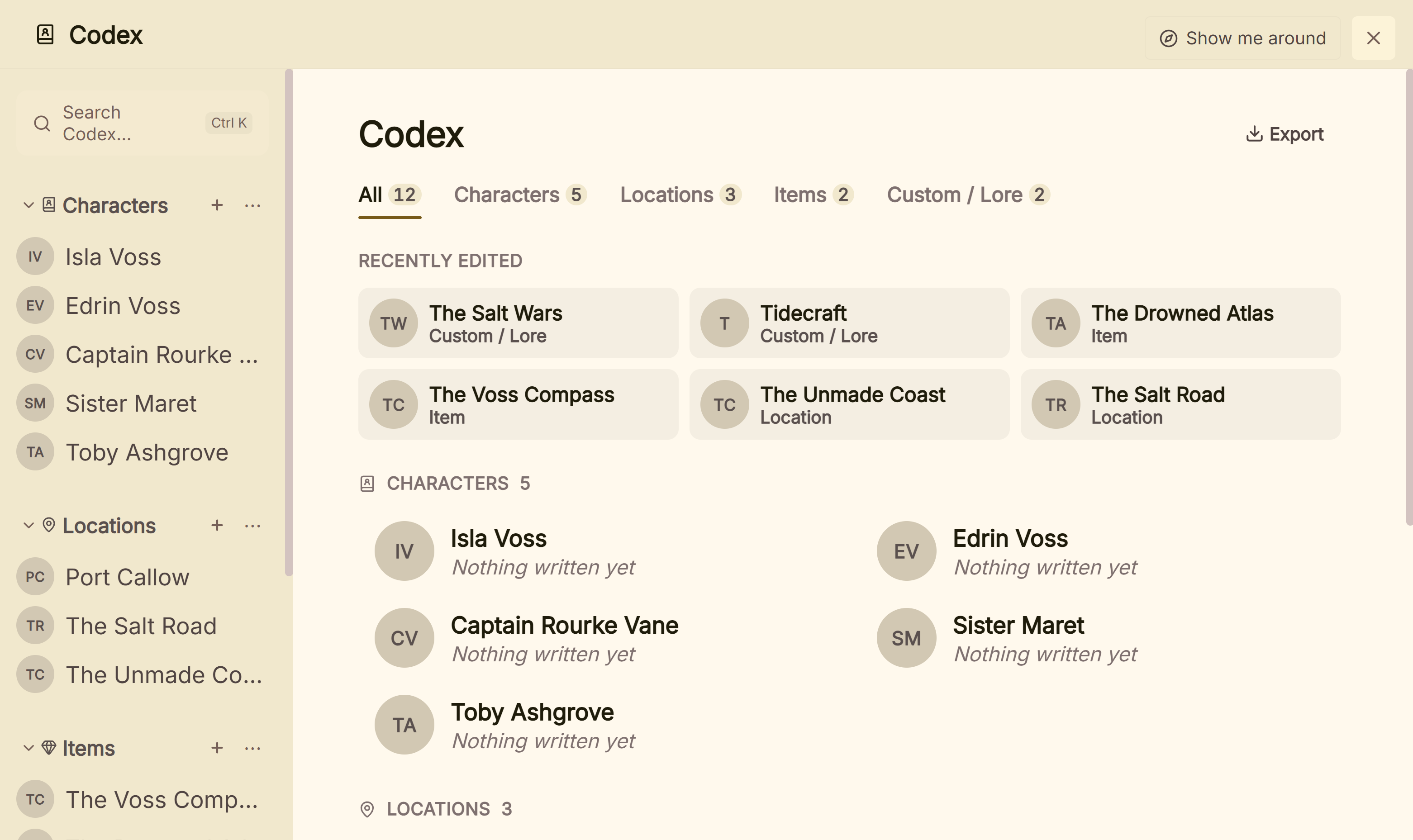 The Codex holds the worldbuilding an Obsidian vault often keeps
Deckle reads an Obsidian vault directly. The Markdown folder import makes each file a chapter, turns a folder of files into a chapter with those files as its scenes, and keeps Longform's scene order. Imported into Research instead, the vault keeps its folders, and [[wikilinks]] between notes resolve to the imported documents. Tables are skipped. The steps are in importing an Obsidian vault into Deckle.
Deckle is not a Markdown app, and an Obsidian user should weigh that. A project is a folder holding one .deckle SQLite database (all the writing, notes and settings) plus research/ and .deckle-assets/ folders. The writing is not kept as .md files. To get plain files back out, Markdown export can write the whole project (Draft, Research and Notes) as folders of .md files that re-import.
What you would give up: Obsidian's plain-file storage, its plugins, and its mobile apps. Deckle has no mobile version and no cloud sync. The comparison from Scrivener's side is in Scrivener vs Deckle.
Deckle is a one-time purchase. To try it, click Take Deckle for a Spin on the screen Deckle opens to. There is no card, no account and no time limit. It opens a sample novel with every screen open to explore, and you can restyle it and export real EPUB, PDF and DOCX files. New writing is capped at about 500 words, and new documents and imports are blocked.
What goes wrong with a novel in Obsidian or Scrivener?
- Relying on File recovery as a backup. Obsidian says it "isn't a full backup solution." Back up the vault folder separately.
- Expecting a whole-book export from core Obsidian. Export to PDF works on one note at a time.
- Treating community plugins as Obsidian features. They are third-party code, maintained by their authors.
- Assuming Scrivener stores Markdown. It writes rich text inside its project. Markdown is an export route.
- Choosing Scrivener for a Linux or Android setup. Scrivener runs on macOS, Windows and iOS only.
FAQ
Is Obsidian good for writing a novel?
It is good for notes, research and worldbuilding. For a manuscript, it needs community plugins such as Longform, and its built-in export is PDF of one note.
Is Obsidian better than Scrivener?
For linked notes and plain Markdown files, yes. For organising and compiling a novel, Scrivener has the Binder, Outliner, Snapshots and Compile.
Is Obsidian free?
The core app is free without limits, including commercial use, as of October 2026. Sync costs $4 a month billed annually and Publish $8 a month billed annually.
Can Obsidian export to Word or EPUB?
Obsidian's help documents Export to PDF only. DOCX and EPUB are not documented as built-in exports.
Can I import Obsidian into Scrivener?
Scrivener imports plain text files. Obsidian notes are plain Markdown files, so they can be brought in as text.
Does Obsidian work offline?
Yes. Notes are stored on your device and work offline.
Is Scrivener a one-time purchase?
Yes. It is $59.99 for macOS or Windows, one licence per platform, as of October 2026. Major new versions may be paid upgrades.
Sources
All retrieved 2026-10-20.
- Literature & Latte, Scrivener overview (organising tools, platforms, import and export formats)
- Literature & Latte, Scrivener features (EPUB, Kindle e-books, MultiMarkdown and Pandoc)
- Literature & Latte, Scrivener FAQs, store and Crossgrading (licence per platform, prices)
- Obsidian, home page (local Markdown files, open formats, plugins, privacy)
- Obsidian, Download (platforms and packages)
- Obsidian, Pricing and Sync (prices, version history)
- Obsidian Help, Export to PDF
- Obsidian Help, Community plugins and Plugin security
- Obsidian Help, File recovery
- Obsidian Community, Longform plugin
- GitHub, kevboh/longform (Longform source and description) and releases (2.1.0, 19 March 2025; retrieved 21 October 2026)
- Literature & Latte, Scrivener release notes for macOS: 3.5.0, 1 October 2025, Kindle (.mobi) removed from Compile; the Windows notes, up to 3.1.6 (3 September 2025), record no such change (retrieved 21 October 2026)
Last checked 2026-10-20. Scrivener is a trademark of Literature & Latte. Obsidian is a trademark of Dynalist Inc. Deckle is not affiliated with or endorsed by any product named here.