

The best word processor for writers depends on where the words are going: Microsoft Word for a manuscript that goes to editors and agents, Google Docs for drafting with beta readers, LibreOffice Writer for a free desktop app that also exports EPUB, and Pages for writers on a Mac or iPad. For a whole book, a long-form writing app such as Scrivener, Ulysses or Deckle holds chapters and scenes better than any word processor, and each still exports a Word file at the end.
No standards body tests word processors for fiction, so this page ranks nothing. It compares what each app does, costs and exports, from each vendor's own pages, read on 26 October 2026. Prices are US dollars before tax. This is Deckle's own site, and Deckle is one of the apps compared, so weigh that section accordingly.
What makes a word processor good for writers?
A word processor is built for documents of a few pages. A novel is 70,000 to 120,000 words, and it goes through drafts, readers, an editor and a formatter. Five things decide whether an app keeps up.
- The file you can hand over. Agents, editors and Amazon KDP all take a .docx. Any app you pick has to produce one cleanly.
- Editing with others. Editors mark up a manuscript with Track Changes and comments. Beta readers want to comment without installing anything.
- Book structure. A long draft needs chapters you can see, reorder and annotate, not one scroll bar.
- Offline and ownership. Some apps keep files on your own disk. Others keep them in an account and need a browser extension to work without a connection.
- The finished book. Few word processors make an ebook, and none in this list claims print typesetting for a paperback interior.
Best word processors for writers compared
| App | Platforms | Price (26 October 2026) | Offline | Exports | Editing with others | Book structure | AI |
|---|---|---|---|---|---|---|---|
| Microsoft Word | Windows, Mac (macOS 14+), iPad, iPhone, Android, web | Microsoft 365 Personal $99.99/yr or $9.99/mo; Office Home 2024 $179.99 once for 1 PC or Mac | Desktop app | .docx, .pdf, .odt, .rtf, .txt, .html; no EPUB | Track Changes, comments | Headings | Copilot on Microsoft 365 plans |
| Google Docs | Browser, iPhone, iPad, Android | Free with a Google account (15 GB storage) | Chrome or Edge with the Docs Offline extension | .docx, .odt, .rtf, .pdf, .txt, .html, .epub, .md | Real-time co-editing, comments, suggestions | Document tabs, up to 3 levels and 100 tabs | Gemini on paid plans |
| LibreOffice Writer | Windows, macOS, Linux | Free, open source | Desktop app | Opens and saves .docx; EPUB export | Track changes, comments | Headings | "No forced AI" |
| Apple Pages | Mac, iPad, iPhone | Free; Apple Creator Studio $12.99/mo or $129/yr for premium extras | Desktop and mobile apps | EPUB, Word, RTF, TXT, PDF | Change tracking, comments, real-time collaboration | Table of contents view | Apple Writing Tools |
| Scrivener | macOS 11+, Windows 10+ (64-bit), iOS | $59.99 once per platform; Mac and Windows bundle $95.98; iOS $23.99 | Desktop app | Word, RTF, PDF, EPUB, plain text, Final Draft | No co-editing listed | Binder, Corkboard, Outliner | None mentioned |
| Ulysses | Mac (macOS 15.4+), iPad, iPhone | $39.99/yr or $5.99/mo; App Store also lists a $199.99 perpetual licence | App with iCloud sync | DOCX, PDF, ePub, HTML, text | No co-editing listed | Library, projects, groups | Built-in grammar and style check |
| Deckle | Windows 10/11, macOS 11+, Linux | One-time purchase, 2 devices; free demo | Yes, after activation | DOCX, EPUB, print PDF, Markdown, plain text | Comments export as Word comments | Binder, Outliner | None in the app |
Which word processor suits which writer?
Microsoft Word, for the manuscript that goes out
Word is the format the publishing trade runs on. Microsoft's support pages show Track Changes on Windows, Mac, the web, iPad and iPhone, and editors return manuscripts marked up in it. Microsoft 365 Personal is $99.99 a year or $9.99 a month for one person on up to five devices, with a one-month free trial. Office Home 2024 is $179.99 once for "1 PC or Mac".
What it does less well for a book: Microsoft's file format list has no EPUB, and Microsoft's own help says "Word for the web can't add section breaks yet", which a print interior needs. Copilot comes with the paid plans. It can be turned off on Windows and Mac with the Enable Copilot checkbox, but Microsoft says "You can't turn off Copilot in the iOS, Android, or web versions of Word". The trade-off of drafting a whole novel in it is on writing a novel in Word vs dedicated software.
Google Docs, for drafting with readers
Google Docs is free with a Google account, which comes with 15 GB of storage. Google says "multiple people can work on the same document at the same time, without having to send versions back and forth", which makes it the easiest place to share chapters with beta readers. It exports .docx, EPUB and Markdown. Document tabs let one Doc hold a book's chapters, nested up to three levels and capped at 100 tabs.
Its limits are stated by Google. A Doc holds up to 1.02 million characters. Working offline needs Chrome or Edge with the Google Docs Offline extension, turned on while you are online, and not in private browsing. How it fares against Word is on Word vs Google Docs for writing a book.
LibreOffice Writer, for a free desktop word processor
The Document Foundation describes Writer as "A powerful word processor for everything from quick notes to full-length books", and its home page title is "Free and private office suite, no forced AI". It runs on Windows, macOS and Linux, with builds for Apple Silicon and ARM64 Windows, and 26.8.1 was the latest stable release on 26 October 2026. It opens and saves Word files, and Edit ▸ Track Changes ▸ Record marks up edits for an editor.
It goes one step past Word for an author: File ▸ Export As ▸ Export as EPUB writes a reflowable or fixed-layout ebook, split at headings or page breaks, with a custom cover. It suits a writer who wants Word's way of working without the subscription. More options for leaving Word are on Word alternatives for writers.
Apple Pages, for writers on a Mac or iPad
Pages is free. Apple says "You can continue using Keynote, Pages, Numbers, and Freeform for free", and the Apple Creator Studio subscription, $12.99 a month or $129 a year, adds premium templates and AI features rather than unlocking the app. The App Store listing says Pages exports "EPUB, Microsoft Word, RTF, TXT, and PDF", offers change tracking and footnotes, and lets you "Design interactive EPUB books" for Apple Books. It suits a writer who works only on Apple devices and sends Word files to an editor.
Scrivener, for organising a long draft
Scrivener is a long-form writing app rather than a word processor, and it is the usual next step for novelists. It costs $59.99 for macOS or Windows, one licence per platform, or $95.98 for both. The trial lasts "30 days of use", so writing every other day stretches it to about 60. Each scene sits in the Binder with a card on the Corkboard and a row in the Outliner, and Compile produces Word, PDF and EPUB. It suits a plotter with a large, research-heavy book. Its learning curve is covered on is Scrivener good for writing a book, and the head-to-head with Word on Scrivener vs Word.
Ulysses, for Markdown on Apple devices
Ulysses is a Markdown writing app for Mac, iPad and iPhone with iCloud sync. It costs $39.99 a year or $5.99 a month, and the App Store also lists a $199.99 perpetual licence. Its help pages list export to DOCX, PDF, ePub, HTML and text. It suits a writer who drafts on an iPad as much as a Mac and likes plain text with no formatting menus. It has no Windows version.
What is the best word processor for writing a book?
For the drafting, a long-form writing app usually beats a word processor once the book passes a few chapters. A word processor gives you one long document; a writing app gives each chapter and scene its own place, with a synopsis and notes beside it. For the hand-over, the answer is still a Word file, so whichever app you draft in has to export a clean .docx.
That leaves three sensible routes:
- Draft and finish in Word, if your book is short or straightforward and an editor is waiting. This is the common route, and how to write a book in Word shows how to set it up with headings.
- Draft in a writing app, finish in Word, if the structure is complex. Scrivener, Ulysses and Deckle all export DOCX.
- Draft and format in one app, if you self-publish. Deckle writes the manuscript and also exports the EPUB and the print PDF, so there is no separate formatting step.
The wider field of book-length apps is on best novel writing software.
What is the best word processor for Mac?
Pages is the free default on a Mac, and Word is the standard if editors are involved. The system requirements, from each vendor on 26 October 2026, decide what will run on an older Mac:
| App | Mac requirement |
|---|---|
| Pages | The App Store listing says macOS 26.0 or later for the current version; Apple's Creator Studio page says macOS 15.6 or later |
| Microsoft Word | macOS 14.0 or later, and a qualifying Microsoft 365 subscription for the App Store version |
| Ulysses | macOS 15.4 or later |
| Scrivener | macOS 11 or later |
| Deckle | macOS 11 or later, universal (Apple Silicon and Intel) |
| LibreOffice | macOS 11 or newer, Intel or Apple silicon |
On a Mac several years old, Scrivener, Deckle and LibreOffice are the ones still supported. Mac-only options are compared in more depth on novel writing software for Mac.
What is the best free word processor for writers?
LibreOffice Writer is the strongest free desktop option: no account, Windows, Mac and Linux, Word files in and out, and EPUB export. Google Docs is the free choice when readers follow the draft, and Pages is free on Apple devices. Word for the web is free with a Microsoft account, but Microsoft says it "can't add section breaks yet", and the AI features in Office Home 2024 are listed as "Limited usage with a free Microsoft account". Free tools judged on book-length drafting are on free novel writing software.
What does a word processor cost over three years?
| App and plan | Three years |
|---|---|
| LibreOffice Writer, Google Docs, Pages | $0 |
| Scrivener, one platform | $59.99 (major upgrades may be paid) |
| Scrivener, Mac and Windows | $95.98 |
| Office Home 2024, one PC or Mac | $179.99 (no upgrade option) |
| Ulysses, yearly | $119.97 |
| Microsoft 365 Personal, yearly | $299.97 |
| Deckle | One price, every update included (check the shop) |
More on paying once is on writing software one-time purchase.
What do ranking pages get wrong about word processors for writers?
The pages that rank for this search are mostly a few years old. These claims disagree with the vendors' own pages on 26 October 2026.
- "Scrivener costs $45" or "$49." TCK Publishing's and Draft2Digital's roundups give those prices. Literature & Latte now lists $59.99 per platform.
- "Word is $160 once, or $70 a year." Draft2Digital's 2021 post gives those figures. Microsoft now lists Office Home 2024 at $179.99 and Microsoft 365 Personal at $99.99 a year.
- "It probably came stock with your operating system." Draft2Digital says this of Word. Word is sold through Microsoft 365 or Office Home 2024. The free editor that did ship with Windows, WordPad, is removed from all editions starting with Windows 11 version 24H2, per Microsoft.
- "Google Docs works offline." Only after setup: Google requires Chrome or Edge, the Google Docs Offline extension, and turning it on while connected.
- "Pages is free for Mac only" or "free for iOS users". Apple lists it for Mac, iPad and iPhone, free on all three.
- "Scrivener exports to Kindle." The macOS release notes for 3.5.0 say "Kindle (.mobi) has now been removed as a Compile export option". Scrivener still exports EPUB, which KDP takes.
How do you write a book in Deckle?
Deckle is our app, so weigh this section accordingly. It is a desktop writing app for Windows, macOS and Linux. Each project is a folder on your own computer, it works offline after activation, and it has no generative AI. It is a one-time purchase that activates on two devices.
- Make a project. Choose File ▸ New Project… and pick where the folder goes.
- Bring in a Word draft, if you have one. In the Binder, click + (Add to Draft) ▸ Import…. In Import Manuscript, Word (.docx) chapters "are detected from your heading styles", so a draft with Heading 1 chapters arrives as one document per chapter. Footnotes in the .docx don't come across, so note them first.
- Add chapters and scenes. The same + menu adds a Part, Chapter or Scene. Drag them in the Binder to reorder the book.
- See the whole book. Open View ▸ Outliner. List View shows each chapter with its words, synopsis, label and status; Grid View shows them as index cards.
- Write without the panels. View ▸ Focus Mode hides everything but the page. View ▸ Continuous View reads several chapters as one.
- Set a goal. Open View ▸ Writing Stats, choose Words and Daily under Goals, and set Target words per day.
- Send it to an editor. Choose File ▸ Export…, pick DOCX, choose the Word variant ("For editors & review"), and on the Options tab tick Standard Manuscript Format for a title page with word count and a "Surname / Title / #" running header. Inline comments go out as real Word comments.
- Make the book. In the same Export window, choose EPUB with a Generic, Kindle, Apple Books or Kobo target, or PDF for print in one of eight trim sizes.
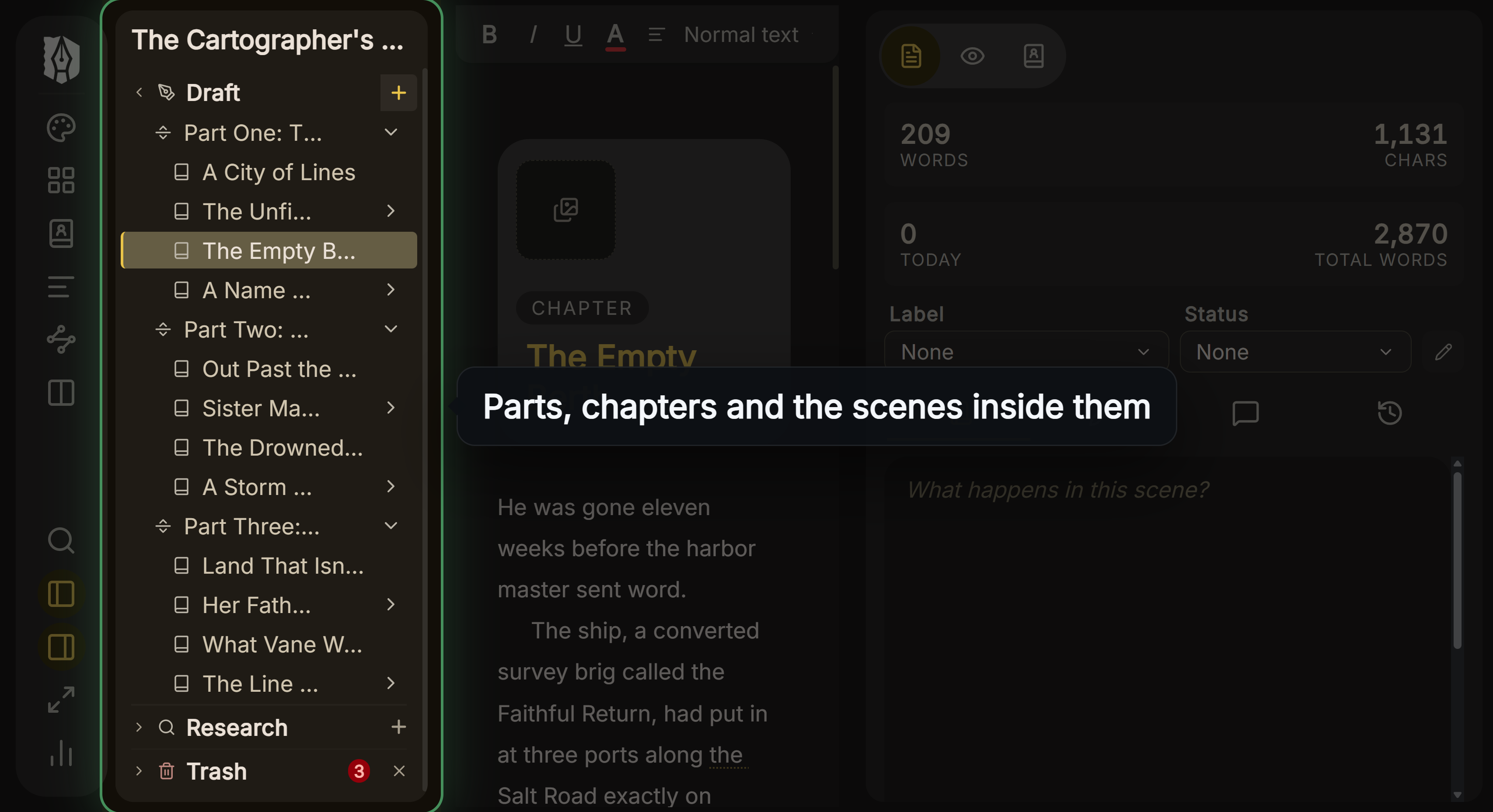 Each chapter and scene is its own document in Deckle's Binder
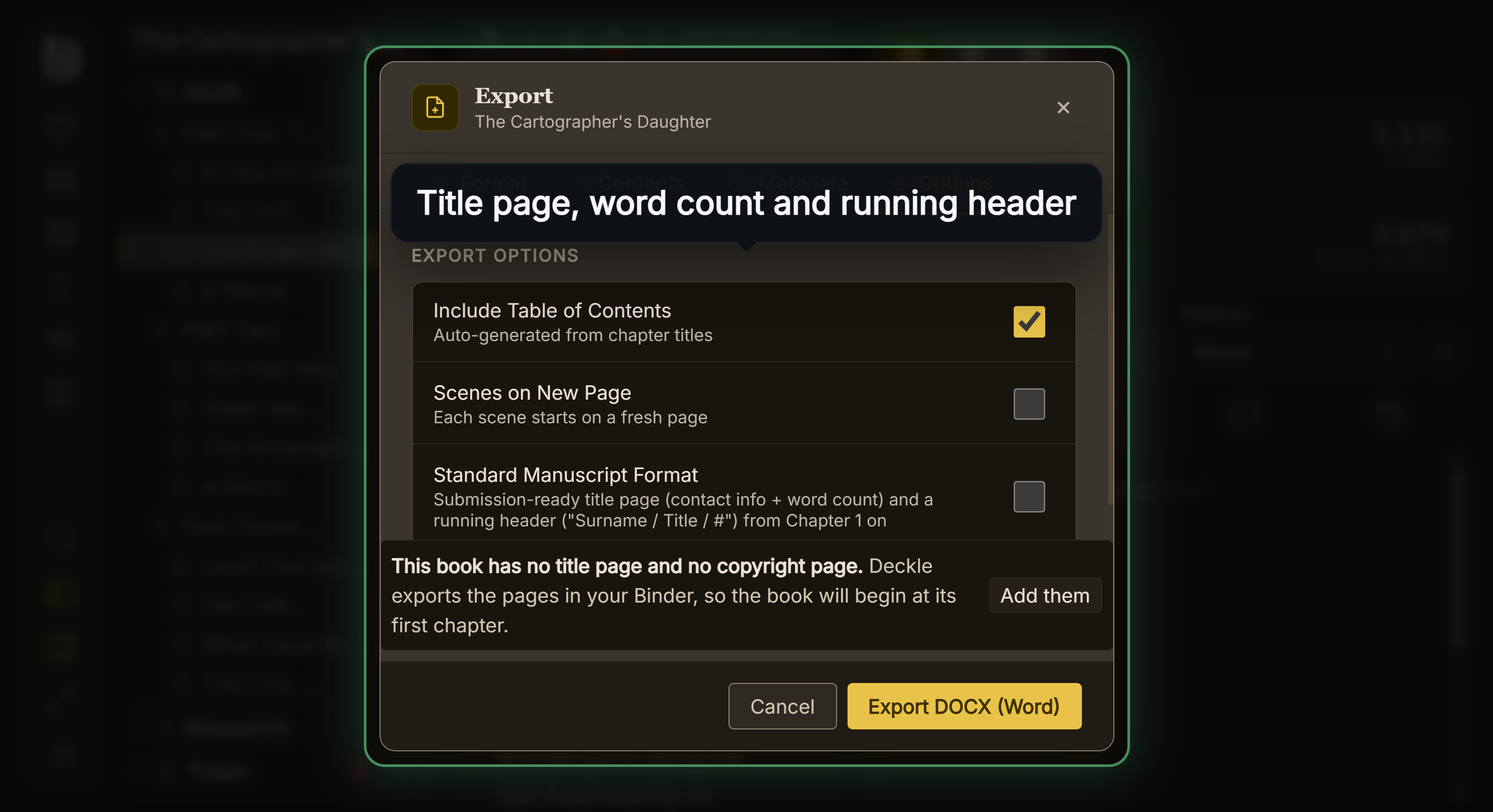 The Word export for editors, with Standard Manuscript Format
Deckle is a desktop app, so a writer who drafts on a phone or iPad is better served by Ulysses, Pages or Google Docs, and one who co-writes live in the same document by Google Docs. Rounds of Track Changes with an editor happen in Word, on the DOCX Deckle exports. What Deckle adds is that the draft, the notes and the finished EPUB and print PDF stay in one project. Every difference from Word is on Word vs Deckle.
To try it, click Take Deckle for a Spin on the screen Deckle opens to. It is a free demo with no card, no account and no time limit. It opens a sample novel with every screen to explore, and you can restyle it and export real EPUB, PDF and DOCX files. New writing is capped at about 500 words, and imports and new documents are blocked, so judge it on the sample book.
Common mistakes when choosing a word processor for writing
- Buying for the first chapter instead of the fortieth. Any app works for 5,000 words. Try the app with a real draft of 30,000 words or more before you pay.
- Paying before you try. Microsoft 365 has a one-month free trial, Scrivener's trial lasts 30 days of use, and Deckle has a free demo. Use them on your own chapters.
- Forgetting the hand-over. Whatever you draft in, check the .docx it exports opens cleanly in Word, with headings and italics intact, before you are on deadline.
- Assuming "offline" means the same thing everywhere. Word and LibreOffice keep files on your disk. Google Docs needs an extension and a setting turned on in advance.
- Paying for AI you don't want. Copilot comes with Microsoft 365 Personal and Family. If you don't want it, LibreOffice says "no forced AI", and Scrivener's pages mention no AI.
- Expecting a word processor to make the paperback. None of the word processors here claims print typesetting. Plan for a formatting tool or an app that does both.
- Ignoring system requirements. The current Pages needs macOS 26 per its App Store listing, and Ulysses needs macOS 15.4. Check before you build a workflow around one.
FAQ
What is the best word processor for writers?
Nothing authoritative ranks them. Word suits manuscripts going to editors, Google Docs suits drafting with readers, LibreOffice Writer suits writers who want free desktop software, and Pages suits Apple users. For a whole book, a writing app such as Scrivener, Ulysses or Deckle organises it better.
What word processor do most authors use?
Most authors hand over a Word file, because agents, editors and KDP take .docx. Many draft elsewhere and export to Word at the end.
Is Google Docs good enough to write a novel?
For drafting and sharing, yes. A Doc holds up to 1.02 million characters, which fits a long novel, and document tabs can hold the chapters.
What is the best free word processor for writing a book?
LibreOffice Writer. It is free on Windows, Mac and Linux, opens and saves .docx, and exports EPUB.
Is Scrivener a word processor?
It is a long-form writing app. It writes like a word processor but splits the book into sections in a Binder, then compiles them into one Word, PDF or EPUB file.
Is there a word processor without a subscription?
Yes. LibreOffice and Pages are free, Office Home 2024 is $179.99 once, Scrivener is $59.99 once per platform, and Deckle is a one-time purchase.
What is the best word processor for Mac?
Pages is free and built in to the Apple ecosystem; Word is the editor's standard. On an older Mac, Scrivener and Deckle run on macOS 11 or later.
Sources
Retrieved 26 October 2026.
- Microsoft, Compare all Microsoft 365 plans: Personal, Family, Premium and Office Home 2024 prices, devices, AI usage
- Microsoft Learn, File format reference for Word: save formats, no EPUB
- Microsoft Support, Insert a section break: Word for the web
- Microsoft Support, Track changes in Word
- Microsoft Support, Turn off Copilot in Microsoft 365 apps
- Microsoft Learn, Deprecated features for Windows client: WordPad removal
- Apple App Store, Microsoft Word: macOS 14.0 or later
- Google, Google Docs: co-editing; Google One plans: 15 GB free, Gemini in Docs
- Google Docs Help, Work offline and Document tabs; Google Drive Help, File sizes
- Google for Developers, Export MIME types: EPUB and Markdown
- The Document Foundation, LibreOffice and Download LibreOffice; LibreOffice Help, Recording changes and Export as EPUB; System requirements
- Apple, Apple Creator Studio: Pages free, subscription price, system requirements
- Apple App Store, Pages: export formats, change tracking, macOS 26.0; Apple, Pages User Guide for Mac: EPUB book templates
- Literature & Latte, Scrivener overview, FAQs and macOS release notes: prices, platforms, trial, Kindle removal
- Ulysses, Pricing, App Store listing and Export help
- Draft2Digital, What's the best word processor for writers? (29 December 2021) and TCK Publishing, The Best Writing Software for Writers: the ranking claims checked above
Microsoft Word, Microsoft 365, Office and Copilot are trademarks of Microsoft. Google Docs and Gemini are trademarks of Google LLC. Apple, Pages and Mac are trademarks of Apple Inc. LibreOffice is a trademark of The Document Foundation. Scrivener is a trademark of Literature & Latte. Ulysses is a trademark of Ulysses GmbH & Co. KG. KDP is a trademark of Amazon.com, Inc. Deckle is not affiliated with or endorsed by any product named here.