

Is Scrivener good for writing a book? Yes, for drafting and organising one: it splits a long manuscript into scenes and chapters you can rearrange, and keeps research and notes beside the draft. Where it asks more of you is the end of the book. Scrivener's Compile turns the draft into Word, PDF and EPUB files. Even so, Literature & Latte's own manual says Scrivener "is not intended to be a full-blown word processor, rather a tool for cutting the text that will become your book in other programs more dedicated to that purpose." Many authors write in Scrivener and format in another app.
How good a fit it is depends on the kind of book. This page answers that for novels, short stories, worldbuilding, formatting and non-fiction, from Literature & Latte's own pages, blog and Scrivener 3 manuals, read on 26 October 2026. Deckle, which appears near the end, is our app, and this is Deckle's own site.
What is Scrivener built for?
Scrivener is a desktop app for long-form writing, made by Literature & Latte. Its overview page calls it "the go-to app for writers of all kinds" and names novelists, screenwriters, academics and non-fiction writers. The core idea is that "Novelists can write each scene in a separate document, or whole chapters as one", then move those pieces around in a sidebar called the Binder.
It is built for the drafting stage. The Windows manual (section 15.1) says the editor can be used like a word processor. It can also be treated "more like a plain-text editor, where the paragraph settings, fonts, and every aspect of how it prints is something you decide for later." That is the key to every answer below: Scrivener is strongest while the book is being written and restructured, and asks for more set-up when the book is being designed.
Is Scrivener good for writing a book, by project type?
| Project type | What Literature & Latte provides | What to plan for |
|---|---|---|
| Novel | Binder, one document per scene, Corkboard, Outliner, Scrivenings, Snapshots, Project Targets, Novel templates | A first export is easy with a built-in Compile format; a custom design takes the Compile Format Designer |
| Short stories | A Short Story template under Fiction, built for "any collection of short writing", with its own compile settings | For one short piece, the Binder has less to organise |
| Worldbuilding | Folders, character and setting sketches, document templates, links, custom metadata, keywords and collections | No timeline or map view is listed on the features page |
| Formatting | Compile to Word, PDF, EPUB and more; Paperback (6 x 9) and Paperback (5.06 x 7.81) formats; facing-page margins | The manual says it is "not intended to be used as a design tool"; Kindle (.mobi) is gone from the Mac version |
| Non-fiction | Footnotes and endnotes ("two note streams"), a research library, a General Non-Fiction (LaTeX) template, an APA 7 template | Citations need an outside reference manager; images for print need a design tool |
The sections below go through each row.
Is Scrivener good for novel writing?
Yes. Novels are what most of Scrivener's tools assume. The features page and overview list the parts a novelist uses daily:
- The Binder, holding every scene and chapter as its own document, in any order.
- The Corkboard and Outliner, showing each section's synopsis as an index card or a row, so you can restructure the plot without opening the text.
- Scrivenings, which shows several sections as one continuous text, so a chapter reads as a whole.
- Full-screen composition mode, which blanks out the rest of the screen while you write.
- Snapshots, a saved copy of a section before a rewrite, with Compare.
- Project Targets, a word goal for the manuscript and for each session.
The Windows manual also documents a Novel (with Parts) template, and a Novel template sets up the Manuscript folder with a Characters folder beside it. A novelist can start writing on day one and learn the rest as needed; Scrivener's learning curve covers which features can wait.
Is Scrivener good for short stories?
Yes, especially for a collection. Literature & Latte's blog post How to Write Short Story or Essay Collections in Scrivener (12 November 2025) gives the path: File ▸ New Project, click Fiction, choose Short Story, then Create. The post says "This project is ideal for any collection of short writing: stories, essays, flash fiction, or novellas."
The template opens with a Short Story Manuscript Format document at the top of the Binder and one file labelled Scene in the Manuscript folder. The post gives two ways to organise a collection: one file per story, or one folder per story with a file for each scene. When you compile, assigning the Short Story section type puts a page break before each story.
For a single 3,000-word story, Scrivener's structure has less to do. Some writers keep one project as a home for all their short fiction, with a folder per story, so the project grows into a collection over time. How Scrivener compares with Word, Dabble, Ulysses and other apps for this kind of work is on best writing software for short stories.
Is Scrivener good for worldbuilding?
It is good for keeping worldbuilding notes in the same project as the draft. Literature & Latte's blog post How to Use Scrivener for Worldbuilding (Kirk McElhearn, 18 March 2026) calls it "an excellent tool for worldbuilding" and describes the method:
- Subfolders in the Characters folder by place, family or faction, and setting sketches in a Places folder.
- Document templates for sketches, "different for each group of characters" if you like.
- Links from scenes to sketches, so reference material is one click away.
- Custom metadata for "characters, settings, events, specific times, and more", shown in the Inspector or Outliner.
- Keywords and search collections, to gather every file that mentions a place or a character.
What the method doesn't include is a timeline or a map. Scrivener's features page lists no timeline view, and it points to Literature & Latte's separate mind-mapping app, Scapple, to "Visualise the relationships and interactions between characters." Writers with a large invented world often pair Scrivener with a dedicated tool. Those tools are compared in the best worldbuilding software, and the dated-events side in timeline software for writers.
Is Scrivener good for formatting a book?
It can produce a finished book, and it asks more of you here than anywhere else. Literature & Latte says Compile can "Generate PDF files ready for self-publishing" and "Create ready-to-sell Epub ebooks." Here is what the manuals say about print:
- Built-in paperback formats. The Windows manual's Appendix D lists Paperback (6 x 9), "optimised to work with standard paperback sizes in the U.S.", and Paperback (5.06 x 7.81), "a typographically pleasing layout that could be taken into a word processor or desktop publishing program for self-publication with little effort."
- Facing pages. Print and PDF formats support "offset margin treatment for facing pages", with inside and outside margins and different headers on recto and verso pages (Windows manual, section 24.19).
- Print-on-demand PDF, Mac only. The Mac manual (section 24.23) has Optimize for print-on-demand services, which removes parts of a PDF "that may cause it to be rejected from certain self-publishing services (such as KDP)" and saves as PDF/X-3. The Windows manual has no such option.
- Images. The Windows manual (section 15.6.5) says "Scrivener is not intended to be used as a design tool": it "will not retain ColorSync profiles, may not handle four-colour CMYK safely" and does not support vector illustrations.
- Kindle. The macOS release notes for 3.5.0 (1 October 2025) say "Kindle (.mobi) has now been removed as a Compile export option, since Amazon no longer supports the .mobi format." EPUB is the route to Kindle now, and the details are in Scrivener EPUB export.
Changing a format's look means the Compile Format Designer, which runs to 67 pages of the Windows manual. Scrivener also ships a Vellum Export compile format (Appendix D.2.11), "designed to convey your work to the Vellum book creation tool, for macOS". That tells you how common the write-here, format-there workflow is. The steps for both routes are in the Scrivener compile tutorial and Scrivener vs Vellum.
Is Scrivener good for non-fiction?
Literature & Latte says so directly: "With support for footnotes and the ability to import and refer to a library of research, Scrivener is the ideal tool for non-fiction writers, too." The manuals back the claim with specifics:
- Footnotes and endnotes. "Scrivener supports two note streams, allowing you to output both footnotes and endnotes, if required" (Windows manual). Notes are placed as you write and numbered at compile.
- Research beside the draft. PDFs, images and web pages sit in the Binder's Research folder and open next to your text.
- Templates. The release notes record a General Non-Fiction (LaTeX) template and an "APA project template for APA 7", updated in 3.5.0. The features page says "Templates for writing papers in MLA, APA and other common formats are available right out of the box."
Two things to plan for. Citations come from an outside reference manager such as Zotero, which Scrivener brings to the front and which scans a compiled RTF; Scrivener for academic writing has the steps. And a heavily illustrated book meets the image limits above. Other tools for the job are compared in the best writing software for non-fiction.
What does Scrivener cost, and what does it run on?
As of 26 October 2026, Scrivener is a one-time purchase: $59.99 for macOS or Windows, $95.98 for a Mac and Windows bundle (Literature & Latte's store checkout), and US$23.99 for iOS and iPadOS. Each licence covers one platform. Minor updates are free, and a future Scrivener 4 "would need to pay an upgrade fee" according to the FAQ. The full breakdown is on Scrivener's price.
The overview lists macOS 11 or later, 64-bit Windows 10 or later, and iOS 11 or later. There is no Linux or Android version. The trial "will only last for 30 days of use", counting only days you open it, on Mac and Windows. Whether the price is worth it for your plans is a separate question, answered in is Scrivener worth it in 2026.
How does Scrivener compare with the other book tools writers weigh?
Writers deciding on Scrivener usually weigh it against a formatter (Vellum, Atticus) or an app that does both jobs. Measurable facts only, from each vendor's own page:
| Scrivener | Atticus | Vellum | Deckle | |
|---|---|---|---|---|
| Platforms | macOS 11+, 64-bit Windows 10+, iOS | Windows, Mac, Linux, Chromebook, browser | Mac only (macOS 13+) | Windows, macOS, Linux |
| Price model, price | One-time per platform: $59.99; Mac+Windows $95.98; iOS $23.99 | One-time, $147 | One-time: Ebooks $199.99, Press $249.99 | One-time (price on the Deckle shop); free demo |
| Offline | Yes, desktop app | Yes, but online needed to import and export (help centre) | Yes, desktop app | Yes, after activation |
| Export | Word, RTF, PDF, EPUB, Final Draft, plain text, more | EPUB, PDF, DOCX | EPUB 3 and 2, print PDF | EPUB, print PDF, DOCX, Markdown, plain text, Academia PDF |
| Print layout | Compile formats incl. Paperback 6 x 9; PDF/X-3 option on Mac | Print-ready PDF, full-bleed images, large print | PDF/X-1a, 24 trim sizes plus large print (Press) | 8 trim sizes, mirrored margins, bleed |
| Drafting and organising | Binder, Corkboard, Outliner, Scrivenings, composition mode, Snapshots, Targets | Chapters, parts, goals | A formatting app; no binder or outline view | Binder, Outliner, Codex, Timeline, Writing Stats |
| AI | None of its own; Mac 3.4 exposes Apple's Writing Tools | None; "no plans" for AI in the editor | None of its own; Apple Writing Tools off by default | None |
What each does well: Scrivener has the deepest drafting and organising toolset and the most configurable output. Vellum gives the most polished print interior with the least set-up, on a Mac. Atticus runs on almost anything, including a Chromebook. Deckle covers drafting, a story bible and formatting in one desktop app.
Who is Scrivener good for, and who should look elsewhere?
Scrivener suits you if:
- You write long books and restructure as you go, moving scenes and chapters around.
- You want research, notes and character sketches in the same project as the draft.
- You write several kinds of thing: a novel, a short story collection, a screenplay, a thesis.
- You're happy to format in a second app, or to learn Compile.
- You want a native iPad or iPhone app alongside your computer. Scrivener for iOS gives you that, synced through Dropbox.
Look elsewhere if:
- You write on Linux or a Chromebook. Atticus or Deckle run there.
- You want the paperback interior designed for you without learning a format designer. Vellum (Mac) or Atticus suit that.
- You write with co-authors in the same document at the same time. A cloud editor such as Google Docs suits that, as is Google Docs good for writing a book explains.
- You want writing and print formatting in one desktop app on Windows. That is the gap Deckle was built for, and Scrivener vs Deckle compares the two in full.
The wider field is in Scrivener alternatives.
How do you write a book in Deckle?
Deckle is our app, so weigh this section accordingly. It is a desktop app for Windows, macOS and Linux that covers drafting, a story bible and formatting, with no generative AI. A Scrivener project comes across as a zipped .scriv backup, as moving from Scrivener to Deckle describes. To start a book from scratch:
- Click New Project on the start screen (or File ▸ New Project…), name the book and pick a folder on your own disk.
- Click the + button beside Draft in the Binder (Add to Draft) and add a Part, Chapter or Scene. For a short story collection, make each story a chapter.
- Open the Inspector (View ▸ Toggle Inspector) and give each scene a synopsis, a label and a status in its Properties view.
- Open the Codex from the View menu and add Characters, Locations and Items, or a custom section for magic systems or factions.
- Open the Timeline from the View menu to place events to scale, or switch to Story order to see flashbacks out of sequence.
- In Styles, pick one of the 26 built-in presets to set the book's look.
- For non-fiction notes, open View ▸ Toggle Styles, switch to Advanced, choose Special pages ▸ Footnotes / Endnotes, and set Style to Footnotes or Endnotes. Do this after choosing a preset, because a preset sets the notes style too.
- Choose File ▸ Export…, pick EPUB, PDF or DOCX, and export. To send one story or the first three chapters, untick the Draft on the Contents tab and tick only what you want.
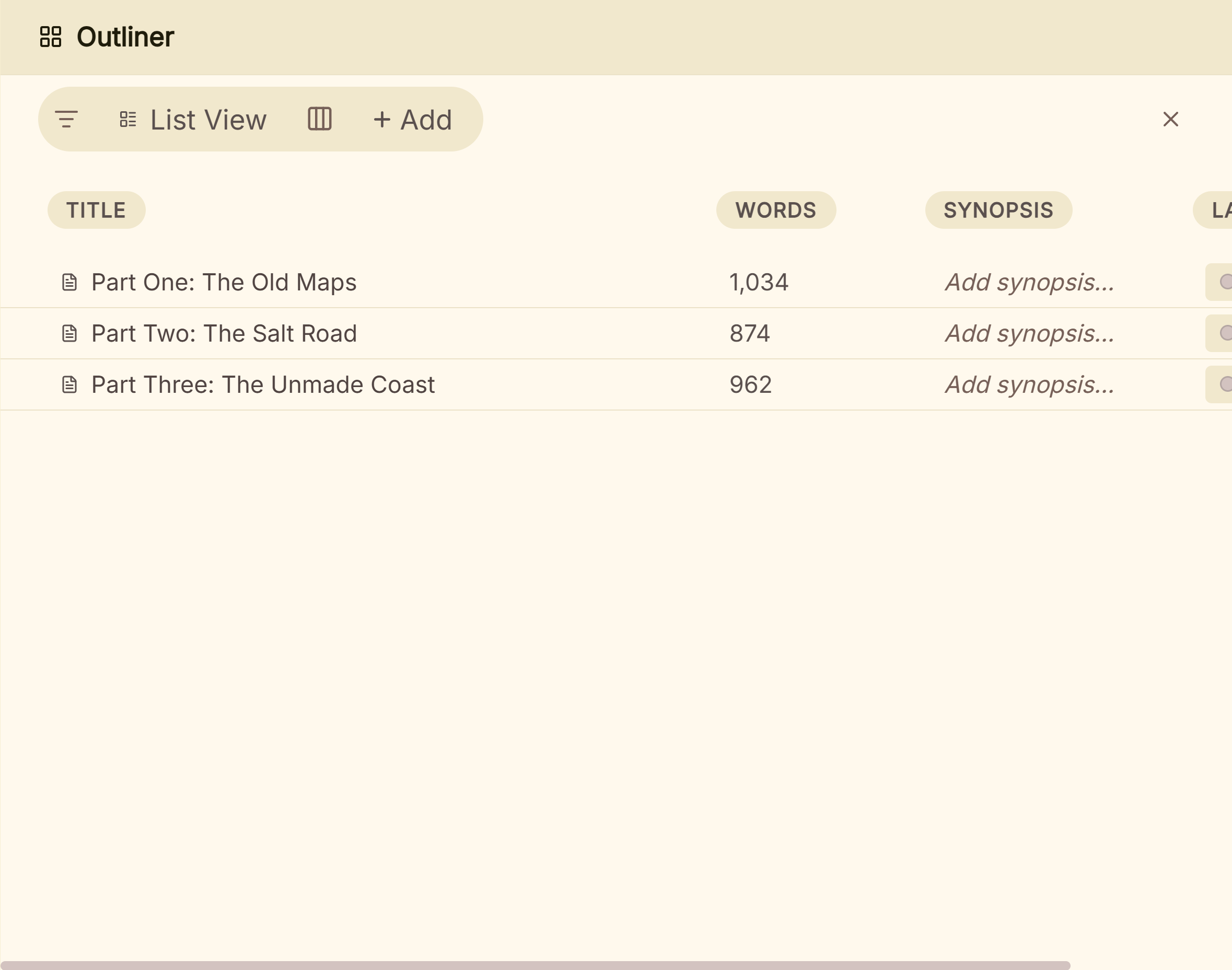 The Outliner lists each part of the book with its word count and synopsis
To try it, click Take Deckle for a Spin on the screen Deckle opens to. There is no card, no account and no time limit. It opens a sample novel with every screen open to explore, and you can restyle it and export real EPUB, PDF and DOCX files. New writing is capped at about 500 words, and new documents and imports are blocked.
Common mistakes when deciding whether Scrivener suits your book
- Judging it from a 2022 review. Some reviews still ranking for this search give $49 as the price, a $15 crossgrade and $19.99 for iOS, and list MOBI export. Literature & Latte's store now charges $59.99, the crossgrade is $37.95, iOS is $23.99, and the Mac version dropped Kindle (.mobi) in October 2025.
- Assuming Mac and Windows are the same app. One licence covers one platform, and the editions differ. The Mac manual documents Linguistic Focus and the print-on-demand PDF option; the Windows manual has neither. Scrivener on Windows vs Mac has the detail.
- Spending the trial on set-up. The trial counts days of use. Write a few real chapters and compile them in the first week, so you see the output before you pay.
- Expecting a designed paperback with no set-up. The built-in paperback formats work, but Literature & Latte describes one as a layout to take into "a word processor or desktop publishing program". Budget time or a second app.
- Buying for the iPad first. There is no iOS trial, and the App Store listing shows version 1.2.4 from September 2023, needing iOS 12 or later. Scrivener for iPad covers what it leaves out.
- Choosing by feature count. A short story writer and an epic fantasy author need different things. Match the tool to the row in the table above that fits your book.
FAQ
Is Scrivener good for beginners?
Yes for writing, which works like a word processor. Its built-in Interactive Tutorial (Help menu) teaches the basics. Compile is the part beginners find hard.
Do professional authors use Scrivener?
Many do, for drafting. Literature & Latte markets it to novelists, screenwriters and academics. Plenty of them format the finished book in another app.
Is Scrivener good for writing a series?
Most writers keep one project per book. A series bible kept in each project, or in a separate tool, keeps names and dates consistent across books.
Can you publish a book directly from Scrivener?
Yes. Compile writes EPUB for ebook stores and a PDF for print. The Mac version can save a PDF/X-3 file for print-on-demand services such as KDP.
Is Scrivener good for screenwriting?
It has scriptwriting features and saves to Final Draft format, but the Windows manual says it "is not intended to be a dedicated scriptwriting program".
Does Scrivener use AI?
Scrivener has no AI of its own. On the Mac, version 3.4 exposes Apple's Writing Tools. The detail is on does Scrivener use AI.
Is Scrivener better than Word for writing a book?
For organising a long draft, Scrivener does more. For formatting a print book in the same file, Word does more. Scrivener vs Word compares them.
Sources
Retrieved 26 October 2026.
- Scrivener overview, Literature & Latte: "go-to app for writers of all kinds", scenes as separate documents, non-fiction and footnotes, export formats, PDF "ready for self-publishing", platforms and requirements
- Scrivener features, Literature & Latte: Corkboard, Outliner, Snapshots, section templates for character and location sheets, MLA and APA templates, Scapple, Dropbox sync; no timeline view listed
- Scrivener FAQ, Literature & Latte: 30 days of use trial, no iOS trial, one platform per licence, upgrade fee for a major version, refunds within 30 days
- Scrivener store, Literature & Latte: iOS US$23.99, education licence terms; macOS $59.99, Windows $59.99 and Mac+Windows $95.98 read from the store's Paddle checkout prices (products 558657, 558662, 648447)
- Scrivener 3 User Manual for Windows, revision 3.1.6.0-02: section 15.1 (not "a full-blown word processor"), 15.6.5 (not "a design tool", CMYK, vector), two note streams, 24.19 (facing pages, inside and outside margins), Appendix D.2.7, D.2.8 and D.2.11 (Paperback formats, Vellum Export), Novel (with Parts)
- Scrivener 3 User Manual for Mac, revision 3.5.2-01: section 24.23 (Optimize for print-on-demand services, PDF/X-3), Linguistic Focus
- Scrivener release notes, macOS, Literature & Latte: 3.5.0 (1 October 2025) Kindle (.mobi) removed and APA 7 template; General Non-Fiction (LaTeX) template; 3.5.2 (18 December 2025)
- How to Write Short Story or Essay Collections in Scrivener, Kirk McElhearn, Literature & Latte blog, 12 November 2025
- How to Use Scrivener for Worldbuilding, Kirk McElhearn, Literature & Latte blog, 18 March 2026
- Scrivener release notes, iOS, Literature & Latte: version 1.2.4, 20 September 2023 (read 21 October 2026)
- Scrivener on the App Store, Apple: $23.99, version 1.2.4 (29 September 2023), "Requires iOS 12.0 or later"
- Crossgrading, Literature & Latte: $37.95 crossgrade
- Vellum, 180g: $199.99 and $249.99, macOS 13 or newer, Mac only, PDF/X-1a, 24 trim sizes plus large print
- Atticus: $147 one-time, Windows, Mac, Linux, Chromebook, offline use, EPUB, PDF and DOCX export
- Atticus help: internet connection to upload or export and Atticus help: AI features (both read 21 October 2026)
Features last checked 26 October 2026. Scrivener and Scapple are trademarks of Literature & Latte. Vellum is a trademark of 180g. Atticus is a trademark of its owner. KDP and Kindle are trademarks of Amazon.com, Inc. Deckle is not affiliated with or endorsed by any product named here.