

Timeline software for writers comes in two kinds: true chronology tools that place events on a dated axis, such as Aeon Timeline, Campfire and Deckle, and plot grids that lay scenes in chapter columns, such as Plottr. Pick a chronology tool if your book has flashbacks, parallel storylines, travel times or characters whose ages matter. Pick a plot grid if you only need to see which subplot happens in which chapter.

No standards body tests or ranks timeline software, so this page ranks nothing. It compares what each tool does, what it costs and what it exports, from each vendor's own pages, read on 26 October 2026. Prices are US dollars before tax. This is Deckle's own site, and Deckle is one of the tools compared, so weigh that section accordingly. The craft side, how to check a finished draft for chronology errors, is on checking story chronology for consistency.
What does timeline software for writers do?
Timeline software holds two orders at once: the order events happen in the story world, and the order the book tells them. A novel with one point of view told in sequence needs neither. A thriller with three timelines needs both. So does a fantasy saga with a war a decade before page one, or a mystery where the reader learns the murder last. A spreadsheet stops being enough at about the point the second subplot starts.
Five features separate the tools.
- A to-scale axis. Events sit at real positions, so the gap between day 3 and day 40 looks like 37 days. A plot grid shows only sequence.
- Real or custom dates. Some tools take calendar dates, and some let you build a calendar for an invented world.
- Story order alongside time order. A flashback is a scene late in the book that happens early in the world. Good timeline software shows both orders without retyping anything.
- Links to characters and places. When each event knows who is there, software can warn you that someone is in two places at once, or work out a character's age.
- Export and print. A timeline you cannot print or share is hard to use with an editor or a co-author.
Timeline software compared
| Tool | Platforms | Price (26 October 2026) | Offline | Timeline output | Dated axis | AI |
|---|---|---|---|---|---|---|
| Aeon Timeline | Mac (macOS 10.13+), Windows 7+ 64-bit, iPad, iPhone | $65 once, includes 1 year of updates; optional $35 a year after | Installed desktop and iOS apps; its FAQ says files can be edited offline | CSV, images of each view, print; syncs with Scrivener (Mac, Windows) and Ulysses (Mac) | Yes, days, weeks or a custom calendar | None mentioned |
| Plottr | Mac, Windows; web app on Pro; Linux "unsupported, beta" | $60/yr or $150 lifetime; Pro $9.99/mo, $99/yr or $599 lifetime | "Work Offline" on each plan; the Pro table marks offline "Coming Soon" | Word and Scrivener; the timeline itself cannot be printed as it appears | No; columns are chapter headings you can rename | "No AI" on every plan |
| Campfire Writing | Mac 10.11+, Windows 7+, browser, iOS and Android | Free plan (20 timeline events, 1 calendar); Standard $12/mo (shown reduced from $19) | Desktop app only; mobile needs a connection | Elements to DOCX while online | Yes, custom calendar and a Gantt view | None mentioned |
| bibisco | Windows 10+, macOS 10.13+, Linux (64-bit) | Community free; Timeline in Supporters, $69 once | Installed desktop app; offline not stated | Not described for the timeline | Not described | None mentioned |
| Casefleet | Any modern web browser (cloud) | Starter $30 per user a month | Not stated | Not described on the writers page | Yes, chronology by date | AI assistant Casey on Advanced AI ($140 per user a month) and up |
| Scrivener | macOS, Windows, iOS | $59.99 once for macOS or Windows | Yes, desktop app | No timeline view listed | No | None mentioned |
| Deckle | Windows, macOS, Linux | One-time; free demo | Yes, after activation | Image (PNG), PDF, Outline (Word) | Yes, to scale, with optional real dates | None in the app |
Which timeline software suits which writer?
Aeon Timeline, for the deepest chronology
Aeon Timeline is the specialist. Its pricing page sells it at $65 to "Own it forever", with one year of updates and an optional $35 a year after that, and a 14-day trial. One licence installs on "up to five devices (Mac, Windows, iOS)". Its storytelling page says it "automatically calculates character ages at key events" and shows a separate timeline for each character. In its Narrative View you can "Drag and drop scenes in any order, regardless of dates". Calendars run from "just days or weeks" to "a custom calendar". Its refund terms, offline use and learning curve are covered in this review of Aeon Timeline for novelists.
Its other draw is two-way sync with Scrivener on Mac and Windows and Ulysses on Mac, so the timeline and the draft share scenes. Sync, Ulysses support and auto backup are desktop only. The App Store listing also offers a free read-only mode for opening timelines others share. It suits mysteries, thrillers, historical fiction and family sagas, and a writer who already drafts in Scrivener.
Plottr, for a plot grid with templates
Plottr's timeline is a grid. Its help centre lists the parts as chapter headings, plotlines and scene cards, and the chapter headings "denote chapters, beats, scenes, or plot points". There is no date axis. Plottr's own blog suggests renaming the unit to "Week" or "Month" and tagging cards with a year, so dates are labels you type. Plottr says "You cannot print the Timeline as it appears in Plottr (but you can export the details to MS Word or Scrivener)".
What it does well is visible subplots, a series view with "a Timeline for the series as well as each individual book", and 30 or more structure templates. It suits a writer who plans scene by scene in story order and drafts elsewhere. The switch-away options are on Plottr alternatives.
Campfire Writing, for a timeline inside a worldbuilding kit
Campfire's Timeline is one of 18 modules. Its timeline maker page offers "a custom calendar for greater detail and accuracy while creating your world's historical timeline", a Gantt chart view, "10+ free templates", and links from events to the Arcs module. The free plan allows 20 timeline events and one calendar, and Standard is $12 a month, shown as a reduction from $19. The desktop app for Mac and Windows works offline; the mobile app needs a connection and leaves out Calendars and Arcs. It suits a fantasy or science-fiction writer whose dates come from an invented world, and the wider field is on best worldbuilding software.
bibisco, for a free planner with a paid timeline
bibisco Community Edition is free desktop software for Windows, macOS and Linux. The Timeline is a Supporters feature, $69 once with two years of updates, and the Community Edition includes a 30-day trial of it. bibisco's comparison page, updated 28 February 2026, lists the Timeline without describing how it works, so try it before relying on it for dates.
Casefleet, for non-fiction and research-heavy books
Casefleet sells chronology software to lawyers and has a page aimed at "investigative journalists, biographers, novelists, and other writers". Each event links to people, places, dates and evidence. It runs in a web browser on Casefleet's cloud servers, starts at $30 per user a month and has a 14-day trial. Its AI assistant, Casey, comes with the Advanced AI plan at $140 per user a month and above, not with Starter. It suits a biographer or journalist working from hundreds of dated sources more than a novelist.
Scrivener, which pairs with a timeline rather than having one
Scrivener's features page lists the Corkboard, Outliner and Snapshots, and no timeline view. Scrivener costs $59.99 for macOS or Windows. Writers who need dates usually pair it with Aeon Timeline, which syncs both ways, for $124.99 for the two.
Plottr vs Aeon Timeline: which do you need?
They answer different questions. Plottr answers "what happens in each chapter, on each plotline?" Aeon Timeline answers "when does each thing happen, and how old is everyone?"
- Choose Plottr if you outline in story order, want beat-sheet templates, and plan a series. It costs $150 for a lifetime licence.
- Choose Aeon Timeline if your story jumps in time, runs parallel storylines that must meet, or depends on travel times and ages. It costs $65 with one year of updates.
- Neither drafts the book. Plottr's help centre recommends "doing the bulk of your writing in a program designed for it", and Aeon Timeline syncs with Scrivener and Ulysses for the same reason.
A writing app with a timeline built in is the third route: one licence, and no export or sync between two apps.
Is there a free timeline maker for writers?
Yes, with limits stated by each vendor.
- Campfire's free plan gives 20 timeline events and one calendar.
- bibisco Community includes a 30-day trial of the Supporters Timeline.
- Aeon Timeline is free to download in read-only mode, which opens timelines others share but does not edit them. Editing needs the $65 licence after the 14-day trial.
- World Anvil's free tier allowed 2 timelines when its pricing page was read on 20 October 2026. It runs in a browser only and needs a connection. Its fit for novelists is on World Anvil for novelists.
- A spreadsheet with one row per event and a date column is free and works for a single storyline. It has no story-order view and no clash checks.
- Deckle's free demo has no time limit and opens a sample novel with a filled Timeline. New events are capped at three.
More free tools, judged on drafting as well, are on free novel writing software.
What does timeline software cost over three years?
| Tool and plan | Three years |
|---|---|
| Scrivener, one desktop platform | $59.99 (no timeline view) |
| Aeon Timeline | $65, or $135 with two more years of updates |
| bibisco Supporters | $69 |
| Scrivener plus Aeon Timeline | $124.99 |
| Plottr | $180 yearly, or $150 lifetime |
| Campfire Standard, monthly at $12 | $432 |
| Casefleet Starter, monthly | $1,080 per user |
| Deckle | One price, every update included (check the shop) |
Updates change some of these. Aeon Timeline keeps working after its year of updates ends; you stop getting new versions until you renew. More on paying once is on writing software one-time purchase.
What do ranking pages get wrong about timeline software?
Two claims in pages that rank for this search disagree with the vendors' own pages on 26 October 2026.
- "Aeon Timeline has a 20-day trial and costs $50." A Goodreads author blog post from July 2016 that still ranks for "timeline software" says both. That may have been true in 2016, but Aeon Timeline's pricing page now offers a 14-day trial and a $65 licence.
- "Plottr has mobile apps." Plottr's features page still mentions syncing across "our web, desktop, and mobile apps". Its help centre says "We have removed our mobile app from the app stores", and the devices article lists Mac, Windows and the Pro web app.
A third point is a framing problem rather than a wrong fact. Roundups list Plottr as timeline software. Its timeline is a chapter-by-plotline grid with no date axis, which suits outlining and does not check chronology.
How do you build a story timeline in Deckle?
Deckle is our app, so weigh this section accordingly. Deckle is a desktop writing app for Windows, macOS and Linux. Each project is a folder on your own computer, it works offline after activation, and it has no generative AI. The Timeline sits in the same project as the draft, so events link to real chapters.
- Open View ▸ Timeline and click Add Plotline. Name one plotline for each thread, such as the main plot, a subplot or one character's arc, and click its dot to pick a colour.
- Add events. Double-click a plotline, or use its +, to open New Timeline Event in the Inspector. Give it a Title, a Start and, if it lasts, an End, then click Create Event. To lay out the chapters you have already written, use Add from chapters.
- Link each event. In the same panel, pick the Linked chapter/scene and the Linked characters/entities from your Codex. Tick Pull characters from linked document to copy the chapter's characters across.
- Set the unit and dates. Click Timeline settings. Under Unit, the axis counts in Day by default, or Age, Year, Turn or anything you type. Under Dates, tick Show real dates, choose The story starts on and Days per step, and the ruler shows calendar dates. Turning it off puts every number back.
- Mark periods. Under Periods, click Add period and name a stretch of time, such as "The Long Winter", so it shows across the board.
- Track ages. Give a character a Born field in the Codex. The Timeline works out their age in every event they are linked to, on the card when you point at an event and in the Inspector.
- Switch to Story order. This view puts a column per chapter in book order, so a flashback is a card in a late column with an early date. Drag a card to another column to link it to that chapter.
- Check for clashes. Set Lanes to Plotlines or to a Codex category such as Characters, and filter with the Everyone dropdown to follow one person. When two overlapping events share a linked character, a warning button shows the count of events that "put someone in two places at once".
- Export it. Click Export timeline and choose Image (PNG), PDF or Outline (Word). The Word file has one heading per plotline and one block per event.
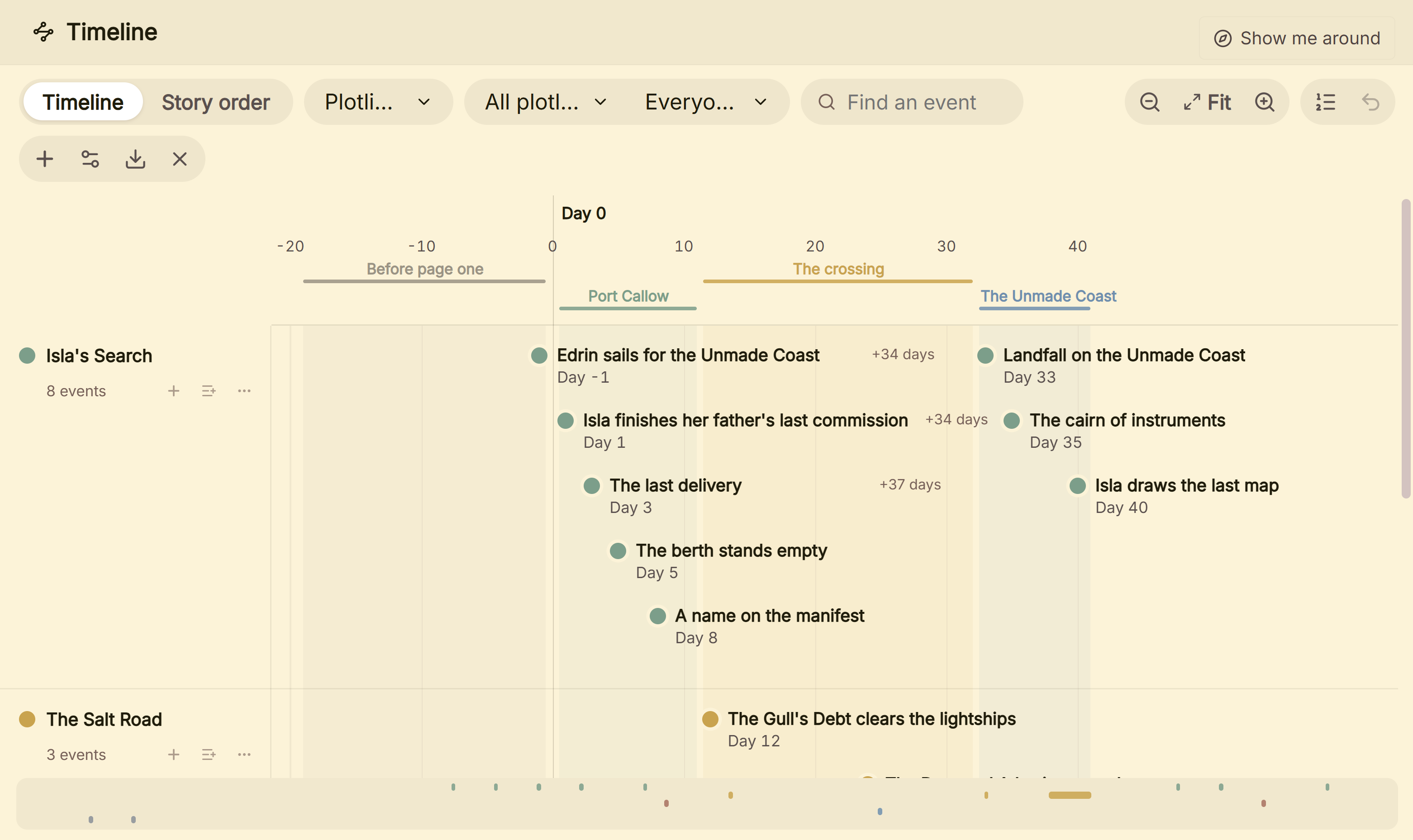 A to-scale Timeline, one lane per plotline, with the gaps between events in days
Deckle leaves plot templates and series timelines to other tools. A writer who wants 30 or more structure templates is better served by Plottr, and one who wants a timeline on an iPad by Aeon Timeline. What Deckle adds is that the Timeline, the Codex and the manuscript are one project, and the same project formats the book as EPUB, print PDF and Word. The field of all-in-one apps is on best novel writing software.
Deckle is a one-time purchase. To try it, click Take Deckle for a Spin on the screen Deckle opens to. There is no card, no account and no time limit. It opens a sample novel with a filled Timeline to explore. New Timeline events are capped at three and new plotlines are blocked, so judge it on the sample's own events.
Common mistakes when buying timeline software
- Buying a plot grid to check chronology. Plottr's columns are chapters. If the question is "can she get from Port Callow to the coast in four days?", you need a dated axis.
- Buying a dated axis for a linear book. One point of view told in order needs a chapter list, not timeline software.
- Skipping the character links. Ages and clash warnings only work when each event knows who is in it. Budget an evening to link a finished draft.
- Forgetting where the timeline has to go. Check whether you can print it or send it to an editor. Plottr cannot print the timeline as it appears; Aeon Timeline exports images and CSV; Deckle exports PNG, PDF and Word.
- Assuming sync works everywhere. Aeon Timeline's Scrivener and Ulysses sync is desktop only, and Campfire's mobile app leaves out Calendars.
- Trialling with an empty project. Put a real book's first act in during the trial, with at least one flashback and two plotlines, or the trial tells you nothing.
FAQ
What is the best timeline software for writers?
Nothing authoritative ranks it. Aeon Timeline suits deep chronology and Scrivener users, Campfire suits invented calendars, Plottr suits chapter-by-chapter plot grids, and Deckle suits writers who want the timeline inside the writing app.
Is there a free timeline maker for writers?
Campfire's free plan gives 20 timeline events, bibisco Community includes a 30-day trial of its Timeline, and Deckle's free demo has no time limit. Aeon Timeline is free only in read-only mode.
Plottr vs Aeon Timeline: what is the difference?
Plottr lays scene cards on a grid of chapters and plotlines, with no date axis. Aeon Timeline places events on dates, with custom calendars and character ages. Plottr is $150 lifetime; Aeon Timeline is $65 with a year of updates.
Does Scrivener have a timeline?
Scrivener's features page lists no timeline view. Writers pair it with Aeon Timeline, which syncs both ways with Scrivener on Mac and Windows.
Can timeline software handle a fantasy calendar?
Aeon Timeline and Campfire build custom calendars. Deckle counts in any unit you name, such as Turn or Age, and switches to real dates only when you ask it to.
Which timeline apps work offline?
Plottr and Campfire say their desktop apps work offline, and Deckle works offline after activation. Aeon Timeline's FAQ says its files can be edited offline. bibisco is an installed desktop app, though the pages checked here do not say "offline" outright. Campfire's mobile app needs a connection, and Casefleet runs in a browser on cloud servers.
Sources
Retrieved 26 October 2026 unless stated. Prices change, so check the vendor page before buying.
- Aeon Timeline, Pricing: $65 one-time, 1 year of updates, $35 a year renewal, no subscription, 14-day trial, five devices
- Aeon Timeline, Platforms: macOS 10.13+, Windows 7+ 64-bit, iOS; sync and auto backup desktop only
- Aeon Timeline, Integrations: Scrivener (Mac, Windows) and Ulysses (Mac) sync, CSV import and export, image export, read-only sharing
- Aeon Timeline, Narrative and storytelling and Interactive timelines: Narrative View, character ages, custom calendars, markers
- Apple App Store, Aeon Timeline 3: version 3.5.123, $64.99 in-app, free read-only mode
- Plottr, Pricing and Features: plans, prices, 30-day trial, "Work Offline", "No AI", series timelines, "mobile apps"
- Plottr Help, Timeline overview (last updated 3 July 2024), Exporting, Devices, Linux; mobile app removed (retrieved 21 October 2026)
- Plottr Help, Can I write my story in Plottr? (last updated 27 February 2025): "the bulk of your writing"
- Plottr blog, Timeline creation (updated 18 August 2025): renaming columns to a unit of time
- Campfire Writing, Timeline maker, Pricing and FAQ: custom calendar, Gantt view, free plan limits, $12 a month, platforms, offline
- bibisco, Download and Community vs Supporters (updated 28 February 2026): $69, platforms, Timeline in Supporters
- Casefleet, Timeline software for writers, Pricing and FAQ: audience, Starter $30 and Advanced AI $140 per user a month, Casey on Advanced AI and up, browser and cloud servers, 14-day trial
- Literature & Latte, Scrivener features and Cross-grading: no timeline view listed, $59.99
- World Anvil, Pricing (retrieved 20 October 2026; the site blocks automated reading and was not re-read): free tier 2 timelines
- Ranking page checked for the claims above: Goodreads author blog, "Timeline software" (10 July 2016)
Scrivener is a trademark of Literature & Latte. Aeon Timeline, Plottr, Campfire Writing, bibisco, Casefleet and World Anvil are trademarks of their respective owners. Deckle is not affiliated with or endorsed by any product named here.