

The best plotting software is the one that plots the way you already do: Plottr for scene cards and templates, Scrivener for index cards tied to the draft, Dabble for a plot grid. Campfire and Aeon Timeline suit timeline-heavy plots, The Novel Factory suits a guided route, and bibisco or Manuskript suit a writer who needs it free. Price is the second question, because the same job costs $65 once in one app and $9.99 a month in another.

No standards body tests or ranks plotting software, so this page ranks nothing. It compares what each tool does, what it costs and what it exports, from each vendor's own pages, read on 26 October 2026. Prices are US dollars before tax. This is Deckle's own site, and Deckle is one of the tools compared, so weigh that section accordingly. It covers plotting a story, not graphing data.
What is plotting software?
Plotting software, also sold as novel planning software, story planning software or outlining software, holds the shape of a story before and during the draft. The tools fall into three groups.
- Dedicated planners. Plottr and Aeon Timeline plan; you write somewhere else. Plottr's help centre says you can write in it "(sort of), but that's not what Plottr is built for at this time".
- Writing apps with plotting built in. Scrivener, Dabble, Campfire, The Novel Factory and Deckle keep the plan and the manuscript in one project.
- Free tools. bibisco, Manuskript and yWriter, plus the free plans of Campfire and Reedsy Studio.
The group matters more than any feature list. A planner adds a second app and an export step. A writing app with plotting tools keeps the cards and the chapters in one place, so a moved card is a moved chapter. Which suits you depends partly on how much you plan at all, which is the subject of plotter vs pantser.
What should you look for in plotting software?
Five questions sort the field faster than a feature list.
- What does a plot look like in it? Index cards, a grid of plot lines against scenes, a timeline with dates, or a guided set of questions. Pick the one that matches how you already plan on paper.
- Do you draft in it? If not, check the export path to the app you do draft in.
- Does it run where you write? Platforms, and whether it works with no connection.
- What does it cost over three years? A subscription and a one-time licence compare only over time.
- Does it bring its own structure? Some ship beat-sheet templates; others leave the structure to you.
Plotting software compared
| Tool | Platforms | Price (as of 26 October 2026) | Offline | Exports | AI | How you plot |
|---|---|---|---|---|---|---|
| Plottr | Windows, Mac; web app on Pro; Linux beta | $60/yr or $150 lifetime; Pro $9.99/mo, $99/yr or $599 lifetime | Base plan yes; Pro edits already-open files offline | Word, Scrivener | "No AI" on every plan | Scene cards on plot-line timelines, 30+ templates, series view |
| Scrivener | macOS, Windows, iOS | $59.99 once for macOS or Windows | Yes, desktop app | Word, RTF, PDF, EPUB and more | None mentioned | Corkboard of index cards, Outliner with synopses and metadata |
| Dabble | Windows, Mac, Linux, web, phone browser | From $15/mo billed yearly; Lifetime Author $699 | Yes, syncs on reconnect | Word, Google Docs, web, Markdown | No training on your work; future AI opt-in | Plot Grid of plot lines against scenes |
| Campfire Writing | Mac, Windows, web, iOS, Android | Free plan; Standard $12/mo | Desktop app | Manuscript PDF and EPUB; elements to DOCX | None stated | Timeline and Arcs modules among 18 |
| Aeon Timeline | Mac, Windows, iOS | $65 once; optional $35/yr for updates | Files stored on your device | Syncs with Scrivener or Ulysses | None stated | Timeline with story-structure planning |
| The Novel Factory | Windows, macOS, iOS, Android (web app, can be installed) | Basic $8.25/mo or $82.50/yr; Standard $22/mo or $220/yr; $649 lifetime | Installed app works offline | Word only | "No AI of any kind" | Plot Manager corkboard, Novel Writing Roadmap |
| bibisco | Windows, macOS, Linux; phones via paid bibisco Everywhere | Community free; Supporters $69 once | Desktop app, local projects | PDF, DOCX, TXT; EPUB in Supporters | None stated | Storylines free; timeline and novel outline in Supporters |
| Manuskript | Linux, macOS, Windows | Free, open source (GPL-3.0) | Desktop app | HTML, ePub, OpenDocument, DocX | None stated | Outliner, plots linked to characters, Snowflake method |
| Deckle | Windows, macOS, Linux | One-time; free demo | Yes, after activation | EPUB, PDF, DOCX, Markdown, plain text | None in the app | Outliner card grid and list, Labels, Timeline with Story order |
Which is the best plotting software for your way of planning?
Plottr, for scene cards and beat-sheet templates
Plottr calls itself "the #1 visual book outlining and series bible software". Scenes sit as cards on drag-and-drop timelines, one row per plot line, and Plottr "auto-generates an outline from your timelines". Its features page lists "30+ plot and scene templates", and a series can hold "as many books" as you want, with a timeline for the series and one for each book. Every plan lists "No AI".
It suits a writer who plans in detail before drafting and wants the structure handed to them. You then draft elsewhere, and Plottr exports to Word and Scrivener only. Plottr has no free plan, only a 30-day trial. The templates are listed on Plottr templates, and the switch-away options are on Plottr alternatives.
Scrivener, for index cards attached to the draft
On Scrivener's Corkboard, "every section of your project is attached to a virtual index card", and moving a card moves that section in the manuscript. The Outliner shows synopses, word counts and metadata, with columns you choose or create. Labels colour-code sections and Status tracks progress, per the Scrivener features page. Literature & Latte does not list a timeline or plot templates.
It suits a writer who wants planning and drafting in one desktop app and is happy to build the structure. It costs $59.99 once for macOS or Windows, with iOS sold separately. How it pairs with a dedicated planner is in Plottr vs Scrivener.
Dabble, for a plot grid inside a writing app
Dabble describes its Plot Grid in one line: "Lay every scene against your plot lines and plot points, and spot the sagging middle before you write it." The Plot Grid is in the Writer plan, and a plot line can export as 3×5 or 4×5 index cards. Dabble runs in a browser and on phones, and keeps writing offline until it can sync.
It suits a writer who thinks in subplots side by side and wants the same project on a laptop and a phone. Writer is $15 a month billed yearly ($180), with a 14-day trial. Dabble "does not export PDF or ePub directly". How the grid works is set out in Dabble Plot Grid.
Campfire Writing, for timelines inside a worldbuilding kit
Campfire is 18 modules, including Manuscript, Timeline, Arcs, Characters, Relationships and Maps. The free plan allows 20 timeline events, 3 arcs and 10 characters, and the Standard plan at $12 a month removes the caps. The desktop app for Mac and Windows "allows you to write offline", while the mobile app needs a connection.
It suits a writer whose plot depends on a built world. Campfire and Scrivener are set side by side in Campfire vs Scrivener.
Aeon Timeline, for chronology-heavy plots
Aeon Timeline offers to "See, plan, and shape your plot" and to "Experiment with story structures", and it syncs "with Scrivener or Ulysses". It is $65 once, with an optional $35 a year for further updates, on Mac, Windows and iOS, with a 14-day trial. Linux is not listed. What it does for fiction, view by view, is on Aeon Timeline.
It suits mysteries, thrillers and multi-generational stories where the order of real events matters as much as the order of chapters.
The Novel Factory, for a guided route
The Novel Factory's Plot Manager turns "scattered scenes into a digital corkboard", and its Novel Writing Roadmap guides you "through every step of writing a novel". It also has character, location and item sections with prompting questions, and a drafting area. The vendor says it has "no AI of any kind". Export is "currently only available as a Word document".
It suits a first-time novelist who wants to be told what to plan next. Basic covers one novel at $82.50 a year; Standard is unlimited at $220 a year; a lifetime licence for Version 3.0 is $649. The trial is 30 days, with no payment details. Platforms, offline mode and the alternatives are in our review of The Novel Factory.
Is there free plotting software?
Yes, though each free option states its own limits. Plottr is not one of them: it has a 30-day trial and no free plan.
- bibisco Community Edition is free desktop software for Windows, macOS and Linux, released under the GNU GPL. Premise, fabula, setting and storylines are free; bibisco's edition comparison, updated 28 February 2026, puts the Timeline, Novel outline and mind maps in the Supporters Edition ($69 once), which you can trial for 30 days.
- Manuskript is free and open source, on GitHub under GPL-3.0. Its site offers the Snowflake method, plots "linked to your characters" and a hierarchical outliner. The latest release on its site is 0.17.0, from June 2025.
- yWriter is "free (on Windows)", with a storyboard view and goal, conflict and outcome fields for each scene. Mac and mobile versions cost "a small charge".
- Campfire's free plan caps the Timeline at 20 events and Arcs at 3.
- Reedsy Studio is free, with "Boards limited to card view" on the free plan. Its Outline plan adds unlimited boards for $7.99 a month, per the Reedsy Studio FAQ, and the app does not work offline.
More free tools, judged on drafting as well as planning, are on free novel writing software.
What does plotting software cost over three years?
Lifetime and one-time prices only make sense next to three years of a subscription.
| Tool and plan | Three years |
|---|---|
| Aeon Timeline | $65, or $135 with two years of update plan |
| Scrivener, one desktop platform | $59.99 |
| Plottr | $180 yearly, or $150 lifetime |
| Plottr Pro | $297 yearly, or $599 lifetime |
| Campfire Standard, monthly | $432 |
| Dabble Writer | $540 yearly, or $699 Lifetime Author |
| The Novel Factory Standard | $660 yearly, or $649 lifetime |
| bibisco Supporters | $69 |
| Deckle | One price, every update included (check the shop) |
Major upgrades can change these. Scrivener's FAQ says new major versions may be a paid upgrade, and The Novel Factory's lifetime price is for Version 3.0. More on paying once is in writing software one-time purchase.
What do roundups get wrong about plotting software?
Three claims in pages ranking for this search disagree with the vendors' own pages on 26 October 2026.
- "Plottr works online or offline." True of the base plan. For Plottr Pro, the pricing table marks offline "(Coming Soon)", and the features page describes Pro offline as "Edit your existing opened files while offline".
- "Plottr has mobile apps." Plottr's features page still mentions "web, desktop, and mobile apps". Its help centre says "We have removed our mobile app from the app stores" and "We don't have a phone/mobile view for Pro."
- "The Novel Factory starts at $7.50 a month." Kindlepreneur's outline-software roundup, updated 5 October 2026, gives that figure. The vendor's buy page shows Basic at $8.25 a month or $82.50 a year.
How do you plot a novel in Deckle?
Deckle is our app, so weigh this section accordingly. Deckle is a desktop writing app for Windows, macOS and Linux. Each project is a folder on your own computer, it works offline after activation, and it has no generative AI. The planning happens on the same chapters and scenes you draft in.
- Open the Outliner from View ▸ Outliner. Use + Add to make a Scene, Chapter or Folder for each beat you know so far.
- Write a synopsis on each card. In Grid View, each card has a title and a synopsis you type straight onto it. Pick Auto width or 2 to 6 columns from the dropdown.
- Colour the cards with Labels. In the Inspector, click the pencil beside the Status dropdown to open the Metadata Manager, and add one label per point of view or subplot on its Labels tab. Then click the label dot on any card to set it. The method is in organising scenes with labels.
- Drag cards into order by the grip on each card. The manuscript order changes with them. A card with scenes inside shows a folder badge; click it to open that level.
- Switch to List View for the whole tree at once, with Words, Synopsis, Status and Label columns. Add your own columns with +, and click a column heading to sort by it.
- Filter the plan. The filter button narrows the Outliner by type, label, status, linked Codex entries, or a search of titles and synopses.
- Lay the plot on the Timeline from View ▸ Timeline. Add from chapters lays your chapters out in order, events sit in lanes by plotline, and the Story order view puts a column per chapter, so a flashback shows out of sequence.
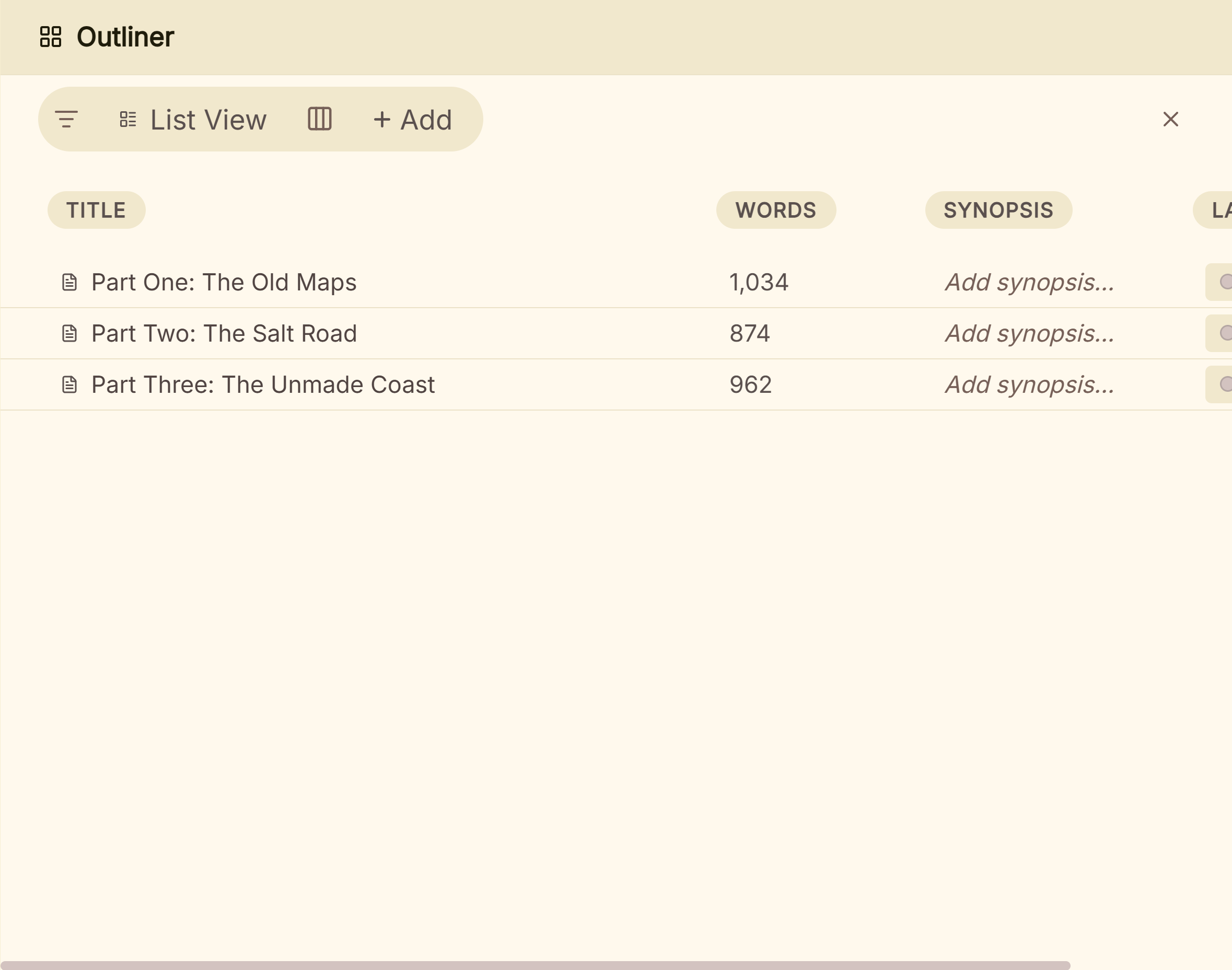 List View shows the plan and the draft's word counts together
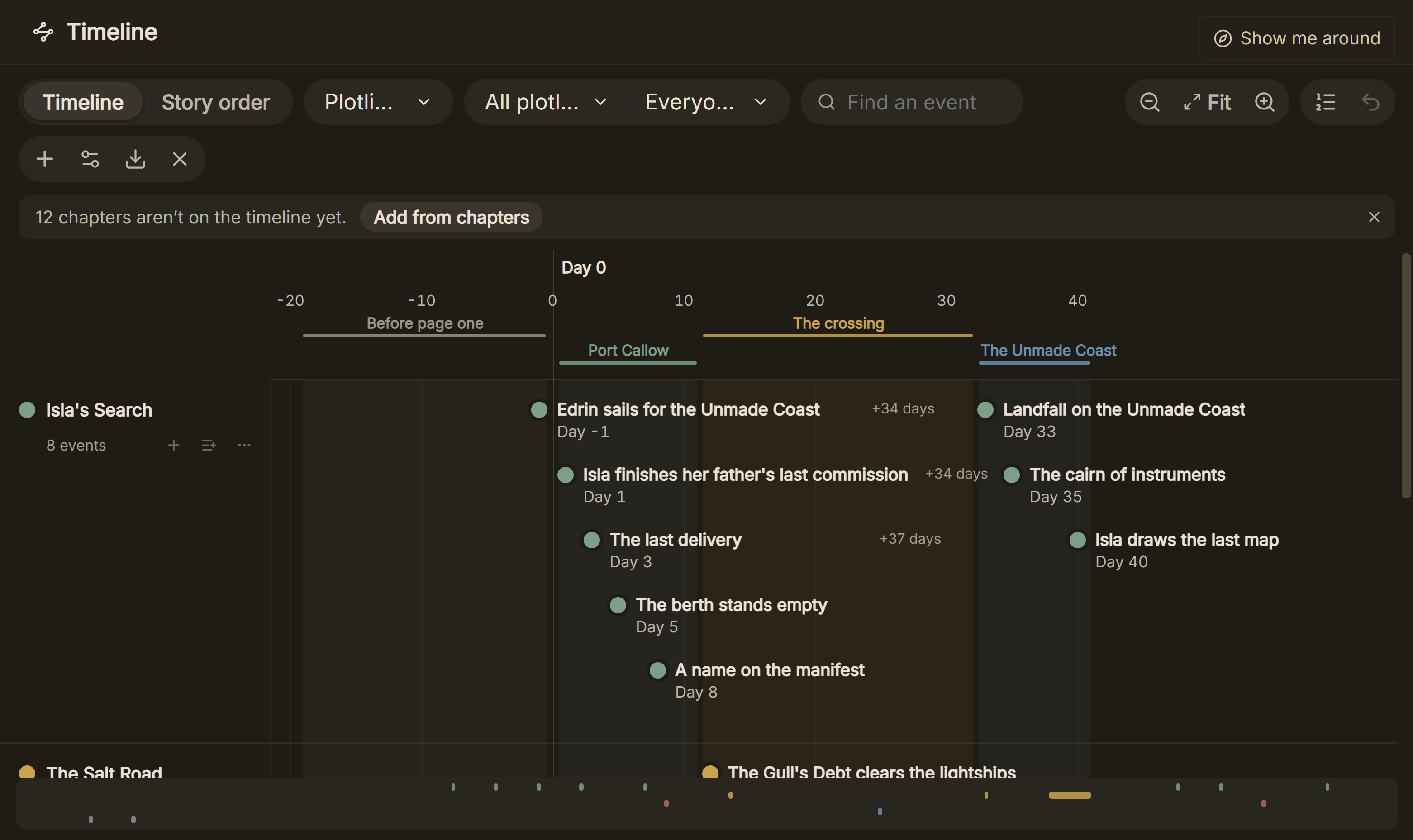 Events on the Timeline, one lane per plotline, with the gaps between them in days
Deckle leaves the structure to you. The beats come from the method you choose, such as Save the Cat or the three-act structure, typed onto cards as synopses. A writer who wants 30 or more ready-made templates inside the app is better served by Plottr, and one who wants the same plan on a phone by Dabble. Restructuring a finished draft is covered in restructuring your novel with the Outliner.
The same project then formats the book: EPUB with Generic, Kindle, Apple Books and Kobo targets, a print PDF in 8 trim sizes, and Word. The Kindle target writes an EPUB for KDP to convert, not a KPF file.
Deckle is a one-time purchase. To try it, click Take Deckle for a Spin on the screen Deckle opens to. There is no card, no account and no time limit. It opens a sample novel with the Outliner and Timeline to explore, and you can set labels, statuses and synopses on its cards. New writing is capped at about 500 words, new documents are blocked, and new Timeline events are capped at three, so judge the planning tools on the sample's own chapters.
Common mistakes when choosing plotting software
- Buying for the template library and then never using it. A beat sheet is a page of headings. If you already plan with one method, a blank card grid holds it as well as a template does.
- Forgetting the export path. A plan in a planner has to reach the draft. Plottr exports to Word and Scrivener; Aeon Timeline syncs with Scrivener and Ulysses; The Novel Factory exports Word only. Check that your drafting app takes the file before you build a 60-scene outline.
- Comparing a monthly price with a lifetime price. Use the three-year table above, not the headline figure.
- Assuming "desktop" means offline. Plottr Pro edits only already-open files offline, Campfire's mobile app needs a connection, and Reedsy Studio has no offline mode.
- Testing with no plot to hand. A trial is wasted on lorem ipsum. Bring the first act of a real book, or a book you know well, and plot that.
- Buying two apps when one would do. A planner plus a writing app is two licences and an export step. That is worth it for series planning or heavy chronology, and less so for a single standalone novel.
FAQ
What is the best plotting software for writers?
Nothing authoritative ranks it. Plottr suits template-led, scene-card planning; Scrivener and Deckle suit planning and drafting in one desktop app; Dabble suits a plot grid on several devices; Aeon Timeline and Campfire suit timeline-heavy plots.
Is there free plotting software?
Yes. bibisco Community Edition, Manuskript and yWriter (on Windows) are free, and Campfire and Reedsy Studio have capped free plans. Plottr has a 30-day trial and no free plan.
Is Plottr worth it?
It is worth it for a writer who wants plot templates and series timelines and drafts elsewhere. It costs $60 a year or $150 for a lifetime licence as of 26 October 2026. The full case is on is Plottr worth it.
Can Scrivener be used for plotting?
Yes. Its Corkboard and Outliner work on synopses, labels and status, and moving a card moves the section. It has no timeline or plot templates of its own.
What is the best novel planning software with no subscription?
Scrivener ($59.99), Aeon Timeline ($65), bibisco Supporters ($69) and Deckle are one-time purchases. Plottr, Dabble and The Novel Factory also sell lifetime licences.
Which plotting software has no AI?
Plottr lists "No AI" on every plan and The Novel Factory has "no AI of any kind". Deckle has no generative AI. The full list is on novel writing software without AI.
Does plotting software work on Linux?
Deckle, bibisco and Manuskript run natively on Linux, and Dabble has a Linux desktop app. Plottr's Linux build is "unsupported, beta software".
Sources
Retrieved 26 October 2026. Prices change, so check the vendor page before buying.
- Plottr, home page: "#1 visual book outlining and series bible software"; Pricing: plans and prices, 30-day trial, "Work Offline" and "(Coming Soon)", "No AI"
- Plottr, Features: 30+ templates, auto-generated outline, series, Word and Scrivener export, Pro offline wording, "mobile apps"
- Plottr Help, Can I write my story in Plottr? (last updated 27 February 2025), mobile app (last updated 10 May 2025) and Linux (last updated 29 May 2025)
- Literature & Latte, FAQ: paid major upgrades, 30-day-of-use trial; Scrivener features and overview: Corkboard, Outliner, labels, platforms, export formats; Cross-grading: "Scrivener for macOS or Windows is $59.99"
- Dabble, Pricing, Features, Install the desktop app and Export your manuscript: Plot Grid, prices, trial, offline, export formats, AI training statement
- Campfire Writing, Pricing and FAQ: modules, free plan limits, $12 a month, desktop offline, export
- Aeon Timeline, Pricing and home page: $65 one-time, $35 a year updates, platforms, trial, story planning, Scrivener and Ulysses sync
- The Novel Factory, home page, Buy, platforms and export: Plot Manager, Roadmap, no AI, prices, trial, offline install, Word export
- bibisco, Download: editions, price, platforms, bibisco Everywhere, export formats, GNU GPL; Community vs Supporters (updated 28 February 2026): Timeline, Novel outline, mind maps and EPUB are Supporters only
- Manuskript, GitHub and project site: licence, features, platforms, export formats, 0.17.0
- Spacejock Software, yWriter 7: free on Windows, storyboard, scene fields
- Reedsy, Studio pricing and Studio FAQ: free plan boards, Outline $7.99 a month, no offline mode
- Ranking pages checked for the claims above: Kindlepreneur, "Best Outline Software" (updated 5 October 2026), and Gitnux, "Top 9 Best Novel Plotting Software of 2026"
Scrivener is a trademark of Literature & Latte. Plottr, Dabble, Campfire Writing, Aeon Timeline, The Novel Factory, bibisco, Manuskript, yWriter and Reedsy Studio are trademarks of their respective owners. Deckle is not affiliated with or endorsed by any product named here.