

Plottr is a visual outlining and series-bible tool, and Scrivener is a writing app with organising tools. Plottr plans the story on a drag-and-drop timeline with 30+ plot templates, but says it is not built for drafting. Scrivener drafts and organises the manuscript and compiles it to Word, PDF and EPUB. Many authors use both: Plottr exports straight to a Scrivener file.

Plottr facts come from plottr.com and Plottr's help centre, and Scrivener facts from Literature & Latte's own pages, all read on 20 October 2026. Prices are as of October 2026.
Plottr vs Scrivener at a glance
| Plottr | Scrivener | |
|---|---|---|
| Main job | Visual outlining and series bible | Long-form writing and organising, with Compile for output |
| Platforms | Mac, Windows; Plottr Pro adds a web app; Linux is an unsupported beta | macOS, Windows, iOS and iPadOS |
| Offline | Base plan "Work Offline"; Pro marked "(Coming Soon)", a beta per the changelog | Desktop app, works offline |
| Price model | Annual subscription or lifetime licence | One-time, one licence per platform |
| Price | $60/yr or $150 lifetime; Pro $9.99/mo, $99/yr or $599 lifetime | $59.99 Mac or Windows; $23.99 iOS |
| Trial | 30 days | 30 days of actual use |
| Refunds | "We do not offer refunds" | Within 30 days |
| Planning views | Drag-and-drop timeline of scene cards by plotline, auto-generated outline | Corkboard, Outliner, Binder |
| Plot templates | 30+ (Hero's Journey, Snowflake, Three Act and more) | Not listed; document templates for character or location sheets |
| Series | Series View, unlimited books | One project at a time |
| Drafting | "You can (sort of)" | Yes, the core of the app |
| Export | Word and Scrivener | Word, RTF, OpenOffice, PDF, EPUB, Final Draft, plain text; Kindle (.mobi) on Windows only since Mac 3.5.0 |
| Collaboration | Real-time, on Pro | Not listed |
| AI | None; "committed to rejecting AI features" | None mentioned on its product pages |
Is Plottr or Scrivener better for outlining?
Plottr is the more visual outliner. Scrivener outlines the manuscript you are already writing.
Plottr lays a book out as "drag & drop visual timelines", "like a digital corkboard". Each scene is a card, and each row is a plotline, so you can see subplots run side by side. "Plottr auto-generates an outline from your timelines that you can view, edit and export." It ships "30+ plot and scene templates", including The Hero's Journey, Snowflake Method, Romancing the Beat, Story Circle, 12 Chapter Mystery, Three Act Structure and the Lester Dent Formula. The homepage now counts "40+ plot outlining templates".
Scrivener attaches "every section of your project" to "a virtual index card" on its Corkboard, per its features page, and cards can sit along coloured lines or in a freeform mode. The Outliner shows the same sections as rows, with synopses, word counts and metadata. Because the cards are the manuscript's own sections, moving a card moves the chapter. Literature & Latte's pages do not list a timeline view or plot-structure templates.
The difference is where the plan lives. In Plottr, the plan is its own file, and you carry it into a writing app. In Scrivener, the plan and the draft are the same project. The methods behind Plottr's templates are explained on pages such as the Snowflake Method and outlining vs discovery writing.
Can you write a novel in Plottr?
Not comfortably. Plottr's help centre answers "You can (sort of), but that's not what Plottr is built for at this time," and recommends "doing the bulk of your writing in a program designed for it." Its workaround is a dedicated "Writing" plotline, with the text typed into scene cards and exported through Advanced Export.
Scrivener is built for drafting. It has a Binder, Scrivenings (several sections edited as one document), Snapshots with Compare, Targets for the manuscript, section and session, Collections, split view and Composition Mode.
Can Plottr export to Scrivener?
Yes. Plottr's help centre says you can "export your data to both Microsoft Word and Scrivener", including "the details of your Timeline, Notes, Characters, and Places." Series View timelines export too. In the Scrivener file, "Scene card and plotline data can be viewed via Scrivener's inspector tool."
Three limits are stated in the same article:
- The file is "technically a 1.5 file", described as a Scrivener 2 file that works on Windows and Mac.
- Plottr cannot export into an existing Scrivener project.
- There is no sync. A change in Scrivener does not flow back to Plottr.
The usual workflow runs one way: plan in Plottr, export once, then draft in Scrivener.
Can Plottr import from Scrivener?
Yes, with strict conditions. Plottr imports from Scrivener 2 or later into Plottr v4.6.2022 or later. The chapters must be subfolders of a Manuscript folder, and the text Plottr reads is the chapter's Synopsis. Plottr warns that "Content entered into the main Text Area of the Document in Scrivener will cause the import not to work as expected." It "cannot currently import content located within subfolders", and notes arrive "in alphabetical order" without images, categories, custom attributes or tags.
In practice the import suits a Scrivener outline written in synopses, not a drafted manuscript.
Plottr vs Scrivener price
Plottr is a subscription by default, and Scrivener is a one-time licence.
| Setup | Price model | Paid at purchase | Total through year 3 |
|---|---|---|---|
| Scrivener, one platform | One-time | $59.99 | $59.99 |
| Plottr, yearly | Subscription | $60 | $180 |
| Plottr, lifetime | One-time | $150 | $150 |
| Plottr yearly plus Scrivener | Mixed | $119.99 | $239.99 |
| Plottr lifetime plus Scrivener | One-time each | $209.99 | $209.99 |
| Plottr Pro, yearly | Subscription | $99 | $297 |
These are list prices from each vendor's page, in US dollars before tax. Scrivener's $59.99 is the same on the Mac App Store. Literature & Latte's FAQ says it "occasionally" releases major updates that are paid for, which the table leaves out. A Mac licence does not cover Windows: the crossgrade costs $37.95. Plottr's base licence covers "Unlimited household devices". The full Plottr breakdown, including how to cancel, is on Plottr price, and Scrivener's is on Scrivener price.
Pick Plottr if
- You plan before you write and want to see plotlines side by side on a timeline.
- You want a ready structure, such as Romancing the Beat or the Hero's Journey, to fill in.
- You plan a series and want one bible across several books.
- You want a vendor that has publicly committed to no AI.
Pick Scrivener if
- You want one app for planning and drafting.
- You write on an iPhone or iPad as well as a computer.
- You want a one-time licence and the 30-day trial counted in days of use.
- You need Compile output to Word, PDF or EPUB.
Neither one formats a finished print book on its own. Scrivener's Compile makes PDFs "for printing, self-publishing", and Literature & Latte does not call them professionally typeset. Plottr has no PDF or EPUB export at all.
A third option: Deckle's Timeline, Outliner and Codex
Deckle is our app, so weigh this section accordingly.
Deckle is a desktop app for Windows, macOS and Linux that drafts, organises and formats a book in one project. For planning, it sits between the two tools above.
- Timeline. Events sit in lanes by plotline, or by any Codex category so one lane follows one character. You drag events to move them or stretch them into spans, and each event can link to a chapter or scene and to Codex entries. A "Story order" view puts a column per chapter, so flashbacks show out of sequence. The Timeline exports as PNG, PDF or DOCX, and checking story chronology shows the method.
- Outliner. A Grid View of index cards and a List view with custom columns, built from the manuscript's own chapters and scenes, as in Scrivener.
- Codex. A story bible with Characters, Locations, Items and custom sections, exportable as a Story bible (PDF) or Story bible (Word).
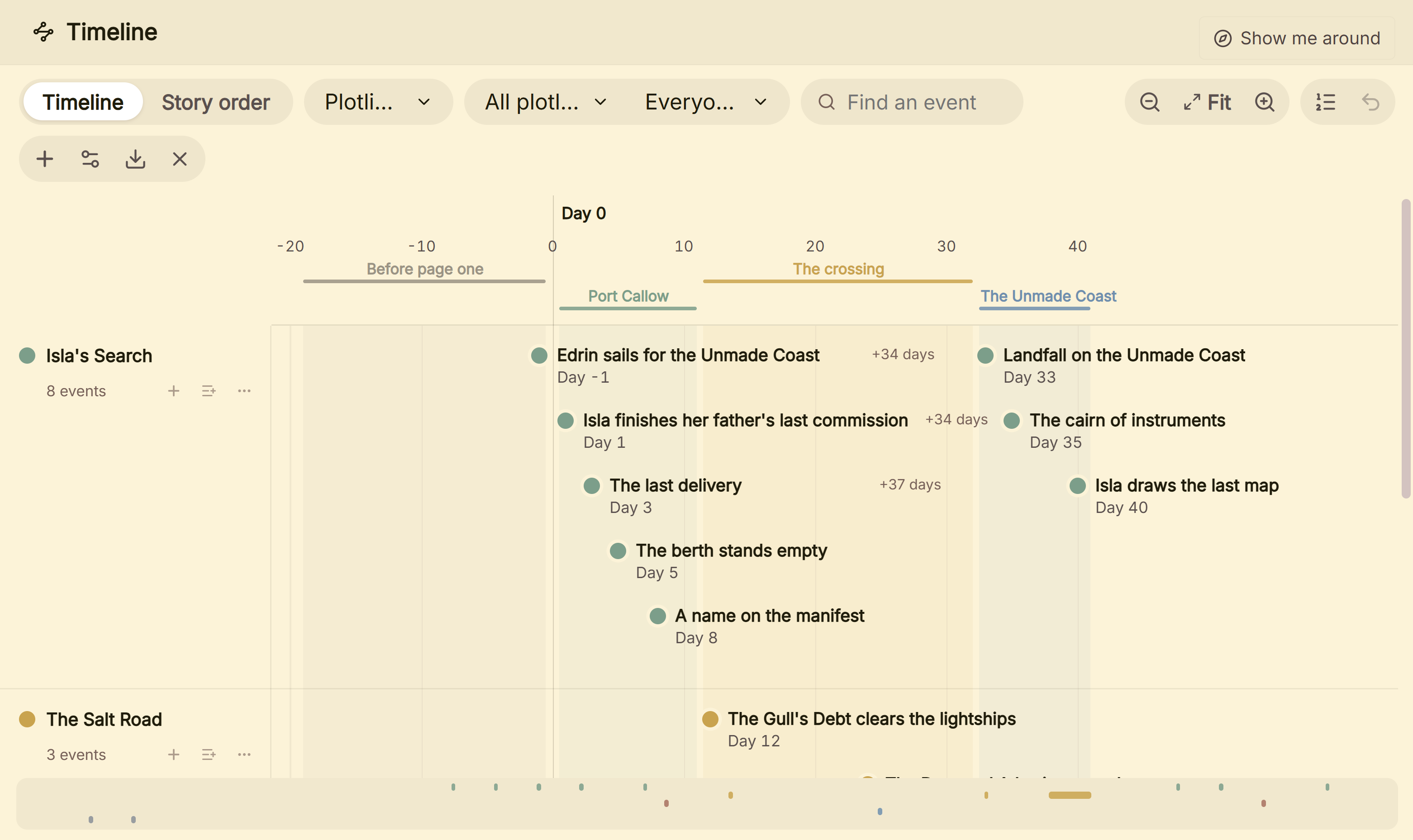 Plotlines as lanes on Deckle's Timeline, the nearest thing it has to Plottr's board
Deckle is behind Plottr on templates and series: it ships no plot-structure templates and has no series view. It is behind Scrivener on iOS, Collections and Snapshot Compare, as set out in Scrivener vs Deckle. It has no web app, sync or collaboration. What it adds is book formatting: 26 style presets, print PDF in eight trim sizes and EPUB for Kindle, Apple Books and Kobo. It imports a zipped Scrivener project and Word files, and has no generative AI.
Deckle is a one-time purchase. To try it, click Take Deckle for a Spin on the screen Deckle opens to. There is no card, no account and no time limit. It opens a sample novel with every screen open to explore, and you can restyle it and export real EPUB, PDF and DOCX files. New writing is capped at about 500 words, and new documents and imports are blocked. Other planning tools are compared in Plottr alternatives.
Common mistakes
- Drafting in Plottr. Plottr's own help steers you to a writing program for the text.
- Importing a drafted Scrivener project into Plottr. Main-text content breaks the import. Only synopses come across.
- Expecting a round trip. Plottr's Scrivener export is one-way, with no sync and no export into an existing project.
- Letting a Pro plan lapse with projects in it. Plottr says Pro plans lose "access to your projects" after expiry unless you renew. Export first.
FAQ
Is Plottr better than Scrivener?
Neither is better in every case. Plottr is a visual outliner with plot templates. Scrivener is a writing app with a Corkboard and Outliner.
Should I use Plottr or Scrivener?
Use Plottr if you plan on a timeline before writing, Scrivener if you plan inside the draft. Many authors plan in Plottr and draft in Scrivener.
Can I use Plottr and Scrivener together?
Yes. Plottr exports your timeline, notes, characters and places to a Scrivener file. The export is one-way.
Does Scrivener have a timeline?
Literature & Latte's product pages do not list one. Scrivener's planning views are the Corkboard and the Outliner.
Does Plottr replace Scrivener?
No. Plottr says it is not built for drafting and recommends writing in a program designed for it.
Is Plottr cheaper than Scrivener?
Not over time. Scrivener is $59.99 once per platform. Plottr is $60 a year or $150 for a lifetime licence, as of October 2026.
Does Plottr work with Scrivener 3?
Plottr imports from Scrivener 2 or later. Its export is a file Plottr calls "technically a 1.5 file", and Plottr's help does not mention Scrivener 3 by name.
Sources
All retrieved 20 October 2026. Prices change, so check the vendor page before buying.
- Plottr: "40+ plot outlining templates", no-AI statements
- Plottr features: visual timelines, auto-generated outline, 30+ templates by name, Series View, Scrivener import and export
- Plottr pricing: plans, prices, household devices, offline "(Coming Soon)" for Pro, Pro expiry terms
- Plottr changelog and Plottr features (retrieved 21 October 2026): Pro offline mode beta (v2026-04-02), "Edit your existing opened files while offline"
- Can I write my story in Plottr?, Plottr Help (last updated 27 February 2025)
- Exporting, Plottr Help (last updated 29 May 2025): Word and Scrivener export, 1.5 file, no sync
- Importing from Scrivener, Plottr Help (last updated 3 July 2024): requirements and limits
- Account purchases and subscriptions, Plottr Help (last updated 22 July 2025): no refunds
- Scrivener overview, Literature & Latte: platforms, exports, imports, organising tools, Compile PDF
- Literature & Latte, Scrivener release notes for macOS (retrieved 21 October 2026): 3.5.0, 1 October 2025, Kindle (.mobi) removed from Compile
- Scrivener features, Literature & Latte: Corkboard, document templates, EPUB and Kindle export
- Scrivener FAQ, Literature & Latte: licence per platform, paid major upgrades, trial, refunds
- Scrivener 3 on the Mac App Store, Apple: $59.99
- Scrivener store and crossgrading, Literature & Latte: $59.99, iOS $23.99, $37.95 crossgrade
Scrivener is a trademark of Literature & Latte. Plottr is a trademark of its owner. Deckle is not affiliated with or endorsed by any product named here.