

The main Plottr alternatives are Scrivener (index cards and an Outliner), Campfire Writing and World Anvil (timelines and worldbuilding), and Dabble (a Plot Grid). Free tools include bibisco, Manuskript and yWriter, and Deckle is a desktop app with a Timeline, Outliner and Codex. Authors usually leave Plottr to stop paying a subscription, to draft and plan in one app, or to get a free tool.

No standards body ranks outlining software, so this page ranks nothing. Every competitor fact comes from the vendor's own pages, read on 20 October 2026, and prices are as of October 2026. If you are choosing a planning tool for the first time rather than leaving Plottr, the whole category is compared on best plotting software for writers. If you are still weighing Plottr itself, what it does, costs and runs on is set out in our Plottr overview.
What Plottr does well
Plottr calls itself "the #1 visual book outlining and series bible software", and these are the parts a replacement has to cover.
- A visual timeline. Plottr describes "drag & drop visual timelines", laid out "like a digital corkboard", with scene cards in rows of plotlines.
- An outline that writes itself. "Plottr auto-generates an outline from your timelines that you can view, edit and export."
- Plot templates. The features page lists "30+ plot and scene templates", including The Hero's Journey, Snowflake Method, Romancing the Beat, Story Circle, 12 Chapter Mystery, Three Act Structure and the Lester Dent Formula. The homepage now says "40+ plot outlining templates".
- A series bible. Character bios, places and notes, with a Series View and unlimited books per series.
- Scrivener and Word export. Plottr exports the outline, notes, characters and places to Microsoft Word and Scrivener.
- No AI. The homepage says "We're not building AI into Plottr" and "Plottr is committed to rejecting AI features."
- A long trial. You can "try out Plottr for free for 30 long days."
Few tools match Plottr's template library or its card-per-scene timeline. If those are what you use, Plottr may already be the right tool. What it costs, plan by plan, is on Plottr price.
Why authors look for a Plottr alternative
- It is not for drafting. Asked "Can I write my story in Plottr?", the help centre answers "You can (sort of), but that's not what Plottr is built for at this time" and recommends "doing the bulk of your writing in a program designed for it."
- A subscription by default. Plottr is $60 a year, or $150 for a lifetime licence. Plottr Pro is $9.99 a month, $99 a year or $599 lifetime. The pricing FAQ says all subscriptions auto-renew.
- No refunds. The help centre says "We do not offer refunds" and points to the 30-day trial instead.
- Pro offline is unfinished. The pricing comparison table marks offline as "(Coming Soon)" for both Pro plans, while the base plan lists "Work Offline". As of October 2026, Plottr's changelog (v2026-04-02) refers to an "offline mode beta", and its features page describes Pro Offline Mode as "Edit your existing opened files while offline".
- Linux is a beta. Native Linux is "unsupported, beta software" that "may be discontinued at any time". Plottr Pro runs on Linux through its web app.
- No book output. Plottr exports to Word and Scrivener only. It has no PDF or EPUB export.
Plottr alternatives at a glance
| Tool | What it is | Platforms | Price (as of October 2026) | Timeline | Drafting | AI |
|---|---|---|---|---|---|---|
| Plottr | Visual outlining and series bible | Mac, Windows; web on Pro; Linux beta | $60/yr or $150 lifetime; Pro from $9.99/mo | Yes, drag and drop | Not built for it | None, by policy |
| Scrivener | Writing and organising | Mac, Windows, iOS | $59.99 Mac or Windows, one-time | Not listed | Yes | None mentioned |
| Campfire Writing | Worldbuilding and writing modules | Web, Mac, Windows, iOS, Android | Free plan; Standard $12/mo | Yes (Timeline module) | Yes | None mentioned |
| World Anvil | Browser worldbuilding | Web only, no offline | Free tier; from $4.50/mo yearly | Yes, plus parallel Chronicles | Manuscripts module | None; no training on your work |
| Dabble | Cloud writing and plotting | Windows, Mac, Linux, web | From $15/mo billed yearly; lifetime $699 | Plot Grid | Yes | None now |
| bibisco | Desktop planning and writing | Windows, Mac, Linux | Free; Supporters $69 one-time | Supporters only | Yes | None mentioned |
| Manuskript | Open-source planning and writing | Linux, Windows, Mac from source | Free (GPL-3.0) | Story-line view | Yes | None mentioned |
| yWriter | Free scene-based writing tool | Windows | Free on Windows | Storyboard view | Yes | None mentioned |
| Deckle | Writing, organising and formatting | Windows, macOS, Linux | One-time; free demo | Yes, plus Story order | Yes | None in the app |
Free Plottr alternatives
Plottr has no free plan, only the 30-day trial. Four tools cover planning for free, and each states its limits.
bibisco is desktop novel-planning software for Windows, macOS and Linux, with chapters, scenes, storylines and character development. The Community Edition is free. The Supporters Edition is $69 once, with two years of updates. bibisco's edition comparison, updated 28 February 2026, puts the Timeline, EPUB export, find/replace and writing goals in Supporters, not in Community. Data stays on your computer: "no novel data is housed on bibisco.com".
Manuskript is free and open source, released on GitHub under GPL-3.0. It has an outliner, index cards, a Snowflake-method novel assistant, characters, plots and a story-line view. Its download page says it is "still in the early development stages" and recommends frequent backups, and EPUB, OpenDocument and DOCX import and export need pandoc installed, and PDF needs LaTeX too, its wiki says. It is the closest match to the "plottr open source alternative" search.
yWriter is a free Windows app that splits a novel into chapters and scenes, with viewpoint, goal, conflict and outcome fields and a storyboard view. The Windows version was last updated on 30 January 2024.
Campfire Writing has a free plan with caps: 25,000 manuscript words, 10 characters and 20 timeline events. Elements over the limit become read-only.
Scrivener, for outlining and drafting in one app
Many Plottr users draft in Scrivener already, since Plottr exports straight to it, and Scrivener can carry the planning too. Its Corkboard attaches "every section of your project" to "a virtual index card", and cards can sit along coloured lines or in a freeform mode. Its Outliner shows synopses and metadata, and document templates make character or location sheets, per the Scrivener features page. Literature & Latte's pages do not list a timeline or plot templates. Scrivener costs $59.99 once for Mac or Windows, with a 30-day-of-use trial. The two tools are compared directly in Plottr vs Scrivener, and Scrivener's own alternatives are on Scrivener alternatives.
Campfire and World Anvil, for worldbuilding timelines
These two go wider than Plottr on the world and narrower on plot templates.
Campfire Writing is a set of 18 modules, including Timeline, Maps, Calendar, Characters, Arcs, Relationships, Magic and Languages. The desktop apps for Mac and Windows work offline, and the mobile apps need a connection. Its Standard plan is $12 a month as of October 2026. It exports manuscripts to PDF and EPUB.
World Anvil runs in the browser only, and its FAQ says "you must be connected to the internet to use it." It has interactive maps, timelines, Chronicles (parallel timelines) and family trees. Paid membership starts at $4.50 a month on an annual plan. Its Manuscripts module exports HTML only.
Dabble, for a plot grid inside a writing app
Dabble is a cloud-synced writing app with a Plot Grid, character profiles, a Story Notebook and plot labels. It runs on Windows, Mac, Linux and the web, with "True Offline" writing that syncs later. The Writer plan is $15 a month billed annually, and Lifetime Author is $699 once. Dabble does not export PDF or EPUB directly. Like Plottr, it is a subscription by default.
Deckle: a Timeline, Outliner and Codex in a writing app
Deckle is our app, so weigh this section accordingly.
Deckle is a native desktop app for Windows, macOS and Linux that covers drafting, organising and book formatting. Each project is a folder on your own disk, holding one .deckle database for all the writing, notes and settings, plus research/ and .deckle-assets/ folders. It works offline after activation and has no generative AI.
The planning tools that overlap with Plottr:
- Timeline. Events sit in lanes, by plotline or by any Codex category, so one lane can follow one character. You drag an event to move it or resize it into a span. Each event can link to a chapter or scene and to Codex entries, and you can filter by plotline.
- Two views of the same events. "Timeline" draws when things happen, to scale. "Story order" puts a column per chapter, so flashbacks show out of sequence.
- Periods and dates. Named periods mark stretches of story time, and real calendar dates are optional. The Timeline exports as PNG, PDF or DOCX.
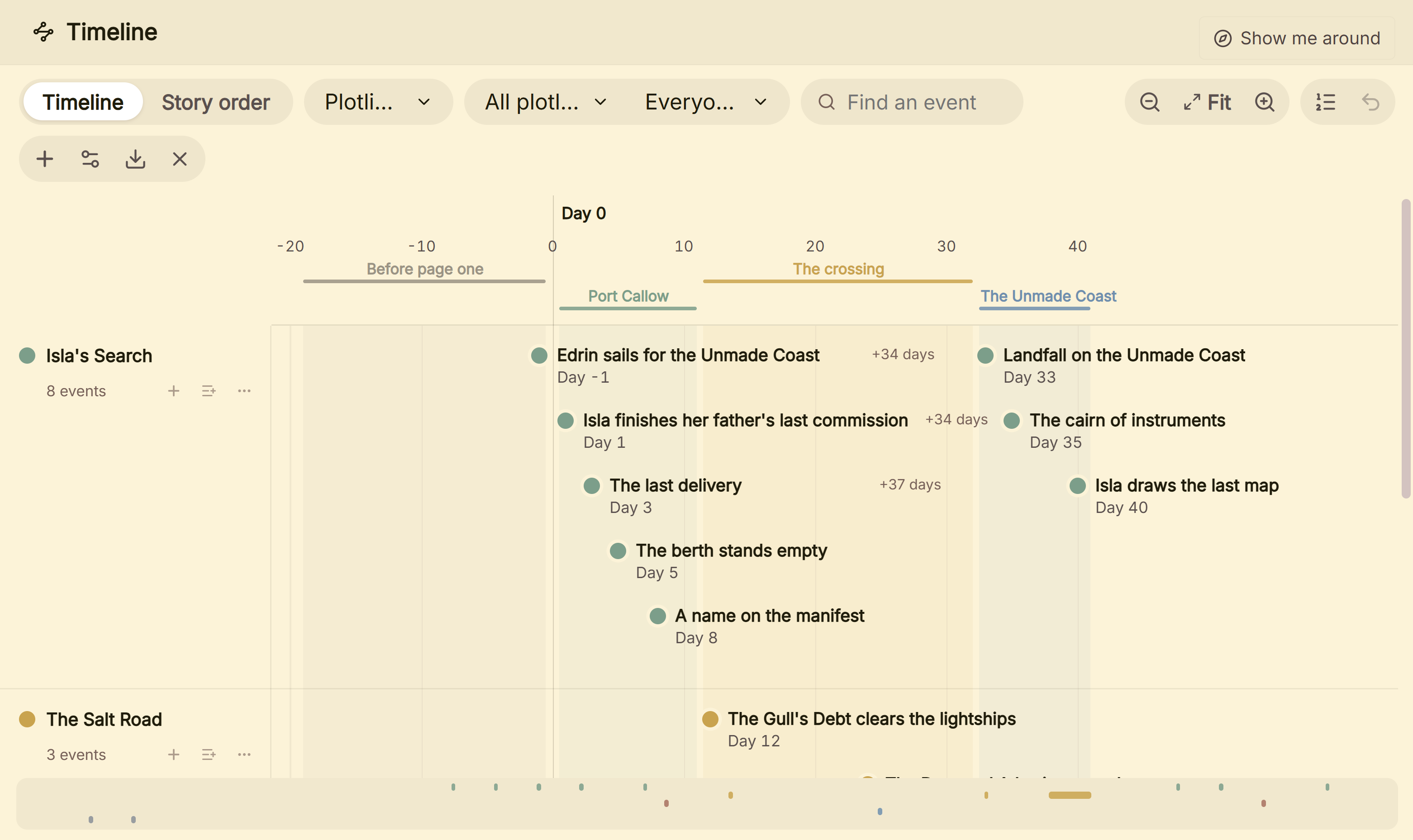 Events by plotline on Deckle's Timeline, with the gaps between them in days
- Outliner. A Grid View of index cards, one level at a time, and a List view with custom columns, built from the chapters and scenes you write in.
- Codex. A story bible with Characters, Locations and Items, custom sections, entry templates and image galleries. It exports as a Story bible (PDF) or Story bible (Word).
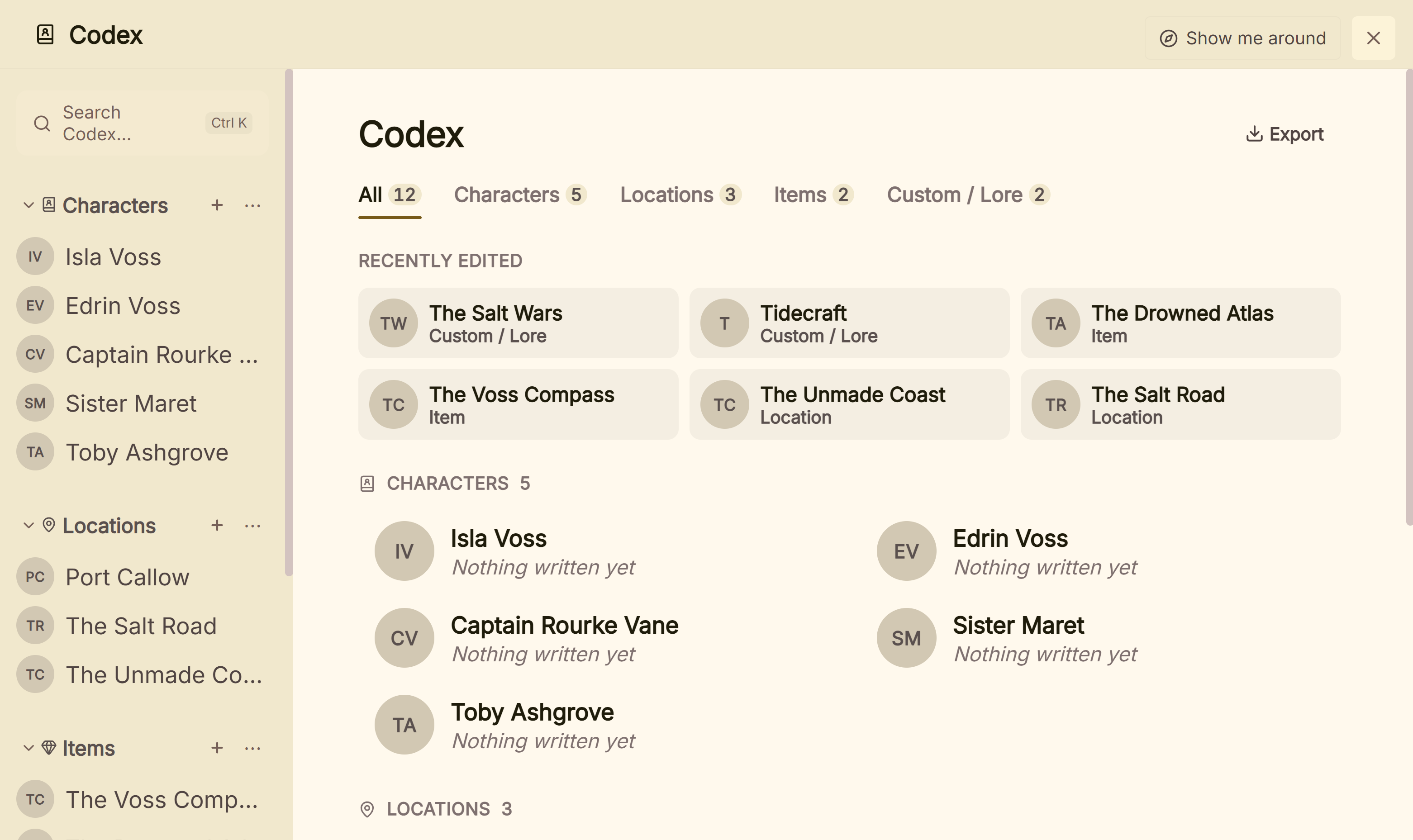 The Codex does the job of Plottr's character bios and places
Where Deckle is behind Plottr:
- No plot templates. Deckle ships no Hero's Journey, Snowflake or beat-sheet templates. You build the structure yourself, using guides such as the three-act structure.
- No series view. Plottr plans unlimited books in one series. Deckle's Timeline and Codex belong to one project.
- The outline does not come from the timeline. In Plottr, scene cards become the outline. In Deckle, the Outliner shows your documents, and timeline events link to them.
- No web app, sync or collaboration. Plottr Pro has a browser app, cloud sync and real-time collaboration. Deckle has none of the three.
What Deckle adds is the rest of the book: drafting, 26 style presets, print PDF in eight trim sizes, and EPUB with Generic, Kindle, Apple Books and Kobo targets. The Kindle target writes an EPUB for KDP to convert, not a KPF file.
Deckle is a one-time purchase. To try it, click Take Deckle for a Spin on the screen Deckle opens to. There is no card, no account and no time limit. It opens a sample novel with every screen open to explore, and you can restyle it and export real EPUB, PDF and DOCX files. New writing is capped at about 500 words, and new documents and imports are blocked. The demo also caps new Timeline events at three and blocks new plotlines, so judge the Timeline on the sample's own events.
What you'd lose by leaving Plottr
| Plottr feature | What the alternatives offer |
|---|---|
| 30+ plot and scene templates | Manuskript has a Snowflake assistant. Scrivener, bibisco, Dabble and Deckle list no plot-structure templates. |
| Drag-and-drop scene cards by plotline | Dabble's Plot Grid and Deckle's Timeline lanes come closest. Scrivener's Corkboard shows cards without a time axis. |
| Series View, unlimited books | World Anvil and Campfire organise a whole world. Deckle and Scrivener work one project at a time. |
| Export to Scrivener | Scrivener imports Word files, which Dabble, bibisco and Deckle all export. Novelcrafter also has an export-to-Scrivener guide. |
| Public no-AI commitment | Novlr, Ellipsus and Penpoint publish one. Scrivener, bibisco and Deckle have no AI but no written policy. The full list is on novel writing software without AI. |
| Browser access on Pro | World Anvil, Campfire and Dabble run in a browser. bibisco, Manuskript, yWriter and Deckle do not. |
How to move an outline out of Plottr
Plottr's export is the way out. Use Advanced Export to pick what goes: General (Title Page), Outline, Characters, Places and Notes. The Word export gives "a full outline of your book, with additional sections for your notes, characters, and places."
Word is the safest route, because almost every alternative imports .docx. Deckle imports Word files and builds chapters from heading styles, so check that each chapter title came out of Plottr as a heading. The Scrivener export is "technically a 1.5 file", and Plottr cannot export into an existing Scrivener project. Test two chapters before you move everything, using the method in how to move a manuscript between writing apps.
If your plan sits in a subscription, export before it lapses. Plottr says Pro plans lose "access to your projects" after expiry unless you renew.
FAQ
What is the best alternative to Plottr?
Nothing authoritative ranks these tools. Scrivener suits authors who want to plan and draft in one app, Campfire and World Anvil suit worldbuilding, and bibisco suits a free desktop tool.
Is there a free alternative to Plottr?
Yes. bibisco Community Edition, Manuskript and yWriter are free, and Campfire has a capped free plan. Plottr itself has a 30-day free trial and no free plan.
Is there an open-source Plottr alternative?
Manuskript is free and open source under GPL-3.0, with an outliner, index cards and a Snowflake assistant. Its download page says it is "still in the early development stages".
Is Plottr free?
No. Plottr offers a 30-day free trial, then costs $60 a year or $150 for a lifetime licence, as of October 2026.
Can you write a book in Plottr?
Plottr says "You can (sort of), but that's not what Plottr is built for" and recommends drafting in a writing program.
Does Plottr work offline?
The base Plottr plan lists "Work Offline". The pricing table marks offline as "Coming Soon" for Plottr Pro, and the changelog calls it a beta.
Does Plottr use AI?
No. Plottr says "We're not building AI into Plottr" and is "committed to rejecting AI features."
Sources
All retrieved 20 October 2026. Prices change, so check the vendor page before buying.
- Plottr: tagline, "40+ plot outlining templates", no-AI statements
- Plottr features: visual timelines, auto-generated outline, 30+ templates by name, series, import and export
- Plottr pricing: plans, prices, offline "(Coming Soon)" for Pro, 30-day trial, auto-renewal, lifetime and expiry terms
- Plottr changelog and Plottr features (retrieved 21 October 2026): Pro offline mode beta (v2026-04-02), "Edit your existing opened files while offline"
- Can I write my story in Plottr?, Plottr Help (last updated 27 February 2025)
- Exporting, Plottr Help (last updated 29 May 2025): Word and Scrivener export, Advanced Export, Scrivener 1.5 file
- Can I install Plottr for Linux?, Plottr Help (last updated 29 May 2025)
- Account purchases and subscriptions, Plottr Help (last updated 22 July 2025): no refunds
- Scrivener overview, features and FAQ, Literature & Latte: Corkboard, Outliner, price, trial
- Campfire pricing and FAQ: modules, free plan limits, offline desktop app
- World Anvil pricing and FAQ: browser only, timelines, membership price
- Dabble pricing and features: Plot Grid, prices, offline
- bibisco download and FAQ: editions, price, local data; Community vs Supporters (updated 28 February 2026, retrieved 20 October 2026): Timeline, EPUB, find/replace and goals are Supporters only
- Manuskript, GitHub: licence, features, development status
- yWriter 7, Spacejock Software: features, free on Windows
- Literature & Latte, Cross-grading: "Scrivener for macOS or Windows is $59.99" (the store page loads its prices from the checkout, so this page shows the figure in its text), retrieved 21 October 2026
Scrivener is a trademark of Literature & Latte. Plottr is a trademark of its owner, as are Campfire Writing, World Anvil, Dabble, bibisco, Manuskript and yWriter. Deckle is not affiliated with or endorsed by any product named here.