

Plottr is a visual outlining and series-bible app for Windows and Mac: you plan a book as scene cards on a timeline of chapters and plotlines, starting from one of its 40+ plot templates, then write the book in another app. It costs $60 a year or $150 for a lifetime licence, with a 30-day free trial, and Plottr Pro adds a browser app, cloud sync and collaboration. It suits writers who outline in depth before drafting, especially series writers. It has no AI and no refunds.
This page sets out what Plottr is and does, what it costs, which device it runs on, and who suits an alternative. Every Plottr fact comes from plottr.com and Plottr's help centre, read on 1 November 2026, and prices are US dollars before tax. No standards body tests plotting software, so there are no scores here. This is Deckle's own site, and Deckle is one of the alternatives, so weigh that section accordingly. If you have already decided you want to leave Plottr, the full field is on Plottr alternatives.
What is Plottr?
Plottr calls itself "the #1 visual book outlining and series bible software". Its homepage says it is made by "a small team of 8 people", invites you to "Join 40,000+ writers", and sums up the app as "Plot. Edit. Series Bible. Best Friend." Its tagline is "Bring your story to life in a weekend."
Plottr is a planning tool. Its help centre asks itself "Can I write my story in Plottr?" and answers "You can (sort of), but that's not what Plottr is built for at this time." So you plan in Plottr and draft in another app. Plottr exports to Word and Scrivener to make that hand-over.
What does Plottr do?
Plottr's features page and help centre describe these parts.
- A visual Timeline. "Drag & drop visual timelines" cross chapters with plotlines. A scene card sits where the two meet, and you drag it to move it. You can "filter your story to easily see who's doing what, where, and when!"
- An outline that builds itself. "Plottr auto-generates an outline from your timelines".
- Plot templates. The homepage cites "40+ plot outlining templates" and names Hero's Journey, Romancing the Beat, Story Genius, 12 Step Mystery Formula, 3 Act Structure, Story Circle and a Horror Beat Sheet. The features page says "30+ proven plot templates", plus scene templates.
- A series bible. Character bios with custom fields, places and notes. A Project is "a container for a number of books or writing projects", and a Series View gives "a unique Timeline where you can organize the details of your Project at the series / project level".
- Tags. "Create tags to add and link custom story elements".
- An Idea Board for loose ideas you later turn into cards, characters, places or notes. The 21 May 2026 update groups ideas by thread.
- Export and import. Export the outline, characters, places and notes to Word or Scrivener. Import from Word, Scrivener and Snowflake Pro.
What Plottr does best is the grid. Few tools let you see every plotline of every chapter on one screen, start it from a named beat sheet, and carry the same characters across a whole series in one file.
What are Plottr templates?
Plottr templates are ready-made structures you start a project from. There are plot templates (beat sheets such as Hero's Journey or Romancing the Beat, laid out as empty scene cards), scene templates, and character templates. The homepage names Enneagram, Myers-Briggs, DISC and Snowflake method among the character ones. On top of those sit community templates shared by other writers and paid project packs. What each kind holds, how to add one and what to do when one goes missing are on Plottr templates.
A template is a starting grid, not a plan. It gives you the beats; you still decide what happens in each one.
How much does Plottr cost?
Plottr's pricing page lists three plans.
| Plan | Monthly | Yearly | Lifetime |
|---|---|---|---|
| Plottr | None | $60 | $150 |
| Plottr Pro | $9.99 | $99 | $599 |
| Plottr Pro + Community | $14.99 | $129 | $649 |
Higher figures appear beside most of these, such as $199 beside the $150 lifetime price. Those are not the prices charged.
- Every plan lists "Unlimited Household Devices", Windows and Mac, "Work Offline", "Automatic Backups", "All Upcoming Features" and "No AI".
- Pro adds a "Browser App (Works on Tablets!)", cloud sync and backups, "Real-time Collaboration" and sync with the separate Idea Threads app.
- Pro + Community adds a private community and an "Education Vault".
- The trial is "30 long days".
- Refunds: "we don't give refunds after purchase". In their place, the "Get Your Book Outlined Guarantee" offers up to five hours of coaching if you cannot outline your book within a week.
- Renewal: "all subscriptions are auto-renewing". A lapsed base plan keeps working without updates. A lapsed Pro plan loses "access to your projects" until you renew. "Lifetime Plottr plans never expire."
Cancelling, the lifetime maths and the full plan list are on Plottr price, and whether the money is well spent for your kind of book is on is Plottr worth it.
Is there a Plottr app for iPad, iPhone or Linux?
Plottr's help centre says it "works natively on Mac (Apple) and Windows (PC) computers". Beyond that:
- Phones and tablets. "We have removed our mobile app from the app stores as it did not meet our high vision for Plottr mobile." Support for existing installs was to end "near the start of Q1 2025". The Pro browser app is "best viewed on tablets/iPads", and "We don't have a phone/mobile view for Pro."
- Chromebook and Surface. Through Pro's browser app: "Plottr Pro can also be used on Chromebooks, Microsoft Surface tablets, and nearly any other device."
- Linux. A build exists, as AppImage and deb, but the help centre says "This is unsupported, beta software" that "may be discontinued at any time", and "Data loss may occur".
What each device can do, and what the separate Idea Threads app adds, is on Plottr for iPad and mobile.
Does Plottr work offline, and does it use AI?
The base plan works offline once installed; every plan lists "Work Offline". Pro is different. The pricing table marks Pro offline "(Coming Soon)", the features page says Pro can "Edit your existing opened files while offline", and the changelog for 2 April 2026 fixes "a crash in the offline mode beta". The details are on does Plottr work offline.
Plottr has no AI. Its homepage says "We're not building AI into Plottr" and that it is "committed to rejecting AI features". What it once planned and what its maker sells separately are on does Plottr use AI.
Plottr and its alternatives compared
| Tool | Platforms | Price model and price | Offline | Export | AI | Plot view |
|---|---|---|---|---|---|---|
| Plottr | Windows, Mac; Pro adds a browser app; Linux "unsupported, beta" | $60 a year or $150 lifetime; Pro $9.99 a month, $99 a year or $599 lifetime | Base plan yes; Pro offline in beta | Word (.docx), Scrivener | "No AI" | Grid of chapters and plotlines, 40+ templates, Series View |
| Dabble | Windows, Mac, Linux desktop; browser; phones and tablets through the browser | Subscription from $15 a month billed yearly; lifetime from $699 | "True Offline", syncs when you reconnect | Word, Google Docs, web page, Markdown; no direct PDF or EPUB | "AI-free", except its Read to Me voices | Plot Grid beside the manuscript |
| Aeon Timeline | Mac, Windows, iPad, iPhone | $65 once with a year of updates; optional $35 a year | Yes, after logging in | CSV, image, print; Scrivener and Ulysses sync | None mentioned | Dated axis with automatic ages |
| Campfire Writing | Mac, Windows, browser, iOS, Android | Free plan; Standard $12 a month, $99 a year or $336 lifetime | Desktop app only | Manuscript to PDF and EPUB; elements to DOCX | None mentioned | Timeline module (20 events on the free plan) |
| Scrivener | macOS, Windows, iOS | $59.99 once for Mac or Windows; iOS $23.99, sold separately | Yes | Word, RTF, PDF, EPUB, Final Draft and more | None mentioned | Corkboard and Outliner |
| Deckle | Windows, macOS, Linux | One-time, every update included; free demo | Yes, after activation | EPUB, print PDF, DOCX, Markdown; timeline as PNG, PDF or Word | No generative AI in the app | Timeline in plotline lanes, Story order view, Outliner Grid View |
Plottr was read on 1 November 2026, Aeon Timeline on 31 October 2026, and Dabble, Campfire and Scrivener on 20 and 21 October 2026.
Who is Plottr for, and who suits an alternative?
Plottr suits the outliner who knows the beats before writing a word, the series writer on book three who needs book one's details to hand, and the writer who wants a written promise of no AI. It especially suits someone who already drafts in Scrivener or Word and only needs the planning half. Scrivener's own overview describes its Corkboard and Outliner for planning inside the draft.
An alternative suits you better if:
- You want the plot grid beside the draft. Dabble puts a Plot Grid next to the manuscript in one app. The two are compared on Dabble vs Plottr.
- Your plot turns on dates, ages and travel times. Aeon Timeline places events on a dated axis and works out ages. Plottr's columns are chapters, not dates. The category is on timeline software for writers.
- You want it free. Campfire has a free plan, and free tools such as bibisco and Manuskript are on Plottr alternatives.
- You plan on a phone or run Linux. Plottr's mobile app is gone and its Linux build is unsupported.
- You want one app from outline to finished book. Plottr exports an outline to Word or Scrivener. Deckle keeps the plan, the draft and the book design in one project, and exports EPUB and print PDF from it.
Planning tools in general, from The Novel Factory to Scrivener's corkboard, are compared on best plotting software.
How do you plot a novel in Deckle?
Deckle is our app. It is a desktop writing app for Windows, macOS and Linux; each project is a folder on your own computer, it works offline after activation, and it has no generative AI. Its Timeline does the job Plottr's grid does, on the chapters you will write into.
- Open View ▸ Timeline and click Add Plotline. Make one plotline per thread: the main plot, the romance, the villain's scheme.
- Add events. Double-click a plotline, or use its +, to open New Timeline Event in the Inspector. Give it a Title, then click Create Event. If you have chapters already, the plotline's Add existing chapters/scenes button lays them out in order.
- Link each event to a Linked chapter/scene, and to the people in it under Linked characters/entities. Pull characters from linked document copies the chapter's characters across.
- Switch to Story order. Each chapter gets a column, in book order, so you see what every plotline does chapter by chapter. Drag a card to another column to relink it.
- Follow one character. Set Lanes to a Codex category such as Characters, and each lane becomes one person's thread.
- Write the synopsis on the cards. Open View ▸ Outliner and choose Grid View. Each chapter or scene is an index card with its synopsis; List View shows the same documents as rows with word count, label and status.
- Build your character sheets. In the Codex, click Manage Templates to set the fields every character, location or item entry starts with.
- Export the plan. In the Timeline, click Export timeline and choose Image (PNG), PDF or Outline (Word).
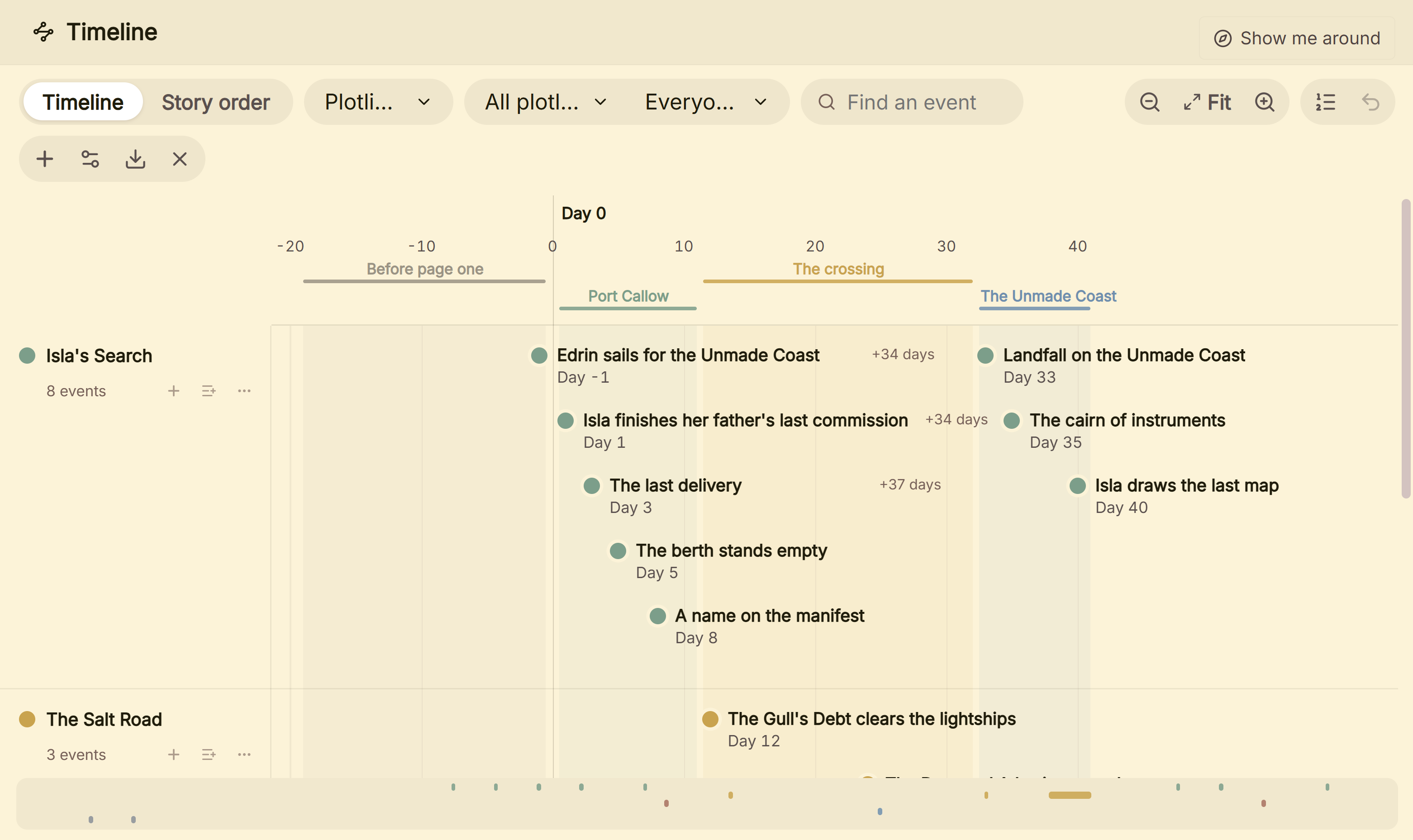 Plotline lanes on Deckle's Timeline; Story order is the tab beside it
Plottr suits writers who want to start from a named beat sheet. In Deckle you lay the beats out as your own chapters, and once the structure works, File ▸ Export as Template… saves the binder, Codex and styling for the next book in a series. A Plottr outline can also come across: export it to Word and import the file into Deckle, as Plottr vs Deckle sets out.
Deckle is a one-time purchase. To try it, click Take Deckle for a Spin on the screen Deckle opens to. It is a free demo with no card, no account and no time limit. It opens a sample novel with a filled Timeline; new Timeline events are capped at three and new plotlines are blocked, so judge it on the sample's own events.
What do ranking pages get wrong about Plottr?
Four pages that rank for Plottr searches disagree with Plottr's own pages on 1 November 2026.
- "Classic: $60/year or $199/lifetime", "Plottr Pro: $150/year or $15/mo", and Plottr on iOS and Android. Kindlepreneur's Plottr review (updated 23 December 2025) says this, and asks for a Pro lifetime option. Plottr's pricing page charges $150 lifetime ($199 is the higher figure shown beside it), Pro $9.99 a month, $99 a year or $599 lifetime. Plottr's help centre says the mobile app was removed from the app stores.
- "$199 for a lifetime deal" and Pro at "$150 per year". Reedsy's Plottr review (updated 2 June 2026) gives these, and lists Pro + Community as "Windows or Mac". The pricing page says $150 lifetime, Pro $99 a year, and gives Pro + Community the same browser app as Pro.
- Device tiers from $25 a year, and mobile apps. SelfPublishing.com's review (15 February 2022) lists $25, $45 and $65 a year for one, three and five devices, and iOS and Android. Every plan now lists "Unlimited Household Devices" at $60 a year, and the mobile app is gone.
- Plottr's own homepage on mobile. It says "Available for Windows, Mac, and Web!" and that Pro runs in a browser on a mobile device. The help centre says "We don't have a phone/mobile view for Pro." Try a phone during the trial before relying on it.
Common mistakes when buying Plottr
- Expecting to write the book in it. Plottr says it is not built for drafting. Budget for a writing app as well.
- Counting on a refund. There are none. Use the 30-day trial on a real book, filled to the midpoint, before you pay.
- Buying Pro untried. Plottr's refund article says the trial gives you "all the features of Plottr (offline)". The browser app, cloud sync and collaboration are Pro extras, so with no refunds you pay before you can try them.
- Letting Pro lapse with no export. A lapsed Pro plan locks your projects until you renew. Export to Word first.
- Planning on a phone. There is no Plottr phone app and no phone view for Pro.
- Trusting an old review's prices. Several ranking reviews quote prices Plottr no longer charges. Read the pricing page on the day you buy.
FAQ
What is Plottr used for?
Plotting a novel or series before you write it: scene cards on a timeline of chapters and plotlines, character and place profiles, and a series bible, exported to Word or Scrivener for drafting.
Is Plottr free?
No. There is a 30-day free trial, then $60 a year or $150 lifetime for the base plan. Campfire has a free plan, and bibisco and Manuskript are free.
Is Plottr a one-time purchase?
It can be. Every plan has a lifetime option: $150 for Plottr, $599 for Pro and $649 for Pro + Community. Lifetime plans "never expire".
Does Plottr have an app for iPad?
Not a native one. The mobile app was removed from the stores, and an iPad means the Plottr Pro browser app, which Plottr says is "best viewed on tablets/iPads".
Can Plottr export to Scrivener?
Yes. It exports the outline, characters, places and notes to a new Scrivener project, or to Word. The steps and limits are on how to export Plottr to Scrivener or Word.
Is Plottr better than Scrivener?
They do different jobs. Plottr plans with timelines and templates; Scrivener drafts and compiles. Many writers use both, as Plottr vs Scrivener explains.
What is the best Plottr alternative?
It depends on the job. Dabble suits a plot grid beside the draft, Aeon Timeline suits dated timelines, Campfire suits a free start, and Deckle suits writers who want to plan, write and format the book in one desktop app.
Sources
Retrieved 1 November 2026 unless stated. Prices change, so check the vendor page before buying.
- Plottr, Pricing: three plans and prices, higher figures beside them, "Unlimited Household Devices", "Work Offline", Pro offline "(Coming Soon)", "No AI", Pro and Pro + Community extras, 30-day trial, no refunds, guarantee, auto-renewal, expiry terms
- Plottr, home page: "#1 visual book outlining and series bible software", "40+ plot outlining templates", named plot and character templates, team of 8, 40,000+ writers, no-AI statements, "Available for Windows, Mac, and Web!"
- Plottr, Features: drag and drop timelines, auto-generated outline, "30+ proven plot templates", series, tags, filters, export and import, Pro offline editing, collaboration
- Plottr, Changelog: latest v2026-06-03; Idea Board grouping (v2026-05-21); offline mode beta crash fix (v2026-04-02)
- Plottr Help: Can I write my story in Plottr? (updated 27 February 2025); What is your refund policy? (retrieved 21 October 2026); What devices does Plottr work on? (26 February 2025); Mobile app (10 May 2025); Linux (29 May 2025); Project and series overview and Series View (3 July 2024); Exporting and Idea Board overview (retrieved 21 October 2026); Import from Word (9 September 2024)
- Dabble, Pricing, Export and Understanding your subscription (retrieved 20 and 21 October 2026)
- Aeon Timeline, Pricing and Integrations and FAQ (retrieved 31 October 2026)
- Campfire Writing, Pricing and FAQ (retrieved 20 and 21 October 2026)
- Literature & Latte, Scrivener overview and Scrivener FAQs and Store (retrieved 20 October 2026)
- Ranking pages checked for the claims above: Kindlepreneur, Plottr review (updated 23 December 2025); Reedsy, Plottr review (updated 2 June 2026); SelfPublishing.com, Plottr review (15 February 2022)
Plottr is a trademark of its owner. Scrivener is a trademark of Literature & Latte. Dabble, Aeon Timeline and Campfire Writing are trademarks of their respective owners. Deckle is not affiliated with or endorsed by any product named here.