

Aeon Timeline is a timeline app for Mac, Windows, iPad and iPhone that places your story's events on a dated axis, works out characters' ages, and syncs both ways with Scrivener. It costs $65 once, with one year of updates included and an optional $35 a year after that. It suits novelists whose books jump in time or run parallel storylines, especially those who already draft in Scrivener or Ulysses. It is a planning tool: you write the book somewhere else.
This page reviews Aeon Timeline for fiction writers, from Aeon Timeline's own pages read on 31 October 2026, and sets it beside the alternatives novelists usually weigh. No standards body tests timeline software, so there are no scores here. Prices are US dollars before tax. This is Deckle's own site, and Deckle is one of the alternatives, so weigh that section accordingly. If you are choosing between timeline tools in general rather than deciding on Aeon Timeline, the whole category is on timeline software for writers.
What is Aeon Timeline?
Aeon Timeline is made by Timeline.App Pty Ltd, the seller named on its App Store listing. Its site points to customer stories from "writers, lawyers, and project managers", so the same app plans a novel, a court case or a project. Writers start from a template. Its story guide lists Story Timeline, Novel, Worldbuilding, Historical Fiction, Biography, Screenplay Runtime, Multiple Story Arcs, Hero's Journey, Plot Grid and "Day 1, Day 2", and says "Templates are simply starting points".
Everything in a file is an item: events, characters, story arcs, locations, and "Anything else your story needs". The guide says "Item types are fully customizable". You then look at the same items through different views, chosen from a tab bar.
What does Aeon Timeline do for writers?
Aeon Timeline's feature pages describe these views and tools for fiction.
- Timeline View. Scenes and backstory sit on a dated axis so you can "examine how your scenes fit together". You can plan "against just days or weeks, or even create a custom calendar", zoom in and out, and add events with uncertain dates.
- Narrative View. Your story on index cards. You can "Drag and drop scenes in any order, regardless of dates", which is how a flashback sits late in the book and early on the axis.
- Outline View. Scenes arranged into chapters and folders.
- Character arcs and ages. You can "View separate timelines for each character", and "Aeon Timeline automatically calculates character ages at key events".
- Relationship View. Who is involved in what, for building believable characters.
- Spreadsheet View. The story guide uses it "to edit details in a table", and the platforms page lists it among the views on every device.
- Mindmap and Subway views. The interactive timeline page describes a Mindmap view of connections between events and a Subway view of "where people or themes intersect".
- Calendar markers. "Highlight key milestone moments so they stand out, or denote significant periods for context."
- Story structure. It "can support storytelling frameworks such as Hero's Journey, StoryGrid, and Save the Cat!", and you can save your own templates for a series.
What it does best is depth. Few tools give a novelist a dated axis, per-character timelines, automatic ages and a separate story-order view in one file.
Does Aeon Timeline work with Scrivener?
Yes. Its integrations page says you can "Sync your narrative with Scrivener (Mac/Windows)", and changes sync both ways. Ulysses sync works the same way on Mac only. You choose which event details go into Scrivener custom fields and keywords, and people and places can become Scrivener folders, such as character sheets.
Sync is desktop only. Aeon Timeline says "syncing is not available on iOS due to platform limitations", and its platforms page adds that Scrivener sync, Ulysses sync and auto backup "are only available on Mac and Windows". A 2022 Writer Unboxed review by Jeanne Kisacky lists "The potential for sync conflicts" among its downsides, so keep backups of both files before the first sync.
How much does Aeon Timeline cost?
The pricing page gives one price.
- $65 once. "Purchasing unlocks access to the current version of Aeon Timeline forever."
- One year of updates included. After that, updates are an optional $35 a year: "Cancel anytime and keep what you have." The FAQ says your card is not charged automatically for updates unless you subscribe to ongoing updates when you buy; if you do, you manage the renewal through FastSpring or Apple.
- Up to five devices across Mac, Windows and iOS, for one person.
- A 14-day free trial. The refund policy describes it as a trial of the desktop app on Mac and Windows.
- A 30-day refund window on purchases made through its own store. For a change of mind, its refund policy says it may "retain a 7% transaction fee". App Store purchases are refunded by Apple.
On the App Store the iOS app is free to download, with Aeon Timeline 3 at $64.99 and a year of updates at $34.99 as in-app purchases. The free download opens "in read-only mode to view timelines shared by other users", which is useful for an editor or co-author who only needs to look.
Over three years, Aeon Timeline costs $65 if you keep the version you bought, or $135 if you renew updates for the second and third years. Its FAQ says "After 12 months, you can continue using the version of the app you have." Other tools' three-year costs are on writing software one-time purchase.
Does Aeon Timeline work offline?
Yes, once you are logged in. Its FAQ says "you can open, view and edit timeline files without a persistent internet connection", and that timelines are saved "in files stored locally on your computer or device" unless you choose somewhere else. You need a connection to log in and unlock editing, to buy, to download updates, to load web-linked images and to sync a file kept in iCloud.
Aeon Timeline "does not have its own cloud storage". To use a file on more than one device you keep it in iCloud, Dropbox, Google Drive, OneDrive or Box, and the FAQ warns that two people editing at once "will cause conflict issues".
Is Aeon Timeline hard to learn?
Reviewers say it takes time. Kisacky's Writer Unboxed review says "the complexity is overwhelming at first", with "an intimidating (and potentially frustrating) learning curve", and concludes "Aeon timeline is not for everybody". She also found an organising system that worked for her as a pantser. The App Store listing showed 3.9 out of 5 from 50 ratings on 31 October 2026.
The fair reading is that the depth and the learning curve are the same thing. Use the 14-day trial on a real book: put in the first act, with at least one flashback and two plotlines, before you decide.
Aeon Timeline and its alternatives compared
| Tool | Platforms | Price model and price | Offline | Timeline export | Dated axis and ages | AI |
|---|---|---|---|---|---|---|
| Aeon Timeline | Mac (macOS 10.13+), Windows 7+ 64-bit, iPad, iPhone | One-time, $65 with 1 year of updates; optional $35 a year | Yes, after logging in | CSV, an image of each view, print; Scrivener and Ulysses sync | Yes, custom calendars; automatic ages | None mentioned |
| Plottr | Mac, Windows; browser on Pro | $60 a year or $150 lifetime; Pro from $9.99 a month | "Work Offline" on the base plan | Word and Scrivener | No; columns are chapters | "No AI" |
| Campfire Writing | Mac, Windows, browser, iOS, Android | Free plan (20 timeline events); Standard $12 a month | Desktop app only | Elements to DOCX while online | Yes, custom calendar and Gantt view | None mentioned |
| bibisco | Windows, macOS, Linux; Android and iOS apps with Community features | Community free; Timeline in Supporters, $69 once | Installed desktop app | Not described for the timeline | Not described | None mentioned |
| Scrivener | macOS, Windows, iOS | $59.99 once for macOS or Windows | Yes, desktop app | No timeline view listed | No | None mentioned |
| Deckle | Windows, macOS, Linux | One-time, every update included; free demo | Yes, after activation | Image (PNG), PDF, Outline (Word) | Yes, to scale with optional real dates; ages from a Born field | None in the app |
Aeon Timeline prices and facts were read on 31 October 2026, Plottr's on the same day, and the others on 26 October 2026.
Who is Aeon Timeline for, and who suits an alternative?
Aeon Timeline suits mystery, thriller and historical writers, family sagas, and any book where travel times or ages decide the plot. It especially suits a Scrivener or Ulysses user who wants the timeline and the draft to share scenes, and a writer who plans on an iPad.
An alternative suits you better if:
- You plot chapter by chapter in story order, with beat-sheet templates. Plottr lays scene cards on a grid of chapters and plotlines. The two are compared head to head on timeline software for writers, and Plottr's own alternatives are on Plottr alternatives.
- Your dates come from an invented world with many other moving parts. Campfire's Timeline is one module in a worldbuilding kit. The wider field is on best worldbuilding software.
- You want it free. Campfire's free plan allows 20 timeline events; bibisco Community includes a 30-day trial of its Supporters Timeline.
- You run Linux. Aeon Timeline lists Mac, Windows and iOS. bibisco and Deckle both ship for Linux.
- You want the timeline inside the app you write and format in. Deckle keeps the Timeline, the story bible and the manuscript in one project, so there is no sync step between two apps.
Planning tools that are not timelines first, from The Novel Factory to Dabble's plot grid, are on best plotting software.
How do you build a story timeline in Deckle?
Deckle is our app. It is a desktop writing app for Windows, macOS and Linux; each project is a folder on your own computer, it works offline after activation, and it has no generative AI. Its Timeline does the Aeon Timeline jobs novelists ask about most: a dated axis, a story-order view, ages and clashes.
- Open View ▸ Timeline and click Add Plotline. Make one plotline per thread, such as the main plot or one character's arc.
- Add events. Double-click a plotline, or use its +, to open New Timeline Event in the Inspector. Give it a Title, a Start and, if it lasts, an End, then click Create Event. If you have chapters already, the plotline's Add existing chapters/scenes button lays them out in order.
- Link each event to a Linked chapter/scene and to Linked characters/entities from the Codex. Pull characters from linked document copies the chapter's characters across.
- Set dates. Click Timeline settings. Under Unit, count in days or any unit you name. Under Dates, tick Show real dates, then set The story starts on and Days per step.
- Track ages. Give a character a Born field in the Codex. The Timeline works out their age in every event they are linked to, on the card when you point at an event and in the Inspector.
- Mark periods. Under Periods, click Add period to name a stretch of time across the board.
- Switch to Story order. A column per chapter, in book order, so a flashback is a card in a late column with an early date. Drag a card to another column to relink it.
- Check for clashes. When overlapping events share a linked character, a warning button appears with a count of the events that "put someone in two places at once", and the clashing events are flagged on the timeline. Click it to hide the flags. To follow one person, set Lanes to a Codex category such as Characters, or pick them from the Everyone filter.
- Export it. Click Export timeline and choose Image (PNG), PDF or Outline (Word).
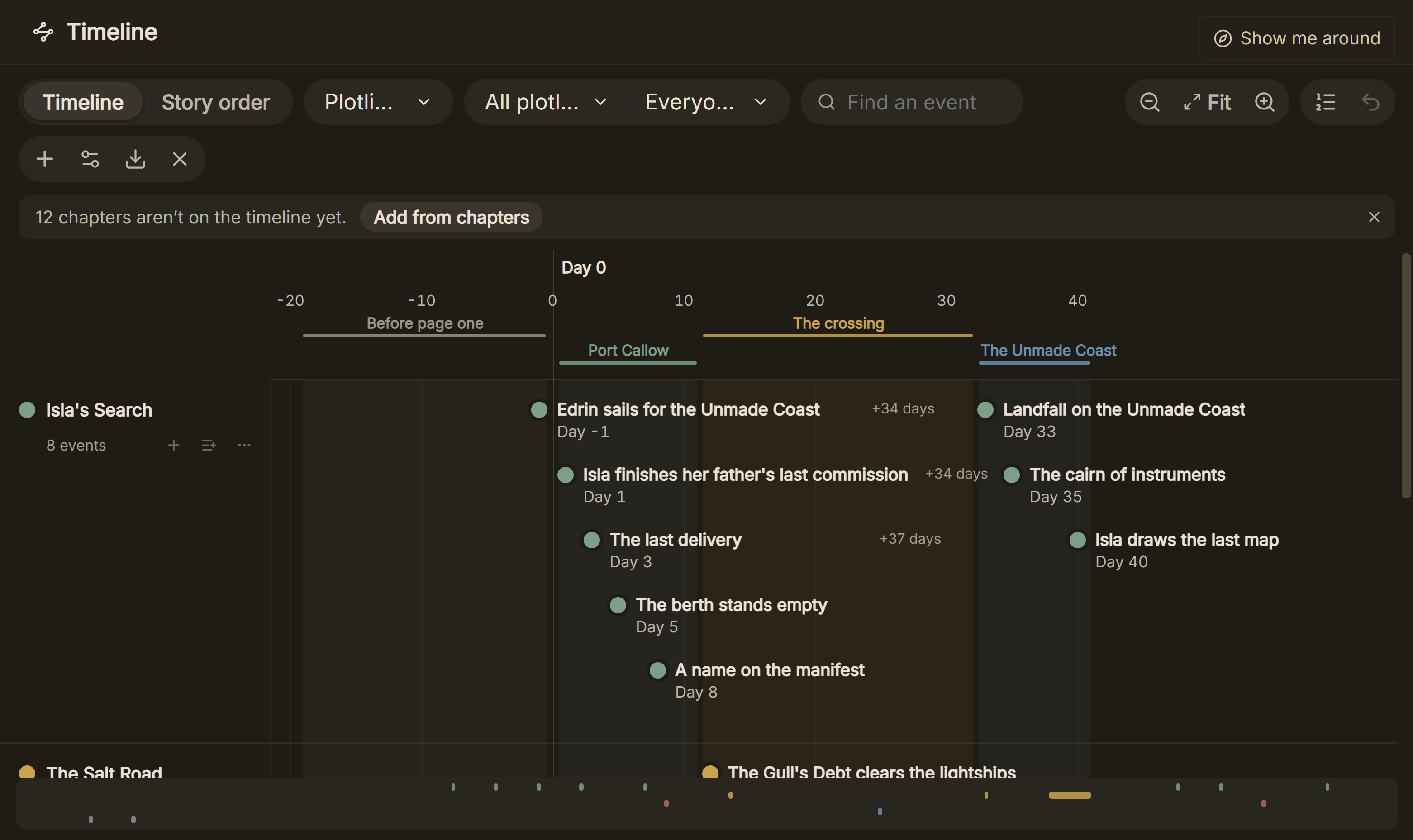 A to-scale Timeline with named periods and the gap in days between events; Story order is the tab beside it
Deckle leaves iPad planning and Scrivener sync to Aeon Timeline. What it adds is that the same project drafts the book and formats it as EPUB, print PDF and Word. A Scrivener project comes in as a zipped .scriv backup. How to use a timeline to find errors in a finished draft is on checking story chronology for consistency.
Deckle is a one-time purchase. To try it, click Take Deckle for a Spin on the screen Deckle opens to. It is a free demo with no card, no account and no time limit. It opens a sample novel with a filled Timeline; new Timeline events are capped at three and new plotlines are blocked, so judge it on the sample's own events.
What do ranking pages get wrong about Aeon Timeline?
Three pages that rank for these searches disagree with the vendors' own pages on 31 October 2026.
- "$50, Mac and Windows." AlternativeTo's Aeon Timeline page, last updated 6 October 2019, lists a single $50 payment and Mac and Windows only. Aeon Timeline's pricing page says $65, and its platforms page adds iPad and iPhone.
- "Plottr: $25/year or $149 lifetime" on "Mac, Windows, Linux, iOS, Android". Chapter's timeline tool roundup (3 May 2026) says this in its Aeon Timeline and Plottr comparison. Plottr's pricing page says $60 a year or $150 lifetime, desktop on Windows and Mac. Plottr's help centre says its mobile app was removed from the app stores and calls native Linux "unsupported, beta software". The same roundup gives Scrivener as "$49 one-time"; Literature & Latte's features page says $59.99.
- "For writers who don't mind working on-line." The 2022 Writer Unboxed review says this. Aeon Timeline's FAQ says files are stored locally and can be edited without a persistent connection; a connection is needed to log in, buy, update, load web images and sync through iCloud.
Common mistakes when buying Aeon Timeline
- Expecting to write the book in it. Aeon Timeline plans. Its answer for drafting is sync with Scrivener or Ulysses.
- Planning to sync from an iPad. Scrivener and Ulysses sync and auto backup run only on Mac and Windows.
- Thinking the $35 a year is a subscription you must keep. It buys updates. Stop paying and the version you have keeps working.
- Syncing without a backup. Copy both the Scrivener project and the timeline file before the first sync.
- Keeping one file in a shared folder for two editors. Aeon Timeline has no cloud of its own, and simultaneous edits conflict.
- Trialling with an empty template. Fourteen days goes quickly. Load a real act with real dates on the first day.
FAQ
Is Aeon Timeline worth it for novelists?
For books with time jumps, parallel storylines or ages that matter, it is one of the deepest timeline tools, at $65 once. For a linear story told in order, a chapter list or a plot grid is usually enough.
Is Aeon Timeline a subscription?
No. Its FAQ says "Aeon Timeline does not require a subscription". $65 buys the current version for good with a year of updates, and further updates are an optional $35 a year.
Does Aeon Timeline have a free version?
There is a 14-day free trial, and the app opens free in read-only mode to view timelines others share. Editing needs a licence.
Does Aeon Timeline work on iPad?
Yes, on iOS 13 or later, and one licence covers up to five devices. Scrivener and Ulysses sync are not available on iPad or iPhone.
Does Aeon Timeline run on Linux?
Its pages list Mac, Windows and iOS only. bibisco and Deckle both run on Linux.
What is the best Aeon Timeline alternative?
It depends on the job. Plottr suits chapter-by-chapter plot grids, Campfire suits invented calendars in a worldbuilding kit, and Deckle suits writers who want the timeline inside the app they write and format the book in.
Plottr vs Aeon Timeline: which should I choose?
Plottr answers what happens in each chapter on each plotline; Aeon Timeline answers when things happen and how old everyone is. Plottr is $150 lifetime or $60 a year; Aeon Timeline is $65 with a year of updates.
Sources
Retrieved 31 October 2026 unless stated. Prices change, so check the vendor page before buying.
- Aeon Timeline, Pricing: $65 one-time, current version forever, 1 year of updates, $35 a year optional, five devices, 14-day trial
- Aeon Timeline, Platforms: macOS 10.13+, Windows 7+ 64-bit, iPad iOS 13+, iPhone iOS 11.4+; sync and auto backup Mac and Windows only
- Aeon Timeline, Integrations: two-way Scrivener (Mac, Windows) and Ulysses (Mac) sync, not on iOS; CSV import and export, image export and print of each view, read-only sharing
- Aeon Timeline, Narrative and storytelling: Outline, Narrative, Timeline and Relationship views, character arcs, automatic ages, story frameworks, saved templates
- Aeon Timeline, Interactive timelines: custom calendars, zoom, markers, Mindmap and Subway views, nested events, uncertain dates
- Aeon Timeline, Story timelines guide: template list, item types, views
- Aeon Timeline, FAQ: no subscription, local files, editing without a persistent connection, no own cloud storage, update expiry, no automatic update charge unless you subscribe
- Aeon Timeline, Refund policy: 30 days, 7% fee may be kept on a change of mind, App Store refunds via Apple
- Aeon Timeline, home page: audiences, 14-day trial
- Apple App Store, Aeon Timeline 3: seller Timeline.App Pty. Ltd., version 3.5.123, in-app $64.99 and $34.99, read-only mode, 3.9 from 50 ratings
- Plottr, Pricing: $60 a year or $150 lifetime, Pro $9.99 a month, $99 a year or $599 lifetime, desktop Windows and Mac; Plottr Help, mobile app removed and Linux (retrieved 21 and 26 October 2026)
- Campfire Writing, Pricing and Timeline maker (retrieved 26 October 2026): free plan limits, $12 a month, custom calendar, Gantt view
- bibisco, Community vs Supporters (retrieved 26 October 2026): Timeline in Supporters, $69; release notes (retrieved 21 October 2026): free Android and iOS apps with Community features
- Literature & Latte, Scrivener features (retrieved 26 October 2026): no timeline view listed, $59.99
- Ranking pages checked for the claims above: Writer Unboxed (Jeanne Kisacky, 30 March 2022); AlternativeTo, Aeon Timeline (last updated 6 October 2019); Chapter, timeline tool for novel writing (3 May 2026)
Aeon Timeline is a trademark of Timeline.App Pty Ltd. Scrivener is a trademark of Literature & Latte. Plottr, Ulysses, Campfire Writing and bibisco are trademarks of their respective owners. Deckle is not affiliated with or endorsed by any product named here.