

The best worldbuilding software for a novelist is the one that keeps the world next to the book. Campfire suits maps, calendars and 18 worldbuilding modules. World Anvil or LegendKeeper suit a large wiki-style world, and Obsidian a free linked vault on your own disk. Scrivener and Deckle keep a story bible inside the manuscript project. Kanka, LegendKeeper and World Anvil also run tabletop campaigns, which matters if you game in the same world. Price and offline use split the field next, because the same job costs nothing in one tool and $12 a month in another.

No standards body tests or ranks worldbuilding software, so this page ranks nothing. It compares what each tool does, what it costs and where your world is stored, from each vendor's own pages, read on 26 October 2026. Prices are US dollars before tax. This is Deckle's own site, and Deckle is one of the tools compared, so weigh that section accordingly. It is about software for writing books; what to put in the bible itself is covered in how to build a worldbuilding bible.
What is worldbuilding software?
Worldbuilding software holds the invented parts of a story as entries you can look up: people, places, factions, magic rules, history and maps. Searches for a worldbuilding app or worldbuilding writing software land on three kinds of tool.
- Worldbuilding platforms. World Anvil, Campfire, LegendKeeper and Kanka are built around articles, maps and timelines. Campfire and World Anvil also have a manuscript module.
- General note apps. Obsidian and Notion are blank workspaces that writers shape into a world wiki with links and templates.
- Writing apps with a story bible. Scrivener and Deckle keep the world in the same project as the chapters, so the bible is open while you draft.
The kind matters more than any feature list. A platform gives you maps and calendars ready-made. A note app gives you freedom and a build job. A writing app keeps the world and the book in one project, so the bible is a click from the chapter.
What should writers look for in worldbuilding software?
Five questions sort the field faster than a feature list.
- Where do you write the book? If the answer is another app, the world has to sit beside it, and you will switch windows. If the tool has a manuscript module, check what it exports.
- Do you need maps and calendars, or a list of facts? Interactive maps and invented calendars belong to the platforms. Many novels need only well-kept entries.
- Does it work with no connection? World Anvil says it needs one. Campfire's desktop app and Obsidian work offline.
- Who else reads it? A game group, a co-writer or an editor changes the answer towards a shared web tool.
- What does it cost over three years? A free plan with caps, a subscription and a one-time licence only compare over time.
Worldbuilding software compared
| Tool | Platforms | Price (as of 26 October 2026) | Offline | Free option | Maps and calendars | Manuscript and exports | AI |
|---|---|---|---|---|---|---|---|
| Campfire Writing | Mac, Windows, web, iOS, Android | Standard $12/mo; modules sold singly | Desktop app; mobile needs a connection | Free plan with caps (2 maps, 10 characters, 25,000 words) | Interactive maps, Calendar Creator | Manuscript module; PDF and EPUB | None stated |
| World Anvil | Web only | Master $54/yr or $7/mo; Grandmaster $99/yr | No | Freeman tier (2 worlds, 2 maps) | Maps with layers; calendars from Master | Manuscripts from Master; HTML export only | Does not train AI on your work |
| LegendKeeper | Web | Pro $9/mo or $90/yr; 14-day trial | "Work offline, sync later" | Basic plan | Nested interactive maps | No manuscript editor; exports modules | "Does not have generative AI features" |
| Kanka | Web ("any device") | Free; Owlbear $4.99/mo, Wyvern $9.99/mo | Not stated | Free, unlimited entries | Maps, calendars, timelines | No manuscript editor; full campaign export | None stated |
| Obsidian | Windows, Mac, Linux, iOS, Android | Free; Sync from $4/mo | Yes, files on your device | Free without limits | Through community plugins | Markdown files; one-note PDF built in | None built in |
| Notion | Mac, Windows, web, mobile | Free; Plus $10 per member/mo | Pages you choose to download | Free plan, 5 MB file uploads | Not built for maps | PDF, HTML, Markdown, CSV | Notion AI trial on Free and Plus |
| Scrivener | macOS, Windows, iOS | $59.99 once per desktop platform | Yes, desktop app | 30-day trial | Images and documents in the project | Full manuscript; Word, PDF, EPUB and more | None mentioned |
| Deckle | Windows, macOS, Linux | One-time; free demo | Yes, after activation | Free demo | Map printed as a full-page image; Timeline in your own units | Full manuscript; EPUB, print PDF, Word | None in the app |
Which worldbuilding software suits which writer?
Campfire, for maps, calendars and modules in one kit
Campfire is 18 modules, among them Characters, Locations, Maps, Calendar, Encyclopedia, Magic, Languages, Species, Cultures, Religions and Manuscript. Its Calendar Creator builds custom months, weekdays and moons, and its Maps module takes an uploaded image and adds linked markers. The free plan caps Maps at 2, Characters at 10, Locations at 5 and the Manuscript at 25,000 words. Standard is $12 a month for every module, and single modules can be bought on their own.
The desktop app for Mac and Windows "allows you to write offline", while the mobile app says "An internet connection is required". Collaborators need only a free account. It suits a writer who wants every world tool ready-made and is happy to draft inside it or alongside it. Its costs over time are weighed in is Campfire Writing worth it.
World Anvil, for a large world you may publish or game in
World Anvil is a browser platform of articles, templates, interactive maps, timelines, family trees and calendars, plus a novel module called Manuscripts. The free Freeman tier allows 2 worlds, 42 articles, 2 maps and 100 MB of storage, with no private worlds and no Manuscripts. Master is $54 a year and Grandmaster $99 a year, with monthly options. Its FAQ says you "must be connected to the internet" and that subscriptions are non-refundable. Manuscripts export as HTML only.
It suits a writer building a world they want to share online, run games in or keep growing for years. The two big platforms are set side by side in Campfire vs World Anvil, and the offline options are on World Anvil offline alternatives.
LegendKeeper, for a fast wiki with nested maps
LegendKeeper calls itself "the ultimate collaborative worldbuilding tool for game-masters and storytellers", and its FAQ says it is "great for writers" as well. Maps nest inside maps, so you can "zoom from continents to crypts, and link every landmark to its wiki page". It lists "Work offline, sync later" and says it "does not have generative AI features". Pro is $9 a month or $90 a year after a 14-day trial with no card, and guests join projects free. There is no native mobile app yet.
It suits a writer who thinks in linked wiki pages and maps and drafts the book somewhere else.
Kanka, for a free world wiki with game tools
Kanka describes itself as "a community driven world building website" with "timelines, calendars, maps, 20+ categories". The free Kobold plan has unlimited entries and campaigns. Paid plans start at $4.99 a month and raise upload limits, map files among them. It says "Download your content anytime. No lock-in, ever."
It suits a writer who wants a free, structured world wiki and may share it with a game group. It organises a world as a campaign, the tabletop word for it.
Obsidian, for a free vault of linked notes on your own disk
Obsidian is "Free without limits" and keeps notes as Markdown files on your device, on Windows, Mac, Linux, iOS and Android. Each note can link to any other, which is how writers turn it into a world wiki. Templates is a core plugin, and maps, timelines and novel tools come from community plugins. Sync between devices is $4 a month billed yearly.
It suits a writer who likes building their own system and wants the files to outlive any app. Whether it also works for the draft is covered in is Obsidian good for novel writing.
Notion, for a world kept in databases you already use
Notion's free plan gives a solo user unlimited pages and blocks, with file uploads up to 5 MB. Writers build a world as databases of characters and places with linked pages. It runs on Mac, Windows, the web and mobile. On the free plan you choose which pages to download for offline use, and it includes a limited trial of Notion AI. Pages export as PDF, HTML or Markdown.
It suits a writer whose notes, research and planning already live in Notion. It is a general workspace, so maps and calendars are yours to build.
Scrivener, for world notes inside the manuscript project
Scrivener keeps research beside the draft. Literature & Latte's overview says you can import "all sorts of files", including images and PDFs, create "character or location sheets for planning a novel" as templates, and "create your own meta-data fields". It is $59.99 once for macOS or Windows, and the Mac App Store listing shows the same price. iOS is $23.99.
It suits a writer who wants one desktop project for the world and the book and is content to shape the world as documents. A dedicated planner beside it is weighed in Campfire vs Scrivener.
Is there free worldbuilding software?
Yes. Each free option states its own limits.
- Obsidian is free with no caps; only Sync and Publish cost money.
- Kanka's free plan has unlimited entries and campaigns.
- Notion's free plan is unlimited for a solo user, with 5 MB uploads and 7 days of page history.
- Campfire's free plan includes every module, capped (2 maps, 1 calendar, 5 encyclopedia articles, 25,000 manuscript words). Elements over a cap become read-only.
- World Anvil's Freeman tier allows 2 worlds, 2 maps and 42 articles, with no Manuscripts.
- LegendKeeper offers a free Basic plan described as "Collaborate & keep your work", and a 14-day Pro trial.
Free tools that also handle the draft are compared on free novel writing software.
Worldbuilding software for writers vs for game masters
A novelist and a game master need different things from the same world. A novel needs the facts the book commits to, open beside the chapter, and a way to check them before an editor does. A campaign needs pages players can read, secrets hidden from them, and statblocks.
World Anvil, LegendKeeper and Kanka serve both, and their own pages show the tabletop side. World Anvil lists statblocks, LegendKeeper says it works alongside Foundry, Roll20 and Fantasy Grounds, and Kanka calls itself an "RPG campaign management tool". A writer who also runs games in their world gets the most from them. A writer who only writes books may never touch half of what they pay for.
Do you need a separate map maker?
Often, yes. The worldbuilding platforms display a map and pin entries to it, but most writers draw the map somewhere else first. Campfire's maps page says you can "Link or upload maps straight from Inkarnate", a separate map-making tool. Two common choices:
- Inkarnate runs in the browser for fantasy maps, and its home page says "You can use Inkarnate Free for as long as you want, no credit card required." Paid plans add more.
- Wonderdraft is a desktop map maker sold as a "ONE-TIME PURCHASE $29.99" with "No subscriptions". Its requirements list Windows 10 (64-bit) and Ubuntu.
A finished map is a picture file, so it then goes wherever the world lives: a pinned map in a platform, an image in a Scrivener project, or a printed map page in a Deckle book.
What do roundups get wrong about worldbuilding software?
Three claims in pages ranking for this search disagree with the vendors' own pages on 26 October 2026.
- "Obsidian has no templates." NowNovel's worldbuilding roundup, hosted by Reedsy and posted 7 April 2026, lists "No templates or prompts" as a con. Obsidian's help says "Templates is a core plugin". It ships no worldbuilding prompts, which is the fair half of the claim.
- "LegendKeeper is online only." It is a web app, but LegendKeeper lists "Work offline, sync later" and "Offline mode" on its home page. Check how much of your world is available offline before relying on it.
- "World Anvil has lifetime options." GuideFlow's roundup, updated 13 August 2026, says lifetime options appear on the pricing page. They do for Grandmaster ($650) and Sage ($1,350), but not for Master, the cheapest paid tier.
How do you build a world in Deckle?
Deckle is our app, so weigh this section accordingly. Deckle is a desktop writing app for Windows, macOS and Linux. Each project is a folder on your own computer, it works offline after activation, and it has no generative AI. The world lives in the Codex, in the same project as the manuscript.
- Open the Codex from View ▸ Codex. Characters, Locations and Items are there already.
- Add your own categories. Click New category, give it a name (the box suggests "Factions, Deities, Vehicles") and pick an icon. A fantasy project might add Lore, Magic and Factions.
- Make an entry. Click + beside a category and choose Blank or one of your templates. Fill in the name, a one-line summary and any names it goes by under Also called.
- Give it the fields it needs. Use + on a section to add another field, and the pencil to edit them. Add a portrait, and pictures under Media with Add image.
- Save the shape as a template. Save as Template turns an entry's fields into a reusable template, and Manage Templates edits it. Editing a template updates the entries made from it.
- Write, and let the Codex find its names. Entry names and aliases are underlined in your chapters as whole words. Rest the pointer on one to see its card. Type @ to put an entry's name in the text and tag the chapter, or press Ctrl+K (Cmd+K on a Mac) to open any entry.
- Check where something appears. An entry's Mentions tab lists the chapters that name it, and the Inspector's Codex tab shows the entries in the chapter you have open.
- Export the bible. On the Codex home, Export ▸ Story bible (PDF) gives every entry with a contents page, and Story bible (Word) gives an editable copy. One entry exports as a Sheet (PDF) or Sheet (Word).
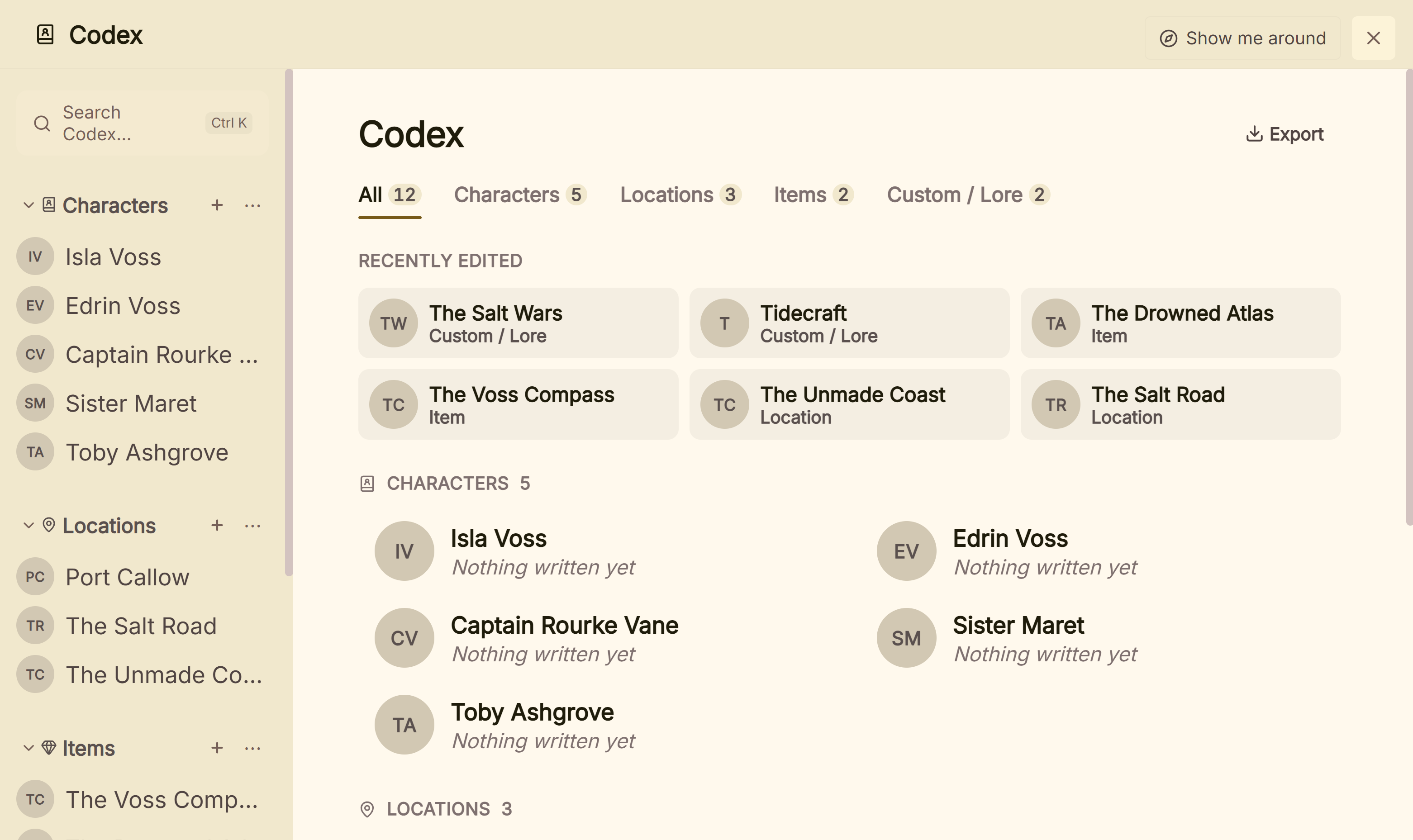 Characters, places, objects and a custom Lore section in one Codex
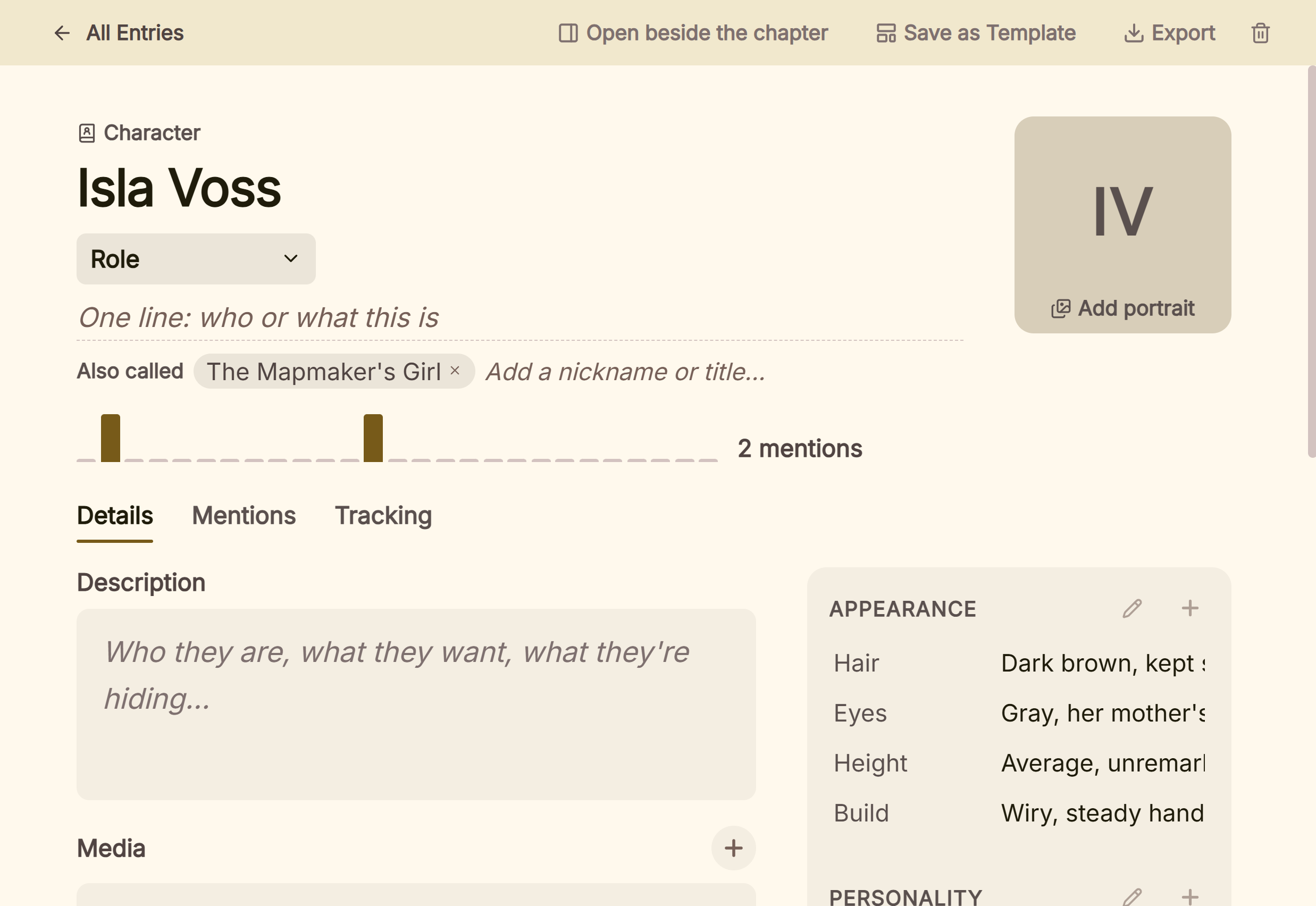 An entry shows how often the book names it
Deckle's Timeline uses the same world. Lanes can follow any Codex category, so each character or faction gets a row, and the axis counts in a unit you name, such as Day, Year or Moon. A character with a Born field shows their age at each event. The map is printed in the book itself: Add ▸ Full Page Image places it on a page of its own or across a two-page spread. For pinning places on an interactive map while drafting, Campfire, World Anvil or LegendKeeper suit as a companion. For the world on a phone, Campfire or Obsidian suit.
The same project then formats the book: EPUB with Generic, Kindle, Apple Books and Kobo targets, a print PDF in 8 trim sizes, and Word. The Kindle target writes an EPUB for KDP to convert, not a KPF file.
Deckle is a one-time purchase. To try it, click Take Deckle for a Spin on the screen Deckle opens to. There is no card, no account and no time limit. It opens a sample novel with its own Codex to explore, and you can export a real story bible from it. New Codex entries are capped at three and new writing at about 500 words, so judge the Codex on the sample's own world.
Common mistakes when choosing worldbuilding software
- Building the world in a tool you will not open while drafting. A bible in a separate app drifts from the book. If you draft elsewhere, keep both windows open, or pick a tool with the manuscript in it.
- Paying for game tools you will never use. Statblocks, player pages and secrets serve a campaign. A novelist who does not game can pay less for the same entries.
- Trusting a free plan's caps for a big world. Campfire's free plan holds 10 characters and 5 locations, and World Anvil's Freeman holds 42 articles. A fantasy series can pass those early in the first book.
- Assuming "web app" means always online, or "desktop" means offline. LegendKeeper works offline then syncs; Campfire's mobile app needs a connection; World Anvil needs one everywhere.
- Forgetting the exit. Check the export before the world grows. Kanka exports the whole campaign, Obsidian is plain Markdown, Notion exports Markdown and HTML, and World Anvil Manuscripts export as HTML only.
- Worldbuilding instead of writing. The bible only needs what the book commits to. More on that line is in how to build a worldbuilding bible.
FAQ
What is the best worldbuilding software for writers?
Nothing authoritative ranks it. Campfire suits maps, calendars and modules in one kit; World Anvil and LegendKeeper suit a large wiki-style world; Obsidian suits a free local vault; Scrivener and Deckle suit a story bible inside the manuscript project.
What is the best free worldbuilding software?
Obsidian is free with no caps, and Kanka's free plan has unlimited entries. Notion is free for a solo user. Campfire and World Anvil have capped free plans.
Is World Anvil good for novelists?
It is good for a large world you want to share or game in. It works only online, Manuscripts start at the $54-a-year Master tier, and Manuscripts export as HTML. The full case is on is World Anvil worth it for writers.
Is there worldbuilding software that works offline?
Yes. Obsidian, Scrivener and Deckle keep the world on your own computer, Campfire's desktop app works offline, and LegendKeeper works offline then syncs. World Anvil needs a connection.
Which worldbuilding apps have maps?
Campfire, World Anvil, LegendKeeper and Kanka have interactive maps: you upload a map image and add pins linked to your entries. Drawing the map itself is the job of a map maker such as Inkarnate or Wonderdraft.
Which worldbuilding software has no AI?
LegendKeeper says it has no generative AI, and Deckle has none in the app. World Anvil says it does not train AI on your work. Notion includes Notion AI.
Can I use Scrivener for worldbuilding?
Yes. Writers keep the world as documents, images and custom metadata in the project, with templates for character or location sheets. A map goes in as an image.
Sources
Retrieved 26 October 2026, except World Anvil's pricing and FAQ, read on 21 October 2026 through a reader service because the site blocks direct fetches. Prices change, so check the vendor page before buying.
- Campfire Writing, Pricing: 18 modules, free plan caps, Standard $12 a month, PDF and EPUB export, refunds; FAQ: desktop offline, mobile needs a connection, collaborators, DOCX element export; Calendar Creator: custom months, weekdays and moons; Interactive Maps: pins and zones, link or upload maps from Inkarnate
- World Anvil, Pricing: Freeman limits, Master $54.00 a year or $7.00 a month, Grandmaster $99.00 a year or $650 once, Sage $1,350 once, calendars and Manuscripts from Master, statblocks; FAQ: online only, non-refundable, no AI training; Export a manuscript: HTML only
- LegendKeeper, home page: who it is for, nested maps, offline, no generative AI, no mobile app, VTT note; Pricing: Basic and Pro, $9 a month or $90 a year, 14-day trial
- Kanka, home page and Pricing: categories, maps, calendars, export, free Kobold plan, paid tiers
- Obsidian, home page, Pricing, Download, Templates and Export to PDF: free core, Sync and Publish prices, platforms, core Templates plugin
- Notion, Pricing: Free and Plus, 5 MB uploads, offline pages, Notion AI trial; Desktop: Mac and Windows; Export your content: PDF, HTML, Markdown, CSV
- Literature & Latte, Scrivener overview: platforms, research import, templates, metadata, export; Cross-grading: $59.99 for macOS or Windows; Store: iOS $23.99; FAQs: 30-day trial (read 20 October 2026)
- Inkarnate, home page: browser map maker, free plan with no card
- Wonderdraft, home page: $29.99 one-time purchase, Windows 10 and Ubuntu requirements
- Apple, Scrivener 3 on the Mac App Store: $59.99
- Ranking pages checked for the claims above: NowNovel, "The Best Worldbuilding Tools for Authors in 2026" (posted 7 April 2026); GuideFlow, "worldbuilding software" (updated 13 August 2026); Gitnux, "Top 10 Best Worldbuilding Software of 2026"
Scrivener is a trademark of Literature & Latte. Campfire Writing, World Anvil, LegendKeeper, Kanka, Obsidian, Notion, Inkarnate and Wonderdraft are trademarks of their respective owners. Deckle is not affiliated with or endorsed by any product named here.