

World Anvil is a browser-based worldbuilding platform: you build your setting as a linked wiki of articles, with maps, timelines and family trees, and you can publish it for readers or players. It has a free tier and paid Guild tiers from $54 a year, it works only online, and its novel-writing module, Manuscripts, starts on the paid Master tier. It suits writers and game masters whose world is large, connected and meant to be shared. It suits less well a novelist who mainly wants to draft and publish a book offline.
This page is an overview of World Anvil for fiction writers, from World Anvil's own pages. The pricing page and the FAQ were read on 1 November 2026 through a reader service, because the site often blocks direct fetches. The monthly and one-time prices only appear once the page's checkout script runs, so those come from a rendered read on 21 October 2026. Prices are US dollars before tax. This is Deckle's own site, and Deckle is one of the alternatives, so weigh that section accordingly. There are no scores here: no independent body tests worldbuilding software.
What is World Anvil?
World Anvil's FAQ describes it as a "worldbuilding toolkit, novel writing software and RPG Campaign Manager". Its pricing page speaks to "a community of 3,500,000+ worldbuilders". Much of that community runs tabletop games: World Anvil supports more than 100 RPG systems, with statblocks, character sheets and campaign tools. Novelists use the same parts for a different job, a story bible that can grow into a public encyclopaedia of their world.
You work in worlds. Each world holds articles, and each article starts from a template, such as a character, a settlement, a species or an organisation. Articles link to each other, so a reader can click from a city to its ruler to the war that made her. Around the articles sit the visual tools: interactive maps, timelines, Chronicles (parallel timelines placed on maps), family trees, a Diplomatic Relations Web and whiteboards.
What does World Anvil do well?
World Anvil is built for the connected, published world. Its pricing page and FAQ list these features, most of them from the Master tier up:
- Article templates for the kinds of thing a world contains, with custom templates on Grandmaster and Sage.
- An auto-linker, which the FAQ says makes "crosslinking instantaneous".
- Interactive maps with markers; paid tiers add marker groups, line maps, labels and a compass.
- Timelines and Chronicles, so a history can run in parallel strands and be pinned to places.
- Family trees and the Diplomatic Relations Web, for dynasties and alliances.
- Calendars for an invented world's months and days.
- Secrets, sections visible only to the subscribers you choose.
- Co-authors and subscribers: 4 co-authors on Master, 9 on Grandmaster, 20 on Sage.
- Themes and CSS, so the public world looks like your book series.
- Manuscripts, the novel module, which keeps chapters beside the world articles they draw on.
For an author with a fan following, that is a series bible and a reader-facing website in one place. Sage adds a custom domain, white labelling and "Monetization Support & Free Seminars".
How much does World Anvil cost?
There is a free tier, Freeman, and three paid Guild tiers. The tier table and the yearly Master and Sage prices were read on 1 November 2026. The monthly and one-time prices are from a rendered read on 21 October 2026. The FAQ puts the entry point at "$4.50 USD a month for an annual subscription", which is Master's $54 a year.
| Tier | Monthly | Yearly | One-time | What a writer gets |
|---|---|---|---|---|
| Freeman | Free | Free | None | 2 worlds, 42 articles, 2 maps, 2 timelines, 100 MB; everything public; no Manuscripts |
| Master | $7.00 | $54.00 | None | 10 worlds, unlimited articles, 2 GB, private worlds, Manuscripts, calendars, family trees |
| Grandmaster | $12.00 | $99.00 | $650.00 | Unlimited worlds, 5 GB, custom article templates and categories |
| Sage | $34.00 | $300.00 | $1,350.00 | 15 GB, custom domain, white labelling, password-protected articles |
Two terms matter before you pay. The pricing page says "As this is a digital product which is delivered immediately, we are unable to offer refunds." And the free tier cannot test the novel workflow, since Manuscripts and private worlds start on Master. The full tier breakdown, lifetime terms and cancelling are on World Anvil price.
Is World Anvil free?
Yes, with limits. The FAQ says free members "can have up to 2 worlds, up to 42 articles and up to 100 MB worth of images (each of which can't be larger than 1 MB)". The pricing table shows the article allowance as "5 / 42" and adds 2 maps with 10 markers, 2 timelines and 20 statblocks. Free worlds are public, carry ads and leave out Manuscripts. Free is a fair test of the wiki side; for the book side, see whether World Anvil is worth paying for as a writer.
Does World Anvil work offline, and is there an app?
No to both. The FAQ says "you must be connected to the internet to use it" and "There is not currently a mobile app for World Anvil." It runs in a browser on any computer or phone, and the FAQ recommends a Chrome-based browser. A writer who drafts on trains or in cabins needs a second tool for those days; offline options for novelists are weighed on World Anvil offline alternatives.
Does World Anvil use AI?
No generative AI writing feature appears on World Anvil's pages. The FAQ says "we do not train AI models on your work." The full policy, including what it says about scrapers on public worlds, is on does World Anvil use AI.
Can you write and publish a novel in World Anvil?
You can write one. Manuscripts, on Master and above, organises a book into chapters and scenes, and the 1.5 release on 9 October 2026 added a corkboard and word-count goals for the whole manuscript or single chapters. World Anvil's post says "this is not even its final form!" What Manuscripts does well is let you read and edit world articles from inside the draft.
Publishing takes another tool. World Anvil's export guide says a manuscript exports as HTML, and suggests your browser's print-to-PDF, pasting into Word, or an EPUB converter. A whole world exports as a zip of JSON and basic HTML for Guild members, or article by article on the free tier. The details are on World Anvil Manuscripts and World Anvil export.
World Anvil and its alternatives compared
| Tool | Platforms | Price model and price | Offline | Export | AI | World wiki and maps |
|---|---|---|---|---|---|---|
| World Anvil | Browser only | Free tier; Master $54/yr or $7/mo; Grandmaster $99/yr | No | Manuscript as HTML; world as JSON and HTML zip (Guild) | Does not train AI on your work | Linked articles, interactive maps, Chronicles, family trees |
| Campfire Writing | Mac, Windows, browser, iOS, Android | Free plan with caps; Standard $12/mo | Desktop app | PDF and EPUB; elements to DOCX | None stated | 18 modules, interactive maps, calendar creator |
| LegendKeeper | Browser | Pro $9/mo or $90/yr; 14-day trial | "Work offline, sync later" | Module export | "Does not have generative AI features" | Fast wiki, nested interactive maps |
| Kanka | Browser | Free; paid from $4.99/mo | Not stated | Full campaign export | None stated | Entities, maps, calendars, timelines |
| Obsidian | Windows, Mac, Linux, iOS, Android | Free; Sync from $4/mo | Yes, local files | Markdown; one note to PDF | None built in | Linked notes; maps through plugins |
| Scrivener | macOS, Windows, iOS | $59.99 once per desktop platform | Yes | Word, PDF, EPUB and more | None mentioned | World notes as documents in the project |
| Deckle | Windows, macOS, Linux | One-time purchase; free demo | Yes, after activation | EPUB, print PDF, Word; story bible as PDF or Word | None in the app | Codex story bible with aliases and mentions; Timeline |
World Anvil facts are from 21 October and 1 November 2026; the others were read on 26 October 2026. The whole category is set out on best worldbuilding software.
Who is World Anvil for, and who suits an alternative?
World Anvil suits:
- an author whose world is part of the product, with readers or patrons who will explore it;
- a writer who runs tabletop games in the same setting;
- a co-written world, since co-authors use the owner's Guild features;
- anyone happy to work online in a browser.
An alternative suits you better if:
- You want maps, calendars and a manuscript in an app that also runs offline. Campfire has desktop apps and mobile apps. The two are set side by side in Campfire vs World Anvil.
- You want a fast wiki for a game more than a book. LegendKeeper and Kanka are built for game masters.
- You want your notes as plain files on your own disk. Obsidian keeps a vault of Markdown files.
- You want the world bible inside the book project, offline, and the finished book out of the same app. Scrivener and Deckle both keep world notes beside the manuscript; Deckle also formats the book. The pairing is compared directly in World Anvil vs Deckle.
How do you keep a World Anvil-style world bible in Deckle?
Deckle is our app. It is a desktop writing app for Windows, macOS and Linux. Each project is a folder on your own computer, it works offline after activation, and it has no generative AI. Its story bible is the Codex, kept in the same project as the manuscript. Here is how World Anvil's parts map onto it.
- Open View ▸ Codex. Characters, Locations and Items are there already.
- Add your article types as categories. Click New category, name it and pick an icon. A World Anvil world with organisations, religions and species might add Factions, Faiths and Species.
- Create an entry. Click + beside a category and pick the category's own template, Blank, or another template. Type the name and add the names it goes by under Also called.
- Bring your articles across. Open an exported World Anvil article in your browser, copy its text, and paste it into the entry's fields. Use + on a section to add a field, and the pencil to edit that section's fields.
- Keep the shape as a template. Save as Template turns an entry's fields into a reusable template, the Codex's answer to World Anvil's article templates. Manage Templates edits it.
- Add your map and portraits. Click the + beside Media (its tooltip is Add image). A map from World Anvil or a map maker sits in the entry as a picture.
- Write, and let the Codex find its names. Entry names and aliases are underlined in your chapters, and resting the pointer on one shows its card. An entry's Mentions tab lists the chapters and notes that name it, and the Inspector's Codex tab shows who and what is in the chapter you have open.
- Lay out the history. In View ▸ Timeline, set Lanes to a Codex category such as Characters, so each person gets a row. Give a character a Born field and the Timeline shows their age at each event.
- Export the bible and the book. On the Codex home, Export ▸ Story bible (PDF) gives every entry with a contents page, and Story bible (Word) an editable copy. The manuscript exports from the same project as EPUB, print PDF or Word.
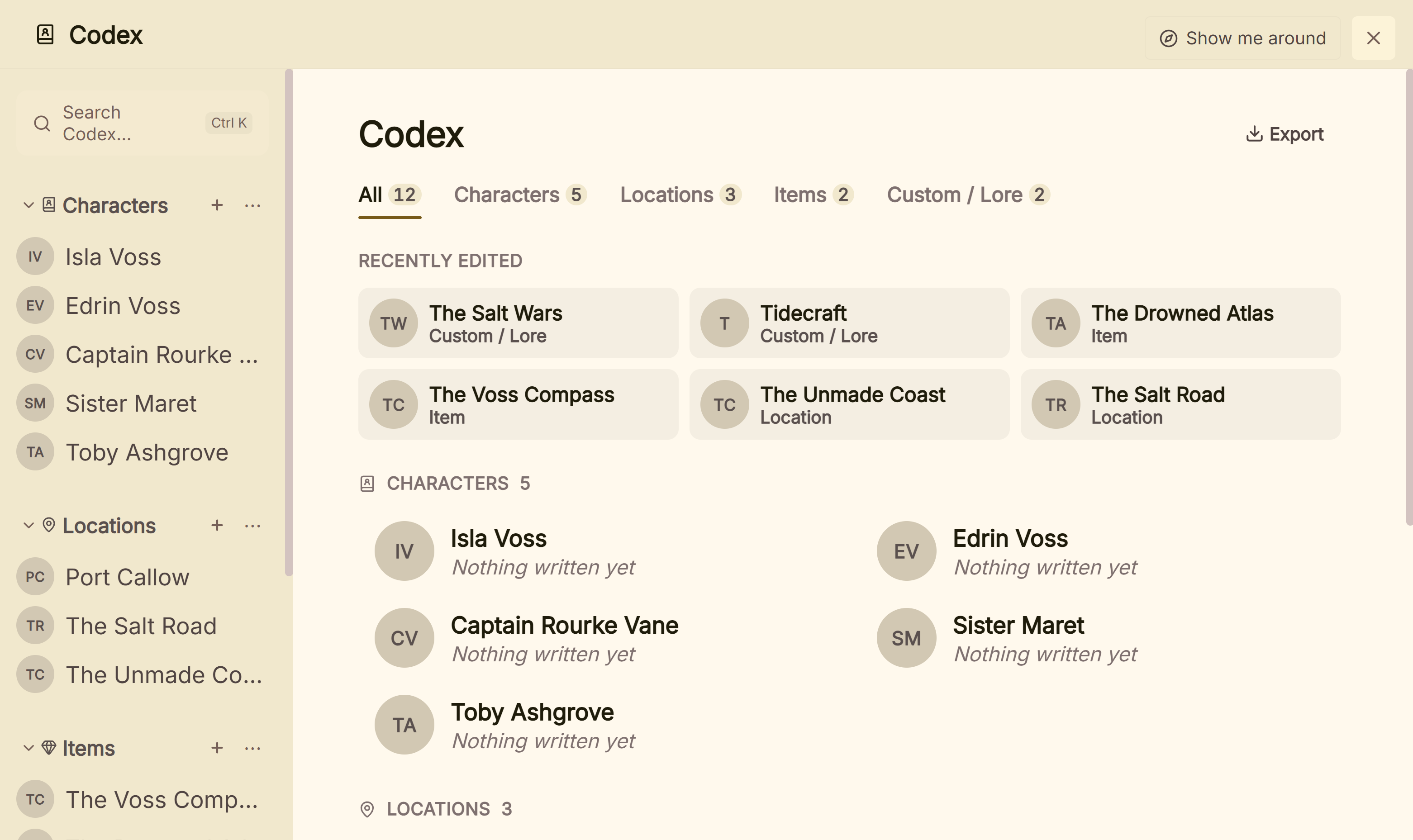 Built-in categories with a custom Lore section beside them
A World Anvil manuscript comes in through Word: paste its HTML export into Word as World Anvil suggests, save it as .docx, and import it into Deckle, which splits chapters from Word heading styles. For a public world site, co-authors and interactive maps, World Anvil stays the better fit, and some writers keep both: the world online, the book on their desk.
Deckle is a one-time purchase with a 30-day refund. To try it, click Take Deckle for a Spin on the screen Deckle opens to. It is a free demo with no card, no account and no time limit. It opens a sample novel with its own Codex and Timeline, and you can export a real story bible and book files from it. New Codex entries and Timeline events are capped at three each and new writing at about 500 words, so judge it on the sample's own world.
What do ranking pages get wrong about World Anvil?
Three pages that rank for World Anvil searches disagree with World Anvil's own pages.
- A "Journeyman" tier and different prices. Kindlepreneur's World Anvil page (updated 27 March 2026) lists Journeyman at "$50/year", Master at "$6.50/month" or "$58/year", Grandmaster at "$105/year", and a free tier with "Up to 175" articles. World Anvil's pricing page lists Freeman, Master, Grandmaster and Sage, with Master at $7.00 a month or $54.00 a year, Grandmaster at $12.00 or $99.00, and Freeman at "5 / 42" articles.
- Privacy for everyone. Self-Publishing School's review (13 November 2023) says "Users can control the privacy settings of their worlds, making them public, private, or accessible to select collaborators." World Anvil's pricing table marks Private Worlds & Articles as × on the free tier; privacy starts on Master.
- Annual billing only. ProWritingAid's worldbuilding apps roundup (29 March 2022) says "All the pricing options for the higher tiers are paid annually." World Anvil's pricing page offers monthly billing on every paid tier, and lifetime options on Grandmaster and Sage.
Common mistakes when choosing World Anvil
- Judging Manuscripts on the free tier. It is not there. Free tests the wiki only.
- Buying a year to try it. There are no refunds, so a month of Master is the cheaper test.
- Keeping an unpublished book in a free world. Free worlds are public.
- Planning to write offline. World Anvil needs a connection, and there is no app.
- Expecting a print-ready book file. Manuscripts exports HTML; an EPUB or print PDF needs another tool.
- Reading old prices. Third-party pages still quote tiers and prices World Anvil no longer lists. Check the pricing page, logged in, before you pay.
FAQ
What is World Anvil used for?
Building a fictional world as a linked wiki with maps, timelines and family trees, running tabletop campaigns in it, and, on paid tiers, writing a novel beside it in Manuscripts.
Is World Anvil free?
There is a free Freeman tier with 2 worlds and up to 42 articles. Paid Guild tiers start at $54 a year or $7 a month.
Is World Anvil good for writing a novel?
It is good for keeping a novel next to a big world. As a drafting and publishing tool it is plainer: online only, HTML export, and Manuscripts needs a paid tier.
Does World Anvil have an app?
No. The FAQ says "There is not currently a mobile app for World Anvil." It runs in a browser and needs an internet connection.
Is World Anvil private?
Only on a paid tier. Free worlds are public. The details are on is World Anvil private.
What is the best World Anvil alternative for writers?
It depends on the job. Campfire suits maps and calendars with offline desktop apps, LegendKeeper and Kanka suit game masters, Obsidian suits local notes, and Deckle suits a story bible inside the app you write and format the book in.
Can I export my world from World Anvil?
Yes. Guild members export a whole world as a zip of JSON and HTML; free members export articles one at a time. Manuscripts export as HTML.
Sources
World Anvil pages were read through the r.jina.ai reader, which returns the vendor page's own text. Prices change, so check the vendor page before buying.
- World Anvil, Pricing: tier table, storage, co-authors, Freeman "5 / 42" articles, Private Worlds and Manuscripts from Master, no refunds, 3,500,000+ worldbuilders, Master $54.00 a year, Sage $300.00 a year (retrieved 1 November 2026); Master $7.00 a month, Grandmaster $12.00, $99.00 or $650.00 once, Sage $34.00 a month or $1,350.00 once (retrieved 21 October 2026)
- World Anvil, FAQ: description, auto-linker, free limits, $4.50 a month on an annual plan, online only, no mobile app, Chrome-based browser, no AI training, export (retrieved 1 November 2026)
- World Anvil, How to Export Your Manuscript: HTML export, print-to-PDF, Word or converter (retrieved 1 November 2026)
- World Anvil, How to export your world: JSON and HTML zip for Guild members (retrieved 1 November 2026)
- World Anvil blog, October Feature Drop: New Manuscripts (9 October 2026; retrieved 1 November 2026)
- Campfire Writing, Pricing and FAQ; LegendKeeper, home page and Pricing; Kanka, Pricing; Obsidian, Pricing; Literature & Latte, Scrivener overview (all retrieved 26 October 2026)
- Ranking pages checked for the claims above (retrieved 1 November 2026): Kindlepreneur, World Anvil (updated 27 March 2026); Self-Publishing School, World Anvil review (13 November 2023); ProWritingAid, best worldbuilding apps (29 March 2022)
World Anvil is a trademark of its owner. Scrivener is a trademark of Literature & Latte. Campfire Writing, LegendKeeper, Kanka and Obsidian are trademarks of their respective owners. Deckle is not affiliated with or endorsed by any product named here.