

The Novel Factory is a guided novel planning and writing app that walks you from first idea to finished draft with a 15-step Roadmap, a card-based Plot Manager and question-led profiles for characters, places and items. It suits a writer who wants to be taught a method while planning, with no AI, and is happy with a subscription or a $649 lifetime licence and a Word file as the only export. A writer who already has a method, wants a one-time price below that, or wants the finished book out as EPUB and print PDF is better served by one of the alternatives below.
How was this review put together?
Nobody at Deckle has written a novel in The Novel Factory, and this page does not pretend otherwise. It is built from The Novel Factory's own home page, buy page and help centre, all read on 31 October 2026, plus three of the review pages that rank for this search. No account was opened and nothing was exported. Prices are US dollars before tax. This is Deckle's own site, and Deckle is one of the alternatives compared, so weigh that section accordingly.
What is The Novel Factory?
The Novel Factory was built by the novelist Katja Kaine, and its home page says the software follows the process she used for her own books. It calls itself "AI-Free book writing software" and says it "contains no AI of any kind". Its tools help you organise your own ideas "without ever writing anything for you".
The current release is Version 3, a progressive web app. The vendor's platforms page says it "can work on almost any device with a browser", naming Windows, macOS, iOS and Android computers, phones and tablets. You can also install it from the browser as a desktop app, which works offline.
Some older reviews say Mac users can only work in the browser. The current platforms page lists macOS, and it is the source of the most common out-of-date claim about the app (see the section on ranking pages below).
What does The Novel Factory do well?
It teaches as you go. The Roadmap is "a step-by-step guide to writing a novel". It has a checklist of 15 topics, one per step, and each step has an article, a video and tasks. For a first novel, that structure is the main reason to choose it.
Plot cards that are the scenes. The Plot Manager works like a corkboard of index cards, with plot templates "based on popular genres". The help centre says "each index card is linked to a scene in the manuscript". Every new card creates its scene in the manuscript, and the two share the same linked information, such as the POV character. A separate Subplot Manager tracks threads across the book.
Profiles that ask the questions. Characters, Locations and Items each have sections with prompting questions, and a Notes board holds the rest. The vendor's website also offers The Ultimate Character Questionnaire and The Ultimate World Building Questionnaire as writing resources.
Statistics that keep you going. The home page lists word count goals, progress graphs and a weekly average word count.
A plain no-AI position. "No AI of any kind" is stated on the home page. The longer list of tools that say the same is on novel writing software without AI.
A long trial and a refund. The free trial runs 30 days with no card and includes one novel with Standard features. Paid plans carry a 30-day money-back guarantee on request.
Where does The Novel Factory stop?
Export is a Word file. The help centre says "The export feature is currently only available as a Word document", and suggests converting to PDF from Word. It adds "We hope to offer more direct export formats in the future." The Word file can include scene and chapter titles, page numbers, a header with your name and title, and, if you tick it, the plot, character and notes data. For an ebook or a paperback interior you need a second tool.
Word import needs markers. To bring an existing draft in, you type a scene divider (by default #Scene#, case sensitive) wherever a scene starts, and a chapter divider likewise. There is a maximum scene size, and a document over it will not import.
Offline is a mode you switch on. In the desktop version you click the cloud icon and choose "work offline". The help page warns that your data "is not being backed up centrally" while offline, and other devices will not see the changes until you go back online.
The cheapest plan holds one novel. Basic covers one novel. Standard adds unlimited novels, Dark Mode, importing characters and locations between novels, and extra formatting features.
How much does The Novel Factory cost?
The buy page lists three plans on 31 October 2026. Paying yearly gives "Two months free" against paying monthly.
| Plan | Monthly | Yearly | Three years | What it covers |
|---|---|---|---|---|
| Basic | $8.25 | $82.50 | $247.50 yearly | One novel; Plot Manager, Characters, Items, Locations, Manuscript, Writing Statistics |
| Standard | $22 | $220 | $660 yearly | Unlimited novels, plus Dark Mode, importing characters and locations between novels, extra formatting |
| Lifetime | none | none | $649 once | Every feature, unlimited novels, "lifetime access to Version 3.0" |
Two details matter before you buy. The lifetime licence is for Version 3.0, so a future major version may not be included. And other currencies are converted at checkout, so the figure you pay outside the US moves with the exchange rate. How this compares with other one-off prices is on writing software one-time purchase.
The Novel Factory and its alternatives compared
Prices and features are from each vendor's own pages, read on the dates in Sources. Nothing here is a score.
| Tool | Platforms | Price model and price | Offline | Manuscript export | AI | Guided planning |
|---|---|---|---|---|---|---|
| The Novel Factory | Browser app for Windows, macOS, iOS, Android; installable | Subscription from $8.25/mo or $82.50/yr; $649 lifetime (Version 3.0); 30-day trial | Desktop install, in offline mode | Word only | "No AI of any kind" | 15-step Roadmap with videos and tasks; genre plot templates; question-led profiles |
| Plottr | Mac, Windows; Pro adds a browser app | $60/yr or $150 lifetime; Pro from $9.99/mo; 30-day trial | Desktop app | Word and Scrivener (the outline, not a book) | "No AI" | 30+ plot templates; planning only, drafting elsewhere |
| Scrivener | macOS, Windows, iOS | $59.99 once per desktop platform; 30-day-of-use trial | Yes | Word, PDF, EPUB and more via Compile | None mentioned | Corkboard and Outliner; no step-by-step course |
| Dabble | Windows, Mac, Linux, browser, phone | From $15/mo billed yearly; $699 lifetime; 14-day trial | Yes | Word, Google Docs, Markdown; no direct PDF or EPUB | AI-free except Read to Me voices | Plot Grid, character profiles, story notebook |
| Campfire Writing | Mac, Windows, browser, iOS, Android | Free plan with caps; Standard $12/mo, $99/yr or $336 lifetime | Desktop app | PDF and EPUB | None found on its pages | 18 modules, from Characters and Arcs to Magic and Languages |
| bibisco | Windows, macOS, Linux; free phone apps | Free Community; Supporters $69 once | Yes, stored locally | PDF, DOCX, TXT; EPUB on Supporters | None mentioned | Character development by qualities, defects and arcs; timeline on Supporters |
| Deckle | Windows, macOS, Linux | One-time purchase; free demo | Yes, after activation | EPUB (Generic, Kindle, Apple Books, Kobo), print PDF, DOCX, Academia PDF, Markdown, plain text | None in the app | Outliner cards that are the scenes; character template that asks for motivation, flaw, the lie and arc; Show me around tours of the Codex and Timeline |
Which Novel Factory alternative suits which writer?
Stay with The Novel Factory if you are writing your first novel and want a course built into the software, or if you plan by answering questions. Its Roadmap is the feature none of the others has in the same form.
Plottr suits a writer who already drafts in Word or Scrivener and wants a visual outline with 30 or more templates beside it. It is a planner, so the book still gets written somewhere else. The wider field of planners is on best plotting software.
Scrivener suits a writer who wants a one-off price, a corkboard tied to the draft, and output beyond Word through Compile. It expects you to bring your own method.
Dabble suits a writer who moves between a desktop, a browser and a phone and wants the plan to sync. It also sells a lifetime licence.
Campfire suits a fantasy or science fiction writer whose world needs maps, magic systems and languages, and it has a free plan to start on.
bibisco suits a writer who likes being asked about characters, wants the files on their own disk, and needs it free.
Deckle suits a writer who wants the plan, the draft and the finished ebook and paperback files in one project on their own computer, for one payment.
Is The Novel Factory worth it?
For a first-time novelist who wants guidance, the 30-day trial is long enough to work through several Roadmap steps on a real idea, and that is the fairest test. If the Roadmap is the reason you stay, the Standard plan or the lifetime licence makes sense once you have more than one book on the go.
It is less of a fit for a writer who already knows how they plan. Then you are paying for a course you do not use, and the Word-only export means a formatting tool on top. Over three years, Basic costs $247.50 and Standard $660, against Scrivener at $59.99 once or Plottr at $150 lifetime.
What do ranking pages get wrong about The Novel Factory?
Three claims on pages that rank for this search disagree with The Novel Factory's own pages on 31 October 2026.
- "Basic is $7.50 a month, Standard $20, and there is a $60 Premium plan." TCK Publishing's review gives these, with storage limits per plan. The buy page lists Basic at $8.25 a month, Standard at $22, and a $649 lifetime licence. No Premium plan is listed.
- "There is no desktop version available for Macs." The same TCK review says Mac users can only work online. The vendor's platforms page lists macOS among the systems Version 3 runs on, and the install guide covers installing the desktop version from the browser.
- "The only difference between the plans is how many novels you can write." Kindlepreneur's review, updated 8 April 2026, says this. The buy page lists Dark Mode, importing characters and locations between novels, and additional formatting features as Standard extras.
Most review pages for The Novel Factory earn a commission on sales, and several print a discount code. NewWriters' 9.5 out of 10 review discloses an affiliate arrangement. That does not make them wrong, but check prices on the buy page before you pay.
How do you plan and write a novel in Deckle?
Deckle is our app, so weigh this section accordingly. Deckle is a desktop writing app for Windows, macOS and Linux. Each project is a folder on your own computer, it works offline after activation, and it has no generative AI. Here is the same route The Novel Factory guides you along, from cards to a finished file.
- Lay out the plot as cards. Open View ▸ Outliner and use + Add to make a Scene or Chapter for each beat. In Grid View each card takes a title and a synopsis. Like The Novel Factory's Plot Manager, the cards are the scenes, so dragging a card moves the scene in the manuscript.
- Pick a structure to fill. Deckle leaves the method to you. Type the beats of the Snowflake Method or Save the Cat onto the cards as synopses.
- Build the cast. Open View ▸ Codex. Click + beside Characters and choose the Character template. It asks for Appearance, Personality, Motivation & Goals, Flaw / Inner Conflict, The Lie They Believe, Arc and Backstory. Locations and Items have their own templates. Save as Template keeps your own questions for the next entry. More on this in the Codex.
- Take the tour. The Codex and the Timeline each have a Show me around button at the top right that walks you through that view.
- Set a target. Open View ▸ Writing Stats. On Today, set Goals to Words and a daily or weekly target. On Manuscript, enter a Target word count and an optional Deadline, and Deckle shows the words a day you need to finish on time.
- Write. Character, place and item names are underlined in the chapters once they have Codex entries, and the Inspector's Codex tab lists the entries named in the open chapter.
- Export. Press Ctrl+E (Cmd+E on a Mac) for Export. Choose DOCX and the Word variant, then tick Standard Manuscript Format on the Options tab for a submission file. Choose EPUB or PDF for the ebook and the print interior from the same project.
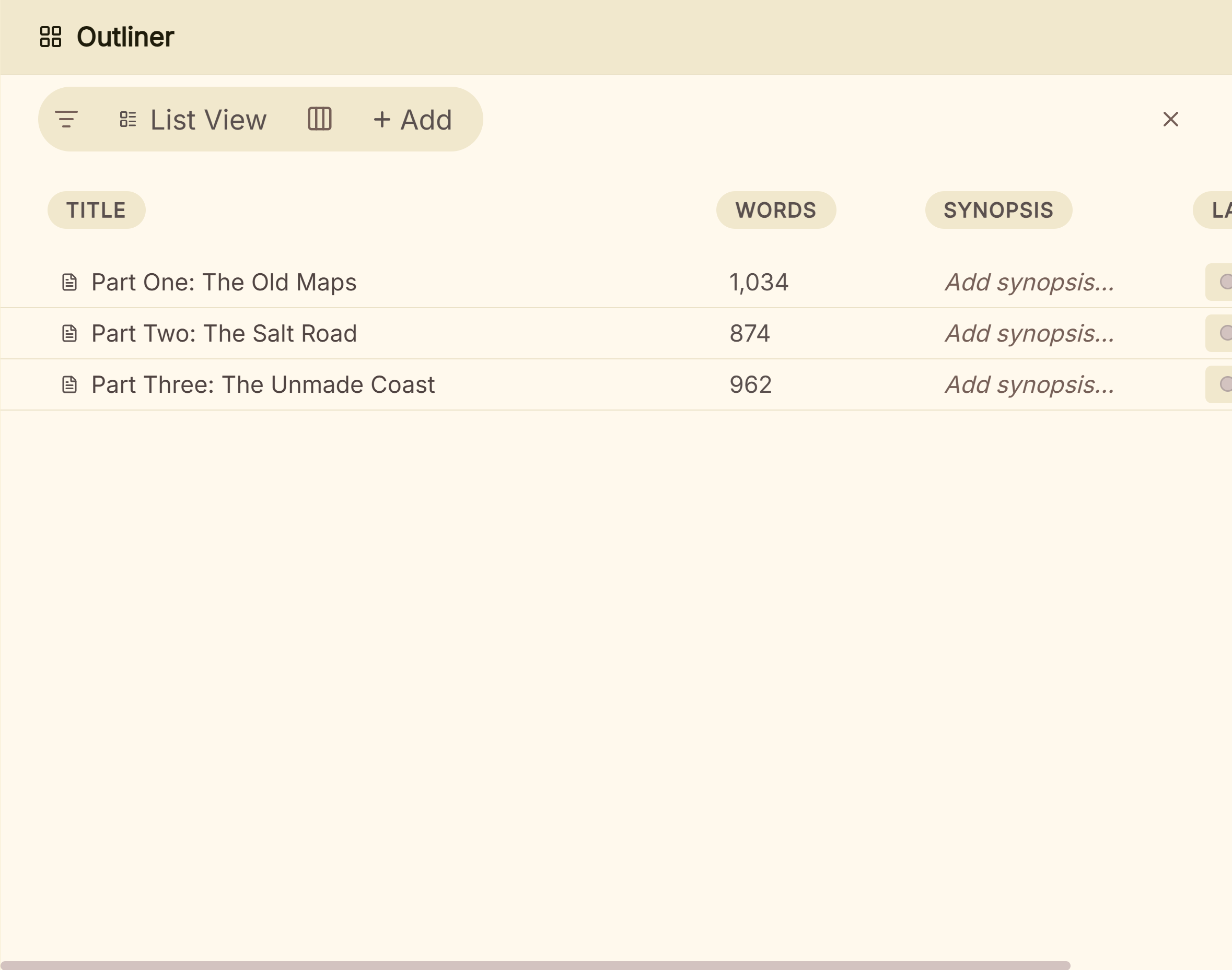 The Outliner, where each card is a scene in the manuscript
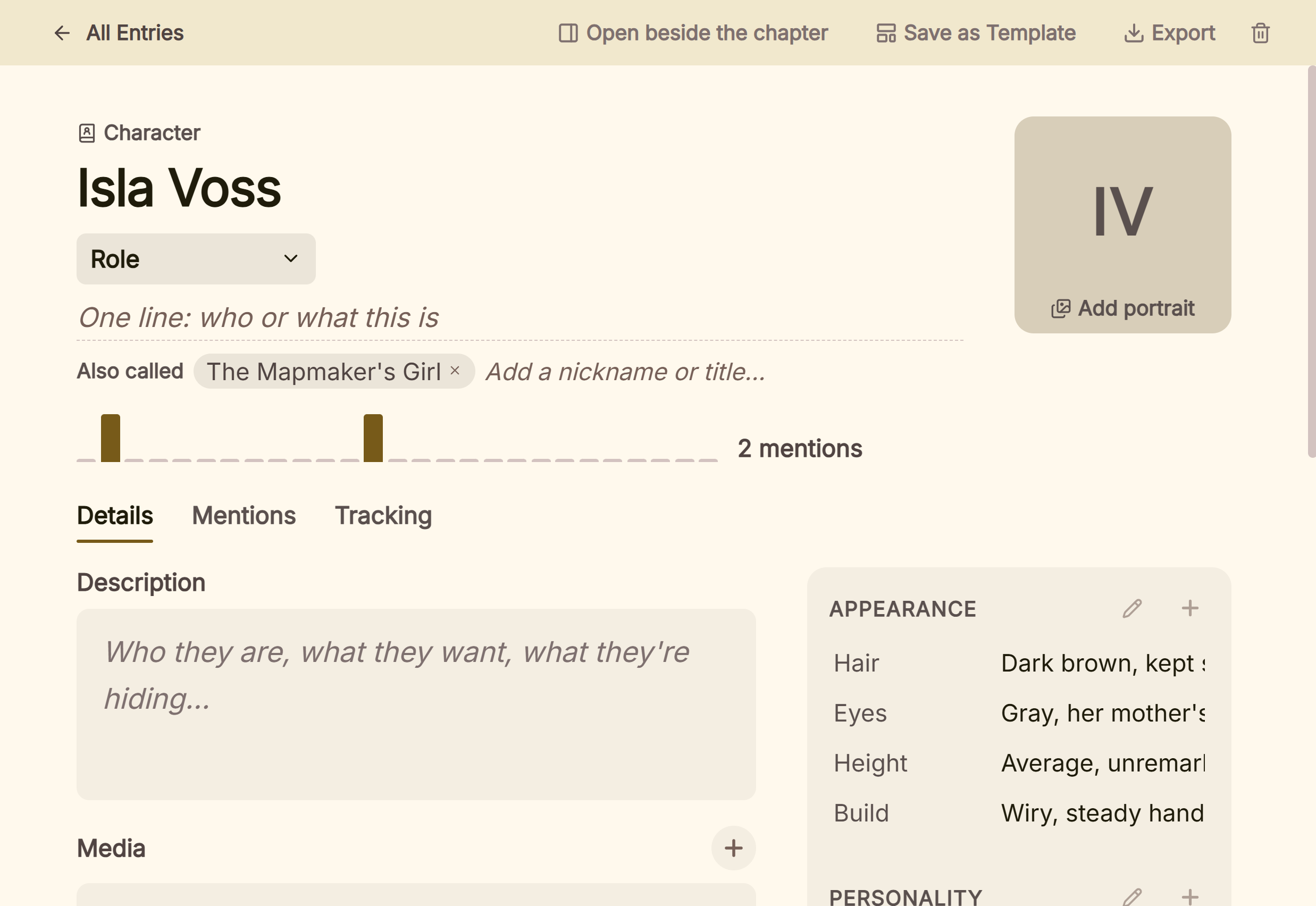 A character entry built from the Character template
A writer who wants a 15-step course with videos inside the app is better served by The Novel Factory. What Deckle adds is that the plan, the cast, the draft and the store-ready files are one project on your own disk. Deckle's Kindle target writes an EPUB for KDP to convert, not a KPF file.
Deckle is a one-time purchase. To try it, click Take Deckle for a Spin on the screen Deckle opens to. It is a free demo with no card, no account and no time limit. It opens a sample novel with the Outliner, Codex, Timeline and Writing Stats to explore, and you can export real EPUB, PDF and DOCX files from it. New writing is capped at about 500 words and new Codex entries at three, and new documents are blocked.
Common mistakes when choosing The Novel Factory or an alternative
- Judging it on an empty project. The Roadmap and the profiles show their worth on a real idea. Spend the trial planning the book you mean to write.
- Forgetting the export path. The Novel Factory exports Word only. Check which tool will make your EPUB and print PDF before the draft is finished.
- Importing a draft without dividers. The importer needs
#Scene#or your own marker at every scene break. Mark a copy of the file first, so the original stays clean. - Working offline without a backup. Offline mode stops the central backup. Go back online when you can, or export a Word copy before a long trip.
- Buying Basic for a series. Basic holds one novel, and importing characters between novels is a Standard feature. A series writer needs Standard or the lifetime licence.
- Trusting a review's price. Several ranking pages quote old plans. The buy page is the current word.
FAQ
What is The Novel Factory?
A guided novel planning and writing app built by the novelist Katja Kaine. It has a 15-step Roadmap, a Plot Manager of index cards linked to scenes, question-led Characters, Locations and Items, a manuscript editor and writing statistics.
How much does The Novel Factory cost?
On 31 October 2026, Basic is $8.25 a month or $82.50 a year, Standard is $22 a month or $220 a year, and a lifetime licence for Version 3.0 is $649. There is a 30-day free trial with no card.
Is The Novel Factory available for Mac?
Yes. Version 3 is a progressive web app that runs in a browser on macOS, Windows, iOS and Android, and installs as a desktop app.
Does The Novel Factory work offline?
The installed desktop version has an offline mode. While it is on, your work is not backed up centrally and does not sync to other devices until you reconnect.
Does The Novel Factory use AI?
No. Its home page says it "contains no AI of any kind".
Can The Novel Factory export to EPUB or PDF?
Not directly. Export is a Word document, which you can save as PDF from Word or format into an ebook in another tool.
Is there a free alternative to The Novel Factory?
bibisco's Community Edition is free on Windows, macOS and Linux and asks guided questions about characters. Campfire has a capped free plan. Deckle's free demo has no time limit.
What is the best alternative to The Novel Factory?
It depends on the reason for leaving. Plottr suits visual outlining with templates, Scrivener a one-off price, Dabble syncing across devices, Campfire large worlds, and Deckle planning, drafting and formatting the book in one desktop project.
Sources
Retrieved 31 October 2026 unless stated. Prices change, so check the vendor page before buying.
- The Novel Factory, home page: Katja Kaine, "AI-Free book writing software", "contains no AI of any kind", Plot Manager, Roadmap, profiles, questionnaires, 30-day trial
- The Novel Factory, Buy: Basic, Standard and Lifetime prices and contents, "Two months free", trial terms, 30-day money-back guarantee, currency conversion
- The Novel Factory Help, What platforms does The Novel Factory work on?, Installing The Novel Factory on your desktop and Work offline in The Novel Factory: Version 3 as a progressive web app, operating systems, desktop install, offline mode and its backup warning
- The Novel Factory Help, Exporting your novel and supporting data and Importing your novel from Word: Word-only export and its options; scene and chapter dividers, size limit
- The Novel Factory Help, The Roadmap, The Plot Manager and An overview of the sections: 15-topic checklist, videos and tasks, index cards linked to scenes, section list
- Plottr, Pricing and Features: prices, trial, "No AI", 30+ templates, Word and Scrivener export (retrieved 20 October 2026)
- Literature & Latte, Scrivener overview, FAQs and Cross-grading: platforms, export formats, 30-day-of-use trial, $59.99 (retrieved 20 October 2026)
- Dabble, Pricing and Export your manuscript: plans, lifetime, trial, AI statements, export formats (retrieved 20 October 2026)
- Campfire Writing, Pricing and FAQ: modules, free plan, Standard prices, platforms, desktop offline, PDF and EPUB export (retrieved 20 October 2026)
- bibisco, Download and Community vs Supporters: editions, price, platforms, export formats (retrieved 20 October 2026)
- Ranking pages checked for the claims above: TCK Publishing, Novel Factory review; Kindlepreneur, The Novel Factory review (updated 8 April 2026); NewWriters, The Novel Factory review
The Novel Factory is a trademark of its owner. Scrivener is a trademark of Literature & Latte. Plottr, Dabble, Campfire Writing and bibisco are trademarks of their respective owners. Deckle is not affiliated with or endorsed by any product named here.