

The best writing software for short stories is the one that handles the three jobs a short story writer repeats: drafting one story, sending it out as a Word file in standard manuscript format, and keeping many stories, with their word counts and submissions, in one place. For a single story, Word or Google Docs is enough. For a body of stories that grows into a collection, Scrivener, Dabble and Deckle keep every story in one project. Ulysses suits a writer on a Mac, iPad and iPhone. Reedsy Studio is free in the browser and formats the collection as a book.
No standards body tests writing apps, so this page ranks nothing. It compares what each app does, what it costs and what it exports, from each vendor's own pages, read on 30 October 2026 unless a different date is given. Prices are US dollars before tax. This is Deckle's own site, and Deckle is one of the apps compared, so weigh that section accordingly. This page is about choosing the software. The craft itself, from the first idea to the last line, is on how to write a short story.
What does a short story writer need from writing software?
A novelist writes one long file for a year. A short story writer finishes, revises and sends out many short ones, often several at once. That changes what matters in the software.
- A Word file the market accepts. Magazines take stories as Word files. Asimov's Science Fiction asks for ".DOC, .DOCX, or .RTF format" in "standard manuscript format", with "the title, your name and address, and the number of words in your story" on the first page.
- A word count you can trust per story. The Science Fiction and Fantasy Writers Association defines a short story as "fewer than 7,500 words", and markets set their own limits. You check each story against each limit.
- Many stories in one place. Twenty stories in twenty loose files are hard to compare, revise in a batch or gather into a book.
- A record of what went where. Asimov's says "We do not accept 'simultaneous submissions'", so you need to know which stories are out, and with whom.
- A route to a collection. Stories that sold separately often become a book. The app either formats that book or hands a clean file to something that does.
A plain word processor covers the first two. The other three are where the dedicated apps differ.
Best writing software for short stories compared
| App | Platforms | Price (30 October 2026) | Offline | Exports | Submission Word file | Many stories in one project | AI |
|---|---|---|---|---|---|---|---|
| Microsoft Word | Windows, Mac, web, phone, tablet | Microsoft 365 Personal $99.99/yr; Office Home 2024 $179.99 once | Desktop app | DOCX, PDF, RTF, ODT, TXT, HTML (no EPUB) | Native; you set the format by hand | One file per story | Copilot in Word |
| Google Docs | Web, iOS, Android | Free with a Google Account | Chrome or Edge with the Docs Offline extension | DOCX, ODT, RTF, PDF, TXT, HTML, EPUB, Markdown | Download as .docx; format by hand | One file per story, or tabs in one file | Gemini on some plans |
| Scrivener | macOS, Windows, iOS | $59.99 once per desktop platform; $95.98 for both; iOS $23.99 | Yes | Word, RTF, PDF, EPUB, Final Draft and more | Short Story template with a manuscript format document | Yes, Short Story template for a collection | None mentioned |
| Ulysses | Mac, iPad, iPhone | $39.99/yr or $5.99/mo | Yes | DOCX, PDF, ePub, HTML, Markdown, RTF, plain text | DOCX with a chosen style; no manuscript style named | Yes, groups in one library | Apple Intelligence Writing Tools |
| Dabble | Windows, Mac, Linux, browser, phone | Writer $180/yr; Author $276/yr or $699 once | Yes | DOCX, Google Docs, Web, Markdown | Manuscript Format is the Word default | Yes, one book at a time on export | Future AI "strictly opt-in" |
| Reedsy Studio | Web browser | Free; Craft $4.99/mo, Outline $7.99/mo add-ons | No | EPUB, PDF; Word file by email | Word backup, not a submission format | Yes, chapters in one book | None listed |
| Deckle | Windows, macOS, Linux | One-time purchase; free demo | Yes, after activation | EPUB, PDF, DOCX, Markdown, Plain Text | Standard Manuscript Format option for Word | Yes, each story a chapter with its own word count | None in the app |
Word and Google Docs are the cheapest route to a submission file. Scrivener, Dabble and Deckle are the ones that keep a whole body of stories together and still produce that file. Reedsy Studio and Deckle are the two that also typeset the finished collection as an ebook and a print PDF.
Which writing app suits which short story writer?
Microsoft Word, for one story at a time in the format markets expect
Word writes the format magazines ask for, because the format is a Word file. Microsoft's file format reference lists .docx, .doc, .rtf, .odt, .pdf and plain text among Word's formats, with no EPUB. Microsoft 365 Personal is $9.99 a month or $99.99 a year, with a one-month free trial, and Office Home 2024 is $179.99 once for one PC or Mac. Copilot in Word drafts and rewrites on the subscription plans.
Word suits a writer who writes one story, formats it and sends it. It does not count words per story across a folder or track where each one went, so a spreadsheet usually sits beside it. The set-up for the format is on how to format a manuscript in Word.
Google Docs, for free drafting and sharing with a workshop
Google Docs is free with a Google Account, and "multiple people can work on the same document at the same time", with comments and version history. That makes it a natural home for a writing group or a class. A document downloads as .docx, .odt, .rtf, .pdf, .txt, HTML, EPUB or Markdown. Offline editing needs Chrome or Edge with the Google Docs Offline extension, switched on while you are connected. Gemini in Docs drafts and rewrites on some plans.
It suits a writer who wants feedback on each story from other people. The manuscript format is set by hand, as described on Google Docs manuscript format.
Scrivener, for a collection built over years
Literature & Latte's blog post on short story collections in Scrivener (Kirk McElhearn, 12 November 2025) gives the path: File ▸ New Project, Fiction, Short Story. The template is for "any collection of short writing: stories, essays, flash fiction, or novellas", and starts with a Short Story Manuscript Format document at the top of the Binder. Each story is one file, or one folder with a file per scene. The same post says you can "set up a submission tracker in Scrivener" with labels, status and custom metadata.
Scrivener is $59.99 once for macOS or Windows, $95.98 for both, and $23.99 for iOS. Its overview lists Word, RTF, PDF, EPUB and Final Draft among its formats and mentions no AI. It suits a writer who wants every story, note and submission in one desktop project, and is happy to learn Compile. Whether it suits other kinds of book is weighed on is Scrivener good for writing a book.
Ulysses, for writing on a Mac, iPad and iPhone
Ulysses is "The Ultimate Writing App for Mac, iPad and iPhone", at $39.99 a year or $5.99 a month. The App Store lists a fully functional trial "(including export and sync)", a $199.99 Perpetual License as an in-app purchase, and requires macOS 15.4, iOS 26.0 or iPadOS 26.0. Its export help lists "Text, HTML, ePub, PDF, or DOCX" on the Mac. It names no manuscript format style, so the DOCX style is one you choose or adjust.
It suits a writer who drafts stories on a phone and finishes them on a Mac. It has no Windows or Android version. Other routes are on Ulysses alternatives.
Dabble, for a manuscript-format Word file from any device
Dabble's export help says "Manuscript Format" uses indented paragraphs, double spacing and 12-point Times New Roman, and that Word exports use it by default. Exports go to Word, Google Docs, the web and Markdown. "Dabble does not export PDF or ePub directly", and "You export one book at a time." The desktop app runs on Windows, Mac and Linux, and the pricing page says work is "stored locally on your devices for offline access".
Writer is $180 a year and Author $276 a year or $699 once, after a 14-day trial with "no credit card required". It suits a writer who wants submission files with no set-up, on every device, and pays yearly. Its costs are weighed on Dabble price.
Reedsy Studio, for a free collection formatted as a book
Reedsy Studio runs in the browser. The free plan includes "Unlimited books" and "Export to PDF and EPUB", and the paid add-ons are Craft at $4.99 a month and Outline at $7.99 a month. Its FAQ gives the EPUB as "EPUB 3" and the print PDF as PDF/X-1a:2001, and says of offline use: "Currently, no." A Word file comes by email from Manage ▸ Exports ▸ Back Up. Invited editors get "full edit rights on the manuscript".
It suits a writer who wants a collection typeset for an ebook and a paperback at no cost, and always writes online. Its free plan's limits are on is Reedsy Studio free.
What is the best free writing app for short stories?
Google Docs is free with no time limit and exports a Word file. LibreOffice Writer is free "at no cost to you", installs on Windows, macOS and Linux, and works offline, with the format set by hand as in Word. Reedsy Studio's core is free and formats the collection as EPUB and PDF, online only. Paid apps can be tried first:
- Scrivener: 30 days of actual use on macOS or Windows.
- Dabble: 14 days with every plan, no card.
- Ulysses: a fully functional trial from the App Store.
- Microsoft 365: one month free.
- Deckle: a free demo with no card, no account and no time limit. It opens a sample novel, and you can export from it, including a Word file in Standard Manuscript Format. New writing is capped at about 500 words.
Free apps for longer work are compared on free novel writing software.
Which writing software formats a short story for submission?
Standard manuscript format is a convention, not a fixed standard, and each market's guidelines win. Asimov's asks for DOC, DOCX or RTF, double spacing, no justified right margin, and the word count "in the upper right corner of the first page". It refers writers to William Shunn's "Proper Manuscript Format" guide for the rest. The background is on what is standard manuscript format.
The apps reach that file in three ways.
- Built in. Dabble's Word export uses Manuscript Format by default. Deckle has a Standard Manuscript Format option for Word exports that adds the contact block, a rounded word count and a "Surname / TITLE / #" running header.
- From a template. Scrivener's Short Story template carries a Short Story Manuscript Format document and compile settings. Storyist, for macOS and iOS, says it produces "submission-ready manuscripts" from its manuscript templates.
- By hand. Word and Google Docs write the file, and you set the spacing, header and first page yourself. Ulysses and Reedsy Studio export a Word file in their own styles, which you adjust before sending.
How do you keep short stories together as a collection?
Treat each story as a chapter of one book. Scrivener, Dabble, Reedsy Studio and Deckle all work that way, with the story's scenes inside it. The project then answers three questions at a glance: how long is each story, which are finished, and in what order would they sit in a book.
When the collection is ready to publish, the app either formats it or exports it. Reedsy Studio and Deckle typeset it as EPUB and print PDF themselves. Scrivener compiles to EPUB and PDF, with a page break before each story when the Short Story section type is set. Dabble exports a Word file for a formatting tool. Word and Google Docs need the stories pasted into one file first.
How do you track word counts and submissions for short stories?
Every app here counts words. The difference is whether it counts each story in one list. Scrivener's Outliner and Deckle's Outliner List View show the stories side by side, one row each. In Word and Google Docs, each story is its own file, so the counts live in a spreadsheet.
Submissions are the same choice. Scrivener's blog suggests labels, status and custom metadata as a tracker. Deckle's Outliner takes custom Text, Dropdown and Date columns beside each story's status. Everywhere else, a spreadsheet or a submission service does the job. Whichever you use, record the market, the date sent and the reply, so no story goes to two markets that forbid simultaneous submissions.
Which apps work for writing short stories on a phone?
Ulysses runs on iPhone and iPad as well as the Mac. Google Docs has iOS and Android apps. Scrivener has an iOS app at $23.99, synced through Dropbox. Dabble runs on phones from the browser. Reedsy Studio works in a mobile browser while online. Word has phone and tablet apps on the Microsoft 365 plans.
Deckle is a desktop app for Windows, macOS and Linux. A writer who drafts on a phone on the way to work suits Ulysses, Google Docs or Scrivener for iOS for that part, then brings the story to the desktop to revise and send.
What do ranking pages get wrong about short story software?
Three claims in pages that rank for this search disagree with the vendors' own pages on 30 October 2026.
- "Dabble exports DOCX, PDF and EPUB." Gitnux's "Top 10 Best Short Story Writing Software of 2026" (updated 13 September 2026) lists those three for Dabble. Dabble's export help says "Dabble does not export PDF or ePub directly". A PDF comes only through the browser's Print.
- "Reedsy Book Editor." Worldmetrics (updated 14 September 2026) and ZipDo (updated 15 September 2026) review the app under its old name. Reedsy's own pages call it Reedsy Studio, and Worldmetrics uses both names on one page.
- "Scrivener exports Kindle ebooks." Scrivener's overview page still lists "Epub and Kindle ebooks". Its macOS release notes record "Kindle (.mobi) has now been removed as a Compile export option" in version 3.5.0 (retrieved 21 October 2026). For a Kindle collection, Amazon's KDP takes an EPUB, which Scrivener still exports.
Worldmetrics and ZipDo both say they include paid placements or earn commissions. Check each fact on the vendor's own page before you buy.
How do you write and submit short stories in Deckle?
Deckle is our app, so weigh this section accordingly. Deckle is a desktop writing app for Windows, macOS and Linux. Each project is a folder on your own computer, it works offline after activation, and it has no generative AI. One project holds a whole body of stories, each story a chapter in the Draft.
- Make the project. Choose File ▸ New Project… and name it after the collection, or call it Short Fiction and let it grow.
- Add a story. Click + beside Draft (Add to Draft) and choose Chapter. Name it with the story's title. With the story selected, + ▸ Scene adds a scene inside it.
- See every story's length. Open View ▸ Outliner and click Grid View to switch to List View. Each story is a row, and its Words column adds up all its scenes.
- Track submissions. In the List View, click Add custom column and add a Text column called Market and a Date column called Sent. For where each story stands, the pencil beside Status in the Inspector opens Edit labels & statuses. The defaults are To Do, In Progress, First Draft, Revised and Final; add Submitted and Accepted.
- Export one story for a market. Choose File ▸ Export… (Ctrl+E, or Cmd+E on a Mac). On Format, pick DOCX and the Word variant. On Contents, turn off Export the whole Draft and tick that story.
- Fill in the first page. On Metadata, set Title to the story's title, check Author, and type your name, address and email under Contact info.
- Turn on the format. On Options, turn on Standard Manuscript Format and pick the Paper Size the market uses. The Word file opens with your contact block, "About 3500 words" rounded to the nearest 500 for the stories you ticked, and a "Surname / TITLE / #" header on every page after the title page.
- Publish the collection. Set Title back to the collection's name, turn Export the whole Draft on, add a Table of Contents from + ▸ Front Matter, and export as EPUB for ebook stores or PDF for print.
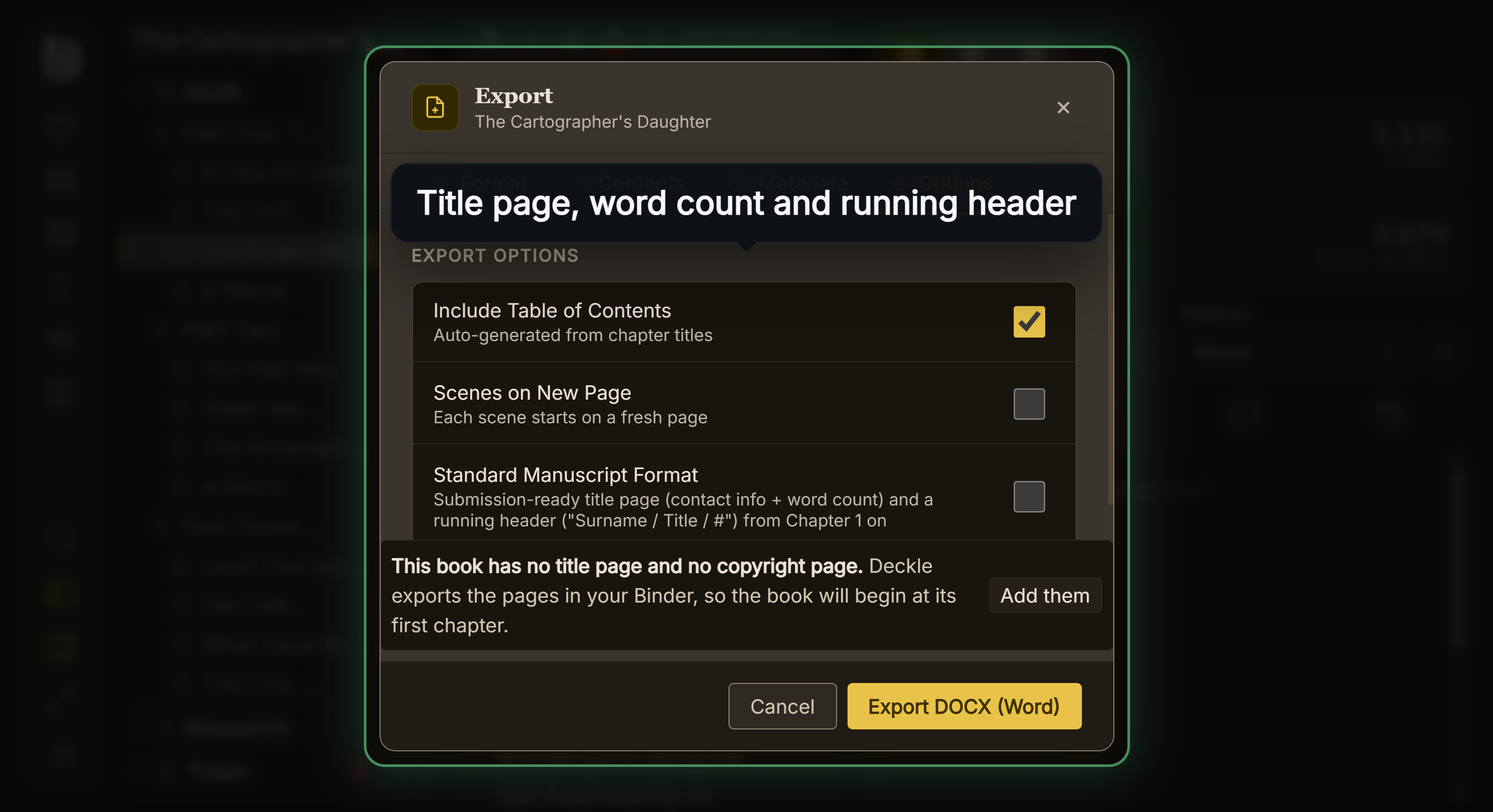 The Standard Manuscript Format option, on the Options tab of a Word export
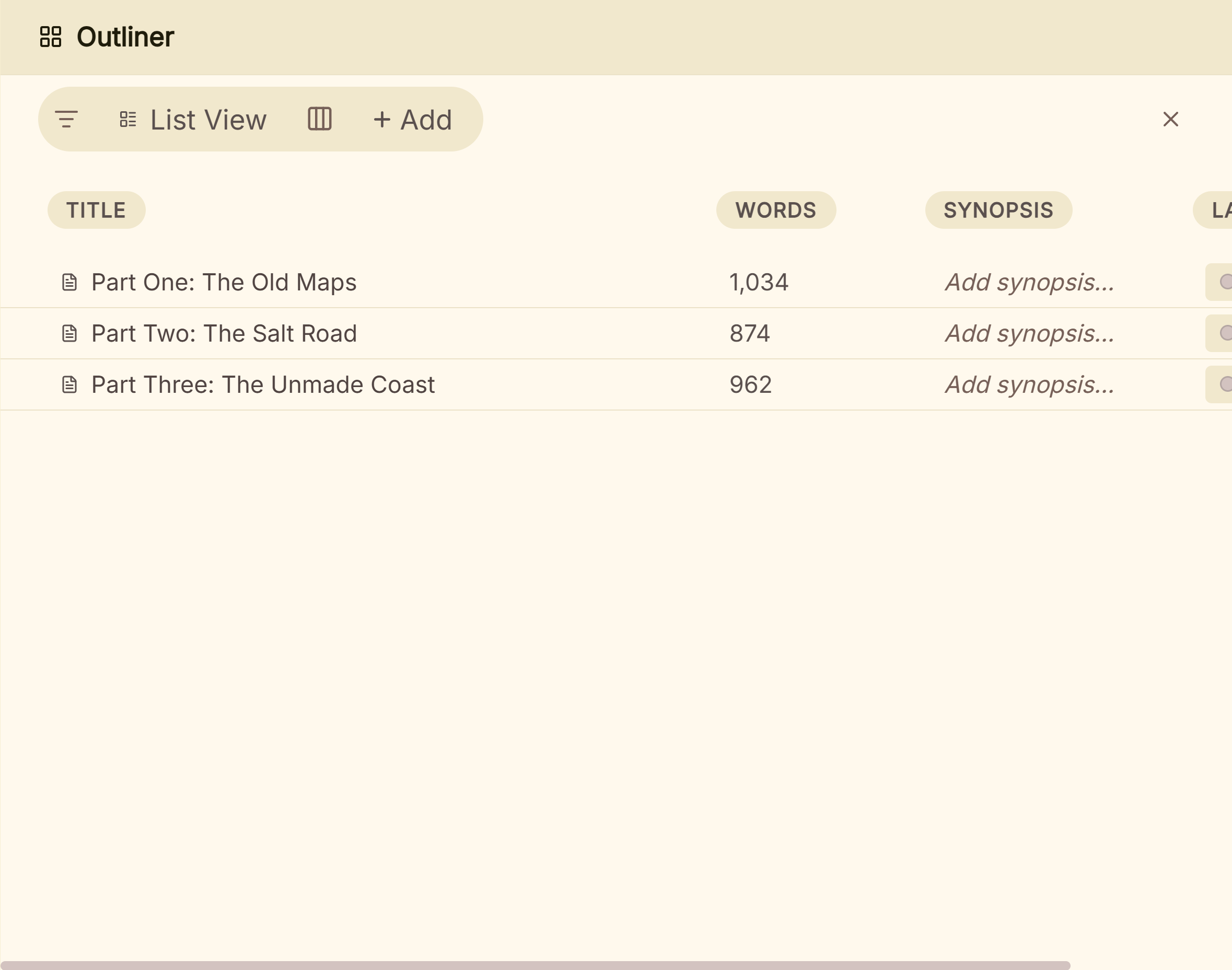 The Outliner's List View, where each story's word count and status sit in one row
For drafting on a phone, Ulysses, Google Docs or Scrivener for iOS suit that part of the day. For workshop comments from several people at once, Google Docs or Reedsy Studio suit. What Deckle adds is that the stories, their counts, their submission records and the finished collection's EPUB and print PDF come from one project on your own disk. Each story's chapter can also be laid out in the Outliner as cards, which is how you settle the order of a collection.
Deckle is a one-time purchase. To try it, click Take Deckle for a Spin on the screen Deckle opens to. There is no card, no account and no time limit. It opens a sample novel, so you can untick all but one chapter, export it as a Standard Manuscript Format Word file, and open the result in Word. New writing in the demo is capped at about 500 words.
Common mistakes when choosing software for short stories
- Buying for the novel you might write. A tool chosen for a 100,000-word epic can be heavy for a 3,000-word story. Choose for the work you finish most often.
- Trialling with one story. Load ten stories before the trial ends. Comparing lengths, tracking status and exporting one story at a time only show their worth with a real batch.
- Trusting the default Word file. An app's own export style is not manuscript format. Open the file in Word and check it against the market's guidelines before sending.
- Sending a story over the limit. Check the per-story count, not the project total, against each market's word limit.
- Losing track of simultaneous submissions. Record every submission on the day you send it, wherever you keep the record.
- Paying yearly for a feature you use once. If you only need the collection typeset once, compare a subscription's three-year cost with a one-time purchase or a free tool.
- Writing where you cannot get the file out. Check that the app exports the whole collection in a format another tool can open, before it holds fifty stories.
FAQ
What is the best writing software for short stories?
Nothing authoritative ranks it. Word and Google Docs suit one story at a time. Scrivener, Dabble and Deckle keep many stories in one project and produce a submission Word file. Ulysses suits Apple devices, and Reedsy Studio formats a collection free in the browser.
What is the best writing app for short stories?
For writing on a phone and a Mac, Ulysses. For free drafting and sharing, Google Docs. For a desktop project holding a whole collection, Scrivener or Deckle. For a manuscript-format Word file from any device, Dabble.
Is Microsoft Word good for short stories?
Yes for one story. Word writes the .docx file markets ask for. It keeps each story in its own file, so word counts and submissions across stories are tracked somewhere else.
Is Scrivener good for short stories?
Yes, especially for a collection. Its Short Story template holds a collection, with a manuscript format document and compile settings that put a page break before each story.
What app do writers use to track short story submissions?
Many use a spreadsheet. Scrivener can hold a tracker in labels, status and custom metadata, and Deckle's Outliner takes custom Text, Dropdown and Date columns beside each story's status.
Which software exports standard manuscript format?
Dabble's Word export uses Manuscript Format by default, Deckle has a Standard Manuscript Format option for Word, and Scrivener's Short Story template includes a manuscript format document. In Word and Google Docs you set the format by hand.
Is there free software for writing short stories?
Google Docs is free, and Reedsy Studio's core is free online. Scrivener, Dabble, Ulysses and Microsoft 365 have free trials, and Deckle has a free demo with no time limit.
Sources
Retrieved 30 October 2026 unless stated. Prices change, so check the vendor page before buying.
- Asimov's Science Fiction, Writers' Guidelines: DOC, DOCX or RTF, standard manuscript format, word count on the first page, no simultaneous submissions
- Science Fiction and Fantasy Writers Association, Nebula Rules: a short story is "fewer than 7,500 words"
- Microsoft, File format reference for Word: Word's save formats, no EPUB; Compare all Microsoft 365 plans: Personal $9.99 a month or $99.99 a year, Office Home 2024 $179.99, one-month trial, Copilot by plan
- Google, Google Docs: free with a Google Account, co-editing, comments, version history, Gemini; Export formats: DOCX, ODT, RTF, PDF, TXT, HTML, EPUB, Markdown; Use Google Docs offline: Chrome or Edge, the Docs Offline extension, set up while connected
- Literature & Latte, How to Write Short Story or Essay Collections in Scrivener (12 November 2025); Scrivener overview: platforms, requirements, export formats; Store: iOS $23.99, 30-day trial, with macOS, Windows and bundle prices of $59.99, $59.99 and $95.98 from the store's Paddle price feed; FAQs: 30 days of actual use (retrieved 20 October 2026); macOS release notes: Kindle (.mobi) removed in 3.5.0 (retrieved 21 October 2026)
- The Document Foundation, LibreOffice: free, Writer word processor; System requirements: Windows 10 and 11, macOS 11 or newer, Linux
- Storyist Software, Storyist: macOS and iOS, "submission-ready manuscripts", manuscript templates
- Ulysses, Pricing: $39.99 a year or $5.99 a month, Mac, iPad and iPhone; Export help: formats and limits; App Store listing: requirements, trial, Perpetual License $199.99; Writing Tools help: Apple Intelligence support (retrieved 20 October 2026)
- Dabble, Pricing: plans, lifetime prices, 14-day trial, offline, AI statements; Export your manuscript: Manuscript Format default, formats, no direct PDF or EPUB, one book at a time; Install the desktop app: Windows, Mac, Linux (retrieved 20 October 2026)
- Reedsy, Studio pricing: free plan, add-ons, 30-day add-on trial, PDF and EPUB export; Book writing software FAQ: no offline mode, EPUB 3, PDF/X-1a:2001, $4.99 and $7.99 add-ons, full edit rights for invitees; Back up your book: Word file by email
- Ranking pages checked for the claims above: Gitnux, "Top 10 Best Short Story Writing Software of 2026" (updated 13 September 2026); Worldmetrics, "Top 10 Best Short Story Writing Software of 2026" (updated 14 September 2026); ZipDo, short story writing software list (updated 15 September 2026)
Scrivener is a trademark of Literature & Latte. Microsoft Word is a trademark of Microsoft. Google Docs is a trademark of Google. LibreOffice is a trademark of The Document Foundation. Ulysses, Dabble, Storyist and Reedsy Studio are trademarks of their respective owners. Deckle is not affiliated with or endorsed by any product named here.