

To export Scrivener to EPUB, choose File > Compile…, set Compile for to the ePub ebook file type, pick the Ebook format, fill in the Metadata and Cover tabs, and click Compile. Scrivener's ePub output "makes use of the ePub 3 specification." Upload that .epub to Amazon KDP directly: KDP lists EPUB as a supported format and no longer accepts MOBI files.

That last point decides the Kindle route. Literature & Latte's own manuals say Scrivener's Kindle file "is not intended for publication via KDP; use ePub instead." The steps below follow those manuals, and the rules on what KDP accepts come from KDP's help pages.
What You'll Need
- Scrivener 3 on macOS or Windows. The steps match the Scrivener 3 User Manual for macOS (revision 3.5.2-01) and for Windows (revision 3.1.6.0-02).
- A cover image in RGB, such as a JPEG. The manual warns against vector formats and the CMYK colour space for ebook covers (section 23.4.5).
- Kindle Previewer, Amazon's free checker, for Windows 10 (64-bit) and above or macOS 12 and above. KDP recommends validating an EPUB with it before upload.
What ebook formats does Scrivener export?
The manual's Table 23.1 lists four ebook file types, and two of them are already retired:
| File type | Extension | What Literature & Latte says |
|---|---|---|
| ePub Ebook | .epub | "Makes use of the ePub 3 specification" |
| ePub 2 Ebook | .epub | "A deprecated file type", shown only for projects that used it before |
| Kindle Ebook | .mobi | "Suitable for previewing on your devices. It is not intended for publication via KDP" |
| Kindle Mobi Ebook | .mobi | "A deprecated file type", shown only for projects that used it before |
Pandoc can also write ePub 2 or 3, but only when Pandoc is installed, and those options do not appear in the Mac App Store edition (Table 23.2).
Can Scrivener still export to Kindle .mobi?
It depends on the platform. Scrivener for macOS 3.5.0, released 1 October 2025, removed the option. The release notes say: "Kindle (.mobi) has now been removed as a Compile export option, since Amazon no longer supports the .mobi format and now expects ebooks to be submitted using the ePub file format. Existing Compile formats set to use Kindle are automatically switched to use ePub."
Scrivener for Windows still lists Kindle Ebook in its 3.1.6.0-02 manual. Ioa, Literature & Latte's Head of Support and Documentation (AmberV on the forum), explained the gap in October 2025: "We just haven't had a Windows release since that decision was made." On Windows, the Kindle option needs Amazon's Kindle Previewer installed to build the file (section 23.4.7).
Neither route matters for publishing. KDP's MOBI FAQ says: "Effective March 18, 2025, we no longer support MOBI files for fixed-layout eBooks. This change completes our transition away from the MOBI format, as we previously ended support for MOBI files for reflowable books on August 1, 2021." The dates and history are on the EPUB vs MOBI page.
How do I compile Scrivener to EPUB for KDP?
- Choose File > Compile… (⌥⌘E on a Mac, Ctrl+Shift+E on Windows).
- Set Compile for at the top to the ePub ebook type.
- Click the Ebook format in the sidebar. The manual calls it "a good starting point for your own formats when creating ebook formats" (appendix D.3.1).
- If a yellow warning appears above the tiles, click Assign Section Layouts… and connect your Chapter and Scene types to layouts (section 23.3.3).
- In the Contents tab, check that every chapter is ticked and that the compile group is Draft.
- In the Metadata tab, enter the title, author and language.
- In the Cover tab, pick the cover image. By default Scrivener uses the first image in your front matter folder (section 23.4.5).
- In the Table of Contents tab, leave Generate HTML table of contents on unless you have made your own contents page.
- Click Compile and save the .epub.
- Open the file in Kindle Previewer, then upload it on KDP's manuscript step.
If the chapters or headings come out wrong, the causes are the same as for any compile and are covered on Scrivener compile not working. The parts of the Compile window are explained in the Scrivener compile tutorial.
Which Scrivener ePub settings should I avoid for KDP?
Optimize for Kindle conversion (Mac only, General Options). The Mac manual is direct: "Do not use this option if you are submitting your ePub to Amazon's KDP." It exists for distributors that convert an ePub to Kindle formats themselves. Ioa described it on the forum as producing "a deliberately sub-standard ePub file". In a January 2022 thread about ePub validation errors reported by an aggregator, Ioa added that tech support had traced the same errors in another case to this checkbox. The Windows manual does not list the option.
The Kindle Ebook file type on Windows, for the reasons above.
A table of contents at the back. The manual notes that placing the contents at the end "is discouraged by Amazon", because sending readers to the end can disrupt the sync that tracks the furthest page read (section 22.3).
How does Scrivener handle scene breaks and contents in an ebook?
In ebooks, a section break is structural. The manual says it "will be the basis for generating the internal table of contents" and the reader's chapter navigation (section 24.4.2 on the Mac, 24.3.2 on Windows). Each chapter needs a layout that inserts a section break, or it will not appear in the contents.
Scene breaks inside a chapter are separators. Ioa noted in October 2025 that "the default Ebook format itself uses the least accessible method, an empty space", which a screen reader passes over without a pause. The stock output is:
<p class="separator"><br /></p>The fix from that answer: in the format's Separators pane, select the Text Section layout, set the between-sections separator to Custom, and type asterisks. The result is a visible * * * that a screen reader announces. A visible break also survives a page turn on a small screen, where blank space is easy to miss.
A hand-made contents page has strict rules in an ePub. The manual says it needs a heading in a numbered heading style such as Heading 1, and "the rest of the content must consist exclusively of links pointing to other sections of the ebook, one link per line." Anything else "may result in a book that does not validate" (section 22.3).
What file formats does KDP accept for ebooks?
KDP's supported formats page lists its recommended formats as Microsoft Word (DOC/DOCX), Kindle Package Format (KPF) from Kindle Create, and EPUB. It also accepts HTML, RTF, plain text and PDF, with PDF limited to English, French, German, Italian, Portuguese, Spanish, Catalan, Galician and Basque. MOBI is no longer accepted.
For EPUB, KDP says it supports "books in EPUB format that meet the specifications outlined in the Kindle Publishing Guidelines", made with "any third-party tool". It recommends validating the file with Kindle Previewer before upload. Kindle Previewer itself "opens eBooks in .epub, .htm, .html, .xhtml, .opf, .kpf, .doc, and .docx formats", and .mobi is not on that list.
For stores beyond Amazon, EPUBCheck is the standard validator. It is "a W3C project maintained by the DAISY Consortium" that checks a file against the official EPUB specifications, now at EPUB 3.3. The full KDP checklist is on Amazon KDP EPUB requirements.
Can I use Scrivener for a KDP paperback?
Yes. Compile to PDF with a print format such as Paperback (6″ x 9″), which the manual describes as "optimised to work with standard paperback sizes in the U.S." (appendix D.2.7).
KDP's rules for the file:
- With bleed, the interior must be a PDF.
- Without bleed, KDP accepts PDF, DOC, DOCX, RTF, HTML or TXT and "will automatically convert these file types to PDF."
- Fonts must be embedded. KDP recommends full embedding "rather than embedding as subsets."
On the Mac, Scrivener's PDF Settings pane has Optimize for print-on-demand services, which removes aspects of a PDF "that may cause it to be rejected from certain self-publishing services (such as KDP)" and saves as PDF/X-3 (section 24.23). The Windows manual does not list this pane. The remaining paperback rules are on KDP print file requirements.
Common Mistakes
- Uploading a .mobi. KDP stopped accepting MOBI for reflowable books on 1 August 2021.
- Ticking Optimize for Kindle conversion for a KDP upload. Literature & Latte says not to.
- Leaving the default blank-space scene break. Readers and screen readers can miss it. Use a Custom separator.
- Using a CMYK cover for the ebook. The manual asks for RGB.
- Skipping Kindle Previewer. KDP recommends it for every EPUB, and it is free.
Making the EPUB in Deckle instead
Deckle is our app, so weigh this section accordingly.
Deckle has no compile designer. Export is driven by Styles presets (26 built in), and the Inspector's Preview tab shows the book live on Kindle, iPhone, iPad and Print previews while you change them. File > Export… writes EPUB with Generic, Kindle, Apple Books and Kobo targets, plus print PDF and DOCX from the same styling.
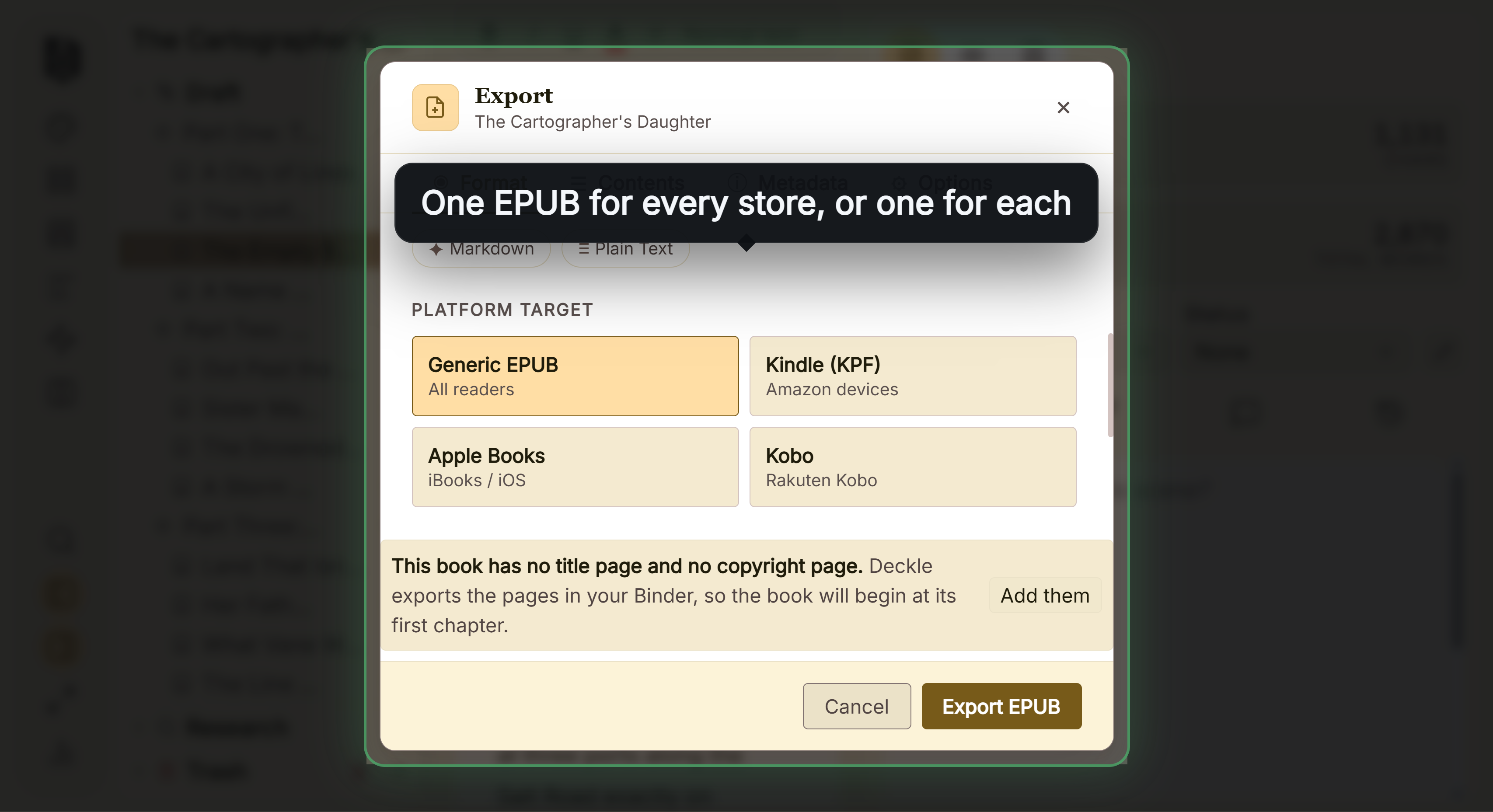 The EPUB platform targets in Deckle's Export window
Scene breaks are one book-wide setting with visible options such as asterisks, an asterism or a fleuron. A Scrivener project comes in as a zipped backup, and moving from Scrivener to Deckle walks through it.
What you would give up. Deckle's Kindle target writes an EPUB for KDP to convert, not a KPF file, which is the same thing a Scrivener ePub upload gives KDP. Deckle has 8 fixed trim sizes, no custom size, and no PDF/X output. Scrivener's per-layout control, Pandoc and LaTeX routes are far more flexible. If Scrivener's ePub already passes Kindle Previewer, you have what KDP needs. For a dedicated formatter, Scrivener to Vellum covers the handoff.
Deckle is a one-time purchase. To try it, click Take Deckle for a Spin on the screen Deckle opens to. There is no card, no account and no time limit. It opens a sample novel with every screen open to explore, and you can restyle it and export real EPUB, PDF and DOCX files. New writing is capped at about 500 words, and new documents and imports are blocked.
FAQ
Can I upload a Scrivener EPUB to KDP?
Yes. KDP lists EPUB as a supported eBook format. Check it in Kindle Previewer first, as KDP recommends.
How do I export Scrivener to Kindle?
Compile to ePub and upload the .epub to KDP. Literature & Latte says Scrivener's Kindle file is for previewing, not for KDP.
Why is the Kindle option missing from Scrivener's Compile?
Scrivener for macOS 3.5.0 removed it in October 2025 because Amazon no longer accepts MOBI. Existing Kindle formats switch to ePub automatically.
Does Scrivener export EPUB 3?
Yes. The ePub Ebook file type uses the ePub 3 specification. ePub 2 survives only for older projects that used it.
Should I use "Optimize for Kindle conversion" for KDP?
No. The Mac manual says not to use it for KDP. It is for distributors that convert the file themselves.
Is Scrivener good for KDP paperbacks?
It can compile a print PDF with built-in Paperback formats. KDP needs a PDF if the book has bleed and wants fonts fully embedded.
Do I need Kindle Create to publish a Scrivener book on Kindle?
No. KDP accepts EPUB directly. Kindle Create is one way to make a KPF, not a requirement.
Sources
All retrieved 2026-10-20.
- Scrivener 3 User Manual for macOS, Literature & Latte, revision 3.5.2-01 (22.3 contents pages in ebooks; 23.4.3 Ebook & HTML Options including Optimize for Kindle conversion; 23.4.5 Cover; 23.4.6 Table of Contents tab; 23.4.7 KindleGen; Table 23.1 and 23.2 file types; 24.4.2 section breaks in ebooks; 24.23 PDF Settings; appendix D.2.7 and D.3.1)
- Scrivener 3 User Manual for Windows, Literature & Latte, revision 3.1.6.0-02 (Table 23.1 with Kindle Ebook; 23.4.3 ebook options without Optimize for Kindle conversion; 23.4.7 KindleGen; 24.3.2 separators)
- Release Notes, Literature & Latte (macOS 3.5.0, 1 October 2025: Kindle .mobi removed; Windows 3.1.6, 3 September 2025)
- About Us, Literature & Latte (Ioa, Head of Support & Documentation, posts as AmberV)
- Why can't I compile into .mobi anymore?, Literature & Latte forum, answers by AmberV, 2025-10-26 and 2025-11-03
- EPUB Compile Errors, Literature & Latte forum, answer by AmberV, 2022-01-10
- Does Scrivener use accessible section breaks in ePub?, Literature & Latte forum, answer by AmberV, 2025-10-29
- What file formats are supported for eBook manuscripts?, KDP Help (DOC/DOCX, KPF, EPUB; other accepted formats; PDF languages; validate with Kindle Previewer)
- MOBI Support for eBooks Frequently Asked Questions, KDP Help (MOBI ended 1 August 2021 reflowable, 18 March 2025 fixed-layout)
- Kindle Previewer, KDP Help (system requirements; formats it opens)
- Save Your Manuscript File, KDP Help (PDF required with bleed; accepted formats without bleed; full font embedding)
- EPUB 3.3, W3C Recommendation
- EPUBCheck, W3C (maintained by the DAISY Consortium)
Scrivener is a trademark of Literature & Latte. Amazon, Kindle and KDP are trademarks of Amazon.com, Inc. or its affiliates. Deckle is not affiliated with or endorsed by any product named here.