

KDP formatting software is any tool whose output meets Amazon KDP's file rules: an EPUB, DOCX or KPF file for a Kindle ebook, and a print interior as a PDF (PDF/X-1a preferred, and required to be a PDF when the book has bleed) or as DOC, DOCX, RTF, HTML or TXT. Amazon's own free tools are Kindle Create, Word templates and Kindle Previewer.

KDP endorses no formatting app outside its own, so this page starts from KDP's help pages, fetched on 20 October 2026, and checks each tool against them in the vendor's own words.
What file formats does KDP accept for an ebook?
KDP's help page "What file formats are supported for eBook manuscripts?" lists Microsoft Word (DOC/DOCX), Kindle Package Format (KPF), EPUB and MOBI as the suggested formats. It also accepts HTML, RTF, plain text and PDF. PDF ebooks are supported only in English, French, German, Italian, Portuguese, Spanish, Catalan, Galician and Basque.
Three rules on that page matter when you choose software:
- EPUB is accepted directly. It must meet the Kindle Publishing Guidelines, and KDP recommends validating it with Kindle Previewer before upload. You do not need to turn an EPUB into KPF first.
- KPF comes from Kindle Create. KDP says you can create KPF files with Kindle Create.
- MOBI is on its way out. "Effective March 2025, we will no longer accept MOBI files for fixed-layout eBooks."
KDP's "Paths to Getting Your Content on Kindle" page tells anyone using a conversion service to validate the EPUB in Kindle Previewer. It warns: "Any errors or warnings will prevent the titles from becoming available." The ebook rules in detail are in Amazon KDP EPUB requirements.
What does KDP require for a print interior?
KDP's "Save Your Manuscript File" and "Paperback Submission Guidelines" pages set these rules for paperbacks.
- File type. Without bleed, upload "a PDF, DOC, DOCX, RTF, HTML, or TXT file", which KDP converts to PDF. With bleed, "you must upload your manuscript as a PDF."
- PDF standard. "PDF/X-1a is preferred." KDP warns that non-PDF/X files may have non-printing objects removed during review.
- Fonts. "Embed all fonts in your native file prior to submission." The minimum font size is 7 points.
- Images. "All images (both cover and manuscript) should be at least 300 DPI."
- File size. "The maximum file size for conversion is 650MB."
- Bleed size. A full-bleed interior PDF is 0.125 inches wider and 0.25 inches taller than the trim size.
- Inside margin. The gutter grows with page count, from 0.375 inches for 24 to 150 pages up to 0.875 inches for 701 to 828 pages. Outside margins are at least 0.25 inches without bleed and 0.375 inches with bleed.
- Clean file. Remove crop marks, trim marks, bookmarks, comments, annotations, placeholder text and metadata. Flatten transparency. Don't submit locked or encrypted files.
Page counts by paper type, trim size bounds and the cover file are listed in KDP print file requirements. How margins and the gutter work on the page is in book margins and gutter explained.
What formatting tools does KDP offer itself?
KDP offers four free tools. None of them is a writing app.
Kindle Create. Amazon's formatter for Windows 10 or later and macOS 10.15 or later (macOS 11 on Apple M1). It imports DOC, DOCX or PDF. For reflowable ebooks and print it exports a KPF file. "Kindle Create produces a publishable file (KPF) that you can submit to KDP." One project covers the ebook and the paperback, with page numbers, headers and footers, page spreads and automatic widow and orphan handling. Amazon's feature chart still lists that route as "Pre-release (beta)", as of October 2026. Its stated limits: "Tables, footnotes, lists, and inline images imported from your DOC(X) file cannot currently be edited in Kindle Create", and themes "cannot be edited by the user". The Paperback Submission Guidelines name Kindle Create for formatting paperback interiors.
Paperback and hardcover manuscript templates. These are Microsoft Word files, downloaded as ZIP folders. KDP offers blank templates with page size and margins already set, and templates with sample content (title page, table of contents, placeholder chapters). Some versions use Amazon Endure, KDP's own font, which KDP says helps reduce page count. KDP warns: "Make sure to remove any template sample text from your final manuscript", or the upload may error or the manuscript may be rejected.
Kindle Previewer. KDP calls it "the best way to validate your content before publishing." It checks an EPUB for errors and shows how it displays on Kindle devices and apps.
Cover Creator. A free cover tool for ebooks and paperbacks. KDP notes it is not a content conversion path.
KDP's ebook formatting guide is "specific to Microsoft Word 2016". It tells you to mark chapter titles with Heading 1 so Word can build the table of contents, and to keep the cover image out of the manuscript file.
Which formatting software produces files KDP accepts?
Every tool below produces at least one file type on KDP's lists. They differ on the details KDP cares about most: PDF/X-1a, bleed and per-store ebook output. Each cell is the vendor's own statement, retrieved 20 October 2026. "Not stated" means the vendor pages we read did not say.
| Tool | Ebook file for KDP | Print file for KDP | PDF/X-1a | Bleed | Platforms |
|---|---|---|---|---|---|
| Kindle Create | KPF (EPUB for reflowable) | KPF | not applicable, no PDF | full-size image bleed is a "pre-release option" | Windows, Mac |
| Word with KDP templates | DOCX | DOCX, or PDF | not claimed | needs a PDF | Windows, Mac, web |
| Vellum | per-store EPUB, Kindle included | PDF (Press tier) | yes, "Professional-Grade PDF/X-1a" | "Full-Bleed Pages" | Mac only |
| Atticus | EPUB | print-ready PDF | "not classified as PDF X-1a" | full-bleed images | Windows, Mac, Linux, Chromebook, browser |
| Reedsy Studio | EPUB 3 | print-ready PDF | yes, "PDF/X-1a:2001 for print-on-demand" | not stated | browser |
| Draft2Digital formatter | EPUB | B&W paperback PDF, 6 trims | not stated | not stated | browser |
| Affinity by Canva | EPUB | PDF with bleed and crop marks | not stated | yes | Windows, Mac |
| Adobe InDesign | reflowable EPUB | PDF, with Preflight | not stated on the pages read | not stated on the pages read | desktop, via Creative Cloud |
| Deckle | EPUB (Kindle target) | PDF typeset with Typst | no, a standard PDF | yes, ⅛" by default | Windows, Mac, Linux |
Atticus answers the PDF/X-1a question directly. "No, our PDF files are not classified as PDF X-1a," it says, "but we do meet most, if not all, of the criteria required for that classification." Atticus says fonts "are embedded within the PDF file during the export process", and it recommends checking the PDF in KDP's paperback print previewer. Atticus costs $147 once (as of October 2026).
Reedsy Studio says its print-ready PDF "removes links and uses CMYK images". Reedsy's Studio FAQ adds: "Our EPUB 3 and PDF files are compatible with all major distributors and retailers." Its FAQ recommends uploading ebooks through Kindle Direct Publishing and print through KDP Print. It is free, with optional add-ons.
The Draft2Digital formatter is free in a browser. Draft2Digital's FAQ says "You are allowed to use your Draft2Digital converted epub anywhere." Its paperback PDF comes in six trim sizes (5x8, 5.25x8, 5.5x8.5, 6x9, 7.5x9.25 and 8.5x11 inches), black and white only. Its FAQ does not mention interior bleed.
Affinity exports PDF "with bleed and crop marks". KDP's guidelines say to remove crop marks, so switch them off in the export settings for a KDP file. Affinity is free with a Canva account.
Vellum generates a separate ebook file for Kindle, Apple Books and Kobo, and Vellum Press makes PDF/X-1a print files in 24 trim sizes. It runs only on Mac, at $199.99 (Ebooks) or $249.99 (Press) as of October 2026. Windows authors have their own page: best book formatting software for Windows.
Does Deckle meet KDP's print rules?
Deckle is our app, so weigh this section accordingly. It is a desktop app for Windows, macOS and Linux that writes and formats a book in one project. These are the KDP-relevant behaviours, read from Deckle's export code.
- Gutter. Deckle's KDP gutter table is 0.375 inches up to 150 pages, 0.5 to 300, 0.625 to 500, 0.75 to 700 and 0.875 above that. That is KDP's published table. The print layout uses whichever is larger, your inside margin setting or KDP's minimum for the estimated page count, so a long book cannot export below KDP's gutter. US Letter and A4 are exempt, because they are manuscript sizes, not trade trims.
- Bleed. Only the top, bottom and outside edges bleed, and the spine side does not. With the default ⅛" bleed, a 6x9 interior exports at 6.125 by 9.25 inches, which is KDP's "0.125 inches wider and 0.25 inches taller" rule.
- Spine width. The Spine Width Calculator uses KDP's four per-page multipliers: 0.002252 inches for white paper and standard colour, 0.0025 for cream, and 0.002347 for premium colour.
- Trim sizes. Eight, including 5x8, 5.5x8.5, 6x9 and 6.14x9.21 (labelled KDP in the app). There is no custom size.
- PDF standard. The print PDF is a standard PDF, not PDF/X-1a. KDP prefers PDF/X-1a and accepts other files, so this is a gap against the preference, not a rejection. Only Deckle's Academia PDF uses a PDF standard, and that is PDF/A-2b for thesis deposit.
- Ebook. The Kindle target writes an EPUB for KDP to convert. It is not a KPF file, despite the "Kindle (KPF)" label in the export list. KDP accepts EPUB directly.
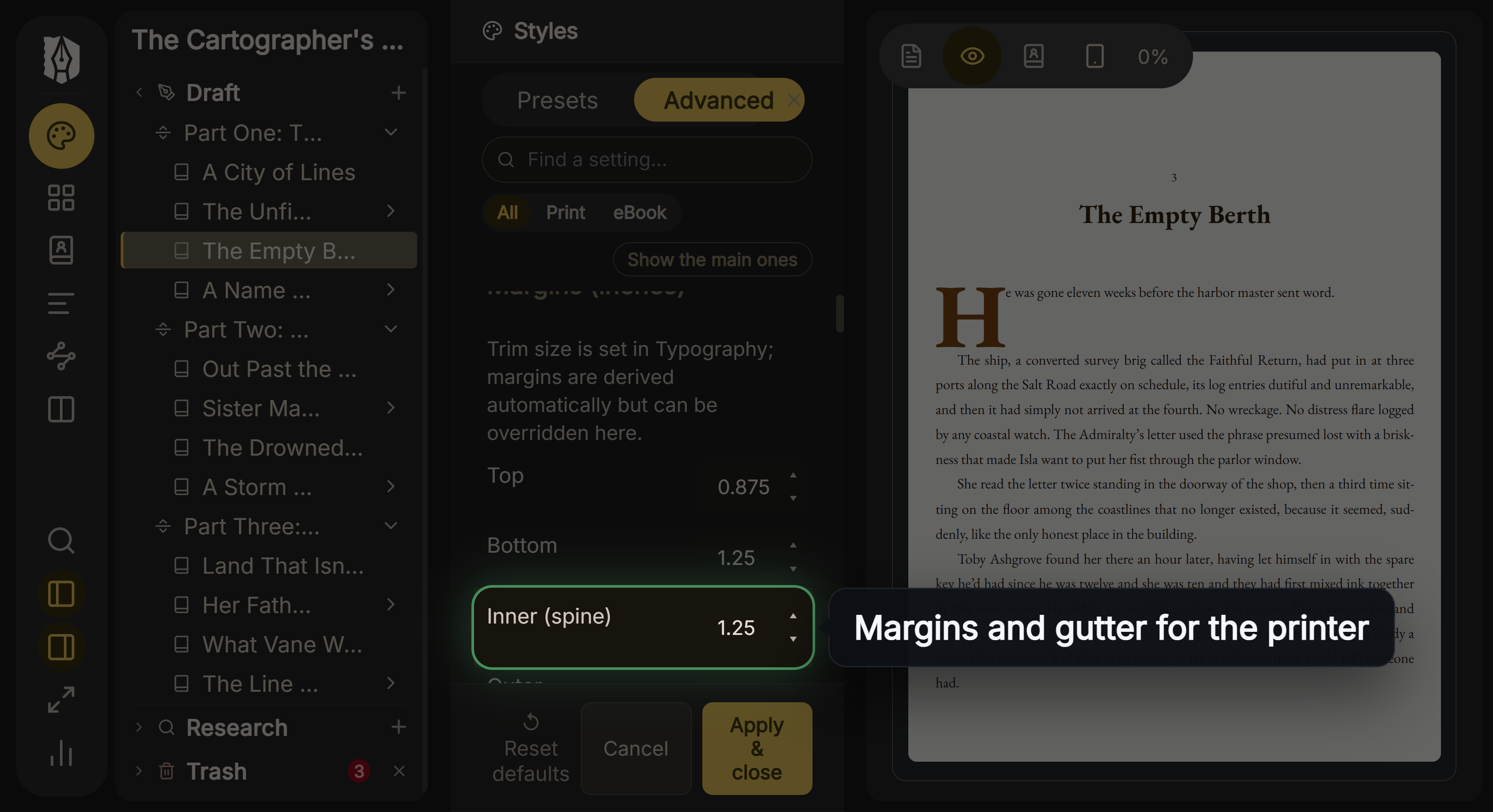 The inner (spine) margin, which on trade trims never drops below KDP's gutter for the page count
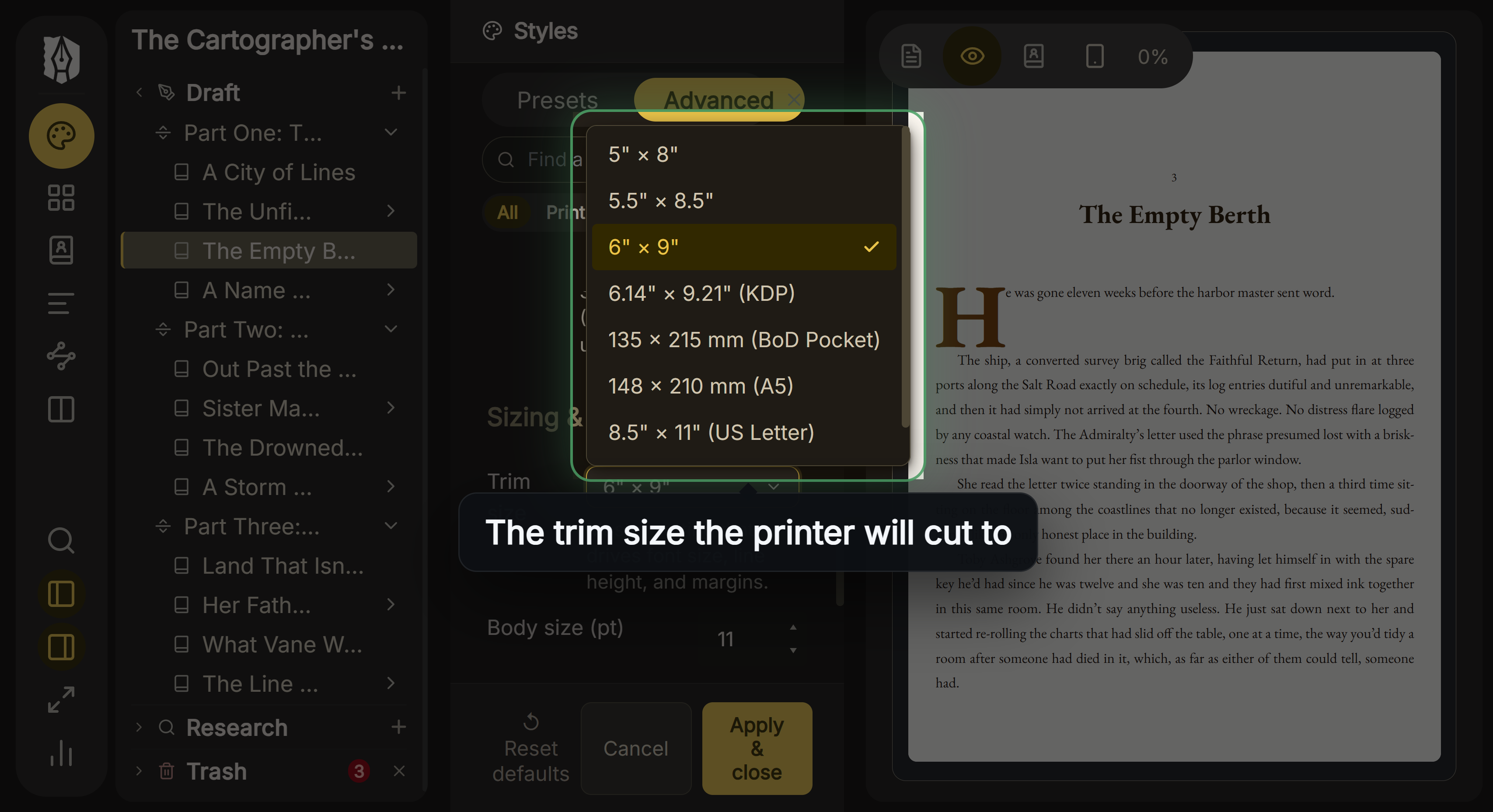 The trim size menu, with KDP's 6.14 x 9.21 inch size labelled
Deckle has no KDP upload button. You export the files and upload them in KDP yourself. Spine width arithmetic is explained in how to calculate spine width.
Common mistakes with KDP formatting software
- Uploading a DOCX for a bleed interior. KDP requires a PDF when the book has bleed.
- Leaving crop marks on. Design apps add them by default, and KDP says to remove them.
- Keeping template sample text. KDP may reject a manuscript with leftover placeholder text.
- Assuming "print-ready" means PDF/X-1a. Vellum and Reedsy Studio state PDF/X-1a. Atticus states it is not. Most others don't say.
- Skipping Kindle Previewer. Validation errors or warnings keep a title from going live.
- Building a fixed-layout ebook as MOBI. KDP stopped accepting MOBI for fixed-layout ebooks in March 2025.
- Converting an EPUB to KPF for no reason. KDP takes EPUB as it is.
How to try Deckle's KDP output
Deckle has a free demo. Click Take Deckle for a Spin on the screen Deckle opens to. It needs no card and no account, and it has no time limit. It opens a sample novel with every screen open to explore, and you can restyle it and export real EPUB, PDF and DOCX files, then check them in Kindle Previewer and KDP's print previewer. New writing is capped at about 500 words, and new documents and imports are blocked. Deckle itself is a one-time purchase.
FAQ
Does KDP have its own formatting software?
Yes. Kindle Create is Amazon's free formatter for Windows and Mac. KDP also offers free Word manuscript templates and Kindle Previewer for checking files.
Do I have to use Kindle Create for KDP?
No. KDP accepts EPUB, DOCX and other formats directly. Kindle Create is the tool that makes KPF files, which are one accepted format among several.
Can I upload an EPUB to KDP?
Yes. EPUB is one of KDP's suggested ebook formats. KDP recommends validating it with Kindle Previewer first.
Does KDP require PDF/X-1a for paperbacks?
No. KDP says "PDF/X-1a is preferred" and accepts PDF, DOC, DOCX, RTF, HTML or TXT for interiors without bleed.
What file do I upload to KDP for a paperback with bleed?
A PDF. KDP states that a manuscript with bleed must be uploaded as a PDF, 0.125 inches wider and 0.25 inches taller than the trim size.
Are KDP's templates free?
Yes. They are Word files, blank or with sample content, including versions in Amazon's Endure font.
Can I format a book for KDP in Word?
Yes. KDP's ebook guide is written for Word 2016, and its print templates are Word files. Word does not save EPUB, but KDP accepts DOCX for ebooks.
What is the best KDP formatting tool?
No authority ranks them. Kindle Create suits a KDP-only book at no cost. A tool with a print PDF and an EPUB suits authors who also publish elsewhere.
Sources
All pages retrieved 2026-10-20.
- Amazon KDP, What file formats are supported for eBook manuscripts?: https://kdp.amazon.com/en_US/help/topic/G200634390
- Amazon KDP, Paths to Getting Your Content on Kindle: https://kdp.amazon.com/en_US/help/topic/G79CTKR8BX79E96L
- Amazon KDP, eBook Manuscript Formatting Guide: https://kdp.amazon.com/en_US/help/topic/G200645680
- Amazon KDP, Save Your Manuscript File (file types, PDF/X-1a, fonts, bleed, 650MB): https://kdp.amazon.com/en_US/help/topic/G202145060
- Amazon KDP, Paperback Submission Guidelines (margins, bleed, clean-file rules): https://kdp.amazon.com/en_US/help/topic/G201857950
- Amazon KDP, Paperback and Hardcover Manuscript Templates: https://kdp.amazon.com/en_US/help/topic/G201834230
- Amazon KDP, Create a Paperback Cover (spine multipliers): https://kdp.amazon.com/en_US/help/topic/G201953020
- Amazon KDP, Kindle Create download, output formats and feature chart (same-manuscript paperback in Pre-release (beta)): https://kdp.amazon.com/en_US/help/topic/GUGQ4WDZ92F733GC
- Amazon KDP, Prepare Reflowable and Print Books with Kindle Create: https://kdp.amazon.com/en_US/help/topic/G7R2L7V5X6SJH948
- Atticus Help, Does Atticus create PDF X-1a files?: https://intercom.help/atticus-5877e36564df/en/articles/12684255-does-atticus-create-pdf-x-1a-files
- Atticus Help, Are fonts embedded in the PDF?: https://intercom.help/atticus-5877e36564df/en/articles/12676915-are-fonts-embedded-in-the-pdf
- Atticus Help, Can I use Amazon's KDP paperback print previewer to check my PDF?: https://intercom.help/atticus-5877e36564df/en/articles/12683532-can-i-use-amazon-s-kdp-paperback-print-previewer-to-check-my-pdf
- Atticus, home page (price, exports): https://www.atticus.io/
- Reedsy Studio, FAQ (exports including PDF/X-1a:2001, KDP recommendation): https://reedsy.com/studio/resources/book-writing-software-faq/
- Draft2Digital, FAQ (EPUB use, trims, print limits): https://draft2digital.com/faq/
- Affinity by Canva, page layout software (PDF with bleed and crop marks, EPUB): https://www.affinity.studio/page-layout-software
- Adobe InDesign, features: https://www.adobe.com/products/indesign/features.html
- Vellum, home page (PDF/X-1a, trim sizes, prices): https://vellum.pub/
- Vellum Help, Generating (per-store files): https://help.vellum.pub/generating/
Prices and features last checked 20 October 2026. Kindle, Kindle Create and KDP are trademarks of Amazon.com, Inc. Vellum is a trademark of 180g. Affinity is a trademark of Canva. InDesign is a trademark of Adobe. Microsoft Word is a trademark of Microsoft. Atticus, Reedsy and Draft2Digital are trademarks of their respective owners. Deckle is not affiliated with or endorsed by any product named here.