

The main Kindle Create alternatives are Atticus, Vellum, Reedsy Studio, the Draft2Digital formatter, Microsoft Word with KDP's templates, Adobe InDesign, Affinity and Deckle. Authors leave Kindle Create for three reasons: to publish beyond Amazon, to get more control over fonts, margins and footnotes, or to write and format the book in the same app.

Kindle Create is free, made by Amazon for KDP, and for a plain novel sold only on Amazon it does the job well. No standards body ranks formatting software, so this page ranks nothing. It compares what each vendor states on its own pages, as of October 2026.
What Kindle Create does well
Kindle Create is "a free desktop application that helps you turn a completed manuscript into a professional looking eBook", in Amazon's words. KDP's Getting Started page lists Windows 10 or later and macOS 10.15 or later (macOS 11 on Apple M1 Macs). There is no subscription.
Its strengths, from Amazon's own help pages:
- One project for ebook and print, still in beta. "You can use Kindle Create to prepare an eBook and paperback with the same manuscript file." Amazon's own feature chart on the Getting Started page lists "Preparation of a text-heavy eBook and paperback with the same manuscript file" under "Pre-release (beta)", as of October 2026.
- Automatic print setup. "When you upload your file to KDP, margins are automatically calculated, and page numbers are added to your paperback's table of contents page and footers."
- Widow and orphan handling. "Kindle Create automatically optimizes your book to minimize widowed and orphaned paragraphs."
- Chapter detection. On import it "will automatically find and format the chapter titles" and builds a Kindle table of contents.
- Book types other formatters skip. Print Replica ebooks from a PDF, and comics and children's books with Guided View. Amazon says "Kindle Create is the only way to create a comic eBook with Guided View."
- A built-in previewer for tablets, phones and Kindle e-readers.
What Kindle Create can't do, in Amazon's words
These limits come from Amazon's Kindle Create help pages, retrieved 20 October 2026:
| Limit | Amazon's wording |
|---|---|
| Output formats | "Kindle Create allows you to export your manuscript in two formats: Kindle Package Format (KPF) and EPUB." |
| EPUB scope | "EPUB export is available for only reflowable books." |
| What the EPUB is for | "You can use Kindle Create to convert your manuscript to an EPUB for viewing your eBook on non-Kindle devices." |
| Tables, lists, footnotes | "Tables, footnotes, lists, and inline images imported from your DOC(X) file cannot currently be edited in Kindle Create." |
| Footnotes in print | "Kindle Create doesn't support paperbacks with tables, footnotes, or endnotes." |
| Themes | "These themes cannot be edited by the user." The product page offers "four high-quality themes". |
| Print fonts | "Font and font size for paperbacks can't be changed." |
| Print margins | "If you use Kindle Create to prepare your paperback, you won't be able to change the margins." |
| Print bleed | "Kindle Create doesn't support paperback images that bleed to the edge of the page." |
| Image captions | "Currently, Kindle Create doesn't support image captions." |
| Writing in it | "Can I write my complete book in Kindle Create? Yes, but we don't recommend it." |
Two of these shape everything else. The publishable file is a KPF, which "is only used for publishing" on KDP. Amazon names no PDF output, so the print interior Kindle Create builds is a file for KDP Print, not a PDF you can take to another printer.
Kindle Create alternatives for publishing wide
Publishing wide means selling through Apple Books, Kobo or an aggregator as well as Amazon. Apple Books asks for an EPUB, and Apple's publishing guide states that "All books submitted to Apple Books must pass the latest version of EPUBCheck." The Apple Books and Kobo file requirements page covers both stores. Kindle Create's EPUB covers reflowable books only, and Amazon describes it as a file "for viewing your eBook on non-Kindle devices", not as a store file.
Print beyond Amazon has a harder requirement. IngramSpark's File Creation Guide states that "Files must be PDF/X-1a:2001 or PDF/X-3:2002 compliant." A KPF is not a PDF, so a Kindle Create print book cannot go to IngramSpark as it stands. The IngramSpark file requirements page has the full specification.
Tools that write files for every store:
- Vellum ($199.99 Ebooks, $249.99 Press, Mac only, as of October 2026) builds a separate ebook for Kindle, Apple Books and Kobo plus a "Generic EPUB" for aggregators, and a "Professional-Grade PDF/X-1a" print file.
- Atticus ($147 one-time, as of October 2026) exports EPUB, print-ready PDF and DOCX, on Windows, Mac, Linux, Chromebook and the browser.
- The Draft2Digital formatter is free in a browser and produces "a pixel-perfect paperback PDF or ebook EPUB file" without publishing through Draft2Digital. Print is black and white paperback only, in six trim sizes.
- Reedsy Studio is free in a browser and exports EPUB 3 and a print-ready PDF. Reedsy says it does not work offline: "Currently, no".
Kindle Create alternatives with more design control
Kindle Create fixes the paperback's font, font size and margins, and offers four themes that cannot be edited. Authors who want their own typography move to a tool with editable styles or to page-layout software.
Atticus offers 17+ chapter themes, a custom theme builder, 1,500+ fonts, full-bleed images, large print and footnotes. Vellum offers Book Styles with "drop caps, embedded fonts, and flourishes", 24 trim sizes plus large print, paperback or hardcover, and full-bleed pages and backgrounds.
Adobe InDesign (US$22.99 a month for the single app on an annual plan, as of October 2026) and Affinity by Canva (free with a Canva account) give full page-layout control. Both export print PDF and EPUB. Both mean building every page yourself, which suits illustrated books, cookbooks and poetry more than a text novel.
Microsoft Word with KDP's templates costs nothing extra if you own Word. KDP offers blank templates with page size and margins set, and templates with sample content. Word gives you full control of fonts and spacing. Kindle Create's own help points there: "If you'd like to customize your paperback's font size and line spacing, we recommend formatting your book in Microsoft Word." Word does not save EPUB, so it covers print only.
Writing and formatting in the same app
Amazon's recommended workflow is to "Complete your manuscript in your preferred writing application (e.g. Microsoft Word)" and import the finished .docx. Later changes have to be pasted back in. Amazon warns that "When replacing older content, you'll lose some of the formatting done in Microsoft Word."
Atticus, Reedsy Studio and Deckle each hold the draft and the layout in one project, so a late edit does not mean another import.
Deckle is our app, so weigh this section accordingly.
Deckle is a desktop app for Windows, macOS and Linux that works offline and keeps each project as a folder on your own disk. For writing it has a Binder (Draft, Research, Trash), an Outliner with a Grid View of index cards, a Codex for characters, locations and items, a Timeline, snapshots and goals. For formatting it has 26 built-in style presets, eight trim sizes, bleed, drop caps, running heads, scene-break ornaments and special pages such as Title Page, Copyright and Also by the Author. Body size and line height are adjustable, and you can upload your own font files in Styles. Footnotes go at the foot of the page in print and pop up in the EPUB.
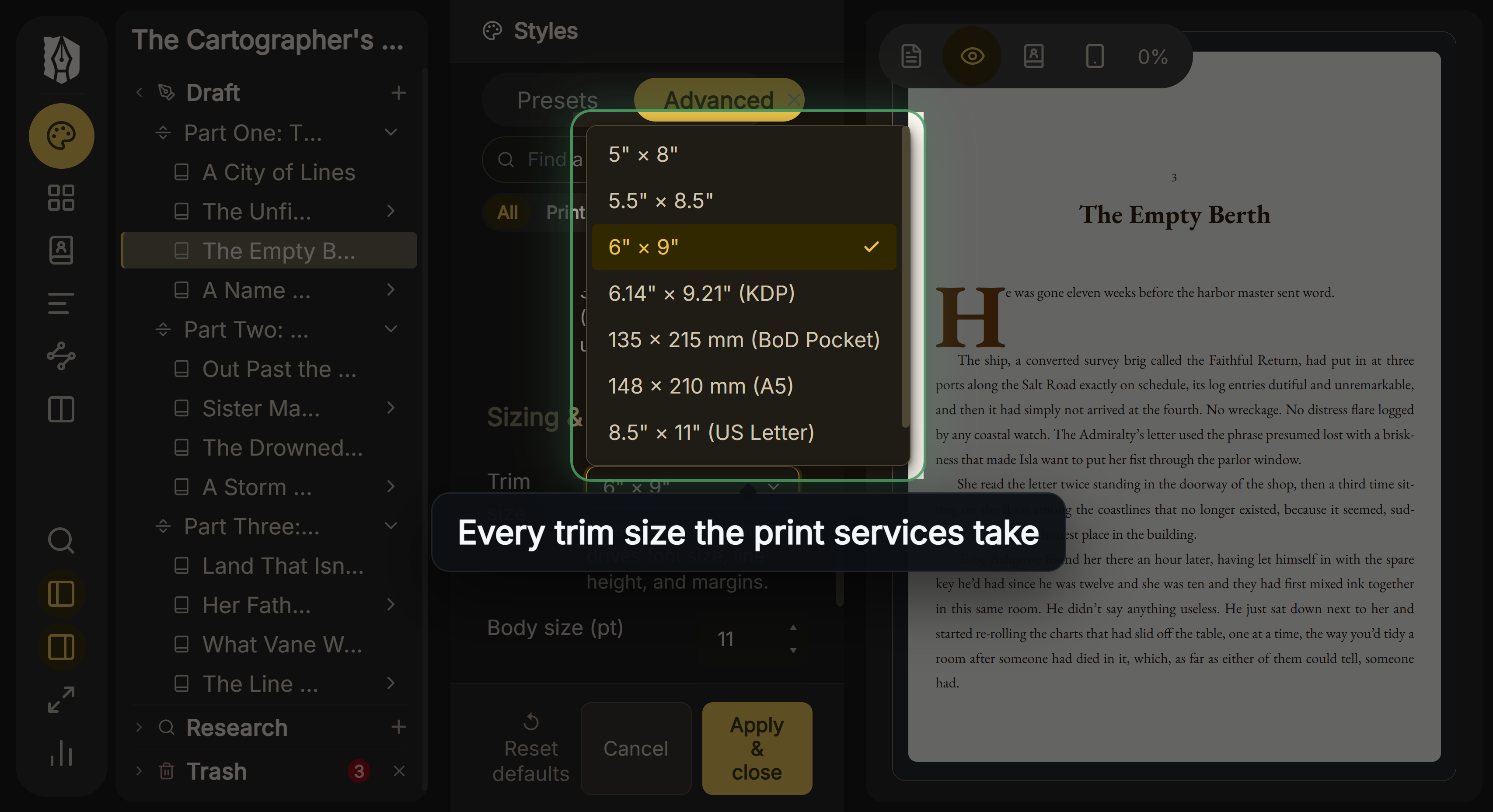 The trim sizes in Deckle's Styles
It exports EPUB with Generic, Kindle, Apple Books and Kobo targets, a print PDF, and DOCX. The Kindle target writes an EPUB for KDP to convert, not a KPF file, so KDP does the conversion that Kindle Create would otherwise do. KDP accepts that: "We support books in EPUB format that meet the specifications outlined in the Kindle Publishing Guidelines."
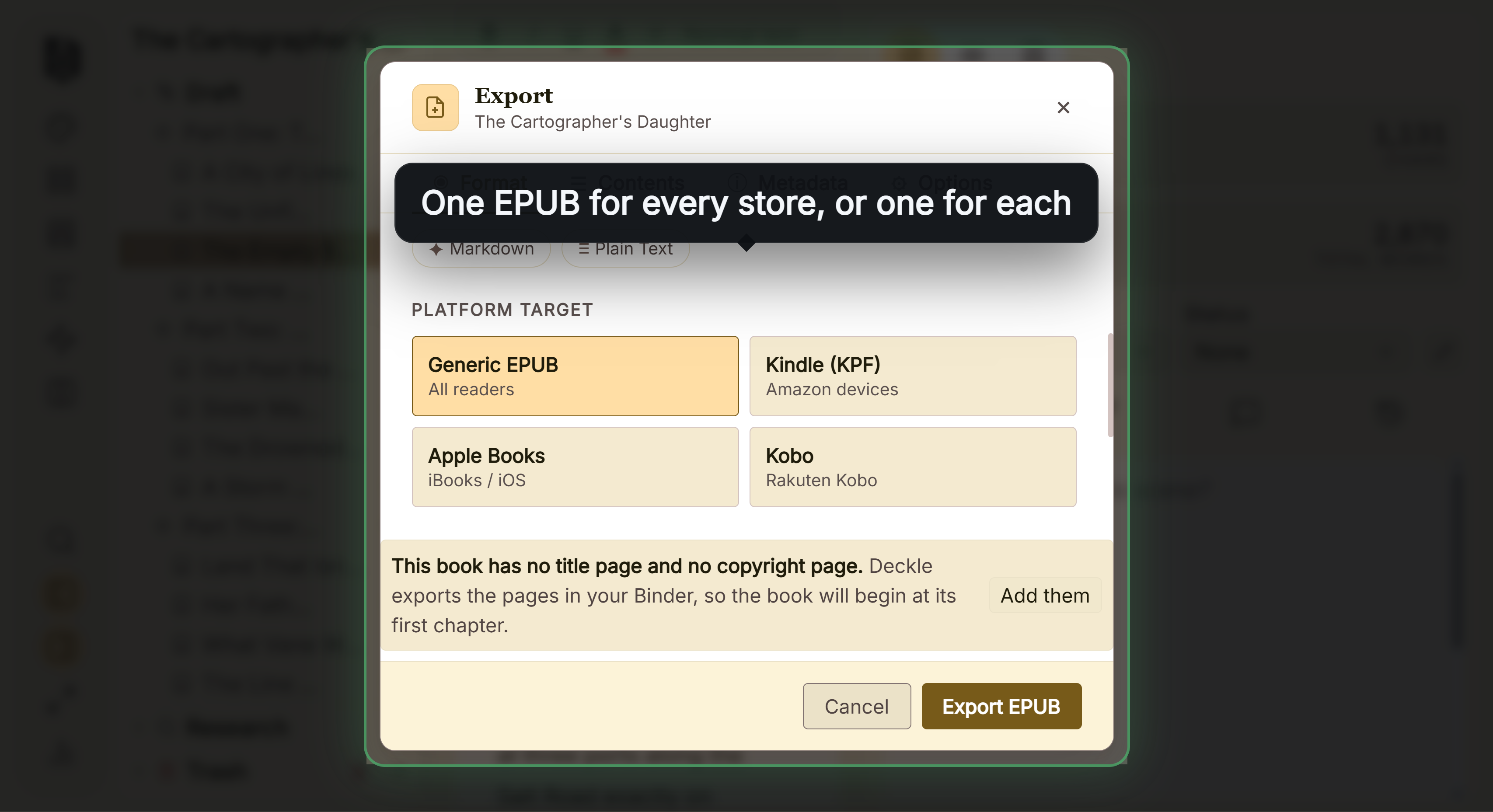 Deckle's EPUB targets. The Kindle one still writes an .epub file
Deckle is behind Kindle Create in places. It has no Print Replica, comic or Guided View mode, and its EPUB is reflowable only. Its print PDF is a standard PDF, not PDF/X-1a. Its Widow & orphan control is off by default, where Kindle Create handles widows and orphans automatically. And it is paid, where Kindle Create is free.
Deckle is a one-time purchase. To try it, click Take Deckle for a Spin on the screen Deckle opens to. There is no card, no account and no time limit. It opens a sample novel with every screen open to explore, and you can restyle it and export real EPUB, PDF and DOCX files. New writing is capped at about 500 words, and new documents and imports are blocked.
Kindle Create alternatives compared
Each vendor's own pages, as of October 2026.
| Tool | Platforms | Price | Ebook output | Print output | Writing tools |
|---|---|---|---|---|---|
| Kindle Create | Windows, Mac | Free | KPF; EPUB for reflowable books | KPF for KDP Print | Not recommended by Amazon |
| Atticus | Windows, Mac, Linux, Chromebook, browser | $147 one-time | EPUB | Print-ready PDF | Yes |
| Vellum | Mac only | $199.99 or $249.99 one-time | EPUB per store, Generic EPUB | PDF/X-1a (Press) | Text editor only |
| Reedsy Studio | Browser, online only | Free core, paid add-ons | EPUB 3 | Print-ready PDF | Yes |
| Draft2Digital formatter | Browser, online only | Free | EPUB | Paperback PDF, B&W | No |
| Word with KDP templates | Windows, Mac, more | Microsoft 365 or Office | No EPUB save | Yes | |
| InDesign | Desktop | US$22.99/month | EPUB | No | |
| Affinity by Canva | Windows, Mac | Free with Canva account | EPUB | PDF with bleed and crop marks | No |
| Deckle | Windows, Mac, Linux | One-time purchase | EPUB per store; Kindle target is EPUB | Standard PDF | Yes |
What Kindle Create and its alternatives cost over three years
List prices in US dollars before tax, as of October 2026.
| Tool | Price model | Cost over 3 years |
|---|---|---|
| Kindle Create | free | $0 |
| Draft2Digital formatter | free | $0 |
| Reedsy Studio, core | free | $0 |
| Affinity by Canva | free with Canva account | $0 |
| Atticus | one-time | $147.00 |
| Vellum Ebooks | one-time | $199.99 |
| Vellum Press | one-time | $249.99 |
| Microsoft 365 Personal (Word), yearly | subscription | $299.97 |
| Adobe InDesign, annual plan billed monthly | subscription | $827.64 if $22.99 a month continues |
| Deckle | one-time | see the free demo first |
A free tool stays the cheapest choice when your book fits it. The cost of Kindle Create shows up as work instead: a second tool for wide distribution, or a rebuild in Word when the paperback needs a different font.
Common mistakes when leaving Kindle Create
- Expecting to open a KPF or KCB elsewhere. The KPF is a publishing file for KDP and the KCB is Kindle Create's work file. Keep your original .docx, because every alternative here starts from a manuscript, not from Kindle Create's files.
- Sending the Kindle Create EPUB to other stores without checking it. Run any EPUB through EPUBCheck first, as Apple requires, and as how to make an EPUB file explains.
- Assuming a footnoted paperback will work. Kindle Create does not support paperbacks with footnotes or endnotes. Choose a tool that does before you format.
- Forgetting KDP's print rules. Whatever tool you choose, the PDF must meet KDP's print file requirements, and KDP states that PDF/X-1a is preferred.
- Converting an EPUB to KPF for KDP. You don't need to. The KDP EPUB requirements page covers what KDP checks in an uploaded EPUB.
FAQ
Is Kindle Create free?
Yes. Amazon calls it "a free desktop application", with free downloads for Windows and Mac.
Can Kindle Create export EPUB?
Yes, for reflowable books only. Amazon describes the EPUB as a way to view your ebook "on non-Kindle devices". The publishing file is a KPF.
Can Kindle Create export to PDF?
Amazon's help names no PDF export. Kindle Create exports KPF and EPUB, and its print books are uploaded to KDP as a KPF.
Is Kindle Create only for ebooks?
No. It also prepares paperbacks for KDP from the same project, with fixed fonts and automatic margins. Amazon's feature chart lists that as a pre-release (beta) feature.
Does Kindle Create work on Chromebook, iPad or online?
Amazon lists Windows 10 or later and macOS 10.15 or later only. Atticus, Reedsy Studio and Draft2Digital run in a browser.
Can I use Kindle Create for IngramSpark?
Not directly. IngramSpark requires a PDF/X-1a or PDF/X-3 file, and Kindle Create's print file is a KPF for KDP.
What is the best alternative to Kindle Create?
Nothing authoritative ranks them. Vellum suits Mac authors who want per-store files and PDF/X-1a print, Atticus suits a one-time price on any platform, and Draft2Digital or Reedsy suit a free browser tool.
Sources
All pages retrieved 20 October 2026. Prices and features change, so check the vendor page before choosing.
- Amazon, Kindle Create product page and FAQ ("free desktop application", four themes, EPUB for non-Kindle devices, writing in Kindle Create, captions, print support): https://www.amazon.com/kindlecreate
- Amazon KDP Help, Getting Started with Kindle Create (system requirements, KPF and EPUB output, reflowable-only EPUB, same-manuscript paperback listed as Pre-release (beta)): https://kdp.amazon.com/en_US/help/topic/GUGQ4WDZ92F733GC
- Amazon KDP Help, Prepare Reflowable and Print Books with Kindle Create (tables, footnotes and lists not editable, themes not editable, KPF and KCB, widows and orphans): https://kdp.amazon.com/en_US/help/topic/G7R2L7V5X6SJH948
- Amazon KDP Help, Prepare Your eBook and Paperback with Kindle Create (no footnotes in paperbacks, fixed fonts and margins, no bleed): https://kdp.amazon.com/en_US/help/topic/G93BCLJGZFGK39BT
- Amazon KDP Help, supported eBook manuscript formats (EPUB accepted): https://kdp.amazon.com/en_US/help/topic/G200634390
- Amazon KDP Help, manuscript file guidance (PDF/X-1a preferred): https://kdp.amazon.com/en_US/help/topic/G202145060
- Amazon KDP Help, paperback and hardcover manuscript templates: https://kdp.amazon.com/en_US/help/topic/G201834230
- IngramSpark, File Creation Guide (PDF/X-1a:2001 or PDF/X-3:2002): https://www.ingramspark.com/hubfs/downloads/file-creation-guide.pdf
- Apple, publish a book from the web (EPUB, EPUBCheck): https://authors.apple.com/support/4574-publish-book-from-web
- Vellum, home page (prices, Mac only, per-store EPUB, PDF/X-1a): https://vellum.pub/
- Atticus, home page (price, platforms, exports, themes, footnotes): https://www.atticus.io/
- Reedsy Studio, FAQ (offline, exports): https://reedsy.com/studio/resources/book-writing-software-faq/
- Draft2Digital, FAQ (free tools, print limits): https://draft2digital.com/faq/
- Adobe InDesign, product and pricing: https://www.adobe.com/products/indesign.html
- Affinity by Canva, page layout: https://www.affinity.studio/page-layout-software
- Microsoft 365, compare plans and prices: https://www.microsoft.com/en-us/microsoft-365/buy/compare-all-microsoft-365-products
- Adobe, Subscription and cancellation terms, effective 1 August 2026: US annual plans billed monthly "automatically renew on a monthly basis" after the first year, at "the then-current rate for your plan" (read 21 October 2026)
Kindle, Kindle Create and KDP are trademarks of Amazon.com, Inc. or its affiliates. Other product names are trademarks of their respective owners. Deckle is not affiliated with or endorsed by any product named here.