

Kindle Create is Amazon's free formatter for Windows and Mac, and it builds a KPF file for KDP ebooks and paperbacks. Vellum is a Mac-only formatter that costs $199.99 for ebooks or $249.99 with print (as of October 2026), and it builds an ebook for every store plus a PDF/X-1a print file. Kindle Create suits Amazon only. Vellum suits publishing wide with more design control.

Every fact below comes from Amazon's and 180g's own pages, read on 20 October 2026. This page ranks neither tool.
Kindle Create vs Vellum at a glance
| Kindle Create | Vellum | |
|---|---|---|
| Made by | Amazon, for KDP | 180g |
| Price (as of October 2026) | Free | Vellum Ebooks $199.99; Vellum Press $249.99; one-time, tax extra |
| Platforms | Windows 10+, macOS 10.15+ | Mac only, macOS 13 or newer |
| Ebook output | KPF; EPUB "for only reflowable books" | EPUB 3 and EPUB 2, one file per store plus a Generic EPUB; MOBI for ARCs |
| Print output | KPF uploaded to KDP Print | "Professional-Grade PDF/X-1a", Press tier |
| Trim sizes | Any trim size KDP supports | "24 Trim Sizes + Large Print" |
| Print bindings | Paperback; Amazon's FAQ also mentions hardcover | "Paperback or Hardcover" |
| Imports | DOC/DOCX; PDF for Print Replica and comics; .rtf and .txt | .docx only |
| Styling | Four themes that "cannot be edited by the user" | Book Styles with "drop caps, embedded fonts, and flourishes" |
| Paperback fonts and margins | Fixed: "Font and font size for paperbacks can't be changed" | Set by the chosen style and trim size |
| Full bleed | Not supported in paperbacks | "Full-Bleed Pages & Backgrounds" |
| Widows and orphans | Handled automatically | "widow-handling and spread-balancing" |
| Fixed-layout books | Print Replica, comics and kids' books with Guided View | Not listed |
| Box sets | Not listed | Yes |
| Try before buying | Free | Free download; can't generate files until you buy |
Is Kindle Create free, and what does Vellum cost?
Kindle Create is free. Amazon calls it "a free desktop application that helps you turn a completed manuscript into a professional looking eBook".
Vellum is a one-time purchase with free updates. Vellum Ebooks costs $199.99 and covers unlimited ebooks. Vellum Press costs $249.99 and adds paperbacks. Upgrading from Ebooks to Press after the first 30 days costs $69.99. Tax is extra. The Vellum download is free, and you can import, try styles and preview, but you "won't be able to Generate files for publishing until you make a purchase".
Does Vellum run on Windows like Kindle Create?
No. Vellum runs only on a Mac with macOS 13 or newer, and 180g suggests renting a cloud Mac to Windows users. Kindle Create runs on Windows 10 or later and macOS 10.15 or later, or macOS 11 on Apple M1 Macs. Neither has a Chromebook, iPad or browser version.
A Windows author can use Kindle Create and cannot use Vellum natively. The Vellum alternatives page covers the Windows and Linux options.
Can Kindle Create or Vellum publish beyond Amazon?
Kindle Create is built for Kindle. Its publishing file is a KPF, and Amazon's Kindle Create help says "The KPF file is only used for publishing." Amazon also states that "Kindle Create is for preparing books that can be published on Kindle", and describes the EPUB export as a way "to convert your manuscript to an EPUB for viewing your eBook on non-Kindle devices." The EPUB works "for only reflowable books".
Vellum is built for every store. Its site says "Create ebooks for every platform: Kindle, Kobo, Apple Books, and more", and it generates a separate file for each store plus a Generic EPUB for aggregators. Each store-specific file "can guide readers to buy your next book in their favorite store."
Print is the sharper difference. Kindle Create's paperback is a KPF that goes to KDP Print, and Amazon's feature chart still lists making the ebook and paperback from one manuscript as "Pre-release (beta)", as of October 2026. Vellum Press writes a PDF/X-1a file, which is what printers ask for. KDP's manuscript guidance says "PDF/X-1a is preferred". IngramSpark's File Creation Guide says "Files must be PDF/X-1a:2001 or PDF/X-3:2002 compliant." The IngramSpark file requirements page has the rest of that specification.
Fonts, footnotes and design control
Kindle Create trades control for simplicity. Amazon's paperback help states these limits:
- "Kindle Create doesn't support paperbacks with tables, footnotes, or endnotes."
- "Font and font size for paperbacks can't be changed."
- "If you use Kindle Create to prepare your paperback, you won't be able to change the margins."
- "Kindle Create doesn't support paperback images that bleed to the edge of the page."
In the ebook, "Tables, footnotes, lists, and inline images imported from your DOC(X) file cannot currently be edited in Kindle Create", and the four themes "cannot be edited by the user".
Vellum's pitch is design with little setup. Its Book Styles offer "drop caps, embedded fonts, and flourishes, all with a click". It lists 24 trim sizes plus large print, paperback or hardcover, full-bleed pages and backgrounds, widow handling and spread balancing, and "ACE-Approved Accessible Output".
Kindle Create does one thing Vellum does not list: fixed-layout books. It makes Print Replica ebooks from a PDF, and comics and children's books with Guided View. Amazon says "Kindle Create is the only way to create a comic eBook with Guided View."
Can you write a book in Kindle Create or Vellum?
Neither is built around drafting. Amazon answers "Can I write my complete book in Kindle Create?" with "Yes, but we don't recommend it", and recommends finishing the manuscript in Word first. Vellum is a formatter, though its Help says the Text Editor can be used to "write your entire novel from scratch"; it has no binder, outline or writing goals.
Both expect a finished manuscript. Vellum imports only .docx, and its help names Scrivener and Pages as apps that can produce one. Kindle Create imports DOC/DOCX and, per its FAQ, .rtf and .txt files.
Pick Kindle Create if
- You publish on Amazon only, as ebook and KDP paperback.
- You work on Windows.
- Your book is text-heavy with no footnotes or tables.
- You are making a comic, a children's book with Guided View, or a Print Replica ebook.
- You want to spend nothing.
Pick Vellum if
- You work on a Mac with macOS 13 or newer.
- You publish wide and want a separate file for each store.
- You want a PDF/X-1a print file, hardcover, full bleed or one of 24 trim sizes.
- You publish series and want box sets.
- A one-time $199.99 or $249.99 fits your budget.
A third option: Deckle
Deckle is our app, so weigh this section accordingly.
Deckle is a desktop app for Windows, macOS and Linux that writes and formats in one project, works offline, and keeps that project as a folder on your own disk. It exports EPUB with Generic, Kindle, Apple Books and Kobo targets, a print PDF in eight trim sizes with optional bleed, and DOCX. Footnotes go at the foot of the page in print and pop up in the EPUB. Its Kindle target writes an EPUB for KDP to convert, not a KPF file.
Deckle is behind Vellum on print credentials. It has eight trim sizes and no custom size, and its print PDF is a standard PDF, not PDF/X-1a.
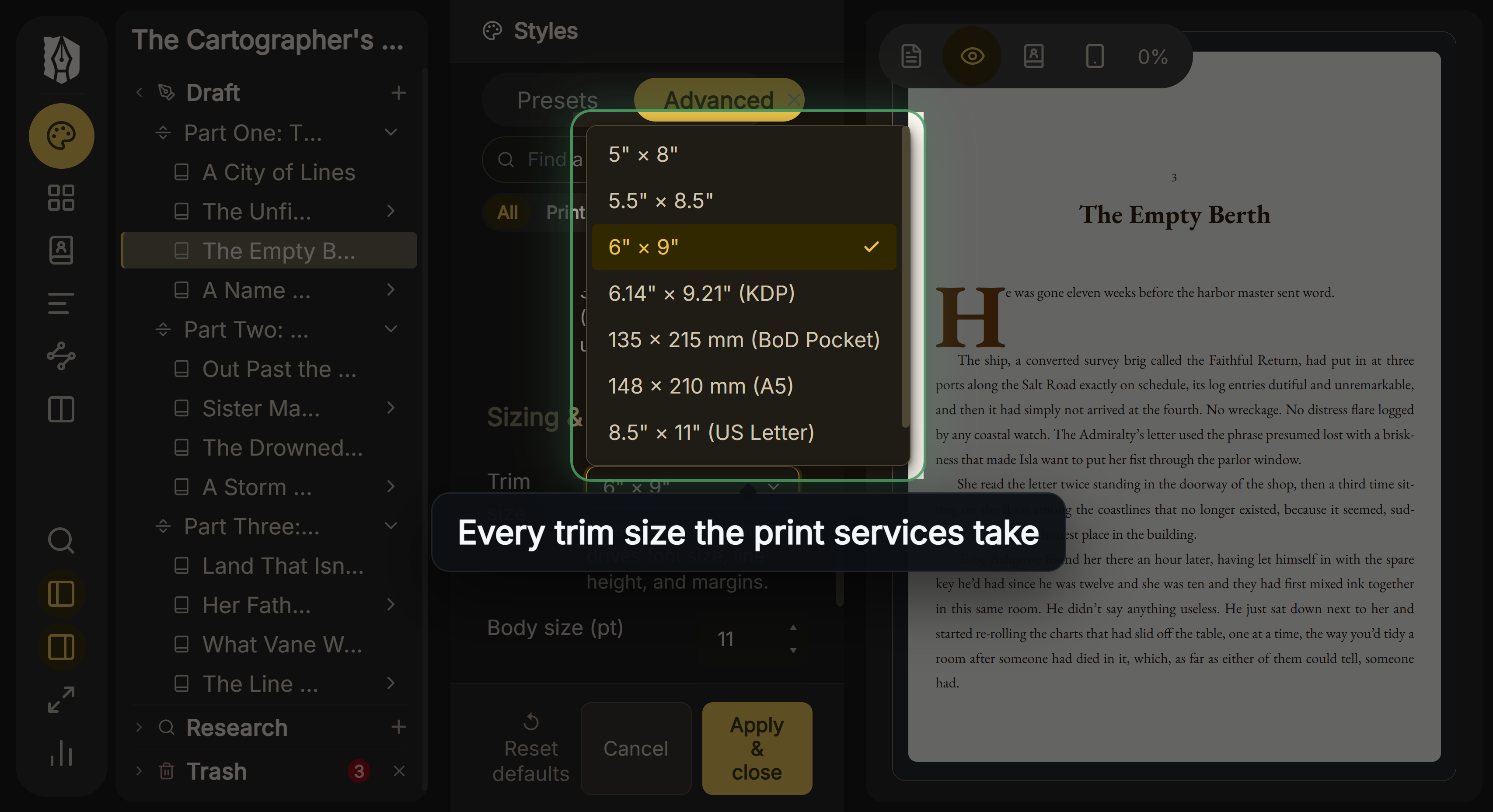 Deckle's eight trim sizes, against Vellum's 24 It is behind Kindle Create on fixed-layout books and on price. Where it differs from both is writing: it has a Binder, an Outliner with a Grid View of index cards, a Codex, a Timeline, snapshots and goals.
Deckle is a one-time purchase. To try it, click Take Deckle for a Spin on the screen Deckle opens to. There is no card, no account and no time limit. It opens a sample novel with every screen open to explore, and you can restyle it and export real EPUB, PDF and DOCX files. New writing is capped at about 500 words, and new documents and imports are blocked.
How to move a book from Kindle Create to Vellum
Vellum imports .docx only, and it cannot open Kindle Create's KCB work file or KPF.
- Find the .docx you imported into Kindle Create, and copy back any text you changed inside Kindle Create.
- Import the .docx into Vellum and check that each chapter came across.
- Choose a Book Style and preview the ebook and print editions.
- Buy Vellum Ebooks or Vellum Press, then generate the files.
- Check the print PDF against KDP's print file requirements and the Kindle file against the KDP EPUB requirements before replacing your KDP files.
What you'd lose by switching
- Price. Kindle Create is free, and Vellum's print tier is $249.99.
- Windows. Vellum is Mac only.
- Fixed-layout formats. Guided View comics, kids' books and Print Replica ebooks.
- Amazon's own tool. Kindle Create's KPF is the format Amazon calls "the preferred format for Kindle eBook and print books".
FAQ
Is Vellum better than Kindle Create?
Neither is better for every book. Kindle Create is free and made for KDP. Vellum costs $199.99 or $249.99 once, runs only on a Mac, and builds files for every store plus PDF/X-1a print.
Is Kindle Create free?
Yes. Amazon calls it "a free desktop application" for Windows and Mac.
Can Kindle Create export a print PDF like Vellum?
Amazon names no PDF export. Kindle Create exports KPF and, for reflowable books, EPUB.
Is there a Vellum for Windows?
No. Vellum is Mac only, and 180g suggests a rented cloud Mac. Kindle Create runs on Windows.
Does Vellum make KPF files?
Vellum doesn't list KPF. It makes a Kindle-specific ebook file, and KDP accepts EPUB uploads that meet its guidelines.
Can I try Vellum for free?
The download is free and you can import and preview, but you can't generate files until you buy.
Which handles footnotes better?
Kindle Create can't edit imported footnotes and doesn't support them in paperbacks. Vellum's home page doesn't mention footnotes, so check its help before relying on them.
Sources
All pages retrieved 20 October 2026. Prices and features change, so check the vendor page before buying.
- Amazon, Kindle Create product page and FAQ ("free desktop application", four themes, EPUB for non-Kindle devices, writing in Kindle Create, Guided View, import formats): https://www.amazon.com/kindlecreate
- Amazon KDP Help, Getting Started with Kindle Create (system requirements, KPF and EPUB output, KPF preferred, same-manuscript paperback listed as Pre-release (beta)): https://kdp.amazon.com/en_US/help/topic/GUGQ4WDZ92F733GC
- Amazon KDP Help, Prepare Reflowable and Print Books with Kindle Create (editing limits, themes, KPF and KCB, widows and orphans): https://kdp.amazon.com/en_US/help/topic/G7R2L7V5X6SJH948
- Amazon KDP Help, Prepare Your eBook and Paperback with Kindle Create (paperback footnotes, fonts, margins, bleed): https://kdp.amazon.com/en_US/help/topic/G93BCLJGZFGK39BT
- Amazon KDP Help, supported eBook manuscript formats (EPUB accepted): https://kdp.amazon.com/en_US/help/topic/G200634390
- Amazon KDP Help, manuscript file guidance (PDF/X-1a preferred): https://kdp.amazon.com/en_US/help/topic/G202145060
- Vellum, home page (prices, macOS 13, store files, PDF/X-1a, trim sizes, bleed, box sets, ACE): https://vellum.pub/
- Vellum Help, Purchasing (trial, upgrade price, no Windows version): https://help.vellum.pub/purchasing/
- Vellum Help, Importing (.docx only): https://help.vellum.pub/importing/
- Vellum Help, Generating (per-store files, Generic EPUB): https://help.vellum.pub/generating/
- IngramSpark, File Creation Guide (PDF/X-1a:2001 or PDF/X-3:2002): https://www.ingramspark.com/hubfs/downloads/file-creation-guide.pdf
- Vellum Help, The Text Editor: "write your entire novel from scratch? You can do it all here", "a full-featured word-processor" (retrieved 21 October 2026)
Kindle, Kindle Create and KDP are trademarks of Amazon.com, Inc. or its affiliates. Vellum is a trademark of 180g. Deckle is not affiliated with or endorsed by any product named here.