

Kindle Create is Amazon's free formatter for Windows and Mac, and it builds a KPF file for KDP, plus an EPUB for reflowable books. Atticus costs $147 one-time (as of October 2026), runs on Windows, Mac, Linux, Chromebook and the browser, and exports EPUB, print-ready PDF and DOCX for any store. Kindle Create suits an Amazon-only book. Atticus suits more control and publishing wide.

Every fact below comes from Amazon's and Atticus's own pages, read on 20 October 2026. Neither vendor ranks the other, and this page does not either.
Kindle Create vs Atticus at a glance
| Kindle Create | Atticus | |
|---|---|---|
| Made by | Amazon, for KDP | Atticus |
| Price (as of October 2026) | Free | $147 one-time, "No monthly fees. Forever." |
| Platforms | Windows 10+, macOS 10.15+ | Windows, Mac, Linux, Chromebook, and any desktop or tablet browser |
| Offline | Yes, a desktop app | Says online and offline; help (Feb 2024): online to import and export |
| Ebook output | KPF; EPUB "for only reflowable books" | EPUB |
| Print output | KPF uploaded to KDP Print | Print-ready PDF |
| Other exports | None named | DOCX |
| Imports | DOC/DOCX; PDF for Print Replica and comics; .rtf and .txt | .docx |
| Themes | Four, which "cannot be edited by the user" | 17+ chapter themes and a custom theme builder |
| Fonts | Paperback font and size "can't be changed" | 1,500+ fonts |
| Footnotes | Not editable; not supported in paperbacks | Footnotes listed |
| Full-bleed images | Not supported in paperbacks | Full-bleed images listed |
| Writing tools | Amazon doesn't recommend writing in it | Chapters, parts, goals, habit tracker, word counter |
| Fixed-layout books | Print Replica, comics and kids' books with Guided View | Not listed |
| Try before buying | Free | No trial; 30-day money-back guarantee |
Is Kindle Create free, and what does Atticus cost?
Kindle Create is free, with nothing to upgrade. Amazon calls it "a free desktop application that helps you turn a completed manuscript into a professional looking eBook".
Atticus costs $147 once, as of October 2026, with ongoing updates included and a 30-day money-back guarantee. Atticus lists no free plan and no trial.
Neither has a subscription, so over three years the gap stays at $0 against $147.
Which platforms do Kindle Create and Atticus run on?
Kindle Create runs on Windows 10 or later and macOS 10.15 or later, or macOS 11 on Apple M1 Macs. Amazon's Getting Started page lists 4 GB of RAM as the minimum and 8 GB as recommended. Amazon names no Chromebook, iPad, Linux or browser version.
Atticus runs on Windows, Mac, Linux and Chromebook, and installs from any desktop or tablet browser as a web app. Atticus says it works online and offline, though its help centre (last updated 14 February 2024) says "You do need to be online to import and export files". It keeps books in cloud storage with backups.
Can Kindle Create or Atticus publish beyond Amazon?
Kindle Create is built for KDP. Its publishing file is a Kindle Package Format (KPF) file. Amazon says "The KPF file is only used for publishing", and adds that "Kindle Create is for preparing books that can be published on Kindle", and describes its EPUB as a way "to convert your manuscript to an EPUB for viewing your eBook on non-Kindle devices." EPUB export works "for only reflowable books".
Atticus exports EPUB and a print-ready PDF, the files other stores and printers ask for. Apple Books, for one, requires an EPUB that passes "the latest version of EPUBCheck". IngramSpark's File Creation Guide requires print files that are "PDF/X-1a:2001 or PDF/X-3:2002 compliant". Atticus calls its PDF print-ready without naming a PDF/X standard, so check the export against IngramSpark's file requirements before uploading there.
For an author selling on Kindle only, Kindle Create's KPF is all KDP needs. For an author also selling on Apple Books, Kobo or through IngramSpark, Atticus writes files for those channels, and Kindle Create's print book cannot leave KDP. Amazon's feature chart also still lists the ebook-and-paperback-from-one-manuscript route as "Pre-release (beta)", as of October 2026.
Fonts, themes and footnotes: how much control does each give?
Kindle Create keeps formatting simple by fixing it. Amazon's paperback help states three limits:
- "Kindle Create doesn't support paperbacks with tables, footnotes, or endnotes."
- "Font and font size for paperbacks can't be changed."
- "If you use Kindle Create to prepare your paperback, you won't be able to change the margins."
In the ebook, "Tables, footnotes, lists, and inline images imported from your DOC(X) file cannot currently be edited in Kindle Create." The four themes "cannot be edited by the user". Images can't bleed to the edge of a paperback page.
Atticus states the opposite list: 17+ chapter themes, a custom theme builder, 1,500+ fonts, full-bleed images, large print and footnotes, with previews by device. For a non-fiction book with notes, or a novel whose paperback needs a particular typeface, that is the deciding difference.
Kindle Create is the stronger tool for one kind of book. It makes Print Replica ebooks from a PDF, and comics and children's books with Guided View. Amazon says "Kindle Create is the only way to create a comic eBook with Guided View." Atticus does not list fixed-layout ebooks.
Can you write a book in Kindle Create or Atticus?
Amazon advises against it. Its FAQ answers "Can I write my complete book in Kindle Create?" with "Yes, but we don't recommend it", and recommends finishing the manuscript in Word first. If you edit the manuscript later, Amazon says you paste the new text in, and "you'll lose some of the formatting done in Microsoft Word."
Atticus is a writing app as well as a formatter. It has drag-and-drop chapters, volumes and parts, book goals, a writing-habit tracker and a word counter. It added collaboration for authors, editors and readers in December 2024. Atticus lists version history as "Coming Soon".
Pick Kindle Create if
- You publish on Amazon only, as ebook and KDP paperback.
- Your book is a text-heavy novel, essay collection or memoir with no footnotes or tables.
- You are happy with Amazon's fixed paperback font and automatic margins.
- You are making a comic, a children's book with Guided View, or a Print Replica ebook.
- You want to spend nothing.
Pick Atticus if
- You publish wide, on Apple Books, Kobo or IngramSpark as well as Amazon.
- You need footnotes, your own fonts or full-bleed images in print.
- You want to write and format in one app, including on Linux, Chromebook or in a browser.
- You want a DOCX copy to send to an editor.
- A $147 one-time price fits your budget. Atticus and Deckle are compared directly in Deckle vs Atticus.
A third option: Deckle
Deckle is our app, so weigh this section accordingly.
Deckle is a desktop app for Windows, macOS and Linux that writes and formats in one project, works offline, and keeps that project as a folder on your own disk. It exports EPUB with Generic, Kindle, Apple Books and Kobo targets, a print PDF in eight trim sizes, and DOCX. Footnotes go at the foot of the page in print and pop up in the EPUB, and you can upload your own font files.
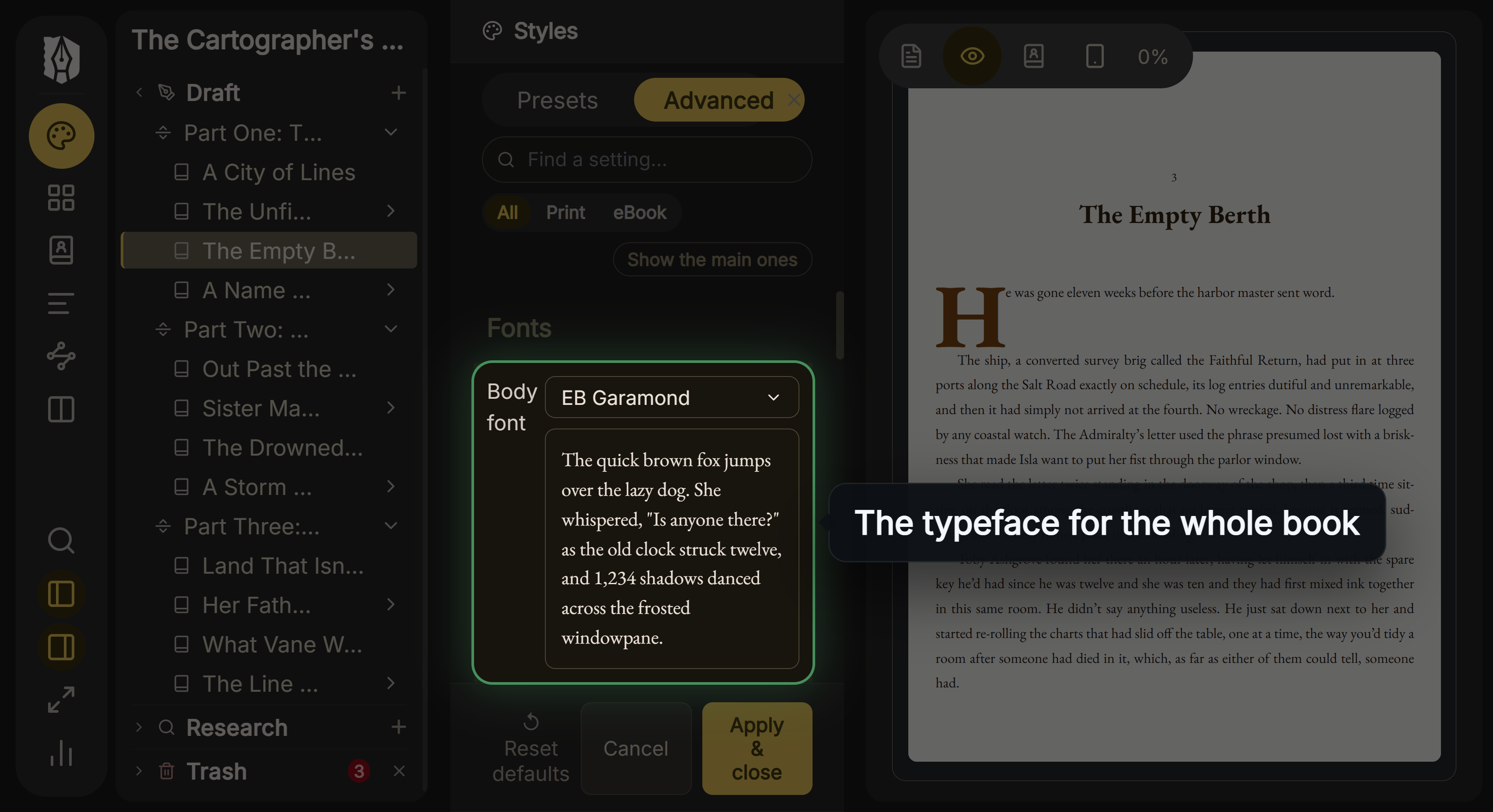 Choosing the body typeface in Deckle's Styles
Its Kindle target writes an EPUB for KDP to convert, not a KPF file. KDP accepts that: "We support books in EPUB format that meet the specifications outlined in the Kindle Publishing Guidelines." Deckle has no comic or Print Replica mode, and its print PDF is a standard PDF, not PDF/X-1a.
Deckle is a one-time purchase. To try it, click Take Deckle for a Spin on the screen Deckle opens to. There is no card, no account and no time limit. It opens a sample novel with every screen open to explore, and you can restyle it and export real EPUB, PDF and DOCX files. New writing is capped at about 500 words, and new documents and imports are blocked.
How to move a book from Kindle Create to Atticus
Kindle Create keeps your book in a KCB work file and exports a KPF for KDP. Atticus imports .docx, so the move starts from your original manuscript, not from Kindle Create's files.
- Find the .docx you imported into Kindle Create. If you edited text inside Kindle Create, copy those changes back into the .docx first.
- Remove any table of contents from the .docx, as Atticus's import help asks.
- Mark chapters with Heading 1 or 20pt+ text, page breaks, or three empty lines, which is how Atticus detects them.
- Import the .docx into Atticus and choose a theme.
- Export the EPUB and PDF, and check them against KDP's print file requirements and the KDP EPUB requirements before you replace the KDP files.
What you'd lose by switching
- Price. Kindle Create is free.
- Automatic KDP print setup. Kindle Create calculates margins and adds page numbers to the table of contents and footers on upload.
- Fixed-layout formats. Guided View comics, kids' books and Print Replica ebooks.
- Automatic widow and orphan handling. Amazon states it; Atticus does not mention it on its home page.
FAQ
Is Atticus better than Kindle Create?
Neither is better for every book. Kindle Create is free and built for KDP. Atticus costs $147 once and exports EPUB, PDF and DOCX for any store, with more font and theme control.
Is Kindle Create free?
Yes. Amazon calls it "a free desktop application" for Windows and Mac.
Can Kindle Create export a PDF like Atticus?
Amazon names no PDF export. Kindle Create exports KPF and, for reflowable books, EPUB.
Does Atticus export KPF?
No. Atticus lists EPUB, PDF and DOCX. KDP accepts EPUB uploads, so no KPF is needed.
Does Kindle Create support footnotes?
Imported footnotes can't be edited, and Amazon says Kindle Create "doesn't support paperbacks with tables, footnotes, or endnotes." Atticus lists footnotes.
Does Atticus work offline?
Partly. Atticus says it works online and offline, on Windows, Mac, Linux and Chromebook, though its help centre says you need to be online to import and export files.
Can I use Kindle Create on a Chromebook?
Amazon lists Windows and macOS only. Atticus runs on Chromebook.
Sources
All pages retrieved 20 October 2026. Prices and features change, so check the vendor page before buying.
- Amazon, Kindle Create product page and FAQ ("free desktop application", four themes, EPUB for non-Kindle devices, writing in Kindle Create, Guided View): https://www.amazon.com/kindlecreate
- Amazon KDP Help, Getting Started with Kindle Create (system requirements, KPF and EPUB output, same-manuscript paperback listed as Pre-release (beta)): https://kdp.amazon.com/en_US/help/topic/GUGQ4WDZ92F733GC
- Amazon KDP Help, Prepare Reflowable and Print Books with Kindle Create (editing limits, themes, KPF and KCB, widows and orphans): https://kdp.amazon.com/en_US/help/topic/G7R2L7V5X6SJH948
- Amazon KDP Help, Prepare Your eBook and Paperback with Kindle Create (paperback footnotes, fonts, margins, bleed): https://kdp.amazon.com/en_US/help/topic/G93BCLJGZFGK39BT
- Amazon KDP Help, supported eBook manuscript formats (EPUB accepted): https://kdp.amazon.com/en_US/help/topic/G200634390
- Atticus, home page (price, platforms, offline, exports, themes, fonts, footnotes, writing tools): https://www.atticus.io/
- Atticus, How to Access Atticus (last updated 14 February 2024; online to import and export): https://www.atticus.io/accessing-atticus/
- Atticus, Importing Existing Work (.docx import, chapter detection, remove TOC): https://www.atticus.io/importing-existing-work/
- Atticus, Updates (collaboration, December 2024): https://www.atticus.io/updates/
- Atticus, checkout (30-day money-back guarantee): https://atticus.thrivecart.com/atticus/
- IngramSpark, File Creation Guide (PDF/X-1a:2001 or PDF/X-3:2002): https://www.ingramspark.com/hubfs/downloads/file-creation-guide.pdf
- Apple, publish a book from the web (EPUB, EPUBCheck): https://authors.apple.com/support/4574-publish-book-from-web
Kindle, Kindle Create and KDP are trademarks of Amazon.com, Inc. or its affiliates. Atticus is a trademark of its owner. Deckle is not affiliated with or endorsed by any product named here.