

Book writing software is any program that holds a whole book while you write it, from a word processor such as Word or Google Docs to a dedicated writing app such as Scrivener, Dabble, Atticus or Deckle. The right one depends on the kind of book: a novel needs chapters you can move and notes on characters, non-fiction needs footnotes and citations, a memoir or children's book needs pictures, and a series needs several books kept in step. Choose for the book you are writing now, then check that the app exports the file the next person in the chain needs: an editor, an agent, a printer or an ebook store.
No standards body or publisher ranks writing software, so this page ranks nothing and awards no scores. It compares what nine tools do, what they cost and what they export, from each vendor's own pages, read on 31 October 2026 unless a different date is given. Prices are US dollars before tax. This is Deckle's own site, and Deckle is one of the nine, so weigh its row and its section accordingly.
What is book writing software?
Book writing software falls into four kinds, and most writers use one or two of them.
- Word processors. Microsoft Word and Google Docs. One long document, or one per chapter. Every editor and agent can open the file.
- Long-form writing apps. Scrivener, Ulysses and Dabble. The book is split into chapters and scenes you can reorder, with notes and research beside the draft.
- Writing and formatting apps. Atticus, Reedsy Studio and Deckle. You write in them, then export the finished ebook and print interior from the same file.
- Formatters. Vellum, and layout tools such as InDesign. They take a finished manuscript and typeset it. Vellum is not a drafting app.
Planning tools such as Plottr and Campfire sit beside these. They hold the outline and the characters; the prose is usually written somewhere else. They are compared on best plotting software. Grammar checkers such as ProWritingAid and Grammarly also sit beside them: they check the prose in whichever app holds it, and they do not hold the book.
Which book writing software fits which kind of book?
Each kind of book asks something different of the software. This table names the job that matters most for each, the tools that handle it, and the page that goes deeper.
| Kind of book | What the software has to handle | Tools that suit it | Deeper comparison |
|---|---|---|---|
| Novel | Chapters and scenes you can reorder; characters, places and dates kept straight | Scrivener, Dabble, Deckle; Plottr or Campfire for planning | Best novel writing software |
| Non-fiction | Footnotes or endnotes, citations, a bibliography, images, sometimes an index | Word, which also builds an index, Scrivener with Zotero, Deckle | Best writing software for non-fiction |
| Memoir | Events in date order, photographs, a few printed copies for family | Word, Scrivener, Deckle; a prompt service such as StoryWorth if a relative is answering questions | Memoir writing software |
| Children's picture book | Pictures on every page, fixed layout | Canva, Affinity, InDesign | Best software for writing a children's book |
| Children's chapter book or middle grade | Text first, with some full-page art | Atticus, Vellum, Scrivener, Deckle | Best software for writing a children's book |
| Short story collection | Many stories with their own word counts; a Word file in manuscript format for magazines | Word, Scrivener, Dabble, Deckle | Best writing software for short stories |
| Series | Characters and facts that carry from book to book; a boxed set at the end | Plottr, Novelcrafter, Scrivener, Deckle | Story bible software and how to write a book series |
| Any book you will self-publish | An EPUB for ebook stores and a print-ready PDF | Atticus, Vellum, Reedsy Studio, Deckle | Book writing and formatting software |
A picture book is the one case where a writing app is the wrong tool for the layout. The text is a few hundred words, and the work is placing it on illustrated spreads, which is what design software does.
Book writing software compared
| Software | Platforms | Price model and price (31 October 2026) | Offline | Exports | AI | Whole book in one project | Formats the finished book |
|---|---|---|---|---|---|---|---|
| Microsoft Word | Windows, Mac, web, phone, tablet | Subscription: Microsoft 365 Personal $99.99/yr. Or once: Office Home 2024 $179.99 | Desktop app | DOCX, PDF, RTF, ODT, TXT, HTML; no EPUB | Copilot on Microsoft 365 plans | One document, or one per chapter | No; PDF save with no book typesetting claimed |
| Google Docs | Browser, iOS, Android | Free with a Google Account | With the Docs Offline extension in Chrome or Edge | DOCX, ODT, RTF, PDF, TXT, HTML, EPUB, Markdown | Gemini on some plans | One document with tabs | No; EPUB and PDF download, no book typesetting |
| Scrivener | macOS 11+, Windows 10+ (64-bit), iOS | Once per platform: $59.99 macOS or Windows; $95.98 both; iOS $23.99 | Yes | Word, RTF, PDF, EPUB, Final Draft and more | None mentioned | Yes, the Binder | Through Compile; no typesetting claim |
| Ulysses | Mac, iPad, iPhone | Subscription: $39.99/yr or $5.99/mo | Yes | DOCX, PDF, ePub, HTML, plain text | Supports Apple's Writing Tools | Yes, groups in one library | PDF, DOCX and ePub styles |
| Dabble | Windows, Mac, Linux desktop; browser; phones as a web app | Subscription: $15, $23 or $39 a month billed annually; lifetime $699 or $899 | Yes, stored locally and synced | Word, Google Docs, Web, Markdown; no direct PDF or EPUB | No AI writing features; future AI "strictly opt-in" | Yes, parts, chapters and scenes | No |
| Atticus | Windows, Mac, Linux, Chromebook, browser | Once: $147 | Yes for writing; import and export need a connection | EPUB, PDF, DOCX | None | Yes, chapters and parts | Yes, ebook and print |
| Reedsy Studio | Browser | Free; Craft $4.99/mo and Outline $7.99/mo add-ons | No | EPUB 3, print PDF (PDF/X-1a), Word backup by email | None listed; will not train AI on your work | Yes, chapters in one book | Yes, ebook and print |
| Vellum | Mac only, macOS 13+ | Once: $199.99 Ebooks; $249.99 Press (adds paperbacks) | Yes | EPUB, print PDF (Press), MOBI for beta-reader copies | None mentioned | Formats a finished manuscript; not for drafting | Yes, the main job |
| Deckle | Windows 10/11, macOS 11+, Linux | Once; free demo with no time limit | Yes, after activation | EPUB, print PDF, DOCX, Academia PDF, Markdown, plain text | None in the app | Yes, the Binder | Yes, ebook and print |
Three patterns show in the table. Word and Google Docs write any book, and the file goes anywhere, but neither lays out a finished book. Scrivener, Ulysses and Dabble are built for drafting a long book in pieces, and only Scrivener and Ulysses go as far as ebook output. Atticus, Reedsy Studio and Deckle take the book from first chapter to the files a store or printer takes, which is weighed on book writing and formatting software.
Who does each book writing tool suit?
Microsoft Word, for the file editors and agents expect
Word's .docx is the file most agents, editors and KDP accept. Microsoft's file format reference lists DOCX, PDF, RTF, ODT and plain text among Word's formats, and no EPUB. Microsoft 365 Personal is $9.99 a month or $99.99 a year with a one-month trial; Office Home 2024 is $179.99 once. Word also has the fullest set of references tools here, including an index. It suits a writer of one book at a time, especially non-fiction, who will hand the file to an editor or a formatter. A long book in one document gets slow to move around, which is the point at which writing a book in Word needs a structure.
Google Docs, for free drafting and sharing
Google Docs is free with a Google Account, lets several people edit and comment at once, and keeps version history. A document downloads as DOCX, PDF, EPUB or Markdown, among others. Offline editing needs the Docs Offline extension in Chrome or Edge, set up while you are online. It suits a first-time writer, a co-author or a writing group. Its limits for a whole book are covered on is Google Docs good for writing a book.
Scrivener, for a long book with a lot of research
Scrivener holds the book in a Binder of sections, with research files beside the draft. Literature & Latte sells it once per platform: $59.99 for macOS or Windows, $95.98 for both, and $23.99 for iOS, with a free trial of 30 days of actual use. Compile produces Word, PDF and EPUB, and the overview lists "Templates for writing papers in MLA, APA and other common formats". It suits a novelist or non-fiction writer with a big project who is happy to learn Compile. How it fits each kind of book is on is Scrivener good for writing a book.
Ulysses, for writing on a Mac, iPad and iPhone
Ulysses is $39.99 a year or $5.99 a month and runs on "all your Macs, iPads and iPhones". It suits a writer who drafts on a phone or tablet as much as at a desk and likes plain text. It has no Windows or Android version.
Dabble, for a novel written on several devices
Dabble's desktop app runs on Windows, Mac and Linux, and work is "stored locally on your devices for offline access". Plans are $15, $23 or $39 a month billed annually, with lifetime plans at $699 and $899 and a 14-day trial with no card. Its export help says "Dabble does not export PDF or ePub directly", so the book goes to a formatter at the end. It suits a novelist who writes on a laptop, a phone and a shared computer and wants them all in step.
Atticus, for writing and formatting in one purchase
Atticus is $147 once, "No monthly fees. Forever.", with a 30-day money-back guarantee. It runs on Windows, Mac, Linux and Chromebook and exports EPUB, PDF and DOCX. It suits a self-publisher who wants one tool for the draft and the finished book on any computer.
Reedsy Studio, for a free book in the browser
Reedsy Studio's free plan includes "Unlimited books" and "Export to PDF and EPUB". Its FAQ gives the print PDF as PDF/X-1a:2001 and answers the offline question with "Currently, no." It suits a writer who always has a connection and wants a typeset book at no cost.
Vellum, for formatting a finished book on a Mac
Vellum Ebooks is $199.99 and Vellum Press, which adds paperbacks, is $249.99. It needs macOS 13 or newer. It suits a Mac author who drafts elsewhere and wants a polished ebook and paperback with little setup. How it compares with the other formatter is on Atticus vs Vellum.
Deckle, for writing, organising and formatting offline on any desktop
Deckle is a desktop app for Windows, macOS and Linux, made by the team behind this site. It is covered in its own section below.
What is the best book writing app?
"App" usually means one of three things, and each suits a different writer.
- A desktop app installs on the computer and works without a connection: Word, Scrivener, Dabble's desktop app, Atticus, Vellum and Deckle.
- A browser app runs in a web page and saves online: Google Docs, Reedsy Studio, and Atticus and Dabble in a browser.
- A phone or tablet app: Ulysses on iPhone and iPad, Scrivener for iOS, Google Docs and Word on iOS and Android, and Dabble as a web app on a phone.
For writing a book on a phone between other things, Ulysses or Google Docs suit that part of the day; which writing apps work on each device is set out separately. For the long sessions where the book takes shape, a desktop app with the whole book in one project is easier to work in. Many writers use one of each and move the text between them, which is what moving a manuscript between writing apps covers.
Is there free book writing software?
Yes. Google Docs is free with no time limit and exports a Word file and an EPUB. Reedsy Studio's core plan is free and formats the book as EPUB and print PDF, online only. Free desktop options such as LibreOffice Writer, bibisco Community Edition and Manuskript are compared on free novel writing software.
The paid tools can be tried first:
- Scrivener: 30 days of actual use on macOS or Windows.
- Dabble: 14 days, no card.
- Microsoft 365: one month free.
- Atticus: a 30-day money-back guarantee rather than a trial.
- Deckle: a free demo with no card, no account and no time limit. It opens a sample novel, and you can export it. New writing is capped at about 500 words.
Do you need separate software to format your book?
Only if your writing software cannot make the files you need. A writer who sends the manuscript to an agent or a traditional publisher needs a Word file, nothing more; the publisher does the typesetting. A self-publisher needs an EPUB for the ebook stores and a print-ready PDF for a paperback.
Word, Google Docs and Dabble stop at the manuscript, so a self-publisher adds a formatter: Vellum on a Mac, Atticus, Kindle Create or a layout tool. Atticus, Reedsy Studio and Deckle make the EPUB and the print PDF themselves. Scrivener compiles both, and Literature & Latte does not describe the result as typesetting. The cost of two tools against one is set out on book writing and formatting software.
What do ranking pages get wrong about book writing software?
Several pages that rank for this search disagree with the vendors' own pages on 31 October 2026.
- Scrivener at "~$49". SelfPublishing.com's "Best Book Writing Software for Authors in 2026 (22 Tools Compared)" (published 24 April 2026) gives Scrivener as "~$49 one-time purchase". Literature & Latte's store prices it at $59.99 for macOS or Windows.
- Vellum at "$99.99 (ebooks only)". The same page gives Vellum as "$199.99 (ebooks + print); $99.99 (ebooks only)". Vellum's own site lists Vellum Ebooks at $199.99 and Vellum Press, with paperbacks, at $249.99.
- Atticus exporting MOBI. The same page says Atticus "Exports to EPUB, MOBI, and print-ready PDF". Atticus's homepage lists EPUB, PDF and DOCX. (Vellum's own page does mention MOBI, but only for advance copies sent to beta readers.)
- Dabble from "$9" or "~$10" a month. The Write Practice (2026) says plans "range from $9/month to $29/month" and SelfPublishing.com "~$10/month". Dabble's pricing page starts at Writer, $15 a month billed annually.
- "Reedsy Book Editor" with MOBI export. Kotobee's list (updated 12 January 2026) uses the old name and lists "EPUB and MOBI". Reedsy now calls it Reedsy Studio, and its FAQ gives the exports as EPUB 3 and PDF.
- Dabble export "limited to .docx or text files". Reedsy's own guide (updated 27 July 2026) says this. Dabble's export help lists Word, Google Docs, Web and Markdown.
Several of these lists are written by companies that sell a writing or publishing tool, as this one is. Check each price and format on the vendor's own page before you buy.
How Do You Write a Book in Deckle?
Deckle is our app, so weigh this section accordingly. It is a desktop writing app for Windows, macOS and Linux. Each project is a folder on your own computer, it works offline after activation, there is no account or cloud, and it has no generative AI. One project holds the whole book, from the first scene to the exported EPUB and print PDF.
- Make the project. Choose File ▸ New Project… (Ctrl+N, or Cmd+N on a Mac), name the book and pick the folder it lives in.
- Build the structure. Click + beside Draft (Add to Draft) and choose Chapter, Scene or Part. Scenes sit inside chapters and chapters inside parts, and you drag them to reorder. How deep to nest is covered on nesting scenes and chapters.
- Bring in a draft you already have. From the same + menu, choose Import… to bring in a Word file, an EPUB, a Scrivener project saved as a ZIP backup, or a folder of Markdown. A Word file is split into chapters by its heading styles.
- Add what your kind of book needs.
- Non-fiction: the toolbar's Insert Footnote / Endnote and Insert Citation buttons. Citations come in APA, MLA, Chicago, Harvard, IEEE, Vancouver and AMA styles, and the References page is built from the sources you cite.
- Memoir or an illustrated book: Insert Image, with an Alt text (accessibility) field, or + ▸ Full Page Image for a photo on a page of its own.
- Novel or series: View ▸ Codex for characters, places and items, and View ▸ Timeline for when each event happens.
- Boxed set: right-click a Part and choose Make This a Separate Book, so each book gets its own title page and chapter numbering.
- Add the front and back matter. + ▸ Front Matter and + ▸ Back Matter add pages such as Title Page, Copyright, Dedication, Table of Contents and About the Author.
- Export the book. Choose File ▸ Export… (Ctrl+E, or Cmd+E). On Format, pick EPUB for ebook stores, PDF for a print-ready interior, or DOCX for an editor or agent. A thesis or academic book can use Academia PDF.
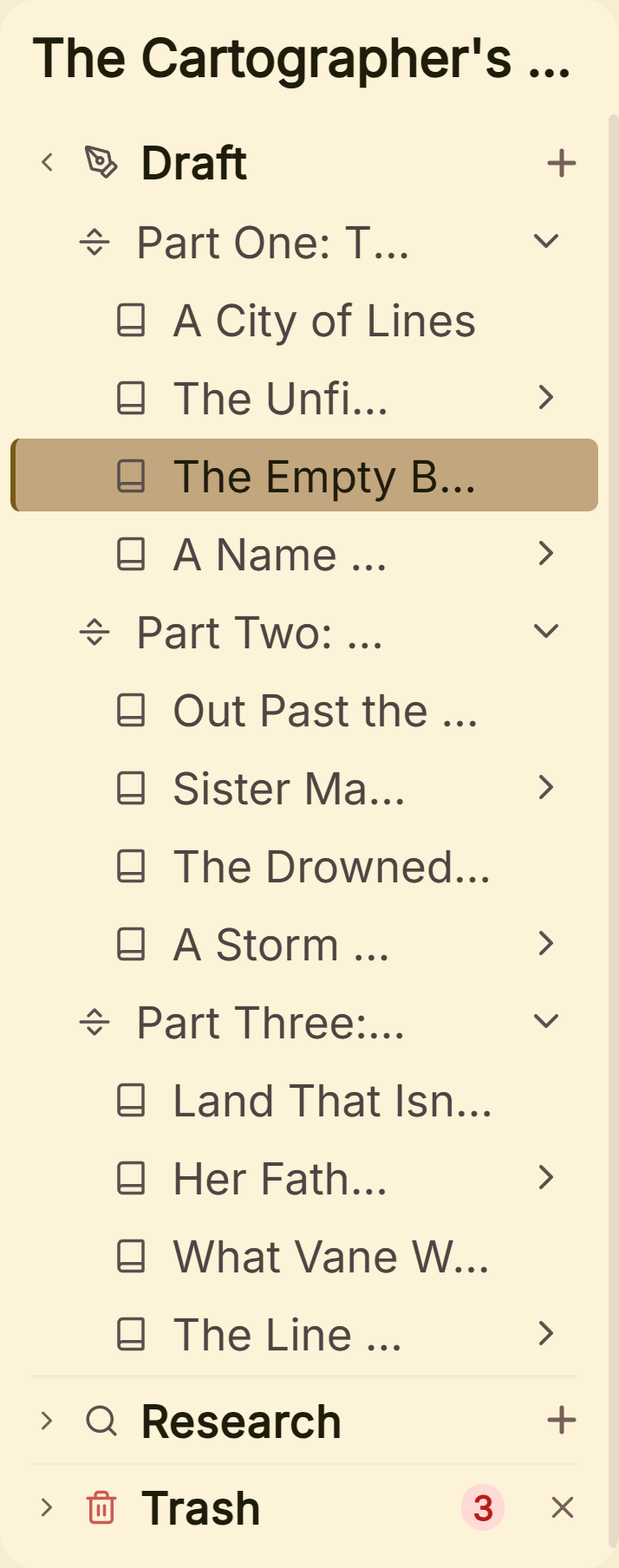 One project holds the book's parts, chapters and scenes
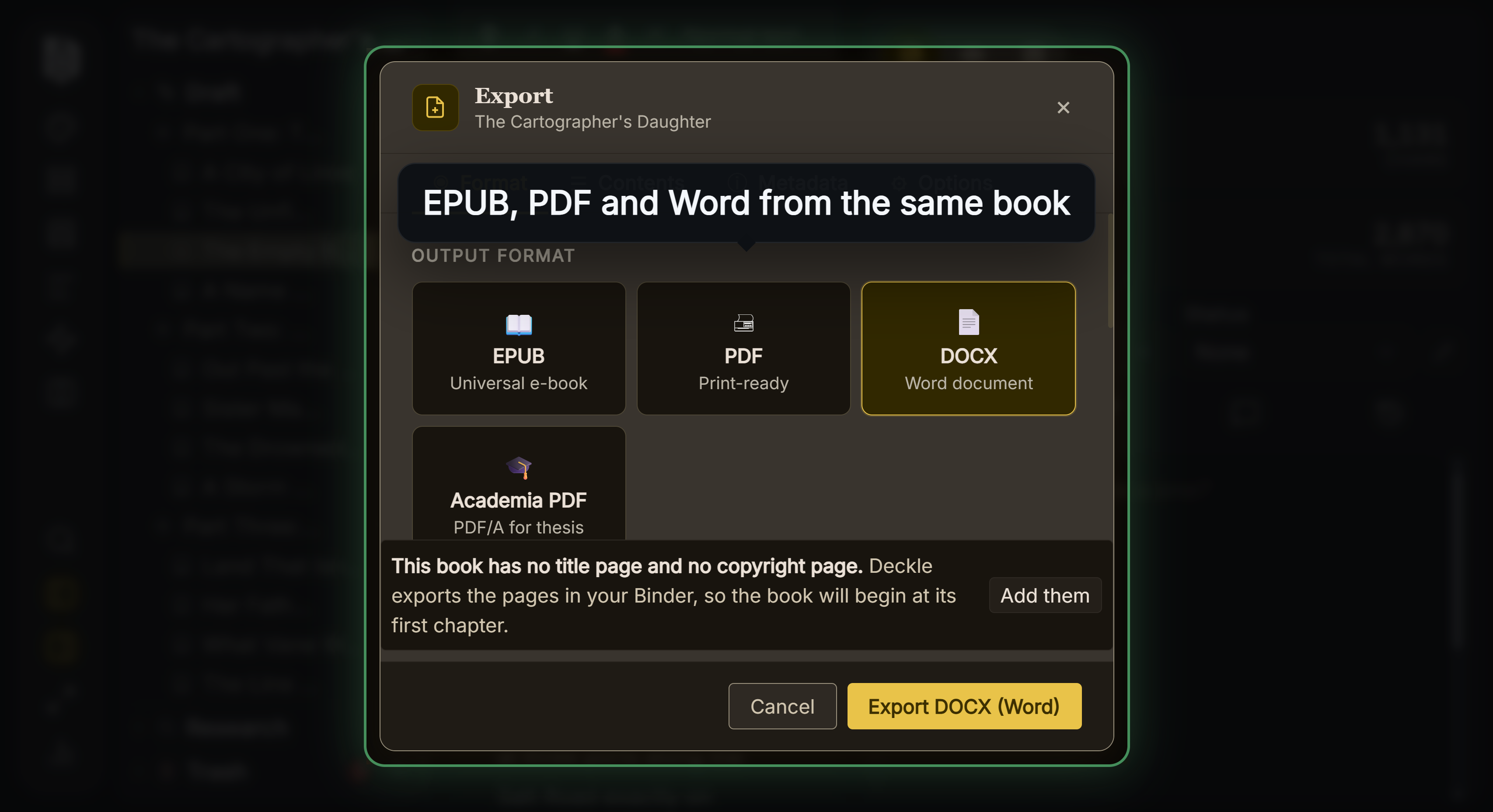 Every export format comes from the same manuscript
For drafting on a phone, Ulysses or Google Docs suit that part of the day. For co-writing in the same document at the same moment, Google Docs suits. For a picture book laid out spread by spread, a design tool suits. What Deckle adds is that a novel, a non-fiction book with notes, a memoir with photographs or a whole series can be written, organised and formatted in one project on your own disk, on Windows, macOS or Linux.
Deckle is a one-time purchase. To try it, click Take Deckle for a Spin on the screen Deckle opens to. There is no card, no account and no time limit. It opens a finished sample novel with its Binder, Codex, Timeline and stats filled in, and you can restyle it and export real EPUB, PDF and Word files from it. New writing in the demo is capped at about 500 words, and new documents and imports are switched off.
Common mistakes when choosing book writing software
- Choosing for a different kind of book. A novelist's app with a plot grid does little for a referenced history, and a design tool is heavy for a novel. Match the tool to the book in front of you.
- Comparing first-year prices only. A subscription and a one-time purchase look different over three years. Work out the total before you commit, as on writing software one-time purchase.
- Not checking the export before you write. Make sure the app exports the file your editor, agent or store takes, before it holds 80,000 words.
- Trialling with a blank page. Bring in a real chapter or two and export them. Organising and exporting only show their worth with real text.
- Paying for a formatter you may not need. If the book is going to an agent or a traditional publisher, a Word file is the deliverable. Formatting is the publisher's job.
- Keeping the only copy in one place. Whatever the app, keep a backup off the computer, or for a browser app, an exported copy on your own disk.
- Trusting a roundup's price. Several ranking pages are out of date. Check the vendor's own page on the day you buy.
FAQ
What is the best book writing software?
Nothing authoritative ranks it, and it depends on the book. Scrivener, Dabble and Deckle suit a novel; Word suits non-fiction with an index; Atticus, Reedsy Studio and Deckle also format the finished book; Vellum formats a finished manuscript on a Mac.
What software do most authors use to write a book?
Many draft in Word or Google Docs, because editors and agents work in Word files. Dedicated apps such as Scrivener are common for long books. Whatever you draft in, expect to send a .docx file at some point.
Is there a free book writing app?
Google Docs is free and exports Word and EPUB files. Reedsy Studio's core plan is free and formats the book, online only. Scrivener, Dabble and Microsoft 365 have trials, and Deckle has a free demo with no time limit.
Can I write a book in Microsoft Word?
Yes. Word writes any kind of book and its .docx is the file most editors take. It does not make an EPUB, so a self-published ebook needs a formatting tool at the end.
What is the best book writing software for beginners?
The one you already know is often enough for a first book. When the book gets long enough that scrolling one document is the problem, try a dedicated app free first. The options are weighed on best writing software for beginners.
Which book writing software works offline?
Word, Scrivener, Ulysses, Vellum and Deckle are desktop apps. Dabble stores work locally for offline use. Atticus writes offline but needs a connection to import and export. Reedsy Studio does not work offline, and Google Docs needs an extension.
Which book writing software has no AI?
Scrivener and Vellum mention none, Atticus has none, Dabble has no AI writing features and says any future AI will be opt-in, and Deckle has none in the app. Word, Google Docs and Ulysses offer AI writing tools.
Sources
Retrieved 31 October 2026 unless stated. Prices change, so check the vendor's page before buying.
- Microsoft, File format reference for Word: Word's formats, no EPUB; Compare all Microsoft 365 plans: Personal $9.99 a month or $99.99 a year, Office Home 2024 $179.99, one-month trial, Copilot by plan (retrieved 20 October 2026)
- Google, Google Docs: free, co-editing, comments, version history, Gemini; Export formats: DOCX, ODT, RTF, PDF, TXT, HTML, EPUB, Markdown; Use Google Docs offline: Chrome or Edge with the Docs Offline extension (retrieved 20 October 2026)
- Literature & Latte, Scrivener overview: platforms and requirements, export formats, academic templates; Store: iOS $23.99, 30-day trial, with macOS, Windows and bundle prices of $59.99, $59.99 and $95.98 from the store's Paddle price feed; FAQs: 30 days of actual use (retrieved 20 October 2026)
- Ulysses, Pricing: $39.99 a year or $5.99 a month, Macs, iPads and iPhones; Writing Tools help: Apple Intelligence support (retrieved 20 October 2026)
- Dabble, Pricing: Writer, Author and Bestseller at $15, $23 and $39 a month billed annually, lifetime $699 and $899, 14-day trial, offline, AI statements; Export your manuscript: Word, Google Docs, Web and Markdown, no direct PDF or EPUB
- Atticus, Homepage: $147 once, Windows, Mac, Linux, Chromebook, EPUB, PDF and DOCX export, offline, 30-day money-back guarantee
- Reedsy, Studio pricing: free plan, unlimited books, PDF and EPUB export, no AI training; Book writing software FAQ: no offline mode, EPUB 3, PDF/X-1a:2001, Craft $4.99 and Outline $7.99 a month; Back up your book: Word file sent by email (retrieved 20 October 2026)
- Vellum, Homepage: Vellum Ebooks $199.99, Vellum Press $249.99, Mac only, macOS 13 or newer, EPUB and PDF/X-1a, EPUB and MOBI copies for beta readers
- Ranking pages checked for the claims above: SelfPublishing.com, Best Book Writing Software for Authors in 2026 (published 24 April 2026); The Write Practice, Book Writing Software (2026): Top 10 for Writers; Kotobee, 12 of the Best Book Writing Software to Try in 2026 (updated 12 January 2026); Reedsy, Book writing software (updated 27 July 2026)
Scrivener is a trademark of Literature & Latte. Microsoft Word and Microsoft 365 are trademarks of Microsoft. Google Docs is a trademark of Google. Kindle Create is a trademark of Amazon. Ulysses, Vellum, Dabble, Atticus, Reedsy Studio, Plottr, Campfire, Novelcrafter, StoryWorth, Canva, Affinity, InDesign, Zotero, LibreOffice, bibisco, Manuskript, ProWritingAid and Grammarly are trademarks of their respective owners. Deckle is not affiliated with or endorsed by any product named here.