

The best story bible software is the one that keeps the bible beside the draft, and, for a series, carries it into the next book. Novelcrafter and Sudowrite share one bible across every book in a series, online. Plottr holds a whole series in one project for planning, with no AI. Campfire and World Anvil suit a large world with maps and family trees. Scrivener, Dabble and Deckle keep the bible in the same project as the manuscript, on your own computer. Notion and Obsidian give you a blank space to build your own.
No standards body tests or ranks story bible software, so this page ranks nothing. It compares what each tool does, what it costs and what it exports, from each vendor's own pages, read on 30 October 2026 unless a different date is given. Prices are US dollars before tax. This is Deckle's own site, and Deckle is one of the tools compared, so weigh that section accordingly. This page is about choosing the tool. What goes in the bible itself is on what to include in a story bible.
What is story bible software?
A story bible is the reference file for everything a book has committed to: who each person is, where things are, how the rules work and what happened when. Story bible software keeps those facts as entries you can search, link and check while you write. The tools that rank for this search fall into four kinds.
- Planning tools with a bible. Plottr keeps characters, places and notes beside a visual outline. You write the book somewhere else.
- Writing apps that read the draft. Novelcrafter and Deckle keep the bible in the same project as the chapters and find each entry's name in the text. Sudowrite builds its Story Bible to feed its AI.
- Worldbuilding platforms. Campfire and World Anvil hold a world as articles and modules, with maps, timelines and relationship tools.
- Blank workspaces. Notion and Obsidian hold whatever you build, from a database of characters to a vault of linked notes.
Canvas boards are a fifth, newer kind. Storyflow, whose own roundup ranks for this search, describes itself as "Your whole project, one board. An AI that sees all of it." It "Works in any browser", Plus is $9.99 a month or $7.99 a month billed yearly, and its free plan "launches before the end of 2026". It suits a visual planner who wants AI on the board.
The kind matters more than any single feature. A bible you have to open in another window gets checked less often than one that is a click from the chapter.
What should you look for in story bible software?
Seven questions sort the field faster than a feature list.
- Where will you write the book? If the answer is another app, the bible sits beside it. If the tool also holds the manuscript, check what the manuscript exports to.
- Does it find entries in your chapters? Automatic mentions answer "where did I last name her?" without a search. Without them, you tag scenes by hand.
- Can you shape the entries? A fantasy saga needs factions and magic rules. A detective series needs suspects and alibis. Look for custom categories and templates.
- Does it carry into Book 2? A series needs the same cast and world in every book. Some tools share one bible live across books; others copy it forward.
- Does it work with no connection? Novelcrafter and World Anvil say they need one. Desktop apps do not.
- Can you get the bible out? An editor, cover designer or co-writer may need it as a document. Check the export before the bible grows.
- Do you want AI reading it? Sudowrite and Novelcrafter use the bible as context for AI writing. Plottr and Deckle have none.
Story bible software compared
| Tool | Platforms | Price (30 October 2026) | Offline | Series bible | Finds entries in the draft | Bible export | AI |
|---|---|---|---|---|---|---|---|
| Plottr | Mac, Windows; Pro adds a browser app | $60/yr or $150 lifetime; Pro $9.99/mo, $99/yr or $599 lifetime | Desktop app | Several books in one project, Series View timeline | Not a drafting tool | Outline, characters and places to Word and Scrivener | "No AI" |
| Novelcrafter | Web browser | $4 to $20 a month; 21-day trial, no free plan | No | Series Codex shared by every book | Yes, highlighted, Mentions tab | Codex as a zip of entries | From the $8 Hobbyist plan |
| Sudowrite | Web; companion phone apps | $10, $22 or $44 a month billed yearly; $19, $29 or $59 billed monthly | iOS app (October 2026) | Series folders share Characters, Worldbuilding and Outline | Not described | Story Bible sections as CSV | AI writing tool |
| Campfire Writing | Mac, Windows, iOS, Android | Free plan with caps; Standard $12/mo | Desktop app; mobile needs a connection | Not described on its pages | Tags and a Notes sidebar | Elements to DOCX online; manuscript to PDF, EPUB | None mentioned |
| World Anvil | Web only | Free (2 worlds, 42 articles); Guild from $4.50/mo billed yearly | No | Not described in its FAQ | Not described | Articles one at a time free; whole world on Guild | Does not train AI on your work |
| Dabble | Windows, Mac, Linux, browser, phone | Writer $180/yr; Author $276/yr or $699 once; 14-day trial | Yes | Not described on its pages | Not described | Not described; manuscript to Word, Google Docs, Web, Markdown | Future AI "strictly opt-in" |
| Scrivener | macOS, Windows, iOS | $59.99 once per desktop platform | Yes | Not described | Keywords and Collections by hand | Word, PDF and more | None mentioned |
| Notion | Mac, Windows, web, mobile | Free for one person; Plus $10 per member/mo | Pages you download | Linked databases you build | No | PDF, HTML, Markdown, CSV | Limited Notion AI trial |
| Obsidian | Windows, Mac, Linux, iOS, Android | Free; Sync $4/mo billed yearly | Yes, notes stored locally | One vault can hold every book | Backlinks between notes | Notes are Markdown files | None mentioned |
| Deckle | Windows, macOS, Linux | One-time purchase; free demo | Yes, after activation | Project template carries the Codex into the next book, or one project holds a boxed set | Yes, names and aliases underlined, Mentions tab | Story bible to PDF or Word | None in the app |
Which story bible software suits which writer?
Plottr, for planning a series bible with no AI
Plottr calls itself series bible software. Its features page says Series View lets you "Create a Timeline for the series as well as each individual book within it", and its series bible page says you can "Organize all of the characters in your books and series" and filter characters "by the book (and link them to your scenes)". Plottr's help describes a Project as "a container for a number of books or writing projects you are working on". Its features page says you can export "your outline, characters, places, and note details" to Word and Scrivener.
The base plan is $60 a year or $150 lifetime, after a 30-day trial, and every plan says "No AI". Plottr is a planning tool, so it suits a series planner who drafts in another app. Other routes are on Plottr alternatives.
Novelcrafter, for a series Codex that finds names as you write
Novelcrafter's Series Codex holds entries "shared over every book in the series", and any entry can move between the book's codex and the series codex. Names and aliases are "highlighted within the Novelcrafter manuscript, plan, and all snippets/chats", and an entry's Mentions tab lists where it appears. The codex exports as "a zip file with your codex entries within it".
Plans run from $4 to $20 a month after a 21-day trial with no card, and there is no free plan. AI features start at Hobbyist, $8 a month. Its offline FAQ says "Right now you can only use Novelcrafter with an active internet connection". It suits a series writer who works online and wants mentions tracked for them. The two apps are weighed on Novelcrafter vs Deckle.
Sudowrite, for a Story Bible that drives AI drafting
Sudowrite's help says its Story Bible "gathers the core elements of your story in one place" so "you and Sudowrite's AI" can refer to it. Synopsis, Characters, Outline and Scenes can be generated from your braindump. Series folders give every book "instant access to its Characters, Worldbuilding elements, and Outline", and "edits made to any of those elements are instantly reflected between projects in the Series".
Plans are $10, $22 or $44 a month billed yearly, or $19, $29 or $59 billed monthly, each listing "Ensure continuity across a series". Story Bible sections export as CSV files, and "Neither Project Export nor Document Export include your Story Bible contents by default". It suits a writer who wants AI to draft from the bible. Writers who want a bible with no AI at all have Plottr, Deckle and the tools that mention none.
Campfire, for a world built in modules
Campfire offers "18 writing and worldbuilding modules", and its pricing page lists them, from Characters, Timeline, Maps and Calendar to Magic and Relationships. The pricing FAQ says "one family tree would be one Relationships Module element". The free plan caps each module, for example 10 characters, 5 locations, 2 maps and a 25,000-word manuscript. Standard is $12 a month, shown against $19. The desktop app for Mac 10.11 or later and Windows 7 or later "allows you to write offline", while the mobile app needs a connection. Elements export to DOCX while online.
It suits a writer who wants a visual world kit with family trees and maps, and is happy to keep it beside the draft or write inside Campfire. Its costs are weighed on Campfire Writing price.
World Anvil, for a world wiki you may publish
World Anvil holds a world as linked articles in the browser. Its FAQ says free accounts include 2 worlds and 42 articles, that Guild starts at "$4.50 USD a month for an annual subscription", that you "must be connected to the internet to use it", and that "we do not train AI models on your work". Free members export articles one at a time; Guild members export the whole world.
It suits a writer whose world is shared with readers or a game group. Maps and calendars are compared on best worldbuilding software.
Dabble, for a bible beside a plot grid
Dabble's help says "Characters is where your cast lives", and its Notebook is "your free-form space for everything else: worldbuilding, magic systems, locations, factions". The desktop app runs on Windows, Mac and Linux, and the pricing FAQ says work is kept "locally on your devices for offline access". Exports go to Word, Google Docs, Web and Markdown, and Include Notes adds document notes to the export. "Dabble does not export PDF or ePub directly."
Writer is $180 a year, Author $276 a year or $699 once, after a 14-day trial with no card. Dabble says "We will not use the content you create, store, or share through Dabble to train AI models." It suits a writer who wants a simple bible next to a plot grid, on any device.
Scrivener, for character and location sheets in the manuscript project
Literature & Latte's overview says Scrivener templates can be "character or location sheets for planning a novel", that you can "create your own meta-data fields", and that Collections "let you create lists of related documents from anywhere in your project". Scrivener is $59.99 once for macOS or Windows, and $37.95 for the other platform once you own one. The iOS app is licensed separately.
It suits a writer who wants the bible in the same desktop project as the book, and is content to gather each character's scenes by hand.
Notion and Obsidian, for a bible you build yourself
Notion is a workspace of pages and databases. A character database, linked to a places database, is a common story bible build. The free plan is free for one person, with 5 MB uploads and 7 days of page history, and Plus is $10 per member a month. Pages export as PDF, HTML or Markdown, and full-page databases as CSV. Free and Plus include a limited trial of Notion AI.
Obsidian "stores your notes locally as plain text Markdown files", and links between notes build a web you can see as a graph. It is "Free without limits" on Windows, Mac, Linux, iOS and Android. Sync is $4 a month billed yearly. Both suit a writer who enjoys building the system. Neither reads your manuscript unless the manuscript lives inside it, which is weighed on is Obsidian good for novel writing.
What is a series bible, and which software keeps one?
A series bible is a story bible that outlives one book. Book 3 needs Book 1's spellings, scars and family trees, plus whatever Book 2 changed. Searches for series bible software and a series bible for writers land on the same job. Tools handle it in three ways.
- One bible shared live by every book. Novelcrafter's Series Codex and Sudowrite's Series folders work this way. An edit in Book 3 shows in Book 1. Both run online.
- One project holding every book. Plottr's Project holds a series of books with one set of characters and places. Obsidian and Notion can hold every book's notes in one vault or workspace.
- A bible carried forward. Deckle's project template copies Book 1's Codex into Book 2 as a starting point. Each book then keeps its own bible, so a change made for Book 2 stays with Book 2, and Book 1's record stays as published.
A writer revising three books at once gains most from a shared bible. A writer releasing one book a year often prefers each book's bible frozen at publication, with the next one starting from it. Deckle also offers the shared route for a boxed set: the whole series lives in one project with one Codex, and each Part is marked as its own book. The steps for the template are on setting up a series template.
What does a story bible look like in software?
Story bible examples in these tools share a shape. Each fact is an entry, each entry has fields, and entries link to each other.
- A character entry: full name and every nickname, age or birth date, appearance, role, wants, and the chapter they first appear in.
- A place entry: what it looks like, what is near it, how long it takes to reach, and who lives there.
- A rule entry: how the magic, technology or institution works, and what it cannot do.
- An object or term entry: the exact spelling and capitalisation of anything invented.
- A timeline: what happened when, so ages and travel times add up.
The software adds what paper cannot: search, links between entries and, in some tools, a list of every chapter that names an entry. The full checklist, with the editor's style sheet it comes from, is on what to include in a story bible. Character fields in particular are compared on character tracking app.
Is there free story bible software?
Yes. Each free option states its own limits.
- Obsidian is free on every desktop and phone platform, with notes on your own disk.
- Notion's free plan is free for one person, with 5 MB uploads and 7 days of page history.
- Campfire's free plan includes every module with caps, such as 10 characters and 5 locations.
- World Anvil's free account holds 2 worlds and 42 articles.
- A document or spreadsheet is free and works for a short book. It cannot tell you which chapter names a character.
- Deckle's free demo has no time limit and opens a sample novel with a full Codex. New Codex entries are capped at three.
Free tools that also handle the manuscript are compared on free novel writing software.
What do ranking pages get wrong about story bible software?
Four claims in pages that rank for this search disagree with the vendors' own current pages on 30 October 2026.
- "Plottr is $49 a year or $149 lifetime." Plottr's own series bible page still lists Classic at $49 a year and $149 lifetime, and Pro at $99 a year and $299 lifetime. ShakespeareAI's buying guide, published 29 August 2026, repeats those figures. Plottr's pricing page shows $60 a year or $150 lifetime, and Pro at $9.99 a month, $99 a year or $599 lifetime.
- "Plottr runs offline on Windows, Mac, Linux, iOS and Android." The same series bible page says so. Plottr's devices help page lists Mac and Windows, with Pro on other devices through the web, and an earlier help article says "We have removed our mobile app from the app stores".
- "World Anvil has some AI." Storyflow's series bible roundup, dated 21 July 2026, marks World Anvil "Some AI". World Anvil's FAQ mentions AI only to say "we do not train AI models on your work" and that it blocks AI scrapers where it can. No AI feature is described there.
- "Dabble's bible is Story Notes." The same Storyflow page calls it a "Story Notes bible". Dabble's help says older versions used Story Notes, and that material now sits in separate Characters and Notebook sections.
Storyflow and ShakespeareAI each make one of the tools they review. That does not make them wrong, but check each fact on the vendor's own page before you buy.
How do you keep a story bible in Deckle?
Deckle is our app, so weigh this section accordingly. Deckle is a desktop writing app for Windows, macOS and Linux. Each project is a folder on your own computer, it works offline after activation, and it has no generative AI. The story bible lives in the Codex, in the same project as the manuscript.
- Open the Codex from View ▸ Codex. Characters, Locations and Items are there already.
- Add your own categories. Click New category, give it a name such as Factions, Deities or Vehicles, pick an icon, and click Create category.
- Make an entry. Click + beside a category and choose its template. The Character template starts with Appearance, Personality, Motivation & Goals, Flaw / Inner Conflict, The Lie They Believe, Arc and Backstory.
- Add every name. Type nicknames and titles under Also called, so Robert, Bobby and the Captain count as one person.
- Shape the fields once. Save as Template turns an entry's fields into a template, and Manage Templates edits it. Editing a template updates every entry made from it.
- Write, and let the Codex find entries. Names and aliases are underlined in your chapters. Rest the pointer on one to see its card, type @ to insert a name, or press Ctrl+K (Cmd+K on a Mac) to open any entry.
- Check where an entry appears. The entry's Mentions tab lists each chapter that names it. In Tracking, tick Match capitals for a name that is also a word, like Will or May, and list phrases under Not this entry.
- Put the bible on a timeline. On the Timeline, set Lanes to a Codex category to give each character or place its own row.
- Export the bible. On the Codex home, Export ▸ Story bible (PDF) gives every entry with a contents page, and Story bible (Word) gives an editable copy. One entry exports as a Sheet (PDF) or Sheet (Word).
- Carry it into the next book. File ▸ Export as Template… packages the Codex, styling and structure. Start Book 2 from New Project ▸ From Template File…. Replace Book 1's chapter text with placeholders first, because chapter text goes into the template too.
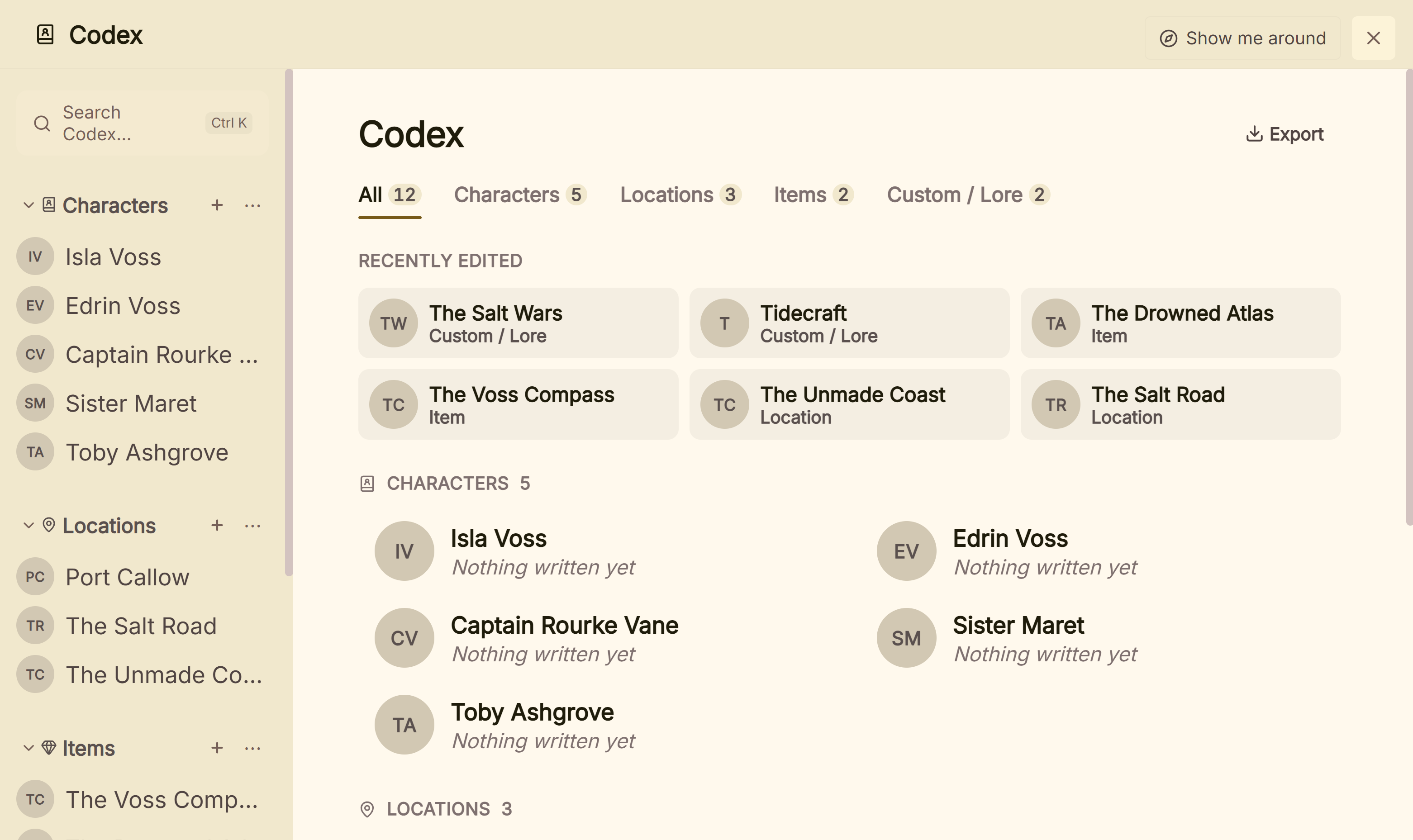 The Codex home, where the whole bible exports as a PDF or Word file
For a drawn map or family tree, Campfire or World Anvil suit as a companion. For a bible you check on a phone, Obsidian, Notion, Dabble or Campfire suit. For a bible shared live by several books online, Novelcrafter and Sudowrite suit. What Deckle adds is that the bible, the Timeline and the manuscript are one project on your own disk, and the same project formats the book as EPUB, print PDF and Word.
Deckle is a one-time purchase. To try it, click Take Deckle for a Spin on the screen Deckle opens to. There is no card, no account and no time limit. It opens a sample novel with its own Codex, so you can watch mentions and the Mentions tab work on real chapters, and export a real story bible from it. New Codex entries are capped at three and new writing at about 500 words.
Common mistakes when choosing story bible software
- Choosing a bible you will not open while drafting. A bible in a separate app drifts from the book. If you draft elsewhere, keep both open, or pick a tool with the manuscript in it.
- Trialling with an empty project. Load a real cast of twenty, with nicknames, and two books of places before the trial ends. That is where search, aliases and filters show their worth.
- Ignoring the free plan's caps. Campfire's free plan holds 10 characters and 5 locations. A fantasy novel passes that early.
- Assuming the bible works offline. Novelcrafter and World Anvil need a connection. Check before you plan to write on a train.
- Forgetting the exit. Sudowrite's project export leaves the Story Bible out by default. Check that the bible itself exports to a document an editor can open.
- Paying for a live series bible you do not need. If each book ships a year apart, a bible copied forward per book may serve better than one that changes under every book at once.
- Building the bible instead of the book. The bible only needs what the book commits to. Record what you would otherwise have to check.
FAQ
What is the best story bible software?
Nothing authoritative ranks it. Plottr suits series planning with no AI, Novelcrafter and Sudowrite suit a bible shared across a series online, Campfire and World Anvil suit large worlds, Notion and Obsidian suit a bible you build, and Scrivener, Dabble and Deckle keep it beside the manuscript.
What is the best series bible software?
For one bible shared live by every book, Novelcrafter's Series Codex and Sudowrite's Series folders, both online. For planning a series offline, Plottr. Deckle carries the Codex into each new book through a project template, or keeps a boxed set in one project.
Is there free story bible software?
Obsidian is free, Notion is free for one person, and Campfire and World Anvil have capped free plans. Deckle's free demo has no time limit, with new Codex entries capped at three.
Can Scrivener be used as a story bible?
Yes. Scrivener has character and location sheet templates, custom metadata and keywords. Finding each place a character appears is done by hand, for example with keywords or Collections.
Which story bible software works offline?
Plottr's desktop app, Campfire's desktop app, Dabble, Scrivener, Obsidian and Deckle work offline. Notion works offline for pages you download. Novelcrafter and World Anvil need a connection.
Which story bible software has no AI?
Plottr says "No AI" and Deckle has none in the app. Campfire, Scrivener and Obsidian mention none. Dabble says any future AI would be opt-in. Novelcrafter's AI starts on a paid plan, and Sudowrite is built around AI.
Can I export a story bible to Word or PDF?
Deckle exports the whole Codex as a story bible in PDF or Word. Notion exports pages as PDF. Sudowrite exports Story Bible sections as CSV, and Novelcrafter exports the codex as a zip of entries.
Sources
Retrieved 30 October 2026 unless stated. Prices change, so check the vendor page before buying.
- Plottr, Series bible software: characters, places and notes across books and series, filter by book, 20+ character templates, Word and Scrivener export, and its stated $49/$149 and $99/$299 prices and "Windows, Mac, Linux, iOS and Android" platforms; Pricing: $60 a year or $150 lifetime, Pro $9.99 a month, $99 a year or $599 lifetime, 30-day trial, "No AI"; Features: Series View, outline, characters, places and notes to Word and Scrivener; Devices: Mac and Windows, Pro on other devices; Project/Series overview (last updated 3 July 2024); mobile app removed (retrieved 21 October 2026)
- Novelcrafter, Series Codex (last updated 31 January 2025); Aliases & Mentions (last updated 19 March 2026); Codex export (last updated 8 February 2026); Pricing: $4 to $20 a month, 21-day trial, no free plan, AI from Hobbyist; Offline FAQ (last updated 6 February 2025); Web app FAQ (retrieved 20 October 2026)
- Sudowrite, What is Story Bible?; Series support changelog (21 November 2024); Exporting files: Story Bible as CSV, not in project exports; Pricing: $10, $22 and $44 a month billed yearly, $19, $29 and $59 billed monthly (the page's own offer data); Sudowrite on the App Store: companion app with offline mode (retrieved 21 October 2026)
- Campfire Writing, Home: 18 modules; Character builder: tags and a Notes sidebar in the manuscript (retrieved 26 October 2026); Pricing: the 18 modules, Relationships for family trees, free plan caps, Standard $12 a month against $19, PDF and EPUB manuscript export; FAQ: Mac 10.11+, Windows 7+, iOS and Android app, desktop offline, mobile needs a connection, DOCX element export online
- World Anvil, FAQ: online only, no mobile app, 2 worlds and 42 articles free, Guild from $4.50 a month billed yearly, article and world export, "we do not train AI models on your work"
- Dabble, How Dabble organizes your story: Characters and Notebook, formerly Story Notes; Pricing: plans, 14-day trial, offline, AI statements; Install the desktop app: Windows, Mac, Linux; Export your manuscript: formats, Include Notes, no direct PDF or EPUB
- Literature & Latte, Scrivener overview: sheet templates, metadata, keywords, Collections, iOS, macOS and Windows; Cross-grading: $59.99 per platform, $37.95 for the second; FAQs: iOS sold separately (retrieved 20 October 2026)
- Notion, Pricing: Free and Plus, 5 MB uploads, 7-day history, offline pages, Notion AI trial; Desktop: macOS, Windows, mobile; Export your content: PDF, HTML, Markdown, CSV
- Obsidian, Home: local plain text Markdown, links, graph; Pricing: "Free without limits", Sync $4 a month billed yearly; Download: Windows, Mac, Linux, iOS, Android
- Storyflow, Pricing: browser board with AI, Plus $9.99 a month or $7.99 billed yearly, paid-only during early access
- Ranking pages checked for the claims above: Storyflow, "The 10 Best Series Bible Software Tools in 2026 (Tested)" (21 July 2026); ShakespeareAI, "Series Bible Software for Authors: 7 Buying Tests" (29 August 2026)
Scrivener is a trademark of Literature & Latte. Plottr, Novelcrafter, Sudowrite, Campfire Writing, World Anvil, Dabble, Notion and Obsidian are trademarks of their respective owners. Deckle is not affiliated with or endorsed by any product named here.