

Scrivener vs Ellipsus comes down to whether you write alone or with other people. Pick Scrivener ($59.99 once per computer platform) to organise and compile a long book on your own disk, offline. Pick Ellipsus (free, with an optional Plus plan) to write in a browser with co-authors, editors and beta readers in the same document. Neither uses generative AI. They are built for different jobs, and many writers end up using one for drafting and something else for the finished book.
Every competitor fact below comes from the vendor's own website, help centre or App Store listing, read on 26 October 2026. Prices are US list prices as of October 2026. This is Deckle's own site, and Deckle is a third option covered in its own section near the end.
What is the difference between Scrivener and Ellipsus?
Scrivener is a desktop app from Literature & Latte for long-form writing. Its overview lists a Binder, a Corkboard of index cards, an Outliner, Snapshots, word Targets, Scrivenings, Collections and a full-screen composition mode, plus Compile for finished output. It runs on macOS 11 or later and 64-bit Windows 10 or later, with a separate iOS app.
Ellipsus is a browser-based writing app from a small Berlin team. Its features page describes working "together in the same draft", or giving each collaborator a draft of their own that you merge back in. It runs in any modern browser and as an Android app. Its download page lists iOS as "Coming soon" and native desktop apps as "in progress".
The short version: Scrivener is a workshop for one writer and a big book. Ellipsus is a shared room for a writer and the people around the book.
Scrivener and Ellipsus compared
| Scrivener | Ellipsus | |
|---|---|---|
| Runs on | macOS 11+, Windows 10+ (64-bit), iOS 12+. No Linux version | Any modern browser, Linux and Chromebook included; Android 10+ app. iOS "Coming soon", desktop apps "in progress" |
| Price model | One-time licence per platform | Free plan; Plus is optional |
| Current price | $59.99 for macOS or Windows; $23.99 iOS; $37.95 crossgrade to the other desktop platform | Free; Plus $99 once, or $6 a month for 24 months ($144), or two payments of $60 ($120) |
| Free trial | 30 days of actual use, macOS and Windows only | The free plan has no time limit; 7-day Plus trial, no card |
| Refund | Within 30 days of purchase | Within 14 days of your first Plus purchase |
| Works offline | Yes, desktop app with local files | Android app only. "In the browser, it is not currently possible to open or edit documents or drafts offline" |
| Where the book lives | Project files on your own disk | Ellipsus's servers |
| Sync between devices | Through Dropbox, or iTunes for iOS | Built in |
| Co-writing in real time | No | Yes, unlimited collaborators on the free plan |
| Structure | Binder, Corkboard, Outliner, Scrivenings, Collections | Documents, mergeable drafts, folders |
| Version history | Snapshots per section | 30 days free; unlimited on Plus |
| Export | Word, RTF, OpenOffice, PDF, EPUB, Final Draft, plain text, MultiMarkdown and Pandoc | .docx, PDF and Markdown per the help centre; copy as HTML, Markdown or Rich Text; Export to AO3. No EPUB |
| Import | Word, OpenOffice, plain text, Final Draft, images, PDF, web pages, media | DOCX and Markdown |
| Generative AI | None mentioned on its overview, features or FAQ pages | "we will never integrate or use generative AI within Ellipsus" |
Is Ellipsus or Scrivener better for co-writing and feedback?
Ellipsus, by a wide margin. Collaboration is the reason it exists. The free plan includes "Unlimited docs, drafts, and collaborators." A collaborator can work in your main text or in their own draft, and you merge their changes when you are ready. Its help centre lists five roles, from Owner and Document editor to Draft editor, Commenter and Viewer, so a beta reader can comment without touching the text. Comments sit beside the words they are about, and a chat for owners and editors comes with Plus.
Scrivener is built for one writer. Its manual tells you never to open one project in two places at once, and offers Import Project and Synchronised Folders as ways to bring a collaborator's changes back in later. Neither is live co-editing. Scrivener writers who need feedback usually compile a Word file or PDF and send it out. The usual ways to do that are on how to send a manuscript to a beta reader.
One limit worth knowing in Ellipsus: its help centre says "Folders can't be shared with collaborators", so a book kept as one document per chapter is shared one document at a time.
Is Scrivener or Ellipsus better for writing offline?
Scrivener. It is installed software, and a project is a set of files on your own computer, so a train or a dead router changes nothing.
Ellipsus's help centre is direct about the browser: "In the browser, it is not currently possible to open or edit documents or drafts offline." Its mobile app article says the Android app works offline once you have opened it online and opened each document you need, and changes "sync to Ellipsus' servers and across devices when you reconnect." The same article says the web version, "including the mobile browser and web apps", "still requires a connection to use", so installing the site from Chrome or Edge does not help. The FAQ on its download page says an offline-capable desktop app is coming soon, with no date. The full detail is on can you use Ellipsus offline.
The trade runs the other way on sync. Ellipsus syncs between devices on its own. Scrivener leaves syncing to you, through Dropbox, and its route for keeping Mac and Windows in step is covered in syncing Scrivener between Mac and Windows.
Which is better for organising a long novel?
Scrivener. Its Binder holds every chapter and scene in one tree, the Corkboard shows them as index cards you can drag into a new order, and the Outliner lists synopses and metadata in columns. Scrivenings lets you read several sections as one document. Research such as PDFs, images and web pages can sit inside the project.
Ellipsus organises by documents, drafts and folders. There is no corkboard, outliner, character database or timeline on its features or Plus pages. What it does well here is drafts: a draft is a branch of a document that you can merge back, which is closer to how programmers handle changes than anything in Scrivener. Scrivener's Snapshots save a version of a section that you can compare and restore, but not merge.
The cost of Scrivener's depth is a learning curve, and how steep it really is depends on how much of it you use. That is covered in is Scrivener hard to learn.
Which can export a finished book?
Scrivener. Its Compile step produces Word, RTF, OpenOffice, PDF, EPUB, Final Draft and plain text from the whole project, and Literature & Latte says it can "Generate PDF files ready for self-publishing." Its overview still says "Epub and Kindle ebooks", but the macOS release notes record that version 3.5.0 (1 October 2025) removed Kindle (.mobi) as a Compile option, because Amazon now asks for EPUB.
Ellipsus stops at a manuscript. Its help centre lists three download formats, .docx, PDF and Markdown, and adds that "page numbers are not preserved in downloads", that comments are "not included in PDF or markdown exports", and that a download holds only the main document, without its drafts. Bulk downloads "are not currently possible." Its Export to AO3 posts work straight to Archive of Our Own, which suits fan fiction writers well. For an ebook store, you would download a .docx and format it elsewhere. The steps are on how to export from Ellipsus.
Is Ellipsus cheaper than Scrivener?
Yes. Ellipsus's free plan covers writing, drafts, collaborators, sync and sharing with no time limit. Plus adds unlimited version history, 5 MB image uploads, a custom theme builder, writing insights and Emboss, and it is subscribe-to-own: $99 once, $6 a month for 24 months, or two payments of $60. Every route ends with a licence you keep.
Scrivener costs $59.99 for macOS or Windows, once. A second desktop platform is a $37.95 crossgrade, and the iOS app is $23.99 on the App Store. Literature & Latte says minor updates are free and major versions may be paid upgrades. Over a few years, Scrivener on one computer costs less than Ellipsus Plus bought monthly, and more than Ellipsus Free. The full Scrivener costs are on is Scrivener a one-time purchase, and Ellipsus's on is Ellipsus free.
Does Scrivener or Ellipsus use AI?
Neither has generative AI. Ellipsus states it outright: "we will never integrate or use generative AI within Ellipsus", and "We will never sell your data or use your works for exploitative purposes." Literature & Latte's overview, features and FAQ pages describe no AI feature in Scrivener, though it publishes no written policy of the same kind. Other apps without AI are listed in novel writing software without AI.
What do other comparison pages get wrong?
Few pages compare these two directly, but the pages that rank for each tool carry some out-of-date claims:
- "Ellipsus is free." AlternativeTo lists it as "Free and Proprietary", and Reedsy's May 2026 roundup lists its price as "Free". The core is free, but Ellipsus Plus is a paid tier that launched on 10 June 2026.
- "$60 a year." A July 2026 review gives Plus as "$6/month, $60/year, or $99 forever". Ellipsus's payment guide says the annual route is "two payments of $60", after which "You own the license forever", so it is $120 in total, not an ongoing yearly fee.
- "Export to Word or Markdown." The same review names only those two. Ellipsus's help centre also lists PDF.
- "Scrivener makes Kindle ebooks." Scrivener's own overview still says so. On macOS, Kindle (.mobi) left Compile in version 3.5.0; make an EPUB for Amazon KDP instead.
Scrivener or Ellipsus: which should you buy?
Choose Scrivener if:
- You write alone, and the book has many chapters, viewpoints or threads to rearrange.
- You want research, notes and synopses beside the text.
- You want to work offline and keep the files on your own disk.
- You want an EPUB, PDF or submission manuscript made from the whole project.
Choose Ellipsus if:
- A co-author, editor or beta readers work in the text with you.
- You want something free, in a browser, with nothing to install.
- You write fan fiction and post to AO3.
- A written no-AI promise matters to you.
Some writers use both: Ellipsus for drafting with a partner, then a .docx download into Scrivener, which imports Word documents, for structure and compiling. Is Scrivener the right fit for your kind of project? That question has its own page: is Scrivener good for writing a book.
What about Dabble or Reedsy Studio?
People comparing these two often look at a tool that sits between them. Both are worth a look if you want co-writing and more structure than Ellipsus has.
- Reedsy Studio is browser-based like Ellipsus, and Reedsy says its basic features, writing and formatting included, are free. It adds what Ellipsus lacks for publishing: "EPUB 3 (which works great on all major ebook stores)" and "PDF (PDF/X-1a:2001 for print-on-demand)". On offline use its FAQ says "Currently, no." Optional add-ons are $4.99 and $7.99 a month. Scrivener against it is on Reedsy Studio vs Scrivener.
- Dabble is a subscription app with "True Offline" writing that syncs when you reconnect, real-time co-authoring on every plan, and a Plot Grid. It runs in the browser and on phones. Plans start at $15 a month billed yearly, with a 14-day trial and no card. Dabble's export help says it "does not export PDF or ePub directly". Scrivener against it is on Scrivener vs Dabble.
Where does Deckle fit next to Scrivener and Ellipsus?
Deckle is our app, so weigh this section accordingly.
Deckle sits on Scrivener's side of this comparison. It is a desktop app for Windows, macOS and Linux that works offline after activation and keeps each book in a folder on your own disk. It has a Binder of parts, chapters and scenes, an Outliner with a Grid View of index cards, a Codex for characters, locations and items, and a Timeline that shows events to scale or in story order. There is no generative AI anywhere in its code.
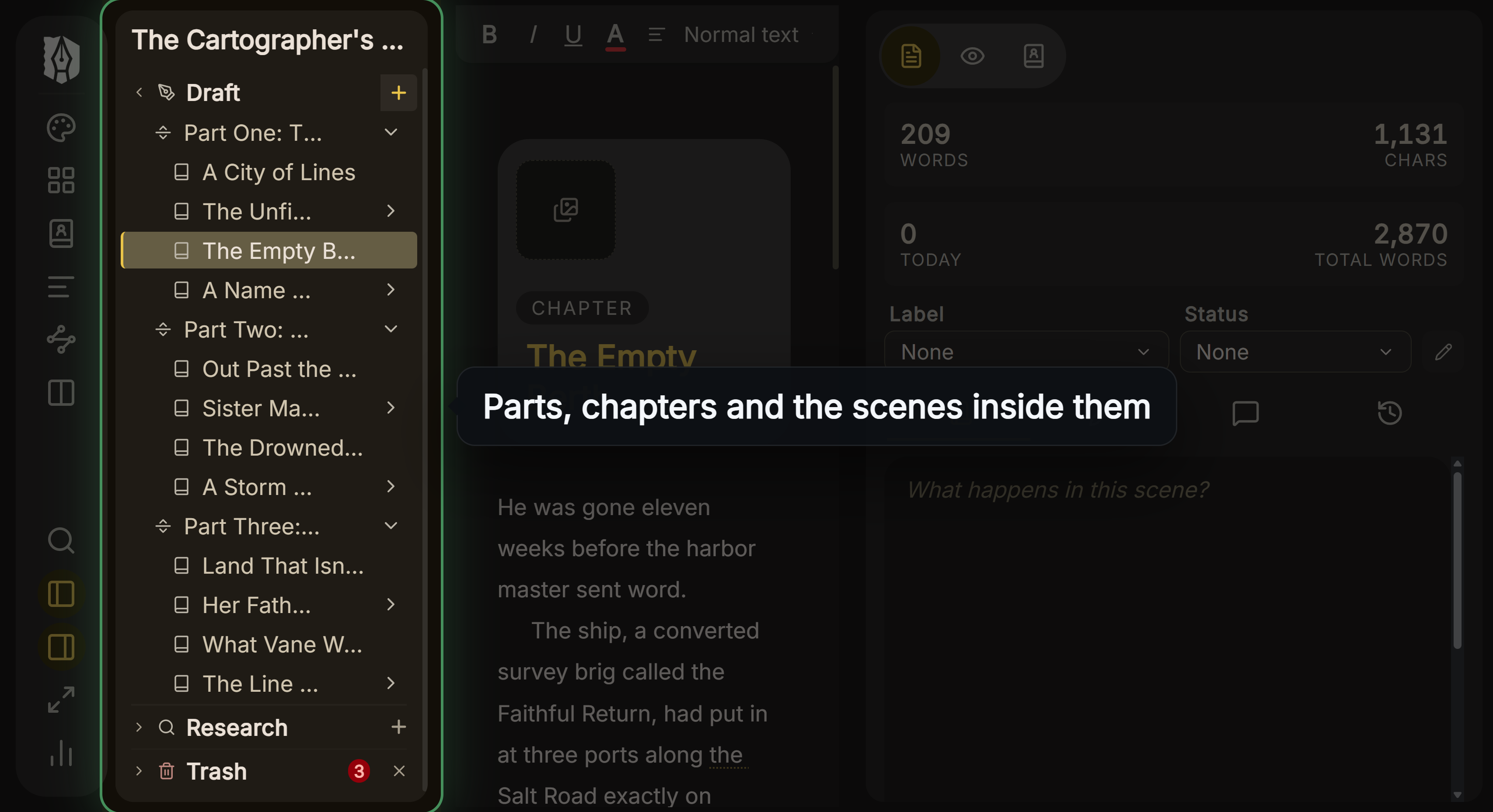 Parts, chapters and scenes in Deckle's Binder
Where it differs from Scrivener is the finished book. Export makes an EPUB with Generic, Kindle, Apple Books and Kobo targets, a print PDF at 8 trim sizes with bleed, a DOCX for editors, Academia PDF and Markdown, with 26 built-in style presets and a live preview on Kindle, iPhone, iPad and Print. For writing with a co-author in the same document, Ellipsus is the better fit; Deckle is built for one author at a desk. The two work together: draft with others in Ellipsus, then bring the .docx into Deckle to lay out the book. The side-by-side pages are Scrivener vs Deckle and Ellipsus vs Deckle.
How do you bring a Scrivener or Ellipsus book into Deckle?
From Scrivener:
- In Scrivener, choose File ▸ Back Up ▸ Back Up To… and tick Backup as ZIP file.
- In Deckle, click the + (Add to Draft) next to Draft in the Binder and choose Import….
- In the Import Manuscript window, click Import… and pick the .zip. Draft, Research and Notes all come across.
From Ellipsus:
- In Ellipsus, set each chapter title as Heading 1.
- Download the document as .docx. Ellipsus has no bulk download, so a book kept as one document per chapter is easiest merged into one document first.
- In Deckle, click the + next to Draft, choose Import…, then Import… again and pick the .docx. Each Heading 1 starts a chapter, and a Heading 2 files under it.
Then open File ▸ Export… and choose EPUB, PDF or DOCX. The general method, for any pair of apps, is on how to move a manuscript between writing apps.
To try this before buying, click Try it free on the screen Deckle opens to. It is a free demo with no card, no account and no time limit. It opens a sample novel with every screen open to explore, and you can restyle it and export real EPUB, PDF and DOCX files. New writing is capped at about 500 words, and new documents and imports are blocked, so the import steps above need the full version.
Common mistakes when choosing between Scrivener and Ellipsus
- Choosing Ellipsus for a book you will write on the move. Its browser version cannot open documents offline. Only the Android app can.
- Buying Scrivener to work with a co-author. It has no live co-editing, and one project should never be open in two places at once.
- Expecting an ebook from Ellipsus. It downloads .docx, PDF and Markdown, with no EPUB and no page numbers.
- Buying Scrivener for Mac and Windows separately at full price. One licence covers one platform. The second is a $37.95 crossgrade, or buy the macOS and Windows bundle at $95.98 up front. Mac App Store purchases do not qualify for the crossgrade.
- Assuming Ellipsus Plus is a subscription forever. All three Plus routes end in a licence you own.
- Leaving drafts behind when you move. An Ellipsus download holds only the main document. Merge the drafts you want to keep first.
FAQ
Is Ellipsus better than Scrivener?
For co-writing and sharing in a browser, yes. For organising and compiling a long book alone and offline, Scrivener does far more.
Can I use Scrivener and Ellipsus together?
Yes. Download an Ellipsus document as .docx and import it into Scrivener, which reads Word documents. Going back means compiling a .docx and importing it into Ellipsus.
Is Ellipsus free?
The core plan is free, with unlimited documents, drafts and collaborators. Ellipsus Plus is $99 once, or paid in instalments.
Does Ellipsus work offline like Scrivener?
Only in the Android app. The browser version cannot open or edit documents offline. Scrivener works offline on every platform.
Can Ellipsus make an EPUB like Scrivener?
No. Ellipsus downloads .docx, PDF and Markdown. Scrivener's Compile makes EPUB.
Does Scrivener have real-time collaboration?
No. It is a single-user app. Its manual offers Import Project and Synchronised Folders for bringing a collaborator's changes back in later.
Which is better for fan fiction?
Ellipsus. It posts straight to AO3 with Export to AO3, and it is free.
Sources
Retrieved 26 October 2026.
- Literature & Latte, Scrivener overview: versions and system requirements, organising tools, import and export formats, "Generate PDF files ready for self-publishing", Dropbox sync
- Literature & Latte, Cross-grading: $59.99 for macOS or Windows, $37.95 crossgrade, Mac App Store purchases excluded
- Literature & Latte, Store: macOS and Windows bundle, $95.98 in US checkout
- Literature & Latte, Scrivener FAQs: 30 days of use trial, one licence per platform, paid major upgrades, 30-day refunds
- Literature & Latte, Scrivener release notes for macOS: 3.5.0, 1 October 2025, Kindle (.mobi) removed from Compile
- Literature & Latte, Scrivener 3 User Manual for macOS: opening a project once, Import Project, Synchronised Folders (read 20 October 2026)
- Apple App Store, Scrivener for iOS: $23.99, iOS 12.0 or later
- Ellipsus, Ellipsus Plus, Plus payment guide, Download, Features, Our stance on generative AI
- Ellipsus Help, Can I use Ellipsus offline?, The Ellipsus Mobile App, Downloading your work, Collaboration in Ellipsus, Folders
- Reedsy, Book writing software FAQ: free core, add-on prices, EPUB 3 and PDF/X-1a, no offline
- Dabble, Pricing and Features: plans, trial, co-authoring, True Offline; Export your manuscript: no direct PDF or EPUB (read 21 October 2026)
- Pages checked for wrong claims: AlternativeTo, Ellipsus, Reedsy, collaborative writing tools (25 May 2026), Meredith Bond, Ellipsus review (5 July 2026)
This is Deckle's site. Scrivener is a trademark of Literature & Latte. Ellipsus is a trademark of Ellipsus GmbH. Reedsy is a trademark of Reedsy Ltd, Dabble of Dabble Writer, and Archive of Our Own belongs to the Organization for Transformative Works. Deckle is not affiliated with or endorsed by any product named here.