

Scrivener is a one-time desktop app for Mac, Windows and iOS, with Compile for EPUB, PDF and Word output. Dabble is a subscription app that syncs in real time across Windows, Mac, Linux, the browser and phones, with a Plot Grid and live co-authoring, but it exports no EPUB or print PDF. Scrivener suits deep organising and making your own files. Dabble suits writing on many devices.

Every Scrivener fact here comes from Literature & Latte's own pages, and every Dabble fact from dabblewriter.com, all read on 20 October 2026. Prices are in US dollars as of October 2026. Nothing here is scored or ranked.
Scrivener vs Dabble at a glance
| Scrivener | Dabble | |
|---|---|---|
| What it is | Writing and organising, with Compile for output | Writing and plotting, cloud-synced |
| Platforms | macOS 11+, Windows 10+ (64-bit), iOS 12+ (App Store, October 2026) | Windows, Mac, Linux desktop apps; any modern browser; iPhone, iPad, Android and Chromebook from the browser |
| Sync | "Sync using Dropbox or transfer with iTunes" | Real-time across every signed-in device |
| Offline | Yes, desktop app | Yes, "offline-first", syncs on reconnect |
| Dabble account | Not applicable | Required, plus a connection to sign in |
| Price model | One-time, one licence per platform | Subscription, or a lifetime one-time payment |
| Price | $59.99 Mac or Windows; $23.99 iOS | $15, $23 or $39 a month billed annually; $19, $29 or $49 billed monthly; lifetime $699 or $899 |
| Trial | 30 days of actual use, macOS and Windows | 14 days, every feature, no card |
| Planning tools | Binder, Corkboard, Outliner, Collections, Snapshots, targets | Plot Grid, Story Notebook, character profiles, sticky notes, goals with a deadline |
| Collaboration | Comments and annotations; no co-authoring described | Live co-authoring; comments and track changes on Author |
| EPUB | Yes, via Compile; Kindle on Windows only | No |
| Compile to PDF "ready for self-publishing" | Browser Print to PDF only | |
| Word | Yes | Yes, Manuscript Format or Dabble Format |
| Import | Word, plain text, Final Draft, images, PDFs, movies, sound, web pages | Word, Markdown, HTML, RTF, up to 50 MB |
| Generative AI | None mentioned | None; future AI "strictly opt-in" |
Is Scrivener or Dabble better for writing on several devices?
Dabble is built for it. Dabble keeps "a full copy of your novel" on each device and another in the cloud, and "Sync is real-time across every device signed in to your account." Edits made on two devices at once "are combined automatically." There is no sync button to press.
Scrivener runs on Mac, Windows and iOS, and its features page says to "sync using Dropbox or transfer with iTunes." Each platform needs its own licence: "Each licence we sell covers only one platform." Scrivener has no Linux, Android or browser version listed. Dabble has all three, though phones run it as a home-screen web app, not an App Store app.
How much do Scrivener and Dabble cost?
Scrivener is a one-time licence: $59.99 for Mac or Windows, $37.95 to crossgrade to the other once you own one, and $23.99 for iOS. Minor updates are free, and Literature & Latte says major versions "may require a paid upgrade fee". The standard licence covers machines you own and family members in the same house.
Dabble is a subscription. Writer costs $180 a year ($15 a month billed annually) or $19 billed monthly. Author is $276 a year or $29 monthly, and Bestseller $468 a year or $49 monthly. Dabble also sells a one-time Lifetime Author plan at $699 and Lifetime Bestseller at $899.
| Over three years, from list prices | Scrivener | Dabble |
|---|---|---|
| One computer | $59.99 | $540 (Writer, annual) |
| Mac or Windows plus iPhone | $83.98 | $540 (same plan, every device) |
| Mac and Windows plus iPhone | $121.93 | $540 |
| Comments and track changes included | Comments only | $828 (Author, annual) or $699 lifetime |
The totals do not make the apps equivalent. Dabble's price pays for cloud sync, co-authoring and continuous backups, which Scrivener does not run. Dabble says that if you stop paying, your manuscripts "remain readable and exportable forever" and only editing switches off; its help calls this "a free, read-only state" (as of October 2026). The full Dabble breakdown is in Dabble Writer price, and Scrivener's is in what Scrivener costs.
Scrivener Corkboard vs Dabble Plot Grid
Scrivener's Corkboard attaches "every section of your project" to "a virtual index card", and moving cards rearranges the manuscript. Its Outliner shows synopses, word counts and metadata, and Collections gather documents into lists.
Dabble's Plot Grid "works like a spreadsheet for your story." Each column is a plot line, such as a main plot or a romance subplot, and each card is one plot point. Linked to a book, its rows follow the scenes, so "reordering scenes in your manuscript reorders the grid to match." Dabble says it helps you "spot the sagging middle before you write it." Scrivener has no grid of plot lines against scenes.
Can you co-write a book in Scrivener or Dabble?
Dabble's features page says "Invite a writing partner into the manuscript and build the story together, live." Co-authoring is on the Writer plan. Comments, track changes and beta-reader support are on Author and above.
Scrivener's features page lists "Add comments and annotations". It describes no co-authoring or shared editing.
Can Scrivener or Dabble make an EPUB or print PDF?
Scrivener can. Its Compile makes EPUB and "Kindle e-books to sell on Amazon or elsewhere", PDF files "ready for self-publishing", and Word, RTF and Final Draft files. The features page still says so, but the macOS release notes record Kindle (.mobi) removed in 3.5.0 (1 October 2025); the Windows version still has it. Literature & Latte does not claim professional typesetting for the PDF.
Dabble can't. Its export help says "Dabble does not export PDF or ePub directly." For a PDF "you use Print and save as PDF", and the print view "is just your document as plain, printable text" at 12pt, without the fonts or spacing you chose in the editor. Dabble exports Word, Google Docs, a shareable web page and Markdown, one book at a time.
That Word file is still a publishing route. Amazon KDP accepts DOCX for ebooks and says "Most DOC/DOCX files convert well to eBooks." For a paperback with bleed, KDP says "you must upload your manuscript as a PDF." A Dabble author who wants a typeset paperback formats the Word file in another app first. The ebook steps are in how to make an EPUB file.
How do you move a book from Scrivener to Dabble?
Dabble imports Word (.docx), Markdown, HTML and RTF up to 50 MB. Its import help does not mention Scrivener, so compile the Scrivener project to Word first. Dabble warns that "Track changes, comments, and unusual styles may not carry over," and "Imported words don't count toward your word-count goals or stats."
Going the other way, Scrivener imports Word files, so export Dabble's manuscript to Word. Dabble's Manuscript Format gives "indented paragraphs, double spacing, Times New Roman 12pt." The general method is in how to move a manuscript between writing apps.
Is there an app that writes and formats the book in one place?
Deckle is our app, so weigh this section accordingly.
Deckle is a desktop app for Windows, macOS and Linux that drafts, organises and formats the book, then exports EPUB, a print PDF and DOCX. It imports a zipped Scrivener project directly, as well as Word, EPUB and a Markdown folder. Like Scrivener, it is a one-time purchase and works offline. Unlike Dabble, it has no cloud sync, phone app or co-authoring. It is compared with each app in Scrivener vs Deckle and Dabble vs Deckle.
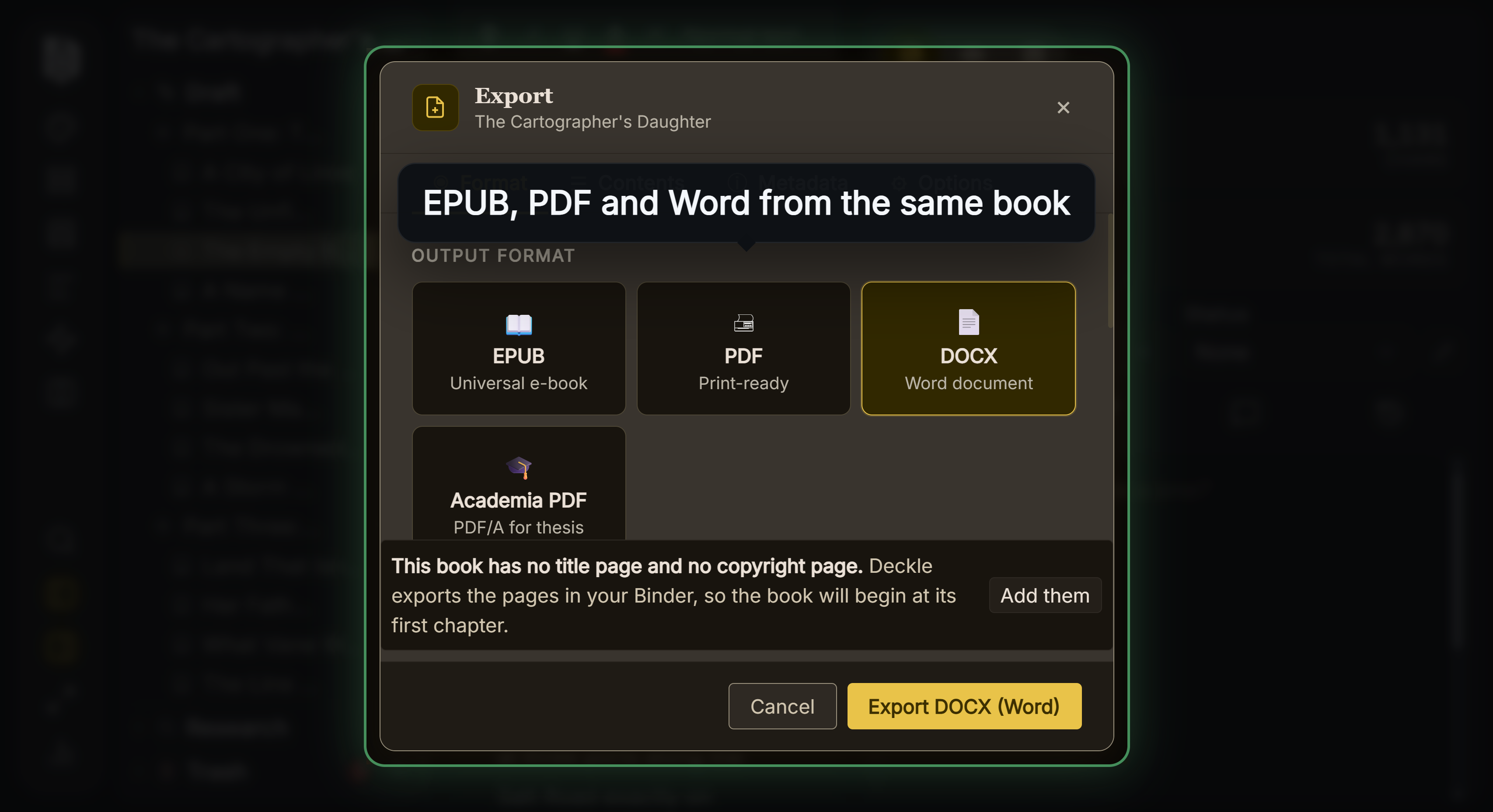 The EPUB and print PDF Dabble leaves to another app
To try it, click Take Deckle for a Spin on the screen Deckle opens to. There is no card, no account and no time limit. It opens a sample novel with every screen open to explore, and you can restyle it and export real EPUB, PDF and DOCX files. New writing is capped at about 500 words, and new documents and imports are blocked.
Who should pick Scrivener over Dabble?
- You want to pay once and keep the app.
- You plan with index cards, an outliner, Collections and Snapshots.
- You want to compile your own EPUB, PDF and Word files.
- You work on a Mac, a Windows PC or an iPhone or iPad, and Dropbox sync is enough.
Who should pick Dabble over Scrivener?
- You write on several devices, including a browser, Linux or an Android phone.
- You plot with plot lines against scenes.
- You write with a co-author or work with an editor inside the app.
- You will format the book in another app or hand a Word file to a formatter.
FAQ
Is Dabble better than Scrivener?
Neither is better in every case. Dabble syncs every device and supports co-authoring. Scrivener is a one-time purchase with deeper organising tools and EPUB and PDF output.
Is Dabble cheaper than Scrivener?
Not over time at list prices. Scrivener is $59.99 once per platform. Dabble Writer is $180 a year billed annually, and Lifetime Author is $699.
Can Dabble import a Scrivener project?
Dabble's import help lists Word, Markdown, HTML and RTF and does not mention Scrivener. Compile the project to Word first.
Does Dabble have a corkboard like Scrivener?
Dabble has a Plot Grid of plot lines and plot points, and a Scenes view for outlining. Scrivener's Corkboard is a board of index cards.
Can Dabble export to EPUB like Scrivener?
No. Dabble says it "does not export PDF or ePub directly." Scrivener compiles EPUB, and Kindle ebooks on Windows.
Does Scrivener sync like Dabble?
Scrivener syncs through Dropbox or iTunes transfer. Dabble syncs in real time across every signed-in device.
Do Scrivener or Dabble use AI?
Scrivener's pages mention no AI. Dabble says it will "never put words on the page for you."
Sources
All retrieved 20 October 2026. Prices change, so check the vendor page before buying.
- Scrivener overview and Scrivener features, Literature & Latte: platforms, sync, Corkboard, Compile formats, comments
- Apple App Store, Scrivener (retrieved 21 October 2026): "Requires iOS 12.0 or later"
- Scrivener FAQ, Literature & Latte: licence per platform, household licence, upgrades, trial
- Scrivener store and Crossgrading, Literature & Latte: prices
- Dabble pricing: plans, prices, lifetime, trial, work after cancelling, AI
- Cancel your subscription, Dabble Help (retrieved 21 October 2026): account moves to "a free, read-only state"
- Dabble features: co-authoring, comments, track changes
- Export your manuscript, Print from Dabble and Import your manuscript, Dabble Help
- How Dabble syncs your work, System requirements and Plotting with the Plot Grid, Dabble Help
- What file formats are supported for eBook manuscripts?, Amazon KDP Help: DOCX for ebooks
- Save Your Manuscript File, Amazon KDP Help: PDF for paperbacks with bleed
- Literature & Latte, Scrivener release notes for macOS: 3.5.0, 1 October 2025, Kindle (.mobi) removed from Compile; the Windows notes, up to 3.1.6 (3 September 2025), record no such change (retrieved 21 October 2026)
Scrivener is a trademark of Literature & Latte. Dabble and every other product name here belong to their owners. Deckle is not affiliated with or endorsed by any product named here.