

Dabble is a subscription writing app that syncs in real time across desktop, browser and phones, with a Plot Grid and live co-authoring. It exports Word but no EPUB or print PDF. Deckle is a one-time desktop app for Windows, macOS and Linux that drafts, organises and formats the book, exporting EPUB, print PDF and DOCX, with no cloud sync or phone app.
Deckle is our app, so weigh this page accordingly. Dabble's facts come from dabblewriter.com and Dabble Help, read on 20 October 2026. Deckle's facts are checked against Deckle's code (version 1.7.8). Prices are as of October 2026. Nothing here is scored or ranked.
Dabble vs Deckle at a glance
| Dabble | Deckle (1.7.8) | |
|---|---|---|
| What it is | Writing and plotting, cloud-synced | Writing, organising and book formatting |
| Platforms | Windows, Mac, Linux desktop apps; browser; iPhone, iPad, Android, Chromebook from the browser | Windows 10/11, macOS 11 or newer, Linux (.deb, .rpm) |
| Where your work lives | On each device and in Dabble's cloud | A project folder on your own disk |
| Sync | Real-time across every signed-in device | None built in |
| Offline | Yes, syncs on reconnect | Yes, after activation |
| Price model | Subscription from $15 a month billed annually; lifetime $699 or $899 | One-time purchase |
| Free version | 14-day trial, every feature, no card | Free demo, no time limit, writing capped at about 500 words |
| Planning | Plot Grid, Scenes view, Story Notebook, character profiles, sticky notes | Outliner Grid View and List view, Codex, Timeline with plotlines |
| Collaboration | Live co-authoring; comments and track changes on Author | Inline comments; no co-authoring or track changes |
| Goals | Word count with a deadline, daily plan, stats and streaks | Manuscript target and deadline, daily or weekly goals in words or minutes, streaks, heatmap |
| Book formatting | None; plain browser print | 26 style presets, 8 trim sizes, drop caps, running heads, scene-break ornaments |
| Export | Word, Google Docs, web link, Markdown | EPUB (Generic, Kindle, Apple Books, Kobo), print PDF, DOCX, Academia PDF, Markdown, plain text |
| Import | Word, Markdown, HTML, RTF, up to 50 MB | Word, EPUB, a zipped Scrivener project, a Markdown folder |
| Generative AI | None | None |
Does Dabble or Deckle sync between devices?
Dabble does, and it is one of the best reasons to use it. Each device keeps a full copy of the book, another lives in the cloud, and "Sync is real-time across every device signed in to your account." Edits from two devices at once "are combined automatically."
Deckle has no built-in cloud sync and no account. A Deckle project is a folder holding one .deckle database for the writing, notes and settings, plus research/ and .deckle-assets/ folders. Nothing is stored on a server. Deckle keeps zip backups (20 by default, in a "Project Name Backups" folder in Downloads, falling back to Desktop or Documents). It makes one every 500 words and when you close the project.
If you write on a phone on the bus and a laptop at night, Dabble fits that and Deckle does not.
Does Dabble or Deckle run on a phone or in a browser?
Dabble runs in any modern browser and installs on iPhone, iPad and Android from the browser. "Looking for Dabble in the App Store? You won't find it there, and that's on purpose." It also has desktop apps for Windows, Mac and Linux.
Deckle runs only on the desktop: Windows, macOS (Apple Silicon and Intel) and Linux. It has no phone, tablet or browser version.
Dabble vs Deckle price
Dabble is a subscription. Writer is $15 a month billed annually ($180 a year) or $19 billed monthly. Author is $23 or $29, and Bestseller $39 or $49. Lifetime Author costs $699 once, and Lifetime Bestseller $899. If you stop paying, Dabble says your manuscripts "remain readable and exportable forever", and only editing switches off. The full breakdown, with a three-year view, is in Dabble Writer price.
Deckle is a one-time purchase with every update included. A licence covers 2 devices in any mix of Windows, Mac and Linux, and there is a 30-day full refund. The two price models pay for different things: Dabble's subscription funds the servers for sync, co-authoring and cloud backups, which Deckle does not run.
Dabble Plot Grid vs Deckle Timeline and Outliner
Dabble's Plot Grid "works like a spreadsheet for your story." Columns are plot lines and cards are plot points. Linked to a book, rows follow the scenes, so "reordering scenes in your manuscript reorders the grid to match."
Deckle has no Plot Grid. Its nearest tools are:
- The Timeline, with two views. "Timeline" places events to scale, and "Story order" puts a column per chapter so flashbacks show out of sequence. Lanes can be plotlines or any Codex category, such as one lane per character.
- The Outliner, with a Grid View of index cards, one level at a time, and a List view with custom columns.
- The Codex, a story bible for characters, locations, items and your own sections, with entry templates and image galleries. Dabble's equivalents are character profiles and the Story Notebook.
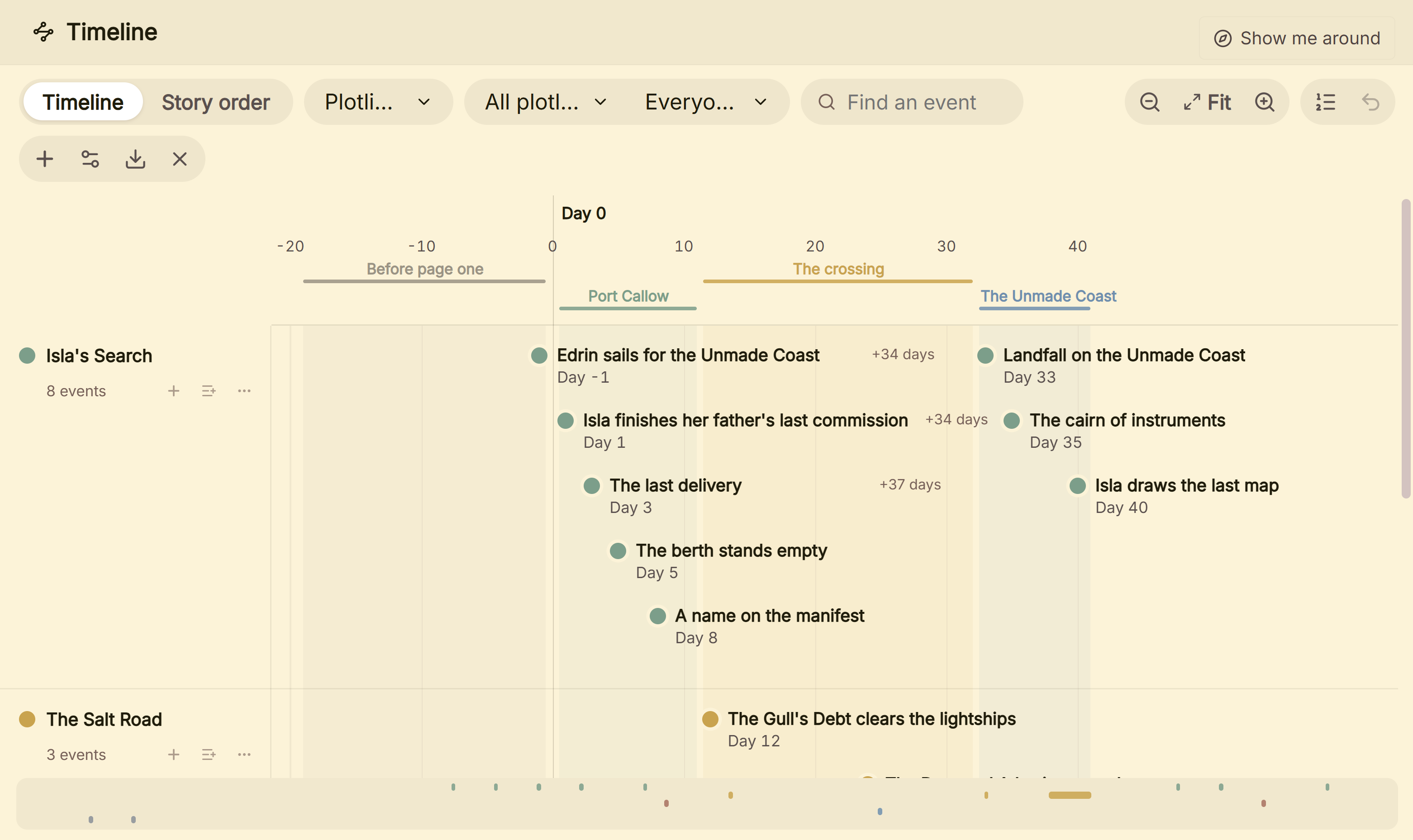 Deckle's Timeline: plotlines as lanes, not a grid against scenes
Co-authoring, comments and track changes
Dabble's features page says "Invite a writing partner into the manuscript and build the story together, live." The Author plan adds comments, track changes, beta-reader and editor support.
Deckle has inline comments anchored to the text, a project-wide Comments view, and comments that export as real Word comments in DOCX. It has no co-authoring and no track changes. To work with an editor in Deckle, you export DOCX and they review it in Word.
Can Dabble or Deckle make an EPUB and a print PDF?
Deckle can. Dabble can't.
Dabble's export help says "Dabble does not export PDF or ePub directly." Its print view "is just your document as plain, printable text" at 12pt, saved as a PDF from the browser. Dabble exports Word in Manuscript Format ("indented paragraphs, double spacing, Times New Roman 12pt") or Dabble Format, plus Google Docs, a web link and Markdown.
Deckle formats the book inside the project. It has 26 built-in style presets, eight trim sizes from 5"×8" to A4, bleed, drop caps, small caps, running heads, scene-break ornaments, and special pages such as Title Page, Copyright and Also by the Author. It exports EPUB, the W3C's ebook standard, with Generic, Kindle, Apple Books and Kobo targets, a print PDF made with Typst, and DOCX for Word or InDesign with a Standard Manuscript Format option. The Kindle target writes an EPUB for KDP to convert, not a KPF file. The print PDF is a standard PDF, not PDF/X-1a. KDP's manuscript file guidance says "PDF/X-1a is preferred" and accepts other PDFs, so check KDP's print file requirements.
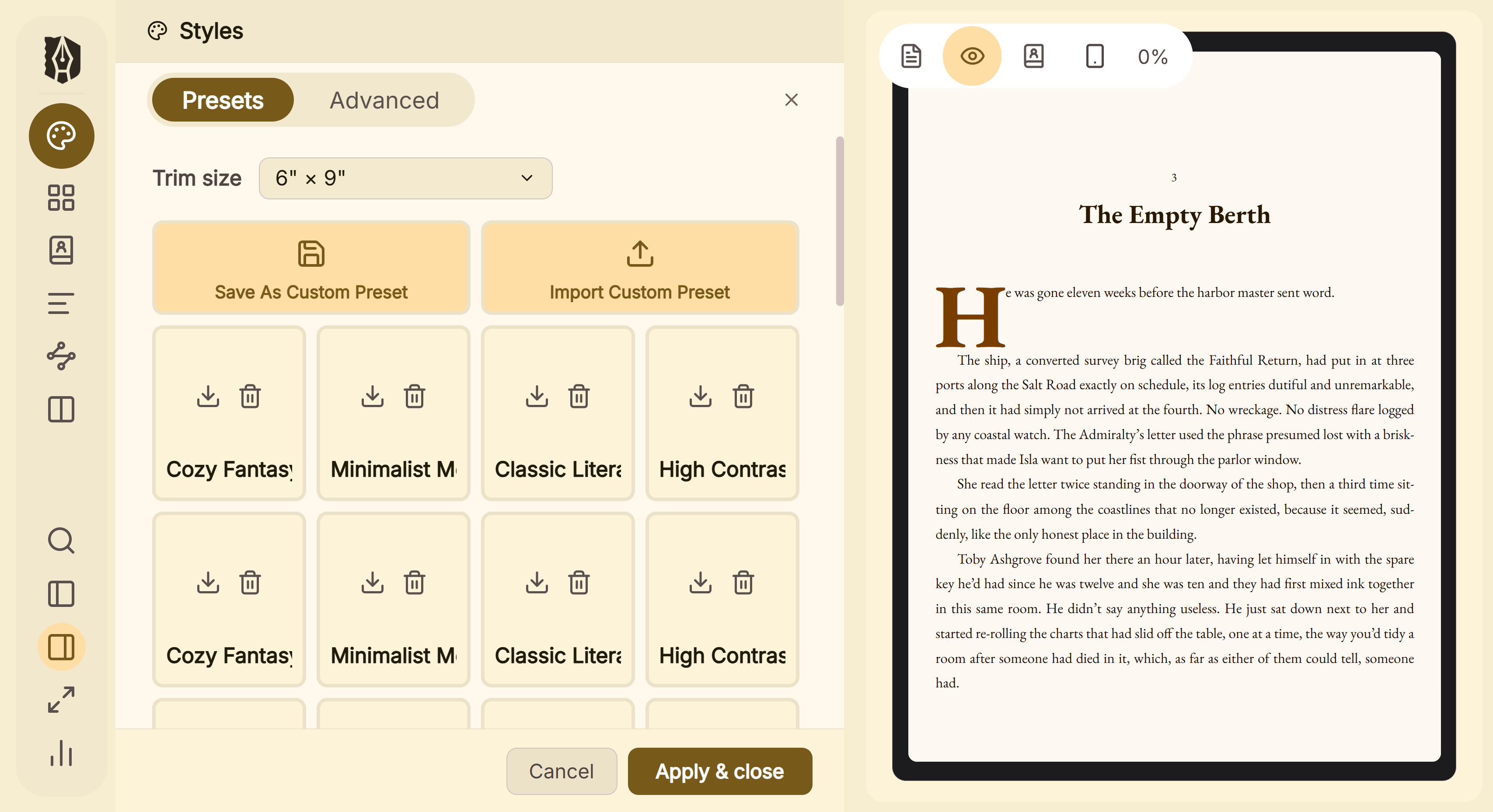 A preset styles the whole book, and the preview shows the page as it will print
A Dabble book can still be published. KDP accepts DOCX for ebooks and says "Most DOC/DOCX files convert well to eBooks." A typeset paperback with bleed needs a PDF from another app.
Moving a book from Dabble to Deckle
- In Dabble, export the book to Word (.docx). Dabble exports one book at a time.
- Check that each chapter title is a heading. Deckle splits a Word file into chapters by heading style.
- In Deckle, import the .docx into Draft.
- Rebuild characters and places in the Codex, and plot lines on the Timeline. Dabble's export help describes the manuscript only.
Test two chapters first, using the method in how to move a manuscript between writing apps.
Where Dabble is ahead
- Real-time sync across every device, with automatic merging.
- Phones, tablets, Chromebooks and the browser. Deckle is desktop only.
- Live co-authoring and track changes. Deckle has comments only.
- The Plot Grid, plot lines against scenes. Deckle has no equivalent grid.
- A goal that "builds the daily plan and adjusts it when life happens." Deckle sets a target and a deadline. This page makes no daily-plan claim for Deckle.
- Grammar and style checks and Read to Me on the Author plan. This page makes no grammar-check or text-to-speech claim for Deckle.
- A trial on your own manuscript. Dabble's 14-day trial takes imports. Deckle's demo blocks them.
Pick Dabble if
- You write on more than one device, including a phone or a browser.
- You co-write, or want an editor to track changes inside the app.
- You plot with plot lines against scenes.
- You submit Word files to agents or hand the book to a formatter.
Pick Deckle if
- You want EPUB and print PDF files from the same project you write in.
- You want a one-time purchase and a project folder on your own disk.
- You write on Windows, macOS or Linux and don't need a phone app.
- You are coming from Scrivener, since Deckle imports a zipped Scrivener project.
To try Deckle, click Take Deckle for a Spin on the screen Deckle opens to. There is no card, no account and no time limit. It opens a sample novel with every screen open to explore, and you can restyle it and export real EPUB, PDF and DOCX files. New writing is capped at about 500 words, and new documents and imports are blocked.
FAQ
Is Deckle a Dabble alternative?
Deckle covers drafting, organising and formatting on the desktop. It does not replace Dabble's cloud sync, phone access or co-authoring.
Does Deckle sync like Dabble?
No. Deckle has no built-in cloud sync or account. Projects are folders on your disk.
Can Dabble export EPUB?
No. Dabble says it "does not export PDF or ePub directly." Deckle exports EPUB and a print PDF.
Is Dabble or Deckle a subscription?
Dabble is a subscription, with lifetime plans at $699 and $899. Deckle is a one-time purchase.
Can I move my book from Dabble to Deckle?
Yes. Export Word from Dabble and import the .docx into Deckle, which splits chapters by heading style.
Does Deckle have a plot grid like Dabble?
No. Deckle has a Timeline with plotline lanes and a Story order view, and an Outliner Grid View of index cards.
Do Dabble or Deckle use AI?
Neither has generative AI. Dabble says it will "never put words on the page for you", and Deckle has no AI service in the app.
Sources
All retrieved 20 October 2026. Prices change, so check the vendor page before buying.
- Dabble pricing: plans, monthly and annual prices, lifetime, trial, work after cancelling
- Dabble features: Plot Grid, goals, co-authoring, comments, track changes
- How Dabble syncs your work, Dabble Help: local and cloud copies, real-time sync, merging
- Install Dabble on mobile and Install the Dabble desktop app, Dabble Help: platforms
- Export your manuscript and Print from Dabble, Dabble Help: export formats, no PDF or EPUB, plain print
- Import your manuscript, Dabble Help: import formats and limits
- Plotting with the Plot Grid and Dabble is AI-free, Dabble Help
- What file formats are supported for eBook manuscripts?, Amazon KDP Help: DOCX for ebooks
- Save Your Manuscript File, Amazon KDP Help: PDF for bleed, PDF/X-1a preferred
- EPUB 3.3, W3C Recommendation: the EPUB standard
Dabble and every other product name here belong to their owners. Scrivener is a trademark of Literature & Latte. Deckle is not affiliated with or endorsed by any product named here.