

Reedsy Studio is a free browser app that writes and typesets a book, and it does not work offline. Scrivener is a desktop app for macOS, Windows and iOS, $59.99 one-time per platform as of October 2026, built for drafting and organising a long manuscript. Reedsy formats the finished book automatically. Scrivener has deeper organising tools and a configurable Compile step.

Every Reedsy fact below comes from Reedsy's own pages, and every Scrivener fact from Literature & Latte's, all read on 20 October 2026. Prices are in US dollars before tax.
Reedsy Studio vs Scrivener at a glance
| Reedsy Studio | Scrivener | |
|---|---|---|
| Main job | Writing and typesetting, with planning add-ons | Writing and organising, with Compile for output |
| Platforms | Web browser only; "it's not a downloadable app" | macOS 11+, 64-bit Windows 10+, iOS 12+ (App Store, October 2026) |
| Offline | "Currently, no" | Yes, a desktop app |
| Price (as of October 2026) | Free core; Craft $4.99/month; Outline $7.99/month | $59.99 for macOS or Windows; $23.99 iOS |
| Price model | Freemium, paid add-ons | One-time, one licence per platform |
| Trial | Core is free; 30-day add-on trial, no card | 30 days of actual use, macOS and Windows |
| Ebook output | "EPUB 3" | EPUB through Compile; Kindle on Windows only |
| Print output | "PDF (PDF/X-1a:2001 for print-on-demand)" | PDF through Compile, "ready for self-publishing" |
| Word file | Through Back Up, emailed as a link | Word, RTF and OpenOffice export |
| Import | .docx or .odt, up to 50 MB | Word, OpenOffice, plain text, Final Draft, images, PDFs, movies, sound, web pages |
| Design choices | Three templates, four trim sizes, three font sizes | Compile Formats you can edit in detail |
| Organising | Chapters, scenes, Boards, goals, version history | Binder, Corkboard, Outliner, Collections, Snapshots, Targets |
| Collaboration | Real time, with comments and tracked changes | Comments and annotations; no real-time co-editing listed |
| AI | None listed; "We will never use it to train AI." | None mentioned on its product pages |
What does Reedsy say about Reedsy Studio vs Scrivener?
Reedsy published its own comparison on 9 September 2025. It says: "Choose Scrivener if you're a planner who loves deep organization and doesn't mind a learning curve."
The same page names Studio's limits in Reedsy's own words. It "currently only offers three preset themes, which you can't customize", and "you can't resize images inside the editor". It "is web-based only," so it "won't suit those who want true offline access." Reedsy Studio is the shorter route from draft to a typeset book. Scrivener is the deeper writing and organising tool, and the book's final look is a separate job.
Does Reedsy Studio or Scrivener work offline?
Scrivener works offline and Reedsy Studio does not. Asked "Can I access Studio offline?", Reedsy's Studio FAQ answers "Currently, no. This is a feature that is on our roadmap, though." Another Reedsy page says it plans "to make offline use a paid feature in the future." Reedsy's help says "No, it's not a downloadable app". Studio "can be accessed only when logged into your Reedsy account on a browser."
Scrivener is a desktop app for macOS and Windows, with a separate iOS app. Projects live on your own computer. Literature & Latte's feature list says Scrivener can "sync using Dropbox or transfer with iTunes". It also "can automatically back up your projects whenever they are opened or closed." The full offline picture for Reedsy is in does Reedsy Studio work offline.
How much do Reedsy Studio and Scrivener cost?
Reedsy Studio's core is free. Reedsy says "Every function that you need to write and format a book in Reedsy Studio is free, and always will be." Two add-ons are paid, as of October 2026. Craft at $4.99 a month and Outline at $7.99 a month. Neither add-on changes the book's formatting. The add-ons and their limits are in is Reedsy Studio free.
Scrivener is a one-time licence. It costs $59.99 for macOS or Windows, and each licence covers one platform. A crossgrade to the other platform is $37.95 once you own one licence. The iOS app is $23.99. Minor updates are free, and Literature & Latte says major new versions may need a paid upgrade. The details are in what Scrivener costs.
Three-year cost from official prices
| Path | Total through year 3 |
|---|---|
| Reedsy Studio, core only | $0 |
| Reedsy Studio with Craft, monthly | $179.64 |
| Reedsy Studio with Outline, monthly | $287.64 |
| Reedsy Studio with both, monthly | $467.28 |
| Scrivener, Mac or Windows | $59.99 |
| Scrivener, Mac or Windows plus iOS | $83.98 |
| Scrivener, Mac and Windows bundle | $95.98 |
| Scrivener, Mac and Windows (crossgrade later) | $97.94 |
Reedsy's annual billing "saves 10%", but Reedsy shows no annual prices, so the monthly price is used. The Scrivener figures assume no paid major upgrade inside the three years.
Which formats a book better, Reedsy Studio or Scrivener?
Reedsy Studio typesets the book for you. Reedsy says Studio will "automatically typeset your book to professional industry standards." You pick one of three templates (Reedsy, Classic and Romance) and one of four trim sizes, and Studio builds the copyright page and table of contents. It exports "EPUB 3 (which works great on all major ebook stores)" and "PDF (PDF/X-1a:2001 for print-on-demand)". The print PDF "removes links and uses CMYK images". KDP's manuscript guidance says "PDF/X-1a is preferred", which is a concrete point in Reedsy's favour. What a print file has to meet is covered in KDP print file requirements.
Reedsy's control stops there. Its help says you can choose "small, medium, or large" for the font size. It adds: "we do not offer any other size or style customization at this time." Images "cannot be adjusted", and chapter titles cannot be removed. The copyright page is fixed: "the copyright page can not be disabled. It includes a small acknowledgment of our Studio app and is the only requirement we have for authors to use this free formatting tool."
Scrivener's Compile step turns the project into Word, RTF, OpenOffice, PDF, EPUB, Final Draft or plain text, plus Kindle (.mobi) on Windows only, since Scrivener for Mac 3.5.0 (1 October 2025) removed it. You choose a Format and map sections to layouts, and the Formats can be edited in detail. Literature & Latte says Compile can "Generate PDF files ready for self-publishing". It does not describe the PDF as professionally typeset or name a PDF standard. Many Scrivener users hand a Word file to a formatting app instead, as in Scrivener vs Vellum. The Compile steps are in the Scrivener compile tutorial.
Which is better for organising a long book?
Scrivener has more organising tools. Literature & Latte lists the Binder, a Corkboard of index cards, an Outliner with synopses and metadata, Collections, and Snapshots with Compare. It adds Targets for the manuscript, a section and a session, Writing History, Scrivenings and split view.
Reedsy Studio has section, chapter and scene structure, front and back matter, Boards for outlining, research and characters, goals, stats and version history with compare and restore. The free plan keeps "One manuscript goal", a "30-day writing history" and "Boards limited to card view". Craft adds unlimited history and custom goals. Outline adds unlimited Boards, notes with attributes and writing templates.
Can you collaborate with an editor in Reedsy Studio or Scrivener?
Reedsy Studio collaborates in real time. Co-authors, editors and proofreaders work in the same manuscript, with comments and tracked changes. Reedsy notes that "any person you invite will have full edit rights on the manuscript".
Scrivener's features page lists "Add comments and annotations" and Snapshots with Compare. It does not mention real-time co-editing. To work with an editor, you export a Word file from Compile and send it.
How to move a book between Reedsy Studio and Scrivener
Word is the bridge in both directions.
Reedsy Studio to Scrivener.
- In Reedsy Studio, go to your Bookshelf, hover over the book and click Manage.
- Click Exports, scroll to the bottom and click Back Up.
- Reedsy emails a link. Download the manuscript as a Word file.
- Import the Word file into Scrivener, which lists Word documents among its import formats.
Scrivener to Reedsy Studio. Compile the manuscript to a Word file in Scrivener. Import it into Reedsy Studio, which takes ".docx or .odt format and no larger than 50 MB."
Neither move carries the book design. Reedsy's templates don't travel out, and Scrivener's Compile settings don't travel in. Test two chapters first, as described in how to move a manuscript between writing apps.
Pick Reedsy Studio if
- You want to pay nothing to write and typeset a book.
- You want a print PDF the vendor names as PDF/X-1a:2001.
- You always have a connection, or write on several devices including a phone browser.
- You want an editor working live in the manuscript.
- Three templates and four trim sizes suit your book.
Pick Scrivener if
- You need to write offline.
- You want a Binder, Corkboard, Collections and Snapshot Compare for a long or complex book.
- You write on an iPhone or iPad as well as a computer.
- You want your project files on your own disk.
- You already format in another app, or hand the book to a typesetter.
Is there an app that organises like Scrivener and formats like Reedsy?
Deckle is our app, so weigh this section accordingly. Deckle is a desktop app for Windows, macOS and Linux that works offline after activation. A project is a folder on your own disk, holding one .deckle database plus research/ and .deckle-assets/ folders. It is a one-time purchase.
It organises like Scrivener, with a Binder, the Outliner's Grid View of index cards, Continuous View, a Codex story bible and a Timeline.
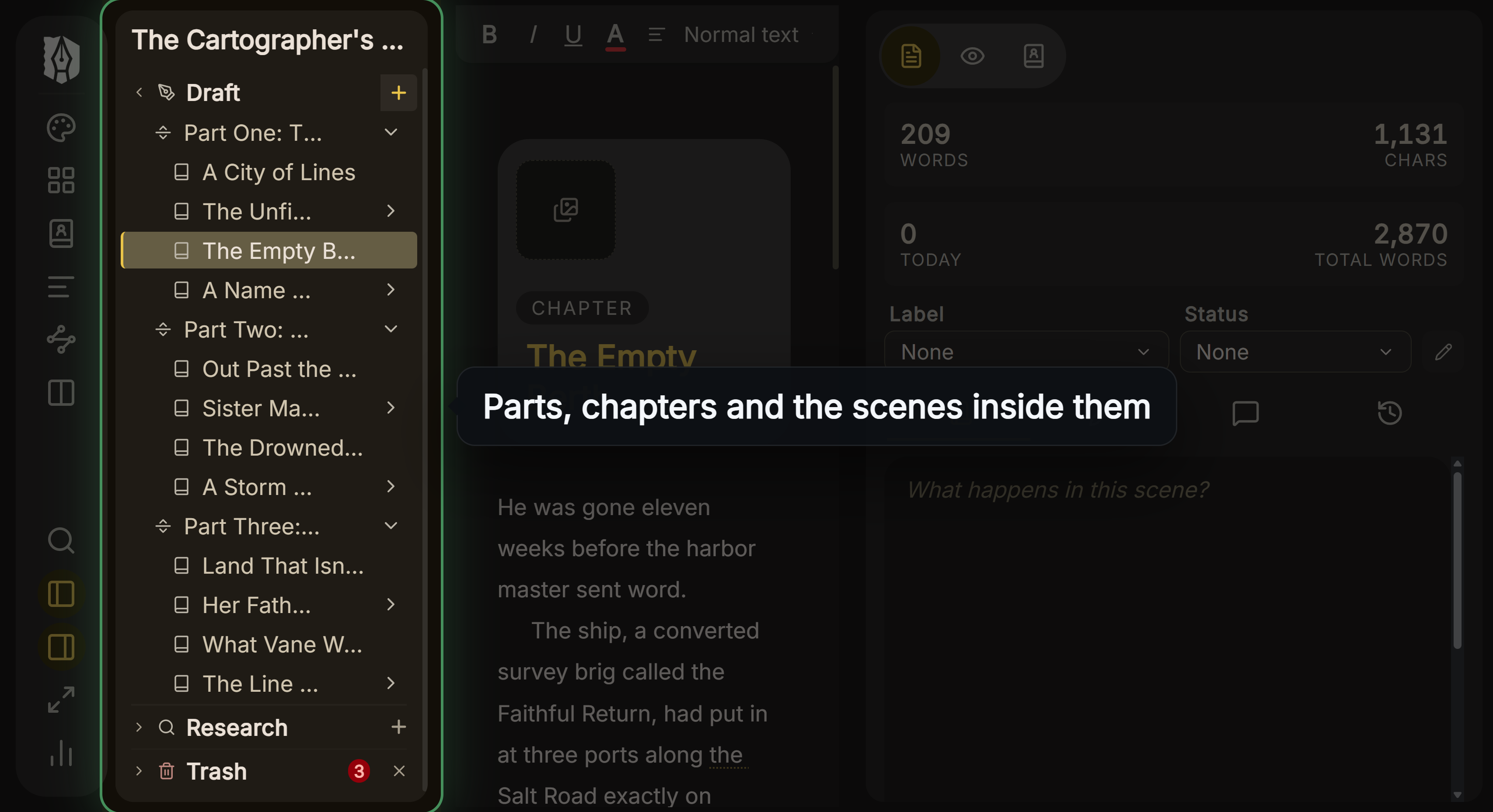 Deckle's Binder: parts, chapters and the scenes inside them
It formats like Reedsy, but with more control: 26 built-in style presets, uploaded fonts, drop caps, running heads, scene-break ornaments and eight trim sizes.
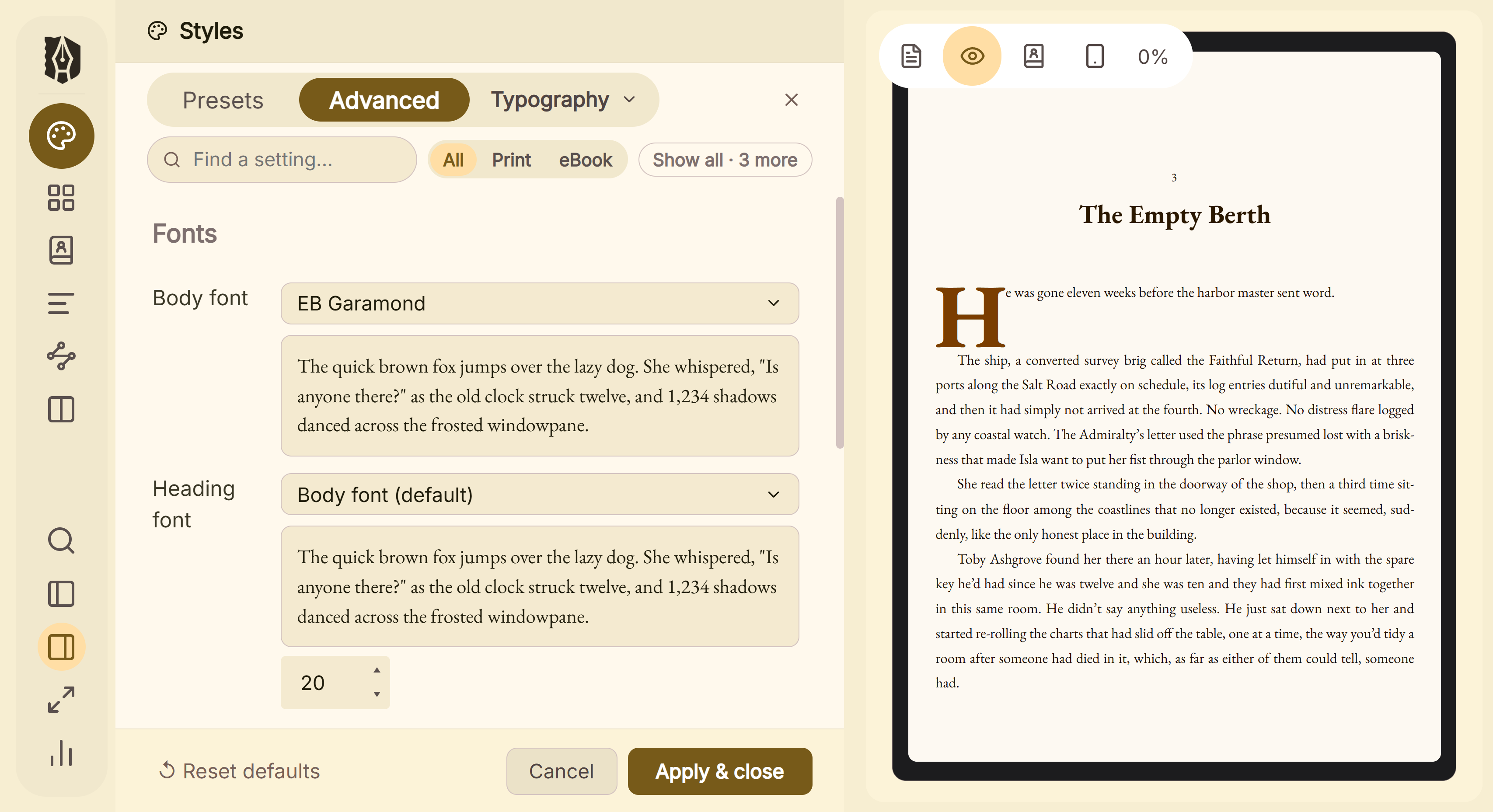 The book's typography is set in Styles and previewed as you change it
Its Copyright page is an ordinary document in the Binder that you can edit or delete. It imports .docx, EPUB and a zipped Scrivener project.
Where Deckle is behind: its print PDF is a standard PDF, not PDF/X-1a. It has no collaboration and no browser version, which Reedsy has, and no iOS app, which Scrivener has. The point-by-point comparison is on Reedsy Studio vs Deckle.
Deckle has a free demo. Click Take Deckle for a Spin on the screen Deckle opens to. There is no card, no account and no time limit. It opens a sample novel with every screen open to explore, and you can restyle it and export real EPUB, PDF and DOCX files. New writing is capped at about 500 words, and new documents and imports are blocked.
FAQ
Is Reedsy Studio better than Scrivener?
Neither is better in every case. Reedsy Studio is free, typesets the book and collaborates in real time, but needs a connection. Scrivener works offline and organises more deeply, and its Compile output is not described as professionally typeset.
Is Reedsy Studio free?
Yes. Writing and formatting are free. Craft ($4.99 a month) and Outline ($7.99 a month) are optional add-ons, as of October 2026.
Does Reedsy Studio work offline like Scrivener?
No. Reedsy's FAQ answers "Currently, no" and says offline use is on its roadmap. Scrivener is a desktop app and works offline.
Is there a Reedsy Studio app for Windows or Mac?
No. Reedsy's help says "it's not a downloadable app." It runs in a browser on Windows, Mac and other devices.
Can I import a Scrivener project into Reedsy Studio?
Not directly. Compile the manuscript to a Word file in Scrivener, then import the .docx into Reedsy Studio.
Can I export my Reedsy Studio book to Scrivener?
Yes, as a Word file. Use Manage ▸ Exports ▸ Back Up in Reedsy, then import the Word file into Scrivener.
Which makes a better print PDF for KDP?
Reedsy names PDF/X-1a:2001, which KDP prefers. Literature & Latte names no PDF standard for Scrivener's Compile.
Do Reedsy Studio or Scrivener use AI?
Neither lists an AI writing feature. Reedsy says it will never use your work to train AI.
Sources
All retrieved 20 October 2026. Prices change, so check the vendor page before buying.
- Reedsy Studio vs. Atticus vs. Scrivener, Reedsy, posted 9 September 2025: Reedsy's own limits and "Choose Scrivener if"
- Reedsy Studio FAQ, Reedsy: offline, prices, EPUB 3 and PDF/X-1a:2001, two PDFs, trim sizes, templates, edit rights
- Reedsy Studio pricing, Reedsy: free plan limits, add-on contents, annual saving
- Reedsy Studio, Reedsy: collaboration, no card for the trial
- Write a book, Reedsy: automatic typesetting, offline as a planned paid feature, AI training statement
- Format a book, Reedsy: free statement, copyright page and contents generated
- Formatting options, Reedsy Help: font sizes, images, chapter titles, copyright page
- Back up my book, Reedsy Help: Word file backup
- Where can I find Reedsy Studio?, Reedsy Help: not a downloadable app, .docx or .odt import up to 50 MB
- Scrivener overview, Literature & Latte: platforms, export and import formats, PDF wording
- Apple App Store, Scrivener (retrieved 21 October 2026): "Requires iOS 12.0 or later"
- Scrivener features, Literature & Latte: organising tools, comments, Dropbox sync, automatic backups
- Scrivener FAQs, Literature & Latte: licence per platform, trial, paid major upgrades
- Scrivener store and Crossgrading, Literature & Latte: prices
- Save Your Manuscript File, Amazon KDP Help: "PDF/X-1a is preferred"
- Literature & Latte, Scrivener release notes for macOS: 3.5.0, 1 October 2025, Kindle (.mobi) removed from Compile; the Windows notes, up to 3.1.6 (3 September 2025), record no such change (retrieved 21 October 2026)
- Literature & Latte's checkout, Paddle price data for the store's products: $59.99 macOS, $59.99 Windows, $95.98 macOS and Windows bundle (US, retrieved 21 October 2026)
Reedsy Studio is a trademark of Reedsy. Scrivener is a trademark of Literature & Latte. Deckle is not affiliated with or endorsed by any product named here.