

The main Reedsy Studio alternatives are Atticus ($147 one-time, writes offline), Vellum (Mac only, $199.99 or $249.99 one-time), Scrivener ($59.99 one-time, for writing and organising), Kindle Create and the Draft2Digital formatter (both free), and Deckle. Authors leave Reedsy Studio for offline or desktop use, more control over the typesetting, deeper organisation, or a one-time purchase.

Prices are as of October 2026, in US dollars before tax. Every competitor fact below comes from the vendor's own pages, read on 20 October 2026. No standards body ranks writing or formatting software, so this page ranks nothing.
What Reedsy Studio does well
Reedsy Studio, formerly the Reedsy Book Editor, is a browser app for planning, writing and typesetting a book.
- It is free. Reedsy's format-a-book page says "Every function that you need to write and format a book in Reedsy Studio is free, and always will be." The free plan includes unlimited books and unlimited devices.
- It typesets automatically. Reedsy says Studio will "automatically typeset your book to professional industry standards". You pick a template and a trim size, and Studio builds the copyright page and table of contents for you.
- It exports EPUB 3 and a print PDF. Reedsy lists "EPUB 3 (which works great on all major ebook stores)" and "PDF (PDF/X-1a:2001 for print-on-demand)". KDP's own manuscript guidance says "PDF/X-1a is preferred".
- It collaborates in real time. Co-authors, editors and proofreaders can work in the same manuscript, with comments and tracked changes.
- It does not train AI on your work. Reedsy says of your writing: "We will never use it to train AI."
Paid add-ons extend it. Craft costs $4.99 a month and adds unlimited history, advanced stats, custom goals, daily check-ins and dark mode. Outline costs $7.99 a month and adds unlimited Boards, notes with attributes, writing templates and pinned notes. Reedsy's own pages disagree on the names: the Studio page calls them "Studio Essential" and "Outlining".
What Reedsy Studio says it can't do
These limits are quoted from Reedsy's Studio FAQ and help pages.
| Topic | Reedsy's words |
|---|---|
| Offline | "Currently, no. This is a feature that is on our roadmap, though." |
| Font size | "You may choose small, medium, or large for your book's font size... we do not offer any other size or style customization at this time." |
| Editor settings | "these settings only control how you visualize the text in the tool", and "they do not affect your exported books." |
| Templates | "We currently offer three templates" (Reedsy, Classic and Romance) |
| Trim sizes | Trade 6 x 9", Digest 5.5 x 8.5", Reedsy standard 5 x 8", Pocket 4.25 x 6.87" |
| Images | "All images added will be sized in the same way and cannot be adjusted." |
| Chapter titles | "you can not remove chapter titles" |
| Copyright page | "the copyright page can not be disabled. It includes a small acknowledgment of our Studio app" |
| Illustrated books | For "more tailored options, we suggest that you work with a book interior designer or typesetter." |
Check the Pocket size before you rely on it. 4.25 x 6.87 inches is not among the paperback trim sizes on KDP's Set Trim Size, Bleed, and Margins page. That page lists 5 x 8, 5.5 x 8.5 and 6 x 9 among its regular sizes. IngramSpark's File Creation Guide does not list it either: its nearest sizes are 4.25 x 7 and 4.37 x 7 inches.
Reedsy Studio alternatives that work offline
Reedsy Studio runs only in a browser. Its Studio page says there is no dedicated mobile app, and you reach it through a web browser on any device. Each of these works without a connection.
Atticus runs on Windows, Mac, Linux and Chromebook, and installs from a browser as a progressive web app. Atticus says: "Work online, offline, in a plane or on a train". Its help centre (last updated 14 February 2024) says "You do need to be online to import and export files". It also keeps cloud storage and backups. It costs $147 once and exports EPUB, PDF and DOCX. The two are compared side by side in Atticus vs Reedsy.
Vellum is a desktop app for Mac only, needing macOS 13 or newer. It formats a manuscript, and its Help says the Text Editor can be used to "write your entire novel from scratch".
Scrivener is a desktop app for Mac and Windows, with a separate iOS app, per Literature & Latte's overview. It is a writing and organising app. Its Compile step produces PDF, EPUB and Word files, and Literature & Latte does not describe the PDF as professionally typeset.
Kindle Create is Amazon's free desktop formatter for Windows 10 or newer and macOS 10.15 or newer.
Deckle is a desktop app for Windows, macOS and Linux that works offline after activation (details below).
Alternatives with more control over the typesetting
Reedsy Studio's design choice is a template, a trim size and one of three font sizes. These tools state more.
Vellum offers "dozens of built-in style options". Each Style is "configured for features like drop caps, ornamental breaks, and more", and you can change those settings and save the result for other books. It lists "24 Trim Sizes + Large Print", paperback or hardcover, and a "Professional-Grade PDF/X-1a" print file. Print needs Vellum Press at $249.99. Vellum's other alternatives are on the Vellum alternatives page.
Atticus states "17 templates", "1200+ Unique combinations" and a custom theme builder, with 1,500+ fonts. It adds full-bleed images, large print and footnotes. Its homepage does not state a trim-size count.
Adobe InDesign and Affinity by Canva give full page-layout control, at the cost of building every page yourself. InDesign is US$22.99 a month for the single app on an annual plan. Affinity is free with a Canva account.
Alternatives with more writing organisation
Reedsy Studio organises a book into front matter, body and back matter, with chapters, scenes and Boards for notes, characters and research. Its free plan limits Boards to card view and keeps 30 days of writing history.
Scrivener is the established organising app. It has a Binder, a Corkboard of index cards, an Outliner with synopses and metadata, Snapshots with Compare, and Targets for the manuscript, a section and a session. Its other alternatives are covered on the Scrivener alternatives page.
Atticus organises chapters, volumes and parts by drag and drop, with book goals, a writing-habit tracker and a word counter. Atticus lists version history as "Coming Soon".
Vellum and Kindle Create have no organising tools. They format a book you wrote elsewhere.
Free alternatives to Reedsy Studio
Kindle Create is free and outputs "Kindle Package Format (KPF) and EPUB", with EPUB only for reflowable books. It handles page numbers, headers and footers, widows and orphans, and trim sizes for KDP print. Amazon states that "Tables, footnotes, lists, and inline images imported from your DOC(X) file cannot currently be edited in Kindle Create" and that themes "cannot be edited by the user". It mentions no print-ready PDF, so its files are built for KDP.
The Draft2Digital formatter is free in a browser "even without ebook distribution". It produces "a pixel-perfect paperback PDF or ebook EPUB file". Print is limited to six trim sizes, perfect-bound paperback, black and white only. Like Reedsy Studio, it needs a connection.
One-time purchase alternatives, and the three-year cost
Reedsy Studio's core is free. Its add-ons are subscriptions. Annual billing "saves 10%", but Reedsy does not show annual prices, so the monthly price is used here.
| Tool | Price model | Cost over 3 years |
|---|---|---|
| Reedsy Studio, core | free | $0 |
| Reedsy Studio with Craft | subscription | $179.64 |
| Reedsy Studio with Outline | subscription | $287.64 |
| Reedsy Studio with Craft and Outline | subscription | $467.28 |
| Atticus | one-time | $147.00 |
| Vellum Ebooks | one-time | $199.99 |
| Vellum Press (ebooks and print) | one-time | $249.99 |
| Scrivener, Mac or Windows | one-time | $59.99 |
| Kindle Create | free | $0 |
| Draft2Digital formatter | free | $0 |
| Deckle | one-time | see the free demo first |
The add-on costs apply only if you want the extra goals, history and planning tools. The free core writes and typesets the whole book.
A desktop app for writing, organising and formatting
Deckle is our app, so weigh this section accordingly. Deckle is a desktop app for Windows, macOS and Linux. A project is a folder on your own disk, holding one .deckle database plus research/ and .deckle-assets/ folders, and it works offline after activation. It is a one-time purchase.
For organising it has a Binder, the Outliner (Grid View index cards and a List view), a Codex story bible, a Timeline and Writing Stats. For typesetting it has 26 built-in style presets, a body font picker that takes uploaded font files, and line height. It also has drop caps, small caps, running heads, scene-break ornaments and bleed.
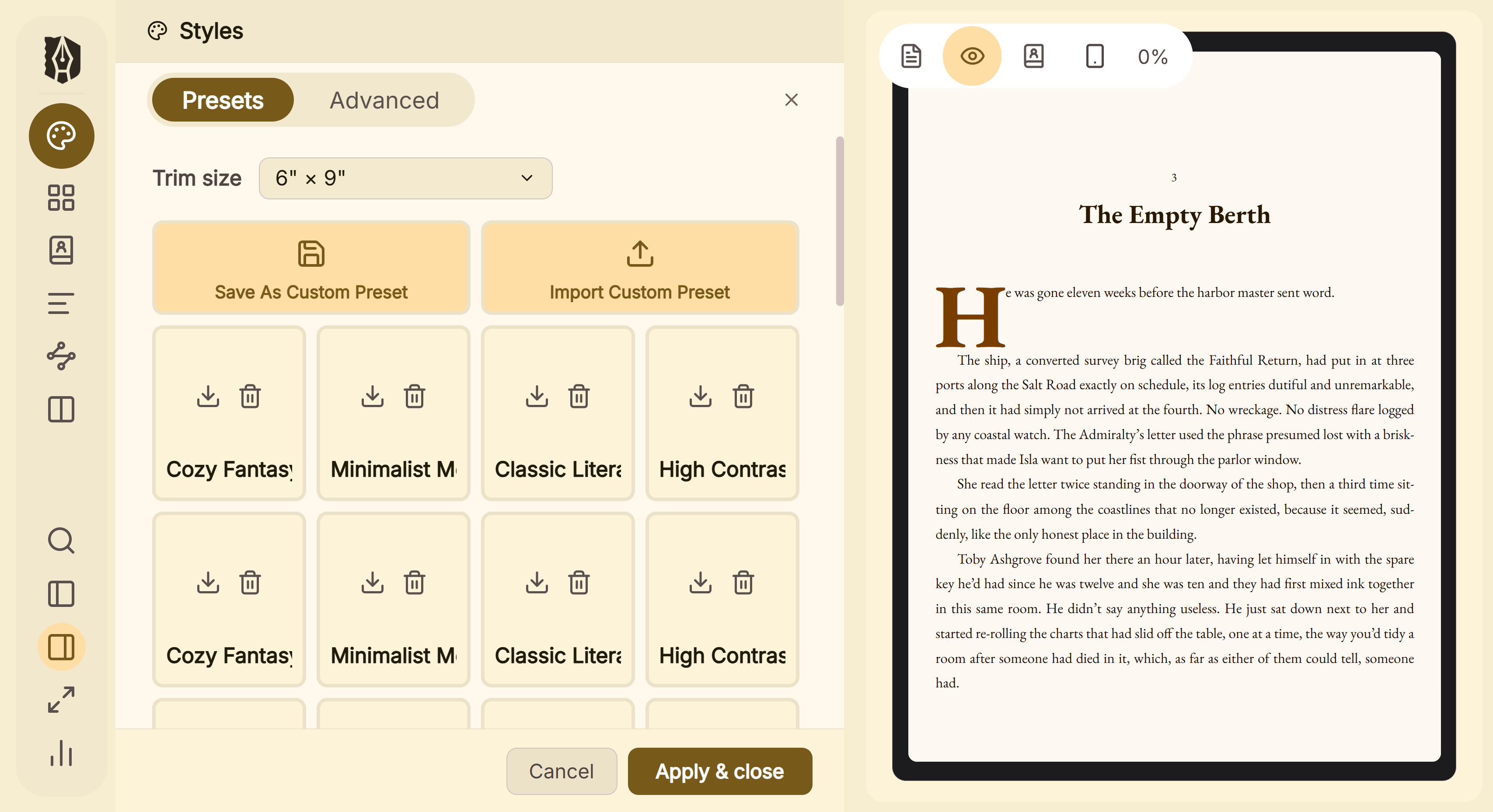 Style presets in Deckle, applied in one click and then changed Its Copyright page is an ordinary document in the Binder that you can edit or delete. It exports EPUB, print PDF and DOCX, and it has no generative AI.
Where Deckle is behind Reedsy Studio:
- Collaboration: none. Reedsy has real-time co-editing with comments and tracked changes.
- Devices: desktop only, with no browser, phone or tablet version.
- Print file: Deckle's print PDF is a standard PDF, not PDF/X-1a. Reedsy names PDF/X-1a:2001.
- Price: Reedsy's core is free.
Deckle has a free demo. Click Take Deckle for a Spin on the screen Deckle opens to. There is no card, no account and no time limit. It opens a sample novel with every screen open to explore, and you can restyle it and export real EPUB, PDF and DOCX files. New writing is capped at about 500 words, and new documents and imports are blocked.
How to move a book out of Reedsy Studio
Reedsy Studio exports a Word file as a backup. Go to your Bookshelf, hover over the book and click Manage, open Exports, scroll to the bottom and click Back Up. Reedsy emails a link to download the manuscript as a Word file.
That Word file is the bridge to most alternatives. Atticus, Vellum and Kindle Create all import .docx. Deckle imports .docx and also EPUB, so Studio's EPUB export is a second route. Test two chapters before moving a whole book, as described in how to move a manuscript between writing apps.
What you'd lose by switching
- Real-time collaboration with an editor inside the manuscript. Atticus has collaboration. Vellum, Kindle Create and Deckle do not.
- Any device with a browser, including a phone. Only Atticus also runs in a browser.
- Zero cost. Kindle Create and Draft2Digital are the only other free formatters here.
- Styling. A Word backup carries the text, not the Reedsy template. You restyle in the new tool.
FAQ
Is Reedsy Studio free?
Yes. Reedsy says every function needed to write and format a book is free. Craft ($4.99 a month) and Outline ($7.99 a month) are optional add-ons, as of October 2026.
Does Reedsy Studio work offline?
No. Reedsy's FAQ answers "Currently, no" and says offline use is on its roadmap.
Is there a Reedsy Studio desktop app or download?
No. Reedsy says there is no dedicated app, and Studio runs in a web browser, including mobile browsers.
What is a good offline alternative to Reedsy Studio?
Atticus says it works with or without an internet connection on Windows, Mac, Linux and Chromebook, though its help centre says you need to be online to import and export files. Vellum (Mac), Scrivener (Mac and Windows), Kindle Create and Deckle are desktop apps.
Can I export my book from Reedsy Studio to Word?
Yes. Use Manage ▸ Exports ▸ Back Up, and Reedsy emails a link to the Word file.
Is Reedsy Studio private?
Reedsy says it will never use your work to train AI. Your manuscript is stored online in Reedsy's service, not as a file on your computer.
Does Reedsy Studio use AI?
Reedsy lists no AI writing tools. The same is true of Atticus, Vellum, Scrivener and Kindle Create on their own pages.
Which alternative gives more design control than Reedsy Studio?
Vellum states dozens of configurable styles and 24 trim sizes. Atticus states 17 templates and a custom theme builder. InDesign and Affinity give full manual layout.
Sources
All retrieved 20 October 2026. Prices change, so check the vendor page before buying.
- Reedsy Studio, Reedsy: no dedicated app, import, collaboration, add-on names
- Reedsy Studio FAQ, Reedsy: offline, prices, EPUB 3 and PDF/X-1a:2001, trim sizes, three templates, editor settings
- Reedsy Studio pricing, Reedsy: free plan limits, add-on contents, 30-day trial, annual saving
- Format a book, Reedsy: "free, and always will be", generated copyright page and contents
- Formatting options, Reedsy Help: font sizes, images, chapter titles, copyright acknowledgment
- Back up my book, Reedsy Help: Word file export
- Write a book, Reedsy: automatic typesetting, AI training statement
- Atticus: price, platforms, offline, templates, fonts, exports
- How to Access Atticus, Atticus (last updated 14 February 2024): online to import and export
- Vellum, 180g: platforms, prices, trim sizes, PDF/X-1a
- Applying Styles, Vellum Help: configurable styles
- Scrivener overview, Literature & Latte: platforms, organising tools, Compile output
- Kindle Create features and limitations, Amazon KDP Help
- Kindle Create download and output formats, Amazon KDP Help
- Draft2Digital FAQ, Draft2Digital: free tools, trims, print limits
- Set Trim Size, Bleed, and Margins, Amazon KDP Help: paperback trim sizes
- Save Your Manuscript File, Amazon KDP Help: "PDF/X-1a is preferred"
- Adobe InDesign, Adobe: pricing
- Literature & Latte, Cross-grading: "Scrivener for macOS or Windows is $59.99" (the store page loads its prices from the checkout, so this page shows the figure in its text), retrieved 21 October 2026
- IngramSpark, File Creation Guide: trim sizes include 4.25 x 7" and 4.37 x 7", not 4.25 x 6.87", retrieved 21 October 2026
- Vellum Help, The Text Editor: "write your entire novel from scratch? You can do it all here", "a full-featured word-processor" (retrieved 21 October 2026)
Reedsy Studio is a trademark of Reedsy. Atticus is a trademark of its owner. Vellum is a trademark of 180g. Scrivener is a trademark of Literature & Latte. Kindle Create is a trademark of Amazon. Deckle is not affiliated with or endorsed by any product named here.