

The main yWriter alternatives are bibisco and Manuskript, free desktop novel apps for Windows, Mac and Linux. The paid ones are Scrivener (one-time, with Compile), Penpoint (a small offline desktop app), Storyist (Mac and iOS only) and Deckle, which writes and formats a book. Writers usually leave yWriter for a Mac version, a typeset print PDF, or a newer interface.

Every yWriter fact on this page comes from Spacejock Software's own site, spacejock.com, read on 20 October 2026. Facts about the other tools come from each vendor's own pages, read the same day. Prices are as of October 2026. No standards body ranks writing software, so this page ranks nothing.
What does yWriter do well?
yWriter is free, scene-based and mature, and that combination is rare.
- Free on Windows. Spacejock says "yWriter7 is free to download and use". Registration is optional, "to encourage me to keep working on the software".
- Built around scenes. It "breaks your novel into chapters and scenes", allows "multiple scenes within chapters", and gives each scene "Viewpoint character, goal, conflict and outcome fields". It adds characters, items and locations, a "Storyboard view, a visual layout of your work", and drag and drop for all of them.
- Safe for your words. It "Saves automatic backups at user-specified intervals" and "Saves a log file every day, showing words per file and the total". A scene marked "unused" stays in the project but out of the word count and exports.
- Offline and local. "It doesn't need or use an internet connection, and all data is stored on your own computer". The network is used only for the optional update check and the optional FTP backup.
- Mature and backward compatible. Each version "has an importer which will read in any earlier yWriter project, right back to yWriter 2". The stable release is 7.1.5.2, dated 30 January 2024, and the changelog lists alpha and beta builds up to 7.1.6.9 after it.
- Written by a novelist. Its developer, Simon Haynes, writes that "yWriter was designed by an author, not a salesman!" It "will not write your novel for you, suggest plot ideas or perform creative tasks of any kind".
If you write on one Windows PC and finish the book in another tool anyway, yWriter may be all the drafting software you need. Its versions, download and exports are set out in our yWriter review.
Why do writers leave yWriter?
Four gaps come up, and each one is stated on Spacejock's own pages.
No finished Mac version. Spacejock's news item "yWriter for MacOS is in progress!" is dated 9 July 2019. The Mac page in October 2026 offers a TestFlight beta and warns "it could make unexpected changes since it's unstable". It adds that "This will be paid software when it's complete". On an Apple silicon Mac, the same page says the iOS app can run instead.
Windows only, apart from Wine. yWriter 7 is "Compatible with Windows 7 SP1 and newer" and "Requires the Windows .Net 4.8 framework". On Linux it is "tested on Linux using Wine", which is not a native package.
Paid mobile apps from another developer. Android and iOS versions exist. "The mobile and Mac versions of yWriter are available for a small charge, as they're the responsibility of another developer". As of October 2026 the charge is $14.99 on the App Store and $5.49 on Google Play, and the Mac beta is "temporarily available free of charge". The mobile apps are "designed for editing your PC projects on the go, using Dropbox".
Print PDF needs LaTeX. yWriter exports to LaTeX, a page-description language, and says "Use TeXworks (free) to generate a print-ready PDF!" That is a second program and a markup language to learn. The LaTeX Project says LaTeX comes in a free TeX distribution such as MiKTeX or TeX Live.
One more detail matters for Kindle. yWriter exports "Epub and Mobi". Amazon KDP ended MOBI support for reflowable ebooks on 1 August 2021 and for fixed-layout on 18 March 2025, and now asks for "EPUB, DOCX, or KPF files". Use yWriter's EPUB export for KDP, not its Mobi. The background is in EPUB vs MOBI.
yWriter alternatives compared
| Tool | Platforms | Price (October 2026) | Scenes and story notes | EPUB | Print PDF | AI |
|---|---|---|---|---|---|---|
| yWriter 7 | Windows; Mac in beta; Android and iOS paid | free on Windows | chapters, scenes, characters, items, locations | yes, plus Mobi | through LaTeX | none; "will not write your novel for you" |
| bibisco | Windows, macOS, Linux (64-bit) | free Community; Supporters $69 once | chapters, scenes, storylines, characters; timeline on Supporters | Supporters only | PDF export, typesetting not stated | none mentioned |
| Manuskript | Linux, Windows; macOS from source for 0.17.0 | free, GPL-3.0 | outliner, index cards, characters, plots, world | needs pandoc | needs pandoc and LaTeX | none mentioned |
| Scrivener | macOS, Windows, iOS | $59.99 Mac or Windows; $23.99 iOS | Binder, Corkboard, Outliner, document templates | yes, plus Kindle on Windows only | Compile to PDF | none mentioned |
| Penpoint | Windows, macOS, Linux | $40 once | chapters, scenes, codex, timeline | yes | PDF export, typesetting not stated | none; "no AI ever touches your prose" |
| Storyist | macOS, iOS | $59 Mac; $19 iOS | outliner, index cards, Story Sheets | yes, plus Kindle via KindleGen | yes, print-ready, paperback templates | none mentioned |
| Deckle (ours) | Windows, macOS, Linux | one-time purchase | Binder, Outliner, Codex, Timeline | yes, for Kindle, Apple Books and Kobo | yes, typeset, 8 trim sizes | none |
What are the free yWriter alternatives?
Two free desktop apps cover most of what yWriter does, and both run on a Mac and Linux.
bibisco organises a novel into chapters, scenes and storylines, with character development (qualities, defects, arcs), a timeline and writing goals. It runs on Windows 10+, macOS 10.13+ and 64-bit Linux. Its FAQ says "no novel data is housed on bibisco.com". The Community Edition is free. The Supporters Edition costs $69 once with two years of updates. It exports PDF, DOCX, TXT and EPUB. bibisco's edition comparison, updated 28 February 2026, puts the Timeline, EPUB export, find/replace and writing goals in the Supporters Edition only.
Manuskript is the open-source option, under GPL-3.0 according to its GitHub repository. It has an outliner, index cards, a snowflake-method assistant, characters, plots and world sheets, and a distraction-free mode with goals. Its download page says it is "still in the early development stages" and recommends frequent backups. It exports plain text, Markdown and HTML on its own, and ePub, OpenDocument and DocX need pandoc installed. PDF needs pandoc and LaTeX, its wiki says. Version 0.17.0 has no macOS download.
The Mac side of the field, including what runs on a Mac without a beta, is in novel writing software for Mac.
Is there a yWriter alternative for Mac?
Scrivener is the established choice. It runs on macOS, Windows and iOS, with a Binder, a Corkboard of index cards, an Outliner with synopses and metadata, Snapshots with Compare, and Compile to Word, PDF and EPUB, plus Kindle (.mobi) on Windows only, since Scrivener for Mac 3.5.0 (1 October 2025) removed it. It costs $59.99 once for Mac or Windows, and a licence covers one platform. Its trial lasts 30 days of actual use. The two are set side by side in yWriter vs Scrivener.
Storyist is Mac and iOS only. It combines a word processor with an outliner, index cards and Story Sheets for plot, character and setting, and its book editor makes print-ready PDFs and EPUB. It costs $59 for Mac and $19 for iOS on Storyist's own store, once.
Penpoint is a newer desktop app for Windows, macOS and Linux, from Tophat Creative. It works offline with no account, costs $40 once, and has chapter and scene views, a codex, a timeline, comments and snapshots. Version 1.0.0 shipped on 2 October 2025, so it is young.
Which yWriter alternative also formats the book?
Deckle is our app, so weigh this section accordingly.
Deckle is a desktop app for Windows, macOS and Linux that drafts, organises and formats a book in one project. It keeps yWriter's local, offline model: a Deckle project is a folder on your own disk, holding one .deckle SQLite database (all the writing, notes and settings) plus research/ and .deckle-assets/ folders. Nothing is stored on a server, and it works offline after activation.
For the scene work yWriter does, Deckle has a Binder with chapter and scene documents, an Outliner with a Grid View of index cards, and a Codex with Characters, Locations and Items.
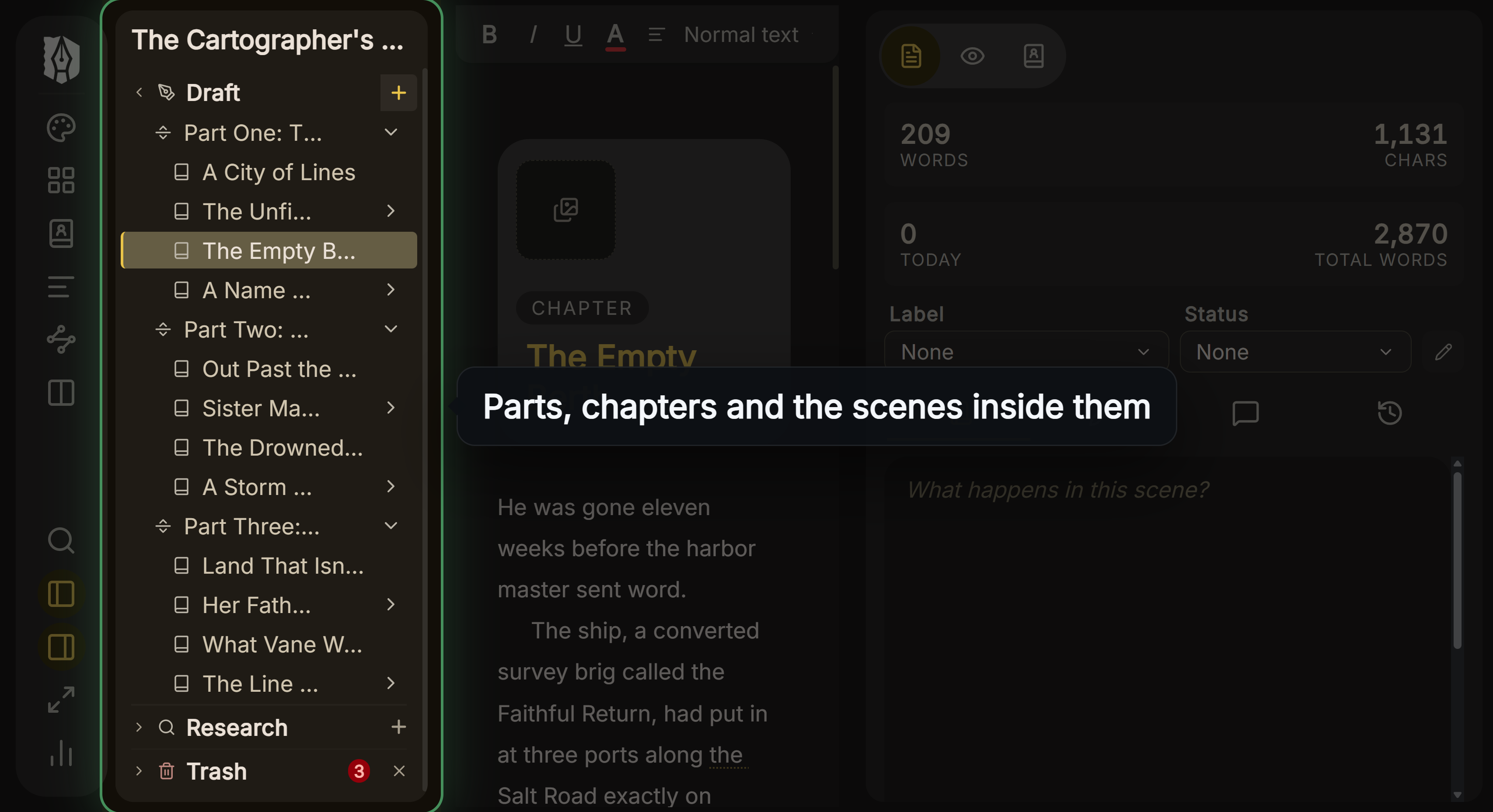 Parts, chapters and scenes in Deckle's Binder
It adds a Timeline, Snapshots, zip backups (also every 500 words), and Writing Stats with goals and a day streak. For the finished book, it makes a typeset print PDF in 8 trim sizes with bleed, without LaTeX, and EPUB targets for Kindle, Apple Books and Kobo. The Kindle target writes an EPUB for KDP to convert, not a KPF file.
What you would lose by switching:
- Price. yWriter is free on Windows. Deckle is a one-time purchase.
- Ready-made scene fields. Deckle has no built-in viewpoint, goal, conflict and outcome fields. Each document has a Label, a Status, a synopsis and notes, and you add your own fields as custom columns in the Outliner's List view.
- Phones. yWriter has Android and iOS apps. Deckle has no mobile, iPad or web version, and no built-in cloud sync.
- Direct import. Deckle does not open
.yw7projects. It imports Word and EPUB files.
To move a book, export it from yWriter to DOCX (the yWriter changelog lists "import and export from docx" in 7.1.3.4) or to EPUB, then import that file into Deckle. Deckle splits Word chapters from heading styles, so check the chapter list after import. The general method is in how to move a manuscript between writing apps.
To try it, click Try it free on the screen Deckle opens to. There is no card, no account and no time limit. It opens a sample novel with every screen open to explore, and you can restyle it and export real EPUB, PDF and DOCX files. New writing is capped at about 500 words, and new documents and imports are blocked.
What goes wrong when leaving yWriter?
- Sending yWriter's Mobi file to KDP. KDP no longer accepts MOBI. Upload the EPUB.
- Using the Mac beta for real work. Spacejock warns the TestFlight build is unstable. Keep backups outside it.
- Using yWriter8 for a book. Spacejock says "yWriter8 is a test version, not an actual usable program. Do not use this for real work, use yWriter 7 instead".
- Assuming a free alternative is a formatter. Manuskript needs pandoc for EPUB, and bibisco does not claim typeset print output.
- Moving without a copy. Export the whole manuscript before you leave yWriter, and keep the yWriter project folder too.
FAQ
Q: What is the best alternative to yWriter? A: It depends on why you are leaving. bibisco and Manuskript are free on Mac and Linux. Scrivener is the established paid option. Storyist and Deckle also format the finished book.
Q: Is there a free alternative to yWriter? A: Yes. bibisco Community Edition and Manuskript are free desktop apps for Windows, Mac and Linux.
Q: Is yWriter available for Mac? A: Not as a finished app. Spacejock offers a TestFlight beta it calls unstable, and says the Mac version will be paid when complete.
Q: Is yWriter still being updated? A: Yes. The stable release is 7.1.5.2, dated 30 January 2024, and the changelog lists alpha builds up to 7.1.6.9.
Q: Is yWriter free? A: Yes, on Windows. The mobile apps cost "a small charge", which the stores list as $14.99 on iOS and $5.49 on Android as of October 2026; the Mac beta is free for now.
Q: Can yWriter make a print-ready PDF? A: Through LaTeX. yWriter exports LaTeX, and Spacejock suggests TeXworks to make the PDF.
Q: Can I move a yWriter project to Scrivener or Deckle? A: Yes, through an exported file. yWriter exports DOCX and EPUB, and both Scrivener and Deckle import Word files.
Sources
All retrieved 20 October 2026. Prices change, so check the vendor page before buying.
- Spacejock Software, yWriter 7: free, features, exports (Epub, Mobi, RTF, LaTeX), TeXworks, offline, earlier-version import, "small charge" for Mac and mobile
- Spacejock Software, yWriter 7 download and changelog: 7.1.5.2 of 30 January 2024, Windows 7 SP1 and .NET 4.8, Wine, docx import and export (7.1.3.4)
- Spacejock Software, yWriter versions: Windows, Android, iOS and Mac versions; mobile apps use Dropbox
- Apple App Store, yWriter Novel Writing, and Google Play, yWriter (both retrieved 21 October 2026): $14.99 iOS, $5.49 Android
- Spacejock Software, yWriter for MacOS and news item of 9 July 2019: TestFlight beta, paid when complete
- Spacejock Software, yWriter8: test version, not for real work
- Amazon KDP, MOBI support: MOBI end dates; EPUB, DOCX or KPF accepted
- The LaTeX Project, Getting LaTeX: free TeX distributions, MiKTeX and TeX Live
- bibisco, download page, general FAQs and Community vs Supporters (updated 28 February 2026, retrieved 20 October 2026): Timeline, EPUB, find/replace and goals are Supporters only
- Manuskript, GitHub repository and import and export capabilities
- Literature & Latte, Scrivener overview, FAQ and store
- Penpoint, penpoint.app and changelog
- Storyist, Storyist for Mac and store
- Storyist Support, Publish on Amazon (retrieved 21 October 2026): Kindle export needs KindleGen
- Literature & Latte, Cross-grading: "Scrivener for macOS or Windows is $59.99" (the store page loads its prices from the checkout, so this page shows the figure in its text), retrieved 21 October 2026
- Literature & Latte, Scrivener release notes for macOS: 3.5.0, 1 October 2025, Kindle (.mobi) removed from Compile; the Windows notes, up to 3.1.6 (3 September 2025), record no such change (retrieved 21 October 2026)
Prices and features last checked 20 October 2026. yWriter is a product of Spacejock Software. Scrivener is a trademark of Literature & Latte. bibisco, Manuskript, Penpoint and Storyist are trademarks of their respective owners. Deckle is not affiliated with or endorsed by any product named here.