

No. yWriter has no AI writing features. Its developer, Spacejock Software, says yWriter "will not write your novel for you, suggest plot ideas or perform creative tasks of any kind." It is a free Windows program that runs offline, and Spacejock says "all data is stored on your own computer."

yWriter is a scene-based novel writing program by Simon Haynes, who calls himself its "designer and programmer" and who is also a novelist. That second job shapes the only AI policy Spacejock has published, which is about his books rather than yours. The current Windows version is yWriter 7, and the quotes here come from spacejock.com, read on 20 October 2026.
Does yWriter have AI features?
No. The yWriter 7 page describes "a word processor" that breaks a novel into chapters and scenes. Its feature list is organising and record-keeping:
- chapters with "multiple scenes within chapters", with automatic chapter renumbering
- "Viewpoint character, goal, conflict and outcome fields for each scene"
- characters, items and locations
- a "Storyboard view, a visual layout of your work"
- word counts for every file, "a log file every day", and "automatic backups at user-specified intervals"
- export to Epub, Mobi, RTF and LaTeX, with DOCX import and export added in 7.1.3.4
None of these is described as AI, and none generates text. The full feature list and current versions are on what yWriter is and who it suits. The scene fields are blanks you fill in yourself. Spacejock's own summary is the plainest statement on the subject: yWriter "will not write your novel for you, suggest plot ideas or perform creative tasks of any kind." The yWriter for MacOS page repeats it: yWriter "will not write your novel for you".
Does yWriter send your writing anywhere?
No, on Windows. Spacejock says "It doesn't need or use an internet connection, and all data is stored on your own computer." The two exceptions are both optional: the "check for update" routine, and a "backup to ftp" feature.
The mobile versions work differently. Spacejock says "Mobile versions of yWriter are designed for editing your PC projects on the go, using Dropbox." So a project you open on a phone passes through your own Dropbox account. The Android, iOS and Mac versions are "the responsibility of another developer", and Spacejock's pages say nothing about AI in them beyond the Mac page's "will not write your novel for you".
Does Spacejock train AI on your writing?
Spacejock's yWriter pages make no statement about AI training on user files. The Windows version stores your project on your own computer, and the only network features are the update check and the optional FTP backup.
Spacejock does have an AI policy page, but it protects Simon Haynes's own work, not yours. Headed "Read this if you want to use my content to train an AI model", it says "Training a machine learning or AI model on my content is strictly prohibited without my express prior written permission." It defines content as "my source code, artwork, software, novels, short stories and web pages." It is a statement of where the developer stands, not a promise about user files.
Haynes is taking a side in an open argument. The US Copyright Office's report on artificial intelligence gave training its own part, Part 3, "Generative AI Training," released in pre-publication form on 9 May 2025. Spacejock's page does not wait for the law: it asks for written permission first.
Has Spacejock promised yWriter will never use AI?
Not in those words. Spacejock's statements answer three different questions:
- Has AI features: no. The yWriter 7 page lists none, and says the program performs no "creative tasks of any kind."
- Has a public no-AI policy for the product: not as a formal policy. "will not write your novel for you" describes what yWriter does today. It is not worded as a commitment about future versions.
- Has a no-training policy: for the developer's own content, yes. The AI usage page forbids training on Spacejock's software and books without permission.
yWriter's design makes the question unusually easy to check. It is a local Windows program with no account and no internet requirement. The stable release is 7.1.5.2, dated 30 January 2024, and the changelog lists alpha builds up to 7.1.6.9 after it. Other vendors' written AI promises are compared in novel writing software without AI.
Is yWriter a good choice if you want no AI?
Yes, if you write on Windows. yWriter has no AI to switch off, it needs no internet connection, and it is free. Its limits are elsewhere. The Mac version is a TestFlight beta that Spacejock calls "unstable", and it "will be paid software when it's complete." Print output goes through LaTeX: Spacejock says "Use TeXworks (free) to generate a print-ready PDF!" LaTeX describes itself as "a high-quality typesetting system," and it is free, but it is a second program to learn. How yWriter compares with the best-known paid app is on yWriter vs Scrivener, and Scrivener's own AI position is on does Scrivener use AI.
Is there a yWriter alternative with no AI that makes a print PDF?
Deckle is our app, so weigh this section accordingly.
Deckle is a writing, organising and formatting app for Windows, macOS and Linux, and no AI library or AI service appears anywhere in its code. Like yWriter, it keeps your work local: a project is a folder on your own disk, holding one .deckle database plus research/ and .deckle-assets/ folders, and nothing is stored on a Deckle server. It works offline after activation.
Unlike yWriter, it typesets the print PDF itself, with no LaTeX step, and the Inspector's Preview tab shows the page at its trim size while you write.
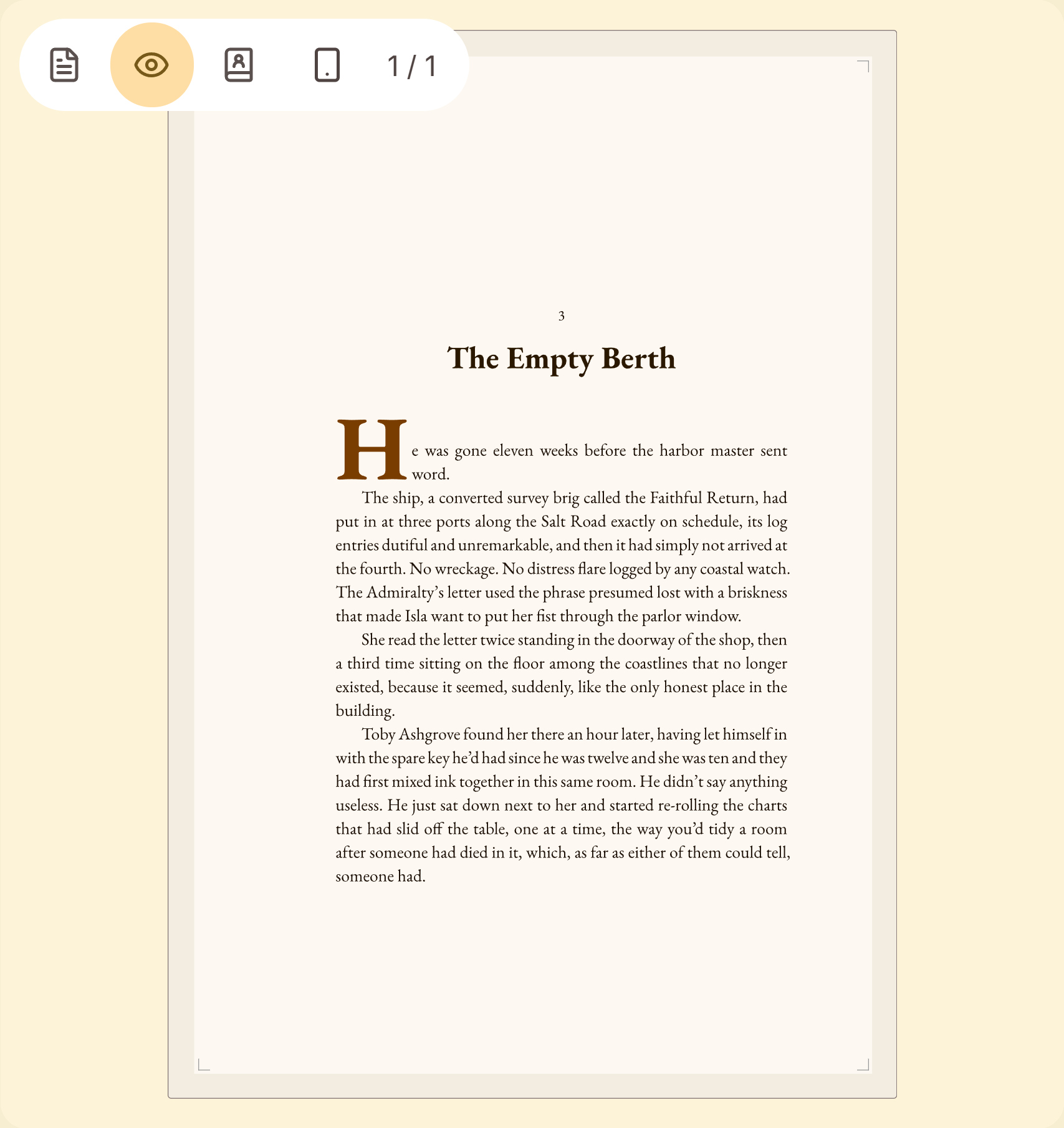 The print page as the PDF will set it
What you would lose by switching: yWriter is free and Deckle is a one-time purchase. yWriter has Android and iOS apps, and Deckle has no phone or tablet version. Deckle has also published no written no-AI policy; it has a codebase with no AI in it today. Deckle does not open yWriter projects, but it imports Word and EPUB files, both of which yWriter exports. Other options are in yWriter alternatives.
To try it, click Try it free on the screen Deckle opens to. There is no card, no account and no time limit. It opens a sample novel with every screen open to explore, and you can restyle it and export real EPUB, PDF and DOCX files. New writing is capped at about 500 words, and new documents and imports are blocked.
FAQ
Q: Does yWriter use AI? A: No. Spacejock says yWriter "will not write your novel for you, suggest plot ideas or perform creative tasks of any kind."
Q: Is yWriter AI-free? A: Yes, as of October 2026. Its feature list is chapters, scenes, scene fields, characters, items, locations, a Storyboard, word counts and backups, with no AI.
Q: Does yWriter need the internet? A: No. Spacejock says it "doesn't need or use an internet connection". Only the optional update check and FTP backup go online.
Q: Does yWriter train AI on my writing? A: The Windows version keeps your files on your own computer, and Spacejock says it does not need an internet connection. Spacejock publishes no AI-training statement about user files.
Q: What is Spacejock's AI policy? A: It forbids training AI on Simon Haynes's own content, including his software and novels, without written permission.
Q: Do the yWriter mobile apps use AI? A: Spacejock's pages do not describe any. The mobile apps are by another developer and sync your PC projects through Dropbox.
Sources
All retrieved 20 October 2026.
- Spacejock Software, yWriter 7: "will not write your novel for you"; feature list; no internet needed; "designer and programmer"; other developer for Mac and mobile
- Spacejock Software, Using my content to train AI: training on the developer's content prohibited without permission
- Spacejock Software, yWriter versions: Windows, Android, iOS and Mac versions; mobile apps use Dropbox
- Spacejock Software, yWriter for MacOS: TestFlight beta, "unstable", paid when complete, "will not write your novel for you"
- Spacejock Software, yWriter 7 download and changelog: 7.1.5.2 of 30 January 2024; alpha builds to 7.1.6.9; docx import and export (7.1.3.4)
- U.S. Copyright Office, Copyright and Artificial Intelligence: Part 3, Generative AI Training (pre-publication version, 9 May 2025)
- LaTeX Project, latex-project.org: "a high-quality typesetting system"; free to use
yWriter is a product of Spacejock Software. Scrivener is a trademark of Literature & Latte. Deckle is not affiliated with or endorsed by any product named here.