

yWriter is a free Windows program that organises a novel into chapters and scenes, and Scrivener is a paid writing app for Mac, Windows and iOS with Compile for finished output. Choose yWriter if you write on one Windows PC and want structured scenes at no cost. Choose Scrivener if you need a Mac or iPad version, broader exports, or Compile.

Every yWriter fact here comes from Spacejock Software's site, spacejock.com, and every Scrivener fact from Literature & Latte's own pages, all read on 20 October 2026. Prices are as of October 2026. This page gives no scores. It compares what each vendor states.
yWriter vs Scrivener at a glance
| yWriter 7 | Scrivener 3 | |
|---|---|---|
| Main job | Scene-based novel writing and organising | Long-form writing and organising, with Compile for output |
| Windows | Windows 7 SP1 or newer, .NET 4.8 | 64-bit Windows 10 or newer |
| Mac | TestFlight beta, "unstable"; paid when complete | macOS 11 or newer |
| Phone and tablet | Android and iOS apps, by another developer, using Dropbox | iOS and iPadOS |
| Linux | "tested on Linux using Wine" | not listed |
| Price | free on Windows; iOS $14.99, Android $5.49; Mac beta free for now | $59.99 Mac or Windows; $23.99 iOS |
| Licence | optional registration | one-time, one licence per platform |
| Offline | yes, "all data is stored on your own computer" | yes, desktop app |
| Structure | chapters holding multiple scenes | Binder of sections |
| Per-scene fields | viewpoint, goal, conflict, outcome | synopsis and metadata in the Outliner |
| Story notes | characters, items, locations | document templates for character or location sheets |
| Visual view | Storyboard | Corkboard of index cards |
| Progress | daily log of words per file | Targets and Writing History |
| Export | EPUB, Mobi, RTF, DOCX, LaTeX | Word, RTF, OpenOffice, PDF, EPUB, Final Draft, plain text; Kindle on Windows only |
| Latest version | 7.1.5.2, 30 January 2024 | macOS 3.5.2 (December 2025); Windows 3.1.6 |
| AI | none; "will not write your novel for you" | none mentioned on its product pages |
Is yWriter as good as Scrivener?
For scene-by-scene drafting, yWriter covers most of the same ground, and it costs nothing on Windows. Scrivener is broader: more platforms, more export formats and a more flexible structure.
yWriter "breaks your novel into chapters and scenes", allows "multiple scenes within chapters", and gives every scene "Viewpoint character, goal, conflict and outcome fields". It adds characters, items and locations, a "Storyboard view, a visual layout of your work", and drag and drop for all of them. It renumbers chapters automatically. A scene marked "unused" stays in the project but out of the word count and exports. Its developer, Simon Haynes, writes that "yWriter was designed by an author, not a salesman!"
Scrivener keeps a book in a Binder of sections. Each section has "a virtual index card" on the Corkboard and a row in the Outliner, with synopses, word counts and metadata. Scrivenings shows several sections as one document, Collections gather sections into sets, and Snapshots with Compare keep earlier versions of a section. Targets cover the manuscript, a section and a session.
The difference is in the structure. yWriter fixes the shape at chapter and scene, and asks the four scene questions up front. Scrivener leaves the shape and the metadata to you. The scene method behind yWriter's fields is explained in outlining vs discovery writing.
Is yWriter free and is Scrivener a one-time purchase?
Yes to both. yWriter is "free to download and use" on Windows, and registration is optional. Scrivener costs $59.99 once for Mac or Windows. A licence covers one platform, and Literature & Latte says major new versions may need a paid upgrade.
| Setup | yWriter, through year 3 | Scrivener, through year 3 |
|---|---|---|
| One Windows PC | $0 | $59.99 |
| Windows and Mac | $0 on Windows; Mac not yet released | $95.98 as a bundle; $97.94 ($59.99 plus a $37.95 crossgrade) if bought one after the other |
| Windows plus iPhone or iPad | $14.99 (the iOS app; Spacejock's pages say only "a small charge") | $83.98 ($59.99 plus $23.99) |
These are list prices from each vendor, in US dollars before tax. Scrivener's trial lasts 30 days of actual use on Mac and Windows, and there is no iOS trial. The Scrivener figures and upgrade terms are on is Scrivener a one-time purchase.
Does yWriter work on Mac like Scrivener?
Not yet. Spacejock's news item "yWriter for MacOS is in progress!" is dated 9 July 2019. In October 2026 the Mac page offers a TestFlight beta and warns "it could make unexpected changes since it's unstable". It says "This will be paid software when it's complete". On an Apple silicon Mac, the page says the iOS app can run instead.
Scrivener has a native Mac app for macOS 11 or newer, version 3.5.2, plus Windows and iOS versions. Its sync is "using Dropbox or transfer with iTunes". yWriter's mobile apps also use Dropbox: they are "designed for editing your PC projects on the go".
Which exports more, yWriter or Scrivener?
Scrivener exports more formats from inside the app, and yWriter leaves print PDF to LaTeX.
- yWriter exports "Epub and Mobi", "selected chapters to RTF format", and LaTeX. The changelog adds "import and export from docx" in version 7.1.3.4, and says the docx export "uses styles for chapter headings and body text". For print, Spacejock says "Use TeXworks (free) to generate a print-ready PDF!" LaTeX itself comes in a free TeX distribution such as MiKTeX or TeX Live, according to the LaTeX Project.
- Scrivener compiles to Microsoft Word, RTF, OpenOffice, PDF, Final Draft, plain text and EPUB, plus Kindle (.mobi) on Windows only, since Scrivener for Mac 3.5.0 (1 October 2025) removed it. Literature & Latte's overview describes the PDF as "for printing, self-publishing", and does not call it professionally typeset. Its Compile settings are walked through in the Scrivener compile tutorial.
One format is now a dead end. yWriter's Mobi export no longer works for Kindle publishing: Amazon KDP ended MOBI support for reflowable ebooks on 1 August 2021 and for fixed-layout on 18 March 2025. KDP asks for "EPUB, DOCX, or KPF files", so send yWriter's EPUB instead.
Can you move from yWriter to Scrivener?
Yes, through a Word file. yWriter exports DOCX, and Scrivener imports Word documents. Scrivener's import list on its overview page is Word documents, plain text, Final Draft, images, PDFs, movies, sound files and web pages. It does not list yWriter projects.
Moving the other way, yWriter's import reads "any earlier yWriter project, right back to yWriter 2", and its changelog lists DOCX import. Spacejock's pages do not mention importing Scrivener projects. Scene fields such as goal and conflict do not travel in a Word file, so copy any you need into the scene text or synopsis first.
When should I pick yWriter?
- You write on Windows and want to pay nothing.
- You plan scene by scene and want viewpoint, goal, conflict and outcome fields built in.
- You want an app that needs no internet connection at all.
- You are happy to finish the book in another tool, or to learn LaTeX for print.
When should I pick Scrivener?
- You write on a Mac, iPhone or iPad, or across platforms.
- You want a Binder you shape yourself, with Scrivenings and Collections.
- You need Compile output to Word, PDF and EPUB from one app.
- You want the trial counted in days of use before you pay.
Neither one makes a typeset print book on its own. yWriter needs LaTeX for print, and Scrivener does not claim professional typesetting for its PDF.
Is there an alternative that also formats the book?
Deckle is our app, so weigh this section accordingly.
Deckle is a desktop app for Windows, macOS and Linux that drafts, organises and formats a book in one project. Like yWriter, it is local and offline after activation. A Deckle project is a folder on your own disk, holding one .deckle SQLite database (all the writing, notes and settings) plus research/ and .deckle-assets/ folders. Like Scrivener, it has a Binder, an Outliner (with a Grid View of index cards) and Continuous View, which shows several documents as one.
It adds a Codex with Characters, Locations and Items, and a Timeline with plotlines.
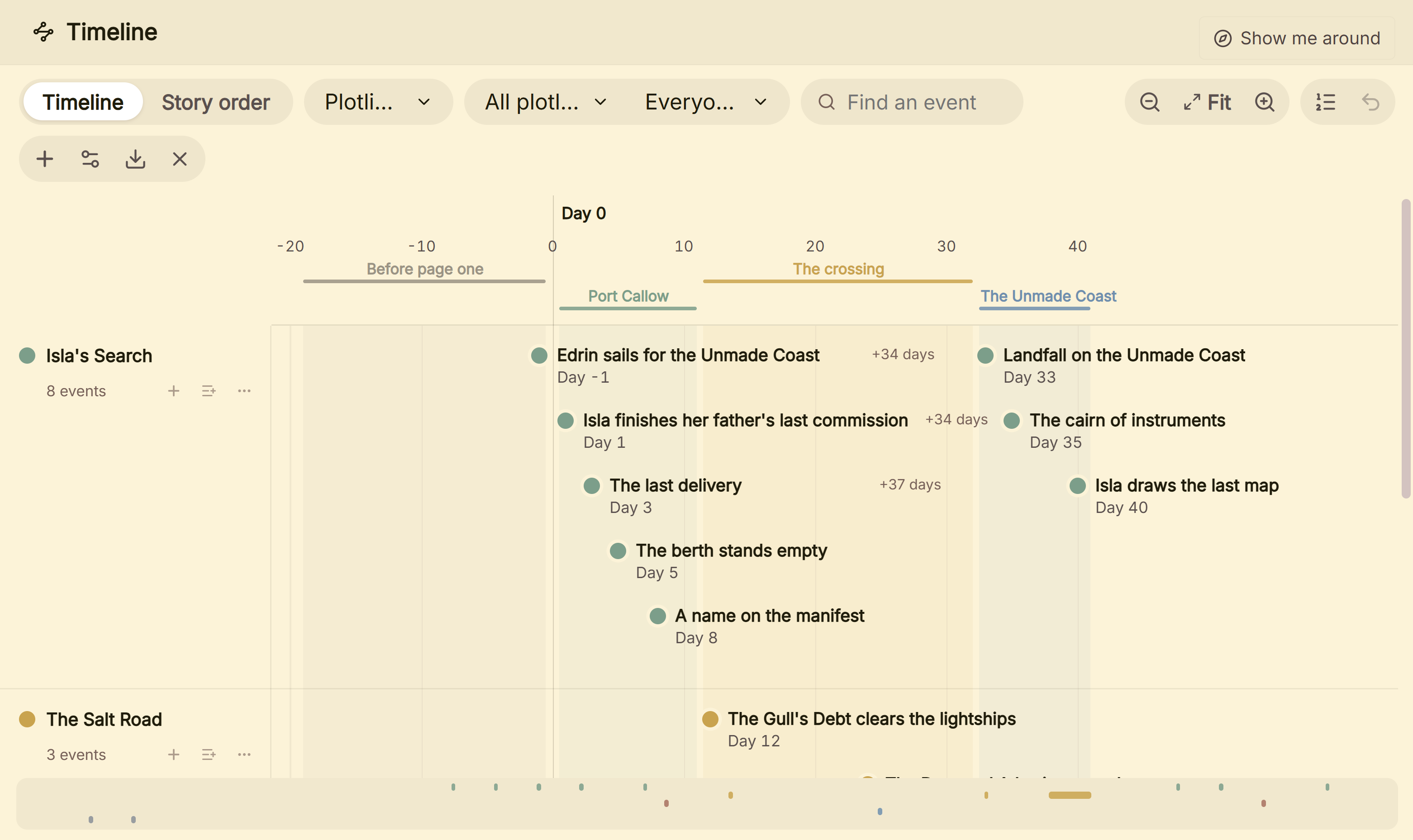 The Timeline, one row per plotline
For the finished book it has 26 style presets, a typeset print PDF in 8 trim sizes with bleed, and EPUB targets for Kindle, Apple Books and Kobo. The Kindle target writes an EPUB for KDP to convert, not a KPF file. It imports Word, EPUB and a zipped Scrivener project, so a yWriter book comes across as a DOCX or EPUB export.
What it lacks against these two: it is a one-time purchase where yWriter is free. It has no ready-made goal and conflict fields, so you add your own as Outliner columns. It has no mobile, iPad or web version and no built-in sync. The fuller Scrivener comparison is in Scrivener vs Deckle.
To try it, click Try it free on the screen Deckle opens to. There is no card, no account and no time limit. It opens a sample novel with every screen open to explore, and you can restyle it and export real EPUB, PDF and DOCX files. New writing is capped at about 500 words, and new documents and imports are blocked. Other tools writers move to from yWriter are in yWriter alternatives.
What goes wrong when switching?
- Uploading a Mobi to KDP. KDP stopped accepting MOBI. Use the EPUB.
- Using a yWriter Mac beta as your only copy. Spacejock calls it unstable. Keep backups.
- Buying Scrivener for Mac and expecting Windows too. Each platform is a separate licence, with a $37.95 crossgrade.
- Expecting scene fields to survive a Word export. They are yWriter data, not manuscript text.
- Assuming either app typesets print. Plan for a formatting step, or a LaTeX step with yWriter.
FAQ
Q: Is yWriter better than Scrivener? A: Neither is better in every case. yWriter is free and scene-based on Windows. Scrivener runs on Mac, Windows and iOS, and exports more formats.
Q: Should I use yWriter or Scrivener? A: Use yWriter if you write on one Windows PC and want free, structured scenes. Use Scrivener if you need a Mac or iPad, or Compile output.
Q: Is yWriter a free version of Scrivener? A: No. yWriter is a separate program from Spacejock Software, with its own scene-based design. It is free on Windows.
Q: Does yWriter have a Corkboard like Scrivener? A: It has a Storyboard view, which Spacejock describes as "a visual layout of your work". Scrivener's equivalent is the Corkboard of index cards.
Q: Can I import a yWriter project into Scrivener? A: Not directly. Export the book from yWriter as DOCX, then import the Word file into Scrivener.
Q: Does yWriter work on Mac? A: Only as a TestFlight beta that Spacejock calls unstable. Scrivener has a native Mac app.
Q: Does yWriter have a dark mode? A: Spacejock's changelog for 7.1.5.0 says "Colour Themes replace almost everything in the program now". The pages do not use the words dark mode.
Sources
All retrieved 20 October 2026. Prices change, so check the vendor page before buying.
- Spacejock Software, yWriter 7: scenes, fields, Storyboard, exports, TeXworks, offline, "small charge" for Mac and mobile
- Spacejock Software, yWriter 7 download and changelog: 7.1.5.2, requirements, Wine, docx import and export, Colour Themes
- Spacejock Software, yWriter versions: Windows, Android, iOS and Mac; mobile apps use Dropbox
- Spacejock Software, yWriter for MacOS and news item of 9 July 2019: TestFlight beta, paid when complete
- Literature & Latte, Scrivener overview: platforms, exports, imports, organising tools, Compile PDF
- Literature & Latte, Scrivener features: Corkboard, document templates, EPUB and Kindle, Dropbox sync
- Literature & Latte, Scrivener FAQ: licence per platform, paid major upgrades, trial
- Literature & Latte, Scrivener store and crossgrading: $59.99, iOS $23.99, $37.95 crossgrade
- Apple, Scrivener 3 on the Mac App Store: version 3.5.2, December 2025
- Apple App Store, yWriter: Novel Writing: $14.99 (retrieved 21 October 2026)
- Google Play, yWriter: Novel Writing: $5.49 (retrieved 21 October 2026)
- Amazon KDP, MOBI support: MOBI end dates; EPUB, DOCX or KPF accepted
- The LaTeX Project, Getting LaTeX: free TeX distributions, MiKTeX and TeX Live
- Literature & Latte, Scrivener release notes for macOS: 3.5.0, 1 October 2025, Kindle (.mobi) removed from Compile; the Windows notes, up to 3.1.6 (3 September 2025), record no such change (retrieved 21 October 2026)
- Literature & Latte's checkout, Paddle price data for the store's products: $59.99 macOS, $59.99 Windows, $95.98 macOS and Windows bundle (US, retrieved 21 October 2026)
Prices and features last checked 20 October 2026. yWriter is a product of Spacejock Software. Scrivener is a trademark of Literature & Latte. Deckle is not affiliated with or endorsed by any product named here.