

yWriter is a free Windows novel-writing program by the author and programmer Simon Haynes (Spacejock Software) that splits a book into chapters and scenes, with characters, items and locations beside them. It suits a writer on one Windows PC who wants a free, offline, scene-based drafting tool and will finish the book in another program; the current stable version is 7.1.5.2, with beta builds as recent as May 2026, and yWriter 8 is a test build not meant for real work. A writer on a Mac, or one who wants a typeset print PDF from the same app, is better served by one of the alternatives compared below.
How was this review put together?
This page is built from Spacejock Software's own pages: the yWriter 7 page, the download page and changelog, the beta page, the yWriter 8 page, the Mac page, the registration page and the yWriter FAQ, all read on 1 November 2026. It also checks four pages that rank for this search. Nobody at Deckle has written a novel in yWriter, and nothing here claims a hands-on test. Prices are US dollars.
This is Deckle's own site, and Deckle is one of the alternatives compared, so weigh that section accordingly.
What is yWriter?
Spacejock describes yWriter as "a word processor which breaks your novel into chapters and scenes, helping you keep track of your work while leaving your mind free to create." Its developer has a programmer's habit of splitting big projects into modules, and he applied it to fiction. He writes that he is "the author of almost thirty novels written with this tool".
The feature list on the yWriter 7 page covers:
- Chapters holding several scenes, with drag and drop and automatic chapter renumbering.
- Characters, items and locations, with "multiple characters per scene".
- "Viewpoint character, goal, conflict and outcome fields for each scene."
- A Storyboard view, "a visual layout of your work".
- A word count for every file, plus a daily log "showing words per file and the total".
- Automatic backups at an interval you set, and snapshot backups, so you can "roll back scenes to where they were half an hour ago".
- Scenes marked "unused", which stay in the project but out of the word count and exports.
It is also plain about what it does not do. yWriter "will not write your novel for you, suggest plot ideas or perform creative tasks of any kind." The full AI picture is on does yWriter use AI?.
Is yWriter still being updated?
Yes, slowly and in public. The download page offers yWriter 7.1.5.2, released 30 January 2024, as the stable version. The beta page offers 7.1.6.5, released 22 May 2026, and the changelog lists alpha builds up to 7.1.6.9 after it. Recent entries add a character report "which shows every sentence every character is mentioned in" (7.1.6.1), Storyboard filters for unused and trashed scenes (7.1.6.0), and "List all matches" in Find (7.1.6.9). Spacejock says beta versions "should not be used on important data".
What is yWriter 8?
yWriter 8 is a rebuild of yWriter 7 on Microsoft's newer .NET 6. Spacejock's yWriter 8 page says it "is exactly the same as version 7, except it's built with dotnet 6", and that text-to-speech does not work in it. The same page is blunt: "yWriter8 is a test version, not an actual usable program. Do not use this for real work, use yWriter 7 instead."
How do you download and install yWriter?
Download it from Spacejock's own yWriter 7 download page, not a third-party mirror, so you get the current build.
- Check your system. yWriter 7 is "compatible with Windows 7 SP1 and newer" and needs the Windows .NET 4.8 framework or newer. The installer tells you if it is missing.
- Pick the installer or the zip. The self-installing EXE is 9.7 MB and is the recommended route. The zip (4.7 MB) is for running it from a folder, which is also how Spacejock's Linux instructions run it.
- Upgrade in place. Spacejock says installing or upgrading "will not delete or overwrite your data OR your settings", and there is no need to uninstall first.
- Open older projects. Each version "has an importer which will read in any earlier yWriter project, right back to yWriter 2", and yWriter 5, 6 and 7 load and save each other's files.
- Add a chapter, then a scene. The FAQ explains that the preview pane on the main screen is not where you type. Double-click a scene to open the editor.
Whether the download is safe, and what registration gets you, is covered on is yWriter free?.
What does yWriter cost?
Nothing on Windows. "Best of all, yWriter is free (on Windows)." Registration is optional, at $11.95 (Silver) or $24.95 (Gold). The registration FAQ says "You're not buying the software, you're supporting the developer", and an unregistered copy only shows "Unregistered Version" in the title bar, with "no popups, no adverts". Registration adds little for now: the FAQ says project password protection is for registered copies, and Gold brings a discount on Spacejock's ebook creation service.
The phone versions are paid and made by another developer: $14.99 on the App Store and $5.49 on Google Play, as of 21 October 2026. They are "designed for editing your PC projects on the go, using Dropbox".
Does yWriter work on a Mac?
Not as a finished app. The Mac page offers a beta, says "Backup your projects before opening with this beta as it could make unexpected changes since it's unstable", and adds "This will be paid software when it's complete". On an Apple silicon Mac, the paid iOS app can run instead. On Linux, Spacejock gives Ubuntu steps for running the Windows zip under Wine with .NET 4.8. Every device is covered on yWriter for Mac.
Is yWriter good? A review from its own documentation
What it does well.
- The scene is the unit. Spacejock argues that "a scene is a pleasant chunk to work on", and the whole program follows from that. Moving scenes between chapters to interleave viewpoints is the core job, and it is drag and drop.
- Planning fields on every scene. Viewpoint, goal, conflict and outcome are there from the first scene, which suits a writer who plans in scene and sequel.
- It protects your words. Timed snapshot backups are kept "in a zip file by date and time", and the FAQ calls them "permanent backups, never overwritten or deleted".
- Offline and local. "It doesn't need or use an internet connection, and all data is stored on your own computer." It goes online only to check for updates or for the optional FTP backup.
- It respects old projects. Each version reads projects from every earlier release back to yWriter 2, and the oldest YWP files convert through yWriter 2.
- Free, with no catch. No adverts, no toolbars, no nag screens.
Where it stops.
- A basic editor. The FAQ itself says "the text editor in yWriter is fairly basic". It has real-time spell checking with UK and US dictionaries. You can open scenes in an external RTF editor, but you must tell yWriter when you have finished.
- Print needs LaTeX. yWriter exports LaTeX and says "Use TeXworks (free) to generate a print-ready PDF!" The LaTeX Project lists the free TeX distributions you would install for that. Page size, margins and fonts are then set in LaTeX.
- Windows first. The Mac version is a beta, Linux is through Wine, and the phone apps edit a Windows project through Dropbox.
- Plot strands by convention. The FAQ's plot lines article suggests tracking each strand with a character, item, location or tag of its own.
What does yWriter export?
From the yWriter 7 page, the changelog and the FAQ:
- EPUB and Mobi. Since 7.1.3.9 the EPUB creator is built in and "no longer uses Calibre". Send the EPUB to Amazon, because Amazon KDP no longer accepts MOBI and asks for EPUB, DOCX or KPF. Why the formats differ is in EPUB vs MOBI.
- DOCX, since 7.1.3.4, with heading styles for chapter titles since 7.1.3.6.
- RTF of selected chapters, for proofing and importing back.
- LaTeX, for a print PDF through TeXworks.
- Text and HTML, among the "wide range of export routines" the FAQ mentions.
yWriter compared with the alternatives
| Tool | Platforms | Price model and current price | Offline | Export | AI | Scene planning |
|---|---|---|---|---|---|---|
| yWriter 7 | Windows 7 SP1+; Mac beta; Linux via Wine; paid Android and iOS apps | free on Windows; optional registration $11.95 or $24.95 | yes | EPUB, Mobi, DOCX, RTF, LaTeX, text, HTML | none; "will not write your novel for you" | chapters and scenes; viewpoint, goal, conflict, outcome per scene; Storyboard |
| bibisco | Windows, macOS, Linux (64-bit) | Community free; Supporters $69 once | yes | PDF, DOCX, TXT; EPUB in Supporters | none mentioned | chapters, scenes, storylines, characters; timeline in Supporters |
| Manuskript | Linux, Windows; macOS from source for 0.17.0 | free, open source (GPL-3.0) | yes | text, Markdown, HTML; EPUB, ODT and DOCX need pandoc | none mentioned | outliner, index cards, characters, plots, world |
| Scrivener | macOS, Windows, iOS | $59.99 once per desktop platform; iOS $23.99 | yes | Word, PDF, EPUB and more through Compile | none mentioned | Binder, Corkboard, Outliner with synopses and metadata |
| Deckle (ours) | Windows, macOS, Linux | one-time purchase; free demo | yes, after activation | EPUB for Kindle, Apple Books and Kobo; typeset print PDF; DOCX; Markdown; text | none in the app | Binder of parts, chapters and scenes; Outliner with custom columns; Codex that finds names in the draft |
yWriter facts are from spacejock.com (1 November 2026). bibisco, Manuskript and Scrivener facts are from each vendor's own pages, read on 20 October 2026; prices change, so check before buying. A longer field, with Storyist and Penpoint, is on yWriter alternatives, and two head-to-heads are on yWriter vs Scrivener and yWriter vs bibisco.
Who does yWriter suit?
yWriter suits a Windows writer who drafts scene by scene, likes planning fields on every scene, wants to pay nothing and keep files on their own PC, and either sends a Word file to an editor or formats the book elsewhere. It also suits anyone with old yWriter projects, since yWriter 7 reads every earlier release back to yWriter 2.
bibisco suits a writer who wants a free novel organiser on a Mac or Linux as well as Windows. Manuskript suits a writer who wants open-source software and is comfortable installing pandoc. Scrivener suits a writer who wants a deep, established desktop app with an iOS companion and is happy to learn Compile. More free choices are on free writing software.
Deckle suits a writer who wants yWriter's local, offline, scene-based way of working on Windows, macOS or Linux, and wants the same project to produce the finished EPUB and a typeset print PDF without LaTeX.
How do you plan a novel in scenes in Deckle?
Deckle is our app, so weigh this section accordingly. Deckle is a desktop writing app for Windows, macOS and Linux. A project is a folder on your own computer, and it works offline after activation. The steps below rebuild yWriter's scene workflow with Deckle's own controls.
- Start a project. Choose File ▸ New Project… and name it after the book.
- Add chapters and scenes. In the Binder, click + beside Draft (Add to Draft) and choose Chapter. Right-click the chapter and choose Add Scene, or Add Scene Below on a scene. Add a Part if the book has acts. Drag documents to reorder them.
- Fill in each scene. In the Inspector, the Synopsis tab asks "What happens in this scene?". Under it, Characters lets you tag the characters in that scene. Set the scene's Label and Status above.
- Add yWriter's scene fields. Open View ▸ Outliner and click the view pill to switch from Grid View to List View. Click + (Add custom column) and add Viewpoint as a Dropdown, then Goal, Conflict and Outcome as Text. Each scene gets its own value in each column.
- See the book as cards. Switch back to Grid View to see each chapter's scenes as index cards with their synopses, in the same order as the Binder. The Outliner has filters and rolled-up word counts too.
- Keep your story notes. Open View ▸ Codex for Characters, Locations and Items. Their names are underlined in the draft, and each entry's Mentions tab lists every chapter it is named in, in manuscript order, with a count.
- Track progress. Open View ▸ Writing Stats and set Goals to Words, Daily or Weekly, with a target word count and an optional deadline.
- Format the book. Choose File ▸ Export… (Ctrl+E, or Cmd+E on a Mac) and pick EPUB, PDF for a print interior, or DOCX for an editor.
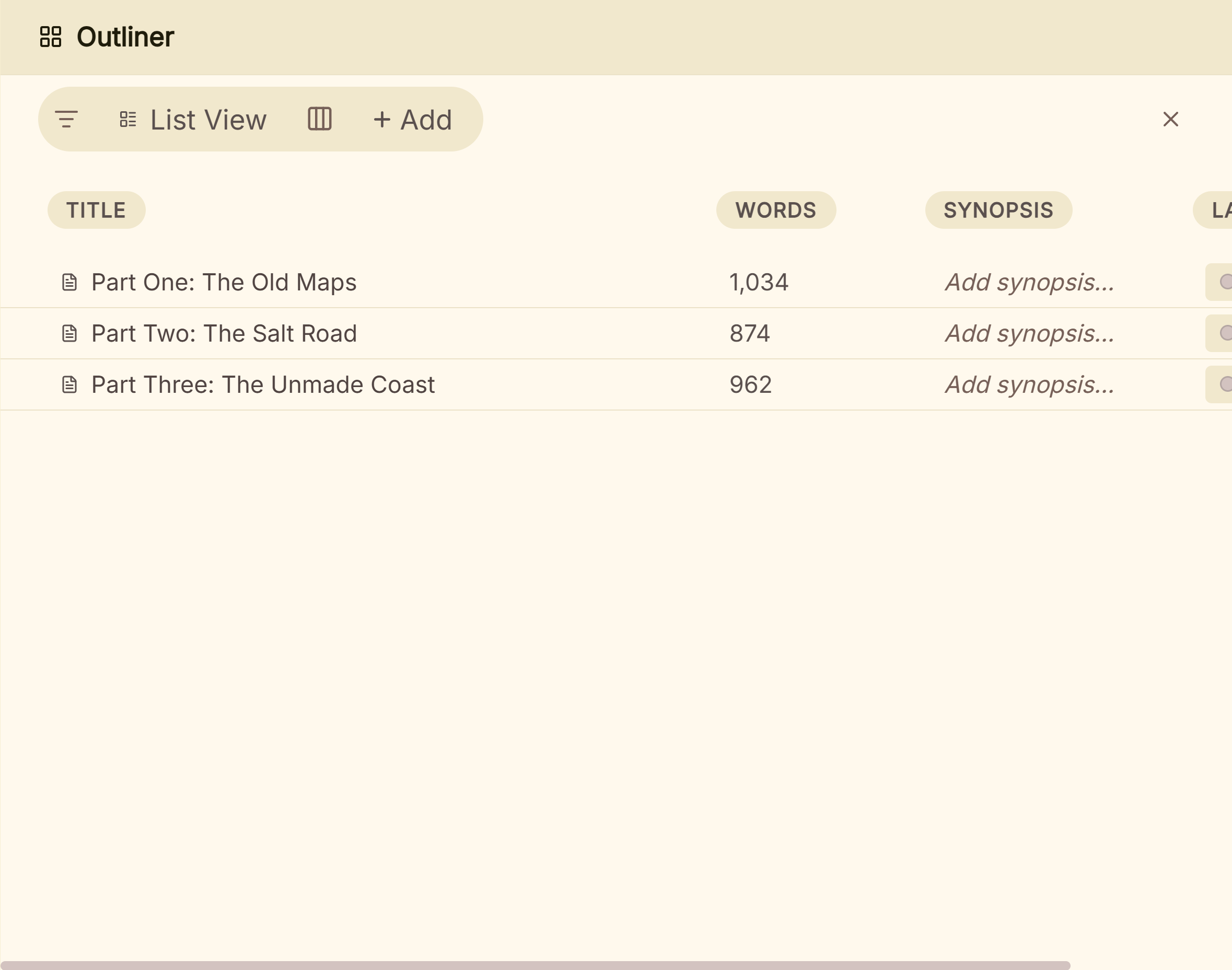 Scenes as rows in Deckle's Outliner, ready for your own columns
To bring an existing yWriter novel across, export it from yWriter as DOCX and import that file; Deckle does not open .yw7 projects. The full route, including which scene data stays behind, is on yWriter vs Deckle, and the general method is on how to move a manuscript between writing apps.
Deckle is a one-time purchase. To try it first, click Try it free on the screen Deckle opens to. It is a free demo with no card, no account and no time limit. It opens a sample novel with every screen open to explore, and you can export it as EPUB, PDF or Word. New writing is capped at about 500 words, and new documents and imports wait for a licence.
What do ranking pages get wrong about yWriter?
Four claims in pages that rank for this search disagree with Spacejock's own pages on 1 November 2026.
- "Free to download and use on Windows and macOS." MundoBytes (last updated 4 October 2024) says this. Spacejock says yWriter is "free (on Windows)", and its Mac page says the Mac version "will be paid software when it's complete", with the beta free only for now.
- "Allows you to export your work to RTF, PDF and HTML." Also MundoBytes. yWriter has no direct PDF export; it exports LaTeX, and Spacejock suggests TeXworks to make the PDF. The same page calls registration a "paid subscription", while Spacejock describes an optional one-off payment to support the developer, with no nag screens if you skip it.
- Export "in the ePub or Kindle formats". Kindlepreneur (updated 1 October 2025) says this. The Kindle-format file yWriter makes is Mobi, which Amazon KDP stopped accepting for reflowable books on 1 August 2021. Send the EPUB.
- "Uses system default fonts" with no decorative themes. PCWorld's review is dated 29 November 2012. yWriter 7 has had a colour scheme editor since 7.1.0.9, and "Colour Themes replace almost everything in the program" since 7.1.5.0. The review was right when written and is now out of date.
Spacejock's own pages also disagree once. The yWriter 7 page says it "runs on Windows PCs and MacOS", while the Mac page offers an unstable beta. Trust the Mac page.
Common mistakes with yWriter
- Using yWriter 8 for a book. Spacejock says it is a test version. Use yWriter 7.
- Writing a real book in a beta. The Mac beta and the 7.1.6 beta both carry warnings. Back up outside them.
- Downloading from a mirror. Third-party download sites can lag behind. Get the installer from spacejock.com.
- Typing in the preview pane. It is read-only. Double-click a scene to open the editor.
- Sending the Mobi file to Amazon. KDP no longer takes MOBI. Upload the EPUB.
- Importing a chapter RTF into another project. The FAQ warns that the scene ID tags will not match and content will be overwritten "at random". Use the Project menu's import and export instead.
- Leaving it late to plan the print edition. A paperback from yWriter means LaTeX. Try it on one chapter early, or plan to format elsewhere.
FAQ
Is yWriter free?
Yes, on Windows. Registration is optional at $11.95 or $24.95 and adds little beyond project passwords. The iOS app costs $14.99 and the Android app $5.49, and the Mac version will be paid when finished.
What is the latest version of yWriter?
The stable release is 7.1.5.2, dated 30 January 2024. The beta 7.1.6.5 is dated 22 May 2026, and alpha builds run to 7.1.6.9.
Should I use yWriter 8?
No. Spacejock calls yWriter 8 "a test version, not an actual usable program" and says to use yWriter 7 for real work.
Is there yWriter for Mac?
Only as an unstable beta, which Spacejock says will be paid when complete. On an Apple silicon Mac, the paid iOS app can run instead.
Does yWriter work on Windows 11?
Spacejock says yWriter 7 is compatible with Windows 7 SP1 and newer, and it needs .NET 4.8 or newer.
Can yWriter make a print-ready PDF?
Through LaTeX. yWriter exports a LaTeX file, and Spacejock suggests TeXworks with a free TeX distribution to make the PDF.
Does yWriter need the internet?
No. It stores everything on your computer and goes online only to check for updates or for the optional FTP backup.
Who makes yWriter?
Simon Haynes, a novelist and programmer, under the name Spacejock Software. The Mac and mobile versions are the responsibility of another developer.
What is a good alternative to yWriter?
bibisco is free on Windows, Mac and Linux, and Manuskript is free and open source. Scrivener is the established paid app. Deckle, a one-time purchase, also formats the finished book as EPUB and print PDF.
Sources
Spacejock pages retrieved 1 November 2026 unless marked. Prices change, so check the vendor page before buying.
- Spacejock Software, yWriter 7: description, feature list, scene fields, Storyboard, snapshot backups, unused scenes, exports, LaTeX and TeXworks, offline use, "free (on Windows)", "almost thirty novels". Retrieved 1 November 2026.
- Spacejock Software, yWriter 7 download and changelog: 7.1.5.2 of 30 January 2024, installer and zip sizes, .NET 4.8, upgrade keeps data, changelog to 7.1.6.9 (DOCX 7.1.3.4 and 7.1.3.6, EPUB 7.1.3.9, themes 7.1.0.9 and 7.1.5.0, character report 7.1.6.1, real-time spell checking 7.0.4.1, UK and US dictionaries 7.0.5.6). Retrieved 1 November 2026.
- Spacejock Software, yWriter 7 beta: 7.1.6.5 released 22 May 2026, not for important data. Retrieved 1 November 2026.
- Spacejock Software, yWriter8: .NET 6 test version, not for real work. Retrieved 1 November 2026.
- Spacejock Software, yWriter versions: current Windows, Android, iOS and Mac versions; mobile apps use Dropbox. Retrieved 1 November 2026.
- Spacejock Software, yWriter for MacOS: beta, unstable, paid when complete, iOS app on Apple silicon. Retrieved 1 November 2026.
- Spacejock Software, yWriter 7 on Linux: Wine and .NET 4.8 steps for Ubuntu. Retrieved 1 November 2026.
- Spacejock Software, yWriter registration: $11.95 and $24.95, optional, "Unregistered Version" title bar, what registration gives. Retrieved 1 November 2026.
- Spacejock Software, yWriter FAQ: basic editor, external editors, autobackups, chapter RTF import warning, preview pane, exports, plot lines, password protection for registered copies. Retrieved 1 November 2026.
- Apple App Store, yWriter: Novel Writing, and Google Play, yWriter: $14.99 and $5.49. Retrieved 21 October 2026.
- Amazon KDP, MOBI support: MOBI end dates; EPUB, DOCX or KPF accepted. Retrieved 20 October 2026.
- The LaTeX Project, Getting LaTeX: free TeX distributions. Retrieved 20 October 2026.
- bibisco, download page and Community vs Supporters: platforms, editions, price, exports. Retrieved 20 October 2026.
- Manuskript, GitHub repository and import and export capabilities: licence, platforms, pandoc. Retrieved 20 October 2026.
- Literature & Latte, Scrivener overview and Cross-grading: platforms, Compile, $59.99. Retrieved 20 October 2026.
- Ranking pages checked for the claims above: MundoBytes, What is yWriter (last updated 4 October 2024); Kindlepreneur, yWriter review (updated 1 October 2025); PCWorld, yWriter review (29 November 2012). Retrieved 1 November 2026.
Prices and features last checked 1 November 2026. yWriter is a product of Spacejock Software. Scrivener is a trademark of Literature & Latte. bibisco and Manuskript are trademarks of their respective owners. Deckle is not affiliated with or endorsed by any product named here.