

The novel writing software that runs on a Mac includes Scrivener, Ulysses, Storyist, bibisco, Dabble, Campfire, Plottr, Penpoint, Atticus, Microsoft Word and Deckle, and Reedsy Studio, Novelcrafter and Google Docs run in a Mac browser. The right one depends on your macOS version, whether you also write on an iPad or iPhone, how much planning your book needs, and whether you want to format it in the same app.

No standards body or writers' organisation ranks writing software, so this page ranks nothing. It sorts the tools by need and sets each vendor's own Mac requirements side by side, as of October 2026. How to judge any writing app by how it stores your work is covered in best novel writing software. This is Deckle's site, and Deckle is one of the tools below, so its section is marked as ours.
Which macOS version does each writing app need?
Each row comes from the vendor's own page or its Mac App Store listing, retrieved 20 October 2026. The minimum macOS version decides more than features do on an older Mac.
| Tool | Minimum macOS | Apple silicon and Intel | Installs as |
|---|---|---|---|
| Ulysses | macOS 15.4 | not stated | Mac App Store app |
| Microsoft Word (Microsoft 365) | "One of the three most recent versions of macOS" (App Store listing: macOS 14.0) | Microsoft lists "Intel processor" | desktop app |
| Scrivener 3.5.2 | macOS 11 | not stated | desktop app, also on the Mac App Store |
| Deckle | macOS 11 | both (Universal) | desktop app (.dmg) |
| Plottr | macOS 10.15; macOS 11 and 12 "no longer supported" | Intel or M series, M1 may need Rosetta | desktop app |
| Storyist 4.4.1 | macOS 10.14 | not stated | Mac App Store app or direct |
| bibisco | macOS 10.13 High Sierra | 64-bit only | desktop app |
| Campfire Writing | macOS 10.11 El Capitan | not stated | desktop app plus browser |
| Dabble | no minimum published | "The same app runs on Apple silicon and Intel Macs" | desktop app plus browser |
| Penpoint | no minimum published | both | desktop app |
| Atticus | no minimum published | not stated | web app installed from Chrome |
| Reedsy Studio, Novelcrafter, Google Docs | any current browser | n/a | browser |
Plottr's requirements page reads oddly as published: it gives macOS 10.15 as the minimum, then says macOS 11 and 12 are no longer supported. Check with Plottr before buying for a Mac on Big Sur or Monterey. Ulysses has the newest floor: its App Store listing requires macOS 15.4 or later, so an older Mac cannot run the current Ulysses. Word moves with Apple's calendar. Microsoft's requirements page asks for "one of the three most recent versions of macOS", so each new macOS release drops the oldest one. Scrivener 3.5.2 still runs on macOS 11.
Writers on a PC have their own page: novel writing software for Windows.
Mac writing apps that sync with an iPad or iPhone
Three Mac writing apps have native iPad and iPhone versions.
Scrivener has an iOS and iPadOS app at $23.99, sold separately from the $59.99 Mac licence (as of October 2026). Literature & Latte says you "sync using Dropbox or transfer with iTunes". There is no iOS trial.
Ulysses is "The Ultimate Writing App for Mac, iPad and iPhone", with sync built in. It is a subscription, $39.99 a year or $5.99 a month (as of October 2026), and its App Store listing also shows a $199.99 Perpetual License purchase. The plans "include a fully functional trial, so you can test Ulysses (including export and sync)." Students pay $10.99 per six months.
Storyist runs on macOS and iOS/iPadOS with optional iCloud storage. The Mac version costs $59 from Storyist's store or $59.99 on the Mac App Store after a 14-day trial, and the iOS version $19 or $19.99 (as of October 2026).
Dabble, Campfire, Reedsy Studio, Novelcrafter and Google Docs reach an iPad through a browser or a mobile app. Deckle has no iPad or iPhone app, and no built-in sync.
Free novel writing software for Mac
bibisco Community Edition is free for macOS 10.13 or later, with chapters, scenes, storylines and character development. "As a desktop application, novel data is stored securely on your PC/Mac." It exports PDF, DOCX and TXT. The Timeline, EPUB export, find/replace and writing goals are in the paid Supporters Edition ($69 once), per bibisco's edition comparison, updated 28 February 2026.
Reedsy Studio is free in Safari or any browser, with chapters and scenes, boards, goals and version history. Asked whether it works offline, Reedsy answers "Currently, no."
Campfire Writing has a free plan with a Mac desktop app, capped at 25,000 manuscript words, 10 characters and 20 timeline events.
Google Docs is free, and works offline only in Chrome or Edge with the Google Docs Offline extension.
Two free tools are harder on a Mac. Manuskript's 0.17.0 release has no macOS download, and Mac users are pointed to running it from source. yWriter's Mac version is described by its developer as "in progress".
Novel writing software for Mac that organises a long book
Scrivener is a structured writing and organising app from Literature & Latte, and the Mac version is 3.5.2. Its feature list includes the Binder, Corkboard index cards, an Outliner with synopses and metadata, Snapshots with Compare, Scrivenings, Collections, targets and composition mode. Compile exports Word, PDF and EPUB. The features page still lists "Kindle e-books", but the macOS release notes say 3.5.0 (1 October 2025) removed Kindle (.mobi) from Compile. The trial lasts 30 days of actual use. Why writers leave it, and what they lose, is set out in Scrivener alternatives.
Storyist combines a word processor with a story planner: outliner, corkboard index cards, Story Sheets for plot, character and setting, and comments. It imports and exports Scrivener .scriv files, creates EPUB and Kindle ebooks, and its book editor produces print-ready PDFs, with paperback templates added in version 4.3. It is sold once, with "No subscription required".
Ulysses is a Markdown writing app built around a library of projects and groups, with keywords, writing goals and deadlines, and a grammar and style checker for 20+ languages. It exports DOCX, PDF, ePub, HTML and plain text, and publishes to WordPress, Ghost, Medium and Micro.blog. Ulysses says it "can't handle directly" a Scrivener project. It has no AI of its own. It supports Apple's Writing Tools since Ulysses 36 (30 October 2024), including a Compose option that uses ChatGPT, and Siri AI since Ulysses 41 (14 September 2026). Its help says your texts are "never used to train AI models". The detail is in does Ulysses use AI.
Dabble, Campfire and Plottr run on Mac as they do on Windows. Dabble is a cloud-synced writing app from $15 a month billed annually and "does not export PDF or ePub directly". Campfire suits heavy worldbuilding, with 18 modules. Plottr is an outliner that says it is not "built for" drafting. Penpoint is a newer native app for Intel and Apple Silicon Macs at $40 once, with a codex, timeline and snapshots, and "no AI ever touches your prose."
Software to write and format a book on a Mac in one app
Most writing apps stop at a manuscript. Vellum, the Mac formatter, imports only .docx, and its help names Scrivener as one app that can produce one. Four tools on a Mac produce the finished EPUB and print PDF themselves: Storyist (above), Atticus, Reedsy Studio and Deckle.
Atticus costs $147 once (as of October 2026). On a Mac it is a web app installed from Chrome, and its help adds that if the app will not install on an older system, "It will always work in your browser". It exports EPUB, PDF and DOCX, with 17+ chapter themes, a theme builder and collaboration. You "do need to be online to import and export files".
Deckle is our app, so weigh this section accordingly. Deckle is a desktop app for macOS, Windows and Linux. The Mac download is a Universal .dmg for Apple Silicon and Intel, macOS 11 or later. A Deckle project is a folder on your own disk: one .deckle database holds the writing, notes and settings, beside research/ and .deckle-assets/ folders. It works offline after activation, and one licence covers two devices in any mix of Mac, Windows and Linux.
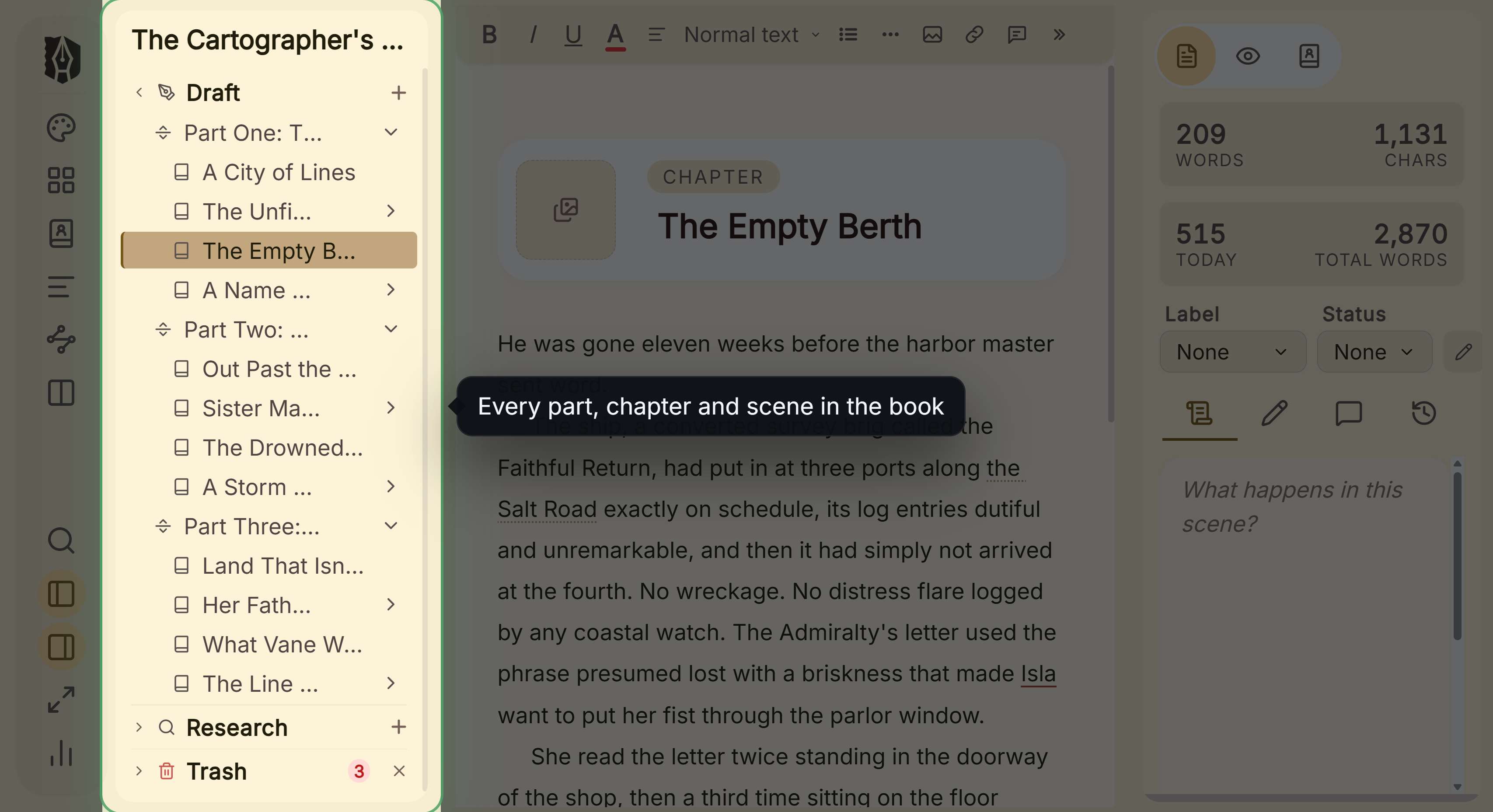 The Binder: every part, chapter and scene in the book
For writing, Deckle has a Binder (Draft, Research, Trash), an Outliner with a Grid View of index cards and a List view, Continuous View, a Codex for characters, locations and items, and a Timeline. It also has inline comments, snapshots, Writing Stats with goals and streaks, writing sprints, Focus Mode and spellcheck in 16 languages. It imports Word, EPUB, a zipped Scrivener project or a Markdown folder, as described in moving from Scrivener to Deckle. It exports EPUB (Generic, Kindle, Apple Books and Kobo targets), a print PDF typeset with Typst, DOCX, Markdown and plain text. The Kindle target writes an EPUB for KDP to convert, not a KPF file. It has no generative AI. The formatting side on a Mac is compared in book formatting software for Mac.
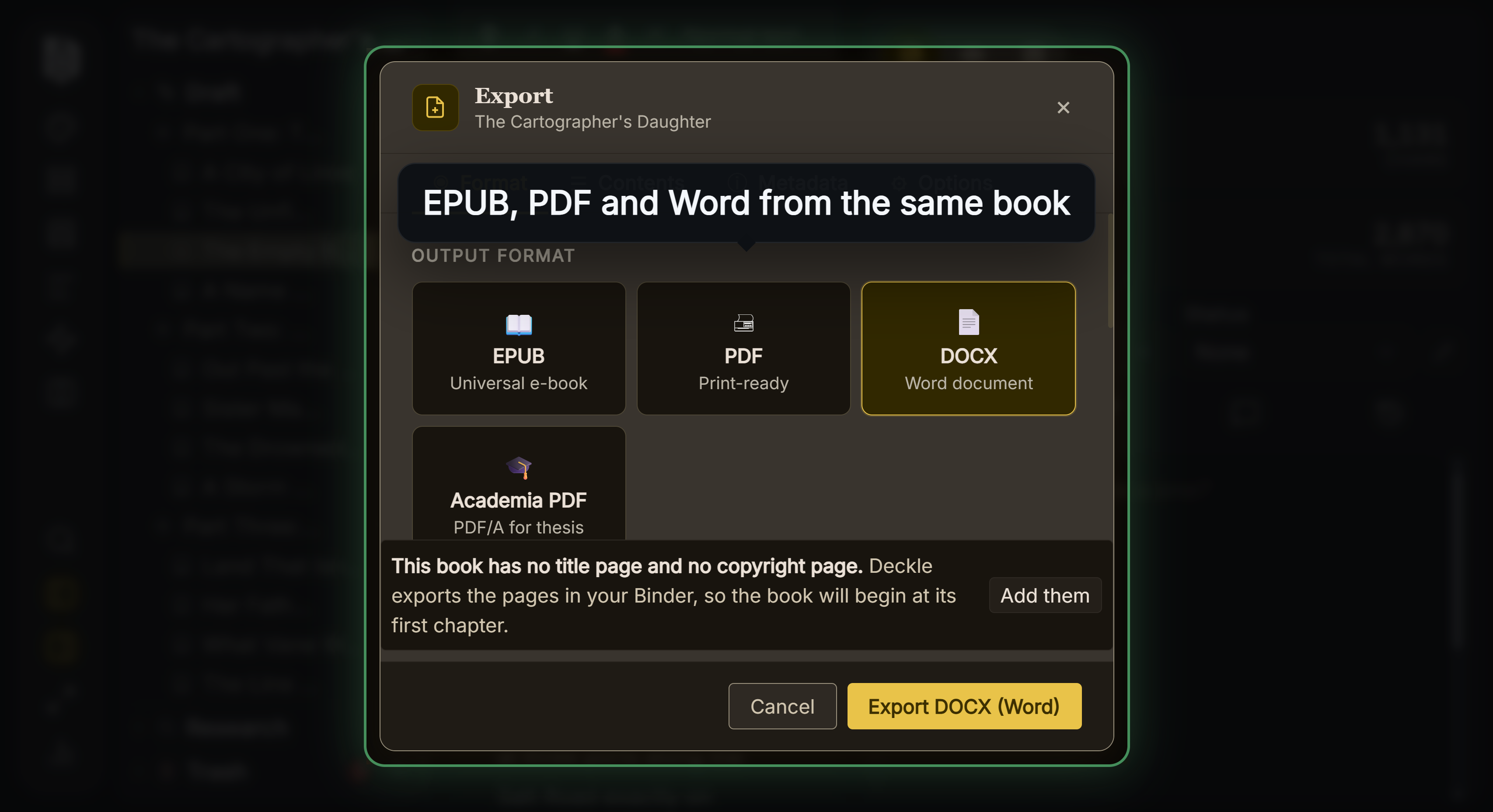 EPUB, PDF and Word from the same book
Where Deckle is behind on a Mac: Scrivener, Ulysses and Storyist all have iPad and iPhone apps, and Deckle has none. It has no browser version, no real-time collaboration and no built-in cloud sync. Scrivener costs $59.99 for the Mac, and bibisco and Reedsy Studio are free, while Deckle is a paid one-time purchase.
Novel writing software for Mac compared
| Tool | Price (October 2026) | Offline | iPad app | Exports EPUB | Generative AI |
|---|---|---|---|---|---|
| Scrivener | $59.99 one-time; iOS $23.99 | yes | yes | yes | none mentioned |
| Ulysses | $39.99/year or $5.99/month | yes | yes | yes | none of its own; supports Apple's Writing Tools and Siri AI |
| Storyist | $59 one-time; iOS $19 | yes | yes | yes | none mentioned |
| bibisco | free; Supporters $69 one-time | yes | via paid add-on service | Supporters only | none mentioned |
| Dabble | from $15/month billed annually; lifetime $699 | writing yes, sync no | browser app | no | none now |
| Campfire Writing | free plan; Standard $12/month | desktop app yes | online-only app | yes | not stated |
| Plottr | $60/year or $150 lifetime | base plan yes | Pro web app | no | none (vendor rejects AI) |
| Penpoint | $40 one-time | yes | not listed | yes | none |
| Atticus | $147 one-time | writing yes, import and export no | browser | yes | none mentioned |
| Reedsy Studio | free; add-ons from $4.99/month | no | browser | EPUB 3 | none listed |
| Microsoft Word | $99.99/year or $179.99 one-time | desktop app | yes | no | yes, Copilot |
| Deckle | one-time purchase | yes, after activation | no | yes, 4 store targets | none |
The one-time apps are compared on their upgrade terms in writing software you buy once.
Which novel writing software should a Mac writer choose?
- You write on a Mac and an iPad: Scrivener, Ulysses or Storyist.
- You want plain Markdown and a clean library, and accept a subscription: Ulysses, on macOS 15.4 or later.
- You want the deepest organising tools and will format elsewhere: Scrivener.
- You want to spend nothing: bibisco Community Edition, or Reedsy Studio online.
- Your Mac is older: check the table first. bibisco, Campfire and Storyist support versions well below macOS 11.
- You want to write and format in one desktop app that works fully offline: Storyist or Deckle.
Try Deckle on a Mac
Deckle has a free demo. Install Deckle, then click Try it free on the screen Deckle opens to. It needs no card and no account, and it has no time limit. It opens a sample novel with every screen open to explore, and you can restyle it and export real EPUB, PDF and DOCX files. New writing is capped at about 500 words, and new documents and imports are blocked. Deckle itself is a one-time purchase.
FAQ
What is the best novel writing software for Mac?
No authority ranks it, so it depends on the need. Scrivener has the deepest organising tools, Ulysses suits Markdown writers on an iPad too, and Storyist and Deckle write and format in one app.
Is there a free book writing app for Mac?
Yes. bibisco Community Edition is a free Mac app, Reedsy Studio and Google Docs are free in a browser, and Campfire has a free plan capped at 25,000 words.
Is Scrivener on the Mac App Store?
Yes. Scrivener 3 is on the Mac App Store at $59.99 as of October 2026, and needs macOS 11 or later.
Is Ulysses a one-time purchase?
Ulysses is sold as a subscription, $39.99 a year or $5.99 a month. Its App Store listing also shows a $199.99 Perpetual License in-app purchase.
Which writing apps sync between a Mac and an iPad?
Scrivener, Ulysses and Storyist have native iPad apps. Deckle has no iPad app.
Does Scrivener work on Apple silicon Macs?
Literature & Latte lists macOS 11 or later for Scrivener 3.5.2, which covers every Apple silicon Mac. Its page does not state a processor requirement.
Can I write a novel in Word on a Mac?
Yes. Word for Mac needs one of the three most recent macOS versions, has no binder or scene cards, and does not save EPUB.
Sources
All pages retrieved 2026-10-20.
- Literature & Latte, Scrivener overview (macOS 3.5.2, macOS 11+): https://www.literatureandlatte.com/scrivener/overview
- Literature & Latte, Scrivener features (sync): https://www.literatureandlatte.com/scrivener/features
- Literature & Latte, Scrivener FAQs (trial, no iOS trial): https://www.literatureandlatte.com/scrivener/faqs
- Literature & Latte, Scrivener store (iOS price): https://www.literatureandlatte.com/store/scrivener/
- Mac App Store, Scrivener 3: https://apps.apple.com/us/app/scrivener-3/id1310686187
- Ulysses, home page: https://ulysses.app/
- Ulysses, pricing: https://ulysses.app/pricing/
- Ulysses, students: https://ulysses.app/students/
- App Store, Ulysses (macOS 15.4, in-app purchases, trial): https://apps.apple.com/us/app/ulysses-writing-app/id1225570693
- Ulysses Help, import (Scrivener): https://help.ulysses.app/123456-import-into-ulysses
- Ulysses Help, export: https://help.ulysses.app/en_US/export-publishing/export
- Ulysses, releases (Apple Intelligence Writing Tools): https://ulysses.app/releases/
- Ulysses, release notes (Ulysses 36 of 30 October 2024, Writing Tools; Ulysses 41 of 14 September 2026, Siri AI), retrieved 20 October 2026: https://ulysses.app/release-notes/
- Ulysses Help, Apple Intelligence (ChatGPT Compose, Siri AI, "never used to train AI models"), retrieved 20 October 2026: https://help.ulysses.app/en_US/dive-into-editing/writing-tools
- Storyist, Mac features: https://storyist.com/mac/
- Storyist, store: https://storyist.com/store4/
- Mac App Store, Storyist 4 (macOS 10.14, trial, version): https://apps.apple.com/us/app/storyist-4/id1445242832?mt=12
- bibisco, general FAQs (macOS 10.13, local storage): https://bibisco.com/docs/general-faqs/
- bibisco docs, Community vs Supporters editions (updated 28 February 2026, retrieved 20 October 2026; Timeline, EPUB, find/replace and goals are Supporters only): https://bibisco.com/docs/differences-between-community-and-supporters-editions/
- Campfire Writing, FAQ (Mac 10.11, offline): https://www.campfirewriting.com/faq
- Campfire Writing, pricing: https://www.campfirewriting.com/pricing
- Plottr Docs, software requirements (last updated 17 March 2026): https://docs.plottr.com/article/30-what-are-plottrs-software-requirements
- Dabble, install the desktop app (Apple silicon and Intel): https://www.dabblewriter.com/docs/apps-sync-offline/install-desktop-app
- Dabble, export your manuscript: https://www.dabblewriter.com/docs/import-export-printing/export-your-manuscript
- Penpoint, home page: https://penpoint.app
- Vellum Help, importing (.docx only, Scrivener named): https://help.vellum.pub/importing/
- Manuskript, releases: https://github.com/olivierkes/manuskript/releases
- Spacejock Software, yWriter platforms: https://www.spacejock.com/yWriter.html
- Atticus Help, How to download Atticus on a desktop or laptop computer: https://intercom.help/atticus-5877e36564df/en/articles/12961553-how-to-download-atticus-on-a-desktop-or-laptop-computer
- Atticus Help, Does Atticus work on older operating systems: https://intercom.help/atticus-5877e36564df/en/articles/12684449-does-atticus-work-on-older-operating-systems
- Atticus Help, How can I use Atticus offline: https://intercom.help/atticus-5877e36564df/en/articles/12703251-how-can-i-use-atticus-offline
- Reedsy Studio, FAQ: https://reedsy.com/studio/resources/book-writing-software-faq/
- Google Docs Help, work offline: https://support.google.com/docs/answer/6388102
- Microsoft Support, system requirements for Microsoft 365 for home use: https://support.microsoft.com/en-us/office/system-requirements/system-requirements-for-microsoft-365-for-home-use
- Mac App Store, Microsoft Word (macOS 14.0): https://apps.apple.com/us/app/microsoft-word/id462054704
- Microsoft, Office file format reference (no EPUB): https://learn.microsoft.com/en-us/office/compatibility/office-file-format-reference
- Literature & Latte, Cross-grading: "Scrivener for macOS or Windows is $59.99" (the store page loads its prices from the checkout, so this page shows the figure in its text), retrieved 21 October 2026
- Literature & Latte, Scrivener release notes for macOS: 3.5.0, 1 October 2025, Kindle (.mobi) removed from Compile; the Windows notes, up to 3.1.6 (3 September 2025), record no such change (retrieved 21 October 2026)
Prices, requirements and features last checked 20 October 2026.
Scrivener is a trademark of Literature & Latte. Mac, macOS, iPad and Safari are trademarks of Apple. Microsoft Word is a trademark of Microsoft. Ulysses, Storyist, bibisco, Dabble, Plottr, Campfire, Penpoint, Manuskript, yWriter, Atticus, Reedsy, Novelcrafter and Google Docs are trademarks of their respective owners. Deckle is not affiliated with or endorsed by any product named here.