

The book formatting software that runs on a Mac is Vellum, Atticus, Kindle Create, Affinity, Adobe InDesign, Storyist, Microsoft Word, Scrivener's Compile and Deckle, plus two browser tools, Reedsy Studio and the Draft2Digital formatter. Vellum is the only one that runs on nothing but a Mac. Which tool fits depends on your macOS version, your budget, the stores you publish to, and whether you also write in the same app.

No standards body ranks formatting software, so this page sorts the tools by need, with each vendor's own Mac requirements as of October 2026. The same tools on every platform are in book formatting software in 2026, and the PC list is book formatting software for Windows. This is Deckle's site, and Deckle is one of the tools below, so its section is marked as ours.
Which macOS version does each formatting tool need?
Each row comes from the vendor's own page or Mac App Store listing, retrieved 20 October 2026.
| Tool | Minimum macOS | Processor and memory | Installs as |
|---|---|---|---|
| Microsoft Word (Microsoft 365) | "One of the three most recent versions of macOS" (App Store listing: macOS 14.0) | 4 GB RAM, 10 GB disk | desktop app |
| Vellum | macOS 13 | not stated | desktop app |
| Deckle | macOS 11 | Apple Silicon and Intel (Universal) | desktop app (.dmg) |
| Scrivener 3.5.2 | macOS 11 | not stated | desktop app |
| Kindle Create | Intel Mac: macOS 10.15; Apple M1: macOS 11 | 1.2 GHz minimum, 4 GB RAM minimum, 8 GB recommended | desktop app |
| Affinity by Canva | macOS 10.15 Catalina | Apple silicon or Intel, 4 GB RAM minimum, 3.5 GB disk | desktop app, online once to activate |
| Storyist 4.4.1 | macOS 10.14 | not stated | desktop app |
| Adobe InDesign | see Adobe's requirements page | Adobe's page refused retrieval, so no figures are repeated here | |
| Atticus | no minimum published | web app installed from Chrome | |
| Reedsy Studio, Draft2Digital formatter | any current browser | browser, needs a connection |
On an older Mac, the table decides for you. Vellum's help notes that version 3.9.3 was the last for macOS 12. A Mac on Monterey can still run that older Vellum, or the current Kindle Create, Affinity, Storyist, Scrivener and Deckle, all of which support macOS 11 or earlier. Microsoft supports only the three most recent macOS versions for Word.
What does Vellum do on a Mac?
Vellum is a book formatting app from 180g that runs only on a Mac with macOS 13 or newer. It turns a manuscript into ebook and print editions. Vellum Help says its Text Editor can be used to "write your entire novel from scratch", though it has no binder, outline or writing goals. Its own feature list says what it does well.
- Book Styles: "Use drop caps, embedded fonts, and flourishes, all with a click to select your favorite Style."
- Store files: "Create ebooks for every platform: Kindle, Kobo, Apple Books, and more", as EPUB 3 and EPUB 2.
- Print: "24 Trim Sizes + Large Print", "Paperback or Hardcover", "Full-Bleed Pages & Backgrounds" and "Professional-Grade PDF/X-1a".
- Typesetting care: Vellum "handles complex tasks like widow-handling and spread-balancing".
- Accessibility: "ACE-Approved Accessible Output".
The PDF/X-1a point matters for print: KDP's manuscript guidance says "PDF/X-1a is preferred". Vellum Ebooks costs $199.99 and Vellum Press, which adds paperbacks, $249.99 (as of October 2026, before tax). It imports only .docx. The download is free, but you "won't be able to Generate files for publishing until you make a purchase". Mac authors who want a different price or more control have a page of their own: Vellum alternatives.
Free book formatting software for Mac
Four tools cost nothing to format a book on a Mac, and each carries a stated limit.
Kindle Create is Amazon's free desktop formatter. Amazon's download page lists Intel Macs on macOS 10.15 or later and Apple M1 Macs on macOS 11 or later. It exports "Kindle Package Format (KPF) and EPUB", with EPUB for reflowable books only. One project makes the Kindle ebook and the KDP paperback, with page numbers, headers and footers and automatic widow and orphan handling. Amazon's feature chart still lists that route as "Pre-release (beta)", as of October 2026. Amazon states that "Tables, footnotes, lists, and inline images imported from your DOC(X) file cannot currently be edited in Kindle Create", and that themes "cannot be edited by the user". It makes no print PDF, so its print output goes to KDP only.
Affinity by Canva is free professional page layout for macOS 10.15 or later, with a free Canva account. It is described in the page layout section below.
The Draft2Digital formatter runs in Safari or any browser, and Draft2Digital's FAQ says it is free "even without ebook distribution". It produces "a pixel-perfect paperback PDF or ebook EPUB file". Print is black and white, perfect-bound paperback, in six trim sizes, 32 to 1,050 pages.
Reedsy Studio is a free browser app for writing and formatting. It exports EPUB 3 and "PDF (PDF/X-1a:2001 for print-on-demand)". Asked whether it works offline, Reedsy answers "Currently, no."
Software to write and format a book on a Mac in one app
Vellum assumes you wrote elsewhere and saved a .docx. Four Mac tools take a book from draft to finished files: Storyist, Atticus, Reedsy Studio and Deckle. Scrivener sits between the two groups.
Scrivener formats through Compile, which makes PDF "for printing, self-publishing" and EPUB. Literature & Latte does not describe the PDF as professionally typeset. Scrivener for macOS 3.5.0 (1 October 2025) removed Kindle (.mobi) from Compile, so as of October 2026 only the Windows version still offers it. Drafting in Scrivener and formatting in Vellum is the subject of Scrivener vs Vellum.
Storyist is a Mac and iOS writing app whose book editor "produces print-ready PDFs", with paperback print templates added in version 4.3, plus EPUB and Kindle ebooks (the Kindle export needs Amazon's separate KindleGen tool, per Storyist's own tutorial, as of October 2026). It costs $59 from Storyist's store or $59.99 on the Mac App Store after a 14-day trial (as of October 2026).
Atticus costs $147 once (as of October 2026), "No monthly fees. Forever." On a Mac it is a web app installed from Chrome. It exports EPUB, PDF and DOCX, with 17+ chapter themes, a custom theme builder, 1,500+ fonts, full-bleed images, large print and footnotes. Atticus's help says its PDFs are "not classified as PDF X-1a", and you "do need to be online to import and export files". The two Mac-friendly formatters are compared in Atticus vs Vellum.
Deckle is our app, so weigh this section accordingly. Deckle is a desktop app for macOS, Windows and Linux. The Mac download is a Universal .dmg for Apple Silicon and Intel, macOS 11 or later. A Deckle project is a folder on your own disk: one .deckle database holds the writing, notes and settings, beside research/ and .deckle-assets/ folders. It works offline after activation, and one licence covers two devices in any mix of Mac, Windows and Linux.
For formatting, Deckle has 26 built-in style presets, 8 trim sizes, bleed, drop caps, small caps, running heads and scene break ornaments. Widow and orphan control is a setting, off by default. Special pages run from Title Page to Also by the Author, plus Full Page Image pages and spreads. A live preview shows Kindle, iPhone, iPad and Print.
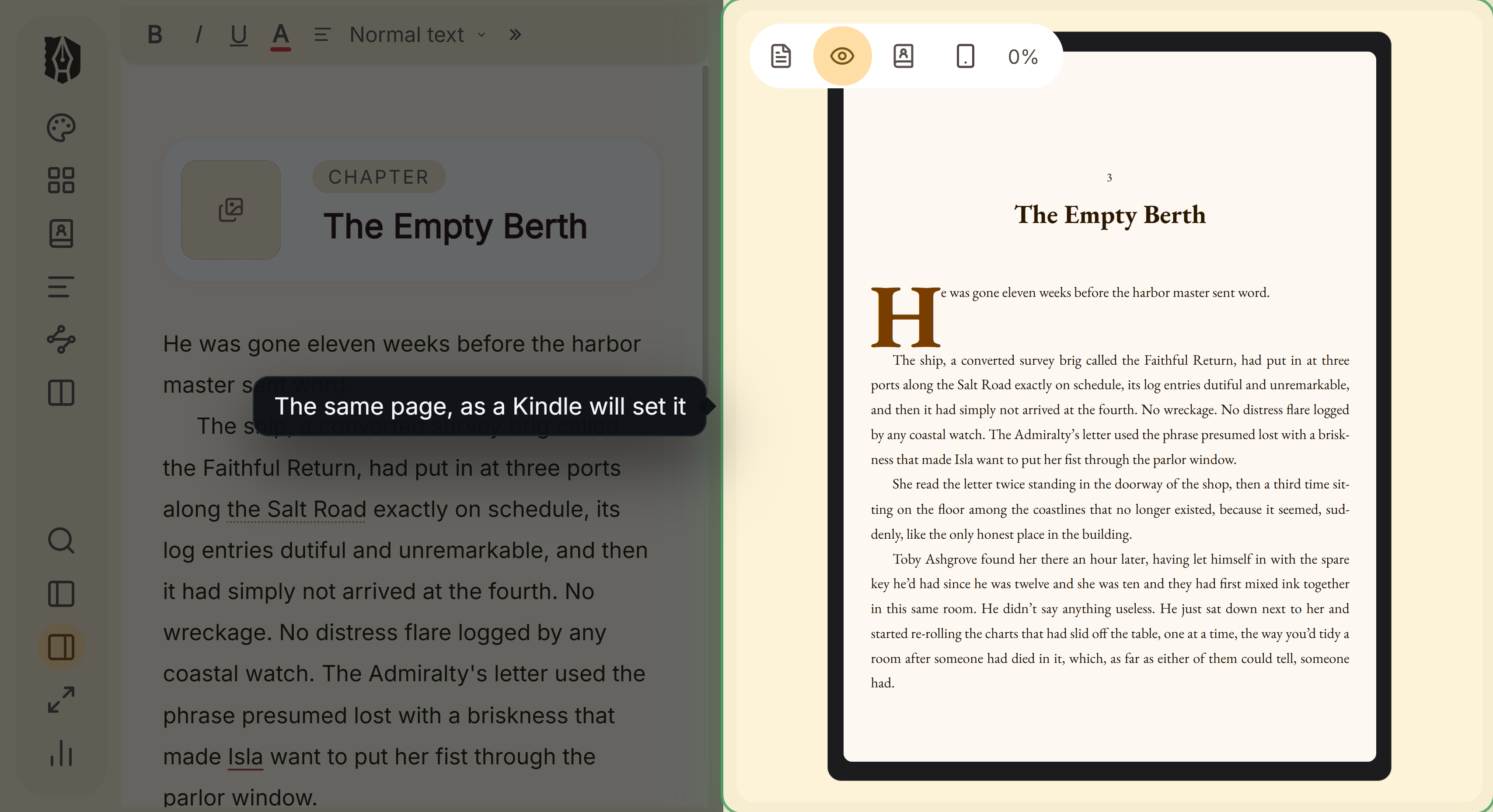 The chapter as written, and as a Kindle will set it
It exports EPUB (Generic, Kindle, Apple Books and Kobo targets), a print PDF typeset with Typst, DOCX for Word or InDesign, Markdown and plain text. The Kindle target writes an EPUB for KDP to convert, not a KPF file. For writing, it has a Binder, an Outliner with a Grid View, a Codex, a Timeline and snapshots. It has no generative AI.
Where Deckle is behind Vellum on a Mac: Vellum offers 24 trim sizes plus large print and hardcover, and Deckle offers 8 trim sizes and no custom size. Vellum's print PDF is PDF/X-1a, and Deckle's is a standard PDF. Vellum names spread balancing and ACE-approved accessible output, and Deckle claims neither. Deckle has no iPad app.
Professional book layout software for Mac: Affinity and InDesign
Affinity and InDesign lay out any printed page by hand. They give the finest typographic control on this page and have no manuscript tools. Affinity's Books panel combines separate documents "as chapters", per Affinity's help on books, but each one is laid out by hand.
Affinity by Canva combines "professional design, photo editing, and page layout" in one free app. It runs natively on Apple silicon and Intel Macs. It exports PDF with bleed and crop marks, and EPUB, and it has Smart Master Pages and shared text styles. It opens InDesign IDML files and, since the September 2026 update, native INDD files. After activation, "there is no requirement to be online, even with extended offline periods." The old Affinity Publisher 2 still runs, but "these apps won't receive future updates".
Adobe InDesign is the professional standard for page layout, sold by subscription at US$22.99 a month for the single app on an annual plan billed monthly (as of October 2026). It has a Preflight panel that flags missing fonts, low-resolution images and overset text, plus paragraph and character styles, parent pages and automatic chapter numbering. Its 7-day trial "will automatically convert to a paid" membership unless cancelled. It includes generative AI such as Layout-aware Rewrite. Adobe publishes its Mac requirements on its help site, which refused automated retrieval on 20 October 2026.
Choose one of these for an illustrated book, a cookbook or poetry with exact line placement. For a text novel, each chapter becomes a manual layout job.
Can you format a book in Word for Mac?
KDP's paperback and hardcover templates are Word files, offered as "blank templates" and as "templates with sample content". KDP warns: "Make sure to remove any template sample text from your final manuscript." Word for Mac does not save EPUB. Microsoft's file format reference notes that a saved PDF "might not have a perfect page-to-page correspondence with the original… pages might break at different locations", so check the PDF before upload. The KDP route is covered in KDP formatting software.
Book formatting software for Mac compared
| Tool | Price (October 2026) | Offline | Print PDF | EPUB | Writing tools |
|---|---|---|---|---|---|
| Vellum | $199.99 Ebooks; $249.99 Press, one-time | yes | Press only, PDF/X-1a | EPUB 3 and 2 | full text editor; no binder or outline |
| Kindle Create | free | yes | no (KPF for KDP print) | reflowable only | no |
| Affinity by Canva | free with a Canva account | yes, after activation | yes, bleed and crop marks | yes | no |
| Adobe InDesign | $22.99/month, annual plan | not stated | yes, with Preflight | reflowable | no |
| Draft2Digital formatter | free | no | yes, B&W paperback, 6 trims | yes | no |
| Reedsy Studio | free; add-ons from $4.99/month | no | yes, PDF/X-1a:2001 | EPUB 3 | yes |
| Atticus | $147 one-time | writing yes, import and export no | yes, not PDF/X-1a | yes | yes |
| Storyist | $59 one-time | yes | yes, paperback templates | yes | yes |
| Scrivener | $59.99 one-time | yes | Compile to PDF | yes | yes |
| Microsoft Word | $99.99/year or $179.99 one-time | desktop app | saves PDF | no | general word processor |
| Deckle | one-time purchase | yes, after activation | yes, Typst | yes, 4 store targets | yes |
What Mac formatting tools cost over three years
List prices from each vendor, as of October 2026, in US dollars before tax.
| Tool | Price model | Cost over 3 years |
|---|---|---|
| Vellum Press | one-time | $249.99 |
| Atticus | one-time | $147.00 |
| Storyist (Storyist store) | one-time | $59.00 |
| Scrivener for Mac | one-time | $59.99 |
| Kindle Create, Affinity, Draft2Digital, Reedsy Studio core | free | $0 |
| Adobe InDesign, single app, annual plan billed monthly | subscription | $827.64 if $22.99 a month continues |
| Microsoft 365 Personal (Word), yearly | subscription | $299.97 |
| Deckle | one-time | see the free demo first |
Which book formatting software should a Mac author choose?
- You write elsewhere and want store-specific ebooks and PDF/X-1a print with little setup: Vellum, on macOS 13 or later.
- You publish only on Amazon and want to spend nothing: Kindle Create.
- You want a free paperback PDF and EPUB and are always online: the Draft2Digital formatter, or Reedsy Studio.
- You want to design every page by hand: Affinity (free) or InDesign (subscription).
- You want to write and format in one app with a browser option: Atticus.
- You want to write and format in one desktop app that works fully offline: Storyist, or Deckle for separate Kindle, Apple Books and Kobo EPUBs.
Whatever makes the file, the store's rules decide whether it passes. They are in KDP print file requirements, and the ebook side is in how to make an EPUB file.
Try Deckle on a Mac
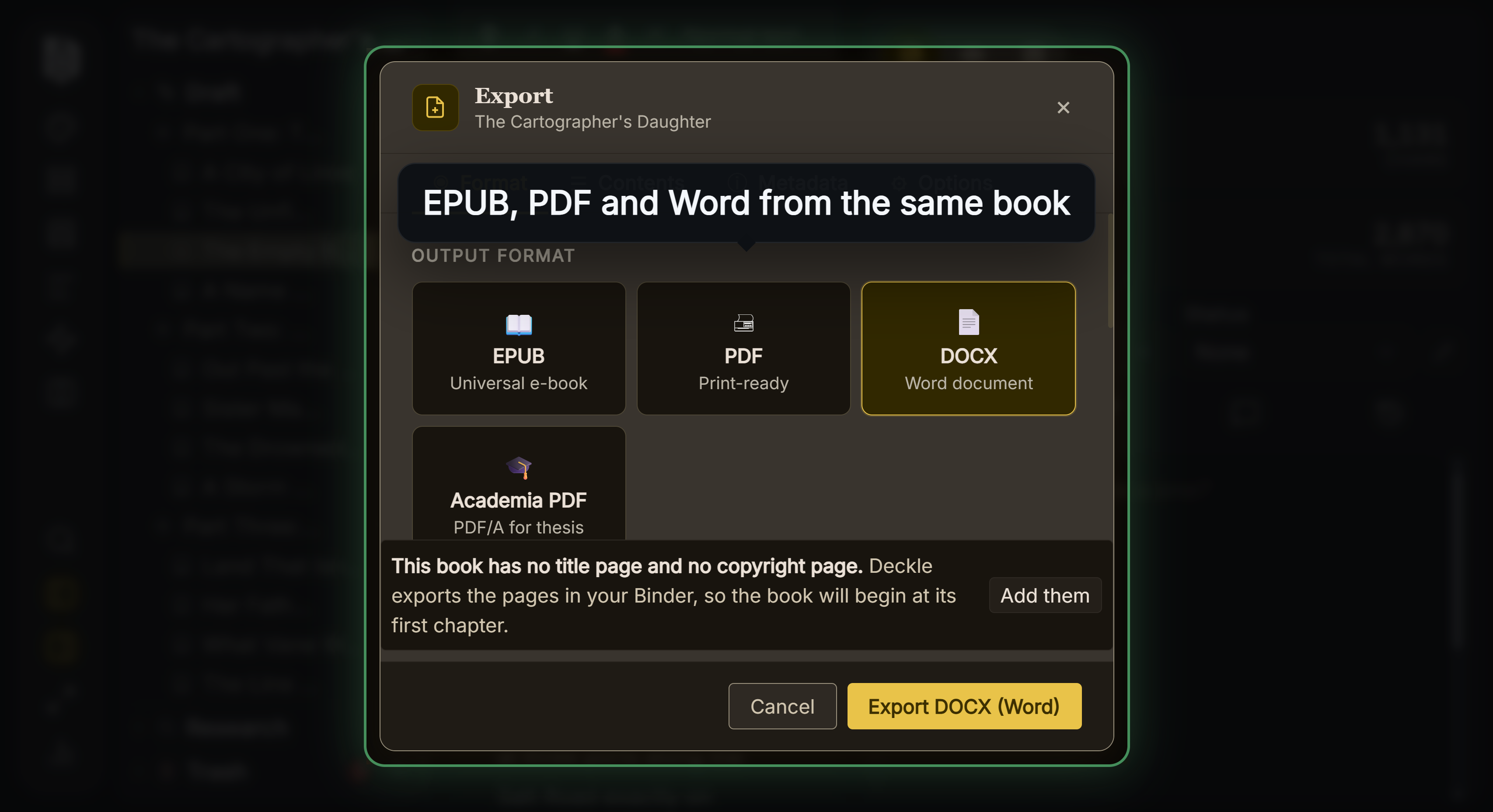 Every export format comes from the same manuscript
Deckle has a free demo. Install Deckle, then click Try it free on the screen Deckle opens to. It needs no card and no account, and it has no time limit. It opens a sample novel with every screen open to explore, and you can restyle it and export real EPUB, PDF and DOCX files to compare with Vellum's preview. New writing is capped at about 500 words, and new documents and imports are blocked. Deckle itself is a one-time purchase.
FAQ
What is the best book formatting software for Mac?
No authority ranks it, so it depends on the need. Vellum suits authors who write elsewhere, Kindle Create and Affinity are free, InDesign gives full layout, and Atticus, Storyist and Deckle write and format in one app.
Is there free book formatting software for Mac?
Yes. Kindle Create and Affinity are free Mac apps, and Reedsy Studio and the Draft2Digital formatter are free in a browser. Kindle Create makes no print PDF, and Draft2Digital prints black and white only.
Does Vellum work on an older Mac?
The current Vellum needs macOS 13 or newer. Vellum's help says version 3.9.3 was the last for macOS 12.
Does Kindle Create work on an M1 Mac?
Yes. Amazon lists macOS 11 or later for Apple M1 Macs, and macOS 10.15 or later for Intel Macs.
Is Vellum worth it on a Mac?
It suits a Mac author who drafts elsewhere and wants PDF/X-1a print files and store-specific ebooks with little setup. It costs $199.99 or $249.99 once, as of October 2026, and you cannot generate files until you buy.
Can I format a book in Scrivener on a Mac?
Yes. Compile makes PDF, EPUB and Kindle e-books, though Literature & Latte does not describe the PDF as professionally typeset.
Can I format a book in Word for Mac?
Yes for KDP print, which offers Word templates. Word for Mac does not save EPUB.
Sources
All pages retrieved 2026-10-20.
- Vellum, home page (macOS 13, features, prices): https://vellum.pub/
- Vellum Help, purchasing (trial, no Windows version): https://help.vellum.pub/purchasing/
- Vellum Help, updating (3.9.3 last for macOS 12): https://help.vellum.pub/updating/
- Vellum Help, importing (.docx only): https://help.vellum.pub/importing/
- Amazon KDP, Kindle Create download, system requirements, output formats and feature chart (same-manuscript paperback in Pre-release (beta)): https://kdp.amazon.com/en_US/help/topic/GUGQ4WDZ92F733GC
- Amazon KDP, Prepare Reflowable and Print Books with Kindle Create: https://kdp.amazon.com/en_US/help/topic/G7R2L7V5X6SJH948
- Amazon KDP, manuscript file guidance (PDF/X-1a preferred): https://kdp.amazon.com/en_US/help/topic/G202145060
- Amazon KDP, Paperback and Hardcover Manuscript Templates: https://kdp.amazon.com/en_US/help/topic/G201834230
- Affinity by Canva, download and Mac requirements: https://affinity.studio/download
- Affinity by Canva, page layout software: https://www.affinity.studio/page-layout-software
- Affinity, V2 apps status: https://affinity.serif.com/v2/
- Affinity, September 2026 update: https://www.affinity.studio/blog/affinity-update-september-2026
- Adobe InDesign, product and pricing: https://www.adobe.com/products/indesign.html
- Adobe InDesign, features: https://www.adobe.com/products/indesign/features.html
- Storyist, Mac features: https://storyist.com/mac/
- Storyist, what's new in 4 (paperback templates): https://www.storyist.com/mac/newin4/
- Storyist Support, publish on Amazon (Kindle export needs KindleGen, retrieved 21 October 2026): https://storyist.com/support/howto/publish-on-amazon/
- Storyist, store: https://storyist.com/store4/
- Mac App Store, Storyist 4 (macOS 10.14, trial): https://apps.apple.com/us/app/storyist-4/id1445242832?mt=12
- Literature & Latte, Scrivener overview (macOS 11, Compile output): https://www.literatureandlatte.com/scrivener/overview
- Literature & Latte, Scrivener release notes for macOS (3.5.0, 1 October 2025: Kindle .mobi removed from Compile; retrieved 21 October 2026): https://www.literatureandlatte.com/scrivener/release-notes?os=macOS
- Atticus, home page: https://www.atticus.io/
- Atticus Help, How to download Atticus on a desktop or laptop computer: https://intercom.help/atticus-5877e36564df/en/articles/12961553-how-to-download-atticus-on-a-desktop-or-laptop-computer
- Atticus Help, Does Atticus create PDF X-1a files?: https://intercom.help/atticus-5877e36564df/en/articles/12684255-does-atticus-create-pdf-x-1a-files
- Atticus Help, How can I use Atticus offline: https://intercom.help/atticus-5877e36564df/en/articles/12703251-how-can-i-use-atticus-offline
- Reedsy Studio, FAQ (offline, exports, add-on prices): https://reedsy.com/studio/resources/book-writing-software-faq/
- Draft2Digital, FAQ (free tools, trims, print limits): https://draft2digital.com/faq/
- Microsoft Support, system requirements for Microsoft 365 for home use: https://support.microsoft.com/en-us/office/system-requirements/system-requirements-for-microsoft-365-for-home-use
- Mac App Store, Microsoft Word (macOS 14.0): https://apps.apple.com/us/app/microsoft-word/id462054704
- Microsoft, Office file format reference (Word save formats, PDF caveat): https://learn.microsoft.com/en-us/office/compatibility/office-file-format-reference
- Microsoft 365, compare plans and prices: https://www.microsoft.com/en-us/microsoft-365/buy/compare-all-microsoft-365-products
- Literature & Latte, Cross-grading: "Scrivener for macOS or Windows is $59.99" (the store page loads its prices from the checkout, so this page shows the figure in its text), retrieved 21 October 2026
- Affinity Help Center, About books: "Add Affinity (.af) documents as chapters", reorder them, keep "page, list and note numbers in sync", retrieved 21 October 2026
- Vellum Help, The Text Editor: "write your entire novel from scratch? You can do it all here", "a full-featured word-processor" (retrieved 21 October 2026)
- Adobe, Subscription and cancellation terms, effective 1 August 2026: US annual plans billed monthly "automatically renew on a monthly basis" after the first year, at "the then-current rate for your plan" (read 21 October 2026)
Prices, requirements and features last checked 20 October 2026. Vellum is a trademark of 180g. Kindle and Kindle Create are trademarks of Amazon.com, Inc. Affinity is a trademark of Canva. InDesign is a trademark of Adobe. Microsoft Word is a trademark of Microsoft. Mac and macOS are trademarks of Apple. Scrivener is a trademark of Literature & Latte. Atticus, Storyist, Reedsy and Draft2Digital are trademarks of their respective owners. Deckle is not affiliated with or endorsed by any product named here.