

Novelcrafter is a browser-based app for planning and writing novels, built around the Codex, a story bible that tracks your characters, places and lore through the text. It costs $4 to $20 a month after a 21-day free trial, its AI tools are optional and run on an AI key you bring yourself, and it needs an internet connection. It suits planners and series writers who want a linked story bible and, if they choose, AI help that already knows their book. It exports Word and Markdown, so the finished book is formatted in another app.
This page explains what Novelcrafter is and how it works, from novelcrafter.com and its help centre, read on 1 November 2026, and sets it beside the tools writers usually weigh against it. Prices are US dollars before tax. Nobody independently tests writing software, so there are no scores here. This is Deckle's own site, and Deckle is one of the alternatives, so weigh that section accordingly.
What is Novelcrafter?
Novelcrafter calls itself a writing app that supports AI, not an AI writer. Its homepage headline is "Write, without restriction", and it promises "the tools you need to dream, draft, and deliver your story." The help centre puts it this way: Novelcrafter "is designed firstly as a writing platform." The homepage says more than "247k+ authors" use it, and the company describes itself as independent, with no venture funding.
It runs in a web browser. Its help shows how to install it as an app from Chrome, Edge or Safari, which puts an icon on your desktop, but the installed app is still the website. Its help names no native Windows, Mac or phone app.
One name, two products. Search results for "novel crafter" also show an iPhone app from Love Power Up, LLC. Its App Store listing does not mention novelcrafter.com, and on 1 November 2026 the listing displayed the name Novel Shaper. It is a different product. Novelcrafter itself is the web app at novelcrafter.com.
How does Novelcrafter work?
A novel in Novelcrafter is acts, chapters and scenes, plus a Codex that sits beside them. You plan in one screen, write in another, and the Codex links the two. Its features page groups the tools like this.
- The Codex. "One intelligent wiki with automatic tracking, progressions, and AI-powered context." Entries hold custom details, aliases and nicknames, tags, custom categories, relations between entries, and progressions, because "Things evolve over time". Mentions find where each entry appears, and a Mention Timeline shows it across the book. A series shares one Codex.
- Plan. Three views of the same structure. Grid: "Drag and drop your acts, chapters and scenes." Matrix: "A magical spreadsheet on steroids," for tracking characters and plot threads across scenes. Outline: "The no-frills, single-page view." Scenes take labels and a point of view.
- Write. A rich text editor with focus mode, highlighting, split and pinned panels, revision history and snippets.
- Review. An appearance heatmap, characters per scene and word statistics.
- Collaboration. On the top tier you can invite others into a novel or series and create teams.
None of these needs the AI. One testimonial on its homepage reads "Even if you don't use AI features (I don't personally), the interface is so easy to use."
How does Novelcrafter AI work?
Novelcrafter sells no AI model. On the Hobbyist tier and above you connect a key from a vendor, and pay that vendor directly for what you use. The homepage lists Anthropic, OpenAI, Google, Meta, Mistral AI and OpenRouter ("300+ models"), plus LM Studio and Ollama for models that run on your own computer.
The AI tools are scene summaries, character detection, prose drafted from scene beats you write, text replacement on a selection, and custom prompts with a preview of "the exact prompt as it is sent to the AI." Artisan adds Workshop chat with a scene, your outline or the whole novel. The Codex feeds context into each prompt, and an Exclude from AI option keeps chosen text out.
Its privacy policy says it does not "use the novels or other creative content created by our users to train any artificial intelligence or machine learning models." Text in a prompt still goes to the vendor whose key you connect, unless you run a local model. The detail, with quotes from each policy, is on does Novelcrafter use AI.
How much does Novelcrafter cost?
Four subscription tiers, on the pricing page on 1 November 2026.
| Tier | Monthly | AI | What it adds |
|---|---|---|---|
| Scribe | $4 | None | Unlimited books, the Codex, series, planning views |
| Hobbyist | $8 | Your own key | Scene summaries, character extraction, prose from scene beats |
| Artisan | $14 | Your own key | Workshop chat; advanced review tools, listed as planned |
| Specialist | $20 | Your own key | Inviting others to your novels and series, teams |
Annual billing is "2 Months off", which the page's plan data put at $40, $80, $140 and $200 a year when it was read on 20 October 2026. There is a 21-day free trial, "No credit card required, all features unlocked", and "we currently do not offer a free plan." There is no lifetime plan. If you cancel, your novels stay readable and exportable.
Over three years on annual billing, that is $120 for Scribe, $240 for Hobbyist, $420 for Artisan and $600 for Specialist, before any AI vendor charges. Refunds, cancelling, local currencies and AI costs are set out on Novelcrafter pricing.
Does Novelcrafter work offline?
No. Its help says "Right now you can only use Novelcrafter with an active internet connection." Installing it as a browser app does not change that. What to do when it is down, and how to keep your own copy, is on Novelcrafter offline.
What can Novelcrafter export?
A novel exports "as a Word .docx (compatible with Google Docs, LibreOffice, etc.) or in markdown", and you can choose to include the Codex, chats and snippets. Novelcrafter's help says "you cannot format your novel within Novelcrafter for publication," and lists formatting as planned with no date. For an ebook or a paperback you take the Word file into a formatting app. The steps, including the Scrivener and Atticus routes, are on how to export from Novelcrafter.
Novelcrafter review: what it does well and where it stops
What it does well. The Codex is the reason most writers choose it. Aliases, relations, progressions and a series Codex mean the story bible follows the text instead of sitting in a separate document. The Matrix view tracks threads across scenes in a way few writing apps attempt. The AI is opt-in, priced by the vendor you pick, and can run on a local model. The trial is long and needs no card. Development is active: the changelog has entries on 24 September, 2 October and 19 October 2026.
Where it stops. It needs a connection. It formats nothing for publication and exports Word and Markdown only. It is a subscription with no free plan and no lifetime option. Reviewers who like it, including Kindlepreneur and MakerStack, also say it takes time to learn.
Whether that adds up for your book, by type of writer and over three years, is on is Novelcrafter worth it.
Novelcrafter compared with its alternatives
| Tool | Platforms | Price model and price | Offline | Export | AI | Story bible |
|---|---|---|---|---|---|---|
| Novelcrafter | Browser (installable web app) | Subscription, $4 to $20 a month; 21-day trial | No | Word, Markdown | Optional, your own key, Hobbyist and up | Codex with aliases, relations, progressions, mentions, series Codex |
| Sudowrite | Browser; iOS and Android companion apps | Subscription with AI credits, $10 to $44 a month billed annually | Not stated for the web; the iOS app has an offline mode | DOCX, ZIP; Story Bible as CSV | Yes, the core of the product | Story Bible |
| Scrivener | macOS, Windows, iOS | One-time, $59.99 for Mac or Windows | Yes | Compile to EPUB, PDF, Word and more | None mentioned | Binder folders and character sheets |
| Plottr | Mac, Windows; Pro adds a browser version | $60 a year or $150 lifetime | Yes, desktop | Word, Scrivener | None | Series bible, character and place cards |
| Campfire Writing | Browser, Mac, Windows, iOS, Android | Free plan with caps; Standard $12 a month | Desktop app only | Manuscript to PDF and EPUB; elements to DOCX | None mentioned | Modules for characters, locations, timelines and more |
| Deckle | Windows, macOS, Linux | One-time, every update included; free demo | Yes, after activation | EPUB, print PDF, DOCX, Markdown, plain text | None in the app | Codex with aliases, mentions, templates and a story bible export |
Novelcrafter facts were read on 1 November 2026. Sudowrite, Scrivener, Plottr and Campfire facts come from their own pages, read between 20 and 31 October 2026.
Who is Novelcrafter for, and who suits an alternative?
Novelcrafter suits a planner who outlines in scenes and wants the story bible linked to the draft, a series writer who wants one Codex across books, and a writer who wants AI help but wants to choose the model and pay for it directly. Scribe, at $4 a month, also suits a writer who wants the Codex and planning views and never runs a prompt. Specialist suits a writing group or co-authors.
An alternative suits you better if:
- You want the AI to do more of the drafting, with credits included. Sudowrite bundles its AI into the subscription. The two are compared on Novelcrafter vs Sudowrite.
- You write offline, or on a train. Scrivener, Plottr's desktop app and Deckle all run with no connection. The Scrivener comparison is on Novelcrafter vs Scrivener.
- You want an app with no AI features at all. The vendors that publish a no-AI stance are on novel writing software without AI.
- You want to pay once. Buy-once apps and their three-year costs are on writing software with a one-time purchase.
- You want the finished ebook and paperback from the same app. Deckle writes and formats in one project.
The whole field, sorted by the reason writers leave, is on Novelcrafter alternatives, and other ways to keep a story bible are on story bible software.
How do you keep a Codex beside your draft in Deckle?
Deckle is our app. It is a desktop app for Windows, macOS and Linux that writes, organises and formats a book. Each project is a folder on your own computer, it works offline after activation, and it has no generative AI. Its story bible is also called the Codex, and it finds each entry's name in the manuscript as you write.
- Bring the book in. If you are coming from Novelcrafter, export the novel as Word first. In Deckle's Binder, click Add to Draft (the + beside Draft) and choose Import…. Word (.docx) chapters are split from your heading styles.
- Open View ▸ Codex. The built-in sections are Characters, Locations and Items, and you can add your own.
- Add an entry. Click New entry (the + beside a section) and choose Blank, or a template if you have saved one. Type the name over the placeholder.
- Add aliases. Under Also called, type a nickname or title in Add a nickname or title… and press Enter. The name and every alias count as mentions.
- See where it appears. Open the entry's Mentions tab. It lists where the entry is named, in manuscript order, with a count per chapter; click one to open the chapter at its first mention.
- Check while you write. In the Inspector, click the Codex tab. Under In this chapter it lists the entries named in the chapter you have open.
- Lay out the structure. Open View ▸ Outliner and use Grid View for index cards, or List View for rows with synopsis, label and status.
- Export the book. Open File ▸ Export… and choose EPUB, PDF (print-ready) or DOCX.
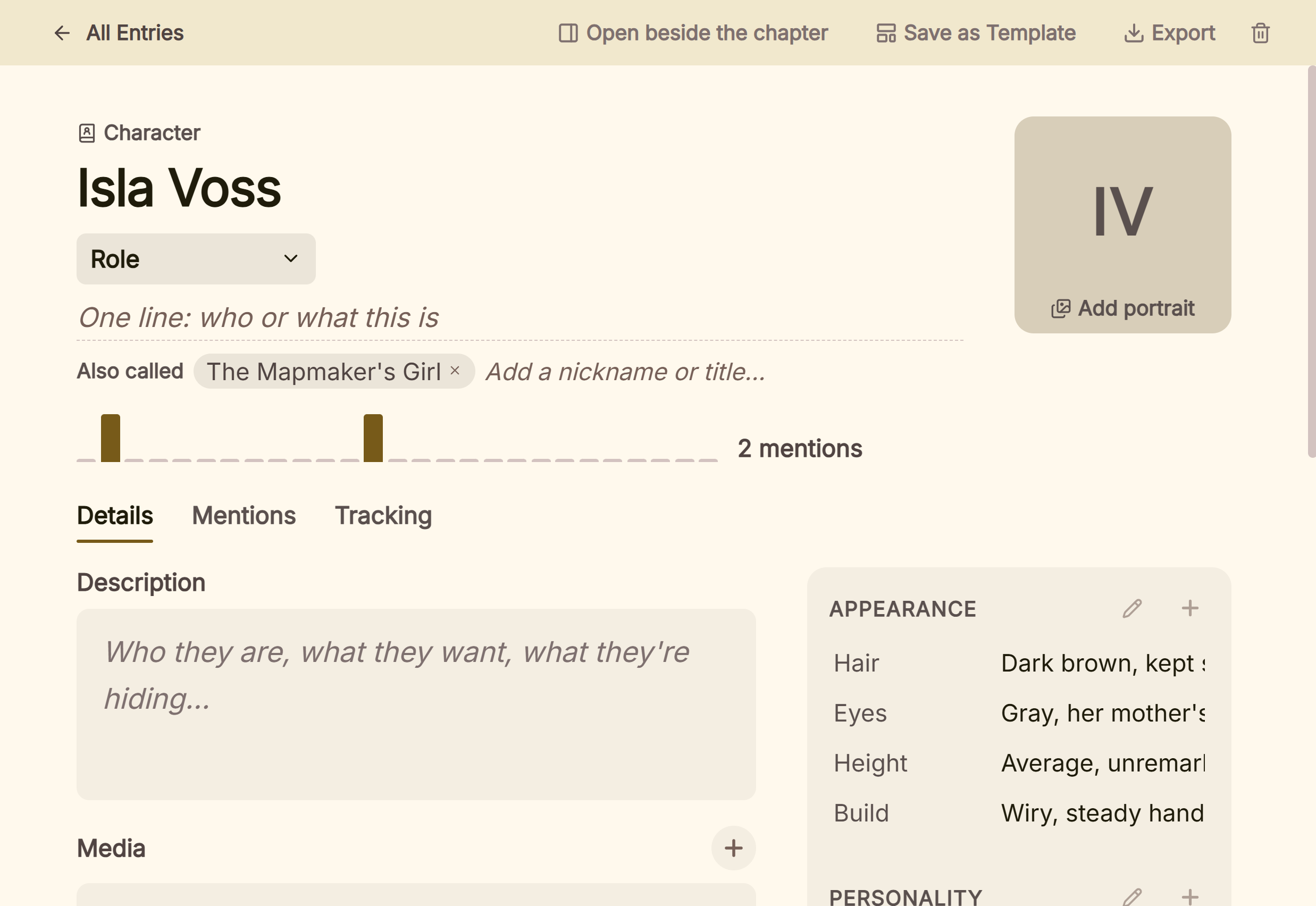 A Codex entry with an alias and its mentions
Deckle leaves the Matrix view, the series Codex, the browser version, collaboration and AI to Novelcrafter. What it adds is that the same project formats the finished book, with no second app and no connection. A side-by-side of the two is on Novelcrafter vs Deckle.
Deckle is a one-time purchase. To try it, click Take Deckle for a Spin on the screen Deckle opens to. It is a free demo with no card, no account and no time limit. It opens a sample novel with a filled Codex that you can explore, restyle and export as real EPUB, PDF and DOCX files. New writing is capped at about 500 words and new Codex entries at three, and imports are blocked.
What do ranking pages get wrong about Novelcrafter?
Two claims on a page that ranks for "novelcrafter review" disagree with Novelcrafter's own pages on 1 November 2026.
- "$40/month (paid annually)". DreamGen's Novelcrafter review (18 April 2026) lists Scribe at "$40/month (paid annually)", and Hobbyist, Artisan and Specialist at $80, $140 and $200 "/month (paid annually)". Annual billing is "2 Months off" the monthly price, so those are prices per year: $40 a year for Scribe, not $40 a month.
- "Word, Markdown, HTML, EPUB, PDF, and DOCX". The same review says you can import or export in these formats. Novelcrafter's export help offers "a Word .docx" or Markdown, and its formatting FAQ (updated 31 August 2026) says "you cannot format your novel within Novelcrafter for publication." Its features page lists HTML as an import format, not an export.
Common mistakes when choosing Novelcrafter
- Counting on the installed app offline. It is the website in its own window, and it needs a connection.
- Buying Hobbyist and expecting AI included. Hobbyist lets you connect a key. The AI vendor bills you separately.
- Expecting a print-ready file. Novelcrafter exports Word and Markdown. Plan for a formatting app, or pick one that formats.
- Downloading the wrong "Novel Crafter". The iPhone app of that name is a different product from a different company.
- Trialling with an empty project. Twenty-one days goes quickly. Import a real draft and build ten Codex entries on the first day.
- Exporting only when you leave. Export to Word now and then, so you always have a copy of your own.
FAQ
What is Novelcrafter?
A browser-based app for planning and writing novels, built around a Codex that tracks characters, places and lore through the text, with optional AI that runs on your own key.
Is Novelcrafter free?
No. It has a 21-day free trial with every feature and no card, then costs $4 to $20 a month. There is no free plan.
Is Novelcrafter AI?
It has optional AI tools on Hobbyist and above, using a vendor key or local model you connect. Scribe has no AI features, and Novelcrafter calls itself a writing app first.
Does Novelcrafter have a desktop app?
Not a native one. You can install the website as an app from Chrome, Edge or Safari, and it still needs an internet connection.
Can Novelcrafter format a book for KDP?
No. Its help says you cannot format your novel for publication in Novelcrafter. You export Word or Markdown and format elsewhere.
Is Novel Crafter the same as Novelcrafter?
People spell it both ways. The web app is Novelcrafter at novelcrafter.com. An iPhone app listed as Novel Crafter is sold by a different company.
What is a good Novelcrafter alternative?
It depends on why you are leaving. Sudowrite suits AI-first drafting, Scrivener suits offline writing with Compile, and Deckle suits writers who want a Codex, no AI and EPUB and print PDF from the same app.
Sources
Retrieved 1 November 2026 unless stated. Prices change, so check the vendor page before buying.
- Novelcrafter, home page: "Write, without restriction", "247k+ authors", AI vendors and local models, no venture funding, testimonial
- Novelcrafter, Pricing: tiers and monthly prices, AI by tier, "2 Months off", advanced review "planned", 21-day trial, no free plan, read-only access with export after cancelling; annual plan data $40, $80, $140 and $200 read on 20 October 2026
- Novelcrafter, Features: Codex ("one intelligent wiki"), Grid, Matrix and Outline, write, review, AI, chat and collaboration features by tier; import from Word, Markdown or HTML
- Novelcrafter Help, Can I use Novelcrafter in offline mode? (updated 6 February 2025)
- Novelcrafter Help, Installing as a web app (updated 17 January 2025)
- Novelcrafter Help, Exporting your novel (updated 25 April 2025): Word .docx or Markdown, with the Codex, chats and snippets optional
- Novelcrafter Help, Formatting for export (updated 31 August 2026): no formatting for publication, planned
- Novelcrafter Help, How much does the AI cost? (retrieved 20 October 2026): "designed firstly as a writing platform"
- Novelcrafter, Privacy Policy (retrieved 20 October 2026): no AI training on users' novels
- Novelcrafter, Changelog: entries on 24 September, 2 October and 19 October 2026
- Apple App Store, listing id6759069936: seller Love Power Up, LLC; displayed name Novel Shaper
- Sudowrite, Scrivener (Literature & Latte), Plottr and Campfire Writing prices and platforms from their own pricing and feature pages, as recorded on Novelcrafter alternatives and Aeon Timeline (retrieved 20 to 31 October 2026)
- Ranking pages checked: DreamGen, Novelcrafter review (18 April 2026); Kindlepreneur, Novelcrafter review (updated 23 December 2025); MakerStack, Novelcrafter review (7 June 2026); SelfPublishing.com, Novelcrafter review (16 April 2025)
Novelcrafter is a trademark of its owner. Scrivener is a trademark of Literature & Latte. Sudowrite, Plottr, Campfire Writing, Atticus and every other product name here belong to their respective owners. Deckle is not affiliated with or endorsed by any product named here.