

Novelcrafter is a browser-based subscription app built around a Codex and optional AI tools. Scrivener is a one-time desktop app for Mac, Windows and iOS that works offline and has no AI features on its product pages. Novelcrafter exports Word and Markdown only. Scrivener's Compile makes EPUB, Kindle ebooks, PDF and Word files. Pick Novelcrafter for AI help drawn from a story bible, Scrivener for offline work and finished files.

Every Novelcrafter fact here comes from novelcrafter.com and every Scrivener fact from literatureandlatte.com, read on 20 October 2026. Prices are in US dollars as of October 2026. This page is published by Deckle, which makes a third app, and the short section on it is marked as ours.
Novelcrafter vs Scrivener at a glance
| Novelcrafter | Scrivener | |
|---|---|---|
| What it is | Planning, Codex and writing, with optional AI | Writing and organising, with Compile for output |
| Platforms | Browser; installable as a web app from Chrome, Edge or Safari | macOS, Windows, iOS and iPadOS |
| Offline | No: "only use Novelcrafter with an active internet connection" | Yes, a desktop app |
| Price model | Subscription, four tiers | One-time, one licence per platform |
| Price (as of October 2026) | $4, $8, $14 or $20 a month | $59.99 Mac or Windows; $23.99 iOS |
| Trial | 21 days, all features, no card | 30 days of actual use, macOS and Windows |
| Story bible | The Codex: types, aliases, relations, mentions, progressions, series codex | Character and location sheets as Binder documents from templates |
| Generative AI | Yes, optional, with your own API key from Hobbyist up | None mentioned |
| Export | Word .docx, Markdown | Word, RTF, OpenOffice, PDF, Final Draft, plain text, EPUB, Kindle ebooks, Pandoc and MultiMarkdown |
| Publication formatting | "you cannot format your novel within Novelcrafter for publication" | Compile PDF "for printing, self-publishing" |
| Import | .docx, Markdown, Apple Pages | Word, plain text, Final Draft, images, PDFs, movies, sound files, web pages |
| Collaboration | Specialist tier: collaborative writing and teams | None listed on its product pages |
How do Novelcrafter and Scrivener organise a novel?
Novelcrafter organises a book into acts, chapters and scenes, with Grid, Matrix and Outline plan views. The Matrix tracks "characters and plot elements across scenes". The Codex sits beside the manuscript as "a wiki that truly keeps track": it holds "characters, places, lore and more" and "automatically keeps track and links them". Codex entries have types, aliases and relations, and a Mentions tab shows where an entry appears. A series codex shares entries across books.
Scrivener organises a project in the Binder, a tree of documents. Literature & Latte's overview says "every section of your project is attached to a virtual index card" on the Corkboard. The Outliner shows synopses and metadata, and Scrivenings joins several sections into one document to edit. Characters and places are ordinary documents made from templates, such as "character or location sheets". Collections build saved lists of documents, and Snapshots with Compare show what changed in a section.
Novelcrafter is ahead on a linked story bible. Scrivener is ahead on flexible views of the manuscript itself.
Does Novelcrafter or Scrivener use AI?
Novelcrafter has AI tools, and they are optional. Scrivener's product pages mention no AI features.
Novelcrafter's homepage says "You're in control of how much you want to use it." The Scribe tier ($4 a month) has no AI features. From Hobbyist ($8 a month) you connect your own API key for scene summaries, character extraction and prose generated from scene beats. Artisan ($14 a month) adds Workshop chat. Novelcrafter's help says "we currently do not offer any AI model ourselves". You connect OpenAI, Claude, OpenRouter, Groq or another vendor and pay it directly, or run a local model through Ollama or LM Studio. One testimonial on the homepage says "the AI pulls details from the codex!"
Literature & Latte mentions no AI feature on Scrivener's overview, features or FAQ pages. The detail, including the writing tools a Mac's operating system adds to every app, is in does Scrivener use AI. Apps whose vendors describe no AI are compared in novel writing software without AI.
Does Novelcrafter work offline like Scrivener?
No. Novelcrafter's help says "Right now you can only use Novelcrafter with an active internet connection." It adds that the app "has been designed from the ground up to eventually support an offline mode" with "no ETA". That page was last updated on 6 February 2025. Installing Novelcrafter as a web app from Chrome does not change this, since Chrome's help says some web apps "may not work completely without an internet connection."
Scrivener is a desktop app on macOS, Windows and iOS, so it works offline. Its features page says to "sync using Dropbox or transfer with iTunes" between devices.
Can Novelcrafter or Scrivener format a book for publishing?
Scrivener can produce publishing files. Novelcrafter cannot.
Novelcrafter's help says "As of February 2025, you cannot format your novel within Novelcrafter for publication. You will need to export the manuscript into your program of choice." It exports "a Word .docx" or Markdown, and publishes guides for exporting to Scrivener and Atticus. The page, updated 31 August 2026, says formatting is "on our roadmap".
Scrivener's Compile writes EPUB, PDF, Word and more. Scrivener for macOS 3.5.0 (1 October 2025) removed Kindle (.mobi) from Compile, so as of October 2026 only the Windows version still offers it. Literature & Latte describes PDF output "for printing, self-publishing" and does not call it professionally typeset. Compile is configurable and takes learning: the steps are in the Scrivener compile tutorial. Many Scrivener users still hand the manuscript to a formatting app such as Vellum or Atticus.
Novelcrafter vs Scrivener price over three years
Novelcrafter is a subscription. Scrivener is paid once per platform. This table uses each vendor's published prices as of October 2026.
| Setup | Novelcrafter, three years | Scrivener, three years |
|---|---|---|
| Writing with no AI | Scribe: $144 monthly, or $120 with annual billing ("2 months off") | $59.99 (Mac or Windows) |
| Writing with AI tools | Hobbyist: $288 monthly, or $240 annually, plus your AI vendor's charges | Not offered |
| AI with Workshop chat | Artisan: $504 monthly, or $420 annually, plus AI vendor charges | Not offered |
Scrivener's minor updates are free. Its FAQ says "we occasionally release more major updates that are paid-for," and "Each licence we sell covers only one platform." After cancelling Novelcrafter, you keep read-only access and can export. Scrivener's prices and licence terms are in what Scrivener costs.
Moving between Novelcrafter and Scrivener
Novelcrafter publishes an "Export to Scrivener" guide, and the route is a Word file. Export the novel from Novelcrafter as .docx, then import it into Scrivener, which imports Word documents. The Codex does not come across inside the manuscript file, so Codex entries need copying into Scrivener documents.
Going the other way, Novelcrafter imports .docx, Markdown and Apple Pages, not Scrivener projects. Compile the Scrivener project to Word first. Novelcrafter's Word import reads Heading 1 as acts and Heading 2 as chapters (or Heading 1 alone for chapters), and "***" as scene breaks. It rejects a table of contents and does not support inline images yet.
Pick Novelcrafter if
- You want AI help that draws on your own story bible, with your choice of AI vendor or a local model.
- You want a linked Codex with aliases, relations, mentions and a series codex.
- You write in a browser on several computers and do not need to work offline.
- You co-write and can use the Specialist tier.
Pick Scrivener if
- You want to write offline, on a desktop or on iOS.
- You prefer one payment over a subscription.
- You want EPUB, Kindle and PDF files from the same app.
- You want no AI features in the app.
Where Deckle sits
Deckle is our app, so weigh this section accordingly.
Deckle is a desktop app for Windows, macOS and Linux, sold as a one-time purchase. It works offline after activation, and a project is a folder on your own disk: one .deckle database plus research/ and .deckle-assets/ folders. It has no generative AI.
Its Codex takes aliases, lists the chapters that name each entry, and underlines Codex names in the prose by default. The Inspector's Codex tab lists the entries in the chapter you have open.
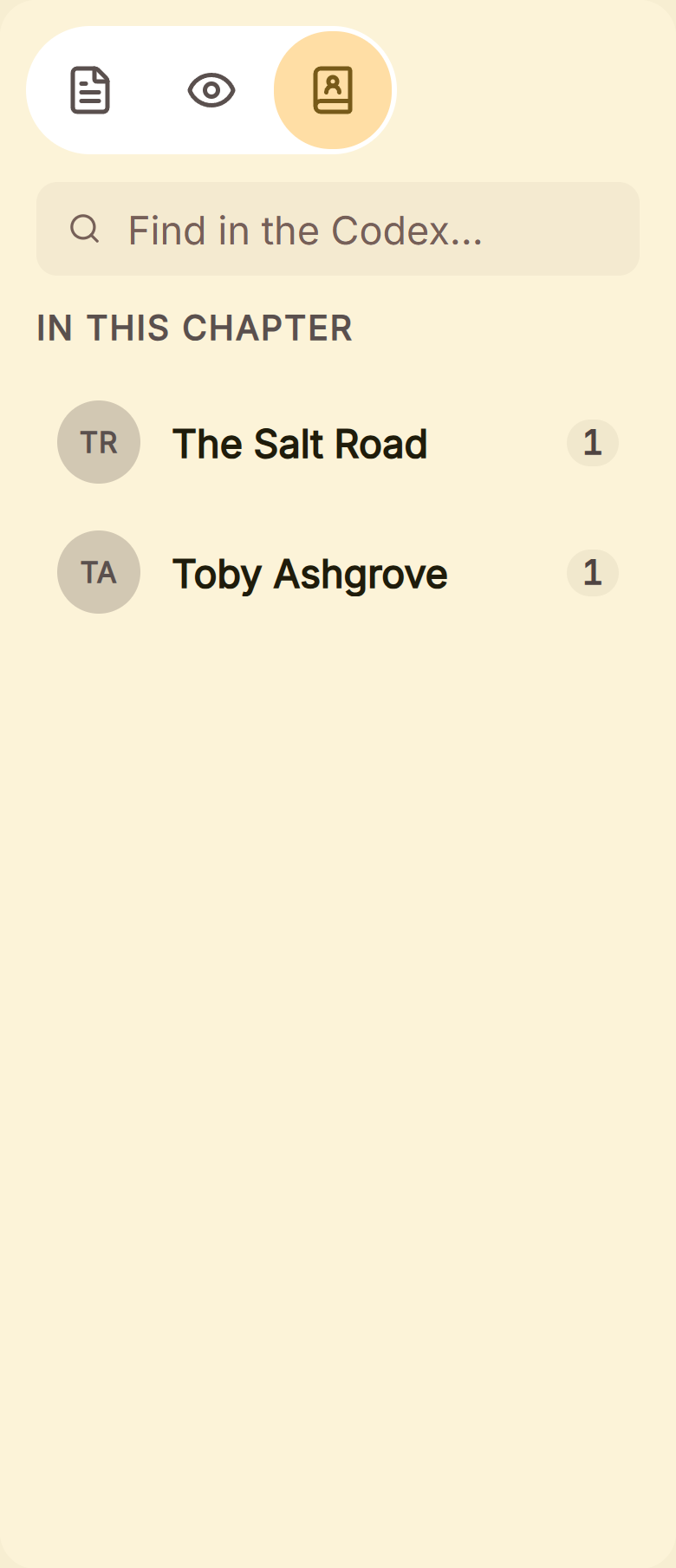 The Inspector's Codex tab: who and what the open chapter names
Unlike either app above, it formats the finished book itself, with 26 style presets and exports to EPUB, print PDF and DOCX.
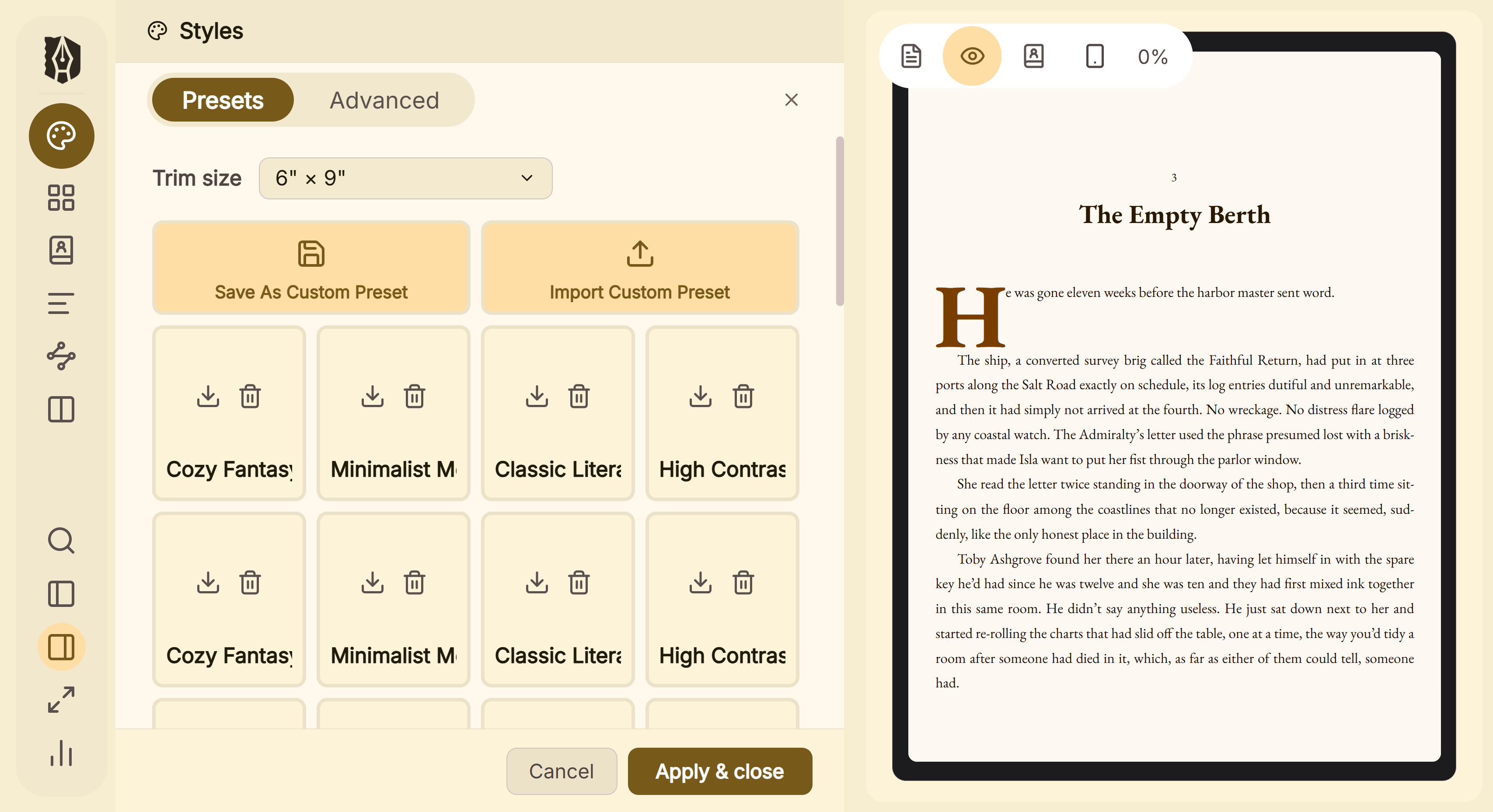 Style presets, previewed on the page before export
It has no iOS app, no browser version and no collaboration. It imports Word files, so a Novelcrafter .docx export goes straight in.
To try it, click Take Deckle for a Spin on the screen Deckle opens to. There is no card, no account and no time limit. It opens a sample novel with every screen open to explore, and you can restyle it and export real EPUB, PDF and DOCX files. New writing is capped at about 500 words, and new documents and imports are blocked. The Scrivener side of that comparison is in Scrivener vs Deckle.
FAQ
Is Novelcrafter better than Scrivener?
Nothing authoritative ranks them. Novelcrafter is ahead on its linked Codex and AI tools. Scrivener is ahead on offline use, output formats and a one-time price.
Does Novelcrafter work offline?
No. Novelcrafter's help says it needs "an active internet connection", with no date for an offline mode. Scrivener works offline.
Can I use Novelcrafter without AI?
Yes. The Scribe tier has no AI features, and higher tiers run AI only with a key you connect.
Can I export from Novelcrafter to Scrivener?
Yes, through a Word file. Novelcrafter exports .docx and publishes an "Export to Scrivener" guide. Codex entries need moving by hand.
Is Novelcrafter a subscription?
Yes. Plans cost $4 to $20 a month as of October 2026, with no free plan. Scrivener is $59.99 once per platform.
Does Novelcrafter have an app for Windows or Mac?
It installs as a web app from Chrome, Edge or Safari. Its help names no native desktop app.
Does Scrivener have a Codex like Novelcrafter?
Not by that name. Scrivener uses character and location sheets as Binder documents made from templates.
Sources
All retrieved 20 October 2026.
- Novelcrafter homepage: Codex description, AI control, AI vendors
- Novelcrafter pricing: tiers, prices, AI by tier, trial, collaboration, read-only access after cancelling
- Can I use Novelcrafter in offline mode?, Novelcrafter Help, updated 6 February 2025
- Formatting for export, Novelcrafter Help, updated 31 August 2026
- Exporting your novel, Importing from Word, documentation index and web app setup, Novelcrafter Help
- Does Novelcrafter provide its own AI?, Novelcrafter Help, updated 8 May 2025
- Scrivener overview, Literature & Latte: platforms, export and import formats, Compile PDF wording
- Literature & Latte, Scrivener release notes for macOS (retrieved 21 October 2026): 3.5.0, 1 October 2025, Kindle (.mobi) removed from Compile
- Scrivener features, Literature & Latte: Corkboard, Scrivenings, templates, Collections, Snapshots, EPUB and Kindle, Dropbox sync
- Scrivener FAQs, Literature & Latte: licence per platform, trial, paid major upgrades
- Scrivener store, Literature & Latte: iOS price
- Use web apps, Google Chrome Help: installed web apps may not work fully offline
- Literature & Latte, Cross-grading: "Scrivener for macOS or Windows is $59.99" (the store page loads its prices from the checkout, so this page shows the figure in its text), retrieved 21 October 2026
Scrivener is a trademark of Literature & Latte. Novelcrafter and every other product name here belong to their owners. Deckle is not affiliated with or endorsed by any product named here.