

The main LivingWriter alternatives are Scrivener, a one-time desktop app, and Dabble, a synced subscription app with no AI apart from the text-to-speech voices behind Read to Me (as of October 2026). Novlr and Reedsy Studio are browser apps with free plans, and Atticus and Deckle write and format in one app. bibisco, Manuskript and yWriter are free desktop tools. Authors usually leave LivingWriter for offline writing, a one-time price, no AI, or an EPUB file.

No standards body ranks writing software, so this page ranks nothing. Every LivingWriter fact comes from livingwriter.com, its help guides at guides.livingwriter.com, or its App Store listing, all read on 20 October 2026. Prices are in US dollars as of October 2026.
What LivingWriter does well
LivingWriter is a cloud writing and planning app for fiction, non-fiction and screenplays. Its features, plans and apps are set out in full on what Living Writer is and who it suits.
- Every device. LivingWriter runs in the browser and as a desktop app for Windows 10 or later and for Mac (Intel and Apple Silicon). Its App Store listing says the iPhone and iPad app "Requires iOS 14.0 or later." Its downloads page says the desktop app syncs with LivingWriter on web, iOS and Android.
- Boards for planning. The Planning Board has a Standard Grid and a Freeform Grid. The Elements Board holds characters, objects and locations in a Simple or Detailed view, and a Research Board keeps sources nearby.
- Templates. LivingWriter's quickstart guide lists templates "from the Hero's Journey and Romancing the Beat to Screenplays and Academic Theses", plus memoir, biography and self-help templates.
- Sharing with permissions. You can share a manuscript or a chapter by link or email invite, with "view-only, comment, or edit rights."
- Revision history. The Revision tab keeps past versions to revert to, plus Local Versions "typically available for around 48 hours."
- Screenplays. Pro includes "Unlimited manuscripts and screenplays", and AI Convert to Screenplay turns a chapter into screenplay format.
- A free plan. One manuscript of up to 25,000 words, with PDF export and no card needed.
If you write on a phone and a laptop, share drafts with an editor, and plan on visual boards, LivingWriter covers all three.
Why authors look for a LivingWriter alternative
- No published offline mode. LivingWriter's public roadmap lists "Offline Mode on Desktop App" as 90% complete with an estimated date of Q4 2026. Its June 2025 changelog told users "many of you have been waiting patiently for Offline Mode." Its pricing FAQ says "Every word you type is instantly saved to the cloud."
- No EPUB export is published. The export guide lists "PDF or docx, to Google Drive, and lastly, to Amazon Manuscript." The pricing comparison lists "PDF, Word (.docx), print" for paid plans. No LivingWriter page names EPUB. The roadmap's "Enhanced Self-Publishing" item, at 60%, promises "Mobi export and send straight to kindle for viewing."
- Generative AI on every plan. Free includes 3 AI requests a month, Pro 25, and Pro + AI unlimited. The features include AI Rewrite, AI Chat and AI cover images. The detail is in does LivingWriter use AI.
- A subscription with prices that vary by visitor. See the next section.
- No Scrivener import is documented. LivingWriter imports Word files on Pro and up, with chapters split by heading or font size.
How much does LivingWriter cost?
LivingWriter does not show every visitor the same price. Its pricing page loads prices from LivingWriter's own price catalog and assigns each visitor a price version. Across 12 visits on 20 October 2026, the page was assigned two sets:
| Plan (as of October 2026) | Price set A | Price set B |
|---|---|---|
| Free | $0 | $0 |
| Pro, monthly | $19.99 a month | $24.99 a month |
| Pro, quarterly | $49 | $59 |
| Pro, annual | $149 a year | $179 a year |
| Pro + AI, monthly | $29.99 a month | $34.99 a month |
| Pro + AI, quarterly | $69 | $79 |
| Pro + AI, annual | $199 a year | $229 a year |
| Lifetime access | $799 once | $799 once |
The catalog describes Lifetime access as "One-time Lifetime access for $799." Paid plans start with a 7-day trial at "$0.99 payment today" on the pricing page (as of 21 October 2026), though LivingWriter's Terms of Service, section 6, still say "We offer a 14-day free trial to new users" and "do not take credit card details until the user chooses to subscribe". Older text on the same pricing page still says "just $14.99 a month", so check the price you are shown before you subscribe.
If you cancel, LivingWriter says "your account will switch to the Free plan at the end of your billing cycle." You can keep editing one manuscript, and "Any additional manuscripts will remain accessible in view-only mode and can be exported at any time."
LivingWriter alternatives at a glance
| Tool | What it is | Platforms | Price (as of October 2026) | Offline | EPUB | Generative AI |
|---|---|---|---|---|---|---|
| LivingWriter | Writing and planning, cloud | Web, Windows, Mac, iOS, Android | Free; Pro from $149 a year; lifetime $799 | Not published (on roadmap) | Not published | Yes |
| Scrivener | Writing and organising | Mac, Windows, iOS | $59.99 Mac or Windows, one-time | Yes | Yes, via Compile | None mentioned |
| Dabble | Writing and plotting, synced | Windows, Mac, Linux, browser, phones (web app) | $15/$23/$39 a month billed annually; lifetime $699 or $899 | Yes | No | None |
| Novlr | Browser writing app | Web only | Free (2 projects); $8 or $16 a month billed yearly ($10 or $20 billed monthly); $499 lifetime | Limited | Studio only | None |
| Reedsy Studio | Writing and formatting | Web only | Free; add-ons from $4.99 a month | No | Yes, EPUB 3 | None listed |
| Atticus | Writing and formatting | Windows, Mac, Linux, Chromebook, browser | $147 one-time | Yes, with limits | Yes | None mentioned |
| Novelcrafter | Planning and writing, Codex | Browser only | $4 to $20 a month | No | No | Yes (your own API key) |
| bibisco | Writing and organising | Windows, Mac, Linux | Free Community; $69 Supporters | Yes | Yes | None mentioned |
| Deckle | Writing, organising and formatting | Windows, macOS, Linux | One-time purchase; free demo | Yes, after activation | Yes | None |
A LivingWriter alternative that works offline
Desktop apps that keep the project on your own disk work with no connection at all.
Scrivener runs on Mac and Windows, and its iOS app syncs "using Dropbox or transfer with iTunes." It has a Binder, a Corkboard of index cards, an Outliner, Snapshots and writing targets. Literature & Latte's overview says Compile can "Create Epub and Kindle ebooks", and it also writes PDF and Word files. The features page still says so, but the macOS release notes record Kindle (.mobi) removed in 3.5.0 (1 October 2025); the Windows version still has it. The two apps are compared in Scrivener vs LivingWriter.
Dabble is the closest match to LivingWriter's cloud model with real offline writing. "As you type, each change saves straight to your device before anything reaches the server." It syncs across Windows, Mac, Linux, the browser and phones, and it has no generative AI. It exports no EPUB or print PDF. The full comparison is in Dabble vs LivingWriter.
bibisco, Manuskript and yWriter are free desktop apps that store everything locally. bibisco runs on Windows, Mac and Linux and exports PDF, DOCX and EPUB. Manuskript needs pandoc for EPUB. yWriter is Windows only and exports EPUB.
Atticus formats "with or without an internet connection", though its help says "You do need to be online to import and export files."
Is there a free LivingWriter alternative?
Free tools cover drafting, and each states its own limit.
- Reedsy Studio is free in the browser and exports EPUB 3 and a print-ready PDF. It has real-time collaboration with comments and tracked changes. Asked about offline use, Reedsy answers "Currently, no".
- Novlr's free plan holds 2 projects in the browser. Novlr says "We do not have AI built into our platform."
- bibisco Community Edition is free on Windows, Mac and Linux.
- Manuskript is free and open source (GPL-3.0), and its download page says it is "still in the early development stages".
- yWriter is free on Windows.
- Google Docs is free, syncs and shares like LivingWriter, and exports .docx, .pdf and .epub. It includes Gemini generative AI on some paid plans.
LivingWriter's own Free plan stays an option: one manuscript, 25,000 words and PDF export.
A LivingWriter alternative with no AI
Dabble, Scrivener, Novlr, Plottr, bibisco and Deckle list no generative AI. Dabble's help says "Dabble will never put words on the page for you." Novelcrafter, another cloud app, has generative AI with your own API key, and the cloud alternatives to it are in Novelcrafter alternatives. The full no-AI list is in novel writing software without AI.
Deckle: writing, organising and formatting on the desktop
Deckle is our app, so weigh this section accordingly.
Deckle is a native desktop app for Windows, macOS and Linux. A project is a folder on your own disk, holding one .deckle database for the writing, notes and settings, plus research/ and .deckle-assets/ folders. It works offline after activation, and nothing is stored on a Deckle server.
For planning, Deckle has a Binder (Draft, Research, Trash) and an Outliner with a Grid View of index cards and a List view. There is a Codex for characters, locations and items, and a Timeline with plotlines and a "Story order" view. Inline comments, snapshots and Writing Stats (a manuscript target, deadline, goals and streaks) cover the rest.
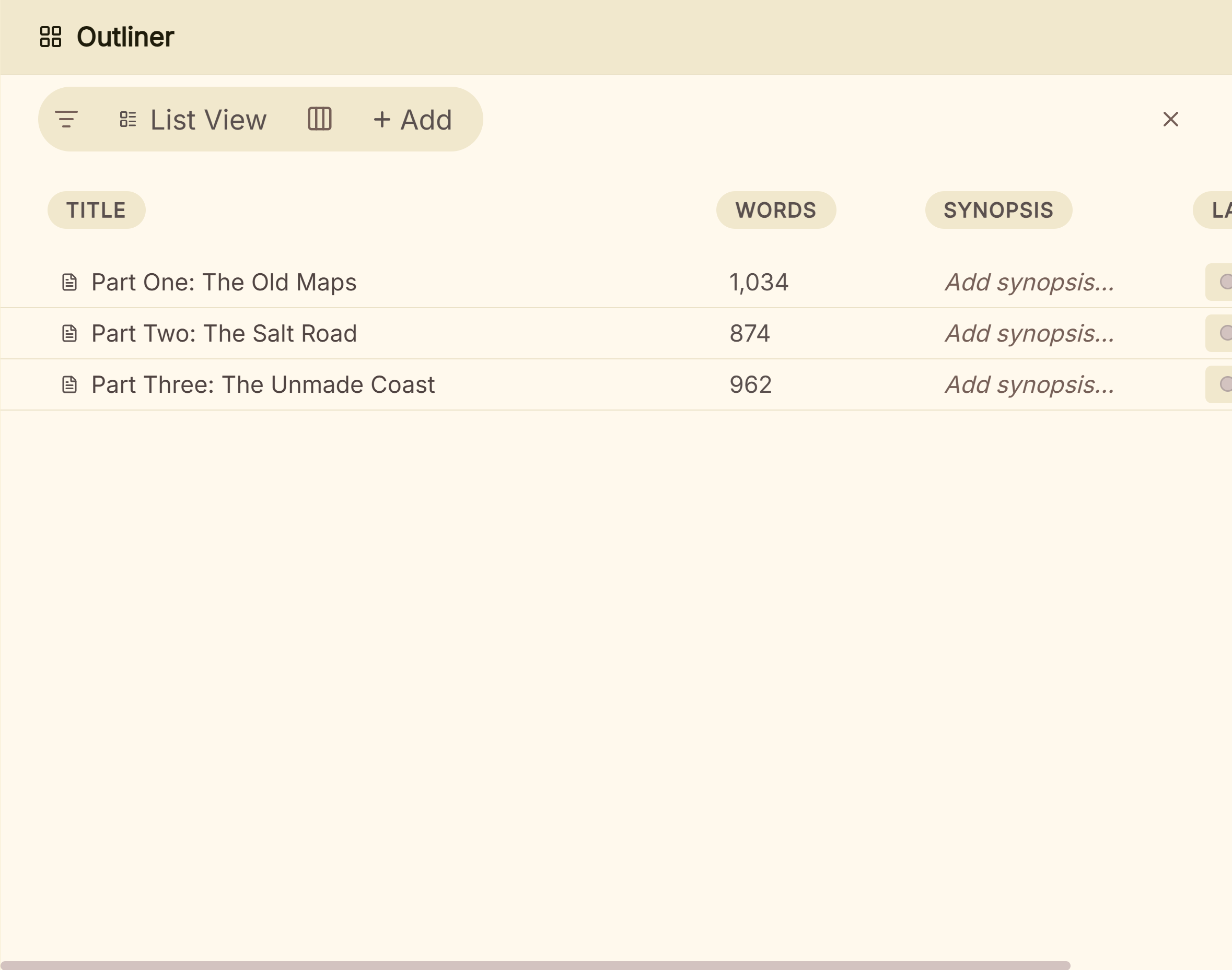 The Outliner's List view, with word counts and synopses
The difference from LivingWriter is the last step. Deckle formats the book itself, with 26 built-in style presets, eight trim sizes, drop caps and running heads. It exports EPUB (Generic, Kindle, Apple Books and Kobo targets), a print PDF and DOCX. The Kindle target writes an EPUB, which KDP accepts for ebooks, so no Mobi file is needed.
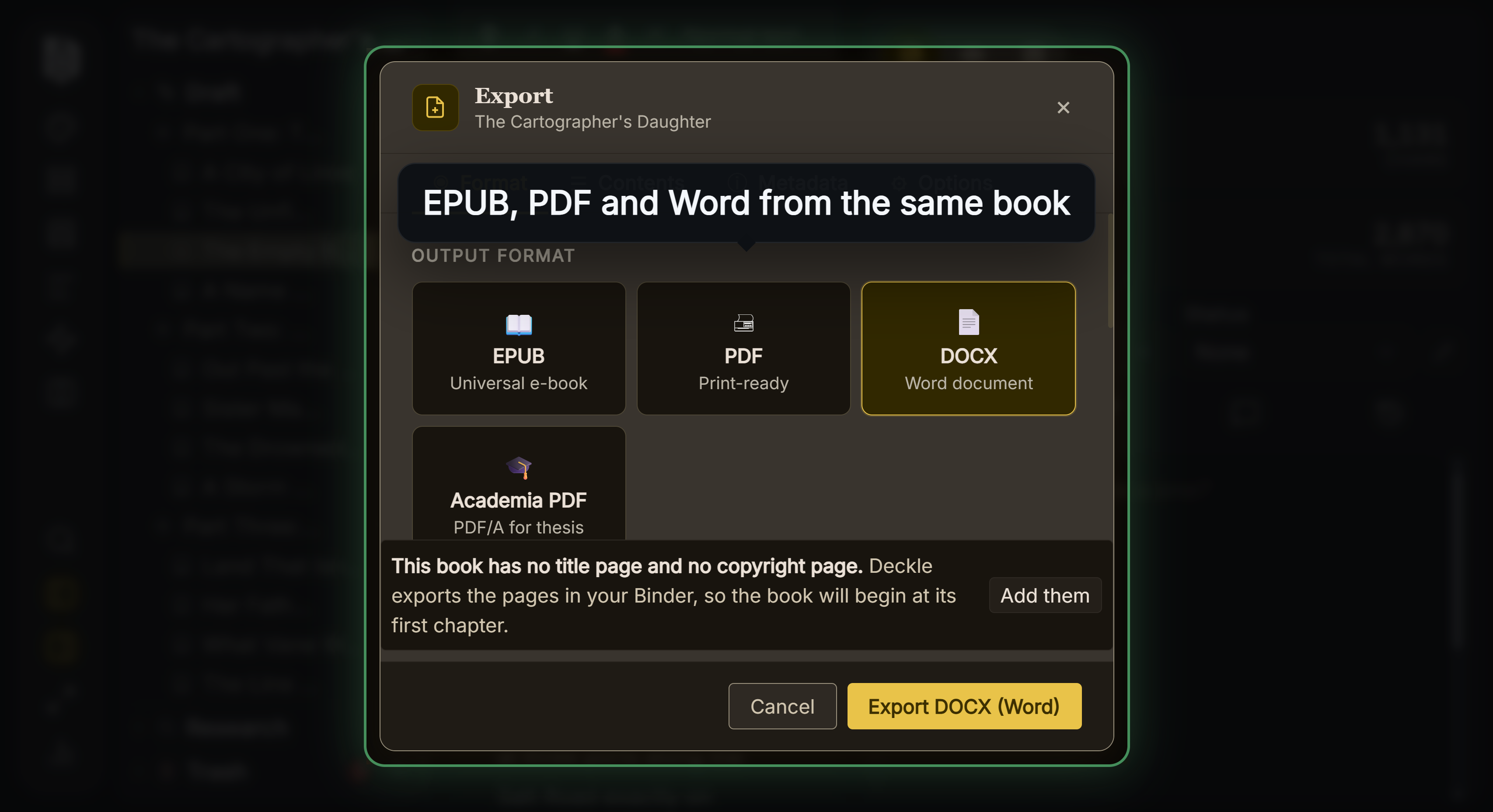 EPUB, print PDF and Word from the same project Deckle has no generative AI, and no AI library or service appears anywhere in its code.
Where Deckle is behind LivingWriter:
- No cloud sync. Files are local. LivingWriter syncs web, desktop and phone.
- No phone, tablet or browser version. LivingWriter has all three.
- No sharing or collaboration. LivingWriter shares with view, comment or edit rights. Deckle has inline comments for your own notes.
- No screenplay format. LivingWriter writes and converts screenplays.
Deckle is a one-time purchase. To try it, click Try it free on the screen Deckle opens to. There is no card, no account and no time limit. It opens a sample novel with every screen open to explore, and you can restyle it and export real EPUB, PDF and DOCX files. New writing is capped at about 500 words, and new documents and imports are blocked.
What you'd lose by leaving LivingWriter
| LivingWriter feature | What the alternatives offer |
|---|---|
| Sync across web, desktop and phones | Dabble syncs every device. Scrivener syncs through Dropbox. bibisco, Manuskript, yWriter and Deckle are local only. |
| A native iPhone and iPad app | Scrivener has an iOS app. Dabble, Novlr and Reedsy run in mobile browsers. Deckle has none. |
| Sharing with view, comment or edit rights | Reedsy Studio and Google Docs share and co-edit. Dabble has live co-authoring. Scrivener and Deckle list none. |
| Planning and Elements boards | Dabble's Plot Grid and Plottr are the nearest match. Scrivener's Corkboard and Deckle's Outliner Grid View are index cards. Deckle's Codex holds characters, locations and items. |
| Story structure templates | Plottr has 30+ plot templates by its features page (40+ by its homepage), including the Hero's Journey and Three Act. |
| AI Rewrite, Chat and Analysis | Novelcrafter and Google Docs have generative AI. The other tools here do not. |
How to move a book out of LivingWriter
Export Word from LivingWriter, then import it into the new tool.
LivingWriter's export guide says you "can export your entire manuscript or specific chapters, as well as the Chapter Notes and even Elements." Word export is on Pro and Pro + AI; the Free plan exports PDF only. If you cancel, your other manuscripts stay view-only and "can be exported at any time."
Scrivener, Dabble, Atticus and Deckle all import Word files. Deckle splits a Word file into chapters by heading style, so check that chapter titles are headings before you import. Export your Elements separately, because a manuscript file does not carry the Elements Board. Test two chapters first, using the method in how to move a manuscript between writing apps.
FAQ
Q: What is the best LivingWriter alternative? A: Nothing authoritative ranks writing software. Scrivener suits a one-time desktop app, Dabble suits synced writing with no AI beyond its Read to Me voices, Reedsy Studio suits a free browser tool, and Atticus or Deckle suit writing and formatting in one app.
Q: Is there a free alternative to LivingWriter? A: Yes. Reedsy Studio, Google Docs, bibisco Community, Manuskript and yWriter are free. Novlr has a free plan with 2 projects.
Q: Does LivingWriter work offline? A: LivingWriter has not published an offline mode. Its roadmap lists "Offline Mode on Desktop App" at 90%, estimated for Q4 2026.
Q: Can LivingWriter export EPUB? A: LivingWriter's pages list PDF, DOCX, Google Drive and Amazon Manuscript export. None of them names EPUB.
Q: Is there a LivingWriter alternative without a subscription? A: Scrivener ($59.99 per platform), Atticus ($147) and Deckle are one-time purchases. LivingWriter's own one-time option is Lifetime access at $799.
Q: Is there a LivingWriter alternative with no AI? A: Dabble, Scrivener, Novlr, Plottr, bibisco and Deckle list no generative AI.
Q: Does LivingWriter have a lifetime plan? A: Yes. LivingWriter's price catalog lists Lifetime access at $799 as a one-time payment (as of October 2026).
Sources
All retrieved 20 October 2026. Prices change, so check the vendor page before buying.
- LivingWriter pricing: plans, plan comparison, AI request counts, trial, cancellation FAQ, cloud saving. Prices are loaded per visitor from LivingWriter's price catalog. Re-checked 21 October 2026: two price sets still assigned per visitor, $799 lifetime still in the catalog, trial listed as a "$1 paid-trial"
- LivingWriter roadmap: "Offline Mode on Desktop App" (90%, Q4 2026), "Enhanced Self-Publishing" (60%)
- LivingWriter downloads: Windows 10+, Mac Intel and Apple Silicon, sync with web, iOS and Android
- Exporting a Manuscript, LivingWriter Guides: PDF, docx, Google Drive, Amazon Manuscript
- Welcome to LivingWriter, Planning Board, Version History and Share Manuscript and Chapters, LivingWriter Guides
- June 17, 2025 changelog, LivingWriter Guides: Offline Mode still awaited
- LivingWriter: Write Anywhere, Apple App Store: iOS 14+, version 2.5.111
- What file formats are supported for eBook manuscripts?, Amazon KDP Help: EPUB and DOCX accepted
- Scrivener overview, Scrivener features and Scrivener store, Literature & Latte
- Dabble pricing, Working offline and Dabble is AI-free, Dabble
- Understanding your subscription, Dabble Help (retrieved 21 October 2026): "Dabble is AI-free", with text-to-speech voices for Read to Me as "the one exception"
- Novlr pricing, Reedsy Studio FAQ, Atticus, Novelcrafter pricing, bibisco download, Manuskript, yWriter 7
- Novlr, Pricing (monthly billing $10 and $20) and Novlr Help, How much does Novlr cost? (EPUB export on Studio), both retrieved 21 October 2026
- Plottr, features ("30+ proven plot templates") and home page ("40+ plot outlining templates"), retrieved 21 October 2026
- Literature & Latte, Cross-grading: "Scrivener for macOS or Windows is $59.99" (the store page loads its prices from the checkout, so this page shows the figure in its text), retrieved 21 October 2026
- Literature & Latte, Scrivener release notes for macOS: 3.5.0, 1 October 2025, Kindle (.mobi) removed from Compile; the Windows notes, up to 3.1.6 (3 September 2025), record no such change (retrieved 21 October 2026)
- LivingWriter, Terms of Service: section 6, "14-day free trial", no card taken up front (read 21 October 2026)
Scrivener is a trademark of Literature & Latte. LivingWriter is a trademark of LivingWriter LLC, and every other product name here belongs to its owner. Deckle is not affiliated with or endorsed by any product named here.