

Living Writer, spelled LivingWriter by its maker, is a cloud writing and planning app for novels, non-fiction and screenplays: you write in chapters, keep characters and places as Story Elements, plan on boards, and open the same manuscript in a browser, a Windows or Mac desktop app, or the iPhone, iPad and Android apps. It has a free plan; Pro costs $149 or $179 a year, depending on which of two price sets its site shows you, and Pro + AI $199 or $229. It suits writers who move between a phone and a laptop, co-write, or want optional AI beside the draft. It documents no offline mode yet, and subscriptions are not refundable.
This page sets out what LivingWriter is and does, what it costs, which devices it runs on, what reviews say, and who suits an alternative. Every LivingWriter fact comes from livingwriter.com, its guides at guides.livingwriter.com, its price catalog and its app store listings, read on 1 November 2026, and prices are US dollars before tax. No standards body tests writing software, so there are no scores here. This is Deckle's own site, and Deckle is one of the alternatives, so weigh that section accordingly.
What is LivingWriter?
LivingWriter's homepage calls it "The best writing app for authors, screenwriters, novelists, and more", with the headline "Your writing. Beautifully organized." It is made by LivingWriter LLC.
It is a cloud app. Your manuscript lives on LivingWriter's servers, not in a file on your computer. The pricing FAQ says manuscripts are kept on Amazon's cloud and "will be hosted by us forever." The homepage describes the work as "synced across web, desktop, iOS, and Android", so you never move files between devices.
People search for it as "living writer", "livingwriter" and "living writer app". They all mean the same product.
What does LivingWriter do?
LivingWriter's homepage, pricing page and guides describe these parts.
- Chapters and subchapters. You write the manuscript in chapters, with notes and to-dos beside them.
- Story Elements. "Create cards for people, places, objects, and organizations." Elements can carry "nicknames, aliases, or title variations", and linked items appear in a "Relations List".
- Boards. A Manuscript Board, Element Board, Planning Board and Research Board. The homepage says you can "See your outline, chapters, elements, notes, planning, and research together on one visual manuscript board." The full Boards system is a Pro feature.
- Templates. The homepage shows a "Structure library" of "9 templates" for "novels, screenplays, and nonfiction." The template list its site loads names 16, from Hero's Journey, Save the Cat and Romancing the Beat to Memoir, PhD Thesis, Book Proposal and two screenplay structures.
- Sharing. Pro lets you "Share and collaborate". LivingWriter's roadmap marks "Share and Co-Author" complete: "collaborate real-time on a story together."
- Version history. LivingWriter's guides describe a Version History panel where you can see past versions of a manuscript and restore an earlier draft. The pricing FAQ promises "minute by minute revision histories".
- Screenplays. Pro covers "Unlimited manuscripts and screenplays", and an AI tool turns a chapter into screenplay format.
- Optional AI. Covered in its own section below.
What LivingWriter does best is reach. A writer can plan on a laptop at lunch, add a paragraph on a phone on the bus, and share a chapter with a co-author, all in one manuscript and with nothing to sync by hand.
How much does LivingWriter cost?
LivingWriter does not show every visitor the same price. Its price catalog runs two price sets side by side and its pricing page assigns each visit one of them. On 1 November 2026 the catalog held these:
| Plan | Price set A | Price set B |
|---|---|---|
| Free | $0 | $0 |
| Pro, monthly | $19.99 | $24.99 |
| Pro, yearly | $149 | $179 |
| Pro + AI, monthly | $29.99 | $34.99 |
| Pro + AI, yearly | $199 | $229 |
| Lifetime access | $799 once | $799 once |
Quarterly billing sits between the two. The catalog describes lifetime as "One-time Lifetime access for $799"; the pricing page itself does not show a lifetime plan.
- Free gives you "Your first book", outlines, chapters and elements, notes and research, "A taste of AI", and basic PDF export.
- Pro adds "Unlimited manuscripts and screenplays", "Pro export formats + print-ready files", "The full Boards system", "Share and collaborate", "Everyday AI across your writing" and "Canva & Google Drive integration".
- Pro + AI adds "Generous AI across every feature", "Chat with your manuscript", AI outlines, rewrites and analysis, manuscript-to-screenplay, and AI cover images.
- The trial on Pro and Pro + AI is a "7-Day Trial" for "$0.99 payment today", then it renews at the plan you picked. LivingWriter's terms of service still say "We offer a 14-day free trial", so the two pages disagree.
- Refunds: "LivingWriter subscriptions are not refundable under any circumstances."
- Cancelling moves you to the Free plan at the end of the billing cycle. You keep editing one manuscript, and the rest stay view-only and exportable.
The three-year cost, the lifetime maths and how to cancel are on LivingWriter price.
Is there a LivingWriter app for Mac, Windows, iPhone and Android?
Yes, for all four, plus the browser.
- Windows and Mac. LivingWriter's downloads page offers a "standalone" desktop app that syncs with LivingWriter on web, iOS and Android. It lists "Windows 10 or above is required" under both the Windows and the Mac button, so the macOS requirement is not stated.
- iPhone and iPad. LivingWriter: Write Anywhere is free to download and needs iOS or iPadOS 14 or later. It was at version 2.5.119, updated 28 October 2026.
- Android. The Google Play listing of the same name shows 50K+ downloads, updated 27 October 2026.
- Linux. Not mentioned. On Linux you use the browser.
Does LivingWriter work offline?
LivingWriter documents no offline mode as of 1 November 2026. Its roadmap lists "Offline Mode on Desktop App" at 90%, expected in Q4 2026, described as "Work offline on your desktop and backup your work to your PC and cloud simultaneously." Until it ships, plan on needing a connection, and keep your own exported copy. What the desktop app does when the connection drops, and how to protect a draft, is on LivingWriter offline.
What can LivingWriter export?
LivingWriter's export guide lists PDF, DOCX, Google Drive and "Amazon Manuscript". You can export the whole manuscript, chosen chapters, chapter notes or Story Elements. Free gets basic PDF; DOCX and the print-ready files are Pro.
EPUB is less clear. LivingWriter's homepage now says you can "export manuscripts to DOCX, PDF, EPUB, Amazon KDP, and more", but its export guide does not list EPUB, and its roadmap still has "Mobi export and send straight to kindle" at 60%. If you need an EPUB for Apple Books, Kobo or a direct sale, check the export menu during the trial. The formats, steps and KDP fit are on LivingWriter export.
Does LivingWriter use AI?
Yes. LivingWriter's AI page lists AI Chat with your manuscript, AI Analysis, element generation, Rewrite, Outline, screenplay conversion, Summarize and book cover concepts. It says "Every AI feature is optional" and that LivingWriter "does not use your manuscript, notes, or Story Elements to train its AI." Every plan has some AI: "A taste" on Free, "Everyday AI" on Pro and "Generous AI" on Pro + AI. The full list and the training statement are on does LivingWriter use AI.
What do LivingWriter reviews say?
Reviews split. The US App Store shows an average of 3.8 stars from 17 ratings on 1 November 2026. Lulu's review, by a writer who moved a real project in for a couple of weeks, concludes "I would already recommend anyone who writes a book or more per year to try LivingWriter", while noting gaps such as paragraph spacing control. Just Publishing Advice, which once reviewed it warmly, now says "I am no longer able to recommend it to authors", citing problems after changes to the web and desktop versions and slow support. Several ranking reviews also quote prices and plans LivingWriter no longer sells (see below), so check the date on any review you read.
Whether the subscription is worth it for your kind of writing is weighed on is LivingWriter worth it.
LivingWriter and its alternatives compared
| Tool | Platforms | Price model and price | Offline | Export | AI | Story elements and boards |
|---|---|---|---|---|---|---|
| LivingWriter | Browser, Windows, Mac, iPhone, iPad, Android | Free plan; Pro $149 or $179 a year; Pro + AI $199 or $229; $799 lifetime in the catalog | None documented; roadmap 90%, Q4 2026 | PDF (Free); DOCX, Google Drive, Amazon Manuscript (Pro); EPUB on the homepage, not in the guide | Generative, optional, on every plan | Story Elements with aliases and relations; Planning, Element, Manuscript and Research boards |
| Dabble | Windows, Mac, Linux desktop; browser; phones through the browser | Subscription from $15 a month billed yearly; lifetime from $699 | "True Offline", syncs on reconnect | Word, Google Docs, web page, Markdown; no direct PDF or EPUB | "AI-free", except its Read to Me voices | Plot Grid, character profiles, Story Notebook |
| Scrivener | macOS, Windows, iOS | $59.99 once for Mac or Windows; iOS $23.99, sold separately | Yes | Word, RTF, PDF, EPUB, Final Draft and more | None mentioned | Corkboard, Outliner, research folder |
| Novlr | Browser only | Free (2 projects); Starter $8 and Studio $16 a month billed yearly; $499 lifetime | Limited, in the browser | PDF, DOCX, ODT, RTF; EPUB on Studio | None | Notes, plot grid |
| Deckle | Windows, macOS, Linux | One-time, every update included; free demo | Yes, after activation | EPUB (Generic, Kindle, Apple Books, Kobo), print PDF in eight trim sizes, DOCX, Markdown | No generative AI in the app | Codex entries with nicknames and a Mentions list; Outliner Grid View; Timeline plotlines |
LivingWriter was read on 1 November 2026; Dabble, Scrivener and Novlr on 20 and 21 October 2026.
Who is LivingWriter for, and who suits an alternative?
LivingWriter suits the writer who drafts on a phone as often as a laptop, the co-author who wants to write in one shared manuscript, the screenwriter or non-fiction writer who likes starting from a structure template, and the writer who wants AI help within reach but optional. It especially suits someone who will hand the finished Word file to an editor or a formatter.
An alternative suits you better if:
- You write without a connection. Dabble syncs but writes offline, and Scrivener and Deckle are desktop apps that work without one.
- You want to pay once. Scrivener is $59.99 per computer platform, and Deckle is a one-time purchase. LivingWriter's own lifetime option is $799.
- You want no AI at all. Dabble, Novlr and Deckle have none in the writing tools. The wider field is on writing software without AI.
- You want the book file from the same app. Scrivener compiles EPUB and PDF, and Deckle typesets EPUB and a print PDF.
- You want your manuscript on your own disk. Scrivener and Deckle keep the project as files on your computer.
Each reason for leaving, with more tools, is on LivingWriter alternatives. The two most common head-to-heads are Scrivener vs LivingWriter and Dabble vs LivingWriter, and the whole category is on best novel writing software.
How do you move a LivingWriter manuscript into Deckle?
Deckle is our app. It is a desktop writing app for Windows, macOS and Linux; each project is a folder on your own computer, it works offline after activation, and it has no generative AI. It keeps the jobs LivingWriter's boards and elements do, and adds the book file at the end.
- Export from LivingWriter. Go to Manuscript, choose export, pick the whole manuscript and export it as DOCX. DOCX is a Pro format, so do this before a plan lapses, or during the $0.99 trial. Export your Story Elements as well, to copy into Deckle.
- Start a Deckle project. Choose File ▸ New Project… and pick where the project folder goes.
- Import the Word file. In the Binder, click Add to Draft (the + beside Draft), choose Import…, and in the Import Manuscript window click Import… and pick the file. Deckle detects chapters from your heading styles. If the book arrives as one long document, give each chapter title Word's Heading 1 style and import again.
- Rebuild your Story Elements in the Codex. Open View ▸ Codex, click New entry beside Characters, Locations or Items, and paste in each element. Add nicknames under Also called. The Mentions tab then lists every chapter that names the entry, in manuscript order.
- Lay out the planning board. Open View ▸ Outliner and choose Grid View: each chapter is an index card with its synopsis, and you drag a card to reorder the book.
- Track the plotlines. Open View ▸ Timeline, click Add Plotline for each thread, then add events with the + on a plotline, or click Add from chapters to lay your chapters out in order.
- Export the book. Choose File ▸ Export…, pick EPUB with a target (Generic EPUB, Kindle (KPF), Apple Books or Kobo), or PDF for a typeset print interior, then click Export EPUB or Export PDF. The Kindle target writes an EPUB for KDP to convert.
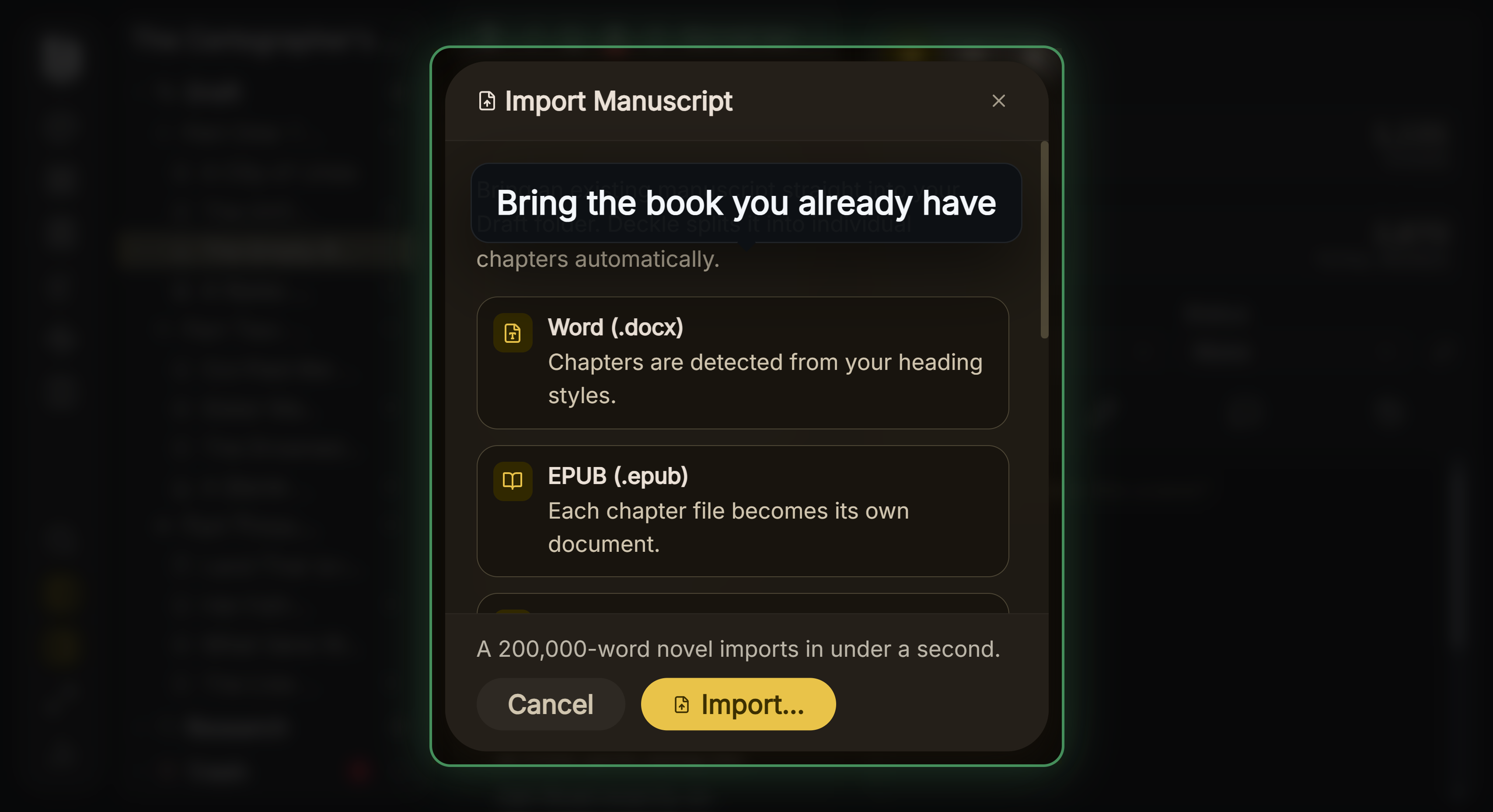 A LivingWriter DOCX export comes into Deckle split into chapters
The Codex does the job of LivingWriter's Story Elements, and the Word import is how most books arrive. Deckle is a one-time purchase with a 30-day refund. To try it first, click Try it free on the screen Deckle opens to. It is a free demo with no card, no account and no time limit. It opens a sample novel with every screen to explore, and you can restyle it and export real EPUB, PDF and DOCX files from it. New writing is capped at about 500 words, and new documents and imports are blocked, so judge the import step on the full version.
What do ranking pages get wrong about LivingWriter?
Four reviews that rank for LivingWriter searches disagree with LivingWriter's own pages on 1 November 2026, and two of LivingWriter's own pages disagree with each other.
- "The lifetime option right now is $699." Kindlepreneur's review (updated 8 April 2026) says this. LivingWriter's catalog describes current lifetime access as "One-time Lifetime access for $799". Kindlepreneur also says "you can write offline for periods of time", which LivingWriter does not document; its roadmap still lists offline mode as unfinished.
- "$9.99 monthly", "$96" a year, "no tiers" and a "14 day free trial". SelfPublishing.com's review (15 March 2023) gives these. LivingWriter now sells Free, Pro and Pro + AI, at $19.99 or $24.99 a month for Pro, with a $0.99 7-day trial.
- "$9.99/month", "$96 paid annually", lifetime "$399", "14 pre-made templates". TCK Publishing's review (29 June 2022, written "As of May 2022") gives these. Today's prices are above, lifetime is $799, and the homepage cites 9 templates while its template list holds 16.
- A desktop version that works offline, a 30-day free trial, and a year's access after cancelling. Just Publishing Advice (updated 30 May 2023) says this. LivingWriter's roadmap puts offline mode at 90%, the trial is 7 days for $0.99, and cancelling drops you to the Free plan with other manuscripts view-only.
- LivingWriter's own pages on EPUB and the trial. The homepage names EPUB export; the export guide does not. The pricing page sells a $0.99 7-day trial; the terms promise a 14-day free trial. Test both inside the trial before you rely on either.
Common mistakes when choosing LivingWriter
- Counting on a refund. There are none. Use the $0.99 trial on a real chapter and cancel before day 7 if it is not for you.
- Comparing prices with a friend. You may each see a different price set. Read the price on your own checkout screen.
- Planning to write offline. Offline mode is on the roadmap, not in the app. Keep a DOCX export of anything you cannot lose.
- Judging it on the Free plan. Word import, the full boards, sharing and the Pro export formats are Pro only, so the free plan tests the editor and little else.
- Assuming the EPUB is there. The homepage and the guide disagree. Check the export menu before you plan an ebook launch around it.
- Letting Pro lapse with books inside. Extra manuscripts go view-only on Free. Export your DOCX files while Pro formats still work.
FAQ
Is Living Writer the same as LivingWriter?
Yes. The maker spells it LivingWriter, as one word; "living writer" is the same app.
Is LivingWriter free?
There is a Free plan for your first book, with basic PDF export and a little AI. Pro costs $149 or $179 a year, depending on the price set you are shown.
Does LivingWriter have a lifetime plan?
Its price catalog lists "One-time Lifetime access for $799", though the pricing page does not display it.
Is there a LivingWriter app for Android and iPhone?
Yes. LivingWriter: Write Anywhere is on the App Store (iOS or iPadOS 14 or later) and Google Play, and it syncs with the browser and desktop apps.
Does LivingWriter work offline?
Not as documented. Its roadmap lists offline mode for the desktop app at 90%, expected in Q4 2026.
Can LivingWriter export an EPUB?
Its homepage says so; its export guide lists only PDF, DOCX, Google Drive and Amazon Manuscript. Check the export menu during the trial.
Is LivingWriter good for screenplays?
It covers them: Pro includes unlimited screenplays, two screenplay templates, and an AI tool that converts a chapter into screenplay format.
What is the best LivingWriter alternative?
It depends on why you are leaving. Dabble suits offline writing with sync, Scrivener suits a one-time desktop app, Novlr suits a browser app with no AI, and Deckle suits writing and formatting the finished book in one desktop app.
Sources
Retrieved 1 November 2026 unless stated. Prices change, so check the vendor page before buying.
- LivingWriter, home page: tagline, devices, Story Elements and Relations List, the four boards, "9 templates", "export manuscripts to DOCX, PDF, EPUB, Amazon KDP, and more", AI outlines and screenplays
- LivingWriter, Pricing: Free, Pro and Pro + AI features, $0.99 7-day trial, cancellation and hosting FAQ; prices from the price catalog the page loads (api.livingwriter.com initial data, pricing mode "v3_v4", plans 100 to 105 and 109, and the 16-item template list)
- LivingWriter, Terms of service (published 16 June 2025): section 6, 14-day free trial; section 7 and the refund policy of 25 May 2026, "not refundable under any circumstances"
- LivingWriter, Downloads: desktop app, sync with web, iOS and Android, "Windows 10 or above is required"
- LivingWriter, Roadmap: Offline Mode on Desktop App (90%, Q4 2026), Enhanced Self-Publishing (60%), Share and Co-Author (100%)
- LivingWriter, AI features: the AI tools, "Every AI feature is optional", no training on your manuscript
- LivingWriter Guides, Version History: see past versions and restore earlier drafts
- LivingWriter Guides, Exporting a Manuscript: PDF, DOCX, Google Drive, Amazon Manuscript; whole manuscript, chapters, notes or elements
- Apple App Store, LivingWriter: Write Anywhere: version 2.5.119 (28 October 2026), iOS 14 or later, 3.8 average from 17 US ratings
- Google Play, LivingWriter: Write Anywhere: 50K+ downloads, updated 27 October 2026
- Dabble, Pricing and Export your manuscript (retrieved 20 and 21 October 2026)
- Literature & Latte, Scrivener overview and Store (retrieved 20 October 2026)
- Novlr, Pricing and Can I use Novlr offline? (retrieved 20 and 21 October 2026)
- Ranking pages checked for the claims above: Kindlepreneur (updated 8 April 2026); SelfPublishing.com (15 March 2023); TCK Publishing (29 June 2022); Just Publishing Advice (updated 30 May 2023); Lulu (24 February 2022, updated 4 April 2025; its $9.99 and 14-day trial figures are also out of date)
LivingWriter is a product of LivingWriter LLC. Scrivener is a trademark of Literature & Latte. Dabble and Novlr are trademarks of their respective owners. Kindle and KDP are trademarks of Amazon.com, Inc. Deckle is not affiliated with or endorsed by any product named here.