

Kindle Create is Amazon's free formatter for Windows and Mac. It turns a finished Word manuscript into a KPF file for KDP, and an EPUB for reflowable books. Deckle is a paid, one-time-purchase app for Windows, macOS and Linux where you write the book and format it, then export EPUB, a print PDF and DOCX for any store. Kindle Create suits an Amazon-only book. Deckle suits drafting and publishing wide in one project.


Deckle is our app, so weigh this page accordingly. Kindle Create's facts come from Amazon's KDP help pages, read on 20 October 2026. Deckle's facts are checked against Deckle's code (version 1.7.8). Nothing here is scored or ranked.
Kindle Create vs Deckle at a glance
| Kindle Create | Deckle (1.7.8) | |
|---|---|---|
| What it is | Formatter for a completed manuscript | Writing, organising and formatting app |
| Made by | Amazon, for KDP | Deckle |
| Price (as of October 2026) | Free | One-time purchase, free demo |
| Platforms | Windows 10+, macOS 10.15+ (macOS 11+ on Apple M1) | Windows 10/11, macOS 11+, Linux (.deb, .rpm) |
| Imports | DOC and DOCX; PDF for Print Replica; PDF or JPEGs for comics | Word (.docx), EPUB, a zipped Scrivener project, a Markdown folder |
| Ebook output | KPF; EPUB "for only reflowable books" | EPUB with Generic, Kindle, Apple Books and Kobo targets |
| Print output | KPF uploaded to KDP for the paperback | Standard PDF in 8 trim sizes, with optional bleed |
| Other exports | None named | DOCX, Academia PDF (PDF/A-2b), Markdown, plain text |
| Paperback fonts | "Font and font size for paperbacks can't be changed" | Adjustable body size and line height; upload your own fonts |
| Footnotes | Not supported in paperbacks | Foot of the page in print, pop-up in the EPUB |
| Widows and orphans | Handled automatically | Widow & orphan control, off by default |
| Fixed-layout books | Print Replica, comics with Guided View | None; EPUB is reflowable only |
| Writing tools | None; a formatting tool | Binder, Outliner, Codex, Timeline, snapshots, goals, comments |
Is Kindle Create free, and what does Deckle cost?
Kindle Create is free to download for Windows and macOS, with nothing to upgrade. Deckle is a one-time purchase that includes every update, with a free demo to judge it first. Over three years Kindle Create still costs $0, and Deckle costs its single purchase price. The cost of Kindle Create shows up elsewhere: a second tool for stores other than Amazon, or a rebuild in Word when the paperback needs a different font.
Which platforms do Kindle Create and Deckle run on?
Kindle Create runs on Windows 10 or later, Intel Macs with macOS 10.15 or later, and Apple M1 Macs with macOS 11 or later. Amazon lists 4 GB of RAM as the minimum and 8 GB as recommended. Deckle ships for Windows 10 and 11, macOS 11 or newer as a Universal app, and Linux as .deb and .rpm packages. Neither has an iPad, Android or browser version. Deckle works offline after activation and keeps each project as a folder on your own disk.
KPF or EPUB: what file does each one give KDP?
Kindle Create's publishing file is a Kindle Package Format (KPF) file. Amazon's Getting Started page says "KPF is the preferred format for Kindle eBook and print books", and "The KPF file is only used for publishing." Kindle Create also saves a KCB work file, which "is for updates". Neither file opens in another formatter.
Deckle does not write KPF. Its Kindle target writes an EPUB for KDP to convert, despite the target's "Kindle (KPF)" label in the export screen.
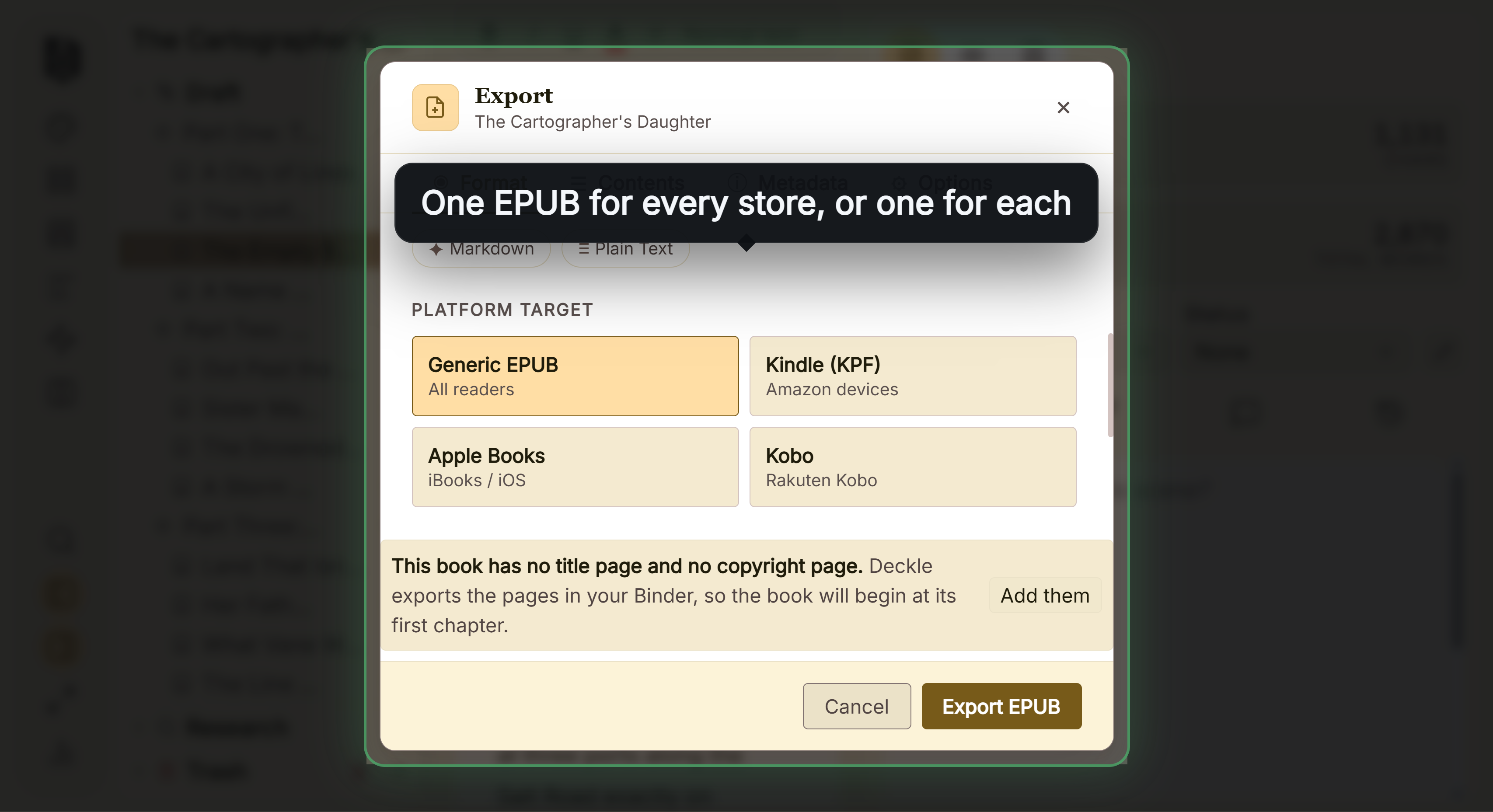 The "Kindle (KPF)" target, which writes an .epub file KDP accepts that route: "We support books in EPUB format that meet the specifications outlined in the Kindle Publishing Guidelines." KDP lists EPUB, DOCX and KPF as the files to use for reflowable ebooks. The checks KDP runs on an uploaded EPUB are on the Amazon KDP EPUB requirements page.
The practical difference is what else the file is good for. A KPF goes to KDP and nowhere else. Deckle's Apple Books, Kobo and Generic targets write EPUBs for other stores. Apple's guide for authors states that "All books submitted to Apple Books must pass the latest version of EPUBCheck."
Can Kindle Create or Deckle make a print PDF?
Kindle Create does not export a PDF. Amazon's help names two export formats, KPF and EPUB, and the paperback is uploaded to KDP as the KPF. Amazon's feature chart still lists that ebook-and-paperback route as "Pre-release (beta)", as of October 2026. That keeps the print book inside KDP Print. IngramSpark's File Creation Guide, for example, states that "Files must be PDF/X-1a:2001 or PDF/X-3:2002 compliant", so a KPF can't go there.
Deckle exports a print PDF made with Typst, in 8 trim sizes from 5"×8" to A4, with optional bleed. It is a standard PDF, not PDF/X-1a.
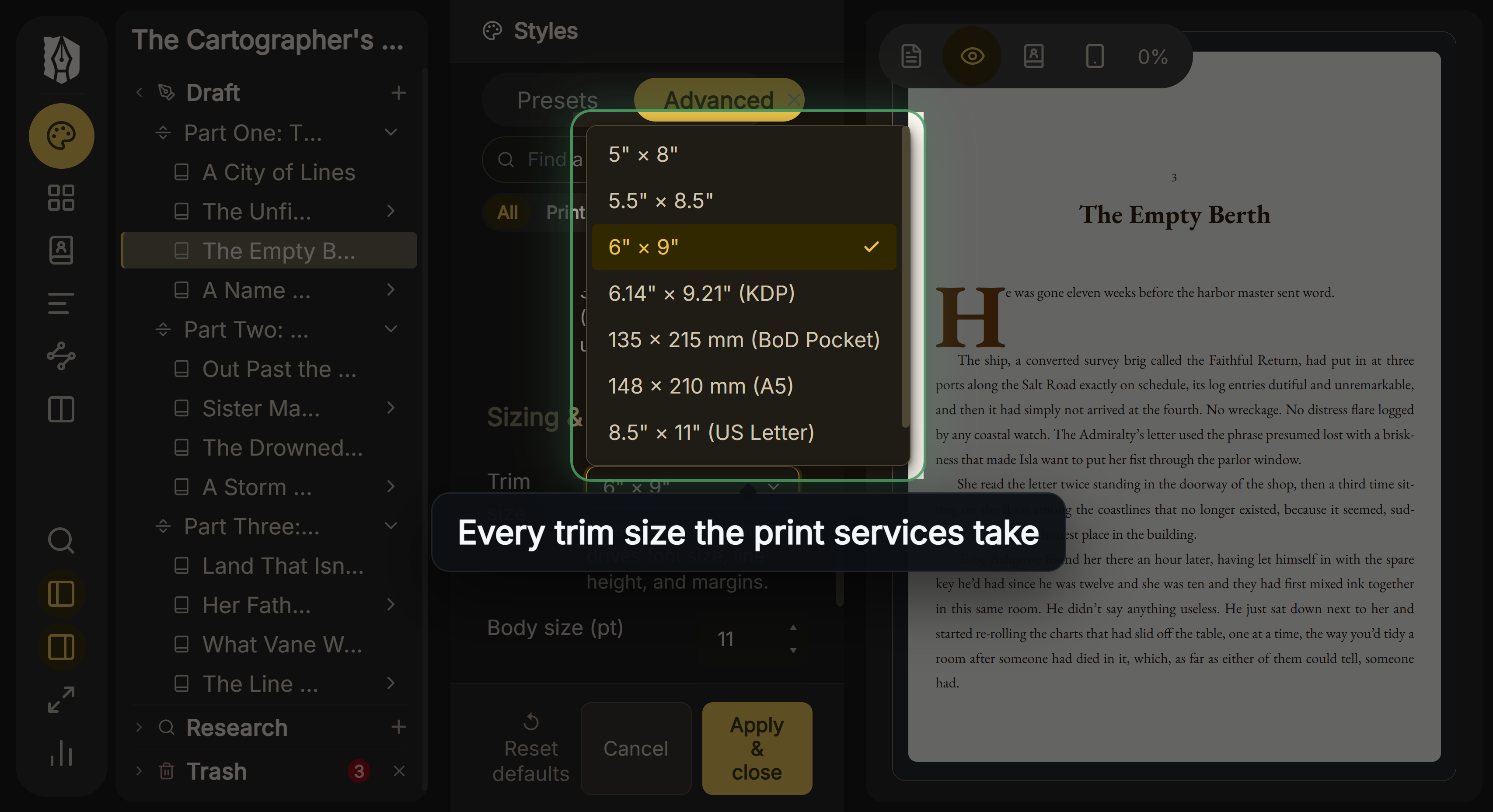 Deckle's trim size menu KDP's file guidance says "PDF/X-1a is preferred" and also accepts other PDFs. Check your file against KDP's print file requirements before you upload, and check a PDF/X requirement with any other printer first. The full export question for Kindle Create is on can Kindle Create export EPUB.
Fonts, footnotes and themes: how much control does each give?
Kindle Create keeps formatting simple by fixing it. Amazon's paperback help states that "Kindle Create doesn't support paperbacks with tables, footnotes, or endnotes." It adds that "Font and font size for paperbacks can't be changed", and that "Kindle Create doesn't support paperback images that bleed to the edge of the page." In the ebook, imported tables, lists and footnotes can't be edited, and the themes "cannot be edited by the user".
Deckle has 26 built-in style presets, plus your own saved or imported ones. It has drop caps, small caps, running heads, scene-break ornaments, bleed, Full Page Image pages and spreads, and special pages such as Title Page, Copyright and Also by the Author. You can set the body size and line height and upload your own font files. Footnotes or endnotes are a project-wide choice: footnotes sit at the foot of the page in print and pop up in the EPUB.
For a non-fiction book with notes, or a paperback that needs a particular typeface, that is the deciding difference.
Can you write a book in Kindle Create?
Kindle Create is a formatting tool, with no writing or organising features. Amazon's own workflow starts from a manuscript finished elsewhere, usually in Word, and "Kindle Create begins finding potential Chapter Title elements" when you import it. Later edits mean changing the text inside Kindle Create or importing again.
Deckle is built for the draft as well as the layout. It has a Binder (Draft, Research, Trash), an Outliner with a Grid View of index cards, a Continuous View and a Codex for characters, locations and items. It also has a Timeline, inline comments, snapshots, Writing Stats with goals and streaks, and spellcheck in 16 languages. A late edit to a chapter is already in the book you export.
Tables of contents in Kindle Create and Deckle
Kindle Create builds its table of contents from the chapter titles it detects at import. Sections with no title element are left out. Amazon notes that chapters missing from the Contents pane "are probably embedded in a previous chapter." The fixes are on Kindle Create table of contents not working.
Deckle builds the contents from the Binder, so there is no detection step. Every chapter, part and scene document, and the front and back matter, is listed by its own title. The Include down to setting adds subheadings or sub-subheadings inside chapters. Each EPUB carries both an EPUB 3 navigation document and an NCX file, and the print PDF's Contents page shows page numbers by default.
Where Kindle Create is ahead
- Price. Kindle Create is free.
- Amazon's own format. KPF is the format Amazon calls "preferred" for Kindle eBook and print books.
- Automatic KDP print setup. Kindle Create "automatically handles margins based on the trim size you choose on KDP", and adds page numbers to the paperback's contents page on upload.
- Widows and orphans out of the box. Kindle Create handles them automatically. Deckle's Widow & orphan control is off by default.
- Fixed-layout books. Print Replica ebooks from a PDF, and comics with Guided View. Deckle has neither.
- Less to learn. One import, a theme and an export. Deckle also holds your drafts, notes and Codex, and that is more app to learn.
Pick Kindle Create if
- You publish on Amazon only, as a Kindle ebook and a KDP paperback.
- Your book is a text-heavy novel, memoir or essay collection with no footnotes or tables.
- Amazon's fixed paperback font and automatic margins suit you.
- You are making a comic or a Print Replica ebook.
- You want to spend nothing.
Pick Deckle if
- You want to write, organise and format the book in one project.
- You publish wide, on Apple Books, Kobo or another printer as well as Amazon.
- You need footnotes, your own fonts or bleed in the paperback.
- You want a DOCX for an editor alongside the ebook and print files.
- You work on Linux, or on a mix of Windows, Mac and Linux.
How to move a book from Kindle Create to Deckle
Deckle cannot open a KCB or KPF file. Start from the manuscript.
- Find the .docx you imported into Kindle Create, and copy into it any text you changed inside Kindle Create.
- Mark each chapter title with a Heading style in Word. Deckle's Word import makes chapters from heading styles.
- Import the .docx into Deckle. If you only have the Kindle Create EPUB, Deckle imports EPUB too. Check the chapter list in the Binder after either import.
- Choose a style preset, then add a Title Page, Copyright and Table of Contents from the special pages.
- Export the Kindle EPUB and the print PDF, and check them against KDP's rules before you replace your KDP files.
What you'd lose by switching
- A free tool. Deckle is a paid one-time purchase.
- KPF. KDP converts Deckle's EPUB itself.
- Automatic widow and orphan handling, unless you turn Deckle's control on.
- Print Replica and Guided View books.
Try Deckle
Deckle is a one-time purchase. To try it, click Try it free on the screen Deckle opens to. There is no card, no account and no time limit. It opens a sample novel with every screen open to explore, and you can restyle it and export real EPUB, PDF and DOCX files. New writing is capped at about 500 words, and new documents and imports are blocked, so you can't run your own manuscript through it.
FAQ
Is Deckle better than Kindle Create?
Neither is better for every book. Kindle Create is free and built for KDP. Deckle is a paid writing and formatting app that exports EPUB, PDF and DOCX for any store.
Does Deckle export KPF like Kindle Create?
No. Deckle's Kindle target writes an EPUB, and KDP accepts EPUB uploads that meet its Kindle Publishing Guidelines.
Can Kindle Create export a PDF?
No. Amazon's help names KPF and EPUB as Kindle Create's two export formats.
Is Kindle Create free?
Yes. Amazon offers free downloads for Windows and macOS.
Does Kindle Create work on Linux?
Amazon lists Windows and macOS only. Deckle ships for Linux as .deb and .rpm packages.
Can Deckle open my Kindle Create project?
No. The KCB and KPF files are Kindle Create's own. Import the original .docx, or the EPUB you exported from Kindle Create.
Does Kindle Create support footnotes in a paperback?
No. Amazon says "Kindle Create doesn't support paperbacks with tables, footnotes, or endnotes." Deckle puts footnotes at the foot of the printed page.
Sources
All retrieved 20 October 2026. Amazon updates Kindle Create without published version numbers, so check the help pages before relying on a limit.
- Getting Started with Kindle Create, Amazon KDP Help (free download, system requirements, KPF and EPUB export, reflowable-only EPUB, import formats, same-manuscript paperback listed as Pre-release (beta))
- Prepare Reflowable and Print Books with Kindle Create, Amazon KDP Help (KPF and KCB, chapter title detection, TOC, editing limits, themes)
- Prepare Your eBook and Paperback with Kindle Create, Amazon KDP Help (paperback footnotes, fonts, margins, bleed)
- Kindle Create Tutorial, Amazon KDP Help (automatic margins by trim size)
- What file formats are supported for eBook manuscripts?, Amazon KDP Help (EPUB accepted)
- Paths to Getting Your Content on Kindle, Amazon KDP Help (EPUB, DOCX or KPF for reflowable content)
- Save Your Manuscript File, Amazon KDP Help (PDF/X-1a preferred)
- File Creation Guide, IngramSpark (PDF/X-1a:2001 or PDF/X-3:2002)
- Publish a book from the web, Apple Books for Authors (EPUBCheck)
Kindle, Kindle Create and KDP are trademarks of Amazon.com, Inc. or its affiliates. Other product names belong to their owners. Deckle is not affiliated with or endorsed by any product named here.