

Six tools format a book for free: Kindle Create, Reedsy Studio, the Draft2Digital formatter, Affinity by Canva, LibreOffice Writer, and KDP's Word templates. Each one has a limit its own maker states. Kindle Create makes no print PDF, Draft2Digital prints black and white only, Reedsy Studio is online only, and Affinity lays out every page by hand.
Every fact on this page comes from the vendor's own page, read on 20 October 2026. If you also want paid options, book formatting software in 2026 covers them on every platform.
What can free book formatting software make?
A finished self-published book needs two files. The ebook is an EPUB, and the print interior is a PDF at the trim size you sell. KDP, IngramSpark and Draft2Digital each set their own rules for those files, and the KDP rules are listed in KDP print file requirements.
| Free tool | Runs as | Ebook file | Print file | Trim sizes | Works offline | Writing tools |
|---|---|---|---|---|---|---|
| Kindle Create | desktop app (Windows 10+, macOS 10.15+) | KPF, or EPUB for reflowable books | KPF for KDP print only, no PDF | resized for any KDP trim | yes | no |
| Draft2Digital formatter | browser | EPUB | paperback PDF, black and white | 6, from 5x8 to 8.5x11 in | no | no |
| Reedsy Studio | browser | EPUB 3 | PDF/X-1a:2001 print PDF | 4, from 4.25x6.87 to 6x9 in | no | yes |
| Affinity by Canva | desktop app (Windows, macOS) | EPUB | PDF with bleed and crop marks | any page size you set | yes, after activation | no |
| LibreOffice Writer | desktop app (Windows, macOS, Linux) | EPUB, reflowable or fixed layout | PDF, with a PDF/UA option | any page size you set | yes | general word processor |
| KDP Word templates | Word files you open in a word processor | none (KDP accepts DOCX for ebooks) | the document you save as PDF | KDP trim sizes, page and margins preset | yes | template only |
Two free tools make both an EPUB and a print PDF from one manuscript, with chapter styling done for you: the Draft2Digital formatter and Reedsy Studio. Both need an internet connection the whole time.
Is Kindle Create free?
Kindle Create is Amazon's free formatter. Amazon's download page lists Windows 10 or later and macOS 10.15 or later. It imports DOC or DOCX and exports "Kindle Package Format (KPF) and EPUB", with EPUB only for reflowable books. Amazon calls KPF "the preferred format for Kindle eBook and print books".
One Kindle Create project makes the Kindle ebook and the KDP paperback, though Amazon's feature chart still lists that route under "Pre-release (beta)", as of October 2026. Its print tools include page numbering, headers and footers, page spreads and automatic widow and orphan handling.
Amazon states the limits itself. "Tables, lists, and footnotes can't be edited in Kindle Create." Inline images can't be edited either, and themes "cannot be edited by the user". Kindle Create makes no print-ready PDF, so its print output goes to KDP and nowhere else. A book sold through IngramSpark as well needs another tool. The tools people move to are compared in Kindle Create alternatives.
Is the Draft2Digital formatter free?
The Draft2Digital formatter runs in a browser "on any operating system". Draft2Digital's FAQ says: "You may use Draft2Digital's conversion and layout tools free of charge, even without ebook distribution." It adds that you can "create, convert, and download a pixel-perfect paperback PDF or ebook EPUB file without having to publish through D2D."
It imports anything Word can read, plus RTF and TXT. It applies one template "to both your eBook and print layout", and it builds an Also By page and an author bio for you.
The limits are in the same FAQ. Print is a perfect-bound paperback in black and white only, from 32 to 1,050 pages, in six trim sizes: 5x8, 5.25x8, 5.5x8.5, 6x9, 7.5x9.25 and 8.5x11 inches. It has no writing tools and no offline mode. Draft2Digital also advises leaving your own front matter and back matter out of the upload. Its file rules are listed in Draft2Digital formatting requirements.
Is Reedsy Studio free for formatting?
Reedsy Studio is a browser app for writing and formatting. Reedsy's Studio FAQ says Studio's basic features, "including writing and formatting", are free. Paid add-ons cost $4.99 a month (Craft) and $7.99 a month (Outline), as of October 2026, and they add planning and stats features, not export.
Reedsy Studio exports EPUB 3 and a print PDF that Reedsy labels "PDF/X-1a:2001 for print-on-demand". The print version "removes links and uses CMYK images", and a second PDF is made for screen reading. It offers four trim sizes: Trade 6x9, Digest 5.5x8.5, Reedsy standard 5x8 and Pocket 4.25x6.87 inches. It has real-time co-authoring, which most desktop tools lack.
The limit is the connection. Asked whether it works offline, Reedsy answers "Currently, no." Its trim sizes stop at 6x9 inches, so a larger format, such as a workbook at 8.5x11, needs another tool. The field it competes with is in Reedsy Studio alternatives.
Is Affinity by Canva free for book layout?
Affinity by Canva combines "professional design, photo editing, and page layout" in one app. It is free for individuals with a free Canva account, on macOS 10.15 or later and on 64-bit Windows 10 or 11. You need to be online once to download and activate it, and after that there is "no requirement to be online". What the free licence covers, and its catches, is in Is Affinity free?.
Affinity exports PDF with bleed and crop marks, and EPUB. It has Smart Master Pages, shared text styles and OpenType support, and it opens InDesign IDML files. Its Canva AI tools are image and vector tools, and they need a paid Canva plan.
Affinity is design software, not a manuscript formatter. It has no outline or manuscript features. Its Books panel, per Affinity's help on books, gathers separate Affinity documents "as chapters" and keeps "page, list and note numbers in sync", but each chapter is still a document you lay out yourself. Every chapter opening, running head and page is set by hand, which suits an illustrated book, a cookbook or poetry with exact line placement, and makes a plain novel a long manual job. It does not run on Linux.
Can LibreOffice Writer format a book?
LibreOffice is free and open-source software from The Document Foundation, which says it is offered "at no cost to you". Its download page offers Windows, macOS and Linux builds, with .deb and .rpm packages for Linux.
Writer is the one free word processor on this page that writes an EPUB. LibreOffice's EPUB export help says it can split the book into sections at each heading or at each page break, and it makes either a reflowable or a fixed-layout EPUB. LibreOffice's help says that in a reflowable EPUB, page style information "is not exported". You can set a cover image and override the title, author, language and date metadata. Its PDF export has a PDF/UA (ISO 14289) accessibility option. The PDF export help page does not mention PDF/X.
Writer opens and saves Word .docx files, so it can also open KDP's Word templates. What it does not do is book typesetting for you: chapter openings, drop caps and running heads are styles you build yourself.
Are KDP's Word templates free formatting software?
KDP offers paperback and hardcover manuscript templates that it made in Microsoft Word. They come as ZIP downloads in two kinds. Blank templates have the page size and margins set. Templates with sample content add formatted front matter, such as a title page and a table of contents, and chapters with placeholder text.
KDP states two rules for them. "Make sure to remove any template sample text from your final manuscript", because leftover template text can cause an upload error or a rejection. And a manuscript with bleed, where art reaches the page edge, needs the larger page size and should go to KDP as a PDF.
A template is a page setup, not a formatting tool. Word itself is a paid app, and it does not save EPUB. Microsoft's file format reference also warns that a saved PDF "might not have a perfect page-to-page correspondence with the original… pages might break at different locations", so check the PDF, not the document, before you upload. The whole KDP route through Word is in KDP formatting software.
Free book formatting software for Windows, Mac and Linux
Every tool above runs on Windows and on a Mac. Linux narrows the list.
- Windows: all six. Kindle Create and Affinity install as desktop apps, and the side-by-side system requirements are in book formatting software for Windows.
- Mac: all six. Kindle Create needs macOS 10.15 or later, and Affinity needs macOS 10.15 or later.
- Linux: LibreOffice installs natively, and the Draft2Digital formatter and Reedsy Studio run in a Linux browser. Kindle Create and Affinity have no Linux version. The Linux writing apps are in book writing software for Linux.
What does free book formatting software leave out?
- Kindle Create costs you the other stores. Its print output exists only inside KDP.
- Draft2Digital costs you colour and trim choice. Formatting is free, and publishing through D2D is a separate service with its own fee.
- Reedsy Studio costs you offline work, and its planning add-ons are paid.
- Affinity costs you time, because every page is laid out by hand. Its AI tools need a paid Canva plan.
- LibreOffice costs you the book styling, which you build from styles yourself.
- KDP's templates cost you a word processor and a separate EPUB step.
Is Deckle free?
Deckle is our app, so weigh this section accordingly. Deckle is not free. It is a desktop app for Windows, macOS and Linux, sold as a one-time purchase with every update included. It writes and formats in one app, with 26 built-in style presets, 8 trim sizes, bleed, and EPUB targets for Kindle, Apple Books and Kobo. Its print PDF is made with Typst. The Kindle target writes an EPUB for KDP to convert, not a KPF file.
Deckle has a free demo. Install Deckle and click Try it free on the screen Deckle opens to. There is no card, no account and no time limit. It opens a sample novel with every screen open to explore, and you can restyle it and export real EPUB, PDF and DOCX files, with no watermark.
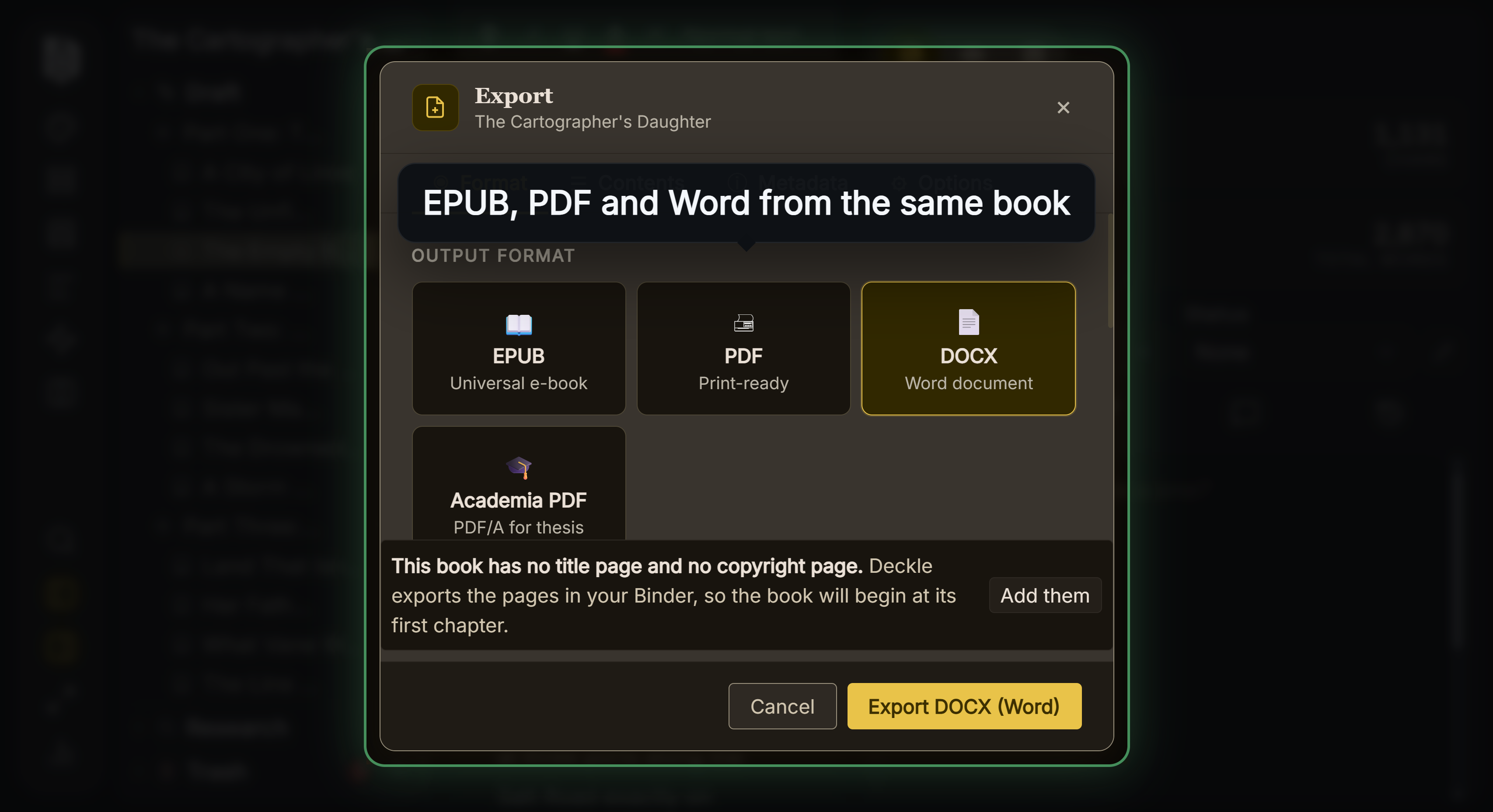 The export formats the demo can build from its sample novel
The demo's caps are real, and they mean the demo cannot format your own book:
- New writing is capped at about 500 words (3,000 characters). Deleting your own new writing frees that room again, but deleting the sample's text never adds to the allowance.
- New documents and imports are blocked, so you cannot bring your manuscript in.
- Codex and Timeline allow 3 new entries and 3 new events.
- Starting the demo again rebuilds the sample, and anything written in it is lost.
The demo shows what Deckle's output looks like before you buy. The free tools above are the ones that will format your own manuscript for nothing.
Which free book formatting software should you use?
- You sell only on Amazon: Kindle Create.
- You want a free paperback PDF and EPUB from one upload: the Draft2Digital formatter.
- You want to write and format in the same free app, always online: Reedsy Studio.
- You want to design every page, for an illustrated or poetry book: Affinity by Canva.
- You work on Linux, or want a free word processor that writes EPUB: LibreOffice Writer.
- You already own Word and publish a plain novel on KDP: KDP's Word templates, plus a separate EPUB tool.
Whatever tool you use, check the EPUB before you upload it. The common faults are in how to make an EPUB file.
FAQ
Q: What is the best free book formatting software? A: No authority ranks it, so it depends on the book. Draft2Digital and Reedsy Studio make both a print PDF and an EPUB for free. Kindle Create is free for books sold only on Amazon.
Q: Is there free book formatting software for Windows? A: Yes. Kindle Create, Affinity by Canva and LibreOffice install on Windows for free, and Reedsy Studio and the Draft2Digital formatter run free in a Windows browser.
Q: Is Kindle Create really free? A: Yes. Amazon offers it as a free download for Windows and macOS. It makes no print PDF, and its print output goes to KDP only.
Q: Can I format a book for print for free? A: Yes. The Draft2Digital formatter makes a black-and-white paperback PDF in six trim sizes, and Reedsy Studio makes a PDF/X-1a print PDF in four trim sizes. Affinity and LibreOffice export PDF at any page size you set.
Q: Is Draft2Digital's formatter free if I don't publish with them? A: Yes. Draft2Digital says its conversion and layout tools are free "even without ebook distribution".
Q: Is there free book formatting software for Mac? A: Yes. Kindle Create and Affinity run on macOS 10.15 or later, LibreOffice has a macOS build, and Reedsy Studio and Draft2Digital run in a browser. Vellum is paid.
Q: Can LibreOffice make an EPUB? A: Yes. LibreOffice Writer exports a reflowable or fixed-layout EPUB, split at headings or page breaks, with a cover image and metadata.
Q: Is Deckle free? A: No. Deckle is a one-time purchase. Its free demo exports real EPUB, PDF and DOCX files of a sample novel, but it blocks imports, so it cannot format your own manuscript.
Sources
All pages retrieved 2026-10-20.
- Amazon KDP, Kindle Create download, system requirements, output formats and feature chart (same-manuscript paperback in Pre-release (beta)): https://kdp.amazon.com/en_US/help/topic/GUGQ4WDZ92F733GC
- Amazon KDP, Prepare Reflowable and Print Books with Kindle Create (features and limits): https://kdp.amazon.com/en_US/help/topic/G7R2L7V5X6SJH948
- Amazon KDP, Paperback and Hardcover Manuscript Templates: https://kdp.amazon.com/en_US/help/topic/G201834230
- Draft2Digital, FAQ (free tools, trim sizes, print limits, imports): https://draft2digital.com/faq/
- Draft2Digital, improved automated layout for print (browser, any operating system): https://draft2digital.com/blog/draft2digital-introduces-improved-automated-layout-for-print/
- Reedsy Studio, book writing software FAQ (free features, exports, PDF/X-1a, trim sizes, offline): https://reedsy.com/studio/resources/book-writing-software-faq/
- Affinity by Canva, download and requirements: https://affinity.studio/download
- Affinity by Canva, page layout software: https://www.affinity.studio/page-layout-software
- LibreOffice, Writer: https://www.libreoffice.org/discover/writer/
- LibreOffice, who we are (The Document Foundation): https://www.libreoffice.org/about-us/who-are-we/
- LibreOffice, download (platforms, Linux packages): https://www.libreoffice.org/download/download-libreoffice/
- LibreOffice Help, EPUB export: https://help.libreoffice.org/latest/en-US/text/shared/01/ref_epub_export.html
- LibreOffice Help, PDF export general options: https://help.libreoffice.org/latest/en-US/text/shared/01/ref_pdf_export_general.html
- LibreOffice Help, using Microsoft Office and LibreOffice: https://help.libreoffice.org/latest/en-US/text/shared/guide/ms_user.html
- Microsoft, Office file format reference (Word save formats, PDF caveat): https://learn.microsoft.com/en-us/office/compatibility/office-file-format-reference
- Affinity Help Center, About books: "Add Affinity (.af) documents as chapters", reorder them, keep "page, list and note numbers in sync", retrieved 21 October 2026
Prices and features last checked 20 October 2026. Kindle and Kindle Create are trademarks of Amazon.com, Inc. Affinity is a trademark of Canva. LibreOffice is a trademark of The Document Foundation. Microsoft Word is a trademark of Microsoft. Vellum is a trademark of 180g. Reedsy and Draft2Digital are trademarks of their respective owners. Scrivener is a trademark of Literature & Latte. Deckle is not affiliated with or endorsed by any product named here.