

The book writing software that runs natively on Linux is Manuskript, bibisco, Penpoint, Dabble, Obsidian, LibreOffice Writer and Deckle. Atticus runs on Linux as a web app installed from Chrome. For typeset print, Typst and LaTeX run on Linux from the command line. Scrivener, Vellum, Kindle Create and Affinity have no Linux version.

Every fact on this page comes from the vendor's own site, download page or help docs, read on 20 October 2026, and prices are as of October 2026. No standards body ranks writing software, so this page sorts the Linux options by the job each one does. If you came here for Scrivener in particular, Scrivener for Linux covers its history, the 2015 beta and the Wine question.
Which writing apps have a Linux version?
These apps list Linux on their own download or home page. Package names are the ones each vendor offers.
| App | What it is | Linux packages on the vendor's page | Price (October 2026) | Offline |
|---|---|---|---|---|
| Manuskript | open-source novel planning and writing (GPL-3.0) | .deb, .rpm, Flatpak, Snap | free | yes |
| bibisco | novel planning and writing | Linux listed, 64-bit only, package type not named | free Community; Supporters $69 once | yes |
| Penpoint | desktop drafting and worldbuilding | Linux listed, package type not named | $40 once | yes |
| Dabble | cloud-synced writing and plotting | AppImage | from $15/month billed annually | yes ("True Offline") |
| Obsidian | general Markdown notes and writing | AppImage, Snap, .deb, community Flatpak | free core; Sync and Publish paid | yes |
| LibreOffice Writer | general word processor | .deb, .rpm | free | yes |
| Atticus | writing and book formatting | web app installed from Chrome | $147 once | writing yes, import and export no |
| Deckle (ours) | writing and book formatting | .deb (Debian/Ubuntu), .rpm (Fedora/RHEL), x86_64 | one-time purchase | yes, after activation |
Three of these make both a print PDF and an EPUB without a second tool: Atticus, Deckle, and LibreOffice Writer for a book you style yourself. The others are drafting tools, and the finished book is made somewhere else.
Novel writing software for Linux
Four apps on Linux are built for novels, with chapters, scenes and story notes.
Manuskript is free and open source under GPL-3.0, and the only open-source novel app here. Version 0.17.0 ships as a .deb, an .rpm, a Flatpak and a Snap. It has an outliner, index cards, a snowflake-method assistant, character, plot and world sheets, and a distraction-free mode with word and time goals. It saves to open plain-text formats. Its download page says it is "still in the early development stages" and recommends frequent backups. It exports plain text, Markdown and HTML on its own, and ePub, OpenDocument and DocX need pandoc installed. PDF needs pandoc and LaTeX, its wiki says.
bibisco organises a novel into chapters, scenes and storylines, with character development, a timeline and writing goals. It runs on 64-bit Linux only. The Community Edition is free, and the Supporters Edition costs $69 once with two years of updates. It exports PDF, DOCX, TXT and EPUB. bibisco's edition comparison, updated 28 February 2026, puts the Timeline, EPUB export, find/replace and writing goals in the Supporters Edition only. Its FAQ says "no novel data is housed on bibisco.com".
Penpoint is a desktop app from Tophat Creative for drafting and worldbuilding, on Windows, macOS and Linux. It works fully offline with no account, and costs $40 once with a 14-day free trial. It has chapter and scene views, a codex, a timeline, margin comments and snapshots. It exports Word, PDF, EPUB and Markdown, and it imports Scrivener 3 projects. Its site says "no AI ever touches your prose." Penpoint 1.0.0 was released on 2 October 2025, so it is a young product.
Dabble installs on Linux as an AppImage and syncs with Windows, Mac and the browser. It writes offline and syncs when you reconnect. Plans start at $15 a month billed annually, with lifetime plans at $699 and $899. Dabble's help says it "does not export PDF or ePub directly"; it exports Word, Google Docs, HTML and Markdown.
General writing apps on Linux: LibreOffice and Obsidian
LibreOffice Writer is free and open source, from The Document Foundation, with .deb and .rpm packages on its download page. The Document Foundation pitches Writer for "everything from quick notes to full-length books." Its EPUB export writes a reflowable or fixed-layout book, split at each heading or page break, with a cover image and metadata. It exports PDF with a PDF/UA accessibility option, and it opens and saves Word .docx files. It has no chapter binder or story notes, and book styling such as chapter openings and running heads is built from styles by hand.
Obsidian is a Markdown notes app whose core is "Free without limits". Its Linux downloads are an AppImage, a Snap, a .deb and a community Flatpak. Notes are plain Markdown files on your own disk. It is not a book tool. The third-party Longform plugin orders scenes and compiles a manuscript, and Obsidian's built-in PDF export handles one note at a time.
Atticus on Linux
Atticus lists Linux among its platforms, and it is a web app rather than a Linux package. Atticus's help says "You'll need to use Chrome to do this": you open app.atticus.io in Chrome and click Install App. It costs $147 once, "No monthly fees. Forever.", with a 30-day money-back guarantee.
Atticus does drafting and formatting in one app. It exports print-ready PDF, EPUB and DOCX, with 17+ chapter themes, a custom theme builder, full-bleed images and footnotes. It has collaboration for authors, editors and readers. Its offline limit is in its own help: "you can write while offline and it will sync to the server once you are back online. You do need to be online to import and export files, however." Atticus is weighed against the field in Atticus alternatives.
Typst and LaTeX: typesetting a book on Linux
Typst and LaTeX are typesetting systems. You write the book as marked-up text, and the program sets the pages and writes a PDF. They suit technical writers, academics, and authors who want full control of the print layout from plain-text files. They are not drafting apps, and neither makes an EPUB on its own.
Typst describes itself as "a new markup-based typesetting system", designed to match LaTeX while being "much easier to learn and use." It is open source under Apache-2.0. On Linux it installs as a prebuilt binary from its releases page, through a Snap, or through the distribution's package manager, which the project notes may lag behind the latest release. Its PDF reference says "PDF is Typst's default export format." Typst can write PDF/A files, including PDF/A-2b, and PDF/UA-1 files for accessibility.
LaTeX is the older standard. The LaTeX Project says the TeX distributions are free, "there are no charges for download or use", and on Linux it points first to your distribution's own software source. It also suggests installing the current TeX Live directly, because "many Linux distributions only contain older versions of TeX Live." For books, the memoir class on CTAN "is for typesetting poetry, fiction, non-fiction, and mathematical works." Manuskript's PDF export runs through LaTeX by way of pandoc.
Book formatting software on Linux
Most dedicated book formatters do not run on Linux. Vellum is Mac only. Kindle Create lists Windows 10 or later and macOS only. Affinity by Canva runs on Windows and macOS. A Linux author who wants a store-ready EPUB and a print PDF has four routes:
- A writing app that also formats: Atticus through Chrome, or Deckle as a native package.
- A browser formatter: the Draft2Digital formatter "is browser-based, so you can use it regardless of what operating system you prefer." Its FAQ says the tools are free even if you never publish through it, and they make a black-and-white paperback PDF and an EPUB. Reedsy Studio is a free browser app that exports EPUB 3 and a print PDF, and it does not work offline. Both are compared in free book formatting software.
- A word processor: LibreOffice Writer, with the book styled by hand.
- A typesetting system: Typst or LaTeX for the print PDF, with the EPUB made separately.
Whatever makes the files, the stores set the rules. KDP's are in KDP print file requirements, and the ebook side is in how to make an EPUB file.
Where Deckle sits on Linux
Deckle is our app, so weigh this section accordingly.
Deckle is a desktop app for Windows, macOS and Linux. Every release is built for Linux on Ubuntu 22.04, so it also installs on older Linux releases. The download page offers a .deb package for Debian and Ubuntu and an .rpm package for Fedora and RHEL, both x86_64. One licence covers any two devices in any mix of Windows, Mac and Linux. It is a one-time purchase, with every update included.
Deckle does drafting and formatting in one app. For writing, it has a Binder, the Outliner (with a Grid View of index cards), Continuous View, a Codex for characters, locations and items, a Timeline, Snapshots, comments, and goals with streaks. For formatting, it has 26 built-in style presets, a live preview, print PDF in 8 trim sizes with bleed, and EPUB targets for Kindle, Apple Books and Kobo. The Kindle target writes an EPUB for KDP to convert, not a KPF file. Deckle's print PDF is typeset with Typst, the same engine described above, so you get Typst output without writing Typst markup. The Inspector's Preview tab shows the printed page at its trim size as you write.
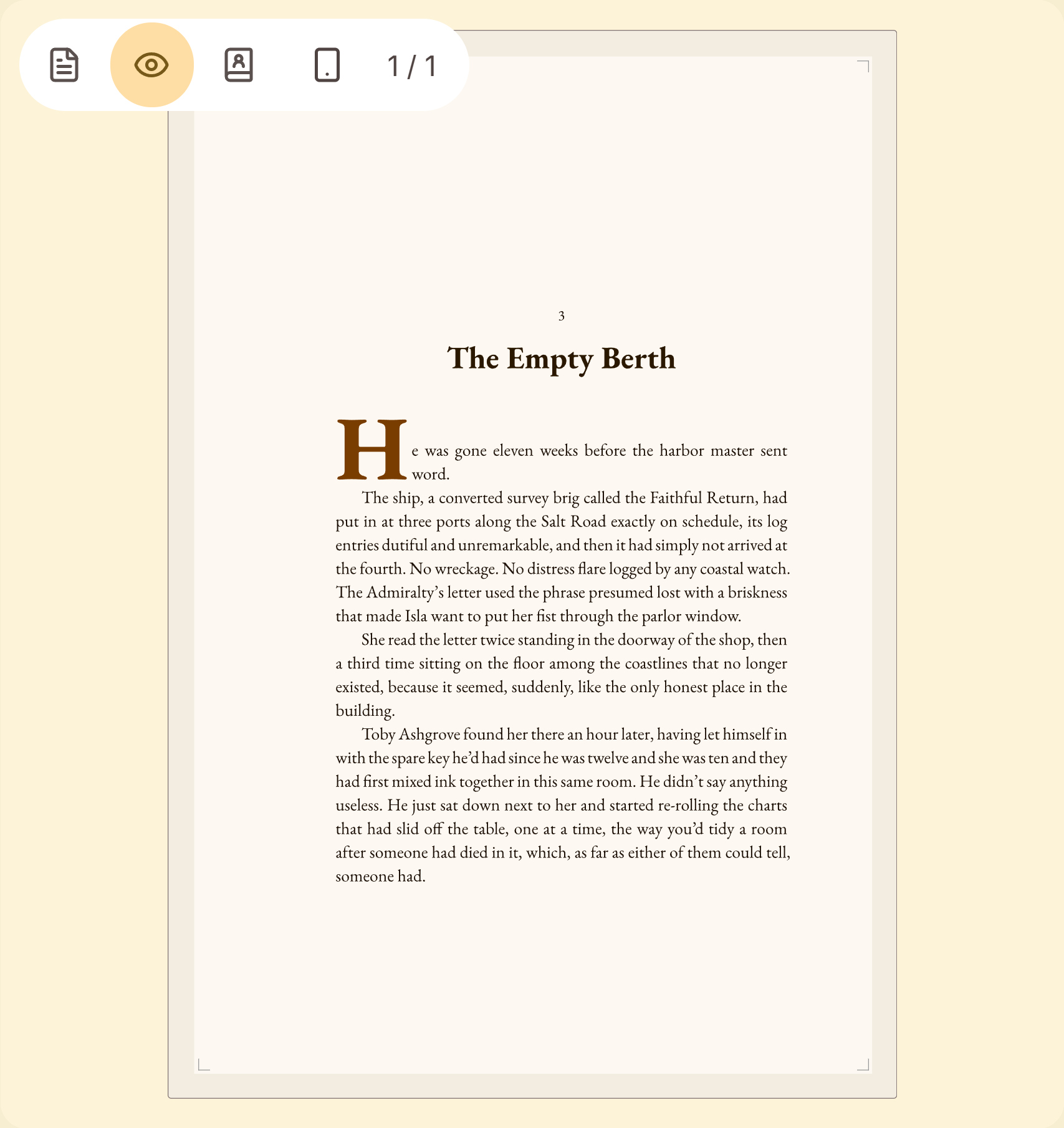 The print preview, set by the same engine as the PDF
A Deckle project is a folder on your own disk. It holds one .deckle SQLite database (all the writing, notes and settings) plus research/ and .deckle-assets/ folders. Nothing is stored on a server, and the app works offline after activation. Deckle imports Word, EPUB, a zipped Scrivener project, and an Obsidian Markdown folder, where it keeps the Longform scene order. A Word file is split into chapters from its heading styles.
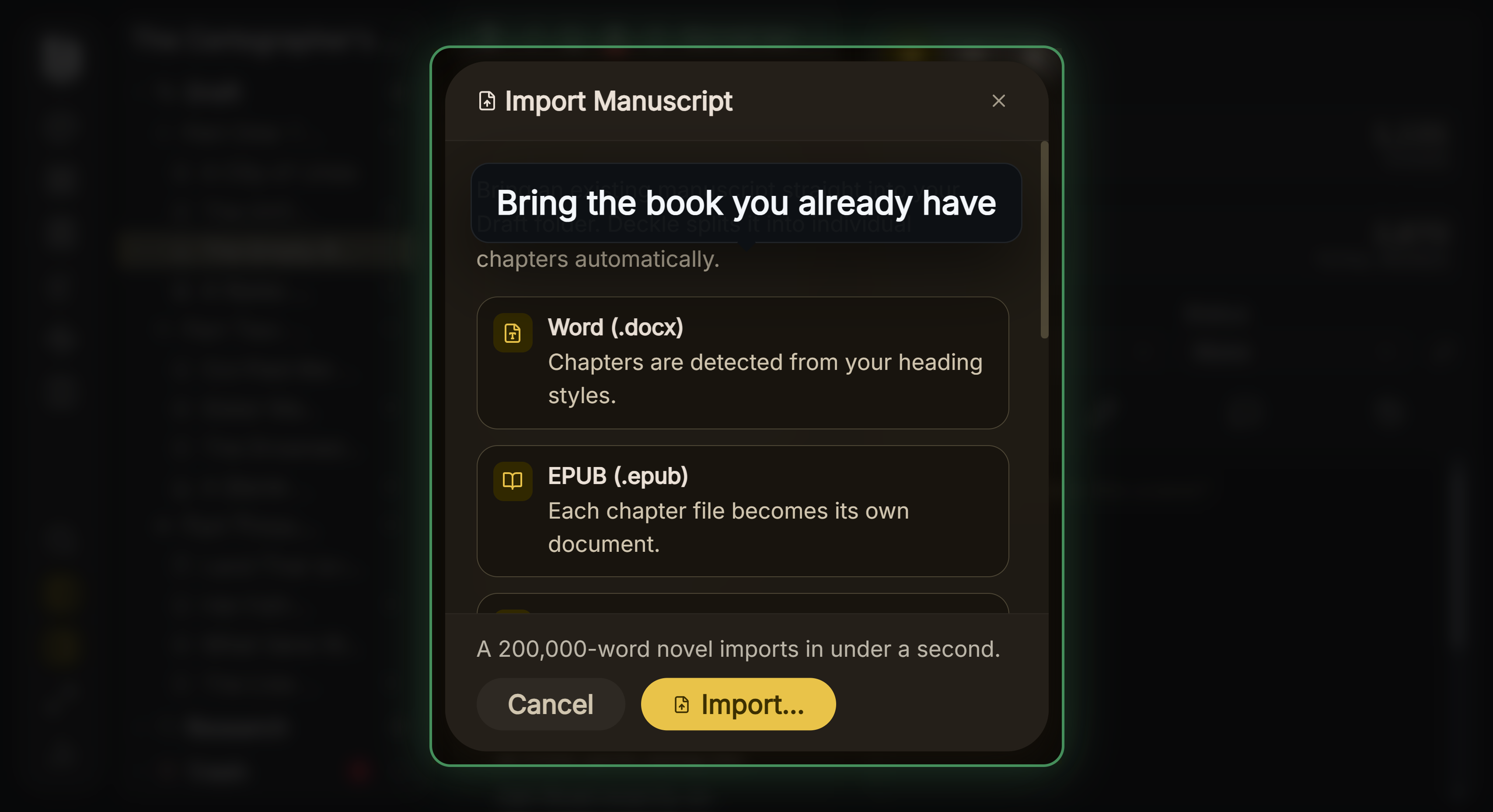 Import Manuscript
The general method for any move is in how to move a manuscript between writing apps.
What you would give up, compared with the apps above:
- Open source. Deckle is not open source. Manuskript, LibreOffice and Typst are.
- Package choice. Deckle offers
.deband.rpmonly, with no Flatpak or Snap, and x86_64 only, with no ARM build. - Sync and mobile. Deckle has no built-in cloud sync and no mobile, iPad or web version. Dabble and Obsidian sync across devices.
- Collaboration. Deckle has no real-time collaboration. Atticus offers it.
- Price. Manuskript, LibreOffice, Obsidian's core and bibisco's Community Edition are free. Deckle is paid.
Try it first. Install Deckle and click Try it free on the screen Deckle opens to. There is no card, no account and no time limit. It opens a sample novel with every screen open to explore, and you can restyle it and export real EPUB, PDF and DOCX files. New writing is capped at about 500 words, and new documents and imports are blocked.
What catches writers out on Linux?
- Reading "runs on Linux" as "native". Atticus runs in Chrome. Plottr's Linux build is an unsupported beta, by its own help's account.
- Expecting EPUB from a drafting app. Dabble does not export EPUB, and Manuskript needs pandoc for it.
- Installing an old LaTeX. Distribution packages often carry an older TeX Live, as the LaTeX Project itself notes.
- Assuming one licence covers every machine. Each app sets its own device rules. Deckle's licence covers two devices.
- Leaving the project behind. Before you move to a Linux machine, export your manuscript to Word from the app you are leaving.
FAQ
Q: What is the best book writing software for Linux? A: No authority ranks it, so it depends on the job. Manuskript and bibisco are free novel apps. Atticus and Deckle write and format in one app. Typst and LaTeX typeset print books from plain text.
Q: Is there free novel writing software for Linux? A: Yes. Manuskript is free and open source, bibisco has a free Community Edition, and LibreOffice Writer and Obsidian's core app are free.
Q: Is Scrivener available for Linux? A: No. Scrivener is sold for macOS, Windows and iOS. Our Scrivener for Linux page covers the old Linux beta and the Wine route.
Q: Does Atticus work on Linux? A: Yes, as a web app. Atticus lists Linux, and you install it from Chrome at app.atticus.io. Importing and exporting need an internet connection.
Q: Does Dabble have a Linux app? A: Yes. Dabble's desktop app installs on Linux as an AppImage. It exports Word, Google Docs, HTML and Markdown, not PDF or EPUB.
Q: Can I format a book for print on Linux? A: Yes. Atticus and Deckle make print PDFs, LibreOffice exports PDF, Typst and LaTeX typeset PDFs, and the Draft2Digital formatter runs in a Linux browser.
Q: Is Typst good for writing a book? A: Typst sets a book's pages and writes a PDF from marked-up text, with PDF/A and PDF/UA options. It is a typesetting system, not a drafting app, and it makes no EPUB on its own.
Q: Does Deckle run on Linux?
A: Yes. Deckle ships a .deb for Debian and Ubuntu and an .rpm for Fedora and RHEL, both x86_64.
Sources
All pages retrieved 2026-10-20.
- Manuskript, GitHub repository, releases and import and export capabilities
- bibisco, download page, general FAQs and Community vs Supporters (updated 28 February 2026, retrieved 20 October 2026)
- Penpoint, penpoint.app and changelog
- Dabble, Install the desktop app, pricing and Export your manuscript
- Obsidian, download, pricing, PDF export and Longform plugin
- LibreOffice, Writer, download, who we are, EPUB export help and PDF export help
- Atticus, atticus.io, How to download Atticus on a desktop or laptop computer and How can I use Atticus offline
- Typst, GitHub repository and PDF export reference
- The LaTeX Project, Getting LaTeX; CTAN, memoir class
- Draft2Digital, improved automated layout for print ("browser-based, so you can use it regardless of what operating system you prefer") and FAQ (free tools, paperback PDF and EPUB, black and white print)
- Reedsy Studio, book writing software FAQ
- Amazon KDP, Kindle Create download and system requirements
- Affinity by Canva, download and requirements
- Plottr, Can I install Plottr for Linux?
Prices, packages and features last checked 20 October 2026.
Scrivener is a trademark of Literature & Latte. Vellum is a trademark of 180g. Kindle and Kindle Create are trademarks of Amazon.com, Inc. Affinity is a trademark of Canva. LibreOffice is a trademark of The Document Foundation. Penpoint is a product of Tophat Creative, LLC. Every other product name here belongs to its owner. Deckle is not affiliated with or endorsed by any product named here.