

Dabble and LivingWriter are both cloud-synced writing and plotting subscriptions. Dabble writes offline, runs on Linux, and has no AI apart from the text-to-speech voices behind its Read to Me feature (as of October 2026). LivingWriter has native phone apps, story templates, PDF and "Amazon Manuscript" export, and generative AI. It has not published an offline mode. Neither publishes an EPUB export. Pick Dabble for offline and no AI, LivingWriter for AI tools and templates.

Dabble facts come from dabblewriter.com and Dabble Help. LivingWriter facts come from livingwriter.com, its help guides and its App Store listing. All were read on 20 October 2026. Prices are in US dollars as of October 2026. Nothing here is scored or ranked.
Dabble vs LivingWriter at a glance
| Dabble | LivingWriter | |
|---|---|---|
| What it is | Writing and plotting, cloud-synced | Writing and planning, cloud-based |
| Desktop apps | Windows, Mac, Linux (AppImage) | Windows 10+, Mac (Intel and Apple Silicon) |
| Browser | Any modern browser | Yes |
| Phones and tablets | iPhone, iPad, Android and Chromebook as a home-screen web app; no app store listing | iPhone and iPad app (iOS 14+) on the App Store; Android app |
| Offline | Yes: "each change saves straight to your device before anything reaches the server" | Not published; "Offline Mode on Desktop App" is on the roadmap at 90%, Q4 2026 |
| Price model | Subscription, or a lifetime one-time payment | Subscription, or a lifetime one-time payment |
| Entry price | Writer $15 a month billed annually ($180 a year), or $19 billed monthly | Free plan; Pro $149 or $179 a year (assigned per visitor) |
| Lifetime | $699 (Author) or $899 (Bestseller) | $799 |
| Free use | 14-day trial, every feature, no card | Free plan: 1 manuscript, up to 25,000 words; 7-day paid trial for $0.99 (as of October 2026), though the terms still promise a 14-day free trial |
| Planning | Plot Grid, Story Notebook, character profiles, sticky notes | Planning Board (Standard and Freeform Grid), Elements Board, Research Board, templates |
| Working with others | Live co-authoring; comments and track changes on Author | Share by link or invite with view, comment or edit rights |
| Export | Word, Google Docs, web page, Markdown | PDF on every plan; DOCX, Google Drive and Amazon Manuscript on paid plans |
| EPUB | No | Not published |
| Browser Print to PDF only | Yes, with trim sizes for Amazon Manuscript | |
| Import | Word, Markdown, HTML, RTF, up to 50 MB | Word, split by heading or font size (paid plans) |
| Generative AI | None: "Dabble will never put words on the page for you" | Yes, on every plan |
Do Dabble and LivingWriter have phone apps?
LivingWriter does. LivingWriter: Write Anywhere is, as of October 2026, a free download on Apple's App Store, sold by LivingWriter LLC, and it "Requires iOS 14.0 or later" on iPhone and iPadOS 14.0 on iPad. There is also an Android app. Dabble has no app store listing: phones and tablets add it to the home screen from the browser.
Does Dabble or LivingWriter work offline?
Dabble does. Its help says "As you type, each change saves straight to your device before anything reaches the server," and there is "no 'sync now' button and no 'work offline' switch." Dabble needs a connection to sign in and to sync.
LivingWriter has not published an offline mode. Its public roadmap lists "Offline Mode on Desktop App" at 90% complete, estimated for Q4 2026. Its June 2025 changelog said "many of you have been waiting patiently for Offline Mode." Its pricing FAQ says "Every word you type is instantly saved to the cloud." If you write on trains or in places with poor signal, this is the deciding difference.
Dabble vs LivingWriter price
Both are subscriptions, and both sell a lifetime plan. Dabble Writer costs $15 a month billed annually ($180 a year) or $19 billed monthly. Author is $23 a month billed annually ($276 a year) and adds comments, track changes and grammar checks. Bestseller is $39 a month billed annually. Lifetime Author is $699 and Lifetime Bestseller $899. The full breakdown is in Dabble Writer price.
LivingWriter assigns each visitor a price version on its pricing page. Across 12 visits on 20 October 2026 it showed two sets. Pro was $19.99 a month, $49 a quarter or $149 a year, or $24.99, $59 or $179. Pro + AI was $29.99, $69 or $199, or $34.99, $79 or $229. Its catalog lists Lifetime access at $799 once.
| Over three years, from list prices | Dabble | LivingWriter |
|---|---|---|
| Entry paid plan, annual | $540 (Writer) | $447 or $537 (Pro) |
| With comments or sharing | $828 (Author) | Sharing is in Pro |
| With unlimited AI | Not offered | $597 or $687 (Pro + AI) |
| Pay once | $699 or $899 | $799 |
After cancelling, Dabble says manuscripts "remain readable and exportable forever", and its cancellation help says the account "moves to a free, read-only state" (as of October 2026). LivingWriter moves you to its Free plan, where you keep editing one manuscript and the rest stay "view-only" and exportable.
Dabble Plot Grid vs LivingWriter Planning Board
Dabble's Plot Grid "works like a spreadsheet for your story." Each column is a plot line and each card a plot point. Linked to a book, its rows follow the scenes, so "reordering scenes in your manuscript reorders the grid to match."
LivingWriter's Planning Board has a Standard Grid for "a clear, methodical layout" and a Freeform Grid to "arrange and connect ideas." The Elements Board holds characters, objects and locations, with relationship boards for family trees and branching timelines. LivingWriter also starts books from templates such as "the Hero's Journey and Romancing the Beat", plus screenplay, thesis, memoir and self-help templates.
Does Dabble or LivingWriter use AI?
Dabble has no AI writing features. Its help page "Dabble is AI-free" says "Your writing is never sent to a generative model," and its pricing FAQ says any future AI features will be "strictly opt-in." The detail is in does Dabble use AI.
LivingWriter has generative AI on every plan: 3 requests a month on Free, 25 on Pro and unlimited on Pro + AI. The tools include AI Rewrite, AI Chat, AI Analysis, AI Summarize, AI outlines, AI element generation, screenplay conversion and AI cover images. LivingWriter says "Every AI feature is optional" and that it "does not use your manuscript, notes, or Story Elements to train its AI." The detail is in does LivingWriter use AI.
Can Dabble or LivingWriter make an EPUB or print PDF?
Neither publishes an EPUB export.
Dabble's export help says "Dabble does not export PDF or ePub directly." For a PDF "you use Print and save as PDF", which gives "your document as plain, printable text." Dabble exports Word in Manuscript Format or Dabble Format, Google Docs, a web page and Markdown.
LivingWriter's export guide lists "PDF or docx, to Google Drive, and lastly, to Amazon Manuscript." A 2021 knowledge-base post says Amazon Manuscript export "allows you to select the most common trim size," and the pricing page calls paid export "Pro export formats + print-ready files." LivingWriter's roadmap lists "Mobi export and send straight to kindle" at 60%. The Free plan exports PDF only.
Either Word file can still become an ebook. Amazon KDP's format list says "Most DOC/DOCX files convert well to eBooks." For a paperback with bleed, KDP says "you must upload your manuscript as a PDF." The ebook steps are in how to make an EPUB file.
Switching between Dabble and LivingWriter
Both import Word. Export the manuscript to .docx from one, then import it into the other. Dabble imports Word, Markdown, HTML and RTF up to 50 MB and warns that "Imported words don't count toward your word-count goals or stats." LivingWriter imports Word on paid plans and has you "select your headings and their font size" so chapters split correctly.
Plot Grid cards and Elements do not travel inside a manuscript file. LivingWriter can export Elements and Chapter Notes on their own, and Dabble's export help describes the manuscript only. The general method is in how to move a manuscript between writing apps.
A desktop option: Deckle
Deckle is our app, so weigh this section accordingly.
Deckle is a desktop app for Windows, macOS and Linux that drafts, organises and formats the book. It exports EPUB, a print PDF and DOCX, a set neither Dabble nor LivingWriter covers in full. A project is a folder on your own disk, holding one .deckle database plus research/ and .deckle-assets/ folders. It works offline after activation, has no generative AI, and is a one-time purchase. It has no cloud sync, no phone or browser version, and no co-authoring or sharing, all of which Dabble and LivingWriter offer.
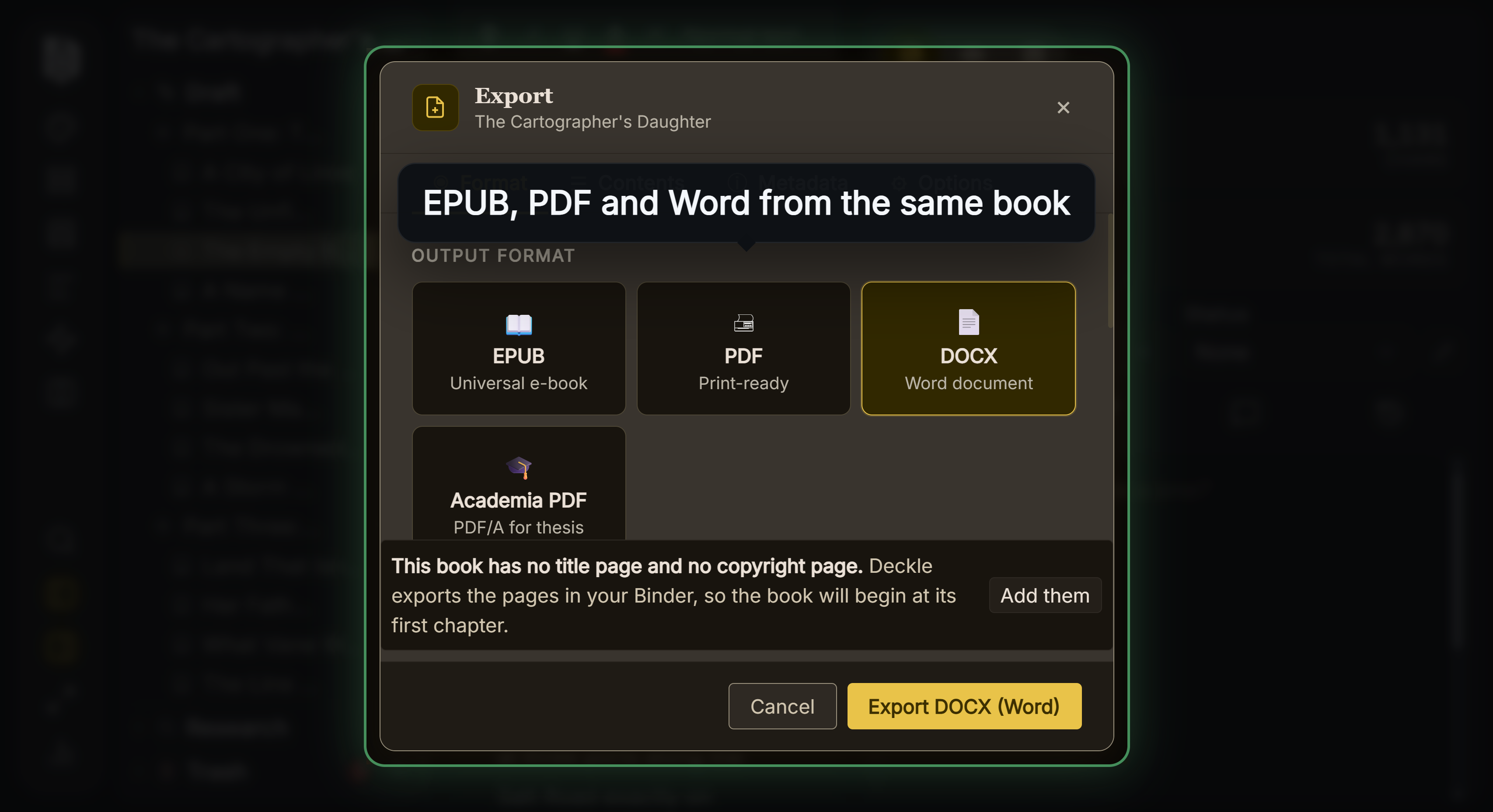 EPUB, PDF and Word from the same book
It is compared with Dabble in Dabble vs Deckle, and more options are in LivingWriter alternatives and Dabble Writer alternatives.
To try it, click Try it free on the screen Deckle opens to. There is no card, no account and no time limit. It opens a sample novel with every screen open to explore, and you can restyle it and export real EPUB, PDF and DOCX files. New writing is capped at about 500 words, and new documents and imports are blocked.
Pick Dabble if
- You need to write offline and sync later.
- You want no AI in your writing app.
- You use Linux, or a Chromebook.
- You plot with plot lines against scenes.
- You write with a co-author live.
Pick LivingWriter if
- You want native iPhone, iPad and Android apps.
- You want AI tools for outlines, rewrites, analysis or covers.
- You start books from structure templates.
- You write screenplays as well as books.
- You want a PDF with a trim size from the same app.
FAQ
Is Dabble or LivingWriter better?
Neither is better in every case. Dabble writes offline and has no AI beyond the text-to-speech voices in Read to Me. LivingWriter has native phone apps, templates, AI tools and PDF export.
Which is cheaper, Dabble or LivingWriter?
At entry level they are close. Dabble Writer is $180 a year billed annually. LivingWriter Pro is $149 or $179 a year, depending on the price you are assigned (as of October 2026).
Does LivingWriter have a lifetime plan like Dabble?
Yes. LivingWriter lists Lifetime access at $799. Dabble's lifetime plans are $699 and $899.
Does Dabble or LivingWriter work offline?
Dabble writes offline and syncs when you reconnect. LivingWriter has not published an offline mode, and its roadmap estimates one for Q4 2026.
Can Dabble or LivingWriter export EPUB?
Neither publishes an EPUB export. Dabble exports Word, Google Docs, web and Markdown. LivingWriter exports PDF, DOCX, Google Drive and Amazon Manuscript.
Does Dabble or LivingWriter use AI?
Dabble has none and says it will "never put words on the page for you." LivingWriter has generative AI on every plan.
Do Dabble and LivingWriter have phone apps?
LivingWriter has an App Store app for iPhone and iPad and an Android app. Dabble runs on phones as a home-screen web app, with no app store listing.
Sources
All retrieved 20 October 2026. Prices change, so check the vendor page before buying.
- Dabble pricing: plans, prices, lifetime, trial, work after cancelling, AI opt-in
- Cancel your subscription, Dabble Help (retrieved 21 October 2026): account moves to "a free, read-only state"
- Understanding your subscription, Dabble Help (retrieved 21 October 2026): "Dabble is AI-free", with text-to-speech voices for Read to Me as "the one exception"
- Dabble features and Plotting with the Plot Grid, Dabble Help
- Working offline, Install Dabble on mobile and Dabble is AI-free, Dabble Help
- Export your manuscript and Import your manuscript, Dabble Help
- LivingWriter pricing: plans, comparison table, AI requests, trial, cancellation FAQ. Prices are loaded per visitor from LivingWriter's price catalog. Re-checked 21 October 2026: two price sets still assigned per visitor, $799 lifetime still in the catalog, trial listed as a "$1 paid-trial"
- LivingWriter roadmap and June 17, 2025 changelog: offline mode, Mobi export
- LivingWriter AI features: AI tools and training statement
- Exporting a Manuscript, Importing a Manuscript, Planning Board and Welcome to LivingWriter, LivingWriter Guides
- LivingWriter downloads and LivingWriter: Write Anywhere, Apple App Store
- What file formats are supported for eBook manuscripts? and Save Your Manuscript File, Amazon KDP Help
- LivingWriter, Terms of Service: section 6, "14-day free trial", no card taken up front (read 21 October 2026)
Dabble is a trademark of its owner. LivingWriter is a trademark of LivingWriter LLC. Scrivener is a trademark of Literature & Latte. Deckle is not affiliated with or endorsed by any product named here.